
Firewall not working


badcrc

Member
Local time
8:04 PM
Posts
27
OS
Windows 11 Pro
version 21H2 22000.194

Firewall doesn't seem to be working.

There's no security icon in taskbar group. In services.msc it seems to flick between starting and running.

In settings I get this
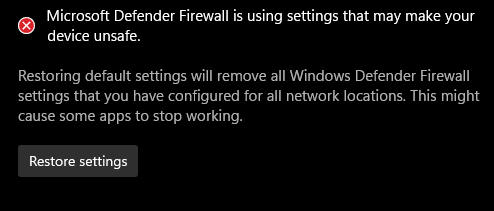
Screenshot 2021-10-06 101326.png

clicking the button has no effect. Also this -

Screenshot 2021-10-06 101437.png

in powershell (admin) I get

PS C:\Users\***> netsh advfirewall show allprofiles state

An unrecoverable Windows Defender Firewall error (0x45b) occurred.

I tried a repair install which seemed to fix the firewall problem, but on restart it was back.

Not having a firewall is a bit of a worry - should I look around for a 3rd party firewall to use until I can fix Defender?

edit - I did another repair install which cured the problem, but then had a windows update that required a restart and the problem returned after restart - no firewall.
 
Last edited:

My Computer My Computer

At a glance

Windows 11 ProRyzen 3700X32GBGTX 1650
OS
Windows 11 Pro
Computer type
PC/Desktop
CPU
Ryzen 3700X
Motherboard
Rog Strix X570-F
Memory
32GB
Graphics Card(s)
GTX 1650
Sound Card
Soundblaster Z
Monitor(s) Displays
3 * 27"
Screen Resolution
3 * 1080p
Hard Drives
EVO 860 1TB
3 * Seagate 4TB
PSU
EVGA 550W
version 21H2 22000.194

Firewall doesn't seem to be working.

There's no security icon in taskbar group. In services.msc it seems to flick between starting and running.

In settings I get this

View attachment 9081

clicking the button has no effect. Also this -

View attachment 9082

in powershell (admin) I get

PS C:\Users\***> netsh advfirewall show allprofiles state

An unrecoverable Windows Defender Firewall error (0x45b) occurred.

I tried a repair install which seemed to fix the firewall problem, but on restart it was back.

Not having a firewall is a bit of a worry - should I look around for a 3rd party firewall to use until I can fix Defender?

edit - I did another repair install which cured the problem, but then had a windows update that required a restart and the problem returned after restart - no firewall.
Did you get to the bottom of this, this has just started happening on mine. Bloody pain in the backside!
 

My Computer My Computer

At a glance

Windows 11 Pro
OS
Windows 11 Pro
If you open an elevated admin command prompt what do you get when you run the following commands?

Code:
sc qc mpssvc
Then this one too
Code:
sc queryex mpssvc

Here is an example of what it should look like

Code:
C:\>sc qc mpssvc
[SC] QueryServiceConfig SUCCESS

SERVICE_NAME: mpssvc
        TYPE               : 20  WIN32_SHARE_PROCESS
        START_TYPE         : 2   AUTO_START
        ERROR_CONTROL      : 1   NORMAL
        BINARY_PATH_NAME   : C:\WINDOWS\system32\svchost.exe -k LocalServiceNoNetworkFirewall -p
        LOAD_ORDER_GROUP   : NetworkProvider
        TAG                : 0
        DISPLAY_NAME       : Windows Defender Firewall
        DEPENDENCIES       : mpsdrv
                           : bfe
        SERVICE_START_NAME : NT Authority\LocalService

C:\>sc queryex mpssvc

SERVICE_NAME: mpssvc
        TYPE               : 20  WIN32_SHARE_PROCESS
        STATE              : 4  RUNNING
                                (NOT_STOPPABLE, NOT_PAUSABLE, IGNORES_SHUTDOWN)
        WIN32_EXIT_CODE    : 0  (0x0)
        SERVICE_EXIT_CODE  : 0  (0x0)
        CHECKPOINT         : 0x0
        WAIT_HINT          : 0x0
        PID                : 3440
        FLAGS              :
 

My Computer My Computer

At a glance

Windows 10Intel i9-9900K64GBEVGA GeForce GTX 1070 TI
OS
Windows 10
Computer type
PC/Desktop
Manufacturer/Model
MSI Custom build
CPU
Intel i9-9900K
Motherboard
MSI MPG Z390 Gaming Edge AC
Memory
64GB
Graphics Card(s)
EVGA GeForce GTX 1070 TI
Internet Speed
1 Gbps
Browser
Firefox
Antivirus
Malwarebytes
If you open an elevated admin command prompt what do you get when you run the following commands?

Code:
sc qc mpssvc
Then this one too
Code:
sc queryex mpssvc

Here is an example of what it should look like

Code:
C:\>sc qc mpssvc
[SC] QueryServiceConfig SUCCESS

SERVICE_NAME: mpssvc
        TYPE               : 20  WIN32_SHARE_PROCESS
        START_TYPE         : 2   AUTO_START
        ERROR_CONTROL      : 1   NORMAL
        BINARY_PATH_NAME   : C:\WINDOWS\system32\svchost.exe -k LocalServiceNoNetworkFirewall -p
        LOAD_ORDER_GROUP   : NetworkProvider
        TAG                : 0
        DISPLAY_NAME       : Windows Defender Firewall
        DEPENDENCIES       : mpsdrv
                           : bfe
        SERVICE_START_NAME : NT Authority\LocalService

C:\>sc queryex mpssvc

SERVICE_NAME: mpssvc
        TYPE               : 20  WIN32_SHARE_PROCESS
        STATE              : 4  RUNNING
                                (NOT_STOPPABLE, NOT_PAUSABLE, IGNORES_SHUTDOWN)
        WIN32_EXIT_CODE    : 0  (0x0)
        SERVICE_EXIT_CODE  : 0  (0x0)
        CHECKPOINT         : 0x0
        WAIT_HINT          : 0x0
        PID                : 3440
        FLAGS              :
Hello i have the same problem can you help me fix it

C:\>sc qc mpssvc
[SC] QueryServiceConfig SUCCESS

SERVICE_NAME: mpssvc
TYPE : 20 WIN32_SHARE_PROCESS
START_TYPE : 2 AUTO_START
ERROR_CONTROL : 1 NORMAL
BINARY_PATH_NAME : C:\Windows\system32\svchost.exe -k LocalServiceNoNetworkFirewall -p
LOAD_ORDER_GROUP : NetworkProvider
TAG : 0
DISPLAY_NAME : Windows Defender Firewall
DEPENDENCIES : mpsdrv
: bfe
: nsi
SERVICE_START_NAME : NT Authority\LocalService

C:\>sc queryex mpssvc

SERVICE_NAME: mpssvc
TYPE : 20 WIN32_SHARE_PROCESS
STATE : 1 STOPPED
WIN32_EXIT_CODE : 1068 (0x42c)
SERVICE_EXIT_CODE : 0 (0x0)
CHECKPOINT : 0x0
WAIT_HINT : 0x0
PID : 0
FLAGS :
 

My Computer My Computer

At a glance

Windows 11
OS
Windows 11
The attached batch script can be used for resetting Windows services to their default startup type, hopefully this will resolve the problem.
 

Attachments

My Computer My Computer

At a glance

Windows 11AMD Ryzen 7 5700GMicron Technology DDR4-3200 16GBNVIDIA GeForce RTX 3060
OS
Windows 11
Computer type
PC/Desktop
Manufacturer/Model
HP Pavilion
CPU
AMD Ryzen 7 5700G
Motherboard
Erica6
Memory
Micron Technology DDR4-3200 16GB
Graphics Card(s)
NVIDIA GeForce RTX 3060
Sound Card
Realtek ALC671
Monitor(s) Displays
Samsung SyncMaster U28E590
Screen Resolution
3840 x 2160
Hard Drives
SAMSUNG MZVLQ1T0HALB-000H1
The attached batch script can be used for resetting Windows services to their default startup type, hopefully this will resolve the problem.
Thanks for the answer,but it stills says the same thing as the first message of this post,and that is not allowing microsoft store to open and i do not have some other applications that are from microsoft store like notepad and also i have second problem with the windows search and i think it happened after i did 2 uptades should i role back them and if yes how?
 

My Computer My Computer

At a glance

Windows 11
OS
Windows 11
Have you restored settings for the Firewall?


You can also perform in-place upgrade of Windows 11. In-place upgrade is to use to replace the current operating system files on your computer. Unlike a clean installation of Windows, you can start a Windows in-place upgrade when your OS is still running. And an in-place upgrade can keep your files, settings, & apps during the upgrade process. You can perform a Windows 11 in-place upgrade is to use the Windows 11 Media Creation Tool. Make sure to select Upgrade this PC now and click Next. Follow the on-screen guide to perform a Windows 11 in-place upgrade.


My Computer My Computer

At a glance

Windows 11AMD Ryzen 7 5700GMicron Technology DDR4-3200 16GBNVIDIA GeForce RTX 3060
OS
Windows 11
Computer type
PC/Desktop
Manufacturer/Model
HP Pavilion
CPU
AMD Ryzen 7 5700G
Motherboard
Erica6
Memory
Micron Technology DDR4-3200 16GB
Graphics Card(s)
NVIDIA GeForce RTX 3060
Sound Card
Realtek ALC671
Monitor(s) Displays
Samsung SyncMaster U28E590
Screen Resolution
3840 x 2160
Hard Drives
SAMSUNG MZVLQ1T0HALB-000H1
Have you restored settings for the Firewall?


You can also perform in-place upgrade of Windows 11. In-place upgrade is to use to replace the current operating system files on your computer. Unlike a clean installation of Windows, you can start a Windows in-place upgrade when your OS is still running. And an in-place upgrade can keep your files, settings, & apps during the upgrade process. You can perform a Windows 11 in-place upgrade is to use the Windows 11 Media Creation Tool. Make sure to select Upgrade this PC now and click Next. Follow the on-screen guide to perform a Windows 11 in-place upgrade.

yeah and now i am on the last part of this guide for windows and i did not understand this
  • The Windows 11 installation media (ISO or USB) must be the same edition, same version, and same or higher build as the currently installed Windows 11
 

My Computer My Computer

At a glance

Windows 11
OS
Windows 11
yeah and now i am on the last part of this guide for windows and i did not understand this
  • The Windows 11 installation media (ISO or USB) must be the same edition, same version, and same or higher build as the currently installed Windows 11
i went with the second option of this guide i though it was easier but the problem is the above and time cause idk if you are online right now...
 

My Computer My Computer

At a glance

Windows 11
OS
Windows 11
You can use the Windows 11 Media creation tool or Windows 11 ISO to perform repair to install of Windows 11.

In this video, i will show you how to repair install of Windows 11 by performing an in-place upgrade without losing anything.


My Computer My Computer

At a glance

Windows 11AMD Ryzen 7 5700GMicron Technology DDR4-3200 16GBNVIDIA GeForce RTX 3060
OS
Windows 11
Computer type
PC/Desktop
Manufacturer/Model
HP Pavilion
CPU
AMD Ryzen 7 5700G
Motherboard
Erica6
Memory
Micron Technology DDR4-3200 16GB
Graphics Card(s)
NVIDIA GeForce RTX 3060
Sound Card
Realtek ALC671
Monitor(s) Displays
Samsung SyncMaster U28E590
Screen Resolution
3840 x 2160
Hard Drives
SAMSUNG MZVLQ1T0HALB-000H1
yeah i did because i could not wait,so everything seems fine i did some updates microsoft store after trying it to open it did not work but after the updates it was opening also the app from it did not work so it was complicated because i had option open reinstall and download and only download worked so now they are working so thank you very much!But what should i do with the old windows file they are taking 25gb of storage can i delete it myself....
 

My Computer My Computer

At a glance

Windows 11
OS
Windows 11
You are very welcome!

You can delete Windows upgrade files from Settings > Storage > Temporary Files.
 

My Computer My Computer

At a glance

Windows 11AMD Ryzen 7 5700GMicron Technology DDR4-3200 16GBNVIDIA GeForce RTX 3060
OS
Windows 11
Computer type
PC/Desktop
Manufacturer/Model
HP Pavilion
CPU
AMD Ryzen 7 5700G
Motherboard
Erica6
Memory
Micron Technology DDR4-3200 16GB
Graphics Card(s)
NVIDIA GeForce RTX 3060
Sound Card
Realtek ALC671
Monitor(s) Displays
Samsung SyncMaster U28E590
Screen Resolution
3840 x 2160
Hard Drives
SAMSUNG MZVLQ1T0HALB-000H1

Latest Support Threads

Back
Top Bottom




