- Local time
- 9:49 AM
- Posts
- 105
- OS
- Windows 11
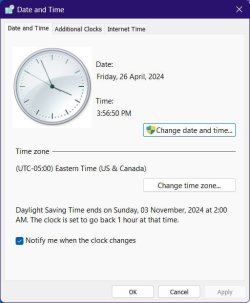
My MSI GS75 Stealth laptop died and I've been sorting it for a few days. I got it up and running and thought everything was working. However, when I opened FIREFOX, most (thought not all) of my bookmarked sites give the response, "Secure connection failed". (Opening in Edge is the same) Then one site's error message was, "Your clock is wrong..." and sure enough it is. It is showing 4/20/2024 when today is 4/26/20. I think the 20th is the day I first disassembled the machine. Could this be affecting the browser problem? I went to windows Time & Languages but can't find where to change the computer clock.
Edit:
Yes. Incorrect clock was the problem. Rather than deleting this question, I'm leaving in case someone has the same problem.
Edit:
Yes. Incorrect clock was the problem. Rather than deleting this question, I'm leaving in case someone has the same problem.
My Computers
-
At a glance
Windows 11Ryzen 9 9900XG.SKILL DDR5 Flare X5 64GB 6000 CL30-40-40-96RTX 4060 6GB- OS
- Windows 11
- Computer type
- PC/Desktop
- Manufacturer/Model
- Home Built
- CPU
- Ryzen 9 9900X
- Motherboard
- ROG STRIX B850-I
- Memory
- G.SKILL DDR5 Flare X5 64GB 6000 CL30-40-40-96
- Graphics Card(s)
- RTX 4060 6GB
- Sound Card
- Onboard Realtek
- Monitor(s) Displays
- Dual Dell U3014
- Screen Resolution
- 2560x1600
- Hard Drives
- Samsung EVO m.2 2TB, Silicon Power m.2 2TB
- PSU
- Corsair Modular SFX 750W
- Case
- Lan-Li H2O
- Cooling
- NZXT KRAKEN 240 AIO
-
At a glance
Windows 11i7-9750H16gbNVIDIA GeForce RTX2070 Q-Max- Operating System
- Windows 11
- Computer type
- Laptop
- Manufacturer/Model
- MSI GS75 Stealth 9sf
- CPU
- i7-9750H
- Motherboard
- MS 17-G1
- Memory
- 16gb
- Graphics card(s)
- NVIDIA GeForce RTX2070 Q-Max