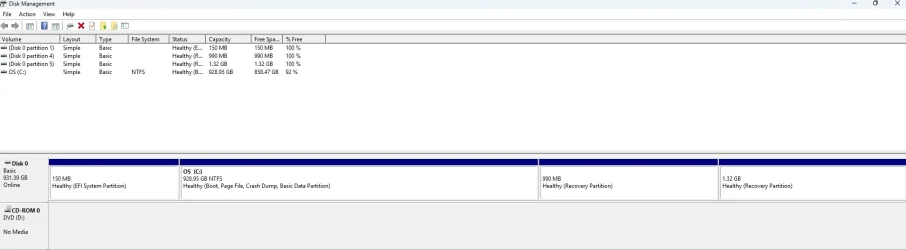
Solved Formatting a 1TB drive question.


Hesitant to delete more partitions as they show as recovery? or dell support
 

My Computer

System One

  • OS
    Windows 11
    Computer type
    PC/Desktop
    Manufacturer/Model
    Home built
    CPU
    Intel i5 9400
    Motherboard
    Gigabyte B365M D3SH WIFI
    Memory
    16GB tforce
    Graphics Card(s)
    GeForce GTX950 SSC
    Monitor(s) Displays
    View Sonic VX 3216 32" curved screen
    Screen Resolution
    1920 x 1080
    Hard Drives
    Crucial 250GB, Western Digital 6TB
    PSU
    MSI MAG A1000GL PCIE5
    Cooling
    standard Intel fan
    Keyboard
    Microsoft 3000 version 2
    Mouse
    Microsoft 3000
    Internet Speed
    symmetrical 50Mb fiber feed
    Browser
    Edge and Chrome
    Antivirus
    using Windows Defender
You have some choices.

Either

leave the two dell partitions where they are ane create a partition from the unallocated space after the dell partitions, which they can use for storage. The dell partitions are unlikely to be accessible after cloning unless you adjust the bcd entry. Bootice can help you do that

re enable winre and it will be placed in a hidden folder called recovery on the os partition

Or

find out how those dell partitions are accessed which might be custom bcd entries so you need to look at the entries.
A simple way to do that is with bootice attached below

Then when you have figured that out it should be possible to move them
 

Attachments

Last edited:

My Computers

System One System Two

  • OS
    Win7,Win11
    Computer type
    PC/Desktop
    CPU
    i7-9700
    Motherboard
    gigabyte b365m ds3h
    Memory
    2x16gb 3600mhz
    Monitor(s) Displays
    benq gw2480
    PSU
    bequiet pure power 11 400CM
    Cooling
    cryorig m9i
  • Operating System
    win7,win11
    Computer type
    PC/Desktop
    CPU
    i5-8400
    Motherboard
    gigabyte b365m ds3h
    Memory
    2x8gb 3200
    PSU
    xfx pro 450
Sorry to delay my response. Seems like I have caught some sort of bug that has me down and out. I'll check back in once I'm back to myself.

Thank you SIW2
 

My Computer

System One

  • OS
    Windows 11
    Computer type
    PC/Desktop
    Manufacturer/Model
    Home built
    CPU
    Intel i5 9400
    Motherboard
    Gigabyte B365M D3SH WIFI
    Memory
    16GB tforce
    Graphics Card(s)
    GeForce GTX950 SSC
    Monitor(s) Displays
    View Sonic VX 3216 32" curved screen
    Screen Resolution
    1920 x 1080
    Hard Drives
    Crucial 250GB, Western Digital 6TB
    PSU
    MSI MAG A1000GL PCIE5
    Cooling
    standard Intel fan
    Keyboard
    Microsoft 3000 version 2
    Mouse
    Microsoft 3000
    Internet Speed
    symmetrical 50Mb fiber feed
    Browser
    Edge and Chrome
    Antivirus
    using Windows Defender
Get well soon. I had two nasties back to back .
 

My Computers

System One System Two

  • OS
    Win7,Win11
    Computer type
    PC/Desktop
    CPU
    i7-9700
    Motherboard
    gigabyte b365m ds3h
    Memory
    2x16gb 3600mhz
    Monitor(s) Displays
    benq gw2480
    PSU
    bequiet pure power 11 400CM
    Cooling
    cryorig m9i
  • Operating System
    win7,win11
    Computer type
    PC/Desktop
    CPU
    i5-8400
    Motherboard
    gigabyte b365m ds3h
    Memory
    2x8gb 3200
    PSU
    xfx pro 450
Sorry to delay my response. Seems like I have caught some sort of bug that has me down and out. I'll check back in once I'm back to myself.

Thank you SIW2
I hope it's short . . . I've been getting upper respiratory infections a few years in a row in fall/winter and they last MONTHS but they don't knock me out but they do keep me from trail running and hiking hard trails. Last year it turned into pneumonia. These things are scary at 70 years old. I think it's from the grand-kids being in school now but, like me when I was a child, they only get runny noses from RSV but I have to go to the doctor . . .
 

My Computers

System One System Two

  • OS
    Windows 11 (up to date)
    Computer type
    PC/Desktop
    Manufacturer/Model
    Custom
    CPU
    Intel i5 12400
    Motherboard
    Gigabyte Z690 UA
    Memory
    Corsair Vengeance LPX 16GB
    Graphics Card(s)
    On Board the Z690
    Sound Card
    On Board
    Monitor(s) Displays
    43" Samsung tu7000
    Screen Resolution
    2560 x 1440
    Hard Drives
    SAMSUNG SSD 1TB NVMe M.2
    PSU
    Thermaltake smart 500w 80+
    Case
    LIAN LANCOOL_205M
    Cooling
    Bunch of fans . . . :o) (lights dont work)
    Keyboard
    Unicomp: Ultra Classic White Buckling Spring USB
    Mouse
    M510
    Internet Speed
    50mbps on Ethernet
    Browser
    Fire Fox
    Antivirus
    Windows
    Other Info
    Love this computer but I still prefer Win-7 like I love my old Lazy Boy Recliner . . . it just feels better.
  • Operating System
    WIN-7-64BIT and Win-11 pro for testing on unsupported hardware
    Computer type
    PC/Desktop
    Manufacturer/Model
    Home built
    CPU
    i5-3570K CPU @ 3.40GHz, 3801 Mhz, 4 Core(s), 4 Logical Processor(s)
    Motherboard
    GA-Z77-HD3
    Memory
    16 GB - Crucial Ballistick 4GB PC3-14900 DDR3-1333 MHz
    Graphics card(s)
    NVIDIA GeForce GTX 1050
    Sound Card
    On Board
    Monitor(s) Displays
    ASUS VP278
    Screen Resolution
    1920 x 1080
    Hard Drives
    4 - internal Samsung 2.5" SSD, 1 WD HDD 7200 and some external drives
    PSU
    EVGA 550w
    Case
    Old Gygabyte Tower
    Cooling
    Yes
    Keyboard
    Unicomp - UNIOP4A USB (like the old IBM Model H that I started with)
    Mouse
    M510
    Internet Speed
    50mbps
    Browser
    Firefox
    Antivirus
    Windows
    Other Info
    The only thing it lack is USB-3.2 on the front face but it has 3.0 on the back
Ok I'm back like pestilence and famine. Still not 100% but improving.

I had hernia surgery about a week before I started this post then for some reason my liver functions went haywire.

After a while I was able read about moving partitions and tried several software programs that promised I could move them, but none did. Even Microsoft Copilot ran me in a circle for over two hours.

The latest download was the MiniPartiton Wizard free version. I could not get the Winretool partition to move to the right behind the unallocated partition (bitlocker was not turned on). Looking at the support video I noticed there was another way " expanding" the regular C partition that I had not tried.

I clicked on the C partition and opted to expand it using all the memory from the unallocated partition.
Looks good. System boots fine and I was able to keep the Winretool and the Dell recovery partitions. I'm down from 6 partitions to 4.

Screenshot 2026-02-16 111808.webp
I would like to thank everybody for helping. I learned a few things (not everything) that I would not otherwise have known.
 

My Computer

System One

  • OS
    Windows 11
    Computer type
    PC/Desktop
    Manufacturer/Model
    Home built
    CPU
    Intel i5 9400
    Motherboard
    Gigabyte B365M D3SH WIFI
    Memory
    16GB tforce
    Graphics Card(s)
    GeForce GTX950 SSC
    Monitor(s) Displays
    View Sonic VX 3216 32" curved screen
    Screen Resolution
    1920 x 1080
    Hard Drives
    Crucial 250GB, Western Digital 6TB
    PSU
    MSI MAG A1000GL PCIE5
    Cooling
    standard Intel fan
    Keyboard
    Microsoft 3000 version 2
    Mouse
    Microsoft 3000
    Internet Speed
    symmetrical 50Mb fiber feed
    Browser
    Edge and Chrome
    Antivirus
    using Windows Defender

My Computers

System One System Two

  • OS
    Win 11 Home ♦♦♦26200.8655 ♦♦♦♦♦♦♦25H2
    Computer type
    PC/Desktop
    Manufacturer/Model
    Built by Ghot® [May 2020]
    CPU
    AMD Ryzen 7 3700X
    Motherboard
    Asus Pro WS X570-ACE (BIOS 5302)
    Memory
    G.Skill (F4-3200C14D-16GTZKW)
    Graphics Card(s)
    EVGA RTX 2070 (08G-P4-2171-KR)
    Sound Card
    Realtek ALC1220P / ALC S1220A
    Monitor(s) Displays
    Dell U3011 30"
    Screen Resolution
    2560 x 1600
    Hard Drives
    2x Samsung 860 EVO 500GB,
    WD 4TB Black FZBX - SATA III,
    WD 8TB Black FZBX - SATA III,
    DRW-24B1ST CD/DVD Burner
    PSU
    PC Power & Cooling 750W Quad EPS12V
    Case
    Cooler Master ATCS 840 Tower
    Cooling
    CM Hyper 212 EVO (push/pull)
    Keyboard
    Ducky DK9008 Shine II Blue LED
    Mouse
    Logitech Optical M-100
    Internet Speed
    300/300
    Browser
    Firefox (latest)
    Antivirus
    Bitdefender Total Security
    Other Info
    Speakers: Klipsch Pro Media 2.1
  • Operating System
    Windows XP Pro 32bit w/SP3
    Computer type
    PC/Desktop
    Manufacturer/Model
    Built by Ghot® (not in use)
    CPU
    AMD Athlon 64 X2 5000+ (OC'd @ 3.2Ghz)
    Motherboard
    ASUS M2N32-SLI Deluxe Wireless Edition
    Memory
    TWIN2X2048-6400C4DHX (2 x 1GB, DDR2 800)
    Graphics card(s)
    EVGA 256-P2-N758-TR GeForce 8600GT SSC
    Sound Card
    Onboard
    Monitor(s) Displays
    ViewSonic G90FB Black 19" Professional (CRT)
    Screen Resolution
    up to 2048 x 1536
    Hard Drives
    WD 36GB 10,000rpm Raptor SATA
    Seagate 80GB 7200rpm SATA
    Lite-On LTR-52246S CD/RW
    Lite-On LH-18A1P CD/DVD Burner
    PSU
    PC Power & Cooling Silencer 750 Quad EPS12V
    Case
    Generic Beige case, 80mm fans
    Cooling
    ZALMAN 9500A 92mm CPU Cooler
    Keyboard
    Logitech Classic Keybooard 200
    Mouse
    Logitech Optical M-BT96a
    Internet Speed
    300/300
    Browser
    Firefox 3.x ??
    Antivirus
    Symantec (Norton)
    Other Info
    Still assembled, still runs. Haven't turned it on for 15 years?

Latest Support Threads

Back
Top Bottom