JavaScript is disabled. For a better experience, please enable JavaScript in your browser before proceeding.
You are using an out of date browser. It may not display this or other websites correctly.
You should upgrade or use an
alternative browser .
Fovorites generic icon Win11 25H2
Crazy bug-hunter
Member
VIP
My
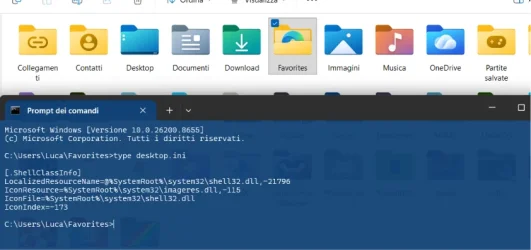
Favorites icon has reverted to generic icon:
IconResource is correct as well as the other ShellClassInfo. Desktop.ini has usual filesystem flags
A SH . Usual guides to reset icon cache didn't work.
Is it a minor glitch in recent Win updates?
Windows Build/Version
Win11 25H2 (10.0.26200.8655) ITA
Windows 11 Home Intel i9-13980HX 32GB DDR5 5600MHz NVidia GTX 4090 Laptop 256bit 16GB 175W Windows 11 Home Laptop ASUS ROG SCAR 18 Intel i9-13980HX 32GB DDR5 5600MHz NVidia GTX 4090 Laptop 256bit 16GB 175W Realtek ALC285 + Dolby Atmos G-Sync NE180QDM-NZ2 18" 16:10, FreeSync Premium XiaoMi Mi 34" 21:9 2560x1600@240Hz (internal), 3440x1440@144Hz (external) NVMe Lexar NM790 1TB 6GB/s, NVMe Lexar NM790 4TB 6GB/s 330W (laptop PSU) ROG Strix Carry Wireless-BT mouse 4K UHD USB Archgon Star Blu-Ray 4K UHD,
Crazy bug-hunter
Member
VIP
Thread Starter
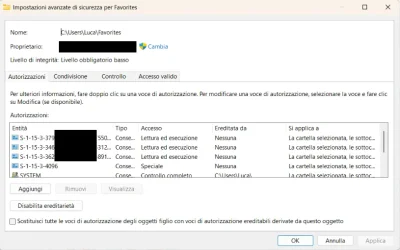
Oh, I've just found a strange thing about permissions:
Those S-1-15... accounts shouldn't be there (???) as the other system icons like Contacts, Links have just SYSTEM, Administrators, user.
Is it also normal that "Integrity level: Low mandatory level" for Favorites? ...
Windows 11 Home Intel i9-13980HX 32GB DDR5 5600MHz NVidia GTX 4090 Laptop 256bit 16GB 175W Windows 11 Home Laptop ASUS ROG SCAR 18 Intel i9-13980HX 32GB DDR5 5600MHz NVidia GTX 4090 Laptop 256bit 16GB 175W Realtek ALC285 + Dolby Atmos G-Sync NE180QDM-NZ2 18" 16:10, FreeSync Premium XiaoMi Mi 34" 21:9 2560x1600@240Hz (internal), 3440x1440@144Hz (external) NVMe Lexar NM790 1TB 6GB/s, NVMe Lexar NM790 4TB 6GB/s 330W (laptop PSU) ROG Strix Carry Wireless-BT mouse 4K UHD USB Archgon Star Blu-Ray 4K UHD,
Crazy bug-hunter
Member
VIP
Thread Starter
Just checked from a VM and is the same, so nothing wrong about permissions....
Windows 11 Home Intel i9-13980HX 32GB DDR5 5600MHz NVidia GTX 4090 Laptop 256bit 16GB 175W Windows 11 Home Laptop ASUS ROG SCAR 18 Intel i9-13980HX 32GB DDR5 5600MHz NVidia GTX 4090 Laptop 256bit 16GB 175W Realtek ALC285 + Dolby Atmos G-Sync NE180QDM-NZ2 18" 16:10, FreeSync Premium XiaoMi Mi 34" 21:9 2560x1600@240Hz (internal), 3440x1440@144Hz (external) NVMe Lexar NM790 1TB 6GB/s, NVMe Lexar NM790 4TB 6GB/s 330W (laptop PSU) ROG Strix Carry Wireless-BT mouse 4K UHD USB Archgon Star Blu-Ray 4K UHD,
Well-known member
Guru
VIP
First thing I would try, Edit the file in Notepad and manually change the icon to see if that works.
Windows 11 Pro 23H2 (5699), 25H2 (8655) Mobile DualCore Intel Core 2 Duo T7250, 2000 MHz 4GB Mobile Intel(R) GMA 4500M (Mobile 4 series) Windows 11 Pro 23H2 (5699), 25H2 (8655) Laptop Acer Extensa 5630EZ Mobile DualCore Intel Core 2 Duo T7250, 2000 MHz Acer Extensa 5630 4GB Mobile Intel(R) GMA 4500M (Mobile 4 series) Realtek ALC268 @ Intel 82801IB ICH9 - High Definition Audio Controller 1 1280x800 Samsung SSD 850 EVO 250GB SATA Device (250 GB, SATA-III) VDSL 50 Mbps MICROSOFT EDGE WINDOWS DEFENDER Legacy MBR installation, no TPM, no Secure Boot, no WDDM 2.0 graphics drivers, no SSE4.2, cannot get more unsupported ;) This is only my test laptop. I had installed Windows 11 here before upgrading my main PC. For my main PC I use everyday see my 2nd system specs.
Windows 11 Pro v25H2 (build 26200.8655) Intel Core-i7 3770 3.40GHz s1155 (3rd generat... 2x Kingston Hyper-X Blu 8GB DDR3-1600 GIGABYTE GeForce RTX 3050 WINDFORCE OC V2 6GB... Windows 11 Pro v25H2 (build 26200.8655) PC/Desktop Custom-built PC Intel Core-i7 3770 3.40GHz s1155 (3rd generation) Asus P8H61 s1155 ATX 2x Kingston Hyper-X Blu 8GB DDR3-1600 GIGABYTE GeForce RTX 3050 WINDFORCE OC V2 6GB (GV-N3050WF2OCV2-6GD) Realtek HD audio (ALC887) Sony Bravia KDL-19L4000 19" LCD TV via VGA 1440x900 32-bit 60Hz WD Blue SA510 2.5 1000GB SSD as system disk, Western Digital Caviar Purple 4TB SATA III (WD40PURZ) as second Thermaltake Litepower RGB 550W Full Wired SUPERCASE MIDI-TOWER Deepcool Gamma Archer CPU cooler, 1x 8cm fan at the back Mitsumi 101-key PS/2 Sunnyline OptiEye PS/2 100Mbps Microsoft Edge, Mozilla Firefox Microsoft Windows Defender Legacy BIOS (MBR) installation, no TPM, no Secure Boot, WDDM 3.0 graphics drivers, WEI score 7.4