Surface IT Pro Blog:
Start a video call on a supported Surface device, and the camera system responds as lighting and color conditions change. It is designed to maintain clarity when daylight shifts, the room grows dim, or a bright window appears behind the subject, while keeping colors natural and fine details visible without distracting noise.

Our latest Surface Pro 12-inch and Surface Laptop 13-inch
Surface develops these experiences by coordinating a purpose-built camera module, an image signal processor, on-device AI, and lab and field testing. Engineers tune the hardware, firmware, image processing, and AI together within each device’s power and thermal limits. AI Noise Reduction Gen2 and AI Enhancement are available on select Surface Pro and Surface Laptop configurations powered by Snapdragon X2 Series processors.
Commissioned testing by DXOMARK provides an external measure of that integrated approach. The tested configurations earned the No. 1 and No. 2 laptop camera rankings, respectively.1 The rankings apply to devices with the same camera hardware, firmware, and settings as tested and may change.
Why camera engineering matters for modern work
Video calls are now a primary form of workplace communication, whether people join from home, an office, a conference room, or while traveling. Employees, customers, and colleagues see the camera output immediately, making image quality highly visible.Surface camera development begins with a straightforward goal: present people naturally and clearly across the lighting conditions they encounter at work. Reaching that goal requires coordinating optics, electronics, firmware, image processing, AI, power and thermal design, industrial design, and Windows integration within a single imaging pipeline.
Surface engineers the full imaging system
The imaging pipeline begins with a camera module purpose-built for Surface. The module brings together the lens, sensor, infrared filter, and electronics in an assembly that requires micrometer-level precision. The module must deliver image quality, complement the device’s design, and minimize power consumption.The image captured by the module then enters the image signal processor, or ISP. The ISP is the processing engine responsible for turning raw sensor data into the image seen in a call or recording. It contains tens of processing blocks and thousands of adjustable parameters governing contrast, tone mapping, aberration correction, color, sharpness, noise, and other image characteristics.
Those parameters cannot be optimized independently. Increasing sharpness can make noise more visible, while reducing noise too aggressively can erase real detail. Correcting exposure for a face can also change the appearance of the background. Surface engineers therefore treat camera tuning as a multivariable optimization problem. They combine modeling, controlled lab evaluation, field testing, and psychovisual analysis, which assesses how people perceive the resulting image, to balance measurable performance with natural-looking output.
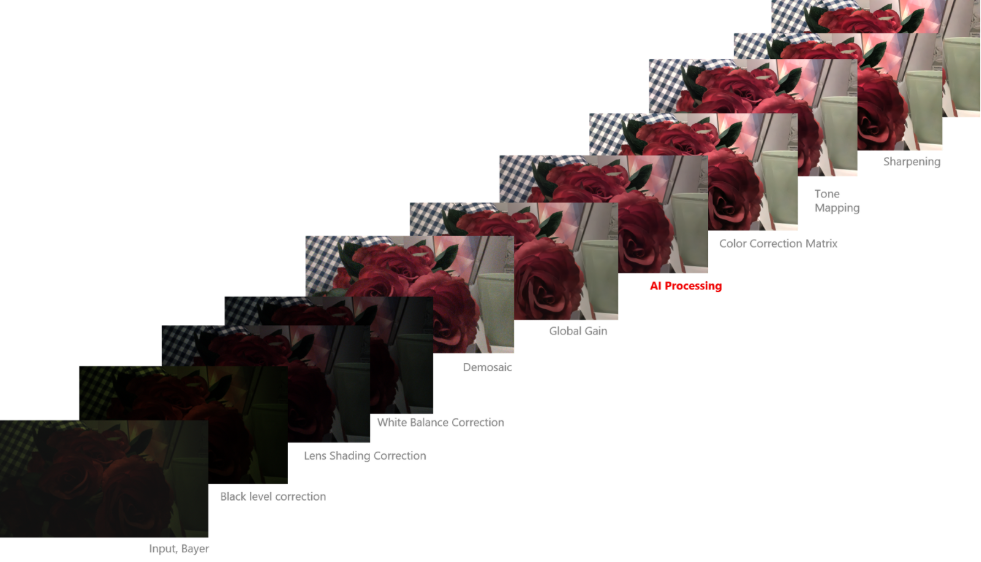
Hybrid (AI and traditional) image processing pipeline
Surface engineers assign each task to the part of the pipeline best suited to perform it. The ISP handles hundreds of image-processing operations. Surface engineers also develop purpose-built AI models with millions of parameters for the characteristics of each camera system. These models address problems that are especially difficult to solve with conventional processing, such as distinguishing a small, distant object, like a fly, from a dead pixel, sensor noise, or another imaging artifact. Placing each operation in the ISP or AI according to its image-quality and power-efficiency requirements helps preserve the characteristics of the original scene while producing a clear, natural-looking image.
Designed for real lighting conditions
Real calls rarely happen under studio lighting. A person may sit in front of a bright window, work in a dim room, move between warm and cool light sources, or join from a space dominated by a single strong color. These conditions challenge the imaging system to balance exposure, noise, detail, and color as the scene changes.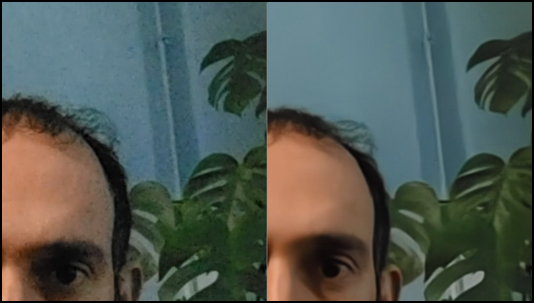
AI Noise Reduction (AINR) cleans the noise in the video while preserving the details. By delivering a cleaner video in low-light conditions, it allows users to rely on their cameras across a wider range of environments.2
Surface tuning balances several competing goals. The subject must remain visible without losing the atmosphere of the room, texture must remain intact while noise is controlled, and adjustments must remain unobtrusive as the scene changes.
Low light is particularly demanding because the sensor receives less usable image information while noise becomes more prominent. Simple noise reduction can create a cleaner image at the cost of fine detail. On select Surface Pro and Surface Laptop configurations powered by Snapdragon X2 Series processors, Surface combines ISP tuning with AI Noise Reduction Gen2, an in-house model designed to reduce visible noise while preserving meaningful detail in dim rooms and other low-light settings.
Large single-color backgrounds and unusual illumination can mislead conventional white-balance systems, producing unstable or inaccurate color. AI-assisted automatic white balance analyzes the scene to improve color rendering and stability.

AI assisted Auto White Balance (AWB) intelligently analyzes scene characteristics to improve overall color rendering and color stability. Challenging backgrounds such as large single-color backgrounds can lead to inaccurate color reproduction. With AI Assisted AWB, colors are rendered more accurately while maintaining stable and consistent color appearance across scenes.2
AI that preserves and enhances the captured image
AI in the Surface camera pipeline improves the captured image while preserving the content, colors, and atmosphere of the original scene. Surface camera AI models are developed in-house and optimized for the unique characteristics of each camera system.The models work from the original image and video signal without generating artificial textures. AI Noise Reduction Gen2 is designed to distinguish unwanted noise from real detail in low light. AI Enhancement improves can help improve texture, local contrast, clarity, and detail while reducing noise in moderate to bright lighting.

AI Enhancement reveals more details and reduces noise in mid to high lux scenarios and helps images lookcrisper and have better local contrast.2
The models run entirely on the device, so image and video data remains local rather than being sent to the cloud for processing. The Surface camera team reports a memory footprint of less than 8 MB for the models. AI Noise Reduction Gen2 performs 120 billion operations per frame with 586,000 parameters, while AI Enhancement performs 70 billion operations per frame with 132,000 parameters. The team also demonstrated full-frame input and output at 30 frames per second on the NPU without dropped frames.
Because NPU architectures differ across silicon platforms, Surface tailors each model to its target NPU. Matching the model architecture to the processor enables efficient full-frame AI processing. This allows the NPU to improve camera quality continuously without requiring a separate user-facing AI interaction.
Testing what people actually experience
Surface engineers combine modeling, controlled testing, field evaluation, and psychovisual analysis. Lab measurements show how individual components perform under repeatable conditions, while perceptual evaluation assesses whether the complete image looks natural to people. The team performed thousands of hours of testing and detailed parameter tuning.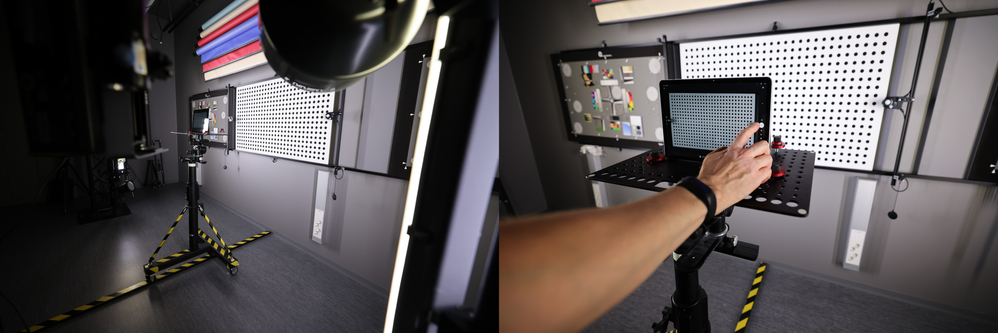
Surface camera lab testing multiple scenarios using controllable lighting and image-quality test equipment
Engineers recreate lighting ranging from bright sunlight to a dim living room and measure how the system responds as variables change. Field testing then evaluates combinations of lighting, backgrounds, and subjects that occur outside the lab. Findings from both environments inform ISP parameters, firmware, and AI model tuning.
Together, these findings help engineers produce predictable, natural-looking results across imperfect scenes without making adjustments distracting.
Camera innovation built across generations
Across generations of Surface Laptop and Surface Pro, advances in camera modules, ISP tuning, AI models, and NPU compute have strengthened the imaging pipeline. On supported configurations, purpose-built camera hardware, an image signal processor configured according to Surface design guidelines, and in-house AI models operate as one imaging system.Specific technologies continue to evolve across device generations, but the Surface approach remains consistent: design for real working conditions, preserve the content and character of the scene, and use advanced processing to improve clarity, color, and detail in real time.
Innovation doesn't happen in isolation. It's the result of countless design choices, technologies, and engineering breakthroughs working together to create better experiences. If you haven't already, explore the most recent blog in this series: Engineering touch into modern computing: The evolution of haptics on Surface | Microsoft Community Hub. And stay tuned, more behind-the-scenes stories from the teams building Surface are still to come.
Source:

From optics to AI: diving into Surface camera innovation | Microsoft Community Hub
From optics to AI, explore how Surface camera innovation helps people look and sound their best with intelligent experiences designed for the modern workplace.
 techcommunity.microsoft.com