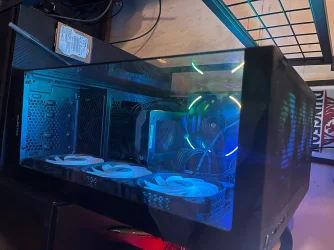
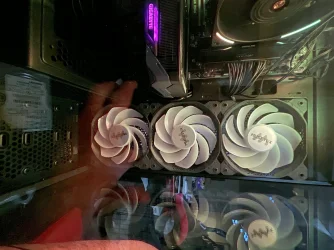
Front case fans not spinning or lighting ( MUSETEX K2 case + hub )


ConnodoreAmiga

Member
Member
Local time
7:03 AM
Posts
6
OS
Windows 11 Pro 64 Bit
Case: MUSETEX ATX PC Case 7 PWM ARGB Fans Pre-Installed, Type-C Mid Tower Computer Case with Full-View Dual Tempered Glass, Gaming PC Case, Black(K2)
Amazon.com: MUSETEX ATX PC Case 7 PWM ARGB Fans Pre-Installed, Type-C Mid Tower Computer Case with Full-View Dual Tempered Glass, Gaming PC Case, Black(K2) : Electronics

Hi everyone,

I just completed a new PC build and everything is working except the three front case fans. I’m hoping someone familiar with RGB hubs or MUSETEX cases can point out what I’m missing.

System / Case Info

Case: MUSETEX K2 (preinstalled RGB/PWM hub)

Motherboard: MSI MAG B850 Tomahawk MAX WiFi

CPU Cooler: Thermalright Phantom Spirit 120 Digital EVO (both fans working)

GPU: RTX 5060 Ti

OS: Windows 11 Pro (fully installed and working)

What IS working

Both CPU cooler fans spin normally

Top case fans spin and light up

Rear case fan spins and lights up

System boots, Windows runs, games run fine

What is NOT working

All three front case fans

No spinning

No RGB lighting

All three affected together

Important observations

The RGB/PWM hub is powered, since top and rear fans work

The hub is connected to a motherboard SYS_FAN header

BIOS only shows RPM for one SYS_FAN

Front fans appear to be connected to the hub, but they behave as if they are not receiving power

- - - Updated - - -

3 images of the fans.


Attachments
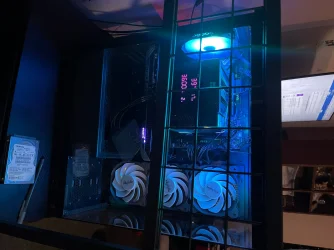
  • IMG_5711.webp
    IMG_5711.webp
    565.3 KB · Views: 1
  • IMG_5712.webp
    IMG_5712.webp
    681.5 KB · Views: 2
  • IMG_5713.webp
    IMG_5713.webp
    1.2 MB · Views: 1

My Computer My Computer

At a glance

Windows 11 Pro 64 BitAMD Ryzen™ 7 9700X 8-Core, 16-Thread UnlockedCrucial Pro DDR5 RAM 32GB Kit (2x16GB)Gigabyte GeForce RTX 5060 Ti
OS
Windows 11 Pro 64 Bit
Computer type
PC/Desktop
Manufacturer/Model
Custom Build. MSI motherboard
CPU
AMD Ryzen™ 7 9700X 8-Core, 16-Thread Unlocked
Motherboard
MSI MAG B850 Tomahawk MAX WiFi V1 Motherboard
Memory
Crucial Pro DDR5 RAM 32GB Kit (2x16GB)
Graphics Card(s)
Gigabyte GeForce RTX 5060 Ti
Monitor(s) Displays
Asus TUF Gaming VG249Q1R
Screen Resolution
1920x1080
Hard Drives
TEAMGROUP T-FORCE A440 Aluminum Heatsink 2TB DRAM SLC Cache 3D NAND TLC NVMe PCIe Gen4x4 M.2 2280 Internal SSD R/W 7000/6900 MB/s TM8FPZ002T0C327
PSU
CORSAIR RM850e ATX 3.1 PCIe 5.1 Ready Fully Modular 850W
Case
MUSETEX ATX PC Case 7 PWM ARGB Fans Pre-Installed, Type-C Mid Tower Computer Case with Full-View Dual Tempered Glass, Gaming PC Case, Black(K2)
Cooling
Thermalright Phantom Spirit 120 Digital EVO
Browser
Firefox, Chrome
Antivirus
AVG Internet Security

Looks like no power delivered, try connecting fans to PSU or different power source.
 

My Computer My Computer

At a glance

Windows 11AMD Ryzen 7 5700GMicron Technology DDR4-3200 16GBNVIDIA GeForce RTX 3060
OS
Windows 11
Computer type
PC/Desktop
Manufacturer/Model
HP Pavilion
CPU
AMD Ryzen 7 5700G
Motherboard
Erica6
Memory
Micron Technology DDR4-3200 16GB
Graphics Card(s)
NVIDIA GeForce RTX 3060
Sound Card
Realtek ALC671
Monitor(s) Displays
Samsung SyncMaster U28E590
Screen Resolution
3840 x 2160
Hard Drives
SAMSUNG MZVLQ1T0HALB-000H1
connect those fans directly to the sys fan header on the mobo. Don't put them all together in one hub so that the bios can see them as separate sys fans.
 

My Computers My Computers

  • At a glance

    Windows 11 ProAMD Ryzen 7 9800X3D32GB DDR5 CL30 Kingston FuryASUS Prime Radeon RX 9060 XT OC Edition 16GB
    OS
    Windows 11 Pro
    Computer type
    PC/Desktop
    CPU
    AMD Ryzen 7 9800X3D
    Motherboard
    MSI PRO B850-P Wifi
    Memory
    32GB DDR5 CL30 Kingston Fury
    Graphics Card(s)
    ASUS Prime Radeon RX 9060 XT OC Edition 16GB
    Monitor(s) Displays
    LG Ultrawide 34" + LG 27" 1080p
    Screen Resolution
    3440x1440
    Hard Drives
    Main Boot Drive : 512GB Adata XPG RGB Gen3x4 NVMe M.2 SSD
    PSU
    EVGA 750 Watts 80+ Gold
    Case
    Deepcool Genome II
    Cooling
    Thermalright Burst Assassin 120
    Internet Speed
    1Gbps
    Browser
    Chrome
    Antivirus
    "Moderna"
  • At a glance

    Windows 11 Proi7-4790K16GB Corsair Vengeance ProMSI R9 290
    Operating System
    Windows 11 Pro
    Computer type
    PC/Desktop
    CPU
    i7-4790K
    Motherboard
    ASRock Xtreme6 Z97
    Memory
    16GB Corsair Vengeance Pro
    Graphics card(s)
    MSI R9 290
    Monitor(s) Displays
    LG Ultrawide 34"
    Screen Resolution
    3440x1440
    Hard Drives
    500GB Adata SSD (OS Only)
    PSU
    Thermaltake 475 Watts 80 Bronze
    Case
    Thermaltake Commander I Snow Edition
    Cooling
    Deep Cool Archer Air Cooler
    Keyboard
    Armageddon MKA-5R RGB-Hornet
    Mouse
    Logitech G402
    Internet Speed
    1Gbps
    Browser
    Chrome
    Antivirus
    Moderna :)
Thanks for the responses so far. I’ll be honest — part of my hesitation here is that I already spent a lot of time doing clean cable management, and everything is velcro-strapped neatly behind the motherboard tray. I’m not thrilled about having to undo all of that just to trace wires that really should have been documented better by the case manufacturer.

That’s part of my frustration with this MUSETEX hub. There is no clear diagram, no labeling, and no explanation of what each connector on the hub actually does. From what I can see, some wires appear to be permanently attached or soldered into the hub, others are modular, and it’s not obvious which ports are fan motor power vs RGB vs control. To someone building carefully, it honestly feels like a mystery box.

Because the top and rear fans work (spin + RGB), I know the hub has power. The fact that all three front fans don’t spin and don’t light up together makes me think this is a hub wiring or port-assignment issue, not dead fans — but without a proper hub diagram, it’s hard to know what to move without pulling everything apart.

I really wish MUSETEX had included even a basic graphic showing:

  • which ports are FAN vs RGB
  • whether FAN1 must be populated
  • how the front fans are intended to be chained

At this point I’m trying to decide whether it’s worth undoing the clean cable management to re-trace everything, or whether someone familiar with this exact MUSETEX hub can confirm the expected wiring behavior first.


If anyone has experience with this specific case or hub or knows if the front fans are typically daisy-chained in a way that differs from the top/rear fans, I’d really appreciate the insight before I start tearing it all back apart.


Thanks again — I’m just trying to understand the design before making a mess of something that’s otherwise running perfectly.
 

My Computer My Computer

At a glance

Windows 11 Pro 64 BitAMD Ryzen™ 7 9700X 8-Core, 16-Thread UnlockedCrucial Pro DDR5 RAM 32GB Kit (2x16GB)Gigabyte GeForce RTX 5060 Ti
OS
Windows 11 Pro 64 Bit
Computer type
PC/Desktop
Manufacturer/Model
Custom Build. MSI motherboard
CPU
AMD Ryzen™ 7 9700X 8-Core, 16-Thread Unlocked
Motherboard
MSI MAG B850 Tomahawk MAX WiFi V1 Motherboard
Memory
Crucial Pro DDR5 RAM 32GB Kit (2x16GB)
Graphics Card(s)
Gigabyte GeForce RTX 5060 Ti
Monitor(s) Displays
Asus TUF Gaming VG249Q1R
Screen Resolution
1920x1080
Hard Drives
TEAMGROUP T-FORCE A440 Aluminum Heatsink 2TB DRAM SLC Cache 3D NAND TLC NVMe PCIe Gen4x4 M.2 2280 Internal SSD R/W 7000/6900 MB/s TM8FPZ002T0C327
PSU
CORSAIR RM850e ATX 3.1 PCIe 5.1 Ready Fully Modular 850W
Case
MUSETEX ATX PC Case 7 PWM ARGB Fans Pre-Installed, Type-C Mid Tower Computer Case with Full-View Dual Tempered Glass, Gaming PC Case, Black(K2)
Cooling
Thermalright Phantom Spirit 120 Digital EVO
Browser
Firefox, Chrome
Antivirus
AVG Internet Security

I dont even know where the daisy chain wire is that connects all 7 fans. fans were preinstalled .
 

My Computer My Computer

At a glance

Windows 11 Pro 64 BitAMD Ryzen™ 7 9700X 8-Core, 16-Thread UnlockedCrucial Pro DDR5 RAM 32GB Kit (2x16GB)Gigabyte GeForce RTX 5060 Ti
OS
Windows 11 Pro 64 Bit
Computer type
PC/Desktop
Manufacturer/Model
Custom Build. MSI motherboard
CPU
AMD Ryzen™ 7 9700X 8-Core, 16-Thread Unlocked
Motherboard
MSI MAG B850 Tomahawk MAX WiFi V1 Motherboard
Memory
Crucial Pro DDR5 RAM 32GB Kit (2x16GB)
Graphics Card(s)
Gigabyte GeForce RTX 5060 Ti
Monitor(s) Displays
Asus TUF Gaming VG249Q1R
Screen Resolution
1920x1080
Hard Drives
TEAMGROUP T-FORCE A440 Aluminum Heatsink 2TB DRAM SLC Cache 3D NAND TLC NVMe PCIe Gen4x4 M.2 2280 Internal SSD R/W 7000/6900 MB/s TM8FPZ002T0C327
PSU
CORSAIR RM850e ATX 3.1 PCIe 5.1 Ready Fully Modular 850W
Case
MUSETEX ATX PC Case 7 PWM ARGB Fans Pre-Installed, Type-C Mid Tower Computer Case with Full-View Dual Tempered Glass, Gaming PC Case, Black(K2)
Cooling
Thermalright Phantom Spirit 120 Digital EVO
Browser
Firefox, Chrome
Antivirus
AVG Internet Security

Thanks for the responses so far. I’ll be honest — part of my hesitation here is that I already spent a lot of time doing clean cable management, and everything is velcro-strapped neatly behind the motherboard tray. I’m not thrilled about having to undo all of that just to trace wires that really should have been documented better by the case manufacturer.

That’s part of my frustration with this MUSETEX hub. There is no clear diagram, no labeling, and no explanation of what each connector on the hub actually does. From what I can see, some wires appear to be permanently attached or soldered into the hub, others are modular, and it’s not obvious which ports are fan motor power vs RGB vs control. To someone building carefully, it honestly feels like a mystery box.

Because the top and rear fans work (spin + RGB), I know the hub has power. The fact that all three front fans don’t spin and don’t light up together makes me think this is a hub wiring or port-assignment issue, not dead fans — but without a proper hub diagram, it’s hard to know what to move without pulling everything apart.

I really wish MUSETEX had included even a basic graphic showing:

  • which ports are FAN vs RGB
  • whether FAN1 must be populated
  • how the front fans are intended to be chained

At this point I’m trying to decide whether it’s worth undoing the clean cable management to re-trace everything, or whether someone familiar with this exact MUSETEX hub can confirm the expected wiring behavior first.


If anyone has experience with this specific case or hub or knows if the front fans are typically daisy-chained in a way that differs from the top/rear fans, I’d really appreciate the insight before I start tearing it all back apart.


Thanks again — I’m just trying to understand the design before making a mess of something that’s otherwise running perfectly.
This is why I never bother with cable management behind the case. It's not visible anyway. I only care about cable management that is visible inside the case. I never use zip ties. It's a pain. It just makes you lazy to do what you need to do to fix your computer fast. It will just hold you back all the time. Your issue should have been fixed by now if not for the clean cable idea behind the case. Velcros are easier to manage. Go for it.
 

My Computers My Computers

  • At a glance

    Windows 11 ProAMD Ryzen 7 9800X3D32GB DDR5 CL30 Kingston FuryASUS Prime Radeon RX 9060 XT OC Edition 16GB
    OS
    Windows 11 Pro
    Computer type
    PC/Desktop
    CPU
    AMD Ryzen 7 9800X3D
    Motherboard
    MSI PRO B850-P Wifi
    Memory
    32GB DDR5 CL30 Kingston Fury
    Graphics Card(s)
    ASUS Prime Radeon RX 9060 XT OC Edition 16GB
    Monitor(s) Displays
    LG Ultrawide 34" + LG 27" 1080p
    Screen Resolution
    3440x1440
    Hard Drives
    Main Boot Drive : 512GB Adata XPG RGB Gen3x4 NVMe M.2 SSD
    PSU
    EVGA 750 Watts 80+ Gold
    Case
    Deepcool Genome II
    Cooling
    Thermalright Burst Assassin 120
    Internet Speed
    1Gbps
    Browser
    Chrome
    Antivirus
    "Moderna"
  • At a glance

    Windows 11 Proi7-4790K16GB Corsair Vengeance ProMSI R9 290
    Operating System
    Windows 11 Pro
    Computer type
    PC/Desktop
    CPU
    i7-4790K
    Motherboard
    ASRock Xtreme6 Z97
    Memory
    16GB Corsair Vengeance Pro
    Graphics card(s)
    MSI R9 290
    Monitor(s) Displays
    LG Ultrawide 34"
    Screen Resolution
    3440x1440
    Hard Drives
    500GB Adata SSD (OS Only)
    PSU
    Thermaltake 475 Watts 80 Bronze
    Case
    Thermaltake Commander I Snow Edition
    Cooling
    Deep Cool Archer Air Cooler
    Keyboard
    Armageddon MKA-5R RGB-Hornet
    Mouse
    Logitech G402
    Internet Speed
    1Gbps
    Browser
    Chrome
    Antivirus
    Moderna :)
This video at Musetex's site detailing fan wiring might be helpful if you haven't seen it.
 

My Computer My Computer

At a glance

Win11Pro 24H2 (26100.7462)i7-12700f32gb ddr4nvidia rtx3060ti
OS
Win11Pro 24H2 (26100.7462)
Computer type
PC/Desktop
Manufacturer/Model
self-built
CPU
i7-12700f
Motherboard
gigabyte auros b660
Memory
32gb ddr4
Graphics Card(s)
nvidia rtx3060ti
Sound Card
onboard realtek
Monitor(s) Displays
1 x benq, 2 x lg
Screen Resolution
1 at 2560x1080, 2 at 1920x1080
Hard Drives
nvme 1tb crucial ssd
sata 1tb samsung ssd
1tb HDD, 3tb HDD
PSU
corsair rm750
Case
NZXT H710
Cooling
BeQuiet Dark Rock
Keyboard
steelseries apex 3
Mouse
generic usb
Internet Speed
500 down 20 up
Browser
librewolf
Antivirus
eset nod32

My Computers My Computers

  • At a glance

    Win 11 Home ♦♦♦26200.8655 ♦♦♦♦♦♦♦25H2AMD Ryzen 7 3700XG.Skill (F4-3200C14D-16GTZKW)EVGA RTX 2070 (08G-P4-2171-KR)
    OS
    Win 11 Home ♦♦♦26200.8655 ♦♦♦♦♦♦♦25H2
    Computer type
    PC/Desktop
    Manufacturer/Model
    Built by Ghot® [May 2020]
    CPU
    AMD Ryzen 7 3700X
    Motherboard
    Asus Pro WS X570-ACE (BIOS 5302)
    Memory
    G.Skill (F4-3200C14D-16GTZKW)
    Graphics Card(s)
    EVGA RTX 2070 (08G-P4-2171-KR)
    Sound Card
    Realtek ALC1220P / ALC S1220A
    Monitor(s) Displays
    Dell U3011 30"
    Screen Resolution
    2560 x 1600
    Hard Drives
    2x Samsung 860 EVO 500GB,
    WD 4TB Black FZBX - SATA III,
    WD 8TB Black FZBX - SATA III,
    DRW-24B1ST CD/DVD Burner
    PSU
    PC Power & Cooling 750W Quad EPS12V
    Case
    Cooler Master ATCS 840 Tower
    Cooling
    CM Hyper 212 EVO (push/pull)
    Keyboard
    Ducky DK9008 Shine II Blue LED
    Mouse
    Logitech Optical M-100
    Internet Speed
    300/300
    Browser
    Firefox (latest)
    Antivirus
    Bitdefender Total Security
    Other Info
    Speakers: Klipsch Pro Media 2.1
  • At a glance

    Windows XP Pro 32bit w/SP3AMD Athlon 64 X2 5000+ (OC'd @ 3.2Ghz)TWIN2X2048-6400C4DHX (2 x 1GB, DDR2 800)EVGA 256-P2-N758-TR GeForce 8600GT SSC
    Operating System
    Windows XP Pro 32bit w/SP3
    Computer type
    PC/Desktop
    Manufacturer/Model
    Built by Ghot® (not in use)
    CPU
    AMD Athlon 64 X2 5000+ (OC'd @ 3.2Ghz)
    Motherboard
    ASUS M2N32-SLI Deluxe Wireless Edition
    Memory
    TWIN2X2048-6400C4DHX (2 x 1GB, DDR2 800)
    Graphics card(s)
    EVGA 256-P2-N758-TR GeForce 8600GT SSC
    Sound Card
    Onboard
    Monitor(s) Displays
    ViewSonic G90FB Black 19" Professional (CRT)
    Screen Resolution
    up to 2048 x 1536
    Hard Drives
    WD 36GB 10,000rpm Raptor SATA
    Seagate 80GB 7200rpm SATA
    Lite-On LTR-52246S CD/RW
    Lite-On LH-18A1P CD/DVD Burner
    PSU
    PC Power & Cooling Silencer 750 Quad EPS12V
    Case
    Generic Beige case, 80mm fans
    Cooling
    ZALMAN 9500A 92mm CPU Cooler
    Keyboard
    Logitech Classic Keybooard 200
    Mouse
    Logitech Optical M-BT96a
    Internet Speed
    300/300
    Browser
    Firefox 3.x ??
    Antivirus
    Symantec (Norton)
    Other Info
    Still assembled, still runs. Haven't turned it on for 15 years?
This is why I never bother with cable management behind the case. It's not visible anyway. I only care about cable management that is visible inside the case. I never use zip ties. It's a pain. It just makes you lazy to do what you need to do to fix your computer fast. It will just hold you back all the time. Your issue should have been fixed by now if not for the clean cable idea behind the case. Velcros are easier to manage. Go for it.
I was working all week so didn't have a chance but im going to give it a try tonight. You guys are an awesome community and I will help others out once I relearn everything I used to know back in the day.
 

My Computer My Computer

At a glance

Windows 11 Pro 64 BitAMD Ryzen™ 7 9700X 8-Core, 16-Thread UnlockedCrucial Pro DDR5 RAM 32GB Kit (2x16GB)Gigabyte GeForce RTX 5060 Ti
OS
Windows 11 Pro 64 Bit
Computer type
PC/Desktop
Manufacturer/Model
Custom Build. MSI motherboard
CPU
AMD Ryzen™ 7 9700X 8-Core, 16-Thread Unlocked
Motherboard
MSI MAG B850 Tomahawk MAX WiFi V1 Motherboard
Memory
Crucial Pro DDR5 RAM 32GB Kit (2x16GB)
Graphics Card(s)
Gigabyte GeForce RTX 5060 Ti
Monitor(s) Displays
Asus TUF Gaming VG249Q1R
Screen Resolution
1920x1080
Hard Drives
TEAMGROUP T-FORCE A440 Aluminum Heatsink 2TB DRAM SLC Cache 3D NAND TLC NVMe PCIe Gen4x4 M.2 2280 Internal SSD R/W 7000/6900 MB/s TM8FPZ002T0C327
PSU
CORSAIR RM850e ATX 3.1 PCIe 5.1 Ready Fully Modular 850W
Case
MUSETEX ATX PC Case 7 PWM ARGB Fans Pre-Installed, Type-C Mid Tower Computer Case with Full-View Dual Tempered Glass, Gaming PC Case, Black(K2)
Cooling
Thermalright Phantom Spirit 120 Digital EVO
Browser
Firefox, Chrome
Antivirus
AVG Internet Security
And here's ten points for each of you, just for filling out your computer specs. :-)
Yes thats very cool of you Ghot I appreciate that big time. Thank you very much. I have run a gaming forum for many years and participation is everything.
 

My Computer My Computer

At a glance

Windows 11 Pro 64 BitAMD Ryzen™ 7 9700X 8-Core, 16-Thread UnlockedCrucial Pro DDR5 RAM 32GB Kit (2x16GB)Gigabyte GeForce RTX 5060 Ti
OS
Windows 11 Pro 64 Bit
Computer type
PC/Desktop
Manufacturer/Model
Custom Build. MSI motherboard
CPU
AMD Ryzen™ 7 9700X 8-Core, 16-Thread Unlocked
Motherboard
MSI MAG B850 Tomahawk MAX WiFi V1 Motherboard
Memory
Crucial Pro DDR5 RAM 32GB Kit (2x16GB)
Graphics Card(s)
Gigabyte GeForce RTX 5060 Ti
Monitor(s) Displays
Asus TUF Gaming VG249Q1R
Screen Resolution
1920x1080
Hard Drives
TEAMGROUP T-FORCE A440 Aluminum Heatsink 2TB DRAM SLC Cache 3D NAND TLC NVMe PCIe Gen4x4 M.2 2280 Internal SSD R/W 7000/6900 MB/s TM8FPZ002T0C327
PSU
CORSAIR RM850e ATX 3.1 PCIe 5.1 Ready Fully Modular 850W
Case
MUSETEX ATX PC Case 7 PWM ARGB Fans Pre-Installed, Type-C Mid Tower Computer Case with Full-View Dual Tempered Glass, Gaming PC Case, Black(K2)
Cooling
Thermalright Phantom Spirit 120 Digital EVO
Browser
Firefox, Chrome
Antivirus
AVG Internet Security
Thank you very much.


Here's some things that you may find useful...


My Computers My Computers

  • At a glance

    Win 11 Home ♦♦♦26200.8655 ♦♦♦♦♦♦♦25H2AMD Ryzen 7 3700XG.Skill (F4-3200C14D-16GTZKW)EVGA RTX 2070 (08G-P4-2171-KR)
    OS
    Win 11 Home ♦♦♦26200.8655 ♦♦♦♦♦♦♦25H2
    Computer type
    PC/Desktop
    Manufacturer/Model
    Built by Ghot® [May 2020]
    CPU
    AMD Ryzen 7 3700X
    Motherboard
    Asus Pro WS X570-ACE (BIOS 5302)
    Memory
    G.Skill (F4-3200C14D-16GTZKW)
    Graphics Card(s)
    EVGA RTX 2070 (08G-P4-2171-KR)
    Sound Card
    Realtek ALC1220P / ALC S1220A
    Monitor(s) Displays
    Dell U3011 30"
    Screen Resolution
    2560 x 1600
    Hard Drives
    2x Samsung 860 EVO 500GB,
    WD 4TB Black FZBX - SATA III,
    WD 8TB Black FZBX - SATA III,
    DRW-24B1ST CD/DVD Burner
    PSU
    PC Power & Cooling 750W Quad EPS12V
    Case
    Cooler Master ATCS 840 Tower
    Cooling
    CM Hyper 212 EVO (push/pull)
    Keyboard
    Ducky DK9008 Shine II Blue LED
    Mouse
    Logitech Optical M-100
    Internet Speed
    300/300
    Browser
    Firefox (latest)
    Antivirus
    Bitdefender Total Security
    Other Info
    Speakers: Klipsch Pro Media 2.1
  • At a glance

    Windows XP Pro 32bit w/SP3AMD Athlon 64 X2 5000+ (OC'd @ 3.2Ghz)TWIN2X2048-6400C4DHX (2 x 1GB, DDR2 800)EVGA 256-P2-N758-TR GeForce 8600GT SSC
    Operating System
    Windows XP Pro 32bit w/SP3
    Computer type
    PC/Desktop
    Manufacturer/Model
    Built by Ghot® (not in use)
    CPU
    AMD Athlon 64 X2 5000+ (OC'd @ 3.2Ghz)
    Motherboard
    ASUS M2N32-SLI Deluxe Wireless Edition
    Memory
    TWIN2X2048-6400C4DHX (2 x 1GB, DDR2 800)
    Graphics card(s)
    EVGA 256-P2-N758-TR GeForce 8600GT SSC
    Sound Card
    Onboard
    Monitor(s) Displays
    ViewSonic G90FB Black 19" Professional (CRT)
    Screen Resolution
    up to 2048 x 1536
    Hard Drives
    WD 36GB 10,000rpm Raptor SATA
    Seagate 80GB 7200rpm SATA
    Lite-On LTR-52246S CD/RW
    Lite-On LH-18A1P CD/DVD Burner
    PSU
    PC Power & Cooling Silencer 750 Quad EPS12V
    Case
    Generic Beige case, 80mm fans
    Cooling
    ZALMAN 9500A 92mm CPU Cooler
    Keyboard
    Logitech Classic Keybooard 200
    Mouse
    Logitech Optical M-BT96a
    Internet Speed
    300/300
    Browser
    Firefox 3.x ??
    Antivirus
    Symantec (Norton)
    Other Info
    Still assembled, still runs. Haven't turned it on for 15 years?
Back
Top Bottom