DeluxeCorp
Active member
- Local time
- 10:59 PM
- Posts
- 11
- OS
- Windows 11 Home
Came back to my login screen & only my mouse cursor would move but not able to click on anything. Manually rebooted & got "A problem with your hardware caused Windows to stop working correctly." with the following DMP file:
EXRESOURCE_TIMEOUT_LIVEDUMP (1cc)
A kernel ERESOURCE has timed out. This can indicate a deadlock condition or
heavy contention which can cause performance issues.
(This code can never be used for a real BugCheck; it is used to identify live dumps.)
Arguments:
Arg1: ffff80859cbf3e50, The ERESOURCE that has timed out
Arg2: ffff8085b904f080, The thread that detected the timeout
Arg3: 0000000000000001, The ERESOURCE contention count
Arg4: 000000000000002d, The configured timeout in seconds
Debugging Details:
------------------
KEY_VALUES_STRING: 1
Key : Analysis.CPU.mSec
Value: 1640
Key : Analysis.Elapsed.mSec
Value: 1643
Key : Analysis.IO.Other.Mb
Value: 0
Key : Analysis.IO.Read.Mb
Value: 1
Key : Analysis.IO.Write.Mb
Value: 0
Key : Analysis.Init.CPU.mSec
Value: 500
Key : Analysis.Init.Elapsed.mSec
Value: 5375
Key : Analysis.Memory.CommitPeak.Mb
Value: 114
Key : Analysis.Version.DbgEng
Value: 10.0.27871.1001
Key : Analysis.Version.Description
Value: 10.2505.01.02 amd64fre
Key : Analysis.Version.Ext
Value: 1.2505.1.2
Key : Bugcheck.Code.LegacyAPI
Value: 0x1cc
Key : Bugcheck.Code.TargetModel
Value: 0x1cc
Key : Dump.Attributes.AsUlong
Value: 0x10
Key : Failure.Bucket
Value: LKD_0x1cc_EXRESOURCE_TIMEOUT_OWNERTHREAD_nt!KiSwapContext
Key : Failure.Hash
Value: {ba09c374-1e32-1908-d12a-b95209a3dc5b}
Key : WER.OS.Branch
Value: ge_release
Key : WER.OS.Version
Value: 10.0.26100.1
BUGCHECK_CODE: 1cc
BUGCHECK_P1: ffff80859cbf3e50
BUGCHECK_P2: ffff8085b904f080
BUGCHECK_P3: 1
BUGCHECK_P4: 2d
FILE_IN_CAB: ResourceTimeout-20250808-1324.dmp
DUMP_FILE_ATTRIBUTES: 0x10
Live Generated Dump
FAULTING_THREAD: ffff8085ac3d6080
PROCESS_NAME: System
STACK_TEXT:
ffffc000`d66ce630 fffff806`e860ff20 : 00000000`00000047 00000000`00000000 ffffc000`d66ce7a8 00000000`00000000 : nt!KiSwapContext+0x76
ffffc000`d66ce770 fffff806`e86921f1 : ffff8085`ac3d6080 ffffffff`00005a52 ffffc000`d66ce958 ffffc000`00000000 : nt!KiSwapThread+0x6a0
ffffc000`d66ce840 fffff806`e8691073 : 00000000`00000000 00000000`00000066 00000000`00000002 000000dc`8598fa89 : nt!KiCommitThreadWait+0x271
ffffc000`d66ce8e0 fffff806`e8652b42 : ffffc000`d66cead0 00000000`0000001b fffff806`00000000 ffff8085`986b4400 : nt!KeWaitForSingleObject+0x773
ffffc000`d66ce9d0 fffff806`e8651c50 : ffff8085`9cbf2ee0 ffffc000`d66ceab8 ffff8085`00010224 00000000`0000002d : nt!ExpWaitForResource+0x72
ffffc000`d66cea60 fffff806`7b516107 : 00000000`00000000 ffff8085`ade52d48 00000000`00000001 ffffc000`d66cece4 : nt!ExAcquireResourceExclusiveLite+0x600
ffffc000`d66ceb80 fffff806`7b515c9a : ffff8085`ade52d48 ffffe386`12c79010 00000000`00000000 00010000`c00000d8 : Ntfs!NtfsAcquireExclusiveFcb+0x97
ffffc000`d66cec00 fffff806`7b710049 : ffffe386`12c79010 ffff8085`9c9ab1b0 00000000`00000000 00010000`00000001 : Ntfs!NtfsAcquireFcbWithPaging+0xca
ffffc000`d66cec70 fffff806`7b6b2ae0 : ffff8085`ade52d48 ffffe386`12c77a00 ffffc000`d66cf0f0 ffffc000`d66cee90 : Ntfs!NtfsOpenSubdirectory+0x109
ffffc000`d66ced70 fffff806`7b6aeb55 : ffff8085`b8be4b20 ffffc000`d66cf0f0 ffffc000`d66cf136 ffff8085`9c9ab030 : Ntfs!NtfsCommonCreate+0x2790
ffffc000`d66cefc0 fffff806`e863650d : ffff8085`9c9ab030 ffff8085`b8be4b20 ffff8085`b976aa00 ffffc000`00000001 : Ntfs!NtfsFsdCreate+0x2b5
ffffc000`d66cf270 fffff806`7a088d8d : 00000000`000000fd ffff8085`b9d5c3b0 00000000`00000000 ffffc000`d66cf369 : nt!IofCallDriver+0xcd
ffffc000`d66cf2b0 fffff806`7a0f7d16 : ffffc000`d66cf360 ffffc000`00000000 00000000`00000000 00000000`00000000 : FLTMGR!FltpLegacyProcessingAfterPreCallbacksCompleted+0x12d
ffffc000`d66cf320 fffff806`e863650d : ffff8085`b7f89700 ffff8085`9c924910 00000000`00000000 00000000`00000000 : FLTMGR!FltpCreate+0x706
ffffc000`d66cf3d0 fffff806`e8c65675 : ffffe386`10280b05 ffffc000`d66cf6c0 ffff8085`9c924910 ffff8085`b976aac0 : nt!IofCallDriver+0xcd
ffffc000`d66cf410 fffff806`e8c635a0 : 00000000`00000000 ffffe386`10280b30 ffffe386`10280b30 ffffc000`d66cf808 : nt!IopParseDevice+0x6e5
ffffc000`d66cf5c0 fffff806`e8c613d1 : ffff8085`b00eb001 ffffc000`d66cf808 ffff8085`00000040 ffff8085`986dcc10 : nt!ObpLookupObjectName+0xc90
ffffc000`d66cf780 fffff806`e8c9a2fa : ffff8085`00000000 ffff8085`986dcc10 ffff8085`b976aac0 00000000`00000000 : nt!ObOpenObjectByNameEx+0x201
ffffc000`d66cf8d0 fffff806`e8c99e69 : 000000f1`0f8fe098 00000000`00100080 000000f1`0f8fe0d0 000000f1`0f8fe0c0 : nt!IopCreateFile+0x47a
ffffc000`d66cf9a0 fffff806`e8ab7a58 : ffff8085`ac3d6080 00000231`4add7200 ffffc000`d66cfb20 ffffffff`ffffffff : nt!NtCreateFile+0x79
ffffc000`d66cfa30 00007ffa`21723354 : 00000000`00000000 00000000`00000000 00000000`00000000 00000000`00000000 : nt!KiSystemServiceCopyEnd+0x28
000000f1`0f8fe028 00000000`00000000 : 00000000`00000000 00000000`00000000 00000000`00000000 00000000`00000000 : 0x00007ffa`21723354
SYMBOL_NAME: nt!KiSwapContext+76
MODULE_NAME: nt
IMAGE_NAME: ntkrnlmp.exe
IMAGE_VERSION: 10.0.26100.4768
STACK_COMMAND: .process /r /p 0xffff8085a7cc10c0; .thread 0xffff8085ac3d6080 ; kb
BUCKET_ID_FUNC_OFFSET: 76
FAILURE_BUCKET_ID: LKD_0x1cc_EXRESOURCE_TIMEOUT_OWNERTHREAD_nt!KiSwapContext
OS_VERSION: 10.0.26100.1
BUILDLAB_STR: ge_release
OSPLATFORM_TYPE: x64
OSNAME: Windows 10
FAILURE_ID_HASH: {ba09c374-1e32-1908-d12a-b95209a3dc5b}
Followup: MachineOwner
EXRESOURCE_TIMEOUT_LIVEDUMP (1cc)
A kernel ERESOURCE has timed out. This can indicate a deadlock condition or
heavy contention which can cause performance issues.
(This code can never be used for a real BugCheck; it is used to identify live dumps.)
Arguments:
Arg1: ffff80859cbf3e50, The ERESOURCE that has timed out
Arg2: ffff8085b904f080, The thread that detected the timeout
Arg3: 0000000000000001, The ERESOURCE contention count
Arg4: 000000000000002d, The configured timeout in seconds
Debugging Details:
------------------
KEY_VALUES_STRING: 1
Key : Analysis.CPU.mSec
Value: 1640
Key : Analysis.Elapsed.mSec
Value: 1643
Key : Analysis.IO.Other.Mb
Value: 0
Key : Analysis.IO.Read.Mb
Value: 1
Key : Analysis.IO.Write.Mb
Value: 0
Key : Analysis.Init.CPU.mSec
Value: 500
Key : Analysis.Init.Elapsed.mSec
Value: 5375
Key : Analysis.Memory.CommitPeak.Mb
Value: 114
Key : Analysis.Version.DbgEng
Value: 10.0.27871.1001
Key : Analysis.Version.Description
Value: 10.2505.01.02 amd64fre
Key : Analysis.Version.Ext
Value: 1.2505.1.2
Key : Bugcheck.Code.LegacyAPI
Value: 0x1cc
Key : Bugcheck.Code.TargetModel
Value: 0x1cc
Key : Dump.Attributes.AsUlong
Value: 0x10
Key : Failure.Bucket
Value: LKD_0x1cc_EXRESOURCE_TIMEOUT_OWNERTHREAD_nt!KiSwapContext
Key : Failure.Hash
Value: {ba09c374-1e32-1908-d12a-b95209a3dc5b}
Key : WER.OS.Branch
Value: ge_release
Key : WER.OS.Version
Value: 10.0.26100.1
BUGCHECK_CODE: 1cc
BUGCHECK_P1: ffff80859cbf3e50
BUGCHECK_P2: ffff8085b904f080
BUGCHECK_P3: 1
BUGCHECK_P4: 2d
FILE_IN_CAB: ResourceTimeout-20250808-1324.dmp
DUMP_FILE_ATTRIBUTES: 0x10
Live Generated Dump
FAULTING_THREAD: ffff8085ac3d6080
PROCESS_NAME: System
STACK_TEXT:
ffffc000`d66ce630 fffff806`e860ff20 : 00000000`00000047 00000000`00000000 ffffc000`d66ce7a8 00000000`00000000 : nt!KiSwapContext+0x76
ffffc000`d66ce770 fffff806`e86921f1 : ffff8085`ac3d6080 ffffffff`00005a52 ffffc000`d66ce958 ffffc000`00000000 : nt!KiSwapThread+0x6a0
ffffc000`d66ce840 fffff806`e8691073 : 00000000`00000000 00000000`00000066 00000000`00000002 000000dc`8598fa89 : nt!KiCommitThreadWait+0x271
ffffc000`d66ce8e0 fffff806`e8652b42 : ffffc000`d66cead0 00000000`0000001b fffff806`00000000 ffff8085`986b4400 : nt!KeWaitForSingleObject+0x773
ffffc000`d66ce9d0 fffff806`e8651c50 : ffff8085`9cbf2ee0 ffffc000`d66ceab8 ffff8085`00010224 00000000`0000002d : nt!ExpWaitForResource+0x72
ffffc000`d66cea60 fffff806`7b516107 : 00000000`00000000 ffff8085`ade52d48 00000000`00000001 ffffc000`d66cece4 : nt!ExAcquireResourceExclusiveLite+0x600
ffffc000`d66ceb80 fffff806`7b515c9a : ffff8085`ade52d48 ffffe386`12c79010 00000000`00000000 00010000`c00000d8 : Ntfs!NtfsAcquireExclusiveFcb+0x97
ffffc000`d66cec00 fffff806`7b710049 : ffffe386`12c79010 ffff8085`9c9ab1b0 00000000`00000000 00010000`00000001 : Ntfs!NtfsAcquireFcbWithPaging+0xca
ffffc000`d66cec70 fffff806`7b6b2ae0 : ffff8085`ade52d48 ffffe386`12c77a00 ffffc000`d66cf0f0 ffffc000`d66cee90 : Ntfs!NtfsOpenSubdirectory+0x109
ffffc000`d66ced70 fffff806`7b6aeb55 : ffff8085`b8be4b20 ffffc000`d66cf0f0 ffffc000`d66cf136 ffff8085`9c9ab030 : Ntfs!NtfsCommonCreate+0x2790
ffffc000`d66cefc0 fffff806`e863650d : ffff8085`9c9ab030 ffff8085`b8be4b20 ffff8085`b976aa00 ffffc000`00000001 : Ntfs!NtfsFsdCreate+0x2b5
ffffc000`d66cf270 fffff806`7a088d8d : 00000000`000000fd ffff8085`b9d5c3b0 00000000`00000000 ffffc000`d66cf369 : nt!IofCallDriver+0xcd
ffffc000`d66cf2b0 fffff806`7a0f7d16 : ffffc000`d66cf360 ffffc000`00000000 00000000`00000000 00000000`00000000 : FLTMGR!FltpLegacyProcessingAfterPreCallbacksCompleted+0x12d
ffffc000`d66cf320 fffff806`e863650d : ffff8085`b7f89700 ffff8085`9c924910 00000000`00000000 00000000`00000000 : FLTMGR!FltpCreate+0x706
ffffc000`d66cf3d0 fffff806`e8c65675 : ffffe386`10280b05 ffffc000`d66cf6c0 ffff8085`9c924910 ffff8085`b976aac0 : nt!IofCallDriver+0xcd
ffffc000`d66cf410 fffff806`e8c635a0 : 00000000`00000000 ffffe386`10280b30 ffffe386`10280b30 ffffc000`d66cf808 : nt!IopParseDevice+0x6e5
ffffc000`d66cf5c0 fffff806`e8c613d1 : ffff8085`b00eb001 ffffc000`d66cf808 ffff8085`00000040 ffff8085`986dcc10 : nt!ObpLookupObjectName+0xc90
ffffc000`d66cf780 fffff806`e8c9a2fa : ffff8085`00000000 ffff8085`986dcc10 ffff8085`b976aac0 00000000`00000000 : nt!ObOpenObjectByNameEx+0x201
ffffc000`d66cf8d0 fffff806`e8c99e69 : 000000f1`0f8fe098 00000000`00100080 000000f1`0f8fe0d0 000000f1`0f8fe0c0 : nt!IopCreateFile+0x47a
ffffc000`d66cf9a0 fffff806`e8ab7a58 : ffff8085`ac3d6080 00000231`4add7200 ffffc000`d66cfb20 ffffffff`ffffffff : nt!NtCreateFile+0x79
ffffc000`d66cfa30 00007ffa`21723354 : 00000000`00000000 00000000`00000000 00000000`00000000 00000000`00000000 : nt!KiSystemServiceCopyEnd+0x28
000000f1`0f8fe028 00000000`00000000 : 00000000`00000000 00000000`00000000 00000000`00000000 00000000`00000000 : 0x00007ffa`21723354
SYMBOL_NAME: nt!KiSwapContext+76
MODULE_NAME: nt
IMAGE_NAME: ntkrnlmp.exe
IMAGE_VERSION: 10.0.26100.4768
STACK_COMMAND: .process /r /p 0xffff8085a7cc10c0; .thread 0xffff8085ac3d6080 ; kb
BUCKET_ID_FUNC_OFFSET: 76
FAILURE_BUCKET_ID: LKD_0x1cc_EXRESOURCE_TIMEOUT_OWNERTHREAD_nt!KiSwapContext
OS_VERSION: 10.0.26100.1
BUILDLAB_STR: ge_release
OSPLATFORM_TYPE: x64
OSNAME: Windows 10
FAILURE_ID_HASH: {ba09c374-1e32-1908-d12a-b95209a3dc5b}
Followup: MachineOwner
- Windows Build/Version
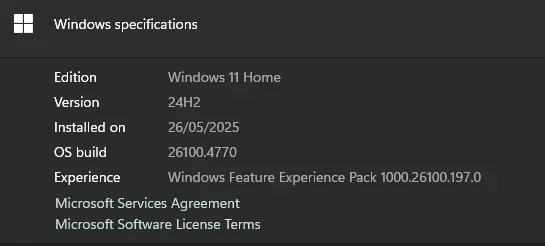
- 24H2 (OS Build 26100. 4770)
My Computer
At a glance
Windows 11 HomeIntel Core i5-9400 2.9 GHz 6-Core ProcessorKingston FURY Beast 16 GB (2 x 8 GB) DDR4-320...MSI RADEON RX VEGA 64 8G Radeon RX VEGA 64 8 ...
- OS
- Windows 11 Home
- Computer type
- PC/Desktop
- Manufacturer/Model
- Asus B-360-F
- CPU
- Intel Core i5-9400 2.9 GHz 6-Core Processor
- Motherboard
- Asus ROG STRIX B360-F GAMING ATX LGA1151 Motherboard
- Memory
- Kingston FURY Beast 16 GB (2 x 8 GB) DDR4-3200 CL16 Memory
- Graphics Card(s)
- MSI RADEON RX VEGA 64 8G Radeon RX VEGA 64 8 GB Video Card
- Monitor(s) Displays
- Gigabyte G27Q
- Screen Resolution
- 2560x1440p
- PSU
- Corsair RM750x (2021) 750 W 80+ Gold Certified Fully Modular ATX Power Supply
- Case
- Deepcool CC560 ATX Mid Tower Case