DSperber
Well-known member
For 20+ years I have used a 3rd-party licensed "screenshot" utility product named Fullshot, from what used to be Inbit Systems. They no longer exist, and the software is now "abandonware", although older "public" versions are available from various online software sources.
However the program hasn't undergone any software update since its final licensed version 10.2 back in 2020 (or possibly even before then). Nevertheless, it has continued to work flawlessly in all versions of Windows including right up to the latest Win11 25H2. At least on MOST machines.
For some reason, a new program issue has popped up very recently on SOME of the numerous Win11 25H2 machines I maintain (via remote connection) for friends and family. I suspect this issue is due to a recent Microsoft update dealing with very recent significant post-25H2 changes to functionality and processing for the Start button, Taskbar, and System Tray (notification area).
So I'm looking for help from anyone in resolving this problem, if possible.
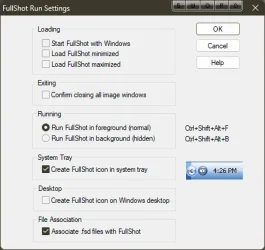
The background: When the Fullshot program itself is launched and active and open, its program window is onscreen (either window/fullscreen or minimized to the taskbar) and simultaneously there is a Fullshot icon displayed in the notification area ("system tray" in the lower right corner of the screen). One of the program settings options is what to do when closing the Fullshot window (i.e. clicking on the 'X" in upper-right corner of the window): either (a) close the program completely, including closing the tray-icon as well, or (b) close just the program window itself fully but leave the tray-icon still active in the system tray and complete Fullshot functionality still active in the "Windows background".
In other words, this latter setting leaves the program and its functionality STILL FULLY ACTIVE even when its program window has been closed. You can still invoke its "screenshot" functions in the usual ways, and you can make the program window reappear by right-slicking on the system tray icon and selecting "show fullshot window" from the popup menu.
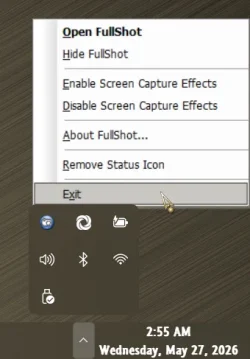
But if you really DO want to terminate Fullshot completely and fully even if you've got it configured to leave that system tray icon present upon cloing the program window, you again right-click on the system tray icon and select "exit" from the popup menu.
Ok. that's how it is designed to operate. And that's how it has ALWAYS operated. And that's how it STILL operates on many of my Win11 25H2 machines.
But for some reason on some machines (interestingly, they are mostly (entirely?) HP desktop machines that came with HP factory pre-installed Win11 on them, when performing that "exit" on the system tray icon to truly close the program, just the tray icon disappears. But the actual background Windows process REMAINS ACTIVE!!! And the program functionality is in kind of a hybrid problematic state, where the Fullshot screenshot functionality is truly no longer active, but neither can the Fullshot program itself be re-launched again (at least not without first using Task Manager to "end task" on the Fullshot "remnant" background process)!
==>while in this hybrid problematic state it is necessary to RUN TASKMGR and do "end task" on the "remnant" Fullshow process, in order to now truly kill everything from the prior instance of Fullshot and return things to normal so that the probram can once again be launched and become fully active and operating nomrally again.
This is VERY SIMILAR to the recently reported problem with Windows Task Manager tasks "remaining active in the background" even though the Task Manager window was closed by clicking on its "X". This ever-running never-ending background Task Manager could accumulate many/dozens/hundreds of still-running Task Manager tasks, accumulating lots of memory and eventually killing performance.
But in my case, it is just the one Fullshot task process that remains once. Since a new instance of Fullshot cannot be "launched" as long as this "previous task remnant" is still active (as the program was designed, since this is how things normally look when the system tray icon is genuinely present), you can never launch a second, third, etc. "instance" of Fullshot. But in this problematic state Fullshot functionality is not actually operating. The program is in this odd half-closed / half-open state. It doesn't function, but it cannot be re-launched to become functional.
So my request for help is what was that problematic Microsoft update which gave rise to the similar 'never ending task" Windows Task Manager story?
Was it ever resolved by Microsoft with a later update, or is it still an outstanding problem for some people but not for others who don't see the symptom?
I suspect my current Fullshot problem (which seems to occur on my HP desktop machines, all of which came from HP with an older factory Win11 pre-installed and all of which have now been upgraded through latest 25H2 updates) is somehow a similar story as the "remnant" Windows Task Manager story. Fullshot was newly installed on these HP machines which arrived with Win11 pre-installed.
Again, strangely I do NOT have the Fullshot malfunction (i.e. task remnant remains active after closing the system tray icon with "exit") on other machines (e.g. Lenovo laptops and desktops) where "retail" (from Microsoft download) Win11 was either installed from scratch (and then Fullshot newly installed) or upgraded from an older Win7/Win10 system (and where Fullshot was probably installed many years ago).
Might be coincidence, or maybe not, observing which machines seem to have the Fullshot-remnant-task problem and which do not. But I still want to solve the problem if I can.
Any thoughts?
However the program hasn't undergone any software update since its final licensed version 10.2 back in 2020 (or possibly even before then). Nevertheless, it has continued to work flawlessly in all versions of Windows including right up to the latest Win11 25H2. At least on MOST machines.
For some reason, a new program issue has popped up very recently on SOME of the numerous Win11 25H2 machines I maintain (via remote connection) for friends and family. I suspect this issue is due to a recent Microsoft update dealing with very recent significant post-25H2 changes to functionality and processing for the Start button, Taskbar, and System Tray (notification area).
So I'm looking for help from anyone in resolving this problem, if possible.
The background: When the Fullshot program itself is launched and active and open, its program window is onscreen (either window/fullscreen or minimized to the taskbar) and simultaneously there is a Fullshot icon displayed in the notification area ("system tray" in the lower right corner of the screen). One of the program settings options is what to do when closing the Fullshot window (i.e. clicking on the 'X" in upper-right corner of the window): either (a) close the program completely, including closing the tray-icon as well, or (b) close just the program window itself fully but leave the tray-icon still active in the system tray and complete Fullshot functionality still active in the "Windows background".
In other words, this latter setting leaves the program and its functionality STILL FULLY ACTIVE even when its program window has been closed. You can still invoke its "screenshot" functions in the usual ways, and you can make the program window reappear by right-slicking on the system tray icon and selecting "show fullshot window" from the popup menu.
But if you really DO want to terminate Fullshot completely and fully even if you've got it configured to leave that system tray icon present upon cloing the program window, you again right-click on the system tray icon and select "exit" from the popup menu.
Ok. that's how it is designed to operate. And that's how it has ALWAYS operated. And that's how it STILL operates on many of my Win11 25H2 machines.
But for some reason on some machines (interestingly, they are mostly (entirely?) HP desktop machines that came with HP factory pre-installed Win11 on them, when performing that "exit" on the system tray icon to truly close the program, just the tray icon disappears. But the actual background Windows process REMAINS ACTIVE!!! And the program functionality is in kind of a hybrid problematic state, where the Fullshot screenshot functionality is truly no longer active, but neither can the Fullshot program itself be re-launched again (at least not without first using Task Manager to "end task" on the Fullshot "remnant" background process)!
==>while in this hybrid problematic state it is necessary to RUN TASKMGR and do "end task" on the "remnant" Fullshow process, in order to now truly kill everything from the prior instance of Fullshot and return things to normal so that the probram can once again be launched and become fully active and operating nomrally again.
This is VERY SIMILAR to the recently reported problem with Windows Task Manager tasks "remaining active in the background" even though the Task Manager window was closed by clicking on its "X". This ever-running never-ending background Task Manager could accumulate many/dozens/hundreds of still-running Task Manager tasks, accumulating lots of memory and eventually killing performance.
But in my case, it is just the one Fullshot task process that remains once. Since a new instance of Fullshot cannot be "launched" as long as this "previous task remnant" is still active (as the program was designed, since this is how things normally look when the system tray icon is genuinely present), you can never launch a second, third, etc. "instance" of Fullshot. But in this problematic state Fullshot functionality is not actually operating. The program is in this odd half-closed / half-open state. It doesn't function, but it cannot be re-launched to become functional.
So my request for help is what was that problematic Microsoft update which gave rise to the similar 'never ending task" Windows Task Manager story?
Was it ever resolved by Microsoft with a later update, or is it still an outstanding problem for some people but not for others who don't see the symptom?
I suspect my current Fullshot problem (which seems to occur on my HP desktop machines, all of which came from HP with an older factory Win11 pre-installed and all of which have now been upgraded through latest 25H2 updates) is somehow a similar story as the "remnant" Windows Task Manager story. Fullshot was newly installed on these HP machines which arrived with Win11 pre-installed.
Again, strangely I do NOT have the Fullshot malfunction (i.e. task remnant remains active after closing the system tray icon with "exit") on other machines (e.g. Lenovo laptops and desktops) where "retail" (from Microsoft download) Win11 was either installed from scratch (and then Fullshot newly installed) or upgraded from an older Win7/Win10 system (and where Fullshot was probably installed many years ago).
Might be coincidence, or maybe not, observing which machines seem to have the Fullshot-remnant-task problem and which do not. But I still want to solve the problem if I can.
Any thoughts?
My Computer
At a glance
Windows 11 Pro 25H2i7-6700HQ4x8GB=32GB DDR4-2133NVidia Quadro M3000M
- OS
- Windows 11 Pro 25H2
- Computer type
- Laptop
- Manufacturer/Model
- Lenovo ThinkPad P70
- CPU
- i7-6700HQ
- Motherboard
- Lenovo Skylake
- Memory
- 4x8GB=32GB DDR4-2133
- Graphics Card(s)
- NVidia Quadro M3000M
- Sound Card
- RealTek ALC298
- Monitor(s) Displays
- (1) laptop screen, (2) External Eizo CG318-4K
- Screen Resolution
- (1) 1920x1080, 125%, (2) 2560x1440, 125%
- Hard Drives
- Samsung NVMe 970 EVO Plus 1TB
Samsung NVMe 950 Pro 512GB
Samsung SATA3 850 Pro 512GB SSD
- Internet Speed
- 600/20
- Antivirus
- BitDefender Total Protection, Malwarebytes Premium