
Fullshot tray task stays active after "exit" on SOME of my 25H2 machines


DSperber

Well-known member
Local time
11:57 AM
Posts
13
Location
Marina Del Rey, CA
OS
Windows 11 Pro 25H2
For 20+ years I have used a 3rd-party licensed "screenshot" utility product named Fullshot, from what used to be Inbit Systems. They no longer exist, and the software is now "abandonware", although older "public" versions are available from various online software sources.

However the program hasn't undergone any software update since its final licensed version 10.2 back in 2020 (or possibly even before then). Nevertheless, it has continued to work flawlessly in all versions of Windows including right up to the latest Win11 25H2. At least on MOST machines.

For some reason, a new program issue has popped up very recently on SOME of the numerous Win11 25H2 machines I maintain (via remote connection) for friends and family. I suspect this issue is due to a recent Microsoft update dealing with very recent significant post-25H2 changes to functionality and processing for the Start button, Taskbar, and System Tray (notification area).

So I'm looking for help from anyone in resolving this problem, if possible.

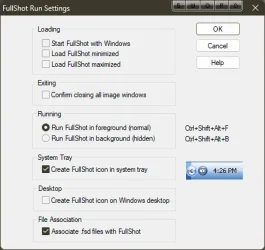
The background: When the Fullshot program itself is launched and active and open, its program window is onscreen (either window/fullscreen or minimized to the taskbar) and simultaneously there is a Fullshot icon displayed in the notification area ("system tray" in the lower right corner of the screen). One of the program settings options is what to do when closing the Fullshot window (i.e. clicking on the 'X" in upper-right corner of the window): either (a) close the program completely, including closing the tray-icon as well, or (b) close just the program window itself fully but leave the tray-icon still active in the system tray and complete Fullshot functionality still active in the "Windows background".

In other words, this latter setting leaves the program and its functionality STILL FULLY ACTIVE even when its program window has been closed. You can still invoke its "screenshot" functions in the usual ways, and you can make the program window reappear by right-slicking on the system tray icon and selecting "show fullshot window" from the popup menu.

But if you really DO want to terminate Fullshot completely and fully even if you've got it configured to leave that system tray icon present upon cloing the program window, you again right-click on the system tray icon and select "exit" from the popup menu.

Ok. that's how it is designed to operate. And that's how it has ALWAYS operated. And that's how it STILL operates on many of my Win11 25H2 machines.

But for some reason on some machines (interestingly, they are mostly (entirely?) HP desktop machines that came with HP factory pre-installed Win11 on them, when performing that "exit" on the system tray icon to truly close the program, just the tray icon disappears. But the actual background Windows process REMAINS ACTIVE!!! And the program functionality is in kind of a hybrid problematic state, where the Fullshot screenshot functionality is truly no longer active, but neither can the Fullshot program itself be re-launched again (at least not without first using Task Manager to "end task" on the Fullshot "remnant" background process)!

==>while in this hybrid problematic state it is necessary to RUN TASKMGR and do "end task" on the "remnant" Fullshow process, in order to now truly kill everything from the prior instance of Fullshot and return things to normal so that the probram can once again be launched and become fully active and operating nomrally again.


This is VERY SIMILAR to the recently reported problem with Windows Task Manager tasks "remaining active in the background" even though the Task Manager window was closed by clicking on its "X". This ever-running never-ending background Task Manager could accumulate many/dozens/hundreds of still-running Task Manager tasks, accumulating lots of memory and eventually killing performance.

But in my case, it is just the one Fullshot task process that remains once. Since a new instance of Fullshot cannot be "launched" as long as this "previous task remnant" is still active (as the program was designed, since this is how things normally look when the system tray icon is genuinely present), you can never launch a second, third, etc. "instance" of Fullshot. But in this problematic state Fullshot functionality is not actually operating. The program is in this odd half-closed / half-open state. It doesn't function, but it cannot be re-launched to become functional.


So my request for help is what was that problematic Microsoft update which gave rise to the similar 'never ending task" Windows Task Manager story?

Was it ever resolved by Microsoft with a later update, or is it still an outstanding problem for some people but not for others who don't see the symptom?

I suspect my current Fullshot problem (which seems to occur on my HP desktop machines, all of which came from HP with an older factory Win11 pre-installed and all of which have now been upgraded through latest 25H2 updates) is somehow a similar story as the "remnant" Windows Task Manager story. Fullshot was newly installed on these HP machines which arrived with Win11 pre-installed.

Again, strangely I do NOT have the Fullshot malfunction (i.e. task remnant remains active after closing the system tray icon with "exit") on other machines (e.g. Lenovo laptops and desktops) where "retail" (from Microsoft download) Win11 was either installed from scratch (and then Fullshot newly installed) or upgraded from an older Win7/Win10 system (and where Fullshot was probably installed many years ago).

Might be coincidence, or maybe not, observing which machines seem to have the Fullshot-remnant-task problem and which do not. But I still want to solve the problem if I can.

Any thoughts?
 

My Computer

System One

  • OS
    Windows 11 Pro 25H2
    Computer type
    Laptop
    Manufacturer/Model
    Lenovo ThinkPad P70
    CPU
    i7-6700HQ
    Motherboard
    Lenovo Skylake
    Memory
    4x8GB=32GB DDR4-2133
    Graphics Card(s)
    NVidia Quadro M3000M
    Sound Card
    RealTek ALC298
    Monitor(s) Displays
    (1) laptop screen, (2) External Eizo CG318-4K
    Screen Resolution
    (1) 1920x1080, 125%, (2) 2560x1440, 125%
    Hard Drives
    Samsung NVMe 970 EVO Plus 1TB
    Samsung NVMe 950 Pro 512GB
    Samsung SATA3 850 Pro 512GB SSD
    Internet Speed
    600/20
    Antivirus
    BitDefender Total Protection, Malwarebytes Premium
Assuming all the problematic machines are running the same version and BUILD as the machines that do not have the problem, the only thought I have is conflicting software. Use one of problematic HP machines as a test machine. Put it in clean boot. If the issue goes away in clean boot, it directly points to conflicting software. You can then use process of elimination by enabling processes individually or in groups as per Brink's tutorial to find out what the conflict is.

I would also Make sure you have no corrupt system files that is causing this problem. Open a command prompt as administrator and type dism /online /cleanup-image /restorehealth
When complete restart. Then open command prompt as admin again and run sfc /scannow
Pay attention to the scan results to see if SFC found anything it could not repair
 

My Computers

System One System Two

  • OS
    Windows 11 Pro 25H2
    Computer type
    PC/Desktop
    Manufacturer/Model
    Dell Optiplex 7080
    CPU
    i9-10900 10 core 20 threads
    Motherboard
    DELL 0J37VM
    Memory
    32 gb
    Graphics Card(s)
    none-Intel UHD Graphics 630
    Sound Card
    Integrated Realtek
    Monitor(s) Displays
    Benq 27
    Screen Resolution
    2560x1440
    Hard Drives
    2x1tb Solidigm m.2 nvme /External drives 512gb Samsung m.2 sata+2tb Kingston m2.nvme
    PSU
    500w
    Case
    MT
    Cooling
    Dell Premium
    Keyboard
    Logitech wired
    Mouse
    Logitech wireless
    Internet Speed
    so slow I'm too embarrassed to tell
    Browser
    #1 Edge #2 Firefox
    Antivirus
    Defender+MWB Premium
  • Operating System
    Windows 11 Pro 24H2 26200.8457
    Computer type
    PC/Desktop
    Manufacturer/Model
    Beelink Mini PC SER5
    CPU
    AMD Ryzen 7 6800U
    Memory
    32 gb
    Graphics card(s)
    integrated
    Sound Card
    integrated
    Monitor(s) Displays
    Benq 27
    Screen Resolution
    2560x1440
    Hard Drives
    1TB Crucial nvme
    Keyboard
    Logitech wired
    Mouse
    Logitech wireless
    Internet Speed
    still too embarrassed to tell
    Browser
    Firefox
    Antivirus
    Defender
    Other Info
    System 3 is non compliant Dell 9020 i7-4770/24gb ram Win11 PRO 26200.8457
What happens if you reopen the window from the tray, hold Ctrl and right click on the taskbar icon and end task? That kills it off right?
 

My Computer

System One

  • OS
    Windows 11 Pro
Fullshot-remnant-task problem...
I'm not experiencing the issue..., even on Canary Build! 🤷‍♂️

13003.webp

Maybe something in Settings?

The program is very dated though!

13002.webp
 

My Computers

System One System Two

  • OS
    Windows 11 Pro
    Computer type
    PC/Desktop
    Manufacturer/Model
    ASUS ROG Strix
  • Operating System
    Windows 11 Pro
    Computer type
    Laptop
    Manufacturer/Model
    ASUS VivoBook
On one of the HP factory installed win 11machines ,can you replace the drive with a new one containing a non factory version of Win 11 plus Fullshot only and see how that works.
If operations are normal,then the factory installation would appear to be the problem
 

My Computer

System One

  • OS
    win 10
    Computer type
    PC/Desktop
    Manufacturer/Model
    home built
    CPU
    amd ryzen 5-2600
    Motherboard
    gigabyte b450m-ds3h
    Memory
    ng skill sniper x 16gb
    Graphics Card(s)
    nvidea gtx 1050
    Monitor(s) Displays
    benq fp 92
    Hard Drives
    samsung 860 evo 500gb m2 ssd
    PSU
    antec ea550g
    Case
    nzxt noctis 450
    Browser
    edge
What happens if you reopen the window from the tray, hold Ctrl and right click on the taskbar icon and end task? That kills it off right?
You are asking about closing the Fullshot program window itself. And yes, that program window can be closed either by clicking on "X" in its upper right corner or right-click (no need for also CTRL) on the active taskbar icon and then "close window". Either of these actions WILL close the program window itself.

However the system tray icon is the relevant object here. When the program window is active/open there is also a system tray icon displayed there. And of course the actually active program corresponds to a "Fullshot background process" in Windows task manager. The Fullshot program is configured to leave that system tray icon present and the underlying Fullshot background process still active even after the program window itself is closed. That's how Fullshot functionality remains 100% active even without its program window launched. This is one way to run the program (and I run it that way), with the other way actually terminating the system tray icon as well as the background task when the program window itself is closed (I do not run it that way).

This latter option (which I do not use) thus completely terminates Fullshot functionality if/when you close its program window. Otherwise, if you use the former option (which is what I do) then the way you truly completely terminate it after closing the program window is to right-click on the system tray icon and select "exit" from the popup menu. This will both (a) close the tray icon, and (b) end the background Fullshot process task.

==> The problem I've run into on all three of my HP desktop machines is that even after "exit" on the system tray icon, the Fullshot background process task DOES NOT END AS IT SHOULD, but rather just remains active. So the hybrid problem state now is that (a) the Fullshot functionality is not actually active, but (b) neither can the program be re-launched into an active state because its Task Manager process is already "active"... but Fullshot is not really normally operating because the system tray icon is not also present. So, doesn't function, and also cannot be launched properly. Solution is it "manually end Fullshot task" through Task Manager, and now it is truly gone from the system and now finally can once again be re-launched from the program shortcut.
 

My Computer

System One

  • OS
    Windows 11 Pro 25H2
    Computer type
    Laptop
    Manufacturer/Model
    Lenovo ThinkPad P70
    CPU
    i7-6700HQ
    Motherboard
    Lenovo Skylake
    Memory
    4x8GB=32GB DDR4-2133
    Graphics Card(s)
    NVidia Quadro M3000M
    Sound Card
    RealTek ALC298
    Monitor(s) Displays
    (1) laptop screen, (2) External Eizo CG318-4K
    Screen Resolution
    (1) 1920x1080, 125%, (2) 2560x1440, 125%
    Hard Drives
    Samsung NVMe 970 EVO Plus 1TB
    Samsung NVMe 950 Pro 512GB
    Samsung SATA3 850 Pro 512GB SSD
    Internet Speed
    600/20
    Antivirus
    BitDefender Total Protection, Malwarebytes Premium

On one of the HP factory installed win 11machines ,can you replace the drive with a new one containing a non factory version of Win 11 plus Fullshot only and see how that works.
If operations are normal,then the factory installation would appear to be the problem
That is what I'm suspecting.

Either that or some HP-proprietary software is installed on all three of these machines, and which is somehow responsible for the Fullshot problem. But I repeat that Fullshot previously worked properly even with any HP software present. It is only more recently with 25H2 and later updates that this "exit" anomaly has started.

All three HP machines were purchased from Best Buy over several years, and all arrived with an earlier release of Win11 pre-installed. They all went through a standard normal upgrade to one or more major Win11 releases via standard Windows Update, including this most recent one to 25H2. And all three of these machines exhibit the Fullshot problem with "exit" on the system tray icon leaving the Fullshot process still active in Task Manager. Fullshot was first installed on these machines with whatever version of Win11 came when purchased, and simply remained installed through this latest upgrade to 25H2. And Fullshot ALWAYS RAN AND ENDED ("exit" on the system tray icon) PERFECTLY until very recently, with 25H2 and probably subsequent updates.

In contrast, ALL my other non-HP machines are older and were previously running either Win7 -> Win11, or Win7 -> Win10 -> Win11, via "in-place upgrade" to Win11). The "in-place upgrade" used standard retail Microsoft Win11 ISO file download. So NONE of these other older machines actually did a "cold, from-scratch, brand new Win11 install. But an "in-place upgrade to Win11" is essentially a brand new Win11 install (with full integrity) but also retaining all previously installed programs and data and desktop customizations which can be migrated. All of these systems of course had Fullshot previously installed on whatever was the original vesion of Windows existed years ago. And Fullshot previously ran perfectly and still runs perfectly on these machines, including exhibiting the correct behavior when ended ("exit" on the system tray icon).


I have now reviewed the Windows Update "quality updates" history for the past 6 months, of the three HP machines vs. all the other non-HP machines. Very interestlingly the three HP machines have the same collection of applied updates, which is missing EIGHT updates that were applied on the other non-HP machines. I have not yet looked more closely into the descriptions of the "missing" updates to see if there is some hardward-justified reason they were not installed.

But it's certainly very interesting that the three HP machines are missing these updates (which may or may not be relevant to this Fullshot "process remnant after exit" issue that I'm chasing down: (NOTE: some machines have the "get the latest updates as soon as they're available" option enabled, which is why the "preview update" items were installed on those machines as opposed to being ignored):

2026-04 Preview Update (KB5083631) (26200.8328)
2026-03 Update (KB5086672) (26200.8117)
2026-03 Update (KB5085516) (26200.8039)
2026-02 Preview Update (KB5077241) (26200.7922)
2026-01 Preview Update (KB5074105) (26200.7705)
2026-01 .NET Framework Preview Update (KB5074828)
2026-01 Update (KB5078127) (26200.7628)
2025-11 Preview Update (KB5070311) (26200.7309)


I may try to do an "in-place upgrade" on one of these HP desktop machines, using my standard method. That will recreate a brand new "retail" Microsoft Win11 25H2 with all currently installed programs and user data and destop customizations from the existing current Win11 25H2 carried across into the new total replacement Win11 25H2.

This method of creating a brand new Win11 25H2 (without having to rebuild everything from scratch including all 3rd-party programs, user data, and desktop customizations) will certainly ensure that all Windows Updates will get applied. And then I can see if Fullshot "exit" now works properly, or still fails.

Can't hurt anything to try this.
 

My Computer

System One

  • OS
    Windows 11 Pro 25H2
    Computer type
    Laptop
    Manufacturer/Model
    Lenovo ThinkPad P70
    CPU
    i7-6700HQ
    Motherboard
    Lenovo Skylake
    Memory
    4x8GB=32GB DDR4-2133
    Graphics Card(s)
    NVidia Quadro M3000M
    Sound Card
    RealTek ALC298
    Monitor(s) Displays
    (1) laptop screen, (2) External Eizo CG318-4K
    Screen Resolution
    (1) 1920x1080, 125%, (2) 2560x1440, 125%
    Hard Drives
    Samsung NVMe 970 EVO Plus 1TB
    Samsung NVMe 950 Pro 512GB
    Samsung SATA3 850 Pro 512GB SSD
    Internet Speed
    600/20
    Antivirus
    BitDefender Total Protection, Malwarebytes Premium
You are asking about closing the Fullshot program window itself. And yes, that program window can be closed either by clicking on "X" in its upper right corner or right-click (no need for also CTRL) on the active taskbar icon and then "close window". Either of these actions WILL close the program window itself.
That’s not what I asked.
 

My Computer

System One

  • OS
    Windows 11 Pro
I'm not experiencing the issue..., even on Canary Build! 🤷‍♂️

View attachment 172618

Maybe something in Settings?

The program is very dated though!

View attachment 172619
I honestly do not recognize that "settings" dialog you've posted. The current version of the program has numerous sub-pages of settings. The few settings you show is just a very small subset of what is actually currently customizable in the program.

You are apparently running a VERY VERY OLD (and perhaps "free"?) version of Fullshot. It definitely has been available for decades. It has always been licensed and non-free from the author, Inbit Inc. Purchasing has been through a wide variety of online payment agents.

Inbit Inc. (and their inbit.com website) is no longer around.

But the very first version I purchased was back in 1999, of what was then Version 5 and was called "Fullshot 99".

They subsequently issued upgraded licensed/non-free versions 6 (in 2000), 7 (in 2002), 8 (in 2003), and 9 (in 2005). Version 9 went through numerous sub-upgrades through 9.5 as late as 2014).

They eventually came out with what was their final Version 10, named "Fullshot 10 PE" (professional?), in 2015. It included the long-awaited "annotations" capability to become competitive, so that users could "mark up" their screenshots like Snagit and other similar productss could do. Initially it was released as version 10.0. And again there were several more sub-upgrades over the years, 10.1 and finally 10.2 which is last update released in 2020.

I am running that very latest and final licensed/paid version 10.2. And it has worked perfectly for me in all versions of Windows 98, XP, 9, 10 and 11... aside from this very very recent anomaly I am chasing which specifically is causing the Fullshot task process to remain "still active but not fully functional" as shown in Task Manager, even after it was supposed to completely terminate through its "exit" function.

And yes, it has been "abandonware" ever since 2020, long before the Octoer 2021 official release of Windows 11 and its own new and unique application program development SDK standards. And even more obvious, not even remotely "compatible and usable" with more recent WIn11 24H2 and now 25H2 radical restrictions, except by real coincidence and good luck (and the particular subset of Windows APIs and services that the product uses inside of its architecture and design).
 

My Computer

System One

  • OS
    Windows 11 Pro 25H2
    Computer type
    Laptop
    Manufacturer/Model
    Lenovo ThinkPad P70
    CPU
    i7-6700HQ
    Motherboard
    Lenovo Skylake
    Memory
    4x8GB=32GB DDR4-2133
    Graphics Card(s)
    NVidia Quadro M3000M
    Sound Card
    RealTek ALC298
    Monitor(s) Displays
    (1) laptop screen, (2) External Eizo CG318-4K
    Screen Resolution
    (1) 1920x1080, 125%, (2) 2560x1440, 125%
    Hard Drives
    Samsung NVMe 970 EVO Plus 1TB
    Samsung NVMe 950 Pro 512GB
    Samsung SATA3 850 Pro 512GB SSD
    Internet Speed
    600/20
    Antivirus
    BitDefender Total Protection, Malwarebytes Premium
That’s not what I asked.
I'm sorry, I apparently didn't understand what you were asking because the wording was technically incorrect and inaccurate, and thus ambiguous to me. Apparently my hunch as to what you probably wanted me to try was apparently wrong.

"What happens if you reopen the window from the tray, hold Ctrl and right click on the taskbar icon and end task? That kills it off right?"

The only "exit" which appears on a right-click menu is when right-clicking on the system tray icon, so that's the item I first thought you were asking me to right-click on and then select "exit". I assumed you were pointing to something extra special that would occur if I simultaneously held down CTRL when also selecting "exit" from that popup menu.

To answer that particular question here now, NO... nothing different occurs just because CTRL is held down when selecting "exit" from the poup menu from right-click on system tray icon (no matter whether the Fullshot program window itself is actually open or not). The Fullshot task still enters its problematic state being still active in Task Manager but non-functional for the application. And it prevents re-launching a brand new and fully functional Fullshot instance until this semi-task is ended through Task Manager.

Note that when Fullshot running as a normal foreground app (with its program window open on the desktop, either minimized to the taskbar or restored up and open on the desktop), its Task Manager item is shown in the "apps" group at the top, i.e. it is in the "foreground". And when I close this foreground Fullshot operation (by "X" in the program Window or "X close window" from the right-click popup menu on the taskbar item) the program window closes and the Task Manager item moves from up in the 'apps" (foreground) group down into the lower "background processes" (background) group.

This IS how it is supposed to operate. And the Fullshot program window can then be brought back open on the desktop by right-clicking on the system tray icon and selecting "Open Fullshot". This will simultaneously move the Fullshot Task Manager item from "background processes" back up into the "apps" (foreground) group.

Note that if I re-open the just closed by "X" in the program window (which if I've set the program as I do, also leaves the system tray icon still present and with Fullshot full functionality now still fully available in the Windows background) by right-click on the system tray icon and select "Open Fullshot", then yes the program window now reappears and its taskbar icon re-activates.

And of course with the Fullshot taskbar shortcut now once again active and operational to show it as an "open program", I can once again minimize/restore the Fullshot window and navigate among Windows tasks through by clicking on that taksbar irem. But if you right-click on that taskbar icon that just produces the expected Windows popup menu which offers "X Close window". This right-click does NOT produce "exit".

And again to answer your question for this right-click, simultaneously holding CTRL down while also selecting "X Close window" acocmplishes nothing special or different. The Fullshot program window closes, the Task Manager task again goes from the "apps" (foreground) group down into the 'background processes" group. This is AS EXPECTED, and the correct behavior.


==> The problem is specifically that when the Fullshot is either (a) active and open in the foreground, or active and still fully functional in the background after closing the program Window, a right-clck and "exit" from the popup menu IS SUPPOSED TO END THE TASK MANAGER TASK (no matter if it is an "app" or a "background process")!! And that is what it is NOT doing on those HP machines... i.e. whatever Windows API request Fullshot is issuing to terminate the task is apparently NOT TERMINATING IT AT ALL!! The task remains active!

As I recall this always DID work previously even on these HP machines (or else I surely would have noticed the failure myself when using Fullshot myself on these machines over the past 6+ months). It is only now, recently, and probably since 25H2 and more recent updates, that this failure has arisen.

As to why only on these HP machines? I still don't know yet.
 

My Computer

System One

  • OS
    Windows 11 Pro 25H2
    Computer type
    Laptop
    Manufacturer/Model
    Lenovo ThinkPad P70
    CPU
    i7-6700HQ
    Motherboard
    Lenovo Skylake
    Memory
    4x8GB=32GB DDR4-2133
    Graphics Card(s)
    NVidia Quadro M3000M
    Sound Card
    RealTek ALC298
    Monitor(s) Displays
    (1) laptop screen, (2) External Eizo CG318-4K
    Screen Resolution
    (1) 1920x1080, 125%, (2) 2560x1440, 125%
    Hard Drives
    Samsung NVMe 970 EVO Plus 1TB
    Samsung NVMe 950 Pro 512GB
    Samsung SATA3 850 Pro 512GB SSD
    Internet Speed
    600/20
    Antivirus
    BitDefender Total Protection, Malwarebytes Premium
I have now done further research using one of those problematic three HP machines where the anomalous Fullshot behavior is occurring. Just to reiterate, the issue DOES NOT OCCUR ON ANY OF MY OTHER WIN11 25H2 MACHINES!

So I did a full "in-place upgrade to Win11 25H2" on this one machine, which was already at Win11 25H2. In essence I accomplished nothing, aside from reinstalling from a "pure retail" Microsoft-provided Win11 25H2 installation ISO image. Presumably all relevant Windows updates since 25H2 would be properly applied, with nothing lost or left out.

==> NO FIX!! The Fullshot "exit" anomaly persists, even with the brand new Microsoft-provided WIn11 25H2 system.

NOTE: I also looked more closely at the list of Windows Update History items on the HP machines vs. the other machines, to evaluate the observed differences. Turns out there really were NO SIGNIFICANT DIFFERENCES after all:

(a) Some machines had the "apply updates as soon as they are available" enabled and other machines did not. This accounted for all of the "preview update" items either being installed as soon as they became available or not.

(b) Some machines showed a "cumulative monthly 25H2 update" and other machines did not. Again, presumably just an early or late catch-up or installation of what was or would be the official update's release on the normal schedule.

==> ALL machines really reflected identical Windows Update History. So the underlying reason why Fullshot's "exit" functionality is now failing on the HP machines probably isn't coming from a Microsoft-caused issue.

The explanation (if it is ever learned) for the Fullshot "exit" anomaly may therefore somehow stem from an interaction with the HP-installed other software on these machines (e.g. HP Health, etc.) and how the whole combination is now working post-25H2.


Next research steps: I am going to compare the detail internal Windows operations using "Process Monitor (SYSINTRNLS)". I will perform "exit" on a WORKING Lenovo machine running Fullshot 10.2 and Win11 25H2, vs. the same "exit" on a FAILING HP machine running Fullshot 10.2 and Win 25H2, generating Process Monitor activity recording for both.

I will then look at the items in both, to see if I can locate any relevant differences which explains why "exit" is not actually terminating the task on the HP machines but does terminate the task on non-HP machines.
 

My Computer

System One

  • OS
    Windows 11 Pro 25H2
    Computer type
    Laptop
    Manufacturer/Model
    Lenovo ThinkPad P70
    CPU
    i7-6700HQ
    Motherboard
    Lenovo Skylake
    Memory
    4x8GB=32GB DDR4-2133
    Graphics Card(s)
    NVidia Quadro M3000M
    Sound Card
    RealTek ALC298
    Monitor(s) Displays
    (1) laptop screen, (2) External Eizo CG318-4K
    Screen Resolution
    (1) 1920x1080, 125%, (2) 2560x1440, 125%
    Hard Drives
    Samsung NVMe 970 EVO Plus 1TB
    Samsung NVMe 950 Pro 512GB
    Samsung SATA3 850 Pro 512GB SSD
    Internet Speed
    600/20
    Antivirus
    BitDefender Total Protection, Malwarebytes Premium
Temporarily, I have now DISABLED the Fullshot setting which allows the Fullshot system tray icon to remain active even after closing ("X") the foreground open Fullshot program window (which also closes the currently open Taskbar shortcut icon, indicating that the program is no longer open and active in the Windows foreground).

This is the alternative (via setting) operational mode when closing Fullshot's program window. You can either leave the system tray icon (and full Fullshot functionality) still running in the background, or you can close it completely right now (meaning 100% immediate and ufll termination of Fullshot functionality until it is subsequently re-launched).

I have discovered that if this alternative "what to do on program window close" operational mode (which I never have used, but now will accept) DOES ACTUALLY TERMINATE THE FULLSHOT "APPS" (foreground) TASK ITEM IN TASK MANAGER! It does NOT enter the 'background processes" group, but instead truly immedately and fully terminates. This is exactly as designed, for when the user really does want the program to behave this way when "X" the program windown. It is desired to terminate Fullshot functionality completely when "X" the program window itself, leaving no system tray icon still active and no 100% fully functional Fullshot still operational in the backgroun.

At least this an acceptable compromise, and allows Fullshot to later be re-lauched perfectly from its shortcut, withour first having to ensure no Task Manager "remnant" that must first be manually ended before a new Fullshot instance can be launched. For the time being (or forever!) this is the course of least inconvencience and annoyance. Perfectly acceptable and tolerable workaround to the issue.


I will still pursue the Process Manager log analysis, to see if I can at least identify the DIFFERENCES showing how Fullshot behaves differently on the HP and non-HP machines.

There must be a scientific explanation for the differnet Fullshot "exit" behaviors on the HP and non-HP machines post 25H2.
 

My Computer

System One

  • OS
    Windows 11 Pro 25H2
    Computer type
    Laptop
    Manufacturer/Model
    Lenovo ThinkPad P70
    CPU
    i7-6700HQ
    Motherboard
    Lenovo Skylake
    Memory
    4x8GB=32GB DDR4-2133
    Graphics Card(s)
    NVidia Quadro M3000M
    Sound Card
    RealTek ALC298
    Monitor(s) Displays
    (1) laptop screen, (2) External Eizo CG318-4K
    Screen Resolution
    (1) 1920x1080, 125%, (2) 2560x1440, 125%
    Hard Drives
    Samsung NVMe 970 EVO Plus 1TB
    Samsung NVMe 950 Pro 512GB
    Samsung SATA3 850 Pro 512GB SSD
    Internet Speed
    600/20
    Antivirus
    BitDefender Total Protection, Malwarebytes Premium
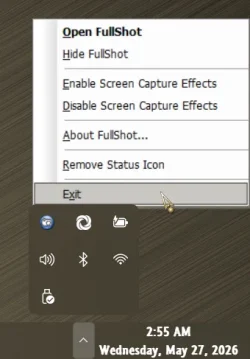
The only "exit" which appears on a right-click menu is when right-clicking on the system tray icon, so that's the item I first thought you were asking me to right-click on and then select "exit". I assumed you were pointing to something extra special that would occur if I simultaneously held down CTRL when also selecting "exit" from that popup menu.
if End Task doesnt show on CTRL+RClick on taskbar icons, enable it in the reg and try what i stated again


My Computer

System One

  • OS
    Windows 11 Pro
if End Task doesnt show on CTRL+RClick on taskbar icons, enable it in the reg and try what i stated again

AHA! That explains everything.

I admit that I was completely unaware of this enhancement from November 2023 (applicable back then to 22H2/23H2) which optionally added a new "end task" (aka "exit" for Fullshot's tray icon right-click menu) item to the popup menu from right-click on an active/open taskbar item. This is thus in addition to the standard "X close window" which always appears on the taskbar item right-click menu. That ignorance of mine is clearly why I could only interpret your original suggestion for me to try in an impossibly ambiguous way.

Ok. I've now enabled that new "end task" option and tried it. And yes, IT DOES WORK in performing an immediate and complete Fullshot task termination.

(a) There is no longer a movement of the Fullshot Task Manager process item from "apps" (foreground) to the "background processes" group, if that would have been what otherwise should have happened upon Fullshot close if I'd chosen that particular "close" behavior in Fullshot settings (i.e. keep Fullshot active in the system tray and Windows Background even after closing the foreground Fullshot program window).

(b) If I had instead chosen the alternative available "close" behavior setting (i.e. to immediately and fully close Fullshot upon "X" and DO NOT keep the program active in the background with system tray icon still present) then this new "end task" from the taskbar item right-click popup menu is really identical to the regular "X close window" popup menu item, which itself is also really identical to the regular "X" on the program window itself. All of these actions immediately and fully terminate Fullshot and its Task Manager process item, and do NOT leave an active system trayicon or "background process" task item.


So if operating as (a) above as I do, this is absolutely one additional way to overcome the "remnant" Fullshot task manager "background process" item that results from subsequently selecting "exit" on the Fullshot system tray icon right-click menu (after first closing Fullshot either by "X" on the program window or with "X Close Window" from the Fullshot taskbar item right-click popup menu).

However, it is still necessary to first re-activate the Fullshot program window and corresponding activated Fullshot taskbar item, in order to then be able to right-click on the taskbar item so as to then see this new "end task" item (which DOES terminate everything). This is a handful of additional clicks and mouse movements, all of which are necessitated because I had chosen to leave the Fullshot system tray icon (and program functionality) active even after closing the Fullshot foreground program window. And it was this choice which even necessitated me to use the no longer working "exit" method on the system tray icon, if I truly now wanted to fully terminate Fullshot instead of leaving it active in the background.

NOTE: having Fullshot "functionally active" (either in foreground or background) produces its "screenshot buttons" on the right side of whichever foreground program window is open and not minimized and "has the focus". Sometimes these buttons are annoying by their visible presence, and sometimes they overlay other program-drawn items on the right upper-corner area of that window frame. Generally there is no conflict of Fullshot's buttons, but sometimes that does occur. Hence why you might want to fully terminate Fullshot (and its buttons) when you don't really need it.


Anyway, as I mentioned a bit earlier, I have now discovered by experimenting that if I do NOT opt to keep Fullshot open in the background (with system tray icon still present, and additional "exit" required if I really do want to fully terminate it), but instead opt to IMMEDIATELY CLOSE THE PROGRAM when "X" on the program window or "X Close window" on the taskbar item popup menu, then either of these CLOSE PROGRAM actions truly does terminate the Fullshot item in Task Manager (with NO system tray icon remaining).

And that means if I will simply select this alternative "close program" behavior setting (which I had not done before, but which was always available as an option) that there will NEVER EVER be a system tray icon left active after closing the program. And furthermore, there will NEVER be a "remnant" Fullshot "backbround processes" Task Manager item that causes problems on HP machines post-25H2.

Thus I will only have to adjust to leaving Fullshot always "active/open" on the taskbar when I want to have its functionality available, instead of how I previously operated which was to close the program window immediately and which always left fullshot still running in the background (and with system tray icon active), and always generating its Fullshot buttons on whichever was the foreground "focus" program's window.

And if I want to terminate Fullshot functionality and its visible buttons on the "focus" window, I will simply now close it. With the newly opted-into program close behavior setting, Fullshot will now close, no system tray icon will remain, no Fullshot buttons will appear on the "focus" program window, and there is no need to fight with "exit" malfunctioning of enabling the new "end task" taskbar right-click menu option.

This is no question the absolute best way to deal with whatever is the root underlying cause of this recent issue with Fullshot "close" behavior post 25H2 occuring specifically on my HP desktop machines. Close Fullshot when not needed, leave Fullshot open (program window minimized to taskbar, mostly) when needed. No extra unnecessary clicks and mouse movements.


(I will still look into the Process Monitor log file and compare HP vs. non-HP, to see if I can detect the obviously different Fullshot behavior and/or Windows handling of the internal Fullshot "exit" request.)
 

My Computer

System One

  • OS
    Windows 11 Pro 25H2
    Computer type
    Laptop
    Manufacturer/Model
    Lenovo ThinkPad P70
    CPU
    i7-6700HQ
    Motherboard
    Lenovo Skylake
    Memory
    4x8GB=32GB DDR4-2133
    Graphics Card(s)
    NVidia Quadro M3000M
    Sound Card
    RealTek ALC298
    Monitor(s) Displays
    (1) laptop screen, (2) External Eizo CG318-4K
    Screen Resolution
    (1) 1920x1080, 125%, (2) 2560x1440, 125%
    Hard Drives
    Samsung NVMe 970 EVO Plus 1TB
    Samsung NVMe 950 Pro 512GB
    Samsung SATA3 850 Pro 512GB SSD
    Internet Speed
    600/20
    Antivirus
    BitDefender Total Protection, Malwarebytes Premium
SOLVED!!!!!!!!!!!!!!

My comparison of the Process Monitor logs from Fullshot running on both an HP machine and a non-HP machine proved to be "giant clue" informational insight into what was perhaps responsible for the unique HP-only behavior of Fullshot as far as its malfunctioning "exit" which failed to terminate its "background process" task as shown in Task Manager.

Looking at the trace log from a non-HP machine, the "Result" column showed "Success" almost 100%. In contrast, the HP machine showed a non-trivial number of "name not found" or other negative unsuccessful responses.

Looking at the resource names and operations that were being made and that resulted in unsuccessful responses, I had the notion that perhaps there was something being done by Fullshot which might have been in "violation" of raised security rights per some "group policy" for user programs operating under the Win11 image created by HP and pre-installed onto all of their machines

I had already tried an "in-place upgrade" fresh install of a new Win11 25H2 on one of those HP machines as a way of getting a "retail" MS-produced Win11, but that didn't solve the Fullshot issue. But perhaps my understanding may be incorrect about exactly how much or how little of the "Windows customizations" are migrated over from the old Win11 into the new Win11. In other words, it might be that whatever was responsible for the Fullshot issue in the original HP-provided Win11 image might actually be duplicated in the just-installed "in-place upgrade" replacement MS-retail Win11 image. So I really hadn't accomplished anything with what I had just tried for an understandable reason.

It then dawned on me that perhaps for some reason Fullshot post-25H2 on HP machines now needed to "run in Administrator mode", because of some imbedded "group security policy" pre-installed originally by HP in their Win11 images. Unknown of course, but perhaps Fullshot running in Administrator mode would now be able to perform all of the operations actually required to truly fully terminate the "background process" task via "exit"?

==> I changed the "advanced" properties of the Fullshot destop shortcut I'd been using to launch the program, to "run as administrator".

And then I restored the original "close behavior" option setting I'd always used for 25+ years, back to "keep active in the system tray". So this put things back to the original condition where the "exit" from right-click on the system tray icon was failing to fully terminate the Fullshot "background process" task. So using "exit" should either once again fail, or perhaps it would now work.

PRESTO, ZINGO! VOILA!!! "EXIT" NOW WORKS PERFECTLY!!! No more "remnant" Fullshot "background process" task leftover preventing new re-launch of Fullshot.

I then went to the other two HP machines and pre-tested Fullshot one more time to be sure "exit" would still "fail" if I re-enabled that "close behavior" option again. And of course sure enough it did. And then I changed the Fullshot shortcut on those two machines to also be "run as administrator", and re-tested "exit" on both of those machines.

PRESTO, ZINGO! VOILA!!! AGAIN, "EXIT" NOW WORKS PERFECTLY!!! Again, no more "remnant" task leftover preventing new re-launch of Fullshot.


Post-mortem thoughts...

Obviously there must be SOMETHING SOMEWHERE in the "group policies" implicit in the HP builds of Win11, along with something new and "restrictive" that Microsoft has implemented recently in either 25H2 itself or possibly in some subsequent post-25H2 Windows Update which is now causing whatever operations Fullshot performs inside of its "exit" functionality to now fail... unless the Fullshot program runs with administrator rights and authority

And obviously, this isn't the case for my other non-HP "Microsoft retail Win11 ISO" installations on the other machines. So Fullshot running in "user mode" has no problem whatsoever. It's only on the HP machines where 'administator rights" are now required for Fullshot's "exit" to now work properly.


CASE CLOSED! I have emerged victorious.
 

My Computer

System One

  • OS
    Windows 11 Pro 25H2
    Computer type
    Laptop
    Manufacturer/Model
    Lenovo ThinkPad P70
    CPU
    i7-6700HQ
    Motherboard
    Lenovo Skylake
    Memory
    4x8GB=32GB DDR4-2133
    Graphics Card(s)
    NVidia Quadro M3000M
    Sound Card
    RealTek ALC298
    Monitor(s) Displays
    (1) laptop screen, (2) External Eizo CG318-4K
    Screen Resolution
    (1) 1920x1080, 125%, (2) 2560x1440, 125%
    Hard Drives
    Samsung NVMe 970 EVO Plus 1TB
    Samsung NVMe 950 Pro 512GB
    Samsung SATA3 850 Pro 512GB SSD
    Internet Speed
    600/20
    Antivirus
    BitDefender Total Protection, Malwarebytes Premium

Latest Support Threads

Back
Top Bottom




