Solved garlin's PowerShell scripts for updating Secure Boot CA 2023


open Task Manager
at the top is 'run new task' click that

when the run new task window opens
tick 'create this task with Admin privileges'

in the 'open' search/command box write
powershell.exe
then press enter

the powershell terminal will know open with full Admin privileges.
best of luck Steve ..
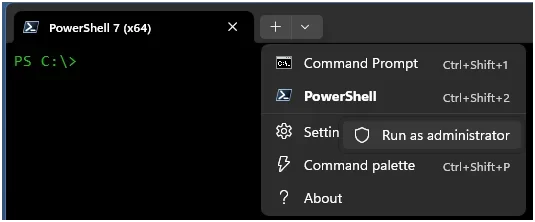
Curious, how is this different from running Powershell as administrator from the Start menu or from the Terminal window option like below... ?

1785269032627.webp
 

My Computer My Computer

At a glance

Windows 11
OS
Windows 11
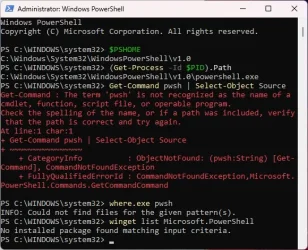
can you provide a new screenshot of the error while using the winget version
can you also run these commands to validate all point to the winget version and not still pointing to MStore
Code:
$PSHOME
(Get-Process -Id $PID).Path
Get-Command pwsh | Select-Object Source
where.exe pwsh

winget list Microsoft.PowerShell

Winget = C:\Program Files\PowerShell\7\pwsh.exe
MStore = C:\Program Files\WindowsApps\Microsoft.PowerShell_7.6.4.0_x64__8wekyb3d8bbwe\

the part in red can be different...
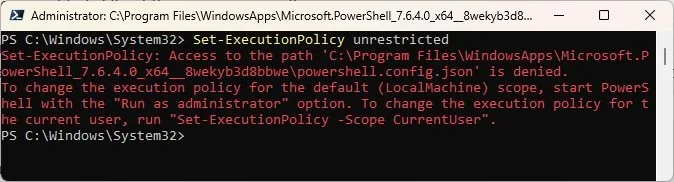
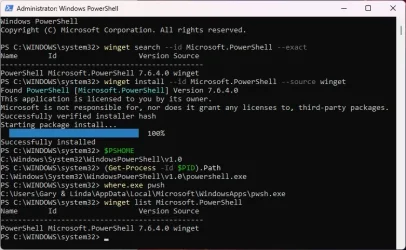
New screen shot:

Image1.webp

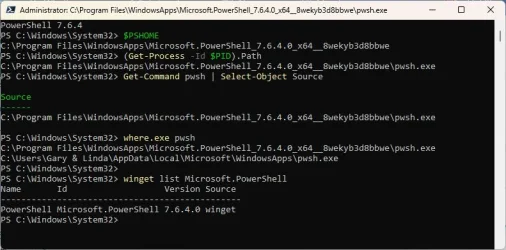
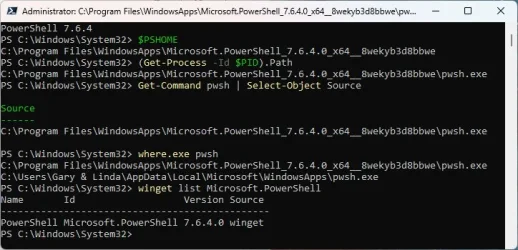
I ran your commands but I'm not sure I did it right:

Image2.webp

Winget = C:\Program Files\PowerShell\7\pwsh.exe - THE POWERSHELL SUB-FOLDER DOESN'T EXIST
MStore = C:\Program Files\WindowsApps\Microsoft.PowerShell_7.6.4.0_x64__8wekyb3d8bbwe\ - DON'T HAVE PERMISSION TO ENTER THE WINDOWS APPS FOLDER
 

My Computers My Computers

  • At a glance

    Windows 11 Pro 25H2i7-8565U16GBIntel UHD Graphics 620
    OS
    Windows 11 Pro 25H2
    Computer type
    Laptop
    Manufacturer/Model
    Lenovo T490 (2020 Hardware)
    CPU
    i7-8565U
    Motherboard
    20N20028US
    Memory
    16GB
    Graphics Card(s)
    Intel UHD Graphics 620
    Sound Card
    Realtec Audio
    Monitor(s) Displays
    ASUS VE248
    Screen Resolution
    1920 X 1080
    Hard Drives
    Samsung SSD 970 PRO 512GB NVMe
    Internet Speed
    Frontier fiber 1GB
    Browser
    Chrome, Firefox, Edge
    Antivirus
    Norton 360 Deluxe Plus
    Other Info
    Supported hardware, upgraded from Windows 10 Pro to Windows 11 Pro version 24H2 on 06/01/2025 using the Windows 11 ISO file. Used the enablement package to upgrade to version 25H2 on 10/07/2025. Secure boot enabled. Secure Boot CA 2023 updated.
  • At a glance

    Windows 11 Pro 25H2i7-4770 (with SSE4.2, and POPCNT)16GBIntel HD Graphics 4600
    Operating System
    Windows 11 Pro 25H2
    Computer type
    PC/Desktop
    Manufacturer/Model
    Lenovo ThinkCentre M83 (2014 Hardware)
    CPU
    i7-4770 (with SSE4.2, and POPCNT)
    Motherboard
    10AL000GUS
    Memory
    16GB
    Graphics card(s)
    Intel HD Graphics 4600
    Sound Card
    Realtec High Definition Audio
    Monitor(s) Displays
    ASUS VE248
    Screen Resolution
    1920 X 1080
    Hard Drives
    Samsung SSD 860 PRO 1TB SATA
    Internet Speed
    Frontier fiber 1GB
    Browser
    Chrome, Firefox, Edge
    Antivirus
    Norton 360 Deluxe Plus
    Other Info
    Unsupported hardware, upgraded from Windows 10 Pro (TPM 1.2 & unsupported CPU, but does have SSE4.2, and POPCNT) to Windows 11 Pro version 24H2 on 06/15/2025. Added Registry Key HKEY_LOCAL_MACHINE\SYSTEM\Setup\MoSetup – AllowUpgradesWithUnsupportedTPMOrCPU=1 to allow installation using the Windows 11 ISO file. Used the enablement package to upgrade to version 25H2 on 10/08/2025. Secure boot enabled. Secure Boot CA 2023 updated.
Curious, how is this different from running Powershell as administrator from the Start menu or from the Terminal window option like below... ?

View attachment 177801

it opens a separate instance of powershell from the default system admin account which is a hidden account.
best of luck Steve ..
 

My Computers My Computers

  • At a glance

    Windows 11 HomeRyzen 7 5825u64GB DDR4 3200Ryzen 7 5825u
    OS
    Windows 11 Home
    Computer type
    PC/Desktop
    Manufacturer/Model
    HP 24" AiO
    CPU
    Ryzen 7 5825u
    Motherboard
    HP
    Memory
    64GB DDR4 3200
    Graphics Card(s)
    Ryzen 7 5825u
    Sound Card
    RealTek
    Monitor(s) Displays
    24" HP AiO
    Screen Resolution
    1920 x 1080 @60 Hz
    Hard Drives
    1TB WD Blue SN580 M2 SSD Partitioned.
    2x 1TB USB HDD External Backup/Storage.
    PSU
    90W external power brick
    Case
    24" All in One
    Cooling
    Default Air Cooling
    Keyboard
    HP WiFi UK extended
    Mouse
    HP WiFi 3 Button
    Internet Speed
    1GB full fibre
    Browser
    Edge & Firefox
    Antivirus
    AVG Internet Security/Windows Defender
    Other Info
    Mainly Open Source Software
  • At a glance

    Ubuntu 22.04.5 LTSi5 7200u16GB DDR4Intel
    Operating System
    Ubuntu 22.04.5 LTS
    Computer type
    Laptop
    Manufacturer/Model
    Dell 13" Latitude 2017
    CPU
    i5 7200u
    Motherboard
    Dell
    Memory
    16GB DDR4
    Graphics card(s)
    Intel
    Sound Card
    Intel
    Monitor(s) Displays
    13" Dell Laptop
    Hard Drives
    250GB Crucial 2.5" SSD
    Mouse
    Generic WiFi 3 button
    Internet Speed
    WiFi only
    Browser
    Firefox
    Antivirus
    ClamAV TK
    Other Info
    Mainly Open Source Software
New screen shot:

View attachment 177804

I ran your commands but I'm not sure I did it right:

View attachment 177805

Winget = C:\Program Files\PowerShell\7\pwsh.exe - THE POWERSHELL SUB-FOLDER DOESN'T EXIST
MStore = C:\Program Files\WindowsApps\Microsoft.PowerShell_7.6.4.0_x64__8wekyb3d8bbwe\ - DON'T HAVE PERMISSION TO ENTER THE WINDOWS APPS FOLDER
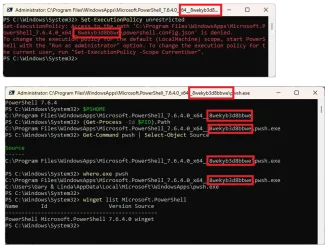
Your still running the MStore version.

1785271562063.webp
  1. uninstall MStore version from MStore directly
  2. uninstall winget version if still present ("winget uninstall --id Microsoft.PowerShell")
  3. make sure no other version is installed ("winget list Microsoft.PowerShell")
  4. restart computer
  5. install winget version ("winget install --id Microsoft.PowerShell")
  6. if you do a search for "powershell" from Start menu, you should have this, and run it as Administrator.

    1785271717633.webp

  7. Test again...
 
Last edited:

My Computer My Computer

At a glance

Windows 11
OS
Windows 11
it opens a separate instance of powershell from the default system admin account which is a hidden account.
best of luck Steve ..
Ok, it's what I thought, it's the samething
 

My Computer My Computer

At a glance

Windows 11
OS
Windows 11
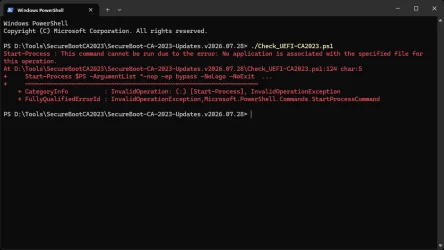
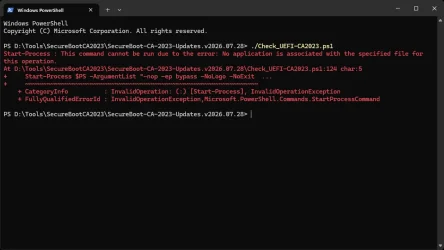
I get this when I try and run your script after installing the 26200-8973 optional preview. Not sure If they broke your stuff or their own.
Screenshot 2026-07-28 201201.webp

Go back to to a Macrium backup of 26200-8894 and they all run just fine. Right click and Run with Poweshell runs it fine.
Running Check-UEFI.bat does seem to work fine though. Just the ps1 file throws that error.

Also tried right click open with and pointed it at C:\Windows\System32\WindowsPowerShell\v1.0\powershell.exe to maybe fix the no application associated error but no dice. Very odd...

Also if I manually go to powershell and right click and open an Administrator Powershell Window then I can cd into the directory and run the file from there.

Gonna sleep on it I think i might be just a bit to tired for this puzzle tonight.

peace
wanna
 

Attachments

  • Screenshot 2026-07-28 201201.webp
    Screenshot 2026-07-28 201201.webp
    47.8 KB · Views: 1
Last edited:

My Computers My Computers

  • At a glance

    Windows 11 ProIntel® Core™ i5-14600KG.SKILL Ripjaws S5 Series DDR5 (2x16GB) 6400M...PNY RTX 5060 Ti OC 16GB
    OS
    Windows 11 Pro
    Computer type
    PC/Desktop
    Manufacturer/Model
    Acme Mail Order (meep meep)
    CPU
    Intel® Core™ i5-14600K
    Motherboard
    MSI PRO Z790-A MAX WiFi bios 7E07vMA
    Memory
    G.SKILL Ripjaws S5 Series DDR5 (2x16GB) 6400MT/s CL32
    Graphics Card(s)
    PNY RTX 5060 Ti OC 16GB
    Sound Card
    Onboard Realtek® ALC4080 Codec
    Monitor(s) Displays
    2 x Dell - S3222DGM 32" LED Curved QHD FreeSync Gaming Monitor
    Screen Resolution
    2560x1440
    Hard Drives
    990 PRO PCIe 4.0 NVMe®1TB OS
    970 EVO PCIe 3.0 NVMe® SSD 500GB Games
    860 EVO SATA 2.5" SSD 1TB Storage
    PSU
    RMx Series™ RM850x — 80 PLUS® Gold
    Case
    LIAN LI PC-G70B Black Aluminum Full Tower
    Cooling
    Custom loop Optimus Foundation Block, MCP655-PWM D5 pump, MCR320 QP rad
    Keyboard
    Razer Black Widow Ultimate
    Mouse
    Razer Death Adder Elite
    Internet Speed
    500 down 20 up
    Browser
    Edge / Chrome
    Antivirus
    Microsoft Defender
    Other Info
    Always switching installs testing out the latest and greatest.
  • At a glance

    Windows 11 ProIntel® Core™ i5-11600KG.SKILL Ripjaws V Series 16GB DDR4 3600 (16-1...EVGA GeForce RTX 3060 XC GAMING 12GB
    Operating System
    Windows 11 Pro
    Computer type
    PC/Desktop
    Manufacturer/Model
    Acme Mail Order (meep meep) Wife's PC Edition
    CPU
    Intel® Core™ i5-11600K
    Motherboard
    MSI - Z590 A Pro - bios 7D09v1B1
    Memory
    G.SKILL Ripjaws V Series 16GB DDR4 3600 (16-16-16-36)
    Graphics card(s)
    EVGA GeForce RTX 3060 XC GAMING 12GB
    Sound Card
    Onboard Realtek® ALC897 Codec
    Monitor(s) Displays
    2 x 27'' ACER S271HL
    Screen Resolution
    1920x1080
    Hard Drives
    980 PRO PCIe 4.0 NVMe® SSD 250GB OS
    Samsung 128GB 850 PRO SATA III for Storage
    PSU
    CORSAIR - CX-M Series 650W
    Case
    LIAN LI PC-A16B Black Aluminum ATX Mid Tower
    Cooling
    Thermalright Phantom Spirit 120SE Air Cooler
    Keyboard
    Logitech - K740 Illuminated
    Mouse
    Razer Death Adder Elite
    Internet Speed
    500 down 20 up
    Browser
    Chrome
    Antivirus
    Windows Defender
    Other Info
    Stock clocked, over cooled, and unmolested for a rock solid, whisper quiet, Wifey approved user experience.
I get this when I try and run your script after installing the 26200-8973 optional preview. Not sure If they broke your stuff or their own.


Go back to to a Macrium backup of 26200-8894 and they all run just fine. Right click and Run with Poweshell runs it fine.
Running Check-UEFI.bat does seem to work fine though. Just the ps1 file throws that error.
I don't see any PS-related changes in the July Preview release notes. I might update to the Preview after I'm done with my current improvements.
 

My Computer My Computer

At a glance

Windows 7
OS
Windows 7
Runs okay for me.

Code:
PS D:\Scripts\SecureBoot-CA-2023-Updates.v2026.07.24> .\Check_UEFI-CA2023.ps1 -bootmedia -verbose
Windows 11 25H2 (26200.8973)

Secure Boot: ON
Virtualization Based Security: ON
BitLocker on (C:) OFF

BIOS Firmware
-------------
    ASUS System Product Name
    Version: 4505
    Date: 2025-11-28

Factory Default UEFI PK Cert
----------------------------
    ASUSTeK MotherBoard PK Certificate

UEFI PK Cert
------------
    ASUSTeK MotherBoard PK Certificate

Factory Default UEFI KEK Certs
------------------------------
    Microsoft Corporation KEK CA 2011
    Microsoft Corporation KEK 2K CA 2023
    ASUSTeK MotherBoard KEK Certificate

UEFI KEK Certs
--------------
    Microsoft Corporation KEK CA 2011
    Microsoft Corporation KEK 2K CA 2023
    Canonical Ltd. Master Certificate Authority
    ASUSTeK MotherBoard KEK Certificate

Factory Default UEFI DB Certs
-----------------------------
    Microsoft Corporation UEFI CA 2011
    Microsoft Windows Production PCA 2011
    Microsoft Option ROM UEFI CA 2023
    Microsoft UEFI CA 2023
    Windows UEFI CA 2023
    ASUSTeK MotherBoard SW Key Certificate
    ASUSTeK Notebook SW Key Certificate

UEFI DB Certs
-------------
    Microsoft Corporation UEFI CA 2011
    Microsoft Windows Production PCA 2011
    Microsoft Option ROM UEFI CA 2023
    Microsoft UEFI CA 2023
    Windows UEFI CA 2023
    Canonical Ltd. Master Certificate Authority
    ASUSTeK MotherBoard SW Key Certificate
    ASUSTeK Notebook SW Key Certificate

Factory Default UEFI DBX Certs
------------------------------
    (NONE)
    EFI_CERT_SHA256_GUID Signatures: 430

UEFI DBX Certs
--------------
    Microsoft Windows Production PCA 2011
    Windows BootMgr SVN 9.0
    EFI_CERT_SHA256_GUID Signatures: 454

UEFI Variables
--------------
    Credential Guard: ON
    SBAT (Linux only): sbat,1,2024010900 / shim,4 / grub,3 / grub.debian,4

EFI Files
---------
    Windows Boot Manager [Windows UEFI CA 2023] is ALLOWED.
        \\.\HarddiskVolume1\EFI\Microsoft\Boot\bootmgfw.efi
        File Version: 28000.352, SVN 9.0

    Registry: "WindowsUEFICA2023Capable" = 2
        [Windows UEFI CA 2023] in UEFI DB, and Windows starting from CA 2023 Boot Manager.

    SkuSiPolicy.p7b is CURRENT.
        \\.\HarddiskVolume1\EFI\Microsoft\Boot\SkuSiPolicy.p7b
        Version: 3.0.0.16
    NOT RECOMMENDED for dual-boot setups.

Macrium Folders
---------------
    Windows Boot Manager [Production PCA 2011] is BANNED.
        c:\boot\macrium\WinREFiles\media\EFI\Microsoft\Boot\bootmgfw.efi
        File Version: 28000.352, SVN 9.0

Bootable Media
--------------
    USB Drive K: "MACRIUMBOOT"
        Windows Boot Manager [Windows UEFI CA 2023] is ALLOWED.
            K:\EFI\Microsoft\Boot\bootmgfw.efi
            File Version: 28000.352, SVN 9.0

        K:\EFI\Microsoft\Boot\boot.stl [5/18/2026 07:44] is CURRENT.

STATUS REPORT
-------------
    Registry: "UEFICA2023Status" = Updated

    SUCCESS: UPDATES ARE FINISHED.
    UEFI CA 2023 certs are present, PCA 2011 cert is revoked.

PS D:\Scripts\SecureBoot-CA-2023-Updates.v2026.07.24>

 

My Computers My Computers

  • At a glance

    Win 11 Pro 25H2 26200.8973Intel® Core™ i7-14700KG.SKILL Ripjaws S5 Series 64GB (2 x 32GB) DDR5ASUS GeForce RTX 4070 Super 12GB
    OS
    Win 11 Pro 25H2 26200.8973
    Computer type
    PC/Desktop
    Manufacturer/Model
    Self Built
    CPU
    Intel® Core™ i7-14700K
    Motherboard
    ASUS TUF Z690-PLUS WIFI (BIOS 4505)
    Memory
    G.SKILL Ripjaws S5 Series 64GB (2 x 32GB) DDR5
    Graphics Card(s)
    ASUS GeForce RTX 4070 Super 12GB
    Sound Card
    Sound Blaster AE-5 Plus
    Monitor(s) Displays
    ASUS TUF Gaming 27" 2K HDR Gaming
    Screen Resolution
    2560 x 1440
    Hard Drives
    Samsung 990 Pro 1TB NVMe (Win 11 25H2)
    SK hynix P41 500GB NVMe
    SK hynix P41 2TB NVMe (x3)
    Crucial P3 Plus 4TB
    PSU
    Corsair RM850x Shift
    Case
    Antec Dark Phantom DP502 FLUX
    Cooling
    Corsair Nautilus 360 RS AIO
    Keyboard
    Logitech MK 320
    Mouse
    Razer Basilisk V3
    Internet Speed
    750Mbs
    Browser
    Firefox
    Antivirus
    Winows Security
    Other Info
    MR 8.1 Home
  • At a glance

    Win 11 Pro 25H2 26200.8973Intel Core i5-1140064 GB DDR4MSI GeForce RTX 3060 Ventus 2X 12GB
    Operating System
    Win 11 Pro 25H2 26200.8973
    Computer type
    PC/Desktop
    Manufacturer/Model
    Self Built
    CPU
    Intel Core i5-11400
    Motherboard
    Asus TUF Gaming Z590 Plus WiFi (BIOS 2803)
    Memory
    64 GB DDR4
    Graphics card(s)
    MSI GeForce RTX 3060 Ventus 2X 12GB
    Sound Card
    SoundBlaster Audigy Fx V2
    Monitor(s) Displays
    Samsung F27T350
    Screen Resolution
    1920x1080
    Hard Drives
    Samsung 980 Pro 1TB
    Samsung 970 EVO Plus 2TB
    Samsung 870 EVO 500GB SSD
    PSU
    Corsair HX750
    Case
    Cougar MX330-G Window
    Cooling
    Thermalright Frozen Edge 240 Black AIO
    Internet Speed
    350Mbps
    Browser
    Firefox
    Antivirus
    Windows Security
  • System Three
    Win 11 Pro 25H2 26200.8973
    ASUS PRIME Z370-P II BIOS 3004 7/12/21
    Intel Core i7-8700 CPU @ 3.20GHz
    32GB DDR4 RAM (4x8)
    iGPU Intel UHD Graphics 630
    Mid-Tower Desktop
I get this when I try and run your script after installing the 26200-8973 optional preview. Not sure If they broke your stuff or their own.

Use the back slash as opposed to the forward slash.

1785290427022.webp
 

My Computers My Computers

  • At a glance

    Win 11 Pro 25H2 26200.8973Intel® Core™ i7-14700KG.SKILL Ripjaws S5 Series 64GB (2 x 32GB) DDR5ASUS GeForce RTX 4070 Super 12GB
    OS
    Win 11 Pro 25H2 26200.8973
    Computer type
    PC/Desktop
    Manufacturer/Model
    Self Built
    CPU
    Intel® Core™ i7-14700K
    Motherboard
    ASUS TUF Z690-PLUS WIFI (BIOS 4505)
    Memory
    G.SKILL Ripjaws S5 Series 64GB (2 x 32GB) DDR5
    Graphics Card(s)
    ASUS GeForce RTX 4070 Super 12GB
    Sound Card
    Sound Blaster AE-5 Plus
    Monitor(s) Displays
    ASUS TUF Gaming 27" 2K HDR Gaming
    Screen Resolution
    2560 x 1440
    Hard Drives
    Samsung 990 Pro 1TB NVMe (Win 11 25H2)
    SK hynix P41 500GB NVMe
    SK hynix P41 2TB NVMe (x3)
    Crucial P3 Plus 4TB
    PSU
    Corsair RM850x Shift
    Case
    Antec Dark Phantom DP502 FLUX
    Cooling
    Corsair Nautilus 360 RS AIO
    Keyboard
    Logitech MK 320
    Mouse
    Razer Basilisk V3
    Internet Speed
    750Mbs
    Browser
    Firefox
    Antivirus
    Winows Security
    Other Info
    MR 8.1 Home
  • At a glance

    Win 11 Pro 25H2 26200.8973Intel Core i5-1140064 GB DDR4MSI GeForce RTX 3060 Ventus 2X 12GB
    Operating System
    Win 11 Pro 25H2 26200.8973
    Computer type
    PC/Desktop
    Manufacturer/Model
    Self Built
    CPU
    Intel Core i5-11400
    Motherboard
    Asus TUF Gaming Z590 Plus WiFi (BIOS 2803)
    Memory
    64 GB DDR4
    Graphics card(s)
    MSI GeForce RTX 3060 Ventus 2X 12GB
    Sound Card
    SoundBlaster Audigy Fx V2
    Monitor(s) Displays
    Samsung F27T350
    Screen Resolution
    1920x1080
    Hard Drives
    Samsung 980 Pro 1TB
    Samsung 970 EVO Plus 2TB
    Samsung 870 EVO 500GB SSD
    PSU
    Corsair HX750
    Case
    Cougar MX330-G Window
    Cooling
    Thermalright Frozen Edge 240 Black AIO
    Internet Speed
    350Mbps
    Browser
    Firefox
    Antivirus
    Windows Security
  • System Three
    Win 11 Pro 25H2 26200.8973
    ASUS PRIME Z370-P II BIOS 3004 7/12/21
    Intel Core i7-8700 CPU @ 3.20GHz
    32GB DDR4 RAM (4x8)
    iGPU Intel UHD Graphics 630
    Mid-Tower Desktop
Looks like our WinRE updated today. Everything still boots fine.

Code:
C:\Windows\System32>powershell -ep bypass -f D:\Scripts\BlockedOrNot.ps1
Windows 11 25H2 (26200.8973)
VBS: ON

Policy File: "\\.\HarddiskVolume1\EFI\Microsoft\Boot\SkuSiPolicy.p7b", Version 3.0.0.16

Filename                        FileVersion Status
--------                        ----------- ------
K:\sources\boot.wim             26100.8875  ALLOWED
C:\Windows\System32\winload.efi 26100.8972  ALLOWED
Disk 0 Partition 4 Winre.wim    26100.8971  ALLOWED
[Code]


C:\Windows\System32>
 

My Computers My Computers

  • At a glance

    Win 11 Pro 25H2 26200.8973Intel® Core™ i7-14700KG.SKILL Ripjaws S5 Series 64GB (2 x 32GB) DDR5ASUS GeForce RTX 4070 Super 12GB
    OS
    Win 11 Pro 25H2 26200.8973
    Computer type
    PC/Desktop
    Manufacturer/Model
    Self Built
    CPU
    Intel® Core™ i7-14700K
    Motherboard
    ASUS TUF Z690-PLUS WIFI (BIOS 4505)
    Memory
    G.SKILL Ripjaws S5 Series 64GB (2 x 32GB) DDR5
    Graphics Card(s)
    ASUS GeForce RTX 4070 Super 12GB
    Sound Card
    Sound Blaster AE-5 Plus
    Monitor(s) Displays
    ASUS TUF Gaming 27" 2K HDR Gaming
    Screen Resolution
    2560 x 1440
    Hard Drives
    Samsung 990 Pro 1TB NVMe (Win 11 25H2)
    SK hynix P41 500GB NVMe
    SK hynix P41 2TB NVMe (x3)
    Crucial P3 Plus 4TB
    PSU
    Corsair RM850x Shift
    Case
    Antec Dark Phantom DP502 FLUX
    Cooling
    Corsair Nautilus 360 RS AIO
    Keyboard
    Logitech MK 320
    Mouse
    Razer Basilisk V3
    Internet Speed
    750Mbs
    Browser
    Firefox
    Antivirus
    Winows Security
    Other Info
    MR 8.1 Home
  • At a glance

    Win 11 Pro 25H2 26200.8973Intel Core i5-1140064 GB DDR4MSI GeForce RTX 3060 Ventus 2X 12GB
    Operating System
    Win 11 Pro 25H2 26200.8973
    Computer type
    PC/Desktop
    Manufacturer/Model
    Self Built
    CPU
    Intel Core i5-11400
    Motherboard
    Asus TUF Gaming Z590 Plus WiFi (BIOS 2803)
    Memory
    64 GB DDR4
    Graphics card(s)
    MSI GeForce RTX 3060 Ventus 2X 12GB
    Sound Card
    SoundBlaster Audigy Fx V2
    Monitor(s) Displays
    Samsung F27T350
    Screen Resolution
    1920x1080
    Hard Drives
    Samsung 980 Pro 1TB
    Samsung 970 EVO Plus 2TB
    Samsung 870 EVO 500GB SSD
    PSU
    Corsair HX750
    Case
    Cougar MX330-G Window
    Cooling
    Thermalright Frozen Edge 240 Black AIO
    Internet Speed
    350Mbps
    Browser
    Firefox
    Antivirus
    Windows Security
  • System Three
    Win 11 Pro 25H2 26200.8973
    ASUS PRIME Z370-P II BIOS 3004 7/12/21
    Intel Core i7-8700 CPU @ 3.20GHz
    32GB DDR4 RAM (4x8)
    iGPU Intel UHD Graphics 630
    Mid-Tower Desktop
  • Helpful
Reactions: x_1
Garlin I HECKING LOVE YOU. My partner followed your instructions for my Acer Nitro 5 AN515-45 and it worked like a miracle. Made this account just to thank you on his behalf. You rock! keep doing the good work.
 

My Computer My Computer

At a glance

Windows 11
OS
Windows 11
can you provide a new screenshot of the error while using the winget version
can you also run these commands to validate all point to the winget version and not still pointing to MStore
Code:
$PSHOME
(Get-Process -Id $PID).Path
Get-Command pwsh | Select-Object Source
where.exe pwsh

winget list Microsoft.PowerShell

Winget = C:\Program Files\PowerShell\7\pwsh.exe
MStore = C:\Program Files\WindowsApps\Microsoft.PowerShell_7.6.4.0_x64__8wekyb3d8bbwe\

the part in red can be different...
I uninstalled PS 7 as you instructed, rebooted the PC and re-ran your commands. It looks to me that PS 7 has been uninstalled:

Image1.webp

Now I'll try to install PS 7 following your winget instructions.

Does this look correct?

Image2.webp

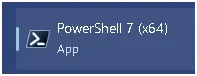
I rebooted the PC and started PS 7. It looks like I'm still running the version from the MS Store. I'm lost.

Image3.webp
 
Last edited:

My Computers My Computers

  • At a glance

    Windows 11 Pro 25H2i7-8565U16GBIntel UHD Graphics 620
    OS
    Windows 11 Pro 25H2
    Computer type
    Laptop
    Manufacturer/Model
    Lenovo T490 (2020 Hardware)
    CPU
    i7-8565U
    Motherboard
    20N20028US
    Memory
    16GB
    Graphics Card(s)
    Intel UHD Graphics 620
    Sound Card
    Realtec Audio
    Monitor(s) Displays
    ASUS VE248
    Screen Resolution
    1920 X 1080
    Hard Drives
    Samsung SSD 970 PRO 512GB NVMe
    Internet Speed
    Frontier fiber 1GB
    Browser
    Chrome, Firefox, Edge
    Antivirus
    Norton 360 Deluxe Plus
    Other Info
    Supported hardware, upgraded from Windows 10 Pro to Windows 11 Pro version 24H2 on 06/01/2025 using the Windows 11 ISO file. Used the enablement package to upgrade to version 25H2 on 10/07/2025. Secure boot enabled. Secure Boot CA 2023 updated.
  • At a glance

    Windows 11 Pro 25H2i7-4770 (with SSE4.2, and POPCNT)16GBIntel HD Graphics 4600
    Operating System
    Windows 11 Pro 25H2
    Computer type
    PC/Desktop
    Manufacturer/Model
    Lenovo ThinkCentre M83 (2014 Hardware)
    CPU
    i7-4770 (with SSE4.2, and POPCNT)
    Motherboard
    10AL000GUS
    Memory
    16GB
    Graphics card(s)
    Intel HD Graphics 4600
    Sound Card
    Realtec High Definition Audio
    Monitor(s) Displays
    ASUS VE248
    Screen Resolution
    1920 X 1080
    Hard Drives
    Samsung SSD 860 PRO 1TB SATA
    Internet Speed
    Frontier fiber 1GB
    Browser
    Chrome, Firefox, Edge
    Antivirus
    Norton 360 Deluxe Plus
    Other Info
    Unsupported hardware, upgraded from Windows 10 Pro (TPM 1.2 & unsupported CPU, but does have SSE4.2, and POPCNT) to Windows 11 Pro version 24H2 on 06/15/2025. Added Registry Key HKEY_LOCAL_MACHINE\SYSTEM\Setup\MoSetup – AllowUpgradesWithUnsupportedTPMOrCPU=1 to allow installation using the Windows 11 ISO file. Used the enablement package to upgrade to version 25H2 on 10/08/2025. Secure boot enabled. Secure Boot CA 2023 updated.
I uninstalled PS 7 as you instructed, rebooted the PC and re-ran your commands. It looks to me that PS 7 has been uninstalled:

View attachment 177892

Now I'll try to install PS 7 following your winget instructions.

Does this look correct?

View attachment 177894

I rebooted the PC and started PS 7. It looks like I'm still running the version from the MS Store. I'm lost.

View attachment 177898
Not at home today...
But it sure looks like MStore Powershell is still present
Go to MStore, Library (bottom left), and search for "power"
Is there still a powershell ? If so, uninstall directly from MStore and restart PC
PS: You probably have Power Automate, but that's something else, don't worry about it
 

My Computer My Computer

At a glance

Windows 11
OS
Windows 11
Looks like our WinRE updated today. Everything still boots fine.

Code:
C:\Windows\System32>powershell -ep bypass -f D:\Scripts\BlockedOrNot.ps1
Windows 11 25H2 (26200.8973)
VBS: ON

Policy File: "\\.\HarddiskVolume1\EFI\Microsoft\Boot\SkuSiPolicy.p7b", Version 3.0.0.16

Filename                        FileVersion Status
--------                        ----------- ------
K:\sources\boot.wim             26100.8875  ALLOWED
C:\Windows\System32\winload.efi 26100.8972  ALLOWED
Disk 0 Partition 4 Winre.wim    26100.8971  ALLOWED
[Code]


C:\Windows\System32>
I would appreciate it if you could send me a link to this script blockedornot.ps1. I would like to run it on one of my computers
Many thanks.
 

My Computer My Computer

At a glance

windows 11
OS
windows 11
A little help, plz.

My reading of the attached and some additional reading elsewhere is that my 9020's KEK being untrusted means no updates to either the db or dbx. Eventually, that system will be farther and farther behind the trust curve without those two databases being refreshed.

Additionally, since the system is well past the EOL threshold as published by Dell, there is no hope of resolving the KEK untrusted status.

If I'm in error/off base/missing some fundamental understand, fire away.
Code:
Code:
PS C:\Garlin> .\check_uefi-CA2023.ps1 -bootmedia -verbose
Windows 11 25H2 (26200.8737)

Secure Boot: ON
Virtualization Based Security: OFF
BitLocker on (C:) OFF

BIOS Firmware
-------------
    Dell Inc. OptiPlex 9020
    Version: A25
    Date: 2019-05-29

Factory Default UEFI PK Cert
----------------------------
    (NONE)

UEFI PK Cert
------------
    Dell Inc. UEFI Platform Key
        Manual update of [KEK CA 2023] is REQUIRED.

Factory Default UEFI KEK Certs
------------------------------
    (NONE)

UEFI KEK Certs
--------------
    Microsoft Corporation KEK CA 2011

Factory Default UEFI DB Certs
-----------------------------
    (NONE)

UEFI DB Certs
-------------
    Microsoft Corporation UEFI CA 2011
    Microsoft Windows Production PCA 2011
    Microsoft Option ROM UEFI CA 2023
    Microsoft UEFI CA 2023
    Windows UEFI CA 2023

Factory Default UEFI DBX Certs
------------------------------
    (NONE)
    EFI_CERT_SHA256_GUID Signatures: 0

UEFI DBX Certs
--------------
    Microsoft Windows PCA 2010
    Windows BootMgr SVN is MISSING.
    EFI_CERT_SHA256_GUID Signatures: 291

UEFI Variables
--------------
    Credential Guard: ON
    SBAT (Linux only): sbat,1,2024010900 / shim,4 / grub,3 / grub.debian,4

EFI Files
---------
    Boot File [Windows UEFI CA 2023] is UNTRUSTED
        \\.\HarddiskVolume1\EFI\Microsoft\Boot\bootmgfw.efi
        File Version: 28000.342, SVN 9.0

    Registry: "WindowsUEFICA2023Capable" = 2
        [Windows UEFI CA 2023] in UEFI DB, and Windows starting from CA 2023 Boot Manager.

REQUIRED ACTION
===============

Run the command:
    Update_UEFI-CA2023.ps1 -Revoke

Finish the UEFI steps to manually add the [KEK CA 2023] cert, if the script provided instructions.
 
Last edited:

My Computers My Computers

  • At a glance

    Windows 11 Pro; Windows Server 2016 EssentialsNUC8I7BEH16 GBIntel Iris
    OS
    Windows 11 Pro; Windows Server 2016 Essentials
    Computer type
    PC/Desktop
    Manufacturer/Model
    Intel
    CPU
    NUC8I7BEH
    Motherboard
    Intel NUC8BEB
    Memory
    16 GB
    Graphics Card(s)
    Intel Iris
    Sound Card
    Intel Cannon Lake-LP - cAVS (Audio, Voice, Speech)
    Monitor(s) Displays
    ASUS PB328
    Screen Resolution
    1920 x 1200
    Hard Drives
    Kingston SSD
  • At a glance

    Windows Server 2016 EssentialsIntel Xeon E-2246G16 GBMatrox MGA-G200eW3
    Operating System
    Windows Server 2016 Essentials
    Computer type
    PC/Desktop
    Manufacturer/Model
    Dell
    CPU
    Intel Xeon E-2246G
    Motherboard
    DELL 0DK9CR (Poweredge T340)
    Memory
    16 GB
    Graphics card(s)
    Matrox MGA-G200eW3
  • Intel NUCs (NUC10I5, NUC13I7, NUC13I3); Dell 9020 MT
I have done a lot of research :
here is what i have found.
this is a unsupported machine .
when i check the Secure Boot High Confidence Database i get a "Temporarily Paused" status. based on what i have seen this could be a combo of
1. i dont have a tpmi
2. my pc does not meet the basic system requirements
3. i used rufus to make a install iso.
my pc is current on all the certs and boots into secure boot. according to my research there is nothing i can do to fix it. and my pc should continue to function till it dies on its own. and i will still get all updates from wu. not sure about the once a year feature updates.
 

My Computer My Computer

At a glance

WINDOWS 11 WINDOWS 10Intel(R) Core(TM) i7 -3770K CPU 3.50 GZ 3501 ...32.0 GB (31.9 GB usable)AMD RADEON TM R5240 INTELL HD GRAPHICS 4600 T...
OS
WINDOWS 11 WINDOWS 10
Computer type
PC/Desktop
Manufacturer/Model
HP H8 1360T
CPU
Intel(R) Core(TM) i7 -3770K CPU 3.50 GZ 3501 4 CORE
Motherboard
PEGATRON 2AD5
Memory
32.0 GB (31.9 GB usable)
Graphics Card(s)
AMD RADEON TM R5240 INTELL HD GRAPHICS 4600 TIGER 1+1 USB
Sound Card
AMD HD . IDT
Monitor(s) Displays
AOC WAL MART SPECIAL . HP 2311 IX IPS LED DELL 1708 FP
Screen Resolution
1920 X 1080 1600X900 1280X940
Hard Drives
1 FAXING S 100 512GB 1 KINGSTON 120 GB SSD 1 X12 SSD 512 GB
PSU
300 WATT HP
Case
FULL
Cooling
ON BOARD FAN
Keyboard
LOGITEC K 520 WIRELESS
Mouse
LOGITEC M 510 WIRELESS
Internet Speed
55 UP 11.2 DOWN
Browser
CHROME EDGE
Antivirus
WINDOWS SECUIRTY
Other Info
NON SUPPORTED HARDWARE FOR WINDOWS 11
A little help, plz.

My reading of the attached and some additional reading elsewhere is that my 9020's KEK being untrusted means no updates to either the db or dbx. Eventually, that system will be farther and farther behind the trust curve without those two databases being refreshed.

Additionally, since the system is well past the EOL threshold as published by Dell, there is no hope of resolving the KEK untrusted status.

If I'm in error/off base/missing some fundamental understand, fire away.
You can follow Garlin's instructions in the README_UEFI.TXT in the same folder as the scripts.
See section: Manual installation of [KEK 2K CA 2023]

Also check the link for Dell computers at the end of the readme file.
Dell published instructions for different BIOS versions.

FYI: next time for your result, use this option it allows pasting your text result and easier for looking at it without needing to download a file

1785359638480.webp
 

My Computer My Computer

At a glance

Windows 11
OS
Windows 11
The last BIOS update for Dell 9020 was from 2019. I would first investigate if your BIOS supports manual KEK key enrollment from the Secure Boot menus. You can try that first before the final option of clearing all keys.
 

My Computer My Computer

At a glance

Windows 7
OS
Windows 7
Yes, the most recent BIOS for the 9020 MT is A25 from 2019, and, my BIOS has been modded to support booting from an SSD mounted in an adapter board in a PCIe slot (Install and boot from an NVMe SSD on a Dell OptiPlex 9020, 7020 or 3020).

The readings of various postings found on the Dell web site addressing secure boot, etc., basically says Dell is not providing any kind of support or machine readables if the computer is past EOL, i.e. you're SOL.

Yes, I believe the firmware does support key enrollment. My machine is using a Type 2 BIOS. I say I believe it does support key enrollment b/c I'm not sure exactly what key enrollment means.

I've "reset" or cleared all keys previously. I've even attempted to change the KEK manually but ran into problems when the replacement key I was attempting to use did not match the expected key format.

I'll review the overlooked documentation then see if I have any more options to explore.
 

My Computers My Computers

  • At a glance

    Windows 11 Pro; Windows Server 2016 EssentialsNUC8I7BEH16 GBIntel Iris
    OS
    Windows 11 Pro; Windows Server 2016 Essentials
    Computer type
    PC/Desktop
    Manufacturer/Model
    Intel
    CPU
    NUC8I7BEH
    Motherboard
    Intel NUC8BEB
    Memory
    16 GB
    Graphics Card(s)
    Intel Iris
    Sound Card
    Intel Cannon Lake-LP - cAVS (Audio, Voice, Speech)
    Monitor(s) Displays
    ASUS PB328
    Screen Resolution
    1920 x 1200
    Hard Drives
    Kingston SSD
  • At a glance

    Windows Server 2016 EssentialsIntel Xeon E-2246G16 GBMatrox MGA-G200eW3
    Operating System
    Windows Server 2016 Essentials
    Computer type
    PC/Desktop
    Manufacturer/Model
    Dell
    CPU
    Intel Xeon E-2246G
    Motherboard
    DELL 0DK9CR (Poweredge T340)
    Memory
    16 GB
    Graphics card(s)
    Matrox MGA-G200eW3
  • Intel NUCs (NUC10I5, NUC13I7, NUC13I3); Dell 9020 MT

Latest Support Threads

Back
Top Bottom