Solved garlin's PowerShell scripts for updating Secure Boot CA 2023


I'm still at SkuSiPolicy.p7b 3.0.0.16 after the latest windows update. SVN remains at 9.0.
We confirmed back in July (when SkuSiPolicy jumped to 3.0.0.16), that the Secure Boot task doesn't want to automatically copy the latest SkuSiPolicy to the EFI volume. It knows how, but it won't.

That's probably for safety reasons, as Windows doesn't know if copying the file will cause unintentional grief to a dual-boot setup. You have to force the copy yourself, or run the update script:
Code:
Update-UEFI.bat -SkuSiPolicy
 

My Computer My Computer

At a glance

Windows 7
OS
Windows 7
  • Like
Reactions: x_1
We confirmed back in July (when SkuSiPolicy jumped to 3.0.0.16), that the Secure Boot task doesn't want to automatically copy the latest SkuSiPolicy to the EFI volume. It knows how, but it won't.

That's probably for safety reasons, as Windows doesn't know if copying the file will cause unintentional grief to a dual-boot setup. You have to force the copy yourself, or run the update script:
Code:
Update-UEFI.bat -SkuSiPolicy
Thats what I had to do to be up to date again.
 

My Computer My Computer

At a glance

Win11 24H2 IOT LTSC / Win11 Pro 25H2AMD Ryzen 7 8700G / Ryzen 7 8700G / Ryzen 8600GF5-6000J3636F16GX2-FX5 32GB / Lexar Ares RGB ...internal
OS
Win11 24H2 IOT LTSC / Win11 Pro 25H2
Computer type
PC/Desktop
Manufacturer/Model
Gigabyte x2 / Asus = Home builds
CPU
AMD Ryzen 7 8700G / Ryzen 7 8700G / Ryzen 8600G
Motherboard
Gigabyte B650 AORUS ELITE AX V2 / ASUS TUF GAMING B650-PLUS / B650 GAMING X AX V2
Memory
F5-6000J3636F16GX2-FX5 32GB / Lexar Ares RGB LD5BU016G-R6000GDLA 32GB / Kingston FURY Beast 32 GB DDR5-5600
Graphics Card(s)
internal
Sound Card
Realtek
Monitor(s) Displays
BenQ 27 L EW2780
Screen Resolution
1920x1080
Hard Drives
Many M.2's (WD)
PSU
be quiet! Pure Power 13 M 550W
Case
Chieftec HC-10B-OP
Cooling
Gelid Solutions Tranquillo 5, many Noctua's 12x12
Keyboard
Microsoft
Mouse
Cherry
Internet Speed
500 mbs
Browser
Vivaldi
Antivirus
Eset
Other Info
PC builder / repair / Trouble-shooter etc.
WARNING: C:\WINDOWS\System32\SecureBootUpdates\SkuSiPolicy.p7b has an invalid or unsupported binary CI policy format version value: 0x0000000B. If you are sure that you are dealing with a binary code integrity policy, there is a high likelihood that Microsoft updated the binary file format to support new schema elements and that this code will likely need to be updated.
This warning is from Matt Graeber's original code.

When he wrote it, the highest known policy format was version 7. Since he knew the code might be used after he stopped work on it, it throws a warning to say "hey, I don't know what happens if you run my code without studying the newer version of the policy file".

I have no clue, since I'm not a Windows security researcher and don't have any interest in reverse-engineering this obscure policy format. In the Check_BootMedia.ps1 script, the warning is ignored.
 

My Computer My Computer

At a glance

Windows 7
OS
Windows 7
We confirmed back in July (when SkuSiPolicy jumped to 3.0.0.16), that the Secure Boot task doesn't want to automatically copy the latest SkuSiPolicy to the EFI volume. It knows how, but it won't.

That's probably for safety reasons, as Windows doesn't know if copying the file will cause unintentional grief to a dual-boot setup. You have to force the copy yourself, or run the update script:
Code:
Update-UEFI.bat -SkuSiPolicy
And then rebuild the Macrium RE rescue media again. So I have 3 choices: Copy the new SkuSiPolicy file to the ESD partition, leave the existing file on the ESD partition, or just remove it from the ESD partition and not enforce the SkuSiPolicy. I just rebuilt my Macrium rescue media after the July update.
 

My Computers My Computers

  • At a glance

    Windows 11 Pro 25H2AMD Ryzen 9 7940HS32 GBRadeon 780M Graphics
    OS
    Windows 11 Pro 25H2
    Computer type
    PC/Desktop
    Manufacturer/Model
    Geekom AX7 Pro
    CPU
    AMD Ryzen 9 7940HS
    Memory
    32 GB
    Graphics Card(s)
    Radeon 780M Graphics
    Monitor(s) Displays
    Dell S2425H 24"
    Screen Resolution
    1920 x 1080
    Hard Drives
    2 TB NVMe SSD
    Internet Speed
    100 Mbs
    Browser
    Microsoft Edge / Firefox
    Antivirus
    F-Secure Security Suite
    Other Info
    All secure boot certificates updated to CA 2023
    Windows Production PCA 2011 certificate has been revoked.
  • At a glance

    Windows 11 Pro 25H212th Gen Intel Core i7-12700 processor (12-Co...16 GBIntel(R) UHD Graphics 770 with shared graphic...
    Operating System
    Windows 11 Pro 25H2
    Computer type
    PC/Desktop
    Manufacturer/Model
    Dell Inspiron 3910
    CPU
    12th Gen Intel Core i7-12700 processor (12-Core, 25M Cache, 2.1GHz to 4.8GHz)
    Motherboard
    Dell 0KHP4K
    Memory
    16 GB
    Graphics card(s)
    Intel(R) UHD Graphics 770 with shared graphics memory
    Monitor(s) Displays
    Dell 27" Monitor S2721DS,
    Screen Resolution
    QHD 2560 x 1440 @ 75 Hz
    Hard Drives
    1TB M.2, PCIe NVMe, SSD
    Internet Speed
    100 Mbps
    Browser
    Edge
    Antivirus
    F-Secure Security Suite
    Other Info
    All secure boot certificates updated to CA 2023
    Windows Production PCA 2011 certificate has been revoked.
  • HP Laptop 15-fd0xxx
    OS: Windows 11 Home 25H2
    Processor: 13th Gen Intel(R) Core(TM) i7-1355U (1.70 GHz), 10 Cores, 12 Logical Processors
    BIOS Version: AMI F.26 4/22/2026
    RAM: 16 GB
    SSD: 1 TB
    Screen Resolution: 1920 x 1080
    All secure boot certificates updated to CA 2023 by factory.
Copying a newer .p7b file from the SecureBootUpdates folder to the EFI volume is trivial. But there's no supported mechanism for chasing down all the dependencies.

Which is why I keep suggesting the Macrium and Hasleo devs pay attention, and monitor when certain security settings change. And when they do, automatically notify the user "hey, time to rebuild your USB recovery drives". Because this is the "new normal", they need to adapt.
 

My Computer My Computer

At a glance

Windows 7
OS
Windows 7
And wimlib.net is back again. 🤷‍♂️
 

My Computer My Computer

At a glance

Windows 7
OS
Windows 7
Copying a newer .p7b file from the SecureBootUpdates folder to the EFI volume is trivial. But there's no supported mechanism for chasing down all the dependencies.

Which is why I keep suggesting the Macrium and Hasleo devs pay attention, and monitor when certain security settings change. And when they do, automatically notify the user "hey, time to rebuild your USB recovery drives". Because this is the "new normal", they need to adapt.
I followed your suggestion and I'm not enforcing SkuSiPolicy since I'm using Macrium and intend to use it or another imaging software for the foreseeable future... ;-)
 

My Computer My Computer

At a glance

Windows 11
OS
Windows 11
Code:
DriveLetter FriendlyName             FileSystemType DriveType HealthStatus OperationalStatus SizeRemaining      Size
----------- ------------             -------------- --------- ------------ ----------------- -------------      ----
G           MACRIUM_PE               FAT32          Removable Healthy      OK                     765.8 MB   1.99 GB
I           MACRIUM_PE               FAT32          Removable Healthy      OK                    447.11 MB   1020 MB
J           Rescue                   Unknown        CD-ROM    Healthy      OK                          0 B   1.25 GB
H           RESCUE                   FAT32          Fixed     Healthy      OK                      2.48 GB   3.72 GB
So basically your H: drive is GPT + FAT32?
 

My Computer My Computer

At a glance

Windows 7
OS
Windows 7
So basically your H: drive is GPT + FAT32?
Yes, Rufus suggest GTP + FAT32 and I just let it do that without changing anything.
If I create the USB from Macrium (G: & I:), it wants MBR and creates the FAT32 partition.
 

My Computer My Computer

At a glance

Windows 11
OS
Windows 11
I'm gonna pretend I don't know you strange people on the web.
 

My Computer My Computer

At a glance

Windows 7
OS
Windows 7
UPDATE: 2026-08-11

1. [Feature Request] Add .wim and .iso file support for -BootMedia
2. Get-Volume doesn't reliably find removable USB drives in PowerShell 7 (pwsh)
3. Remove the restriction to ignore Hasleo Backup Suite's staging folders for versions 5.8.2.2 and later
4. Fix reporting on the W10 release name when checking a WIM image
5. Add feature to check the current WinRE from Check_BootMedia.ps1
6. Remove boot.stl checking if mounted drive is missing install WIM/ESD
7. Non-Windows boot files were reported as BANNED
8. Check_DBXUpdate.bin.ps1 does not ignore invalid command-line parameters
9. Add -Quiet option to Check_BootMedia.ps1
10. Check for Secure-Boot-Update task status in Check_UEFI-CA2023.ps1 & Update_UEFI-CA2023.ps1 scripts

Check_BootMedia.ps1 will now read from individual WIM and ISO files.
Code:
Check-BootMedia D:\sources\boot.wim R:\folder\Windows11.iso

Check_BootMedia.ps1 can now find a lot more removable media devices (except for @anchamp65's Frankenstein GPT + FAT32 Macrium recovery drive).

There's no longer a restriction on ignoring the WinPE staging folders on later versions of Hasleo. All versions are treated equally.

Your current WinRE can be checked (it's a WIM file).
Code:
Check-BootMedia -WinRE

boot.stl checking is only done when there is an install WIM/ESD on the device. The warning about matching boot.stl doesn't apply when you're using boot.wim as a platform, and no install is intended.

Fixed a problem where 3rd-party boot files (Rufus and Ventoy) were incorrectly tagged as BANNED.

After July 2026's CU, some users report their PC's locking up shortly after reboot. Disabling the Secure Boot task appears to temporarily fix the problem. Added checking to confirm if the task is disabled or removed. If you removed the task, MS provides a script for recreating it.

 

My Computer My Computer

At a glance

Windows 7
OS
Windows 7
Code:
Windows Recovery
----------------
    \\.\HarddiskVolume4\Recovery\WindowsRE\Winre.wim:1 (W11 24H2 26100.1)
        Boot Manager [Windows UEFI CA 2023] is ALLOWED.
        winload.efi is ALLOWED


PS C:\Users\

thing boots everything but is that W11 24H2 26100.1 correct ? I know I am getting OLD :geek:
 

My Computer My Computer

At a glance

Win11 24H2 IOT LTSC / Win11 Pro 25H2AMD Ryzen 7 8700G / Ryzen 7 8700G / Ryzen 8600GF5-6000J3636F16GX2-FX5 32GB / Lexar Ares RGB ...internal
OS
Win11 24H2 IOT LTSC / Win11 Pro 25H2
Computer type
PC/Desktop
Manufacturer/Model
Gigabyte x2 / Asus = Home builds
CPU
AMD Ryzen 7 8700G / Ryzen 7 8700G / Ryzen 8600G
Motherboard
Gigabyte B650 AORUS ELITE AX V2 / ASUS TUF GAMING B650-PLUS / B650 GAMING X AX V2
Memory
F5-6000J3636F16GX2-FX5 32GB / Lexar Ares RGB LD5BU016G-R6000GDLA 32GB / Kingston FURY Beast 32 GB DDR5-5600
Graphics Card(s)
internal
Sound Card
Realtek
Monitor(s) Displays
BenQ 27 L EW2780
Screen Resolution
1920x1080
Hard Drives
Many M.2's (WD)
PSU
be quiet! Pure Power 13 M 550W
Case
Chieftec HC-10B-OP
Cooling
Gelid Solutions Tranquillo 5, many Noctua's 12x12
Keyboard
Microsoft
Mouse
Cherry
Internet Speed
500 mbs
Browser
Vivaldi
Antivirus
Eset
Other Info
PC builder / repair / Trouble-shooter etc.
as I dont see no 24H2 here:

Code:
Details for image : \\?\GLOBALROOT\device\harddisk0\partition4\Recovery\WindowsRE\winre.wim

Index : 1
Name : Microsoft Windows Recovery Environment (amd64)
Description : Microsoft Windows Recover Environment (amd64)
Size : 3,218,126,030 bytes
WIM Bootable : No
Architecture : x64
Hal : <undefined>
Version : 10.0.26100
ServicePack Build : 9168
ServicePack Level : 0
Edition : WindowsPE
Installation : WindowsPE
ProductType : WinNT
ProductSuite :
System Root : WINDOWS
Directories : 4698
Files : 21288
Created : 4/1/2024 - 9:51:35 AM
Modified : 8/11/2026 - 7:31:39 PM
Languages :
        en-US (Default)
The operation completed successfully.

C:\Windows\System32>
 

My Computer My Computer

At a glance

Win11 24H2 IOT LTSC / Win11 Pro 25H2AMD Ryzen 7 8700G / Ryzen 7 8700G / Ryzen 8600GF5-6000J3636F16GX2-FX5 32GB / Lexar Ares RGB ...internal
OS
Win11 24H2 IOT LTSC / Win11 Pro 25H2
Computer type
PC/Desktop
Manufacturer/Model
Gigabyte x2 / Asus = Home builds
CPU
AMD Ryzen 7 8700G / Ryzen 7 8700G / Ryzen 8600G
Motherboard
Gigabyte B650 AORUS ELITE AX V2 / ASUS TUF GAMING B650-PLUS / B650 GAMING X AX V2
Memory
F5-6000J3636F16GX2-FX5 32GB / Lexar Ares RGB LD5BU016G-R6000GDLA 32GB / Kingston FURY Beast 32 GB DDR5-5600
Graphics Card(s)
internal
Sound Card
Realtek
Monitor(s) Displays
BenQ 27 L EW2780
Screen Resolution
1920x1080
Hard Drives
Many M.2's (WD)
PSU
be quiet! Pure Power 13 M 550W
Case
Chieftec HC-10B-OP
Cooling
Gelid Solutions Tranquillo 5, many Noctua's 12x12
Keyboard
Microsoft
Mouse
Cherry
Internet Speed
500 mbs
Browser
Vivaldi
Antivirus
Eset
Other Info
PC builder / repair / Trouble-shooter etc.
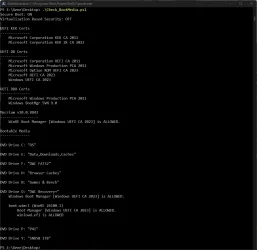
Just download the new update 8-11 from github ran two files both throw errors:
PS C:\Windows\System32> powershell -nop -ep bypass -f C:\temp17\check_bootmedia.ps1
Secure Boot: ON
Virtualization Based Security: ON

UEFI KEK Certs
--------------
Microsoft Corporation KEK CA 2011
Microsoft Corporation KEK 2K CA 2023

UEFI DB Certs
-------------
Microsoft Corporation UEFI CA 2011
Microsoft Windows Production PCA 2011
Microsoft Option ROM UEFI CA 2023
Microsoft UEFI CA 2023
Windows UEFI CA 2023

UEFI DBX Certs
--------------
Microsoft Windows Production PCA 2011
Windows BootMgr SVN 9.0

EFI Files
---------
SkuSiPolicy.p7b is CURRENT.

Hasleo 5.9.2.1
--------------
WinPE Boot Manager [Windows UEFI CA 2023] is BANNED.
You cannot call a method on a null-valued expression.
At C:\temp17\check_bootmedia.ps1:2393 char:9
+ $RemovableDrives = @(
+ ~~~~~~~~~~~~~~~~~~~~~
+ CategoryInfo : InvalidOperation: (:) [], RuntimeException
+ FullyQualifiedErrorId : InvokeMethodOnNull


batfile:
ecure Boot: ON
Virtualization Based Security: ON

UEFI KEK Certs
--------------
Microsoft Corporation KEK CA 2011
Microsoft Corporation KEK 2K CA 2023

UEFI DB Certs
-------------
Microsoft Corporation UEFI CA 2011
Microsoft Windows Production PCA 2011
Microsoft Option ROM UEFI CA 2023
Microsoft UEFI CA 2023
Windows UEFI CA 2023

UEFI DBX Certs
--------------
Microsoft Windows Production PCA 2011
Windows BootMgr SVN 9.0

EFI Files
---------
SkuSiPolicy.p7b is CURRENT.

Hasleo 5.9.2.1
--------------
WinPE Boot Manager [Windows UEFI CA 2023] is BANNED.
InvalidOperation: C:\Temp17\Check_BootMedia.ps1:2393
Line |
2393 | $RemovableDrives = @(
| ~~~~~~~~~~~~~~~~~~~~~
| You cannot call a method on a null-valued expression.
 

My Computer My Computer

At a glance

Windows 11 Intel i5 10400 HD630 graphics chipi5-1040012 gbHD630 chipset
OS
Windows 11 Intel i5 10400 HD630 graphics chip
Computer type
PC/Desktop
Manufacturer/Model
HP
CPU
i5-10400
Memory
12 gb
Graphics Card(s)
HD630 chipset
Monitor(s) Displays
LG 24inch
Hard Drives
SSD, external usb drive 1tb for files/backups
Keyboard
wireless Logi
Mouse
ms 4000 wireless mouse
Internet Speed
10meg
Browser
Firefox
Antivirus
Defender
Other Info
Win11 Home 25h2 26200.9168 08/11/2026
(y)

All my disk drives are listed as DVD, but I know they aren't ;-)

Screenshot 2026-08-11 190132.webp
 

My Computers My Computers

  • At a glance

    Windows 11 ProIntel Core i9 14900K 5800/4500 P/E all core96GB (2x48) G.skill Ripjaws 6800 MT/s DDR5Asus ROG Strix 4070 Ti OC
    OS
    Windows 11 Pro
    Computer type
    PC/Desktop
    Manufacturer/Model
    DIY Photoshop/Audio/Game/tinker
    CPU
    Intel Core i9 14900K 5800/4500 P/E all core
    Motherboard
    Asus ROG Maximus Z790 Dark Hero
    Memory
    96GB (2x48) G.skill Ripjaws 6800 MT/s DDR5
    Graphics Card(s)
    Asus ROG Strix 4070 Ti OC
    Sound Card
    Bowers & Wilkins 606 S3 speakers; Audiolabs 7000a integrated amp; RSL 10S Mk2 sub; Creative Pebble Pro Minimilist
    Monitor(s) Displays
    Eizo CG2730 ColorEdge, ViewSonic VP2768, i1 Display Pro calibration puck
    Screen Resolution
    2560 x 1440p x 2
    Hard Drives
    WDC SN850X 4TB nvme, SN850 1TB nvme, SK-Hynix 2 TB P41 nvme,. Sabrent USB-C DS-SC5B 5-bay docking station: 6TB WDC Black, 6TB Ironwolf Pro; 2x 2TB WDC Black HDD
    PSU
    850W Seasonic Vertex PX-850 ATX 3.0/PCI-E 5.0
    Case
    Fractal Design North XL Mesh, Black Walnut
    Cooling
    EK Nucleus black 360 AIO w/Phanteks T30-120 fans, 2 Noctua NF-A14 Chromax case fan, 1 T30-120 fan cooling memory
    Keyboard
    Keychron Q3 Max TKL with custom GMK Redsuns Red Samuri keycaps, TX Stabs
    Mouse
    Logitech G305 wireless gaming
    Internet Speed
    575 Mb/s down | 25 Mb/s up
    Browser
    Firefox
    Antivirus
    Defender, Macrium Reflect X
    Other Info
    Phangkey Amaterasu V2 Desk Mat
  • At a glance

    Apple M1
    Computer type
    Laptop
    Manufacturer/Model
    💻 Apple 13" Macbook Pro 2020 (m1)

    CPU
    Apple M1
    Screen Resolution
    2560x1600
    Browser
    Firefox
as I dont see no 24H2 here:
Code:
Version : 10.0.26100
ServicePack Build : 9168
There is nothing wrong with your screen. WinRE is a special version of WinPE (it's WinPE + extra parts).

The build is 26100.9168 or 24H2. WinPE isn't a fully functional Windows, so there's no point have a 25H2 Enablement Package installed to trick it into reporting it's 25H2.
 

My Computer My Computer

At a glance

Windows 7
OS
Windows 7
I give up... new updates is giving error codes and not showing any of my USB drives.

Hasleo 5.9.2.1
--------------
WinPE Boot Manager [Windows UEFI CA 2023] is BANNED.
C:\Program Files\Hasleo\Hasleo Backup Suite\bin\WADK\Boot\EFI_EX\bootmgfw.efi
File Version: 26100.30227, SVN 7.0
You cannot call a method on a null-valued expression.
At C:\temp17\check_bootmedia.ps1:2393 char:9
+ $RemovableDrives = @(
+ ~~~~~~~~~~~~~~~~~~~~~
+ CategoryInfo : InvalidOperation: (:) [], RuntimeException
+ FullyQualifiedErrorId : InvokeMethodOnNull

SVN is wrong showing 7.0, was 9.0 before todays MS update. :(
 

My Computer My Computer

At a glance

Windows 11 Intel i5 10400 HD630 graphics chipi5-1040012 gbHD630 chipset
OS
Windows 11 Intel i5 10400 HD630 graphics chip
Computer type
PC/Desktop
Manufacturer/Model
HP
CPU
i5-10400
Memory
12 gb
Graphics Card(s)
HD630 chipset
Monitor(s) Displays
LG 24inch
Hard Drives
SSD, external usb drive 1tb for files/backups
Keyboard
wireless Logi
Mouse
ms 4000 wireless mouse
Internet Speed
10meg
Browser
Firefox
Antivirus
Defender
Other Info
Win11 Home 25h2 26200.9168 08/11/2026
Check_BootMedia.ps1 can now find a lot more removable media devices (except for @anchamp65's Frankenstein GPT + FAT32 Macrium recovery drive).
:LOL:
Totally agree, don't do any more work on my Frankenstein USB
I'll try tomorrow to have Rufus Create MBR + FAT32 and see
If it works and your script catches it, good for me, if not, too bad for me...! :p

Your script already can validate my ISO from Macrium, so I'm already covered for my usage pattern.

Thanks Garlin for all you do for us all !!!
 

My Computer My Computer

At a glance

Windows 11
OS
Windows 11
I give up... new updates is giving error codes and not showing any of my USB drives.

Hasleo 5.9.2.1
--------------
WinPE Boot Manager [Windows UEFI CA 2023] is BANNED.
C:\Program Files\Hasleo\Hasleo Backup Suite\bin\WADK\Boot\EFI_EX\bootmgfw.efi
File Version: 26100.30227, SVN 7.0
You cannot call a method on a null-valued expression.
At C:\temp17\check_bootmedia.ps1:2393 char:9
+ $RemovableDrives = @(
+ ~~~~~~~~~~~~~~~~~~~~~
+ CategoryInfo : InvalidOperation: (:) [], RuntimeException
+ FullyQualifiedErrorId : InvokeMethodOnNull

SVN is wrong showing 7.0, was 9.0 before todays MS update. :(
I just tried my Sandisk and it no longer boots - says system needs repair or something like that. Back to drawing board to figure out how to create a rescue disk/usb in Hasleo
 

My Computer My Computer

At a glance

Windows 11 Intel i5 10400 HD630 graphics chipi5-1040012 gbHD630 chipset
OS
Windows 11 Intel i5 10400 HD630 graphics chip
Computer type
PC/Desktop
Manufacturer/Model
HP
CPU
i5-10400
Memory
12 gb
Graphics Card(s)
HD630 chipset
Monitor(s) Displays
LG 24inch
Hard Drives
SSD, external usb drive 1tb for files/backups
Keyboard
wireless Logi
Mouse
ms 4000 wireless mouse
Internet Speed
10meg
Browser
Firefox
Antivirus
Defender
Other Info
Win11 Home 25h2 26200.9168 08/11/2026
I just tried my Sandisk and it no longer boots - says system needs repair or something like that. Back to drawing board to figure out how to create a rescue disk/usb in Hasleo
Could it be that Hasleo has detected an update and it triggered an update of its staging and while updating it, it actually brought back unsupported boot loader...

I'm probably wrong, but hey, maybe I'm not... ! ?
 

My Computer My Computer

At a glance

Windows 11
OS
Windows 11

Latest Support Threads

Back
Top Bottom