Solved garlin's PowerShell scripts for updating Secure Boot CA 2023


I guess I will NOT be installing the preview until this issue is resolved or at least better understood.
 

My Computers My Computers

  • At a glance

    Windows 11 Pro 25H2i7-8565U16GBIntel UHD Graphics 620
    OS
    Windows 11 Pro 25H2
    Computer type
    Laptop
    Manufacturer/Model
    Lenovo T490 (2020 Hardware)
    CPU
    i7-8565U
    Motherboard
    20N20028US
    Memory
    16GB
    Graphics Card(s)
    Intel UHD Graphics 620
    Sound Card
    Realtec Audio
    Monitor(s) Displays
    ASUS VE248
    Screen Resolution
    1920 X 1080
    Hard Drives
    Samsung SSD 970 PRO 512GB NVMe
    Internet Speed
    Frontier fiber 1GB
    Browser
    Chrome, Firefox, Edge
    Antivirus
    Norton 360 Deluxe Plus
    Other Info
    Supported hardware, upgraded from Windows 10 Pro to Windows 11 Pro version 24H2 on 06/01/2025 using the Windows 11 ISO file. Used the enablement package to upgrade to version 25H2 on 10/07/2025. Secure boot enabled. Secure Boot CA 2023 updated.
  • At a glance

    Windows 11 Pro 25H2i7-4770 (with SSE4.2, and POPCNT)16GBIntel HD Graphics 4600
    Operating System
    Windows 11 Pro 25H2
    Computer type
    PC/Desktop
    Manufacturer/Model
    Lenovo ThinkCentre M83 (2014 Hardware)
    CPU
    i7-4770 (with SSE4.2, and POPCNT)
    Motherboard
    10AL000GUS
    Memory
    16GB
    Graphics card(s)
    Intel HD Graphics 4600
    Sound Card
    Realtec High Definition Audio
    Monitor(s) Displays
    ASUS VE248
    Screen Resolution
    1920 X 1080
    Hard Drives
    Samsung SSD 860 PRO 1TB SATA
    Internet Speed
    Frontier fiber 1GB
    Browser
    Chrome, Firefox, Edge
    Antivirus
    Norton 360 Deluxe Plus
    Other Info
    Unsupported hardware, upgraded from Windows 10 Pro (TPM 1.2 & unsupported CPU, but does have SSE4.2, and POPCNT) to Windows 11 Pro version 24H2 on 06/15/2025. Added Registry Key HKEY_LOCAL_MACHINE\SYSTEM\Setup\MoSetup – AllowUpgradesWithUnsupportedTPMOrCPU=1 to allow installation using the Windows 11 ISO file. Used the enablement package to upgrade to version 25H2 on 10/08/2025. Secure boot enabled. Secure Boot CA 2023 updated.
Got an automated update just a moment ago:

This device has updated Secure Boot CA/keys. This device signature information is included here.
DeviceAttributes: BaseBoardManufacturer:MSI;FirmwareManufacturer:American Megatrends Inc.;FirmwareVersion:1.A1_0.4.3;OEMModelBaseBoard:X99A GODLIKE GAMING (MS-7883);OEMManufacturerName:MSI;OSArchitecture:amd64;
BucketId: 73e03340f2bc718554edb3267053f76dd37bfa7b6e1a35f913a29980eefe9c1a
BucketConfidenceLevel: High Confidence
UpdateType: Policy Update (SKU), Windows UEFI CA 2023 (DB), Option ROM CA 2023 (DB), 3P UEFI CA 2023 (DB), KEK 2023, Boot Manager (2023)


So looks like it just does it on it's own now, but just highlighting: this is on an 11 year old mobo with manual key management.

Can you describe what triggered that information to display, was it something you input and that was the response, or was it some sort of popup?
 

My Computer My Computer

At a glance

Windows 11
OS
Windows 11
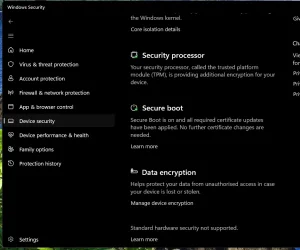
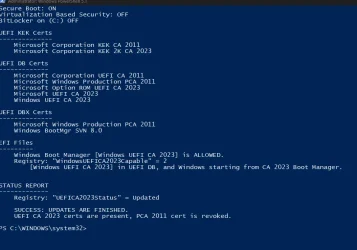
@FIREMEDIC2700 Update was through Windows Update. Normal update. Nothing special. Secure Boot in Windows Security is O.K. Nothing to worry about. PCA 2011 is already banned into DBX database as can be seen in the screenshot in my previous post.

SB.webp
 

My Computers My Computers

  • At a glance

    Windows 11 Pro build 26200.8524Intel i7-4790Teams DDR3-1600 4x4 GBMSI Nvidia GeForce GTX 1050Ti
    OS
    Windows 11 Pro build 26200.8524
    Computer type
    PC/Desktop
    Manufacturer/Model
    Home Built
    CPU
    Intel i7-4790
    Motherboard
    Asus H97 Pro Gamer with add-on TPM1.2 module
    Memory
    Teams DDR3-1600 4x4 GB
    Graphics Card(s)
    MSI Nvidia GeForce GTX 1050Ti
    Sound Card
    Realtek ALC1150
    Monitor(s) Displays
    Dell P2425D
    Screen Resolution
    2560 by 1440 pixels
    Hard Drives
    Corsair NVMe M.2 Core XT 1000 GB (Windows 11 v.25H2); Samsung SATA Evo 870 500 GB (Windows 11 v.25H2);
    PSU
    Corsair HX850
    Case
    Gigabyte Solo 210
    Cooling
    Zalman CNPS7X Tower
    Keyboard
    Microsoft AIO Wireless (includes touchpad)
    Mouse
    HP S1000 Plus Wireless
    Internet Speed
    500 Mb fiber optic
    Browser
    Chrome; MS Edge
    Antivirus
    Windows Defender
  • At a glance

    MacOS 12 MontereyIntel Core i58 GBIntel integrated
    Operating System
    MacOS 12 Monterey
    Computer type
    Laptop
    Manufacturer/Model
    Apple Macbook Air
    CPU
    Intel Core i5
    Memory
    8 GB
    Graphics card(s)
    Intel integrated
    Screen Resolution
    1440 by 900 pixels
    Hard Drives
    128 GB
    Keyboard
    Built-in
    Mouse
    Microsoft Wireless
    Internet Speed
    802.11 ac
    Browser
    Chrome; Safari
    Antivirus
    N/A
Update was through Windows Update. Normal update. Nothing special. Secure Boot in Windows Security is O.K. Nothing to worry about. PCA 2011 is already banned into DBX database as can be seen in the screenshot in my previous post.

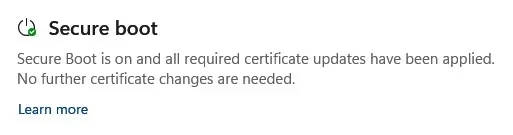
The message in security center is not telling you that 2011 is revoked.
It is telling you if the system has been updated to 2023 and is being used.

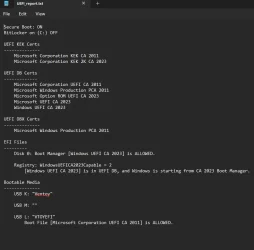
From a system where 2011 is not revoked yet:

Screenshot 2026-05-27 072721.webp


66.webp
 

My Computer My Computer

At a glance

Windows 11 Pro
OS
Windows 11 Pro
@KevTech I revoked PCA 2011 about a year ago and @garlin 's check script is reading that PCA 2011 is revoked.
 

My Computers My Computers

  • At a glance

    Windows 11 Pro build 26200.8524Intel i7-4790Teams DDR3-1600 4x4 GBMSI Nvidia GeForce GTX 1050Ti
    OS
    Windows 11 Pro build 26200.8524
    Computer type
    PC/Desktop
    Manufacturer/Model
    Home Built
    CPU
    Intel i7-4790
    Motherboard
    Asus H97 Pro Gamer with add-on TPM1.2 module
    Memory
    Teams DDR3-1600 4x4 GB
    Graphics Card(s)
    MSI Nvidia GeForce GTX 1050Ti
    Sound Card
    Realtek ALC1150
    Monitor(s) Displays
    Dell P2425D
    Screen Resolution
    2560 by 1440 pixels
    Hard Drives
    Corsair NVMe M.2 Core XT 1000 GB (Windows 11 v.25H2); Samsung SATA Evo 870 500 GB (Windows 11 v.25H2);
    PSU
    Corsair HX850
    Case
    Gigabyte Solo 210
    Cooling
    Zalman CNPS7X Tower
    Keyboard
    Microsoft AIO Wireless (includes touchpad)
    Mouse
    HP S1000 Plus Wireless
    Internet Speed
    500 Mb fiber optic
    Browser
    Chrome; MS Edge
    Antivirus
    Windows Defender
  • At a glance

    MacOS 12 MontereyIntel Core i58 GBIntel integrated
    Operating System
    MacOS 12 Monterey
    Computer type
    Laptop
    Manufacturer/Model
    Apple Macbook Air
    CPU
    Intel Core i5
    Memory
    8 GB
    Graphics card(s)
    Intel integrated
    Screen Resolution
    1440 by 900 pixels
    Hard Drives
    128 GB
    Keyboard
    Built-in
    Mouse
    Microsoft Wireless
    Internet Speed
    802.11 ac
    Browser
    Chrome; Safari
    Antivirus
    N/A
I revoked PCA 2011 about a year ago and @garlin 's check script is reading that PCA 2011 is revoked.
I was referring to the security center message.
 

My Computer My Computer

At a glance

Windows 11 Pro
OS
Windows 11 Pro

My Computers My Computers

  • At a glance

    Windows 11 Pro build 26200.8524Intel i7-4790Teams DDR3-1600 4x4 GBMSI Nvidia GeForce GTX 1050Ti
    OS
    Windows 11 Pro build 26200.8524
    Computer type
    PC/Desktop
    Manufacturer/Model
    Home Built
    CPU
    Intel i7-4790
    Motherboard
    Asus H97 Pro Gamer with add-on TPM1.2 module
    Memory
    Teams DDR3-1600 4x4 GB
    Graphics Card(s)
    MSI Nvidia GeForce GTX 1050Ti
    Sound Card
    Realtek ALC1150
    Monitor(s) Displays
    Dell P2425D
    Screen Resolution
    2560 by 1440 pixels
    Hard Drives
    Corsair NVMe M.2 Core XT 1000 GB (Windows 11 v.25H2); Samsung SATA Evo 870 500 GB (Windows 11 v.25H2);
    PSU
    Corsair HX850
    Case
    Gigabyte Solo 210
    Cooling
    Zalman CNPS7X Tower
    Keyboard
    Microsoft AIO Wireless (includes touchpad)
    Mouse
    HP S1000 Plus Wireless
    Internet Speed
    500 Mb fiber optic
    Browser
    Chrome; MS Edge
    Antivirus
    Windows Defender
  • At a glance

    MacOS 12 MontereyIntel Core i58 GBIntel integrated
    Operating System
    MacOS 12 Monterey
    Computer type
    Laptop
    Manufacturer/Model
    Apple Macbook Air
    CPU
    Intel Core i5
    Memory
    8 GB
    Graphics card(s)
    Intel integrated
    Screen Resolution
    1440 by 900 pixels
    Hard Drives
    128 GB
    Keyboard
    Built-in
    Mouse
    Microsoft Wireless
    Internet Speed
    802.11 ac
    Browser
    Chrome; Safari
    Antivirus
    N/A
After installing the latest Preview Build 26200.8524 yesterday, I have this:

Windows Boot manager [Windows UEFI CA 2023] is BANNED. But Windows still boots off of CA 2023 certificate.
I have a similar situation but with the Bootmedia: USB Drive G: "MACRIUMBOOT" Windows Boot Manager [Windows UEFI CA 2023] is BANNED but the boot media still boots anyway. And I have the CA 2011 cert revoked. I'm not going to worry about the supposed anomaly since I can still boot from the Macrium Rescue Disk. In the future though, something may change that. Here is the full script result:

PS C:\Users\thele> powershell -nop -ep bypass -f C:\temp\Check_UEFI-CA2023.ps1 -bootmedia verbose
Secure Boot: ON
Virtualization Based Security: OFF
BitLocker on (C:) OFF

UEFI KEK Certs
--------------
Microsoft Corporation KEK CA 2011
Microsoft Corporation KEK 2K CA 2023

UEFI DB Certs
-------------
MosbyKey [2025.12.17]
Microsoft Corporation UEFI CA 2011
Microsoft Windows Production PCA 2011
Microsoft Option ROM UEFI CA 2023
Microsoft UEFI CA 2023
Windows UEFI CA 2023

UEFI DBX Certs
--------------
Microsoft Windows Production PCA 2011
Windows BootMgr SVN 8.0

EFI Files
---------
Windows Boot Manager [Windows UEFI CA 2023] is ALLOWED.
Registry: "WindowsUEFICA2023Capable" = 2
[Windows UEFI CA 2023] in UEFI DB, and Windows starting from CA 2023 Boot Manager.

Bootable Media
--------------
USB Drive F: "Sceptre"
USB Drive G: "MACRIUMBOOT" Windows Boot Manager [Windows UEFI CA 2023] is BANNED.

STATUS REPORT
-------------
Registry: "UEFICA2023Status" = Updated

SUCCESS: UPDATES ARE FINISHED.
UEFI CA 2023 certs are present, PCA 2011 cert is revoked.

PS C:\Users\thele>
 

My Computers My Computers

  • At a glance

    Windows 11 Home, ver 25H2 build 26200.8246Intel Core i5 5200U @ 2.20GH4 GBIntel HD Graphics 5500 on board
    OS
    Windows 11 Home, ver 25H2 build 26200.8246
    Computer type
    Laptop
    Manufacturer/Model
    Hewlett-Packard Spectre 13-4001 x360 convertable
    CPU
    Intel Core i5 5200U @ 2.20GH
    Motherboard
    Hewlett-Packard 802D
    Memory
    4 GB
    Graphics Card(s)
    Intel HD Graphics 5500 on board
    Sound Card
    Intel Smart Sound Technology (Intel SST)
    Hard Drives
    Micron 256GB M.2 2280 NGFF SSD MTFDDAV256TBN, (SATA 6.0 Gb/s)
    Keyboard
    Model # G01KB
    Antivirus
    Microsoft Defender
    Other Info
    born on date: 25 Feb 2016
  • At a glance

    Win 11 Home 25H2 build 26200.7922Intel Core i7 4th Gen 4790 (3.60GHz), Haswell...Samsung 16 GB DDR3 (8GB in 2 modules)NVIDIA GeForce GTX 760, 3GB, and on-board Int...
    Operating System
    Win 11 Home 25H2 build 26200.7922
    Computer type
    PC/Desktop
    Manufacturer/Model
    Asus Desktop model M32AD-US019S (DOM: 6/9/2014 )
    CPU
    Intel Core i7 4th Gen 4790 (3.60GHz), Haswell 22nm Technology, SOCKET 1150
    Motherboard
    H81M-E/M51AD/DP_MB
    Memory
    Samsung 16 GB DDR3 (8GB in 2 modules)
    Graphics card(s)
    NVIDIA GeForce GTX 760, 3GB, and on-board Intel HD Graphics 4600 Rev 6
    Monitor(s) Displays
    HP EliteDisplay E241i LED; HP EliteDisplay E243
    Hard Drives
    Samsung 500GB SSD, 870 EVO (SATA 6.0 )
    Micron 250GB SSD, CT250MX500
    Toshiba HDD, 3GB (original drive w/PC)
    Case
    ASUS
    Keyboard
    ASUS-------------------------
    Antivirus
    MS Defender
    Other Info
    Additional Laptops:

    HEWLETT PACKARD
    HP OmniBook X Flip NGAI (Next Gen AI),
    Model: 16-as0023dx
    PT# B5UH1UA#ABA Product #: B5UH1UA
    delivered and setup 7/25/25
    16" 2K Touch-Screen Laptop
    Intel Core Ultra 7 256V '24 Series 2 - CPU
    Boost Clock Frequency 4.8 gigahertz; Neural Processing Unit (NPU) Yes;
    16GB Memory, LPDDR5X
    1TB SSD PCIe 4.0
    Graphics: Intel Arc 140V
    1 x HDMI 2.1
    1 x Thunderbolt 4
    2K Touch-Screen display, LED, IPS; 1920 x 1200 (Full HD+)
    USB Ports: 1 x USB-C 3.1, 2 x USB-A 3.1
    Wi-Fi 6E
    weight 4.15 pounds

    DELL
    Model:I7591-7483BLK-PUS 2-in-1 (7000 Series)
    purchased 12/3/2019,
    15.6 inch 2-IN-1;
    4K Ultra HD Touch-Screen, 3840 x 2160,
    Intel Core i7 10510U CPU 1.80GHz,
    16GB RAM DDR4 SDRAM 2400 megahert (2 slots),
    dedicated graphics Nvidia GeForce MX250 2 GB Graphics,
    PCIe 512GB Intel SSD + 32GB Optane Memory (Intel Optane Memory H10 with solid-state storage),
    wireless-AX & Bluetooth
    Battery: 68wh, Type 4VGMP 4 cell
Just updated my SP9 and Dell 3910 with latest Preview Build 26200.8524, both with CA 2011 revoked
CA 2023 is still showing as ALLOWED when running Garlin's check.
And Windows Security Secure Boot still says I'm all done on both
 

My Computer My Computer

At a glance

Windows 11
OS
Windows 11
After installing the latest Preview Build 26200.8524 yesterday, I have this:

Windows Boot manager [Windows UEFI CA 2023] is BANNED. But Windows still boots off of CA 2023 certificate.
I think it's a bug which is fixed in this unreleased version of the check script. I reverse the "polarity" of a check and that may be reporting a false positive.
 

Attachments

My Computer My Computer

At a glance

Windows 7
OS
Windows 7

My Computer My Computer

At a glance

Windows 11 Pro 25H2Intel Core i7-11800H16GB (2x8 GB)RTX 3060 Laptop GPU
OS
Windows 11 Pro 25H2
Computer type
Laptop
Manufacturer/Model
Acer Predator Helios 300 PH314-54-72ZJ
CPU
Intel Core i7-11800H
Motherboard
TGL
Memory
16GB (2x8 GB)
Graphics Card(s)
RTX 3060 Laptop GPU
Sound Card
Realtek ALC295
Monitor(s) Displays
1
Screen Resolution
2560 x 1440 @ 165Hz
Hard Drives
1TB NVMe SSD, 512GB NVMe SSD, 1TB 7200 RPM HDD
Cooling
Aeroblade 5th Gen 3D fan
Keyboard
RGB Laptop keyboard
Mouse
Logitech Lightsync G203
Internet Speed
175 Mbps up/175 Mbps down
Browser
Firefox with uBlock Origin and YouTube enhancing extensions..
Antivirus
Windows Security with Core Isolation on
I just tried using 'Check-UEFI.bat' or '.\Check_UEFI-CA2023.ps1' from the latest 'SecureBoot-CA-2023-Updates.v2026.05.21' download and I'm seeing an error that doesn't appear if using an older version?
Are you using the 32-bit version of PowerShell? There was a fix for "cannot find any specified files" a few releases back.
 

My Computer My Computer

At a glance

Windows 7
OS
Windows 7
I have a similar situation but with the Bootmedia: USB Drive G: "MACRIUMBOOT" Windows Boot Manager [Windows UEFI CA 2023] is BANNED but the boot media still boots anyway. And I have the CA 2011 cert revoked. I'm not going to worry about the supposed anomaly since I can still boot from the Macrium Rescue Disk. In the future though, something may change that.
Same answer as post #1950. Try the updated script.
 

My Computer My Computer

At a glance

Windows 7
OS
Windows 7
I think it's a bug which is fixed in this unreleased version of the check script. I reverse the "polarity" of a check and that may be reporting a false positive.
Hmm, that didn't seem to fix anything! :lmao:

1779896529372.webp

FWIW, the script from the 21th worked fine.
 

My Computers My Computers

  • At a glance

    Win 11 Pro 25H2, Build 26200.8894Intel Core i5 1450064GB DDR4GeForce RTX 4060
    OS
    Win 11 Pro 25H2, Build 26200.8894
    Computer type
    PC/Desktop
    Manufacturer/Model
    Home Brew
    CPU
    Intel Core i5 14500
    Motherboard
    Gigabyte B760M G P WIFI
    Memory
    64GB DDR4
    Graphics Card(s)
    GeForce RTX 4060
    Sound Card
    Chipset Realtek
    Monitor(s) Displays
    LG 45" Ultragear, Acer 24" 1080p
    Screen Resolution
    5120x1440, 1920x1080
    Hard Drives
    Crucial P310 2TB 2280 PCIe Gen4 3D NAND NVMe M.2 SSD (O/S)
    Silicon Power 2TB US75 NVMe PCIe Gen4 M.2 2280 SSD (backup)
    Crucial BX500 2TB 3D NAND (2nd backup)
    Seagate 4TB Ironwolf, rotating HDD archive files
    External off-line backup Drives: 2 NVMe 4TB drives in external enclosures
    PSU
    Thermaltake Toughpower GF3 750W
    Case
    LIAN LI LANCOOL 216 E-ATX PC Case
    Cooling
    Lots of fans!
    Keyboard
    Microsoft Comfort Curve 2000
    Mouse
    Logitech G305
    Internet Speed
    Verizon FiOS 1GB
    Browser
    Firefox
    Antivirus
    Malware Bytes & Windows Defender Security
  • At a glance

    Win 11 Pro 25H2, Build 26200.8894Intel Core i5 1440032GB DDR5Intel 700 Embedded GPU
    Operating System
    Win 11 Pro 25H2, Build 26200.8894
    Computer type
    PC/Desktop
    Manufacturer/Model
    Home Brew
    CPU
    Intel Core i5 14400
    Motherboard
    Gigabyte B760M DS3H AX
    Memory
    32GB DDR5
    Graphics card(s)
    Intel 700 Embedded GPU
    Sound Card
    Realtek Embedded
    Monitor(s) Displays
    27" HP 1080p
    Screen Resolution
    1920x1080
    Hard Drives
    Crucial P310 2TB 2280 PCIe Gen4 eD NAND PCIe SSD
    Samsung EVO 990 2TB NVMe Gen4 SSD
    Samsung 2TB SATA SSD
    PSU
    Thermaltake Smart BM3 650W
    Case
    Okinos Micro ATX Case
    Cooling
    Fans
    Keyboard
    Microsoft Comfort Curve 2000
    Mouse
    Logitech G305
    Internet Speed
    Verizon FiOS 1GB
    Browser
    Firefox
    Antivirus
    Malware Bytes & Windows Defender Security
  • Nimo N171 17" Laptop, (Intel i3-1215U, 16GB RAM, 2TB NVMe, Win11 Pro)
    Acemagic Vista Mini PC V1 (Intel N150, 16GB RAM, 1TB NVMe, Win11 Pro)
    HP ENVY h8-1540t, (24GB RAM, 2TB SSD, 2TB HDD, Win11 Pro)
Missing a ')' on the line. I should probably not post before having my caffeine in the morning.
This works fantastically. Thanks.
 

My Computers My Computers

  • At a glance

    Windows 11 Pro build 26200.8524Intel i7-4790Teams DDR3-1600 4x4 GBMSI Nvidia GeForce GTX 1050Ti
    OS
    Windows 11 Pro build 26200.8524
    Computer type
    PC/Desktop
    Manufacturer/Model
    Home Built
    CPU
    Intel i7-4790
    Motherboard
    Asus H97 Pro Gamer with add-on TPM1.2 module
    Memory
    Teams DDR3-1600 4x4 GB
    Graphics Card(s)
    MSI Nvidia GeForce GTX 1050Ti
    Sound Card
    Realtek ALC1150
    Monitor(s) Displays
    Dell P2425D
    Screen Resolution
    2560 by 1440 pixels
    Hard Drives
    Corsair NVMe M.2 Core XT 1000 GB (Windows 11 v.25H2); Samsung SATA Evo 870 500 GB (Windows 11 v.25H2);
    PSU
    Corsair HX850
    Case
    Gigabyte Solo 210
    Cooling
    Zalman CNPS7X Tower
    Keyboard
    Microsoft AIO Wireless (includes touchpad)
    Mouse
    HP S1000 Plus Wireless
    Internet Speed
    500 Mb fiber optic
    Browser
    Chrome; MS Edge
    Antivirus
    Windows Defender
  • At a glance

    MacOS 12 MontereyIntel Core i58 GBIntel integrated
    Operating System
    MacOS 12 Monterey
    Computer type
    Laptop
    Manufacturer/Model
    Apple Macbook Air
    CPU
    Intel Core i5
    Memory
    8 GB
    Graphics card(s)
    Intel integrated
    Screen Resolution
    1440 by 900 pixels
    Hard Drives
    128 GB
    Keyboard
    Built-in
    Mouse
    Microsoft Wireless
    Internet Speed
    802.11 ac
    Browser
    Chrome; Safari
    Antivirus
    N/A
Is there any way to change the Secure Boot mode?
After you log into the BIOS, you can access Secure Boot (enable or disable Secure Boot under Boot) and modify Secure Boot settings (under Security). The key was setting the BIOS password first.

Secure Boot Mode was fixed at Standard. After I erased Secure Boot settings and rebooted, Secure Boot Mode showed Custom.
 
Last edited:

My Computer My Computer

At a glance

Windows 11 Pro
OS
Windows 11 Pro
Computer type
Laptop
Manufacturer/Model
Acer TravelMate P215-52
Same answer as post #1950. Try the updated script.
Thanks!! That did the trick. I did a lot of searching but didn't find that post, my search skills are pretty weak.
 

My Computers My Computers

  • At a glance

    Windows 11 Home, ver 25H2 build 26200.8246Intel Core i5 5200U @ 2.20GH4 GBIntel HD Graphics 5500 on board
    OS
    Windows 11 Home, ver 25H2 build 26200.8246
    Computer type
    Laptop
    Manufacturer/Model
    Hewlett-Packard Spectre 13-4001 x360 convertable
    CPU
    Intel Core i5 5200U @ 2.20GH
    Motherboard
    Hewlett-Packard 802D
    Memory
    4 GB
    Graphics Card(s)
    Intel HD Graphics 5500 on board
    Sound Card
    Intel Smart Sound Technology (Intel SST)
    Hard Drives
    Micron 256GB M.2 2280 NGFF SSD MTFDDAV256TBN, (SATA 6.0 Gb/s)
    Keyboard
    Model # G01KB
    Antivirus
    Microsoft Defender
    Other Info
    born on date: 25 Feb 2016
  • At a glance

    Win 11 Home 25H2 build 26200.7922Intel Core i7 4th Gen 4790 (3.60GHz), Haswell...Samsung 16 GB DDR3 (8GB in 2 modules)NVIDIA GeForce GTX 760, 3GB, and on-board Int...
    Operating System
    Win 11 Home 25H2 build 26200.7922
    Computer type
    PC/Desktop
    Manufacturer/Model
    Asus Desktop model M32AD-US019S (DOM: 6/9/2014 )
    CPU
    Intel Core i7 4th Gen 4790 (3.60GHz), Haswell 22nm Technology, SOCKET 1150
    Motherboard
    H81M-E/M51AD/DP_MB
    Memory
    Samsung 16 GB DDR3 (8GB in 2 modules)
    Graphics card(s)
    NVIDIA GeForce GTX 760, 3GB, and on-board Intel HD Graphics 4600 Rev 6
    Monitor(s) Displays
    HP EliteDisplay E241i LED; HP EliteDisplay E243
    Hard Drives
    Samsung 500GB SSD, 870 EVO (SATA 6.0 )
    Micron 250GB SSD, CT250MX500
    Toshiba HDD, 3GB (original drive w/PC)
    Case
    ASUS
    Keyboard
    ASUS-------------------------
    Antivirus
    MS Defender
    Other Info
    Additional Laptops:

    HEWLETT PACKARD
    HP OmniBook X Flip NGAI (Next Gen AI),
    Model: 16-as0023dx
    PT# B5UH1UA#ABA Product #: B5UH1UA
    delivered and setup 7/25/25
    16" 2K Touch-Screen Laptop
    Intel Core Ultra 7 256V '24 Series 2 - CPU
    Boost Clock Frequency 4.8 gigahertz; Neural Processing Unit (NPU) Yes;
    16GB Memory, LPDDR5X
    1TB SSD PCIe 4.0
    Graphics: Intel Arc 140V
    1 x HDMI 2.1
    1 x Thunderbolt 4
    2K Touch-Screen display, LED, IPS; 1920 x 1200 (Full HD+)
    USB Ports: 1 x USB-C 3.1, 2 x USB-A 3.1
    Wi-Fi 6E
    weight 4.15 pounds

    DELL
    Model:I7591-7483BLK-PUS 2-in-1 (7000 Series)
    purchased 12/3/2019,
    15.6 inch 2-IN-1;
    4K Ultra HD Touch-Screen, 3840 x 2160,
    Intel Core i7 10510U CPU 1.80GHz,
    16GB RAM DDR4 SDRAM 2400 megahert (2 slots),
    dedicated graphics Nvidia GeForce MX250 2 GB Graphics,
    PCIe 512GB Intel SSD + 32GB Optane Memory (Intel Optane Memory H10 with solid-state storage),
    wireless-AX & Bluetooth
    Battery: 68wh, Type 4VGMP 4 cell
Missing a ')' on the line. I should probably not post before having my caffeine in the morning.
Scared me with that first scrip but all ok again !
 

My Computer My Computer

At a glance

Win11 24H2 IOT LTSC / Win11 Pro 25H2AMD Ryzen 7 8700G / AMD Ryzen 7 8700GF5-6000J3636F16GX2-FX5 32GB / Lexar Ares RGB ...internal
OS
Win11 24H2 IOT LTSC / Win11 Pro 25H2
Computer type
PC/Desktop
Manufacturer/Model
Gigabyte / Asus Home build
CPU
AMD Ryzen 7 8700G / AMD Ryzen 7 8700G
Motherboard
Gigabyte B650 AORUS ELITE AX V2 / ASUS TUF GAMING B650-PLUS
Memory
F5-6000J3636F16GX2-FX5 32GB / Lexar Ares RGB LD5BU016G-R6000GDLA 32GB
Graphics Card(s)
internal
Sound Card
Realtek
Monitor(s) Displays
BenQ 27 L EW2780
Screen Resolution
1920x1080
Hard Drives
Many M.2's
Internet Speed
400 mbs
Browser
Vivaldi
Antivirus
Eset
well hopefully i am good till i die . but wait this is microsoft lol. what do u think master garlin
 

Attachments

  • Screenshot 2026-05-27 113913.webp
    Screenshot 2026-05-27 113913.webp
    55 KB · Views: 5
  • Screenshot 2026-05-27 114209.webp
    Screenshot 2026-05-27 114209.webp
    41 KB · Views: 5

My Computer My Computer

At a glance

WINDOWS 11 WINDOWS 10Intel(R) Core(TM) i7 -3770K CPU 3.50 GZ 3501 ...32.0 GB (31.9 GB usable)AMD RADEON TM R5240 INTELL HD GRAPHICS 4600 T...
OS
WINDOWS 11 WINDOWS 10
Computer type
PC/Desktop
Manufacturer/Model
HP H8 1360T
CPU
Intel(R) Core(TM) i7 -3770K CPU 3.50 GZ 3501 4 CORE
Motherboard
PEGATRON 2AD5
Memory
32.0 GB (31.9 GB usable)
Graphics Card(s)
AMD RADEON TM R5240 INTELL HD GRAPHICS 4600 TIGER 1+1 USB
Sound Card
AMD HD . IDT
Monitor(s) Displays
AOC WAL MART SPECIAL . HP 2311 IX IPS LED DELL 1708 FP
Screen Resolution
1920 X 1080 1600X900 1280X940
Hard Drives
1 FAXING S 100 512GB 1 KINGSTON 120 GB SSD 1 X12 SSD 512 GB
PSU
300 WATT HP
Case
FULL
Cooling
ON BOARD FAN
Keyboard
LOGITEC K 520 WIRELESS
Mouse
LOGITEC M 510 WIRELESS
Internet Speed
55 UP 11.2 DOWN
Browser
CHROME EDGE
Antivirus
WINDOWS SECUIRTY
Other Info
NON SUPPORTED HARDWARE FOR WINDOWS 11
Back
Top Bottom