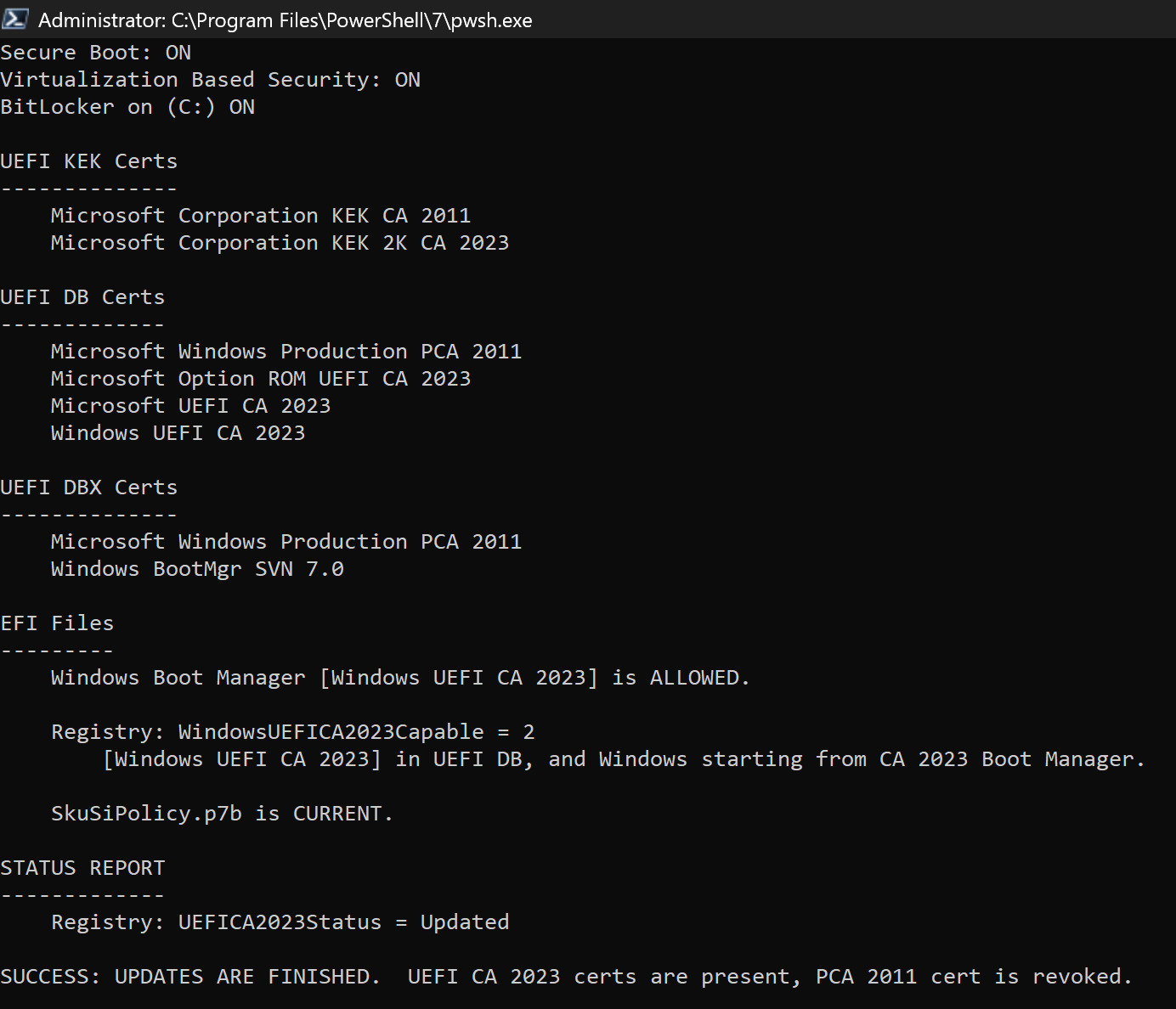
Solved garlin's PowerShell scripts for updating Secure Boot CA 2023


Here are my results with the "updated script", I don't get the "Windows Hello PIN" part. I guess that is because I don't have that activated on my computer. 🤷‍♂️
The newest version of the script checks for Windows Hello users. When the Setup Mode is required for updating certs, the TPM gets worried that something bad happened and invalidates the PIN that's securely saved.

You could be unintentionally locked out from Windows if you only had the PIN option. So it's better to highlight those situations where PIN users need to exercise caution by disabling the PIN first. The same principle applies to BitLocker protection, TPM can invalidate the saved key and ask you for a recovery key on USB, or entering the recovery password. We want to avoid causing harm whenever possible.
 

My Computer My Computer

At a glance

Windows 7
OS
Windows 7
Hello!

When I decided to enter the BIOS to update the certificates, I disabled the Windows Hello pin because I had read something that warned about this issue.
So I only had the password to log into the PC.
After the updates, when I wanted to reactivate the PIN... I couldn't do it at all.
The problem was solved with a backup I had made a few days before when the PIN was activated.
As soon as it finished, the PIN returned (the same as before).
;-)
 

My Computer My Computer

At a glance

Windows 11 Pro 25H2Intel(R) Core(TM) i7-7500U CPU @ 2.70GHz8 GB
OS
Windows 11 Pro 25H2
Computer type
Laptop
Manufacturer/Model
Dell XPS 13 9360
CPU
Intel(R) Core(TM) i7-7500U CPU @ 2.70GHz
Memory
8 GB
The newest version of the script checks for Windows Hello users. When the Setup Mode is required for updating certs, the TPM gets worried that something bad happened and invalidates the PIN that's securely saved.

You could be unintentionally locked out from Windows if you only had the PIN option. So it's better to highlight those situations where PIN users need to exercise caution by disabling the PIN first. The same principle applies to BitLocker protection, TPM can invalidate the saved key and ask you for a recovery key on USB, or entering the recovery password. We want to avoid causing harm whenever possible.

That's a great idea - no telling how many people you may save from having a huge headache.
 

My Computers My Computers

  • At a glance

    Windows 11 Pro 25H2 26200.8655Intel® Core™ Ultra 7 265 1.8GHz to 5.3GHz (Ar...SK Hynix 32GB DDR5 5600 Desktop RAM UDIMM Non...Dell NVIDIA® GeForce RTX™ 4060 8GB GDDR6 & (i...
    OS
    Windows 11 Pro 25H2 26200.8655
    Computer type
    PC/Desktop
    Manufacturer/Model
    Dell Tower Plus EBT2250, DOB: 06/15/2025
    CPU
    Intel® Core™ Ultra 7 265 1.8GHz to 5.3GHz (Arrow Lake)
    Motherboard
    Dell Inc. 02D3NT A00 (U3E1)
    Memory
    SK Hynix 32GB DDR5 5600 Desktop RAM UDIMM Non-ECC PC5-5600B
    Graphics Card(s)
    Dell NVIDIA® GeForce RTX™ 4060 8GB GDDR6 & (iGPU) Integrated Intel® UHD Graphics
    Sound Card
    Chipset Realtek High-Definition Audio with Dolby Atmos
    Monitor(s) Displays
    Dell Ultra Sharp U2515H 25-Inch Screen LED-Lit
    Screen Resolution
    2560 X 1440
    Hard Drives
    Samsung (NVMe PM9C1a 1024GB) M.2 PCIe NVMe Solid State Drive (OS), with Samsung Piccolo (S4LY022) 6-Core 4 Channel Controller.

    Samsung T7 500GB SSD, USB-C External Drive
    PSU
    Dell 460W
    Case
    Dell Tower Plus EBT 2250
    Cooling
    Fan
    Keyboard
    Dell Wired Keyboard - KB216
    Mouse
    Logitech M510
    Internet Speed
    Intel Killer E3100G 2.5 Gigabit Ethernet Controller
    Browser
    Microsoft Edge
    Antivirus
    Microsoft Windows Security
    Other Info
    The Samsung NVMe PM9C1a 1024GB SSD does not use a Phison NAND controller. Instead, it uses Samsung's in-house developed Piccolo (S4LY022) 6-Core 4 Channel Controller. The PM9C1a utilizes a controller built using Samsung's 5-nanometer process and seventh-generation V-NAND technology. 🤔
  • At a glance

    Windows 11 Pro 25H2 26200.865510th Generation Intel Core i7-10510U Processo...16GB DDR4 RAMNVIDIA® GeForce® MX250 with 2GB GDDR5 graphic...
    Operating System
    Windows 11 Pro 25H2 26200.8655
    Computer type
    Laptop
    Manufacturer/Model
    Dell Inspiron 15 7000 (7591) 2-in-1, DOB: 11/30/2019
    CPU
    10th Generation Intel Core i7-10510U Processor (8MB Cache, up to 4.9 GHz) Comet Lake
    Motherboard
    Dell 0NNW5N
    Memory
    16GB DDR4 RAM
    Graphics card(s)
    NVIDIA® GeForce® MX250 with 2GB GDDR5 graphics memory
    Sound Card
    Chipset Realtek ALC3254 🤔🤣
    Monitor(s) Displays
    Dell 15.6-inch UHD Truelife Touch Narrow Border WVA Display with Active Pen support
    Screen Resolution
    3840 x 2160
    Hard Drives
    Intel NVME 512GB SSD with 32GB Intel Optane Memory, M.2 80mm PCIe 3.0 RAID

    SanDisk 256GB Extreme microSDXC UHS-I Memory Card
    PSU
    Dell 4-Cell Battery, 68 Whr (Integrated), 90 Watt AC Adapter
    Case
    Dell Inspiron 15 7000 2-in-1 (7591)
    Cooling
    Standard Dell Case Fan & Havit HV-F2056 USB Powered (3 Fans) Laptop Cooling Pad.
    Keyboard
    Dell
    Mouse
    Logitech Wireless Mouse M650L
    Internet Speed
    Wireless/Wired connectivity (WiFi 6 - 802.11 ax)
    Browser
    Microsoft Edge
    Antivirus
    Microsoft Windows Security
    Other Info
    From Dell: 512GB NVME Solid State Drive accelerated by 32GB Intel Optane Memory are the fastest as compared to NAND SSDs. Intel Optane H10 with SSD offers speedy storage and accelerates opening your programs.
UPDATE: The Secure Boot folks have confirmed to me, that someone will be assigned to fix the Get-SecureBootSVN bug. Let's hope it arrives in the May or June monthly update cycle.
 

My Computer My Computer

At a glance

Windows 7
OS
Windows 7
UPDATE: The Secure Boot folks have confirmed to me, that someone will be assigned to fix the Get-SecureBootSVN bug. Let's hope it arrives in the May or June monthly update cycle.

Is there anything you can't do?!
Amazing work.
 

My Computers My Computers

  • At a glance

    Windows 11 ProIntel Core i5-12600K 3.7 GHz 10-Core ProcessorCorsair Vengeance LPX 64 GB (2 x 32 GB) DDR4-...Integrated Intel UHD Graphics 770
    OS
    Windows 11 Pro
    Computer type
    PC/Desktop
    Manufacturer/Model
    Self built PC by me.
    CPU
    Intel Core i5-12600K 3.7 GHz 10-Core Processor
    Motherboard
    Gigabyte B760M H DDR4 Micro ATX LGA1700 Motherboard
    Memory
    Corsair Vengeance LPX 64 GB (2 x 32 GB) DDR4-3200 CL16 Memory
    Graphics Card(s)
    Integrated Intel UHD Graphics 770
    Sound Card
    Realtek
    Monitor(s) Displays
    LG
    Hard Drives
    Samsung 990 Pro 1 TB M.2-2280 PCIe 4.0 X4 NVME Solid State Drive
    Samsung 990 Pro 2 TB M.2-2280 PCIe 4.0 X4 NVME Solid State Drive
    PSU
    NZXT 850w ATX 3.1 Gold Fully Modular Power Supply
    Case
    Thermaltake Versa H25 ATX Mid Tower Case
    Cooling
    CPU Cooler Thermalright Assassin Spirit 120 EVO ARGB (ARGB Disabled) - Case Fans BlackThermalright TL-C12C-S X3 66.17 CFM 120 mm Fans 3-Pack (ARGB disabled)
    Internet Speed
    1 Gbps
    Other Info
    I hate ARGB.
  • At a glance

    Windows 11 Pro
    Operating System
    Windows 11 Pro
    Computer type
    Laptop
    Manufacturer/Model
    Lenovo ThinkBook 14 G2 ITL
Here are my results with the "updated script", I don't get the "Windows Hello PIN" part. I guess that is because I don't have that activated on my computer. 🤷‍♂️


View attachment 168219
I got the Windows Hello Pin activated, but my output doesn't show it either. Mine looks exactly like yours.
 

My Computer My Computer

At a glance

Windows 11 Pro 25H2Gen 11 Core i516GB
OS
Windows 11 Pro 25H2
Computer type
Laptop
Manufacturer/Model
HP
CPU
Gen 11 Core i5
Memory
16GB
I got the Windows Hello Pin activated, but my output doesn't show it either. Mine looks exactly like yours.

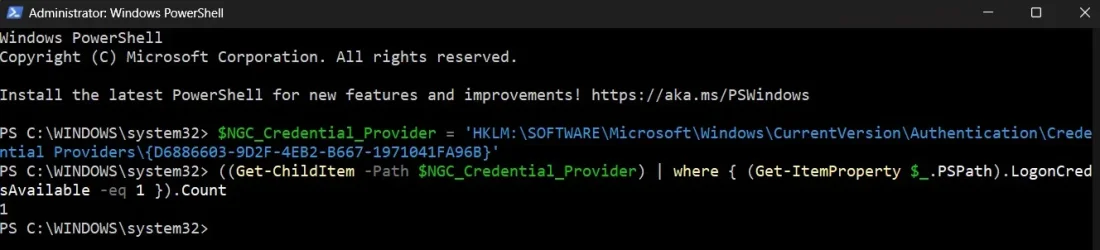
Can you run these commands from PowerShell (as Admin)? It should return the number of PIN users.
Code:
$NGC_Credential_Provider = 'HKLM:\SOFTWARE\Microsoft\Windows\CurrentVersion\Authentication\Credential Providers\{D6886603-9D2F-4EB2-B667-1971041FA96B}'
((Get-ChildItem -Path $NGC_Credential_Provider) | where { (Get-ItemProperty $_.PSPath).LogonCredsAvailable -eq 1 }).Count
 

My Computer My Computer

At a glance

Windows 7
OS
Windows 7
Can you run these commands from PowerShell (as Admin)? It should return the number of PIN users.
Code:
$NGC_Credential_Provider = 'HKLM:\SOFTWARE\Microsoft\Windows\CurrentVersion\Authentication\Credential Providers\{D6886603-9D2F-4EB2-B667-1971041FA96B}'
((Get-ChildItem -Path $NGC_Credential_Provider) | where { (Get-ItemProperty $_.PSPath).LogonCredsAvailable -eq 1 }).Count
 

Attachments

  • Screenshot 2026-04-09 231805.webp
    Screenshot 2026-04-09 231805.webp
    46.8 KB · Views: 3

My Computer My Computer

At a glance

Windows 11 Pro 25H2Gen 11 Core i516GB
OS
Windows 11 Pro 25H2
Computer type
Laptop
Manufacturer/Model
HP
CPU
Gen 11 Core i5
Memory
16GB
Well, you don't have this version I'm working on.

I might end up hiding the Windows Hello status because it only matters if you're about to delete keys. Adding certs doesn't trigger a bad response from the TPM. The final goal is to remind users to turn off PIN's when necessary.
 

Attachments

My Computer My Computer

At a glance

Windows 7
OS
Windows 7
Well, you don't have this version I'm working on.

I might end up hiding the Windows Hello status because it only matters if you're about to delete keys. Adding certs doesn't trigger a bad response from the TPM. The final goal is to remind users to turn off PIN's when necessary.
Screenshot 2026-04-09 233722.webp
 

My Computer My Computer

At a glance

Windows 11 Pro 25H2Gen 11 Core i516GB
OS
Windows 11 Pro 25H2
Computer type
Laptop
Manufacturer/Model
HP
CPU
Gen 11 Core i5
Memory
16GB
hmmmmmm umm!!!
Previous posts back i did the deleting of ALL SB files in bios and entered secure boot setup mode then used the older script to check then update, completely oblivious to the fact i had windows hello pin enabled... WHAT???!!!

It all worked fine though, but what i did was used the built in admin account that doesn't use my microsoft account, just local password for the entire process until it was all updated.
THEN i logged into my MS user account.

So now i run your new check and eek!

I must of avoided the windows hello part somehow??? i dunno. Weird.
What ya think happened?


------------------------------------------------------------------------

PS D:\AdminTools\CheckCA2023> .\Check_UEFI-CA2023.ps1
Secure Boot: ON
Virtualization Based Security: OFF
BitLocker on (C:) OFF
Windows Hello PIN: ON

UEFI KEK Certs
--------------
Microsoft Corporation KEK CA 2011
Microsoft Corporation KEK 2K CA 2023

UEFI DB Certs
-------------
Microsoft Corporation UEFI CA 2011
Microsoft Windows Production PCA 2011
Microsoft Option ROM UEFI CA 2023
Microsoft UEFI CA 2023
Windows UEFI CA 2023

UEFI DBX Certs
--------------
Microsoft Windows Production PCA 2011
Windows BootMgr SVN 7.0

EFI Files
---------
Windows Boot Manager [Windows UEFI CA 2023] is ALLOWED.

Registry: WindowsUEFICA2023Capable = 2
[Windows UEFI CA 2023] in UEFI DB, and Windows starting from CA 2023 Boot Manager.

STATUS REPORT
-------------
Registry: UEFICA2023Status = Updated

SUCCESS: UPDATES ARE FINISHED. UEFI CA 2023 certs are present, PCA 2011 cert is revoked.
 

My Computer My Computer

At a glance

Windows 10
OS
Windows 10
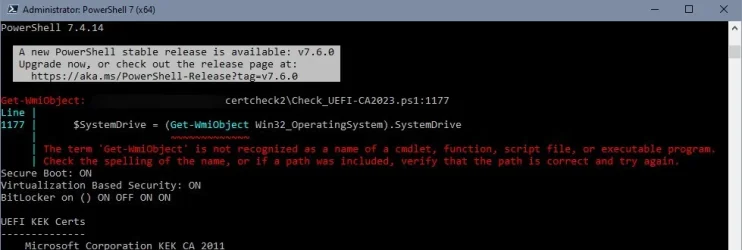
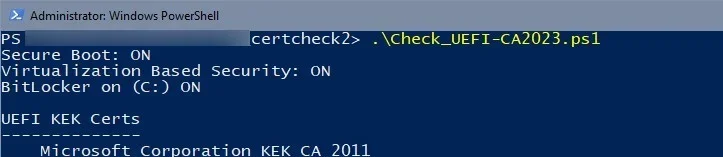
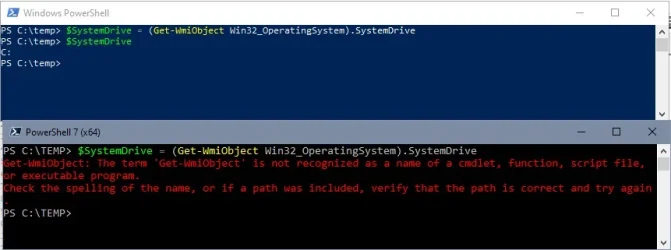
Just for your information: W10 ESU, Powershell 7.4.14 LTS gives a small error in the beginning and displays Bitlocker state of all drives (possibly since it can't determine the system drive):

3.webp

Powershell 7.4.14 LTS is installed parallely to the standard Powershell 5.1 where the script works without error message and only gives Bitlocker state of drive C:

4.webp

5.webp

Thanks for your work!
 

My Computer My Computer

At a glance

W10
OS
W10
hmmmmmm umm!!!
Previous posts back i did the deleting of ALL SB files in bios and entered secure boot setup mode then used the older script to check then update, completely oblivious to the fact i had windows hello pin enabled... WHAT???!!!

It all worked fine though, but what i did was used the built in admin account that doesn't use my microsoft account, just local password for the entire process until it was all updated.
THEN i logged into my MS user account.

So now i run your new check and eek!

I must of avoided the windows hello part somehow??? i dunno. Weird.
What ya think happened?
Windows Hello is unrelated to the Secure Boot update process. But if you have to do something drastic like enter Setup mode (because you have an unsupported BIOS), TPM will cancel your PIN. And that's bad news.

Not everyone will end up needing to do Setup mode. You shouldn't jump to that solution, until after you've confirmed that manual KEK enrollment doesn't work for you. Always try the least intrusive solution first before going to Setup mode.

Windows Hello didn't enter the picture because nobody else mentioned it before. It's like disabling BitLocker, if you didn't have a fallback strategy then it gets ugly when TPM stops trusting itself.
 

My Computer My Computer

At a glance

Windows 7
OS
Windows 7
Just for your information: W10 ESU, Powershell 7.4.14 LTS gives a small error in the beginning and displays Bitlocker state of all drives (possibly since it can't determine the system drive):
Thanks, I had two stragglers for Get-WmiObject.

Change line 1177 on your script from:
Code:
SystemDrive = (Get-WmiObject Win32_OperatingSystem).SystemDrive
to:
Code:
SystemDrive = (Get-CimInstance -ClassName Win32_OperatingSystem).SystemDrive
 

My Computer My Computer

At a glance

Windows 7
OS
Windows 7
Thank you!

Changing line 1177 to

Code:
$SystemDrive = (Get-CimInstance -ClassName Win32_OperatingSystem).SystemDrive

worked for me. Now both PS versions (5.1. and 7.4.14) have the same output.
 

My Computer My Computer

At a glance

W10
OS
W10
Can you run these commands from PowerShell (as Admin)? It should return the number of PIN users.
Code:
$NGC_Credential_Provider = 'HKLM:\SOFTWARE\Microsoft\Windows\CurrentVersion\Authentication\Credential Providers\{D6886603-9D2F-4EB2-B667-1971041FA96B}'
((Get-ChildItem -Path $NGC_Credential_Provider) | where { (Get-ItemProperty $_.PSPath).LogonCredsAvailable -eq 1 }).Count


That did show 0 for me.


Screenshot 2026-04-10 075321.webp
 

My Computers My Computers

  • At a glance

    Windows 11 Pro 25H2 26200.8655Intel® Core™ Ultra 7 265 1.8GHz to 5.3GHz (Ar...SK Hynix 32GB DDR5 5600 Desktop RAM UDIMM Non...Dell NVIDIA® GeForce RTX™ 4060 8GB GDDR6 & (i...
    OS
    Windows 11 Pro 25H2 26200.8655
    Computer type
    PC/Desktop
    Manufacturer/Model
    Dell Tower Plus EBT2250, DOB: 06/15/2025
    CPU
    Intel® Core™ Ultra 7 265 1.8GHz to 5.3GHz (Arrow Lake)
    Motherboard
    Dell Inc. 02D3NT A00 (U3E1)
    Memory
    SK Hynix 32GB DDR5 5600 Desktop RAM UDIMM Non-ECC PC5-5600B
    Graphics Card(s)
    Dell NVIDIA® GeForce RTX™ 4060 8GB GDDR6 & (iGPU) Integrated Intel® UHD Graphics
    Sound Card
    Chipset Realtek High-Definition Audio with Dolby Atmos
    Monitor(s) Displays
    Dell Ultra Sharp U2515H 25-Inch Screen LED-Lit
    Screen Resolution
    2560 X 1440
    Hard Drives
    Samsung (NVMe PM9C1a 1024GB) M.2 PCIe NVMe Solid State Drive (OS), with Samsung Piccolo (S4LY022) 6-Core 4 Channel Controller.

    Samsung T7 500GB SSD, USB-C External Drive
    PSU
    Dell 460W
    Case
    Dell Tower Plus EBT 2250
    Cooling
    Fan
    Keyboard
    Dell Wired Keyboard - KB216
    Mouse
    Logitech M510
    Internet Speed
    Intel Killer E3100G 2.5 Gigabit Ethernet Controller
    Browser
    Microsoft Edge
    Antivirus
    Microsoft Windows Security
    Other Info
    The Samsung NVMe PM9C1a 1024GB SSD does not use a Phison NAND controller. Instead, it uses Samsung's in-house developed Piccolo (S4LY022) 6-Core 4 Channel Controller. The PM9C1a utilizes a controller built using Samsung's 5-nanometer process and seventh-generation V-NAND technology. 🤔
  • At a glance

    Windows 11 Pro 25H2 26200.865510th Generation Intel Core i7-10510U Processo...16GB DDR4 RAMNVIDIA® GeForce® MX250 with 2GB GDDR5 graphic...
    Operating System
    Windows 11 Pro 25H2 26200.8655
    Computer type
    Laptop
    Manufacturer/Model
    Dell Inspiron 15 7000 (7591) 2-in-1, DOB: 11/30/2019
    CPU
    10th Generation Intel Core i7-10510U Processor (8MB Cache, up to 4.9 GHz) Comet Lake
    Motherboard
    Dell 0NNW5N
    Memory
    16GB DDR4 RAM
    Graphics card(s)
    NVIDIA® GeForce® MX250 with 2GB GDDR5 graphics memory
    Sound Card
    Chipset Realtek ALC3254 🤔🤣
    Monitor(s) Displays
    Dell 15.6-inch UHD Truelife Touch Narrow Border WVA Display with Active Pen support
    Screen Resolution
    3840 x 2160
    Hard Drives
    Intel NVME 512GB SSD with 32GB Intel Optane Memory, M.2 80mm PCIe 3.0 RAID

    SanDisk 256GB Extreme microSDXC UHS-I Memory Card
    PSU
    Dell 4-Cell Battery, 68 Whr (Integrated), 90 Watt AC Adapter
    Case
    Dell Inspiron 15 7000 2-in-1 (7591)
    Cooling
    Standard Dell Case Fan & Havit HV-F2056 USB Powered (3 Fans) Laptop Cooling Pad.
    Keyboard
    Dell
    Mouse
    Logitech Wireless Mouse M650L
    Internet Speed
    Wireless/Wired connectivity (WiFi 6 - 802.11 ax)
    Browser
    Microsoft Edge
    Antivirus
    Microsoft Windows Security
    Other Info
    From Dell: 512GB NVME Solid State Drive accelerated by 32GB Intel Optane Memory are the fastest as compared to NAND SSDs. Intel Optane H10 with SSD offers speedy storage and accelerates opening your programs.
@garlin
Firstly, thanks for your effort and time! 🙂
Secondly, is there anything that I can do or everything on pictures bellow is fine!?

PS.png


DB.png


Also thanks @antspants for advice about updating SkuSiPolicy from this post! 🙂
 

My Computer My Computer

At a glance

Windows 11 Pro
OS
Windows 11 Pro
Computer type
Laptop
Manufacturer/Model
Samsung Galaxy Book3 Pro
That did show 0 for me.
Are you using Windows Hello? If not, it should be 0 (users). Again, it only matters for users who can't do updates other than by using Setup Mode. If you're already updated or you have a supported PC, there's no need to think about Windows Hello.
 

My Computer My Computer

At a glance

Windows 7
OS
Windows 7
@garlin
Firstly, thanks for your effort and time! 🙂
Secondly, is there anything that I can do or everything on pictures bellow is fine!?
You're done. It's strange that your DB is missing "Microsoft Corporation UEFI CA 2011".

This cert was only used by Linux (not Windows), but you do have its newer replacement "Microsoft UEFI CA 2023". Most Linux distros (if you ever need to install one) have moved to CA 2023 any way. I wouldn't worry about it, maybe the factory image didn't come with that cert.
 

My Computer My Computer

At a glance

Windows 7
OS
Windows 7
Few weeks ago uninstalled Linux Mint/Fedora from dual boot and deleted everything from SSD so maybe that's the reason...
 

My Computer My Computer

At a glance

Windows 11 Pro
OS
Windows 11 Pro
Computer type
Laptop
Manufacturer/Model
Samsung Galaxy Book3 Pro
Back
Top Bottom