Solved garlin's PowerShell scripts for updating Secure Boot CA 2023


@garlin

On my Surface Pro 9, I've been monitoring events 1801.
  • 2026-02-13, got, "BucketConfidenceLevel: No Data Observed - Action Required"
    and a few more of the same until 2026-03-22

  • 2026-04-02, it changed to "BucketConfidenceLevel: Under Observation - More Data Needed"
    and stayed that way until 2026-04-30

  • 2026-05-01, it went back to "BucketConfidenceLevel: No Data Observed - Action Required"
As mentioned in a previous post, I was going to wait untill May patching to see if MS will update it on it's own.
Am I waiting for nothing and MS will not be able to do it.

Also, FYI, I use OOSU10 and telemetry is disable, and found that it most likely triggers the more data needed and no data observed.

Here the full event 1801 from 2026-05-01 if it helps you help me...:-)

Code:
Updated Secure Boot certificates are available on this device but have not yet been applied to the firmware. Review the published guidance to complete the update and maintain full protection. This device signature information is included here.
DeviceAttributes: FirmwareManufacturer:Microsoft Corporation;FirmwareVersion:23.102.143;OEMModelNumber:Surface Pro 9;OEMManufacturerName:Microsoft Corporation;OSArchitecture:amd64;
BucketId: 87d4f3cc5ce437d27bbdb9d5c838c732bfd7cb70751fd63d3dd5b9d2c6f60741
BucketConfidenceLevel: No Data Observed - Action Required
UpdateType:
For more information, please see https://go.microsoft.com/fwlink/?linkid=2301018.

Your insight will be greatly appreciated
Thanks in advance
 
Last edited:

My Computer My Computer

At a glance

Windows 11
OS
Windows 11
MS remotely manages updates by pushing out bucket confidence data. If your bucket is given the "green light", updates are applied immediately. When your bucket "needs more data", everyone in your pool is blocked until the bucket's status is changed. And some PC's are in the "never update" pool because someone has identified a known HW issue.

I wouldn't bother waiting. This bucket concept sounds great on paper. In real life, it's kinda of a slow moving disaster. It's a Catch 22, MS wants to protect users from a bad update, but they can't collect data unless some tries the update first...

I bet your Surface Pro 9 will update just fine by running my script. Just make sure you're using the latest official version in post #1 or the GitHub.

In some rare instances, BIOS'es can freak out when certs are applied. Most of those issues can be fixed by disabling Secure Boot, and doing a factory reset of Secure Boot keys to clear the NVRAM. Then you restart the update process. The same kind of issues can pop up when people install BIOS updates which include the CA 2023 certs. So far, this type of problem tends to be rare on PC's manufactured after around 2020-2021.
 

My Computer My Computer

At a glance

Windows 7
OS
Windows 7
Good morning Mr @garlin, you are doing The Big Guys work on this thread alone, it is very much appreciated.
I ran the Check_UEFI-CA2023.ps1 script and the results looked promising... except for that one word in allcaps BANNED
Secure Boot: ON Virtualization Based Security: OFF BitLocker on (C:) OFF UEFI KEK Certs -------------- Microsoft Corporation KEK CA 2011 UEFI DB Certs ------------- Microsoft Corporation UEFI CA 2011 Microsoft Windows Production PCA 2011 Microsoft Option ROM UEFI CA 2023 Microsoft UEFI CA 2023 Windows UEFI CA 2023 UEFI DBX Certs -------------- (NONE) EFI Files --------- Boot File [Windows UEFI CA 2023] is BANNED Registry: WindowsUEFICA2023Capable = 2 [Windows UEFI CA 2023] in UEFI DB, and Windows starting from CA 2023 Boot Manager. REQUIRED ACTION =============== Run the command: Update_UEFI-CA2023.ps1 -Revoke Finish the UEFI steps to manually add the [KEK CA 2023] cert, if the script provided instructions.

Running the Update_UEFI-CA2023.ps1 -Revoke script was not nearly as promising..


Downloading "KEKUpdate_MSI_PK1.bin" from GitHub. ERROR: Failed to append "KEKUpdate_MSI_PK1.bin" to UEFI KEK. UEFI doesn't allow appending to KEK variable. Please try Setup Mode. PS C:\Users\Joe\Desktop\SecureBoot-CA-2023-Updates>

What next? Am I waiting on Microsoft or am I waiting on MSI to do something (not holding my breath waiting for that) Laptop is MSI PE60 6QE mfrd around 2015-16

Kindly advise and once again I appreciate your herculean efforts not only on this thread but on all of Brink's fine sites, also seen your work on the NTLite forums.

TIA!

EDIT: I looked at my BIOS and find no reference to Setup Mode whatsoever.
 

My Computer My Computer

At a glance

Win10 Pro lx64 19045.7184 (extended sec updts)Intel Core i7-6700HQ CPU @ 2.60GHz16gb DDR4Intel HD Graphics 530 (Skylake-H GT2) RealTek...
OS
Win10 Pro lx64 19045.7184 (extended sec updts)
Computer type
Laptop
Manufacturer/Model
MSI PE60 6QE
CPU
Intel Core i7-6700HQ CPU @ 2.60GHz
Motherboard
MSI MS-16J5
Memory
16gb DDR4
Graphics Card(s)
Intel HD Graphics 530 (Skylake-H GT2) RealTek ALC899
Sound Card
Intel Skylake PCH-H - High Definition Audio
Screen Resolution
1920x1080
Hard Drives
Samsung SSD 850 EVO M.2 250GB
HGST HTS721010A9E6301TB 7200 RPM
Samsung PSSD T9 USB SSD
Browser
Chrome
Antivirus
Defender
Other Info
Intel Dual Band Wireless-AC 3165
Qualcomm/Atheros AR8161/8165 PCI-E Gigabit Ethernet Controller
I wouldn't bother waiting. This bucket concept sounds great on paper. In real life, it's kinda of a slow moving disaster. It's a Catch 22, MS wants to protect users from a bad update, but they can't collect data unless some tries the update first...

I'm convinced your script will work !
It worked on my computers:
  • Surface Pro 5 (2017) Win11 25H2, BIOS Secure Boot custom
  • Lenovo L440 (2014) Win11 25H2, BIOS Secure Boot custom
  • Dell Inspiron 15z 5523 (2012) Win11 25H2, BIOS Secure Boot custom
  • 2 x Hyper-V VM Win11 25H2 <-- hosted on Dell Inspiron 3910
I also have a Dell Inspiron 3910 which also has events 1801 saying "More Data Needed" since 2026-03-06.

I'll give MS another go at it on both (Surface 9, Inspiron 3910) just to see... ;-)
Only have 1 more week to wait and see.
If any of them don't get updated by Windows Update, your script it will be without any hesitation !

Thanks again for all your insights for all of us !!!
 

My Computer My Computer

At a glance

Windows 11
OS
Windows 11
EDIT: I looked at my BIOS and find no reference to Setup Mode whatsoever.
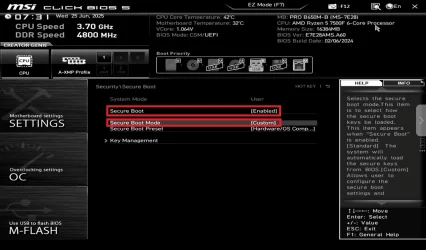
In your case MSI calls it "custom"
Check out this video that can help you get to Secure Boot, if you haven't alreay found how on your own...


BIOS screen might be different layout because it changes over the years but you should be able to find it.

Once there, set it like in the following screenshot.
That shows you how to set the "Setup Mode" that Garlin is talking about.

Wait for Garlin's response on how to proceed afterwards on your "2023" BANNED.
I can't guide you on that, Garlin probably can.


1777988426096.webp

FYI: screenshot is from step 18 on this web page, MSI with UEFI SECURE BOOT | CCBoot Cloud Wiki
 
Last edited:

My Computer My Computer

At a glance

Windows 11
OS
Windows 11
Sometimes the wording in the BIOS screens is different, depending on your BIOS version.

You can look under Key Management, and see if there's an option to Delete All Keys. This puts you into "Setup Mode", though older BIOS'es may not use that same term.
 

My Computer My Computer

At a glance

Windows 7
OS
Windows 7
* Dell Inspiron 15z 5523 (2012) Win11 25H2, BIOS Secure Boot custom
Wow. That's the oldest PC successfully updated on this thread. Other people have done 2014 PC's.
 

My Computer My Computer

At a glance

Windows 7
OS
Windows 7
Wow. That's the oldest PC successfully updated on this thread. Other people have done 2014 PC's.
Followed your instructions on getting BIOS into "ready to receive new certs" and it all worked fine
I won't surprise you if I say that Laptop can't do VBS, or will I... ??? :unsure:
 

My Computer My Computer

At a glance

Windows 11
OS
Windows 11
VBS requires specific HW features, it depends if you have:
- Intel VT-x or AMD-V​
- Second Level Address Translation​
- TPM 1.2 or higher​
- Secure Boot enabled​
 

My Computer My Computer

At a glance

Windows 7
OS
Windows 7
VBS requires specific HW features, it depends if you have:
- Intel VT-x or AMD-V​
- Second Level Address Translation​
- TPM 1.2 or higher​
- Secure Boot enabled​
No TPM, everything else is present
But can't activate Core Isolation Memory Integrity because of an old driver for the graphics card
It has the O Mighty and state of the art Intel HD Graphics 4000 with a woping 2GB of memory and a driver from 2015 (10.18.10.4358)
Obviously, Intel does not publish newer drivers and windows automatically installs the driver

But, it does the job when I need to have a computer for troubleshooting or setting up a client's home network.
Win11 actually runs quite decently on it
And if I ever loose it, or drop it, I won't be too upset :LOL:
 

My Computer My Computer

At a glance

Windows 11
OS
Windows 11
In your case MSI calls it "custom"
Check out this video that can help you get to Secure Boot, if you haven't alreay found how on your own...

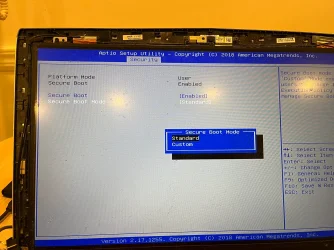
Thanks for replying. I've no problem setting Secure Boot, I've been using it for as long as I've had this Laptop (about 10 years) also it's not an an MSI BIOS but an AMI (Aptio V) OEM so the setup is not quite the same, but not quite different with far fewer options. I've run the script under both standard & custom with same result.
.IMG_0115.webp

Sometimes the wording in the BIOS screens is different, depending on your BIOS version.

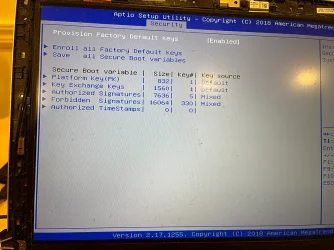
You can look under Key Management, and see if there's an option to Delete All Keys. This puts you into "Setup Mode", though older BIOS'es may not use that same term.
There is, under the "security" tab see attd
:IMG_0116.webp

I'll try to post a video of all the options under this tab, I don't wanna screw the pooch (just an above average noob here 😁
Also @garlin, would you be so kind as to address the "BANNED" issue I referenced in my OP.


Last edited:

My Computer My Computer

At a glance

Win10 Pro lx64 19045.7184 (extended sec updts)Intel Core i7-6700HQ CPU @ 2.60GHz16gb DDR4Intel HD Graphics 530 (Skylake-H GT2) RealTek...
OS
Win10 Pro lx64 19045.7184 (extended sec updts)
Computer type
Laptop
Manufacturer/Model
MSI PE60 6QE
CPU
Intel Core i7-6700HQ CPU @ 2.60GHz
Motherboard
MSI MS-16J5
Memory
16gb DDR4
Graphics Card(s)
Intel HD Graphics 530 (Skylake-H GT2) RealTek ALC899
Sound Card
Intel Skylake PCH-H - High Definition Audio
Screen Resolution
1920x1080
Hard Drives
Samsung SSD 850 EVO M.2 250GB
HGST HTS721010A9E6301TB 7200 RPM
Samsung PSSD T9 USB SSD
Browser
Chrome
Antivirus
Defender
Other Info
Intel Dual Band Wireless-AC 3165
Qualcomm/Atheros AR8161/8165 PCI-E Gigabit Ethernet Controller
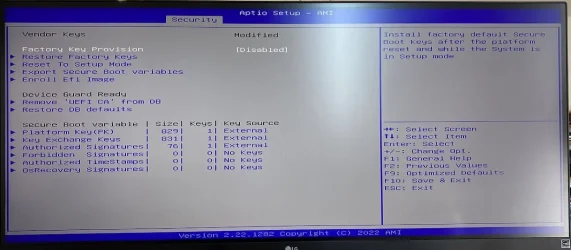
You want to "Factory Key Provision -> Disabled". Then "Reset to Setup Mode".
I'm taking this screen capture from Google search.

d4c620e88cfd5a1f0dd17734faec61321f4182ea.webp
 

My Computer My Computer

At a glance

Windows 7
OS
Windows 7
Thanks will try now & let everyone know results shortly... BTW there is a KEK Update .bin in C:\Users\XXX\AppData\Local\Temp\KEKUpdate_MSI_PK1.bin so I'm hopeful this will be successful. Thanks again for your quick and accurate response.
 

My Computer My Computer

At a glance

Win10 Pro lx64 19045.7184 (extended sec updts)Intel Core i7-6700HQ CPU @ 2.60GHz16gb DDR4Intel HD Graphics 530 (Skylake-H GT2) RealTek...
OS
Win10 Pro lx64 19045.7184 (extended sec updts)
Computer type
Laptop
Manufacturer/Model
MSI PE60 6QE
CPU
Intel Core i7-6700HQ CPU @ 2.60GHz
Motherboard
MSI MS-16J5
Memory
16gb DDR4
Graphics Card(s)
Intel HD Graphics 530 (Skylake-H GT2) RealTek ALC899
Sound Card
Intel Skylake PCH-H - High Definition Audio
Screen Resolution
1920x1080
Hard Drives
Samsung SSD 850 EVO M.2 250GB
HGST HTS721010A9E6301TB 7200 RPM
Samsung PSSD T9 USB SSD
Browser
Chrome
Antivirus
Defender
Other Info
Intel Dual Band Wireless-AC 3165
Qualcomm/Atheros AR8161/8165 PCI-E Gigabit Ethernet Controller
The script first checks if you have an existing KEK CA 2023, and tries in order:

1. Check for your PK's thumbprint, and searches the MS GitHub for a matching thumbprint.

2. Downloads the returned KEK bin file (like MS does).

3. Tries to apply it. In some cases, KEK appends are not supported by the BIOS. So you must go into Setup Mode and wipe the existing certs so the update script can try again with a different method (replace all certs).
 

My Computer My Computer

At a glance

Windows 7
OS
Windows 7
Success! Worked like a charm, you are truly the Master of (Microsoft) Disaster. :cool:

Logs attached:

SUCCESS: NO UPDATES ARE REQUIRED.

PS C:\Users\XXX\Desktop\SecureBoot-CA-2023-Updates>

SUCCESS: Matched 278/278 EFI signatures from "dbxupdate.bin"
SUCCESS: Matched 3/3 SVN signatures from "DBXUpdate2024.bin"
SUCCESS: Matched 3/3 SVN signatures from "DBXUpdateSVN.bin"

PS C:\Users\xxx\Desktop\SecureBoot-CA-2023-Updates>

Secure Boot: ON
Virtualization Based Security: OFF
BitLocker on (C:) OFF

UEFI KEK Certs
--------------
Microsoft Corporation KEK CA 2011
Microsoft Corporation KEK 2K CA 2023

UEFI DB Certs
-------------
Microsoft Corporation UEFI CA 2011
Microsoft Windows Production PCA 2011
Microsoft Option ROM UEFI CA 2023
Microsoft UEFI CA 2023
Windows UEFI CA 2023

UEFI DBX Certs
--------------
Microsoft Windows Production PCA 2011
Windows BootMgr SVN 8.0

EFI Files
---------
Windows Boot Manager [Windows UEFI CA 2023] is ALLOWED.

Registry: WindowsUEFICA2023Capable = 2
[Windows UEFI CA 2023] in UEFI DB, and Windows starting from CA 2023 Boot Manager.

STATUS REPORT
-------------
Registry: UEFICA2023Status = Updated

SUCCESS: UPDATES ARE FINISHED.
UEFI CA 2023 certs are present, PCA 2011 cert is revoked.

PowerShell 7.6.0

A new PowerShell stable release is available: v7.6.1
Upgrade now, or check out the release page at:
Release v7.6.1 Release of PowerShell · PowerShell/PowerShell

SUCCESS: NO UPDATES ARE REQUIRED.

PS C:\Windows\System32>
Kindly advise if there is anything else I need to do, such as removing/deleting 2011 certs, etc.

EDIT: I searched high & low for a way to insert spoiler tag to no avail, can someone let me know via PM if A) It's available B) If so, where it is. TIA!

Also thanks to @anchamp65 for taking the time to reply, much appreciated!
 

My Computer My Computer

At a glance

Win10 Pro lx64 19045.7184 (extended sec updts)Intel Core i7-6700HQ CPU @ 2.60GHz16gb DDR4Intel HD Graphics 530 (Skylake-H GT2) RealTek...
OS
Win10 Pro lx64 19045.7184 (extended sec updts)
Computer type
Laptop
Manufacturer/Model
MSI PE60 6QE
CPU
Intel Core i7-6700HQ CPU @ 2.60GHz
Motherboard
MSI MS-16J5
Memory
16gb DDR4
Graphics Card(s)
Intel HD Graphics 530 (Skylake-H GT2) RealTek ALC899
Sound Card
Intel Skylake PCH-H - High Definition Audio
Screen Resolution
1920x1080
Hard Drives
Samsung SSD 850 EVO M.2 250GB
HGST HTS721010A9E6301TB 7200 RPM
Samsung PSSD T9 USB SSD
Browser
Chrome
Antivirus
Defender
Other Info
Intel Dual Band Wireless-AC 3165
Qualcomm/Atheros AR8161/8165 PCI-E Gigabit Ethernet Controller

My Computers My Computers

  • At a glance

    Win 11 Pro 25H2, Build 26200.8737Intel Core i5 1450064GB DDR4GeForce RTX 4060
    OS
    Win 11 Pro 25H2, Build 26200.8737
    Computer type
    PC/Desktop
    Manufacturer/Model
    Home Brew
    CPU
    Intel Core i5 14500
    Motherboard
    Gigabyte B760M G P WIFI
    Memory
    64GB DDR4
    Graphics Card(s)
    GeForce RTX 4060
    Sound Card
    Chipset Realtek
    Monitor(s) Displays
    LG 45" Ultragear, Acer 24" 1080p
    Screen Resolution
    5120x1440, 1920x1080
    Hard Drives
    Crucial P310 2TB 2280 PCIe Gen4 3D NAND NVMe M.2 SSD (O/S)
    Silicon Power 2TB US75 NVMe PCIe Gen4 M.2 2280 SSD (backup)
    Crucial BX500 2TB 3D NAND (2nd backup)
    Seagate 4TB Ironwolf, rotating HDD archive files
    External off-line backup Drives: 2 NVMe 4TB drives in external enclosures
    PSU
    Thermaltake Toughpower GF3 750W
    Case
    LIAN LI LANCOOL 216 E-ATX PC Case
    Cooling
    Lots of fans!
    Keyboard
    Microsoft Comfort Curve 2000
    Mouse
    Logitech G305
    Internet Speed
    Verizon FiOS 1GB
    Browser
    Firefox
    Antivirus
    Malware Bytes & Windows Defender Security
  • At a glance

    Win 11 Pro 25H2, Build 26200.8655Intel Core i5 1440032GB DDR5Intel 700 Embedded GPU
    Operating System
    Win 11 Pro 25H2, Build 26200.8655
    Computer type
    PC/Desktop
    Manufacturer/Model
    Home Brew
    CPU
    Intel Core i5 14400
    Motherboard
    Gigabyte B760M DS3H AX
    Memory
    32GB DDR5
    Graphics card(s)
    Intel 700 Embedded GPU
    Sound Card
    Realtek Embedded
    Monitor(s) Displays
    27" HP 1080p
    Screen Resolution
    1920x1080
    Hard Drives
    Crucial P310 2TB 2280 PCIe Gen4 eD NAND PCIe SSD
    Samsung EVO 990 2TB NVMe Gen4 SSD
    Samsung 2TB SATA SSD
    PSU
    Thermaltake Smart BM3 650W
    Case
    Okinos Micro ATX Case
    Cooling
    Fans
    Keyboard
    Microsoft Comfort Curve 2000
    Mouse
    Logitech G305
    Internet Speed
    Verizon FiOS 1GB
    Browser
    Firefox
    Antivirus
    Malware Bytes & Windows Defender Security
  • Nimo N171 17" Laptop, (Intel i3-1215U, 16GB RAM, 2TB NVMe, Win11 Pro)
    Acemagic Vista Mini PC V1 (Intel N150, 16GB RAM, 1TB NVMe, Win11 Pro)
    HP ENVY h8-1540t, (24GB RAM, 2TB SSD, 2TB HDD, Win11 Pro)
UEFI DBX Certs
--------------
Microsoft Windows Production PCA 2011
Windows BootMgr SVN 8.0

EFI Files
---------
Windows Boot Manager [Windows UEFI CA 2023] is ALLOWED.

Registry: WindowsUEFICA2023Capable = 2
[Windows UEFI CA 2023] in UEFI DB, and Windows starting from CA 2023 Boot Manager.

STATUS REPORT
-------------
Registry: UEFICA2023Status = Updated

SUCCESS: UPDATES ARE FINISHED.
UEFI CA 2023 certs are present, PCA 2011 cert is revoked.
Also thanks to @anchamp65 for taking the time to reply, much appreciated!
You're all done. PCA 2021 is revoked and SVN is 8.0.

The hardest part of the whole process is hoping users can figure out their BIOS screens. Most PC's will support Setup Mode, but some systems make this a confusing process. I'm in total debt to everyone who has shared their knowledge about how to get through their BIOS menus.
 

My Computer My Computer

At a glance

Windows 7
OS
Windows 7
I'm in total debt to everyone who has shared their knowledge about how to get through their BIOS menus.
If we're counting who owes who some thanks, the balance is greatly tilted in your favor, without a doubt...
The time you take to answer everyone, and the dept of details you provide in each answer is greatly appreciated by all of us !
 

My Computer My Computer

At a glance

Windows 11
OS
Windows 11
I thought I would share with you a response I received on the Mini PC Forum is response to me pointing out there was no Bios update for an Acemagic S1 Mini PC that I own. I had posted the first part of the CheckUEFI script that showed:
Windows 11 25H2 (26200.8328)

Secure Boot: ON
Virtualization Based Security: ON
BitLocker on (C:) OFF

BIOS Firmware
-------------
Default string Default string
Version: 5.26
Date: 2023-09-27

Factory Default UEFI PK Cert
----------------------------
DO NOT TRUST - AMI Test PK

Their response was:

BIOS date ≠ computer manufacturing date. Many OEM machines don't necessarily have updated BIOS versions after leaving the factory; they often use a stable version. This script has two characteristics:

It's a community script, not an official Microsoft tool.
Source: ElevenForum user-written
Purpose: Security self-check/audit
Not belonging to:
Microsoft official
OEM manufacturer tools
Therefore, its "judgment criteria" are defined by the author.

It uses "rule-based judgment," not "security certification."
For example: Seeing AMI test PK
Marking it "untrustworthy."
But in reality:
Many OEM BIOS internal test keys may already exist
Or the fields are not fully standardized.
The script "judges by string," not certified by a security organization.

To determine if this type of script is reliable, consider three points:
Is it an official Microsoft tool?
No

Does it provide "chain of evidence verification"?
No (it only reads fields + rule-based judgment)
Is it possible for false alarms? ✔ Very high (especially the BIOS/UEFI section)

I get the distinct impression they are giving me "the finger"!

Any comments gratefully received.
 

My Computer My Computer

At a glance

Windows11Intel(R) N97, 2000 Mhz, 4 Core(s), 4 Logical16GbIntel(R) UHD Graphics
OS
Windows11
Computer type
PC/Desktop
Manufacturer/Model
Acemagic S1
CPU
Intel(R) N97, 2000 Mhz, 4 Core(s), 4 Logical
Memory
16Gb
Graphics Card(s)
Intel(R) UHD Graphics
Sound Card
(Generic USB Audio)
Monitor(s) Displays
2
Screen Resolution
2560 x 1440 x 59 hertz
Hard Drives
Model KPART512GBC2DVT 512Gb

Latest Support Threads

Back
Top Bottom