Solved garlin's PowerShell scripts for updating Secure Boot CA 2023


My Computer My Computer

At a glance

Win10 Pro lx64 19045.7184 (extended sec updts)Intel Core i7-6700HQ CPU @ 2.60GHz16gb DDR4Intel HD Graphics 530 (Skylake-H GT2) RealTek...
OS
Win10 Pro lx64 19045.7184 (extended sec updts)
Computer type
Laptop
Manufacturer/Model
MSI PE60 6QE
CPU
Intel Core i7-6700HQ CPU @ 2.60GHz
Motherboard
MSI MS-16J5
Memory
16gb DDR4
Graphics Card(s)
Intel HD Graphics 530 (Skylake-H GT2) RealTek ALC899
Sound Card
Intel Skylake PCH-H - High Definition Audio
Screen Resolution
1920x1080
Hard Drives
Samsung SSD 850 EVO M.2 250GB
HGST HTS721010A9E6301TB 7200 RPM
Samsung PSSD T9 USB SSD
Browser
Chrome
Antivirus
Defender
Other Info
Intel Dual Band Wireless-AC 3165
Qualcomm/Atheros AR8161/8165 PCI-E Gigabit Ethernet Controller
Or just use "bcdboot /ex" like MS instructs you (which my script does).

UPDATE: Figured out why Macrium WinRE drives aren't correctly updated, the script is calling bcdboot with a drive letter that doesn't have the ":" character. Which means bcdboot isn't really doing anything. The drive letter is correct everywhere except the one line.
 
Last edited:

My Computer My Computer

At a glance

Windows 7
OS
Windows 7
...I use the WINRE to make my rescue media
By far the easiest method IMHO, I just ran Macrium Rescue builder, chose WinRE, rebuild BCD, create ISO replaced ISO in Ventoy w/ new ... Boots to Macrium just fine whereas before updating it just kept reverting to the Ventoy picker in an endless loop. Thanks @wabbit for solid advice!

Now to update my MTPWiz 9 boot ISO...
 

My Computer My Computer

At a glance

Win10 Pro lx64 19045.7184 (extended sec updts)Intel Core i7-6700HQ CPU @ 2.60GHz16gb DDR4Intel HD Graphics 530 (Skylake-H GT2) RealTek...
OS
Win10 Pro lx64 19045.7184 (extended sec updts)
Computer type
Laptop
Manufacturer/Model
MSI PE60 6QE
CPU
Intel Core i7-6700HQ CPU @ 2.60GHz
Motherboard
MSI MS-16J5
Memory
16gb DDR4
Graphics Card(s)
Intel HD Graphics 530 (Skylake-H GT2) RealTek ALC899
Sound Card
Intel Skylake PCH-H - High Definition Audio
Screen Resolution
1920x1080
Hard Drives
Samsung SSD 850 EVO M.2 250GB
HGST HTS721010A9E6301TB 7200 RPM
Samsung PSSD T9 USB SSD
Browser
Chrome
Antivirus
Defender
Other Info
Intel Dual Band Wireless-AC 3165
Qualcomm/Atheros AR8161/8165 PCI-E Gigabit Ethernet Controller

My Computers My Computers

  • At a glance

    Win 11 Pro 25H2, Build 26200.8737Intel Core i5 1450064GB DDR4GeForce RTX 4060
    OS
    Win 11 Pro 25H2, Build 26200.8737
    Computer type
    PC/Desktop
    Manufacturer/Model
    Home Brew
    CPU
    Intel Core i5 14500
    Motherboard
    Gigabyte B760M G P WIFI
    Memory
    64GB DDR4
    Graphics Card(s)
    GeForce RTX 4060
    Sound Card
    Chipset Realtek
    Monitor(s) Displays
    LG 45" Ultragear, Acer 24" 1080p
    Screen Resolution
    5120x1440, 1920x1080
    Hard Drives
    Crucial P310 2TB 2280 PCIe Gen4 3D NAND NVMe M.2 SSD (O/S)
    Silicon Power 2TB US75 NVMe PCIe Gen4 M.2 2280 SSD (backup)
    Crucial BX500 2TB 3D NAND (2nd backup)
    Seagate 4TB Ironwolf, rotating HDD archive files
    External off-line backup Drives: 2 NVMe 4TB drives in external enclosures
    PSU
    Thermaltake Toughpower GF3 750W
    Case
    LIAN LI LANCOOL 216 E-ATX PC Case
    Cooling
    Lots of fans!
    Keyboard
    Microsoft Comfort Curve 2000
    Mouse
    Logitech G305
    Internet Speed
    Verizon FiOS 1GB
    Browser
    Firefox
    Antivirus
    Malware Bytes & Windows Defender Security
  • At a glance

    Win 11 Pro 25H2, Build 26200.8655Intel Core i5 1440032GB DDR5Intel 700 Embedded GPU
    Operating System
    Win 11 Pro 25H2, Build 26200.8655
    Computer type
    PC/Desktop
    Manufacturer/Model
    Home Brew
    CPU
    Intel Core i5 14400
    Motherboard
    Gigabyte B760M DS3H AX
    Memory
    32GB DDR5
    Graphics card(s)
    Intel 700 Embedded GPU
    Sound Card
    Realtek Embedded
    Monitor(s) Displays
    27" HP 1080p
    Screen Resolution
    1920x1080
    Hard Drives
    Crucial P310 2TB 2280 PCIe Gen4 eD NAND PCIe SSD
    Samsung EVO 990 2TB NVMe Gen4 SSD
    Samsung 2TB SATA SSD
    PSU
    Thermaltake Smart BM3 650W
    Case
    Okinos Micro ATX Case
    Cooling
    Fans
    Keyboard
    Microsoft Comfort Curve 2000
    Mouse
    Logitech G305
    Internet Speed
    Verizon FiOS 1GB
    Browser
    Firefox
    Antivirus
    Malware Bytes & Windows Defender Security
  • Nimo N171 17" Laptop, (Intel i3-1215U, 16GB RAM, 2TB NVMe, Win11 Pro)
    Acemagic Vista Mini PC V1 (Intel N150, 16GB RAM, 1TB NVMe, Win11 Pro)
    HP ENVY h8-1540t, (24GB RAM, 2TB SSD, 2TB HDD, Win11 Pro)
I finally did some actual testing with Macrium Free v8.0.7783, the last free version as "No updates available".

1. Created a WinRE rescue drive:

Screenshot 2026-05-07 113527.webp

Code:
PS C:\Users\GARLIN\Downloads> .\Check_UEFI-CA2023.ps1 -bootmedia -verbose

Bootable Media
--------------
    USB Drive E: "MACRIUM_PE"
        Boot File [Production PCA 2011] is BANNED
            E:\EFI\Microsoft\Boot\bootmgfw.efi
            File Version: 28000.322, SVN 8.0
Code:
PS C:\Users\GARLIN\Downloads> .\Update_UEFI-CA2023.ps1 -BootMedia
Updating WinRE boot media on USB Drive E: "MACRIUM_PE"
Boot files successfully created.
SUCCESS: NO UPDATES ARE REQUIRED.

2. Created a WinPE rescue drive:

Screenshot 2026-05-07 113911.webp

Code:
PS C:\Users\GARLIN\Downloads> .\Check_UEFI-CA2023.ps1 -bootmedia -verbose

Bootable Media
--------------
    USB Drive E: "MACRIUM_PE"
        Boot File [Production PCA 2011] is BANNED
            E:\EFI\Boot\bootx64.efi
            File Version: 22621.1, SVN 1.0
Code:
PS C:\Users\GARLIN\Downloads> .\Update_UEFI-CA2023.ps1 -BootMedia
Updating WinPE boot media on USB Drive E: "MACRIUM_PE"

SUCCESS: NO UPDATES ARE REQUIRED.

3. An important lesson is don't mix & match files, when you're trying to manually update. WinPE needs to replace bootx64.efi (single file copy), and WinRE needs to replace several files in \EFI\Microsoft\Boot folder (bcdboot /ex).

4. Free v8 was released at a time before you had to consider switching boot files, so there's no option to always choose the newer boot file(s). If you make a new USB rescue drive, you will always have to update the files (preferrably using the update script in -BootMedia mode).
 

Attachments

My Computer My Computer

At a glance

Windows 7
OS
Windows 7
This is the command I used to get a newly built Macrium v8.0 Rescue Media USB to boot

copy C:\Windows\Boot\EFI_EX\bootmgfw_EX.efi D:\EFI\Microsoft\Boot\bootmgfw.efi
 

My Computer My Computer

At a glance

Windows 11
OS
Windows 11
4. [Macrium Reflect] Free v8 was released at a time before you had to consider switching boot files, so there's no option to always choose the newer boot file(s). If you make a new USB rescue drive, you will always have to update the files (preferrably using the update script in -BootMedia mode).

I have Macrium Reflect Free v8.0.7783, and earlier versions of the scripts using the -BootMedia option weren't working for me. I just tested the new scripts from your post above, and they are working great now. Thanks for the fix.

Edit: As mentioned in a later post, the proof of the pudding is in the ability to boot. I was able to boot just fine using the Macrium Reflect Free v8.0.7783 recovery disk modified by garlin's script on a system with revoked PCA 2011 cert.
 
Last edited:

My Computer My Computer

At a glance

Windows 11 pro 25h2AMD Ryzen 7 5700G64 GB G.Skill (F4-3200C16Q-64GVK)Integrated into CPU
OS
Windows 11 pro 25h2
Computer type
PC/Desktop
Manufacturer/Model
DIY
CPU
AMD Ryzen 7 5700G
Motherboard
MSI B450M Bazooka, BIOS version 7A38vHJ5 (latest beta as of 2025-09-23)
Memory
64 GB G.Skill (F4-3200C16Q-64GVK)
Graphics Card(s)
Integrated into CPU
Sound Card
Realtek (built into motherboard)
Monitor(s) Displays
Generic HDMI
Screen Resolution
1080p
Hard Drives
System and apps: SK hynix Gold P31 1TB M.2
Data: Toshiba HDWQ140 4TB internal SATA
PSU
Seasonic 400W SS-400FL2 fanless
Case
Fractal Design Define R5
Cooling
Cooler Master Hyper 212 Evo
Keyboard
Lenovo Preferred Pro II Wired External USB Keyboard (4X30M86879)
Mouse
Belkin cheapo corded USB mouse
Internet Speed
300 MBit/sec
Browser
Firefox
Antivirus
Windows Defender
Many Thanks again @garlin (y)


Code:
Bootable Media
--------------
    USB Drive H: "RESCUE"
        Boot File [Production PCA 2011] is BANNED
            H:\EFI\Microsoft\Boot\bootmgfw.efi
            File Version: 19041.4648, SVN 1.0

Code:
PS C:\USB_PS1>  .\Update_UEFI-CA2023.ps1 -BootMedia
Updating WinRE boot media on USB Drive H: "RESCUE"
Boot files successfully created.
SUCCESS: NO UPDATES ARE REQUIRED.

I'm assuming that my MR Rescue deployed successfully on my Ventoy stick because the bootloader on Ventoy is "ALLOWED"... even though it shows as Microsoft Corporation UEFI CA 2011 (now i'm really confused :oops::unsure:)

Code:
Bootable Media
--------------
    USB Drive G: "Ventoy"
    USB Drive H: "VTOYEFI"
        Boot File [Microsoft Corporation UEFI CA 2011] is ALLOWED.
            H:\EFI\Boot\bootx64.efi
            File Version: , SVN 0.0

EDIT: When I ran .\Update_UEFI-CA2023.ps1 -BootMedia I got an "unsigned" warning :what: used SEP: Bypass to run it.
 

My Computer My Computer

At a glance

Win10 Pro lx64 19045.7184 (extended sec updts)Intel Core i7-6700HQ CPU @ 2.60GHz16gb DDR4Intel HD Graphics 530 (Skylake-H GT2) RealTek...
OS
Win10 Pro lx64 19045.7184 (extended sec updts)
Computer type
Laptop
Manufacturer/Model
MSI PE60 6QE
CPU
Intel Core i7-6700HQ CPU @ 2.60GHz
Motherboard
MSI MS-16J5
Memory
16gb DDR4
Graphics Card(s)
Intel HD Graphics 530 (Skylake-H GT2) RealTek ALC899
Sound Card
Intel Skylake PCH-H - High Definition Audio
Screen Resolution
1920x1080
Hard Drives
Samsung SSD 850 EVO M.2 250GB
HGST HTS721010A9E6301TB 7200 RPM
Samsung PSSD T9 USB SSD
Browser
Chrome
Antivirus
Defender
Other Info
Intel Dual Band Wireless-AC 3165
Qualcomm/Atheros AR8161/8165 PCI-E Gigabit Ethernet Controller
Microsoft UEFI CA 2011 is not Windows PCA 2011. Two different certs.

"Microsoft" is for Linux boot files.
"Windows" is for Microsoft boot files.

Also not to be confused with Windows PCA 2010, found on really old Dell BIOS'es.
 

My Computer My Computer

At a glance

Windows 7
OS
Windows 7
EDIT: When I ran .\Update_UEFI-CA2023.ps1 -BootMedia I got an "unsigned" warning :what: used SEP: Bypass to run it.
All my PS scripts are unsigned. An externally verified signing cert will cost serious money, as to deter casual cybercrooks and hackers. For everyone, there's the batch files which automatically call the scripts with "-ExecutionPolicy Bypass" for you.
 

My Computer My Computer

At a glance

Windows 7
OS
Windows 7
EDIT: When I ran .\Update_UEFI-CA2023.ps1 -BootMedia I got an "unsigned" warning :what: used SEP: Bypass to run it.
I had this too after downloading the two scripts above. Curiously, this did not happen when executing the scripts that were unzipped from the zip file in post 1 of this thread. I used 7-zip for the unzipping, not File Explorer.

Anyway, I tried right-clicking on each script and choosing "Properties", checking "Unblock" for each one and clicking OK. After that, the scripts ran fine. I checked the execution policy in PowerShell using Get-ExecutionPolicy, and it returned RemoteSigned. The AI query I did says RemoteSigned allows local scripts to run, so I guess unblocking it makes PowerShell see it as a local script.
 

My Computer My Computer

At a glance

Windows 11 pro 25h2AMD Ryzen 7 5700G64 GB G.Skill (F4-3200C16Q-64GVK)Integrated into CPU
OS
Windows 11 pro 25h2
Computer type
PC/Desktop
Manufacturer/Model
DIY
CPU
AMD Ryzen 7 5700G
Motherboard
MSI B450M Bazooka, BIOS version 7A38vHJ5 (latest beta as of 2025-09-23)
Memory
64 GB G.Skill (F4-3200C16Q-64GVK)
Graphics Card(s)
Integrated into CPU
Sound Card
Realtek (built into motherboard)
Monitor(s) Displays
Generic HDMI
Screen Resolution
1080p
Hard Drives
System and apps: SK hynix Gold P31 1TB M.2
Data: Toshiba HDWQ140 4TB internal SATA
PSU
Seasonic 400W SS-400FL2 fanless
Case
Fractal Design Define R5
Cooling
Cooler Master Hyper 212 Evo
Keyboard
Lenovo Preferred Pro II Wired External USB Keyboard (4X30M86879)
Mouse
Belkin cheapo corded USB mouse
Internet Speed
300 MBit/sec
Browser
Firefox
Antivirus
Windows Defender
When you download individual script files (as attachments), your browser will mark them as "unsafe". It's known as Mark of the Web.
Files will need to be unblocked.

When you extract files from a ZIP, there is no browser to mark each file as "unsafe". So unblocking isn't needed in this instance.
 

My Computer My Computer

At a glance

Windows 7
OS
Windows 7
I finally did some actual testing with Macrium Free v8.0.7783, the last free version as "No updates available".

1. Created a WinRE rescue drive:

View attachment 170830

Code:
PS C:\Users\GARLIN\Downloads> .\Check_UEFI-CA2023.ps1 -bootmedia -verbose

Bootable Media
--------------
    USB Drive E: "MACRIUM_PE"
        Boot File [Production PCA 2011] is BANNED
            E:\EFI\Microsoft\Boot\bootmgfw.efi
            File Version: 28000.322, SVN 8.0
Code:
PS C:\Users\GARLIN\Downloads> .\Update_UEFI-CA2023.ps1 -BootMedia
Updating WinRE boot media on USB Drive E: "MACRIUM_PE"
Boot files successfully created.
SUCCESS: NO UPDATES ARE REQUIRED.

2. Created a WinPE rescue drive:

View attachment 170831

Code:
PS C:\Users\GARLIN\Downloads> .\Check_UEFI-CA2023.ps1 -bootmedia -verbose

Bootable Media
--------------
    USB Drive E: "MACRIUM_PE"
        Boot File [Production PCA 2011] is BANNED
            E:\EFI\Boot\bootx64.efi
            File Version: 22621.1, SVN 1.0
Code:
PS C:\Users\GARLIN\Downloads> .\Update_UEFI-CA2023.ps1 -BootMedia
Updating WinPE boot media on USB Drive E: "MACRIUM_PE"

SUCCESS: NO UPDATES ARE REQUIRED.

3. An important lesson is don't mix & match files, when you're trying to manually update. WinPE needs to replace bootx64.efi (single file copy), and WinRE needs to replace several files in \EFI\Microsoft\Boot folder (bcdboot /ex).

4. Free v8 was released at a time before you had to consider switching boot files, so there's no option to always choose the newer boot file(s). If you make a new USB rescue drive, you will always have to update the files (preferrably using the update script in -BootMedia mode).
Godsend, this works flawlessly!
Thanks a ton mate!
 

My Computers My Computers

  • At a glance

    Windows 11 Pro 25H2AMD Ryzen 5 5600G @ 3.9/4.4Ghz2 x 16 GB DDR4 Kingston Fury Beast 3200 MhzAMD Radeon RX 6600 XT MSI Mech 2X OC Edition ...
    OS
    Windows 11 Pro 25H2
    Computer type
    PC/Desktop
    Manufacturer/Model
    Built PC
    CPU
    AMD Ryzen 5 5600G @ 3.9/4.4Ghz
    Motherboard
    MSI B550M-PRO-WiFi Ver. 1.4
    Memory
    2 x 16 GB DDR4 Kingston Fury Beast 3200 Mhz
    Graphics Card(s)
    AMD Radeon RX 6600 XT MSI Mech 2X OC Edition 8 GB
    Sound Card
    Realtek High Definition Audio (Integrated)
    Monitor(s) Displays
    Samsung C50Rx 27" LED / HP S2031 20" LCD
    Screen Resolution
    1920 x 1080 px / 1600 x 900 px
    Hard Drives
    WD Blue SN570 NVME M.2 SSD [1 TB] -- External Drives: - WD Scorpion Blue 250 GB 5400 RPM (Data Backup) - Hitachi 500 GB 5400 RPM (Software / ISOs Backup) - Toshiba MQ01ABD100 1 TB 5400 RPM (OS Images) - HGST TravelStar 7K1000 1 TB, 7200 RPM USB 3.0 - ADATA SU800 2TB SSD USB 3.0
    PSU
    Corsair RM750e 750W Fully Modular
    Case
    Naceb Hydra NA-1602
    Cooling
    Naceb Orpheus x 3 (Front) + Naceb Cepheus 1200 RPM Max (Rear) + ThemalRight Assasin X 90 SE (CPU)
    Keyboard
    Logitech MK470 Wireless
    Mouse
    Logitech MK470 Wireless
    Internet Speed
    120 MB Symetrical
    Browser
    Firefox / Brave / Edge
    Antivirus
    Windows Defender
    Other Info
    - VMs: WMware Player - Windows 8.1 Pro x64 / Windows 11 Pro
    - Wacom Intuos Pro Small Tablet PTH-460
  • At a glance

    Windows 11 Pro 25H2AMD Ryzen 7 7730U @ 2.0/4.5 Ghz2 x 16 GB Kingston Fury Impact DDR4 3200 MhzRadeon (tm) Graphics Vega 8 (512 MB)
    Operating System
    Windows 11 Pro 25H2
    Computer type
    Laptop
    Manufacturer/Model
    HP Pavilion 15-eh3000la (80M53LA)
    CPU
    AMD Ryzen 7 7730U @ 2.0/4.5 Ghz
    Motherboard
    HP 8BC7
    Memory
    2 x 16 GB Kingston Fury Impact DDR4 3200 Mhz
    Graphics card(s)
    Radeon (tm) Graphics Vega 8 (512 MB)
    Sound Card
    Realtek High Definition Audio (Integrated)
    Monitor(s) Displays
    AU Optronics
    Screen Resolution
    1920 x 1080 px (125% size)
    Hard Drives
    WD Blue SN570 1TB NVME M.2 Drive
    PSU
    45 Watt Charger
    Cooling
    Laptop Cooling Pad
    Keyboard
    Free Wolf Foldable Portable Keyboard
    Mouse
    Free Wolf Wireless Mouse
    Internet Speed
    120 MB Symetrical
    Browser
    Firefox / Brave / Edge
    Antivirus
    Windows Defender
    Other Info
    - 41mWh battery.
    - Wacom Intuos Pro Small Tablet PTH-460
Installed Macrium v8.1.8853 (Trial Version), with the same results as v8.0.7783.

1. Created a WinRE rescue drive:
Code:
Bootable Media
--------------
    USB Drive E: "MACRIUM_PE"
        Boot File [Production PCA 2011] is BANNED
            E:\EFI\Microsoft\Boot\bootmgfw.efi
            File Version: 28000.322, SVN 8.0
Code:
PS C:\Users\GARLIN\Downloads> .\Update_UEFI-CA2023.ps1 -BootMedia
Updating WinRE boot media on USB Drive E: "MACRIUM_PE"
Boot files successfully created.
SUCCESS: NO UPDATES ARE REQUIRED.

2. Created a WinPE rescue drive:
Code:
Bootable Media
--------------
    USB Drive E: "MACRIUM_PE"
        Boot File [Production PCA 2011] is BANNED
            E:\EFI\Boot\bootx64.efi
            File Version: 22621.1, SVN 1.0
Code:
PS C:\Users\GARLIN\Downloads> .\Update_UEFI-CA2023.ps1 -BootMedia
Updating WinPE boot media on USB Drive E: "MACRIUM_PE"

SUCCESS: NO UPDATES ARE REQUIRED.
 

My Computer My Computer

At a glance

Windows 7
OS
Windows 7
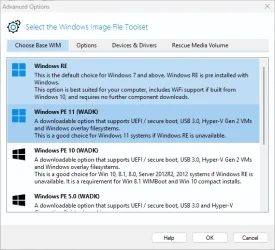
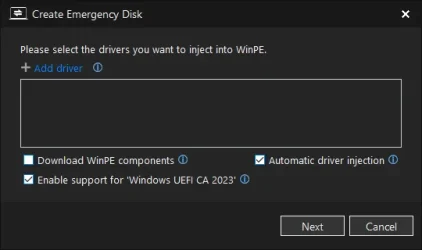
Installed Hasleo Backup Site Free v5.8.2.0.

Created an Emergency Disk:

Screenshot 2026-05-07 220333.webp

Code:
Bootable Media
--------------
    USB Drive E: "HASLEOBS"
        Boot File [Windows UEFI CA 2023] is ALLOWED.
            E:\EFI\Boot\bootx64.efi
            File Version: 28000.322, SVN 8.0

Very nice.
 

My Computer My Computer

At a glance

Windows 7
OS
Windows 7
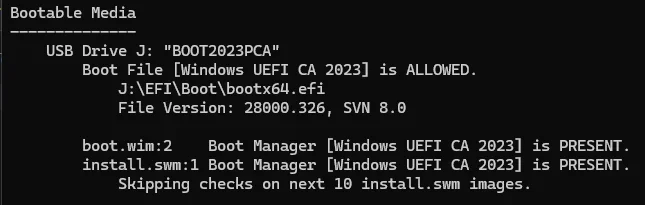
The real test is verifying that they actually boot. This is my Win 11 install media:

1778220615478.webp

Looks good, right?

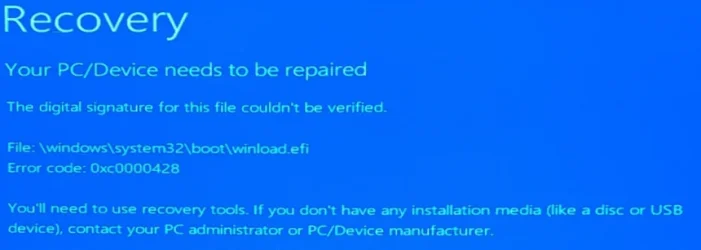
Nope.

1778220673414.webp
 

My Computers My Computers

  • At a glance

    Win 11 Pro 25H2 26200.8737Intel® Core™ i7-14700KG.SKILL Ripjaws S5 Series 64GB (2 x 32GB) DDR5ASUS GeForce RTX 4070 Super 12GB
    OS
    Win 11 Pro 25H2 26200.8737
    Computer type
    PC/Desktop
    Manufacturer/Model
    Self Built
    CPU
    Intel® Core™ i7-14700K
    Motherboard
    ASUS TUF Z690-PLUS WIFI BIOS 4505 11/29/25
    Memory
    G.SKILL Ripjaws S5 Series 64GB (2 x 32GB) DDR5
    Graphics Card(s)
    ASUS GeForce RTX 4070 Super 12GB
    Sound Card
    Sound Blaster AE-5 Plus
    Monitor(s) Displays
    ASUS TUF Gaming 27" 2K HDR Gaming
    Screen Resolution
    2560 x 1440
    Hard Drives
    Samsung 990 Pro 1TB NVMe (Win 11 25H2)
    SK hynix P41 500GB NVMe 25H2 DEV/Games
    SK hynix P41 2TB NVMe (x3)
    Crucial P3 Plus 4TB
    PSU
    Corsair RM850x Shift
    Case
    Antec Dark Phantom DP502 FLUX
    Cooling
    Corsair Nautilus 360 RS AIO
    Keyboard
    Logitech MK 320
    Mouse
    Razer Basilisk V3
    Internet Speed
    750Mbs
    Browser
    Firefox
    Antivirus
    Winows Security
    Other Info
    MR 8.1 Home
  • At a glance

    Win 11 Pro 25H2 26200.8737Intel Core i7-11700F64 GB DDR4MSI GeForce RTX 3060 Ventus 2X 12GB
    Operating System
    Win 11 Pro 25H2 26200.8737
    Computer type
    PC/Desktop
    Manufacturer/Model
    Self Built
    CPU
    Intel Core i7-11700F
    Motherboard
    Asus TUF Gaming Z590 Plus WiFi (BIOS 2803)
    Memory
    64 GB DDR4
    Graphics card(s)
    MSI GeForce RTX 3060 Ventus 2X 12GB
    Sound Card
    SoundBlaster Audigy Fx V2
    Monitor(s) Displays
    Samsung F27T350
    Screen Resolution
    1920x1080
    Hard Drives
    Samsung 980 Pro 1TB
    Samsung 970 EVO Plus 2TB
    Samsung 870 EVO 500GB SSD
    PSU
    Corsair HX750
    Case
    Cougar MX330-G Window
    Cooling
    Thermalright Frozen Edge 240 Black AIO
    Internet Speed
    350Mbps
    Browser
    Firefox
    Antivirus
    Windows Security
  • System Three
    Win 11 Pro 25H2 26200.8737
    ASUS PRIME Z370-P II BIOS 3004 7/12/21
    Intel Core i7-8700 CPU @ 3.20GHz
    32GB DDR4 RAM (4x8)
    iGPU Intel UHD Graphics 630
    Mid-Tower Desktop
I believe you have a SkuSiPolicy, and different versions of it exist (even they're all "3.0.0.14").

For example:
Code:
Policy File: "C:\Windows\System32\SecureBootUpdates\SkuSiPolicy.p7b" (3.0.0.14)

ID                   MinimumFileVersion MaximumFileVersion
--                   ------------------ ------------------
ID_FILEATTRIB_F_0010 0.0.0.0            10.0.14393.9039
ID_FILEATTRIB_F_000E 10.0.14400.0       10.0.17763.8619
ID_FILEATTRIB_F_000D 10.0.18000.0       10.0.19041.7159
ID_FILEATTRIB_F_0016 10.0.19100.0       10.0.20348.4999
ID_FILEATTRIB_F_0017 10.0.20400.0       10.0.22621.6914
ID_FILEATTRIB_F_000F 10.0.23000.0       10.0.25398.2259
ID_FILEATTRIB_F_0014 10.0.25400.0       10.0.26100.8220
ID_FILEATTRIB_F_0013 10.0.26100.32000   10.0.26100.32649
ID_FILEATTRIB_F_0012 10.0.26172.0       10.0.26172.32650
ID_FILEATTRIB_F_0015 10.0.27000.0       10.0.28000.1815
ID_FILEATTRIB_F_0011 10.0.29426.0       65535.65535.65535.65535

Each policy version allows a specific range of winload.efi builds. I have a working prototype, but unfortunately it adds 3500 more lines of PS (I'm borrowing another function from a known security researcher to recover XML rules from a SkuSiPolicy file). It would be nice to shrink that general function down, but currently I'm not sure how to begin.
 

My Computer My Computer

At a glance

Windows 7
OS
Windows 7
That particular media was built with the official ISO downloaded from MS.

I believe you have a SkuSiPolicy, and different versions of it exist (even they're all "3.0.0.14").

I do.
1778226888879.webp

Here's the thing though, I built a Win 11 install media using a ISO from UUPdump that booted straight-away, no other updates needed.
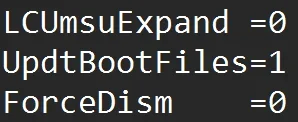
Prior to running the download command I opened the ConvertConfig.ini file and changed UpdtBootFiles=0 to UpdtBootFiles=1
1778227307331.webp

Saved and closed the file then ran the uup_download_windows.cmd file.

I have been using the updated Make2023BootableMedia.ps1 script to build my Win 11 media.


I used Example 6, but added -FileSystem FAT32, otherwise it defaults to ExFAT.
 

My Computers My Computers

  • At a glance

    Win 11 Pro 25H2 26200.8737Intel® Core™ i7-14700KG.SKILL Ripjaws S5 Series 64GB (2 x 32GB) DDR5ASUS GeForce RTX 4070 Super 12GB
    OS
    Win 11 Pro 25H2 26200.8737
    Computer type
    PC/Desktop
    Manufacturer/Model
    Self Built
    CPU
    Intel® Core™ i7-14700K
    Motherboard
    ASUS TUF Z690-PLUS WIFI BIOS 4505 11/29/25
    Memory
    G.SKILL Ripjaws S5 Series 64GB (2 x 32GB) DDR5
    Graphics Card(s)
    ASUS GeForce RTX 4070 Super 12GB
    Sound Card
    Sound Blaster AE-5 Plus
    Monitor(s) Displays
    ASUS TUF Gaming 27" 2K HDR Gaming
    Screen Resolution
    2560 x 1440
    Hard Drives
    Samsung 990 Pro 1TB NVMe (Win 11 25H2)
    SK hynix P41 500GB NVMe 25H2 DEV/Games
    SK hynix P41 2TB NVMe (x3)
    Crucial P3 Plus 4TB
    PSU
    Corsair RM850x Shift
    Case
    Antec Dark Phantom DP502 FLUX
    Cooling
    Corsair Nautilus 360 RS AIO
    Keyboard
    Logitech MK 320
    Mouse
    Razer Basilisk V3
    Internet Speed
    750Mbs
    Browser
    Firefox
    Antivirus
    Winows Security
    Other Info
    MR 8.1 Home
  • At a glance

    Win 11 Pro 25H2 26200.8737Intel Core i7-11700F64 GB DDR4MSI GeForce RTX 3060 Ventus 2X 12GB
    Operating System
    Win 11 Pro 25H2 26200.8737
    Computer type
    PC/Desktop
    Manufacturer/Model
    Self Built
    CPU
    Intel Core i7-11700F
    Motherboard
    Asus TUF Gaming Z590 Plus WiFi (BIOS 2803)
    Memory
    64 GB DDR4
    Graphics card(s)
    MSI GeForce RTX 3060 Ventus 2X 12GB
    Sound Card
    SoundBlaster Audigy Fx V2
    Monitor(s) Displays
    Samsung F27T350
    Screen Resolution
    1920x1080
    Hard Drives
    Samsung 980 Pro 1TB
    Samsung 970 EVO Plus 2TB
    Samsung 870 EVO 500GB SSD
    PSU
    Corsair HX750
    Case
    Cougar MX330-G Window
    Cooling
    Thermalright Frozen Edge 240 Black AIO
    Internet Speed
    350Mbps
    Browser
    Firefox
    Antivirus
    Windows Security
  • System Three
    Win 11 Pro 25H2 26200.8737
    ASUS PRIME Z370-P II BIOS 3004 7/12/21
    Intel Core i7-8700 CPU @ 3.20GHz
    32GB DDR4 RAM (4x8)
    iGPU Intel UHD Graphics 630
    Mid-Tower Desktop
The boot sequence for Windows involves two different files. UEFI searches for bootmgfw.efi or bootx64.efi (if the first filename isn't found) on the EFI partition. Boot manager in turn runs winload.efi on the Windows volume, which actually kicks off the full Windows startup.

1. Let's assume you have a fully updated Windows install image, from MCT (April 2026) or UUP dump (26200.8246+). There are two parallel sets of boot files: folder "\Windows\Boot\EFI" (CA 2011) and folder "\Windows\Boot\EFI_EX" (CA 2023).

2. When you use UpdtBootFiles=1, or ask Rufus to copy the latest boot files, the decision is made to copy bootx64.efi from the install image's EFI_EX folder. If for some reason, you haven't installed the CA 2023 certs, then you would use the default EFI folder.

Eventually I would expect the EFI (CA 2011) folder to disappear in 27H2, and there would only be a single version of the boot files.

3. The boot manager is different from winload.efi, which can also be updated in later Monthly Updates. Boot manager and winload.efi don't have to be in sync, they serve different purposes. But the execution chain with Secure Boot is a trusted boot manager runs winload.efi

4. To restrict the allowed versions of winload.efi, SkuSiPolicy is deployed whenever you have Virtualization Based Security. It's not mandatory, but normally done as an extra security feature. SkuSiPolicy has a range of banned winload.efi versions (presumably because they have security holes). When your winload.efi version falls into one of the banned ranges, you get the digital signature error.

Windows could be more helpful and display "SkuSiPolicy doesn't allow this version of winload.efi", but we're stuck with it.

5. One of the classic MS problems (as a large company) is the old left hand & right hand problem. SkuSiPolicy is not exactly the same file across the different releases! Some Insider builds are stuck on 3.0.0.13, while production builds are 3.0.0.14. Even the banned ranges inside the SkuSiPolicy file are not exactly the same. Some won't tolerate winload.efi from higher Insider builds.

To my knowledge there is no general tool for predicting a given image (or winload.efi) will work with a specific SkuSiPolicy. This also applies to Macrium and other bootable USB drives. MS has this contradictory approach which boils down to "try booting and if you get an error, then go investigate" rather than a proactive approach.

Even more confusing, the same bootable USB might work on a different PC, because it doesn't have a SkuSiPolicy in the EFI or its SkuSiPolicy isn't the same one. So yeah... I've realized the scripts have gotten much longer and more involved, because the stricter security requirements require everyone to jump through more hoops.
 

My Computer My Computer

At a glance

Windows 7
OS
Windows 7
UPDATE: 2026-05-08

Download the new ZIP file from post #1, or from GitHub.

1. Get-SecureBootUEFI_DBXSVN should sort SVN's as [Version] type, instead of implicit string type
2. Write a finite state machine for $UpdateMessage and $RevokeMessage
3. 32-bit PowerShell cannot read \Windows\System32\SecureBootUpdates folder
4. Remove SBAT option for Update_UEFI-CA2023.ps1, and make it a mandatory update
5. BUG: Update_UEFI-CA2023.ps1 doesn't correctly update WinRE boot media


New version of scripts, with mostly bug fixes.

32-bit PowerShell is correctly supported; removed the -SBAT option from the update script as nobody used it (and MS is pushing SBAT to the UEFI on its own); and finally fixed the problem with updating Macrium (and other WinRE) boot drives.

What's new? In -Verbose mode, you will likely see some UEFI Variables.

DeviceGuard (VBS) can be UEFI locked, where Windows transfers the enable/disable policy control out of the registry and into a secure UEFI variable. If the UEFI is "locked", then changing the registry settings won't disable DeviceGuard enforcement. You need to clear the UEFI lock, to return enable/disable rights back to Windows.

Credential Guard (LSA) can also be UEFI locked. LSA is a setting you can find in Windows Security Center, under Core Isolation.

SBAT is a Linux only setting which the Secure Boot task pushes out even if you don't own Linux. It doesn't affect Windows, but is done to "protect" current or future Linux installs. There is a reg key to opt out of SBAT, but it must be applied before the Secure Boot task runs.

For most of you, it's too late to block it. You can't clear SBAT without wiping the UEFI Secure Boot setting back to factory defaults. So stop worrying it's there. It's only reported in verbose mode, for transparency.

The UEFI Variables aren't directly related to the CA 2023 certs, but are additional Windows security measures that MS is pushing out at the same time. If you have problems trying to disable certain VBS-related security features, they may be locked by UEFI variables. I'm working on a separate script to help clear the DeviceGuard and Credential Guard locks, but it's not 100% reliable.
 

My Computer My Computer

At a glance

Windows 7
OS
Windows 7

Latest Support Threads

Back
Top Bottom