Solved garlin's PowerShell scripts for updating Secure Boot CA 2023


UPDATE: 2026-06-14

1. Missing brace on Boot Manager validation if-then
2. Allow Update_UEFI-CA2023.ps1 to make post-revocation updates without requiring -Revoke option
3. Verbose mode for Check_DBXUpdate.bin.ps1 doesn't report missing EFI signatures when they're missing from the GitHub JSON file

Finally, I believe the string index problem with SVN has been squashed. Sorry that one took so long, was looking in the wrong error condition.
 

My Computer

System One

  • OS
    Windows 7
I have read this whole thread and I never felt like your tool was being put down by any of Garlin's comments

So this:
But with any crypto tool, you always have ask if your tools are secure. The source code for Mosby is available on GitHub for everyone to examine, but you might need to be a subject matter expert to fully understand the code.

Cannot be construed as a veiled insinuation that, because most people aren't experts on crypto, they may want to be cautious about using Mosby?

Please try to re-read the quote objectively, in context, because sentences like "you always have to ask if your tools are secure" are very hard to construe as unbiased, objective (especially when the same should apply equally to PowerShell scripts) or non-disparaging. And in previous comments, garlin also put forward the idea that using self-signing to install certs was somehow less secure (whereas Mosby runs in Setup Mode anyway, so it doesn't make a difference if what you install is signed or not, and as I pointed out, the origin of what we install, which is the exact same as garlin's script, can easily be assessed in our project). Mosby and the script install the same base data in the end, obtained directly from Microsoft with no alteration. And instead of giving credence to "but there's always the possibility that something that doesn't install the signed updates directly from Windows might be doing something nefarious...", you can actually validate what gets installed, and conclude that there is no inherently one approach that is "less secure" than the other when the end result is that the exact same data gets installed in the relevant Secure Boot stores.

EDIT:
Is this where people should be referred to when they have questions about Mosby ?
GitHub pbatard Mosby issue tracker

If you read my previous reply, you shouldn't have to ask that question. I explicitly pointed that out there, with the link so I already directly answered the question. All in all, can I ask you to perhaps not skim over what people post here? Because, if you want to put forward the idea that there's nothing in what garlin said that was problematic, you may want to demonstrate that you actually did read the counter argument in full.
 

My Computer

System One

  • OS
    Windows 11
    Computer type
    PC/Desktop
    Manufacturer/Model
    Home Built
    Screen Resolution
    4k
Correct. If you have an EFI boot manager that has SVN 8.0, and your current DBX SVN 9.0, then it's not allowed the next time you reboot.

The provided commands from the script will ask the Secure Boot task to copy a new boot manager. Just remember: if you ever get locked out by accident, temporarily disable Secure Boot. Then you start Windows and run the script to figure out why you weren't allowed to boot.
first of all, thx garlin for this wonderfull script, and for the response, anyway, i found the problem on my system, i run win10 and win11 in dualboot, but for some reason when i tried to update the windows 11 my computer was not booting from the Win11 EFI system partition, no matter from where i want to boot, win10 or 11 the system kept using the win10 EFI partition, i had to do a fix in the BCD of windows 11 to link the correct EFI partition of windows 11, don't know if you understand it a bit, my english is not that good though ;) anyway, now all is ok, thx again !
 

My Computer

System One

  • OS
    Win11
    Computer type
    PC/Desktop
    Manufacturer/Model
    Gigabyte z790 UD AX
    CPU
    I7-12700K
    Motherboard
    Gigabyte z790 UD AX
    Memory
    2x16 DDR5 - 6000 CL36
    Graphics Card(s)
    Gigabyte RX 9060 XT 16Gb.
    Sound Card
    Creative Sound BlasterX G6
    Monitor(s) Displays
    Iiyama G-Master GB2741QSU 144hz
    Screen Resolution
    2560x1440
    PSU
    Corsair RM750x
    Cooling
    Scythe Mugen 6
    Keyboard
    Corsair K55 RGB Pro XT
    Mouse
    Logitech G502 Hero
    Internet Speed
    Fiber 1G 1000/500
    Browser
    Firefox
You make an important point. When I first wrote the check script, it was very simple and looked for the EFI volume on the system drive by matching for the "System" partition. This only works if you have a simple setup. For example, there is only one disk or you don't make extra partitions to allow for dual-boot.

As more users tried the script on their systems, it was obvious that different disk layouts could confuse the script and make it look at the wrong disk volume. After trying several different methods, I switched to the BCD store's details for {bootmgr}.

A similar problem can happen to WinRE, the "reagentc /info" points to a wrong volume. But the user doesn't notice because they have not recently booted into the Recovery Environment. Some of these problems have required a lot of work to debug, but hopefully the scripts are more accurate now.
 

My Computer

System One

  • OS
    Windows 7
@garlin ,

Well it was a tense 90 minutes, but I think it all worked. My BIOS menu was unique, and very difficult to navigate, not like the Dell or your instructions, but I bumbled my way through. Then I had to re-enable my Windows PIN, which turned out to be also time-consuming for some reason. I guess Microsoft does not like me.

Below is my latest Check_UEFI.bat results.

Windows 11 25H2 (26200.8655)

Secure Boot: ON
Virtualization Based Security: OFF
BitLocker on (C:) OFF

BIOS Firmware
-------------
Dell Inc. XPS 8930
Version: 1.1.31
Date: 2023-11-20

Factory Default UEFI PK Cert
----------------------------
Pegatron PK

UEFI PK Cert
------------
Pegatron PK

Factory Default UEFI KEK Certs
------------------------------
Microsoft Corporation KEK CA 2011

UEFI KEK Certs
--------------
Microsoft Corporation KEK CA 2011
Microsoft Corporation KEK 2K CA 2023

Factory Default UEFI DB Certs
-----------------------------
Microsoft Corporation UEFI CA 2011
Microsoft Windows Production PCA 2011

UEFI DB Certs
-------------
Microsoft Corporation UEFI CA 2011
Microsoft Windows Production PCA 2011
Microsoft Option ROM UEFI CA 2023
Microsoft UEFI CA 2023
Windows UEFI CA 2023

Factory Default UEFI DBX Certs
------------------------------
(NONE)
EFI_CERT_SHA256_GUID Signatures: 77

UEFI DBX Certs
--------------
(NONE)
Windows BootMgr SVN is MISSING.
EFI_CERT_SHA256_GUID Signatures: 495

UEFI Variables
--------------
Credential Guard: ON
SBAT (Linux only): sbat,1,2024010900 / shim,4 / grub,3 / grub.debian,4

EFI Files
---------
Windows Boot Manager [Windows UEFI CA 2023] is ALLOWED.
\\.\HarddiskVolume4\EFI\Microsoft\Boot\bootmgfw.efi
File Version: 28000.342, SVN 9.0

Registry: "WindowsUEFICA2023Capable" = 2
[Windows UEFI CA 2023] in UEFI DB, and Windows starting from CA 2023 Boot Manager.


REQUIRED ACTION
===============
To REVOKE the [PCA 2011] cert, run the commands:

reg add HKEY_LOCAL_MACHINE\SYSTEM\CurrentControlSet\Control\Secureboot /v AvailableUpdates /t REG_DWORD /d 0x280 /f
powershell Start-ScheduledTask -TaskName "\Microsoft\Windows\PI\Secure-Boot-Update"

PS C:\WINDOWS\system32>

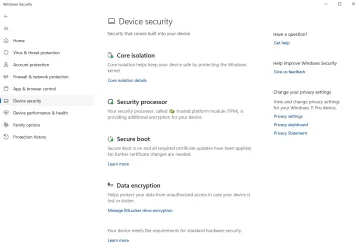
I have attached an image of the welcome news from the Windows Security - Device Security screen

If I am not mistaken, I am good to go ... ? You did salvage my beloved Dell XPS 8930 SE, and for that I owe you BIG TIME!

Thank you again, and have a great day.

Regards,
Phil
 

Attachments

  • Windows Security Device Security.webp
    Windows Security Device Security.webp
    66.2 KB · Views: 1

My Computers

System One System Two

  • OS
    Windows 11 Pro Version 25H2 (Build 26200.8655
    Computer type
    PC/Desktop
    Manufacturer/Model
    Dell XPS8930 SE
    CPU
    Intel i7-9700K 4700 MHz
    Motherboard
    Dell XPS 8930
    Memory
    32 GB (4 x 8GB SK Hynix DDR4 @1333 MHz) (2666 MHz)
    Graphics Card(s)
    NVIDIA GeForce RTX 2060 (6 GB) GDDR6 300 MHz
    Sound Card
    None
    Monitor(s) Displays
    Dell UltraSharp U2518D 25"
    Screen Resolution
    2560 x 1440
    Hard Drives
    NVMe Intel 1024 TB
    Seagate 2 TB, SATA-III
    Western Digital Black 4TB
    PSU
    850 W Gold Standard
    Case
    Dell XPS 8930 Base (Special Edition)
    Cooling
    Air
    Keyboard
    Dell 0G4D2W
    Mouse
    Dell MOCZUL
    Internet Speed
    Download 553 Mbps, Upload 686 Mbps
    Browser
    Google Chrome
    Antivirus
    ESET Smart Security Premium, plus Malwarebytes Premium
    Other Info
    BIOS Version 1.1.31
  • Operating System
    Windows 11 Pro Version 25H2 (Build 26200.8655)
    Computer type
    Laptop
    Manufacturer/Model
    Dell XPS 15 7590
    CPU
    i7-9750H 4.5 GHz
    Motherboard
    Dell XPS 15 7590
    Memory
    16 GB (2 x 8GB @ 1333 MHz) DDR4-2666 MHz
    Graphics card(s)
    NVIDIA GeForce 1650 4 GB GDDR5
    Sound Card
    None
    Monitor(s) Displays
    Dell XPS 15 7590, 15.6" InfinityEdge Anti-Glare, Non-Touch
    Screen Resolution
    1920 x 1080
    Hard Drives
    512 GB M.2 PCle NVMe SK Hynix
    PSU
    130W Power Adapter
    Case
    Dell XPS 15 7590
    Cooling
    Air
    Keyboard
    Laptop
    Mouse
    Logitech M510
    Internet Speed
    Download: 400 Mbps, Upload: 203 Mbps
    Browser
    Google Chrome
    Antivirus
    ESET Smart Security Premium, plus Malwarebytes Premium
    Other Info
    BIOS Version 1.35.0
Well it was a tense 90 minutes, but I think it all worked. My BIOS menu was unique, and very difficult to navigate, not like the Dell or your instructions, but I bumbled my way through. Then I had to re-enable my Windows PIN, which turned out to be also time-consuming for some reason. I guess Microsoft does not like me.

Below is my latest Check_UEFI.bat results.
Your PC has the CA 2023 certs added, but hasn't revoked CA 2011 yet. You can wait for MS to perform that later this year.

I have to hand to you folks for having the perseverance to learn your BIOS setup screens. As I've said before, I don't have access to so many PC's and can't tell how your BIOS works. Give yourself a pat on the back. You only have to do this process once, but save your notes in case you ever have to end up resetting the BIOS for another unrelated issue.
 

My Computer

System One

  • OS
    Windows 7
@garlin ,

You are AWESOME! THANK YOU.

I didn't make any notes. I just bumbled through the BIOS trying to find a way to do what you suggested. There were a lot of wrong turns, but patience and determination triumphed in the end.

I stay away from the BIOS. I haven't been in it since the last Dell BIOS update in May 2023 to Version 1.31. I only went there then because each Dell BIOS update would change three settings back to Dell defaults, allowing Windows Update to manage BIOS version updates, and that can cause grief. For years now, I only update the BIOS via the Dell Flash Update method with a FAT32 USB stick with just the BIOS update file on it. That is the safest way to do it. Even the infamous Dell Support Assist would mess up from time to time. I got rid of that, and other Dell bloatware, as soon as my warranty ran out in October 2020.

Yes, I am feeling pretty proud of myself, and most very grateful to you for your wonderful scripts. ESET kept interfering, and I even had to learn how to Run a .ps1 script. I had never done that before.

I do want to commend you for all of the time and expertise you share with ElevenForum members. You are a tremendous asset to ElevenForum!

You have my undying gratitude. I just wish I could award a lot more reputation points, because that is your only "payment"; that, and knowing that you are helping so many fellow computer users. You truly are a gentleman and a scholar!

Have a very great day. You made mine!!!

Best Regards,
Phil
 

My Computers

System One System Two

  • OS
    Windows 11 Pro Version 25H2 (Build 26200.8655
    Computer type
    PC/Desktop
    Manufacturer/Model
    Dell XPS8930 SE
    CPU
    Intel i7-9700K 4700 MHz
    Motherboard
    Dell XPS 8930
    Memory
    32 GB (4 x 8GB SK Hynix DDR4 @1333 MHz) (2666 MHz)
    Graphics Card(s)
    NVIDIA GeForce RTX 2060 (6 GB) GDDR6 300 MHz
    Sound Card
    None
    Monitor(s) Displays
    Dell UltraSharp U2518D 25"
    Screen Resolution
    2560 x 1440
    Hard Drives
    NVMe Intel 1024 TB
    Seagate 2 TB, SATA-III
    Western Digital Black 4TB
    PSU
    850 W Gold Standard
    Case
    Dell XPS 8930 Base (Special Edition)
    Cooling
    Air
    Keyboard
    Dell 0G4D2W
    Mouse
    Dell MOCZUL
    Internet Speed
    Download 553 Mbps, Upload 686 Mbps
    Browser
    Google Chrome
    Antivirus
    ESET Smart Security Premium, plus Malwarebytes Premium
    Other Info
    BIOS Version 1.1.31
  • Operating System
    Windows 11 Pro Version 25H2 (Build 26200.8655)
    Computer type
    Laptop
    Manufacturer/Model
    Dell XPS 15 7590
    CPU
    i7-9750H 4.5 GHz
    Motherboard
    Dell XPS 15 7590
    Memory
    16 GB (2 x 8GB @ 1333 MHz) DDR4-2666 MHz
    Graphics card(s)
    NVIDIA GeForce 1650 4 GB GDDR5
    Sound Card
    None
    Monitor(s) Displays
    Dell XPS 15 7590, 15.6" InfinityEdge Anti-Glare, Non-Touch
    Screen Resolution
    1920 x 1080
    Hard Drives
    512 GB M.2 PCle NVMe SK Hynix
    PSU
    130W Power Adapter
    Case
    Dell XPS 15 7590
    Cooling
    Air
    Keyboard
    Laptop
    Mouse
    Logitech M510
    Internet Speed
    Download: 400 Mbps, Upload: 203 Mbps
    Browser
    Google Chrome
    Antivirus
    ESET Smart Security Premium, plus Malwarebytes Premium
    Other Info
    BIOS Version 1.35.0
I would like to give an update on my battle with my HP Z440 workstation. Last week I left off with the UEFI PK having (none) when I ran the check-UEFI -verbose script, which resulted in windows 11 not running in secure boot mode.
So I tried to get back a UEFI PK. Searching on the internet did not help me any further. So I started to experiment:
1. Reinstalling the same bios version did not make a difference.
2. In the bios I set the secure boot to ON and then reset it to factory defaults ( before, I had done the same, but with secure boot off and that did not resolve anything). I restarted the machine, and ran the update-UEFI.bat. Checking with check-UEFI.bat -verbose showed that there was again a UEFI PK from HP. Why it did not do so, when secure boot was off, is not clear to me, but, hell, I didn't care anymore. I rebooted and saw that there was no secure boot. I went back to the bios and saw it had been reset to secure boot off. No idea why. Resetting it to secure boot, then gave the message: selected boot image did not authenticate. So, again in the bios I set the secure boot to off, and restarted.
Running the update-UEFI.bat resulted in successfull updates to KEK, and DB. Rebooted with secure boot still off. Then I ran update-UEFI.bat -Revoke and rebooted as the script told me to.
After reboot, using check-UEFI -Audit told me all was well, but secure boot off.
Then I set it to secure boot ON in the bios, and restarted.
Now I get from .\check-UEFI.bat -Verbose
PowerShell 7.6.2
Windows 11 25H2 (26200.8655)

Secure Boot: ON
Virtualization Based Security: ON
BitLocker on (C:) OFF

BIOS Firmware
-------------
Hewlett-Packard HP Z440 Workstation
Version: M60 v02.62
Date: 2024-01-04

Factory Default UEFI PK Cert
----------------------------
Hewlett-Packard UEFI Secure Boot Platform Key

UEFI PK Cert
------------
Hewlett-Packard UEFI Secure Boot Platform Key

Factory Default UEFI KEK Certs
------------------------------
Microsoft Corporation KEK CA 2011
Hewlett-Packard UEFI Secure Boot Key Exchange Key

UEFI KEK Certs
--------------
Microsoft Corporation KEK CA 2011
Microsoft Corporation KEK 2K CA 2023
Hewlett-Packard UEFI Secure Boot Key Exchange Key

Factory Default UEFI DB Certs
-----------------------------
Microsoft Corporation UEFI CA 2011
Microsoft Windows Production PCA 2011
Hewlett-Packard UEFI Secure Boot DB Key

UEFI DB Certs
-------------
Microsoft Corporation UEFI CA 2011
Microsoft Windows Production PCA 2011
Microsoft Option ROM UEFI CA 2023
Microsoft UEFI CA 2023
Windows UEFI CA 2023
Hewlett-Packard UEFI Secure Boot DB Key
HP UEFI Secure Boot 2013 DB key

Factory Default UEFI DBX Certs
------------------------------
(NONE)
EFI_CERT_SHA256_GUID Signatures: 14

UEFI DBX Certs
--------------
Microsoft Windows Production PCA 2011
Windows BootMgr SVN 9.0
EFI_CERT_SHA256_GUID Signatures: 296

UEFI Variables
--------------
Credential Guard: ON
SBAT (Linux only): sbat,1,2024010900 / shim,4 / grub,3 / grub.debian,4

EFI Files
---------
Windows Boot Manager [Windows UEFI CA 2023] is ALLOWED.
\\.\HarddiskVolume1\EFI\Microsoft\Boot\bootmgfw.efi
File Version: 28000.342, SVN 9.0

Registry: "WindowsUEFICA2023Capable" = 2
[Windows UEFI CA 2023] in UEFI DB, and Windows starting from CA 2023 Boot Manager.

SkuSiPolicy.p7b is CURRENT.
\\.\HarddiskVolume1\EFI\Microsoft\Boot\SkuSiPolicy.p7b
Version: 3.0.0.15


STATUS REPORT
-------------
Registry: "UEFICA2023Status" = Updated

SUCCESS: UPDATES ARE FINISHED.
UEFI CA 2023 certs are present, PCA 2011 cert is revoked.

PS C:\Users\admin\Downloads\SecureBoot-CA-2023-Updates-2026.06.14> .\Check-DBX.bat
PowerShell 7.6.2
SUCCESS: Matched 289/289 EFI signatures from "dbxupdate.bin"
SUCCESS: Matched 3/3 SVN signatures from "DBXUpdate2024.bin"
SUCCESS: Matched 3/3 SVN signatures from "DBXUpdateSVN.bin"

So, that means I have finally cracked it, and this machine is now up-to-date.
Cinsdering the hoops I had to go through to get this going, a huge lemon goes to HP and Microsoft for leaving people with older machines in the lurch.
A huge thank you to Garlin for his scripts, his explanations and his willingness to keep helping us, non-experts. THANK YOU.
 

My Computer

System One

  • OS
    windows 11
So, that means I have finally cracked it, and this machine is now up-to-date.
Cinsdering the hoops I had to go through to get this going, a huge lemon goes to HP and Microsoft for leaving people with older machines in the lurch.
You get a pat on the back too. Some BIOS'es are wackier than others.
 

My Computer

System One

  • OS
    Windows 7
first of all, thx garlin for this wonderfull script, and for the response, anyway, i found the problem on my system, i run win10 and win11 in dualboot, but for some reason when i tried to update the windows 11 my computer was not booting from the Win11 EFI system partition, no matter from where i want to boot, win10 or 11 the system kept using the win10 EFI partition, i had to do a fix in the BCD of windows 11 to link the correct EFI partition of windows 11, don't know if you understand it a bit, my english is not that good though ;) anyway, now all is ok, thx again !
You make an important point. When I first wrote the check script, it was very simple and looked for the EFI volume on the system drive by matching for the "System" partition. This only works if you have a simple setup. For example, there is only one disk or you don't make extra partitions to allow for dual-boot.

As more users tried the script on their systems, it was obvious that different disk layouts could confuse the script and make it look at the wrong disk volume. After trying several different methods, I switched to the BCD store's details for {bootmgr}.

A similar problem can happen to WinRE, the "reagentc /info" points to a wrong volume. But the user doesn't notice because they have not recently booted into the Recovery Environment. Some of these problems have required a lot of work to debug, but hopefully the scripts are more accurate now.

i must add, for someone in my situation maybe, for my dualboot setup i didn't use partitions for each windows, but 2 separate drives, first did the win10 install on one drive, then disabled that drive and installed win11 on another drive and use my system boot menu (in my case F12 at post) to switch the operating systems from one to another, so both OS's has they're separate EFI,WinRE partitions, don't know if that's the case if you install both OS's on one drive partitioned.
 

My Computer

System One

  • OS
    Win11
    Computer type
    PC/Desktop
    Manufacturer/Model
    Gigabyte z790 UD AX
    CPU
    I7-12700K
    Motherboard
    Gigabyte z790 UD AX
    Memory
    2x16 DDR5 - 6000 CL36
    Graphics Card(s)
    Gigabyte RX 9060 XT 16Gb.
    Sound Card
    Creative Sound BlasterX G6
    Monitor(s) Displays
    Iiyama G-Master GB2741QSU 144hz
    Screen Resolution
    2560x1440
    PSU
    Corsair RM750x
    Cooling
    Scythe Mugen 6
    Keyboard
    Corsair K55 RGB Pro XT
    Mouse
    Logitech G502 Hero
    Internet Speed
    Fiber 1G 1000/500
    Browser
    Firefox
The problem is there can be many ways a dual-boot PC could be set up.

You could have an existing Windows, and later install a different one on another drive. Setup would try to share the first Windows' EFI as the active boot manager. Or you could take another self-contained Windows drive from another PC and plug it in. This Windows was never sharing the boot manager from another drive.

All these setups are supported, but if your tool doesn't understand how to handle the different setups, it can report the wrong information.
 

My Computer

System One

  • OS
    Windows 7
The problem is there can be many ways a dual-boot PC could be set up.

You could have an existing Windows, and later install a different one on another drive. Setup would try to share the first Windows' EFI as the active boot manager. Or you could take another self-contained Windows drive from another PC and plug it in. This Windows was never sharing the boot manager from another drive.

All these setups are supported, but if your tool doesn't understand how to handle the different setups, it can report the wrong information.
i see, maybe thats the reason that the both OS's were still booting fine hence the wrong SVN version ? wrong report ? case was my DBX is 9.0 including my Win11, but Win10 was still version 8.0, yet using the script in Win11 was reading the information from the Win10 EFI partition.
 

My Computer

System One

  • OS
    Win11
    Computer type
    PC/Desktop
    Manufacturer/Model
    Gigabyte z790 UD AX
    CPU
    I7-12700K
    Motherboard
    Gigabyte z790 UD AX
    Memory
    2x16 DDR5 - 6000 CL36
    Graphics Card(s)
    Gigabyte RX 9060 XT 16Gb.
    Sound Card
    Creative Sound BlasterX G6
    Monitor(s) Displays
    Iiyama G-Master GB2741QSU 144hz
    Screen Resolution
    2560x1440
    PSU
    Corsair RM750x
    Cooling
    Scythe Mugen 6
    Keyboard
    Corsair K55 RGB Pro XT
    Mouse
    Logitech G502 Hero
    Internet Speed
    Fiber 1G 1000/500
    Browser
    Firefox
W10 ESU will get the same SVN update to 9.0 in the June 2026 CU.

If your setup doesn't share a common EFI volume, then each update has to be applied separately. W10 doesn't get the exact same boot file as W11, the files are similar but the version number for W10 boot manager will match other W10 files (19043.xxxx).
 

My Computer

System One

  • OS
    Windows 7
ATTENTION ACER OWNERS:

I heard about this thread on the Acer support forum.
The Truth About the Secure Boot Update Warning ("Hardware/Firmware Limitations") on Legacy Systems

I personally don't know if the comments are true, not having owned any Acer products. But if you haven't updated your Acer, you should check if your model is referenced in the thread. It suggests there may be HW limitations if you try deleting all keys, simply because older models have a NVRAM partition that is too small to fit the new Secure Boot keys.

Concerned Acer owners should skim the thread and see if their model is mentioned.
 

My Computer

System One

  • OS
    Windows 7
@garlin ,

First of all, thank you for helping me. I do really appreciate it!

I tried with, and without, adding "verbose", but the output was the same (image attached), but I could have been doing something wrong ... 😢

It would appear that I don't have the 2023 KEK installed ... ?

The computer does not have active Bitlocker on any of its three drives, but I do use Windows PIN to log in, which I understand I must disable until the Certificate Update process completes successfully.

I do have the 2023 KEK file from GitHub, and three other related .der files that were listed as available for other 2023 certificates (image attached). All of the files have been "unblocked."

What is the next step?

Thank you again, and have a great day.

Windows Hello must be disabled? I've read most of Microsoft's documentation on the certificate update process. This was never mentioned.
You need to re-enter your Windows Hello password if you clear TPM.
 

My Computer

System One

  • OS
    Windows 11 & Zorin Pro
    Computer type
    Laptop
    Manufacturer/Model
    Asus Rog Strix G16
    CPU
    Intel® Core™ Ultra 9 Processor 275HX 2.7 GHz
    Motherboard
    AsusteK Computer
    Memory
    32 gb
    Graphics Card(s)
    NVIDIA® GeForce RTX™ 5060 Laptop GPU
    Sound Card
    Realtek High Definition Audio
    Monitor(s) Displays
    Laptop 16 inch
    Screen Resolution
    2560 X 1600
    Hard Drives
    Boot: Samsung 9100 NVME 2 TB Microsoft Storage Controller: Standard NVM Express Driver: Microsoft 6/21/2006. No SATA/AHCI on my motherboard or in bios
    Mouse
    Pad
    Browser
    Google Chrome
    Antivirus
    Microsoft
    Other Info
    Printer: HP Color LaserJet MFP M477dw
Windows Hello must be disabled? I've read most of Microsoft's documentation on the certificate update process. This was never mentioned.
You need to re-enter your Windows Hello password if you clear TPM.
If you're required to delete all Secure Boot keys, it's recommended to disable both BitLocker and Windows Hello.

The reason is some BIOS implementations will behave (for security reasons) like the TPM data was invalidated. You may be asked to provide BitLocker credentials and your Hello PIN stops working. It's happened to one user who followed the manual process on this thread.

Typically a change like only appending new certs doesn't require such precautions. But it's better to be safe than sorry, because I can't help you troubleshoot if your Hello PIN stops working. Which is why the update script checks to see if a PIN is enabled, before running.

Maybe it's not 100% necessary, but I don't want to find out later we caused you get to locked out of your account.
 

My Computer

System One

  • OS
    Windows 7
Thank you for the clear explanation... It's always best to do it the safe way and it's uaually faster in the long run.
 

My Computer

System One

  • OS
    Windows 11 & Zorin Pro
    Computer type
    Laptop
    Manufacturer/Model
    Asus Rog Strix G16
    CPU
    Intel® Core™ Ultra 9 Processor 275HX 2.7 GHz
    Motherboard
    AsusteK Computer
    Memory
    32 gb
    Graphics Card(s)
    NVIDIA® GeForce RTX™ 5060 Laptop GPU
    Sound Card
    Realtek High Definition Audio
    Monitor(s) Displays
    Laptop 16 inch
    Screen Resolution
    2560 X 1600
    Hard Drives
    Boot: Samsung 9100 NVME 2 TB Microsoft Storage Controller: Standard NVM Express Driver: Microsoft 6/21/2006. No SATA/AHCI on my motherboard or in bios
    Mouse
    Pad
    Browser
    Google Chrome
    Antivirus
    Microsoft
    Other Info
    Printer: HP Color LaserJet MFP M477dw
Hello,
After running Garlin's latest script, here's what I get. Am I on the right track, or have I missed something? Regardspowershell_P7SNILGVPQ.webp
 

My Computer

System One

  • OS
    windows 11 25H2
    Computer type
    Laptop
    Manufacturer/Model
    ASUS Vivobook 15 (X1504)
    Motherboard
    Intel Alder Lake-P PCH
    Memory
    24GB
    Graphics Card(s)
    iris xe
    Sound Card
    realtek
    Screen Resolution
    1920X1080
    Hard Drives
    Samsung SSD 990 PRO 1TB
    Browser
    edge
    Antivirus
    eset anti virus
If Garlin were here, (he must be putting out a fire somewhere else at moment) I believe he would say that you are good to go.
 

My Computers

System One System Two

  • OS
    Windows 11 Pro 25H2 26200.8655
    Computer type
    PC/Desktop
    Manufacturer/Model
    Dell Tower Plus EBT2250, DOB: 06/15/2025
    CPU
    Intel® Core™ Ultra 7 265 1.8GHz to 5.3GHz (Arrow Lake)
    Motherboard
    Dell Inc. 02D3NT A00 (U3E1)
    Memory
    SK Hynix 32GB DDR5 5600 Desktop RAM UDIMM Non-ECC PC5-5600B
    Graphics Card(s)
    Dell NVIDIA® GeForce RTX™ 4060 8GB GDDR6 & (iGPU) Integrated Intel® UHD Graphics
    Sound Card
    Chipset Realtek High-Definition Audio with Dolby Atmos
    Monitor(s) Displays
    Dell Ultra Sharp U2515H 25-Inch Screen LED-Lit
    Screen Resolution
    2560 X 1440
    Hard Drives
    Samsung (NVMe PM9C1a 1024GB) M.2 PCIe NVMe Solid State Drive (OS), with Samsung Piccolo (S4LY022) 6-Core 4 Channel Controller.

    Samsung T7 500GB SSD, USB-C External Drive
    PSU
    Dell 460W
    Case
    Dell Tower Plus EBT 2250
    Cooling
    Fan
    Keyboard
    Dell Wired Keyboard - KB216
    Mouse
    Logitech M510
    Internet Speed
    Intel Killer E3100G 2.5 Gigabit Ethernet Controller
    Browser
    Microsoft Edge
    Antivirus
    Microsoft Windows Security
    Other Info
    The Samsung NVMe PM9C1a 1024GB SSD does not use a Phison NAND controller. Instead, it uses Samsung's in-house developed Piccolo (S4LY022) 6-Core 4 Channel Controller. The PM9C1a utilizes a controller built using Samsung's 5-nanometer process and seventh-generation V-NAND technology. 🤔
  • Operating System
    Windows 11 Pro 25H2 26200.8655
    Computer type
    Laptop
    Manufacturer/Model
    Dell Inspiron 15 7000 (7591) 2-in-1, DOB: 11/30/2019
    CPU
    10th Generation Intel Core i7-10510U Processor (8MB Cache, up to 4.9 GHz) Comet Lake
    Motherboard
    Dell 0NNW5N
    Memory
    16GB DDR4 RAM
    Graphics card(s)
    NVIDIA® GeForce® MX250 with 2GB GDDR5 graphics memory
    Sound Card
    Chipset Realtek ALC3254 🤔🤣
    Monitor(s) Displays
    Dell 15.6-inch UHD Truelife Touch Narrow Border WVA Display with Active Pen support
    Screen Resolution
    3840 x 2160
    Hard Drives
    Intel NVME 512GB SSD with 32GB Intel Optane Memory, M.2 80mm PCIe 3.0 RAID

    SanDisk 256GB Extreme microSDXC UHS-I Memory Card
    PSU
    Dell 4-Cell Battery, 68 Whr (Integrated), 90 Watt AC Adapter
    Case
    Dell Inspiron 15 7000 2-in-1 (7591)
    Cooling
    Standard Dell Case Fan & Havit HV-F2056 USB Powered (3 Fans) Laptop Cooling Pad.
    Keyboard
    Dell
    Mouse
    Logitech Wireless Mouse M650L
    Internet Speed
    Wireless/Wired connectivity (WiFi 6 - 802.11 ax)
    Browser
    Microsoft Edge
    Antivirus
    Microsoft Windows Security
    Other Info
    From Dell: 512GB NVME Solid State Drive accelerated by 32GB Intel Optane Memory are the fastest as compared to NAND SSDs. Intel Optane H10 with SSD offers speedy storage and accelerates opening your programs.
Thank you very much, so everything is fine.
 

My Computer

System One

  • OS
    windows 11 25H2
    Computer type
    Laptop
    Manufacturer/Model
    ASUS Vivobook 15 (X1504)
    Motherboard
    Intel Alder Lake-P PCH
    Memory
    24GB
    Graphics Card(s)
    iris xe
    Sound Card
    realtek
    Screen Resolution
    1920X1080
    Hard Drives
    Samsung SSD 990 PRO 1TB
    Browser
    edge
    Antivirus
    eset anti virus

Latest Support Threads

Back
Top Bottom