Solved garlin's PowerShell scripts for updating Secure Boot CA 2023


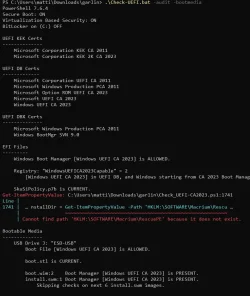
VERBOSE: Perform operation 'Enumerate CimInstances' with following parameters, ''className' = Win32_ComputerSystem,'namespaceName' = root\cimv2'.
VERBOSE: Operation 'Enumerate CimInstances' complete.
InvalidOperation: C:\Users\Public\Public Scripts\SecureBoot-Scripts\SecureBoot-CA-2023-Latest\Update_UEFI-CA2023.ps1:1749
Line |
1749 | '*LENOVO*M700*' { $Unsafe_Model = $true }
| ~~~~~~~~~~~~~~~
| The regular expression pattern *LENOVO*M700* is not valid.
VERBOSE: Perform operation 'Enumerate CimInstances' with following parameters, ''className' = Win32_OperatingSystem,'namespaceName' = root\cimv2'.
VERBOSE: Operation 'Enumerate CimInstances' complete.
VERBOSE: Perform operation 'Enumerate CimInstances' with following parameters, ''className' = Win32_DeviceGuard,'namespaceName' = root\Microsoft\Windows\DeviceGuard'.
VERBOSE: Operation 'Enumerate CimInstances' complete.
VERBOSE: Firmware SVN (from DBX): 9.0
VERBOSE: Using specified boot manager: \\.\HarddiskVolume1\EFI\Microsoft\Boot\bootmgfw.efi
VERBOSE: Boot Manager SVN: 9.0
VERBOSE: Staged SVN: 9.0
VERBOSE: Compliance Status: Compliant (Boot Manager SVN meets staged SVN)
Successfully appended "DBUpdateOROM2023.bin" to UEFI DB.
Get-ItemPropertyValue: C:\Users\Public\Public Scripts\SecureBoot-Scripts\SecureBoot-CA-2023-Latest\Update_UEFI-CA2023.ps1:1547
Line |
1547 | … Integrity = Get-ItemPropertyValue -Path 'HKLM:\Software\Policies\Micr …
| ~~~~~~~~~~~~~~~~~~~~~~~~~~~~~~~~~~~~~~~~~~~~~~~~~~~~~~~~~
| Property HypervisorEnforcedCodeIntegrity does not exist at path HKEY_LOCAL_MACHINE\Software\Policies\Microsoft\Windows\DeviceGuard.
Applying SBAT update for Linux.

REQUIRED ACTION
---------------
Restart Windows, for UEFI updates to take effect.

PS C:\Users\Public\Public Scripts\SecureBoot-Scripts\SecureBoot-CA-2023-Latest>

From my 2025 Asus Rog Strix G16
 

My Computer My Computer

At a glance

Windows 11 & Zorin ProIntel® Core™ Ultra 9 Processor 275HX 2.7 GHz32 gbNVIDIA® GeForce RTX™ 5060 Laptop GPU
OS
Windows 11 & Zorin Pro
Computer type
Laptop
Manufacturer/Model
Asus Rog Strix G16
CPU
Intel® Core™ Ultra 9 Processor 275HX 2.7 GHz
Motherboard
AsusteK Computer
Memory
32 gb
Graphics Card(s)
NVIDIA® GeForce RTX™ 5060 Laptop GPU
Sound Card
Realtek High Definition Audio
Monitor(s) Displays
Laptop 16 inch
Screen Resolution
2560 X 1600
Hard Drives
Boot: Samsung 9100 NVME 2 TB Microsoft Storage Controller: Standard NVM Express Driver: Microsoft 6/21/2006. No SATA/AHCI on my motherboard or in bios
Mouse
Pad
Browser
Google Chrome
Antivirus
Microsoft
Other Info
Printer: HP Color LaserJet MFP M477dw
InvalidOperation: C:\Users\Public\Public Scripts\SecureBoot-Scripts\SecureBoot-CA-2023-Latest\Update_UEFI-CA2023.ps1:1749
Line |
1749 | '*LENOVO*M700*' { $Unsafe_Model = $true }
| ~~~~~~~~~~~~~~~
| The regular expression pattern *LENOVO*M700* is not valid.
This is a known bug (but doesn't impact the script).

Get-ItemPropertyValue: C:\Users\Public\Public Scripts\SecureBoot-Scripts\SecureBoot-CA-2023-Latest\Update_UEFI-CA2023.ps1:1547
Line |
1547 | … Integrity = Get-ItemPropertyValue -Path 'HKLM:\Software\Policies\Micr …
| ~~~~~~~~~~~~~~~~~~~~~~~~~~~~~~~~~~~~~~~~~~~~~~~~~~~~~~~~~
| Property HypervisorEnforcedCodeIntegrity does not exist at path HKEY_LOCAL_MACHINE\Software\Policies\Microsoft\Windows\DeviceGuard.
Some instances of Get-ItemPropertyValue don't ignore an error when a queried reg key doesn't exist on the system. I'll add another fix.
Thanks.
 

My Computer My Computer

At a glance

Windows 7
OS
Windows 7
Thank you for your all your help and scripts. I've successfully updated a 2013 Dell 8700 and two 2018 Intel Nucs 8i5 & 8i7 to 2023 Windows certs. I used your CA2023 update script to obtain new certs from github. No issues with any of them. Intel Nucs have Intel Visual Bios which is the best example of a GUI bios that I've ever seen.
 

My Computer My Computer

At a glance

Windows 11 & Zorin ProIntel® Core™ Ultra 9 Processor 275HX 2.7 GHz32 gbNVIDIA® GeForce RTX™ 5060 Laptop GPU
OS
Windows 11 & Zorin Pro
Computer type
Laptop
Manufacturer/Model
Asus Rog Strix G16
CPU
Intel® Core™ Ultra 9 Processor 275HX 2.7 GHz
Motherboard
AsusteK Computer
Memory
32 gb
Graphics Card(s)
NVIDIA® GeForce RTX™ 5060 Laptop GPU
Sound Card
Realtek High Definition Audio
Monitor(s) Displays
Laptop 16 inch
Screen Resolution
2560 X 1600
Hard Drives
Boot: Samsung 9100 NVME 2 TB Microsoft Storage Controller: Standard NVM Express Driver: Microsoft 6/21/2006. No SATA/AHCI on my motherboard or in bios
Mouse
Pad
Browser
Google Chrome
Antivirus
Microsoft
Other Info
Printer: HP Color LaserJet MFP M477dw
For your information: yesterday I checked the laptop of a friend, a Lenovo E595 thinkpad (20NF0000GE), bought in Jan 2020, and happily I can say it received the new secure boot certificates automatically. Using the Garlin scripts I checked and everything was fine.

Having read this article <Microsoft admits it can't fix Windows 11 Secure Boot problems, and older PCs are hit hardest> the updates of the secure boot certificates are a true mess, and the MS and the OEM's dropped the ball completely on this one. Hence, a big thank you to Garlin for his continued support and scripts. Much appreciated.
 

My Computer My Computer

At a glance

windows 11
OS
windows 11
UPDATE: 2026-07-24

1. Check for presence and correct version of \EFI\Microsoft\Boot\boot.stl on removable media
2. Check Macrium WinRE and Hasleo WADK staging folders for the correct Windows boot manager
3. Add Samsung 300E4C/300E5C/300E7C to the unsafe list
4. Exception created when "HKEY_LOCAL_MACHINE\Software\Policies\Microsoft\Windows\DeviceGuard" is missing

After the June 2026 CU, MS recommends a current version of boot.stl be copied to your boot media. The check script will inform you when boot.stl is missing, or the wrong version. Update-UEFI.bat -BootMedia will push the boot.stl if required.

If you're using Macrium or Hasleo backup software, "-BootMedia" will now check the boot file versions in the app's WinPE or WinRE cache folders. This provides a clue if you're about to make a new recovery USB drive that may be banned from booting. Typically it's because the cache folder has an outdated version of WinPE or WinRE.

In the different Macrium or Hasleo threads, there's some discussion about manually copying the latest version of bootmgfw.efi or bootx64.efi into the cache folders, so you don't have to wait for Macrium or Hasleo to catch up.

Fixed the dreaded "Lenovo M700" reporting bug. As I didn't have the actual model string, I had to guess what it might looked on a real M700. But I found different M700 models listed in the HighConfidenceBucket CSV's, so we can avoid some questionable regex matching.
 

My Computer My Computer

At a glance

Windows 7
OS
Windows 7
This is nit picking but lots of new pc's have this status. :-)

PS C:\Users\Public\Public Scripts\SecureBoot-Scripts\SecureBoot-CA-2023-Latest> .\Check_UEFI-CA2023.ps1 -Audit -Verbose
Windows 11 25H2 (26200.8894)

Secure Boot: ON
Virtualization Based Security: ON
BitLocker on (C:) OFF

BIOS Firmware
-------------
ASUSTeK COMPUTER INC. ROG Strix G16 G615LM_G615LM
Version: G615LM.338
Date: 2026-06-03

Factory Default UEFI PK Cert
----------------------------
ASUS Secure Boot PK

UEFI PK Cert
------------
ASUS Secure Boot PK

Factory Default UEFI KEK Certs
------------------------------
Microsoft Corporation KEK CA 2011
Microsoft Corporation KEK 2K CA 2023
ASUS Secure Boot KEK

UEFI KEK Certs
--------------
Microsoft Corporation KEK CA 2011
Microsoft Corporation KEK 2K CA 2023
ASUS Secure Boot KEK

Factory Default UEFI DB Certs
-----------------------------
Microsoft Corporation UEFI CA 2011
Microsoft Windows Production PCA 2011
Microsoft UEFI CA 2023
Windows UEFI CA 2023
ASUS Secure Boot DB

UEFI DB Certs
-------------
Microsoft Corporation UEFI CA 2011
Microsoft Windows Production PCA 2011
Microsoft UEFI CA 2023
Windows UEFI CA 2023
ASUS Secure Boot DB

Factory Default UEFI DBX Certs
------------------------------
(NONE)
EFI_CERT_SHA256_GUID Signatures: 371

UEFI DBX Certs
--------------
Microsoft Windows Production PCA 2011
Windows BootMgr SVN 9.0
EFI_CERT_SHA256_GUID Signatures: 447

UEFI Variables
--------------
Credential Guard: ON

EFI Files
---------
Windows Boot Manager [Windows UEFI CA 2023] is ALLOWED.
\\.\HarddiskVolume1\EFI\Microsoft\Boot\bootmgfw.efi
File Version: 28000.352, SVN 9.0

Registry: "WindowsUEFICA2023Capable" = 2
WIndows UEFI [CA 2023] in UEFI DB, and Windows starting from CA 2023 Boot Manager.

SkuSiPolicy.p7b is CURRENT.
\\.\HarddiskVolume1\EFI\Microsoft\Boot\SkuSiPolicy.p7b
Version: 3.0.0.16


AUDIT REPORT
============

I revoked the 2011 certs to ensure that it would still run... I'm not happy with Microsoft or Asus. I'm sure I will have lots of company,

1. [Microsoft Option ROM UEFI CA 2023] is missing from UEFI DB (This is not an option when waiting for Confidence Level Under Observation
new firmware and bios. 1801 error in Event Manager.

REQUIRED ACTION
===============
To install [UEFI CA 2023] certs, run the commands: Certs are installed but in a 'not finished' state.

reg add HKEY_LOCAL_MACHINE\SYSTEM\CurrentControlSet\Control\Secureboot /v AvailableUpdates /t REGCert_DWORD /d 0x4800 /f
powershell Start-ScheduledTask -TaskName "\Microsoft\Windows\PI\Secure-Boot-Update"
 
Last edited:

My Computer My Computer

At a glance

Windows 11 & Zorin ProIntel® Core™ Ultra 9 Processor 275HX 2.7 GHz32 gbNVIDIA® GeForce RTX™ 5060 Laptop GPU
OS
Windows 11 & Zorin Pro
Computer type
Laptop
Manufacturer/Model
Asus Rog Strix G16
CPU
Intel® Core™ Ultra 9 Processor 275HX 2.7 GHz
Motherboard
AsusteK Computer
Memory
32 gb
Graphics Card(s)
NVIDIA® GeForce RTX™ 5060 Laptop GPU
Sound Card
Realtek High Definition Audio
Monitor(s) Displays
Laptop 16 inch
Screen Resolution
2560 X 1600
Hard Drives
Boot: Samsung 9100 NVME 2 TB Microsoft Storage Controller: Standard NVM Express Driver: Microsoft 6/21/2006. No SATA/AHCI on my motherboard or in bios
Mouse
Pad
Browser
Google Chrome
Antivirus
Microsoft
Other Info
Printer: HP Color LaserJet MFP M477dw
This is nit picking but lots of new pc's have this status. :-)

UEFI DB Certs
-------------
Microsoft Corporation UEFI CA 2011
Microsoft Windows Production PCA 2011
Microsoft UEFI CA 2023
Windows UEFI CA 2023
ASUS Secure Boot DB
AUDIT REPORT
============
1. [Microsoft Option ROM UEFI CA 2023] is missing from UEFI DB (This is not an option when waiting for Confidence Level Under Observation
new firmware and bios. 1801 error in Event Manager.

REQUIRED ACTION
===============
To install [UEFI CA 2023] certs, run the commands: Certs are installed but in a 'not finished' state.

reg add HKEY_LOCAL_MACHINE\SYSTEM\CurrentControlSet\Control\Secureboot /v AvailableUpdates /t REGCert_DWORD /d 0x4800 /f
powershell Start-ScheduledTask -TaskName "\Microsoft\Windows\PI\Secure-Boot-Update"
This another example of "left hand of MS doesn't talk to its right hand".

Option ROM is considered optional, since your PC may not have any HW devices which have their own signed firmware. Typically that's some NVIDIA graphics card or a Thunderbolt storage controller. Does it hurt to install it? Probably not.

But TPM-WMI keeps throwing "errors" like it's supposed to be present. And if you don't have Option ROM, then Security Center doesn't give you the best possible rating. While it's optional, my opinion is to install it so Windows stops throwing these warnings. Technically they're informative messages, but everything gets categorized by TPM-WMI as a "serious problem".

Sometimes the trouble is because 0x4000 value added to AvailableUpdates is interpreted as "don't add Option ROM CA 2023" unless your BIOS already had the Option ROM 2010. And not surprisingly, some older PC's don't never had the Option ROM 2010 and so the update fails when 0x4000 is used.
 

My Computer My Computer

At a glance

Windows 7
OS
Windows 7
i got this. i have never used Macrium.
1784916665430.webp
 

My Computer My Computer

At a glance

Windows 11 Pro 64bit (release preview channel)i5 840016 GB DDR4RTX 3060 Ti
OS
Windows 11 Pro 64bit (release preview channel)
Computer type
PC/Desktop
Manufacturer/Model
Asus
CPU
i5 8400
Motherboard
ROG STRIX Z370-H GAMING
Memory
16 GB DDR4
Graphics Card(s)
RTX 3060 Ti
Sound Card
On Board
Monitor(s) Displays
Acer VG242Y P
Screen Resolution
1080p
Hard Drives
Intel 660p SSD
PSU
800w
Internet Speed
1000 Mbps

My Computer My Computer

At a glance

Windows 11 Pro 64bit (release preview channel)i5 840016 GB DDR4RTX 3060 Ti
OS
Windows 11 Pro 64bit (release preview channel)
Computer type
PC/Desktop
Manufacturer/Model
Asus
CPU
i5 8400
Motherboard
ROG STRIX Z370-H GAMING
Memory
16 GB DDR4
Graphics Card(s)
RTX 3060 Ti
Sound Card
On Board
Monitor(s) Displays
Acer VG242Y P
Screen Resolution
1080p
Hard Drives
Intel 660p SSD
PSU
800w
Internet Speed
1000 Mbps
You fix one bug, and forgot you duplicated it somewhere else... I'll update the ZIP file after lunch.

UPDATE: 2026-07-24
Fixed new bug when you don't have Macirum installed.
 

My Computer My Computer

At a glance

Windows 7
OS
Windows 7
Thank you !!!
 

My Computer My Computer

At a glance

Windows 11 Pro x64 Version V23H2i7-8700KG.Skill Trident Z 3200MHz F4-3200C16D-16GTZ (...Intel UHD Graphics 630
OS
Windows 11 Pro x64 Version V23H2
Computer type
PC/Desktop
Manufacturer/Model
Custom
CPU
i7-8700K
Motherboard
Asus Maximus X Code - Z370
Memory
G.Skill Trident Z 3200MHz F4-3200C16D-16GTZ (2) 32GB
Graphics Card(s)
Intel UHD Graphics 630
Sound Card
Integrated ROG SupremeFX
Monitor(s) Displays
Asus VP279 27", Samsung BX2431 24"
Screen Resolution
1920 x 1080
Hard Drives
Samsung M.2 NVMe 960 EVO 500GB Boot,
Samsung 840 EVO 250GB (System Copy Drive),
Samsung 860 EVO 1TB (Primary Data Drive),
WD Black 500GB (Data Copy Drive)
ICY Dock 5.25 2.5/3.5 Bays MB971SP-B
PSU
Corsair RM 650i +Gold
Case
Phanteks Enthroo Primo
Cooling
Corsair Hydro H150i, 360mm Rad & Five Corsair 140mm Pro ML Case Fans
Keyboard
das Keyboard MX Brown Mechanical Switches Model DASKMKPROSIL-3G7-r1.0
Mouse
Logitech MX Master 3 Wireless & Bluetooth
Internet Speed
500Mb +
Browser
Chrome (Pri), Firefox (Sec)
Antivirus
Malwarebytes Premium, SuperAntiSpyware Pro (Licensed)
Other Info
Microsoft LifeCam HD,
APC Back-UPS Pro 1500,
Macrium (Licensed),
Microsoft 365,
Wise Disk Cleaner,
Crystal Disk Info,
Screenpresso (Licensed),
AnyDesk (Licensed),
@garlin thanks for the updated scripts.
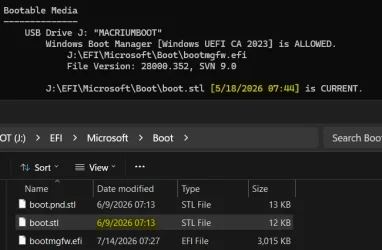
In regards to boot.stl, where does the script get the date/time stamp?

1784948129801.webp
 

My Computers My Computers

  • At a glance

    Win 11 Pro 25H2 26200.8894Intel® Core™ i7-14700KG.SKILL Ripjaws S5 Series 64GB (2 x 32GB) DDR5ASUS GeForce RTX 4070 Super 12GB
    OS
    Win 11 Pro 25H2 26200.8894
    Computer type
    PC/Desktop
    Manufacturer/Model
    Self Built
    CPU
    Intel® Core™ i7-14700K
    Motherboard
    ASUS TUF Z690-PLUS WIFI (BIOS 4505)
    Memory
    G.SKILL Ripjaws S5 Series 64GB (2 x 32GB) DDR5
    Graphics Card(s)
    ASUS GeForce RTX 4070 Super 12GB
    Sound Card
    Sound Blaster AE-5 Plus
    Monitor(s) Displays
    ASUS TUF Gaming 27" 2K HDR Gaming
    Screen Resolution
    2560 x 1440
    Hard Drives
    Samsung 990 Pro 1TB NVMe (Win 11 25H2)
    SK hynix P41 500GB NVMe
    SK hynix P41 2TB NVMe (x3)
    Crucial P3 Plus 4TB
    PSU
    Corsair RM850x Shift
    Case
    Antec Dark Phantom DP502 FLUX
    Cooling
    Corsair Nautilus 360 RS AIO
    Keyboard
    Logitech MK 320
    Mouse
    Razer Basilisk V3
    Internet Speed
    750Mbs
    Browser
    Firefox
    Antivirus
    Winows Security
    Other Info
    MR 8.1 Home
  • At a glance

    Win 11 Pro 25H2 26200.8894Intel Core i5-1140064 GB DDR4MSI GeForce RTX 3060 Ventus 2X 12GB
    Operating System
    Win 11 Pro 25H2 26200.8894
    Computer type
    PC/Desktop
    Manufacturer/Model
    Self Built
    CPU
    Intel Core i5-11400
    Motherboard
    Asus TUF Gaming Z590 Plus WiFi (BIOS 2803)
    Memory
    64 GB DDR4
    Graphics card(s)
    MSI GeForce RTX 3060 Ventus 2X 12GB
    Sound Card
    SoundBlaster Audigy Fx V2
    Monitor(s) Displays
    Samsung F27T350
    Screen Resolution
    1920x1080
    Hard Drives
    Samsung 980 Pro 1TB
    Samsung 970 EVO Plus 2TB
    Samsung 870 EVO 500GB SSD
    PSU
    Corsair HX750
    Case
    Cougar MX330-G Window
    Cooling
    Thermalright Frozen Edge 240 Black AIO
    Internet Speed
    350Mbps
    Browser
    Firefox
    Antivirus
    Windows Security
  • System Three
    Win 11 Pro 25H2 26200.8894
    ASUS PRIME Z370-P II BIOS 3004 7/12/21
    Intel Core i7-8700 CPU @ 3.20GHz
    32GB DDR4 RAM (4x8)
    iGPU Intel UHD Graphics 630
    Mid-Tower Desktop
boot.stl is a strange critter, it's basically a Certificate Trust List (CTL) like the ones Windows downloads once a week to revoke entries in your Certificate Store. CTL's don't really have a formal method of encoding version details for itself.

Instead I'm using "certutil -dump boot.stl" and extracting the ThisUpdate field.
Code:
PKCS7 Message:
  CMSG_SIGNED(2)
  CMSG_SIGNED_DATA_PKCS_1_5_VERSION(1)
  Content Type: 1.3.6.1.4.1.311.10.1 Certificate Trust List

PKCS7 Message Content:
================ Begin Nesting Level 1 ================
Certificate Trust List:
Version: 1
Usage Entries: 1
  [0] 1.3.6.1.4.1.311.61.3.1 szOID_KMOD_REVOCATION_LIST
 ThisUpdate: 5/18/2026 10:44 AM  <-----
 NextUpdate: EMPTY
Subject Algorithm:
    Algorithm ObjectId: 1.3.6.1.4.1.311.61.3.1 szOID_KMOD_REVOCATION_LIST
    Algorithm Parameters:
    05 00
CTL Entries: 0
Extensions: 6
    1.3.6.1.4.1.311.61.3.3.3: Flags = 0, Length = 3c
    szOID_KMOD_CERT_SHA256
    0: 1ee185a1a48b2ff301b641e91cdf3a98... EMPTY
    1: 4ef556c930201cfaeee893102954a630... EMPTY
    2: b68a22f66c3359c21ea9c523a1fa6728... EMPTY

    1.3.6.1.4.1.311.61.3.2.3: Flags = 0, Length = f0
    szOID_KMOD_IMAGE_SHA256
    0: 023e503fdd490a9a240c9f8a49f11f0f...
    1: 0bed282befde12649d3e2d3d79268522...
    2: 118325d896390721d3b1a0e562d27711...
    3: 3f92b76a2dd23627f6f3b2501332cbf5...
    4: 497f01ec8f9da1c9a55087f23b3a9719...
    5: 50dfbc1e0500ae542f6966210221feaa...
    6: 557ee402570bebfa789704c9cba54ca5...
    7: 81b2c43e8258d6cbb97831f820da0f6a...
    8: 922fb787a28d2d9a5f1781db0abc34d5...
    9: 965290207195df8c3a073d51db41f990...
    10: b4c91d507c2ecc96744d235680c85e2b...
    11: bb6f150172b03ebc80149c4b4679fcf1...
    12: cc56b4de6ef293eb229308a58a600a04...
    13: dc011c00ed93f836c15c5757d2c6f657...
    14: dca8e7c090f8c100cd1497462bbc8436...

When you use certutil, many of the details belong to the individual certs that the CTL is bundling, but the CTL doesn't say much about itself. The OID's (or those long digits with dots in between) represent organized nodes in a tree structure, so you can't use them for identification.

If there's a better method of identifying boot.stl files, I'll take it.
 

My Computer My Computer

At a glance

Windows 7
OS
Windows 7
all seems fine to me as always, Thank you again for all your hard work into this @garlin

Code:
EFI Files
---------
    Windows Boot Manager [Windows UEFI CA 2023] is ALLOWED.

    Registry: "WindowsUEFICA2023Capable" = 2
        [Windows UEFI CA 2023] in UEFI DB, and Windows starting from CA 2023 Boot Manager.

    SkuSiPolicy.p7b is CURRENT.

Macrium Folders
---------------
    Windows Boot Manager [Windows UEFI CA 2023] is ALLOWED.

Bootable Media
--------------
    USB Drive F: "TBWINRE"
        Windows Boot Manager [Windows UEFI CA 2023] is ALLOWED.

        boot.stl is CURRENT.


AUDIT REPORT
============
    PASSED ALL CHECKS.

STATUS REPORT
-------------
    Registry: "UEFICA2023Status" = Updated

    SUCCESS: UPDATES ARE FINISHED.
    UEFI CA 2023 certs are present, PCA 2011 cert is revoked.
 

My Computer My Computer

At a glance

Win11 24H2 IOT LTSC / Win11 Pro 25H2AMD Ryzen 7 8700G / AMD Ryzen 7 8700GF5-6000J3636F16GX2-FX5 32GB / Lexar Ares RGB ...internal
OS
Win11 24H2 IOT LTSC / Win11 Pro 25H2
Computer type
PC/Desktop
Manufacturer/Model
Gigabyte / Asus Home build
CPU
AMD Ryzen 7 8700G / AMD Ryzen 7 8700G
Motherboard
Gigabyte B650 AORUS ELITE AX V2 / ASUS TUF GAMING B650-PLUS
Memory
F5-6000J3636F16GX2-FX5 32GB / Lexar Ares RGB LD5BU016G-R6000GDLA 32GB
Graphics Card(s)
internal
Sound Card
Realtek
Monitor(s) Displays
BenQ 27 L EW2780
Screen Resolution
1920x1080
Hard Drives
Many M.2's
Internet Speed
400 mbs
Browser
Vivaldi
Antivirus
Eset
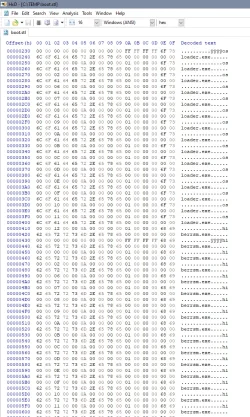
Seems boot.stl has a list of winload.efi/osloader.exe and winresume.efi/hiberrsm.exe. Looks quite similar to SkuSiPolicy.p7b?


1784959845939.webp
 

My Computer My Computer

At a glance

W10
OS
W10
An Update on my HP Z440:
I started my HP Z440 without problem, and having seen that there were new scripts, I downloaded them, and checked with .\check-UEFI.bat - Verbose:
PS C:\Users\admin\Downloads\SecureBoot-CA-2023-Updates.v2026.07.24> .\check-UEFI.bat -Verbose
PowerShell 7.6.4
Windows 11 25H2 (26200.8894)

Secure Boot: ON
Virtualization Based Security: ON
BitLocker on (C:) OFF

BIOS Firmware
-------------
Hewlett-Packard HP Z440 Workstation
Version: M60 v02.62
Date: 2024-01-04
This BIOS may be corrupted by updating Secure Boot certs.

Factory Default UEFI PK Cert
----------------------------
Hewlett-Packard UEFI Secure Boot Platform Key

UEFI PK Cert
------------
Hewlett-Packard UEFI Secure Boot Platform Key

Factory Default UEFI KEK Certs
------------------------------
Microsoft Corporation KEK CA 2011
Hewlett-Packard UEFI Secure Boot Key Exchange Key

UEFI KEK Certs
--------------
Microsoft Corporation KEK CA 2011
Microsoft Corporation KEK 2K CA 2023
Hewlett-Packard UEFI Secure Boot Key Exchange Key

Factory Default UEFI DB Certs
-----------------------------
Microsoft Corporation UEFI CA 2011
Microsoft Windows Production PCA 2011
Hewlett-Packard UEFI Secure Boot DB Key

UEFI DB Certs
-------------
Microsoft Corporation UEFI CA 2011
Microsoft Windows Production PCA 2011
Microsoft Option ROM UEFI CA 2023
Microsoft UEFI CA 2023
Windows UEFI CA 2023
Hewlett-Packard UEFI Secure Boot DB Key
HP UEFI Secure Boot 2013 DB key

Factory Default UEFI DBX Certs
------------------------------
(NONE)
EFI_CERT_SHA256_GUID Signatures: 14

UEFI DBX Certs
--------------
Microsoft Windows Production PCA 2011
Windows BootMgr SVN 9.0
EFI_CERT_SHA256_GUID Signatures: 298

UEFI Variables
--------------
Credential Guard: ON
SBAT (Linux only): sbat,1,2024010900 / shim,4 / grub,3 / grub.debian,4

EFI Files
---------
Windows Boot Manager [Windows UEFI CA 2023] is ALLOWED.
\\.\HarddiskVolume1\EFI\Microsoft\Boot\bootmgfw.efi
File Version: 28000.352, SVN 9.0

Registry: "WindowsUEFICA2023Capable" = 2
[Windows UEFI CA 2023] in UEFI DB, and Windows starting from CA 2023 Boot Manager.

SkuSiPolicy.p7b is CURRENT.
\\.\HarddiskVolume1\EFI\Microsoft\Boot\SkuSiPolicy.p7b
Version: 3.0.0.16


STATUS REPORT
-------------
Registry: "UEFICA2023Status" = Updated

SUCCESS: UPDATES ARE FINISHED.
UEFI CA 2023 certs are present, PCA 2011 cert is revoked.

PS C:\Users\admin\Downloads\SecureBoot-CA-2023-Updates.v2026.07.24>

Although it says the bios may be corrupted by updating the secure boot certs, I updated them in june and have had no issue with my HP Z440 using secure boot since.
Then, I wanted to check if the boot.stl was good on my recovery drive, using check-UEFI.bat -Bootmedia
It told me boot.stl was the wrong version. On using update-UEFI.bat -Bootmedia I got the following error: "Model may be corrupted by updating secure certs. Exiting."
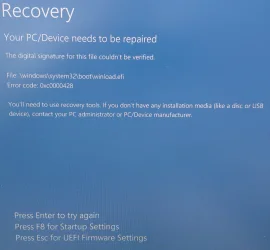
On restarting my computer, the recovery drive threw the following message:see attached photo
On restarting the computer without the recovery drive, I got the same message.
I then disabled secure boot, and rebooted my computer. I then started to search in the postings here for problems with winload.efi. I found a posting from Garlin to mount S: .....etc, then delete the file skusipolcy.p7b, and del mount, and on reboot reactivate secure boot. That worked.
So, now my HP Z440 boots again with secure boot activated, the newer 2023 certs, and without the skusiPolicy.p7b, but I still have a boot.stl version that is wrong on my recovery drive.
I can't use the script to update the recovery drive, as it believes my HP Z440 is at risk, although it has worked properly with the cert updates since june.
I had a look at the script itself to see if I could change it, but I came to the conclusion my knowledge is far too limited to try it.

I also had a look at the HP website. the HP Z440 is not supported anymore. The latest Bios is from 2024, and which I installed in 2024, but it did not include any new secure boot certs. I did not find any info, why the HP Z440 may have problems with the new secure boot certs.
What is the best way to proceed? I could deactivate secure boot, which I do not like. Or keep secure boot with the newer sec boot certs running, but with the chance I run into problems in the future due to the boot.stl version, or any other stuff that an incompetent MS and HP may add in the future?
 

Attachments

  • 20260725_084304.webp
    20260725_084304.webp
    304.5 KB · Views: 1

My Computer My Computer

At a glance

windows 11
OS
windows 11
Although it says the bios may be corrupted by updating the secure boot certs, I updated them in june and have had no issue with my HP Z440 using secure boot since.
This is one of those annoying balancing acts I need to follow.

There's been 3 (?) confirmed reports of bricked PC's when people run the update script. It's presumed that it's not the fault of the actual process of clearing certs, or how to apply new certs. But there is a hidden and fundamental flaw in how certain BIOS'es or BIOS flash ROM's store the Secure Boot data. When data corruption occurs, not all PC's can be restored to working order (some can be reset to factory defaults, others are "bricked" and need to be reflashed by a qualified repair tech).

In a best effort to not intentionally allow users to get into trouble, I'm borrowing parts of the the Confidence Level data. While I don't believe the "More Data Needed" is conclusive, the "Temporarily Paused" and "Not Supported" categories are probably derived from something serious that MS knows about.

This version of the script will check if your Confidence Level falls into either category, and try warning you beforehand. I suspect your PC model is tagged "Temporarily Paused", indicating HP is supposed to work a BIOS fix (least that's what this category is for). Whether that's actually true, or MS is wrong or nobody's changed the status is unknown to me.

So it's better to get a false positive, than have someone else get a bricked PC because they didn't know their BIOS had a hidden flaw. The user isn't going to know unless someone tells them. The next best info would be MS's own list of blocked PC's because they have some info I don't have.

Then, I wanted to check if the boot.stl was good on my recovery drive, using check-UEFI.bat -Bootmedia
It told me boot.stl was the wrong version. On using update-UEFI.bat -Bootmedia I got the following error: "Model may be corrupted by updating secure certs. Exiting."
I put the same check in the update script. So you're getting a false positive in two different places :(

On restarting my computer, the recovery drive threw the following message:see attached photo
On restarting the computer without the recovery drive, I got the same message.
I then disabled secure boot, and rebooted my computer. I then started to search in the postings here for problems with winload.efi. I found a posting from Garlin to mount S: .....etc, then delete the file skusipolcy.p7b, and del mount, and on reboot reactivate secure boot. That worked.
So, now my HP Z440 boots again with secure boot activated, the newer 2023 certs, and without the skusiPolicy.p7b, but I still have a boot.stl version that is wrong on my recovery drive.
I can't use the script to update the recovery drive, as it believes my HP Z440 is at risk, although it has worked properly with the cert updates since june.
I had a look at the script itself to see if I could change it, but I came to the conclusion my knowledge is far too limited to try it.

You can just copy the same boot.stl by hand:
Code:
copy C:\Windows\Boot\EFI\boot.stl E:\EFI\Microsoft\Boot

I'll have to add some override to the command-line, in case you have a fully updated UEFI but MS still thinks your BIOS should not be touched.
 

My Computer My Computer

At a glance

Windows 7
OS
Windows 7
I have a compromise solution, which isn't 100% perfect but should work for most users.

The script will only issue a warning if your UEFI doesn't already have both the KEK CA 2023 installled and PCA 2011 in the DBX. My thinking is if you've already gotten that far, it's too late now to give you a warning not to update the UEFI.

@Capricornus, try this version of both scripts.
 

Attachments

My Computer My Computer

At a glance

Windows 7
OS
Windows 7
I have a compromise solution, which isn't 100% perfect but should work for most users.

The script will only issue a warning if your UEFI doesn't already have both the KEK CA 2023 installled and PCA 2011 in the DBX. My thinking is if you've already gotten that far, it's too late now to give you a warning not to update the UEFI.

@Capricornus, try this version of both scripts.
Well, that makes sense! If all that is done, you're finished, right?
 

My Computers My Computers

  • At a glance

    Win 11 Pro 25H2, Build 26200.8894Intel Core i5 1450064GB DDR4GeForce RTX 4060
    OS
    Win 11 Pro 25H2, Build 26200.8894
    Computer type
    PC/Desktop
    Manufacturer/Model
    Home Brew
    CPU
    Intel Core i5 14500
    Motherboard
    Gigabyte B760M G P WIFI
    Memory
    64GB DDR4
    Graphics Card(s)
    GeForce RTX 4060
    Sound Card
    Chipset Realtek
    Monitor(s) Displays
    LG 45" Ultragear, Acer 24" 1080p
    Screen Resolution
    5120x1440, 1920x1080
    Hard Drives
    Crucial P310 2TB 2280 PCIe Gen4 3D NAND NVMe M.2 SSD (O/S)
    Silicon Power 2TB US75 NVMe PCIe Gen4 M.2 2280 SSD (backup)
    Crucial BX500 2TB 3D NAND (2nd backup)
    Seagate 4TB Ironwolf, rotating HDD archive files
    External off-line backup Drives: 2 NVMe 4TB drives in external enclosures
    PSU
    Thermaltake Toughpower GF3 750W
    Case
    LIAN LI LANCOOL 216 E-ATX PC Case
    Cooling
    Lots of fans!
    Keyboard
    Microsoft Comfort Curve 2000
    Mouse
    Logitech G305
    Internet Speed
    Verizon FiOS 1GB
    Browser
    Firefox
    Antivirus
    Malware Bytes & Windows Defender Security
  • At a glance

    Win 11 Pro 25H2, Build 26200.8894Intel Core i5 1440032GB DDR5Intel 700 Embedded GPU
    Operating System
    Win 11 Pro 25H2, Build 26200.8894
    Computer type
    PC/Desktop
    Manufacturer/Model
    Home Brew
    CPU
    Intel Core i5 14400
    Motherboard
    Gigabyte B760M DS3H AX
    Memory
    32GB DDR5
    Graphics card(s)
    Intel 700 Embedded GPU
    Sound Card
    Realtek Embedded
    Monitor(s) Displays
    27" HP 1080p
    Screen Resolution
    1920x1080
    Hard Drives
    Crucial P310 2TB 2280 PCIe Gen4 eD NAND PCIe SSD
    Samsung EVO 990 2TB NVMe Gen4 SSD
    Samsung 2TB SATA SSD
    PSU
    Thermaltake Smart BM3 650W
    Case
    Okinos Micro ATX Case
    Cooling
    Fans
    Keyboard
    Microsoft Comfort Curve 2000
    Mouse
    Logitech G305
    Internet Speed
    Verizon FiOS 1GB
    Browser
    Firefox
    Antivirus
    Malware Bytes & Windows Defender Security
  • Nimo N171 17" Laptop, (Intel i3-1215U, 16GB RAM, 2TB NVMe, Win11 Pro)
    Acemagic Vista Mini PC V1 (Intel N150, 16GB RAM, 1TB NVMe, Win11 Pro)
    HP ENVY h8-1540t, (24GB RAM, 2TB SSD, 2TB HDD, Win11 Pro)

Latest Support Threads

Back
Top Bottom