Solved garlin's PowerShell scripts for updating Secure Boot CA 2023


You ran the commands in the MStore one, try them in the other window, this one

View attachment 178107

But have you tried Garlin's commands again ? in either one ?

EDIT:
I think I found why your not finding the new one you installed with winget.
On my systems, I uninstalled all Powershell versions except the one from winget.
So when I search for PowerShell, that's the only one it finds.
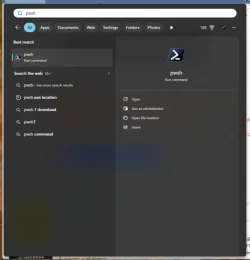
Instead of searching for "
PowerShell" in the Start Menu, search for "pwsh", it should show you the one you installed with winget.
You should now see this one, right click and start as administrator and test Garlin's commands.


View attachment 178125
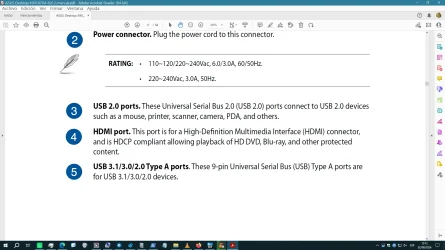
Searching the start menu for pwsh doesn't look like your screen shot.

Image1.webp
 

My Computers My Computers

  • At a glance

    Windows 11 Pro 25H2i7-8565U16GBIntel UHD Graphics 620
    OS
    Windows 11 Pro 25H2
    Computer type
    Laptop
    Manufacturer/Model
    Lenovo T490 (2020 Hardware)
    CPU
    i7-8565U
    Motherboard
    20N20028US
    Memory
    16GB
    Graphics Card(s)
    Intel UHD Graphics 620
    Sound Card
    Realtec Audio
    Monitor(s) Displays
    ASUS VE248
    Screen Resolution
    1920 X 1080
    Hard Drives
    Samsung SSD 970 PRO 512GB NVMe
    Internet Speed
    Frontier fiber 1GB
    Browser
    Chrome, Firefox, Edge
    Antivirus
    Norton 360 Deluxe Plus
    Other Info
    Supported hardware, upgraded from Windows 10 Pro to Windows 11 Pro version 24H2 on 06/01/2025 using the Windows 11 ISO file. Used the enablement package to upgrade to version 25H2 on 10/07/2025. Secure boot enabled. Secure Boot CA 2023 updated.
  • At a glance

    Windows 11 Pro 25H2i7-4770 (with SSE4.2, and POPCNT)16GBIntel HD Graphics 4600
    Operating System
    Windows 11 Pro 25H2
    Computer type
    PC/Desktop
    Manufacturer/Model
    Lenovo ThinkCentre M83 (2014 Hardware)
    CPU
    i7-4770 (with SSE4.2, and POPCNT)
    Motherboard
    10AL000GUS
    Memory
    16GB
    Graphics card(s)
    Intel HD Graphics 4600
    Sound Card
    Realtec High Definition Audio
    Monitor(s) Displays
    ASUS VE248
    Screen Resolution
    1920 X 1080
    Hard Drives
    Samsung SSD 860 PRO 1TB SATA
    Internet Speed
    Frontier fiber 1GB
    Browser
    Chrome, Firefox, Edge
    Antivirus
    Norton 360 Deluxe Plus
    Other Info
    Unsupported hardware, upgraded from Windows 10 Pro (TPM 1.2 & unsupported CPU, but does have SSE4.2, and POPCNT) to Windows 11 Pro version 24H2 on 06/15/2025. Added Registry Key HKEY_LOCAL_MACHINE\SYSTEM\Setup\MoSetup – AllowUpgradesWithUnsupportedTPMOrCPU=1 to allow installation using the Windows 11 ISO file. Used the enablement package to upgrade to version 25H2 on 10/08/2025. Secure boot enabled. Secure Boot CA 2023 updated.
@garlin
Going back to 26200.8894 makes all your scripts work for me as they did before.
Right clicking on them and selecting Run with Powershell opens admin powershell and they run as expected.
Whatever broke that when I installed 26200.8973 is either a me problem, or a they problem, not a you problem.

Sorry for any confusion.

peace
wanna
 

My Computers My Computers

  • At a glance

    Windows 11 ProIntel® Core™ i5-14600KG.SKILL Ripjaws S5 Series DDR5 (2x16GB) 6400M...PNY RTX 5060 Ti OC 16GB
    OS
    Windows 11 Pro
    Computer type
    PC/Desktop
    Manufacturer/Model
    Acme Mail Order (meep meep)
    CPU
    Intel® Core™ i5-14600K
    Motherboard
    MSI PRO Z790-A MAX WiFi bios 7E07vMA
    Memory
    G.SKILL Ripjaws S5 Series DDR5 (2x16GB) 6400MT/s CL32
    Graphics Card(s)
    PNY RTX 5060 Ti OC 16GB
    Sound Card
    Onboard Realtek® ALC4080 Codec
    Monitor(s) Displays
    2 x Dell - S3222DGM 32" LED Curved QHD FreeSync Gaming Monitor
    Screen Resolution
    2560x1440
    Hard Drives
    990 PRO PCIe 4.0 NVMe®1TB OS
    970 EVO PCIe 3.0 NVMe® SSD 500GB Games
    860 EVO SATA 2.5" SSD 1TB Storage
    PSU
    RMx Series™ RM850x — 80 PLUS® Gold
    Case
    LIAN LI PC-G70B Black Aluminum Full Tower
    Cooling
    Custom loop Optimus Foundation Block, MCP655-PWM D5 pump, MCR320 QP rad
    Keyboard
    Razer Black Widow Ultimate
    Mouse
    Razer Death Adder Elite
    Internet Speed
    500 down 20 up
    Browser
    Edge / Chrome
    Antivirus
    Microsoft Defender
    Other Info
    Always switching installs testing out the latest and greatest.
  • At a glance

    Windows 11 ProIntel® Core™ i5-11600KG.SKILL Ripjaws V Series 16GB DDR4 3600 (16-1...EVGA GeForce RTX 3060 XC GAMING 12GB
    Operating System
    Windows 11 Pro
    Computer type
    PC/Desktop
    Manufacturer/Model
    Acme Mail Order (meep meep) Wife's PC Edition
    CPU
    Intel® Core™ i5-11600K
    Motherboard
    MSI - Z590 A Pro - bios 7D09v1B1
    Memory
    G.SKILL Ripjaws V Series 16GB DDR4 3600 (16-16-16-36)
    Graphics card(s)
    EVGA GeForce RTX 3060 XC GAMING 12GB
    Sound Card
    Onboard Realtek® ALC897 Codec
    Monitor(s) Displays
    2 x 27'' ACER S271HL
    Screen Resolution
    1920x1080
    Hard Drives
    980 PRO PCIe 4.0 NVMe® SSD 250GB OS
    Samsung 128GB 850 PRO SATA III for Storage
    PSU
    CORSAIR - CX-M Series 650W
    Case
    LIAN LI PC-A16B Black Aluminum ATX Mid Tower
    Cooling
    Thermalright Phantom Spirit 120SE Air Cooler
    Keyboard
    Logitech - K740 Illuminated
    Mouse
    Razer Death Adder Elite
    Internet Speed
    500 down 20 up
    Browser
    Chrome
    Antivirus
    Windows Defender
    Other Info
    Stock clocked, over cooled, and unmolested for a rock solid, whisper quiet, Wifey approved user experience.
Normally Secure Boot (as related to the certs) only prevents a boot file from booting. It shouldn't have other bad effects.

The exceptions are conflicts with a GPU's signed firmware (this is a well-known issue in the NVIDIA community, but the problem is the same) where it's not allowed once CA 2011 is revoked, and on occasion where your UEFI's NVRAM has corruption issues and "freezes" up whenever the Secure Boot task tries to check in there's any new work to be performed.

There hasn't been any NVRAM corruption issues reported on ASRock motherboards, so it's more likely a GPU issue with older cards. Newer cards have signed firmware which is compatible with CA 2023.
On my HP Z440 workstation I have an old Nvidia Quadro K2200, running with bios version 82.07.A4.00.0C from 30 jan 2017 (is the newest bios available). How can I determine if the firmware of the GPU may give problems or not with the new sec boot certs 2023? I have the new sec boot certs 2023 installed, and revoked the 2011 certs. And my computer runs well. Does it mean that all is well, or can the GPU still cause problems in October?
 

My Computer My Computer

At a glance

windows 11
OS
windows 11
On my HP Z440 workstation I have an old Nvidia Quadro K2200, running with bios version 82.07.A4.00.0C from 30 jan 2017 (is the newest bios available). How can I determine if the firmware of the GPU may give problems or not with the new sec boot certs 2023? I have the new sec boot certs 2023 installed, and revoked the 2011 certs. And my computer runs well. Does it mean that all is well, or can the GPU still cause problems in October?
The problem isn't compatibility with new CA 2023 certs, it's because the old GPU firmware was signed with CA 2011.

After you explicitly ban CA 2011, old GPU's can no longer present a trusted cert to the UEFI and won't be allowed to handle video setup through the GOP. Some 3rd-party projects are trying to switch the existing firmware by re-signing them with a CA 2023 cert, so they can be trusted again.

Unfortunately, I don't have a legacy NVIDIA card that old. You can scrounge around for a graphics card made in the last 3-4 years (which probably have a newer VBIOS or can be updated). Or try suffering through this Reddit thread:

PSA: Secure Boot 2026 June cert expiry can block older NVIDIA GOPs at POST

But the topic is of real concern to folks using really, really old NVIDIA's.
 

My Computer My Computer

At a glance

Windows 7
OS
Windows 7
The problem isn't compatibility with new CA 2023 certs, it's because the old GPU firmware was signed with CA 2011.

After you explicitly ban CA 2011, old GPU's can no longer present a trusted cert to the UEFI and won't be allowed to handle video setup through the GOP. Some 3rd-party projects are trying to switch the existing firmware by re-signing them with a CA 2023 cert, so they can be trusted again.

Unfortunately, I don't have a legacy NVIDIA card that old. You can scrounge around for a graphics card made in the last 3-4 years (which probably have a newer VBIOS or can be updated). Or try suffering through this Reddit thread:

PSA: Secure Boot 2026 June cert expiry can block older NVIDIA GOPs at POST

But the topic is of real concern to folks using really, really old NVIDIA's.
Thank you very much for that link.
I tried the different official nvidia tools. First v2, and v1.2 but those did offer nothing. But v1.1 did offer an upgrade, which I accepted. Afterwards, on restarting my computer, it booted normally, and my graphics card works well too.
I also had a quick look at the unofficial tools, but they are way beyond my present knowledge, so I will stay well away.

In order to check what happened, I did try to run the powershell script that was mentioned in that reddit thread, but it threw an exception I did not understand.

I then looked further into that thread and saw this workaround:
How to Easily Check GOP Version
  1. Download and install GPU-Z Click here to download GPU-Z - techpowerup.com
  2. Open GPU-Z
  3. Save your BIOS using GPU-Z with the button next to the BIOS version on the right side.
  4. Download GOP updater / Click here to download GOP_Updater - pCloud
  5. Choose version v0.5.2
  6. Extract it somewhere on the disk
  7. Move the saved VBIOS file to the extracted folder
  8. Drag and drop the VBIOS onto the GOPupd batch file (GOPupd.bat) and check the GOP version

I tried that and got this result:

************************* GOPupd 1.9.6.5.k mod v0.5 *************************


************************ Drop VBIOS file on this .bat ***********************


Using python from GOPupd

Dumping info from = bios 82.07.a4.00.0c GM107.rom


Found Nvidia IFR header before ROM start, size 0x600

ID of IFR header = CC77-4956

ID of ROM file = 10DE-13BA


***************************************************************
*** Extracting with UEFIRomExtract by AndyV ***
***************************************************************

Found compressed EFI ROM start at 0x50
Input size: 69552, Output size: 134528, Scratch size: 13368

---------------------------------------------------------------

***************************************************************
*** Extracting with GOPupd... ***
***************************************************************

Nvidia GOP 0x10036 Variant 0x0000000000000005 = GM1xx

Dated: Jan 16 2017 Changelist 21577143

Most likely signed by: Microsoft Corporation UEFI CA 2011

Machine Code = x64

Checksum CRC32 = EB0E4B16

---------------------------------------------------------------

***************************************************************
*** Processing with Python... ***
***************************************************************

You already have the latest available GOP!


---------------------------------------------------------------


Press any key to exit..


So, it looks like I need to search for another graphics card. The big questions now is: which one and will it work on this computer? The K2200 is one without need for a power cable. Hence no power supply in this computer that can give me power for a modern graphics card. By the looks of it, a new computer may be a better investment.
 

My Computer My Computer

At a glance

windows 11
OS
windows 11
So, it looks like I need to search for another graphics card. The big questions now is: which one and will it work on this computer? The K2200 is one without need for a power cable. Hence no power supply in this computer that can give me power for a modern graphics card. By the looks of it, a new computer may be a better investment.
You could look at USB graphics cards if you want to keep your HP Z440 workstation running.
No idea on the price or if they have 2023 certs, but you could give it a look... ;-)
Maybe go to your local computer shop, they might be able to guide you.
 

My Computer My Computer

At a glance

Windows 11
OS
Windows 11
I have a bare bones guide in the README_UEFI.TXT, which could be expanded with that text.

If you run the update script, it will temporarily suspend BitLocker for one reboot (following MS's guidance) whenever it applies any certs. I will have the script also suspend BitLocker when it copies the cert file to the EFI volume. Just in case the manual enrollment works, and you forgot to suspend or disable BitLocker before starting.

The suspension will clear when the reboot counter drops to zero.
In my case, BitLocker recovery became necessary when I disabled secure boot, before running your script. Fortunately, I was prepared for that.

Edit: or at least that's how I remember it. I did a lot of different things before running your script.
 

My Computer My Computer

At a glance

Windows 11
OS
Windows 11
Computer type
Laptop
Manufacturer/Model
Dell XPS 13 9360
So, it looks like I need to search for another graphics card. The big questions now is: which one and will it work on this computer? The K2200 is one without need for a power cable. Hence no power supply in this computer that can give me power for a modern graphics card. By the looks of it, a new computer may be a better investment.
*******************************************************************************
hello,
-it seems i am in a pretty similar f**d situation; i have an ASUS pc from 2016 with a NVIDIA GeForce GT 720 graphic card with BIOS v 80.28.80.00.09 [UEFI] and driver v30.0.14.7514 (GeForce 475.14) from 2024 June------
-after make the update of the Secure Boot 2023 certs (thanks again to garlin), now comes this issue with the graphic card when the revocation comes (if i understand correctly..)
-i guess one possible and radical "solution" to keep using the pc, would be disable the Secure Boot in the BIOS with its inherent consequences; am i right?
best regards,
fernando
----------------------
PS C:\windows\system32> C:\Users\fbm\Desktop\Check_UEFI-CA2023.ps1 -Verbose
Windows 10 21H2 (19044.7548)

Secure Boot: ON
Virtualization Based Security: OFF
BitLocker on (C:) OFF

BIOS Firmware
-------------
ASUSTeK COMPUTER INC. M32CD_A_F_K20CD_K31CD
Version: 1102
Date: 2018-04-12

Factory Default UEFI PK Cert
----------------------------
ASUSTeK MotherBoard PK Certificate

UEFI PK Cert
------------
Windows OEM Devices PK

Factory Default UEFI KEK Certs
------------------------------
Microsoft Corporation KEK CA 2011
Canonical Ltd. Master Certificate Authority
ASUSTeK MotherBoard KEK Certificate

UEFI KEK Certs
--------------
Microsoft Corporation KEK CA 2011
Microsoft Corporation KEK 2K CA 2023

Factory Default UEFI DB Certs
-----------------------------
Microsoft Corporation UEFI CA 2011
Microsoft Windows Production PCA 2011
Canonical Ltd. Master Certificate Authority
ASUSTeK MotherBoard SW Key Certificate
ASUSTeK Notebook SW Key Certificate

UEFI DB Certs
-------------
Microsoft Corporation UEFI CA 2011
Microsoft Windows Production PCA 2011
Microsoft Option ROM UEFI CA 2023
Microsoft UEFI CA 2023
Windows UEFI CA 2023

Factory Default UEFI DBX Certs
------------------------------
(NONE)
EFI_CERT_SHA256_GUID Signatures: 77

UEFI DBX Certs
--------------
(NONE)
Windows BootMgr SVN is MISSING.
EFI_CERT_SHA256_GUID Signatures: 445

UEFI Variables
--------------
SBAT (Linux only): sbat,1,2024010900 / shim,4 / grub,3 / grub.debian,4

EFI Files
---------
Windows Boot Manager [Windows UEFI CA 2023] is ALLOWED.
\\.\HarddiskVolume6\EFI\Microsoft\Boot\bootmgfw.efi
File Version: 28000.342, SVN 9.0

Registry: "WindowsUEFICA2023Capable" = 2
[Windows UEFI CA 2023] in UEFI DB, and Windows starting from CA 2023 Boot Manager.


REQUIRED ACTION
===============
To REVOKE the [PCA 2011] cert, run the commands:

reg add HKEY_LOCAL_MACHINE\SYSTEM\CurrentControlSet\Control\Secureboot /v AvailableUpdates /t REG_DWORD /d 0x280 /f
powershell Start-ScheduledTask -TaskName "\Microsoft\Windows\PI\Secure-Boot-Update"

 

My Computer My Computer

At a glance

windows 10 Enterprise IoT LTSCIntel(R) Core(TM) i5-6400 CPU @ 2.70GHz16GBNVIDIA GeForce GT 720 2GB
OS
windows 10 Enterprise IoT LTSC
Computer type
PC/Desktop
Manufacturer/Model
ASUS/ K31CD
CPU
Intel(R) Core(TM) i5-6400 CPU @ 2.70GHz
Memory
16GB
Graphics Card(s)
NVIDIA GeForce GT 720 2GB
Other Info
BIOS: American Megatrends Inc.
v. 1102 (12-2018)
hello,
-it seems i am in a pretty similar f**d situation; i have an ASUS pc from 2016 with a NVIDIA GeForce GT 720 graphic card with BIOS v 80.28.80.00.09 [UEFI] and driver v30.0.14.7514 (GeForce 475.14) from 2024 June------
-after make the update of the Secure Boot 2023 certs (thanks again to garlin), now comes this issue with the graphic card when the revocation comes (if i understand correctly..)
-i guess one possible and radical "solution" to keep using the pc, would be disable the Secure Boot in the BIOS with its inherent consequences; am i right?
UEFI DBX Certs
--------------
(NONE)
Windows BootMgr SVN is MISSING.
EFI_CERT_SHA256_GUID Signatures: 445
Your BIOS has not revoked PCA 2011. When that change happens, your GT 720 will probably stop working since the firmware is not re-signed with a CA 2023 cert.

Just like everyone else, your options are:
1. Keep Secure Boot disabled.
2. Replace the graphics card with a less outdated model.
 

My Computer My Computer

At a glance

Windows 7
OS
Windows 7
-i guess one possible and radical "solution" to keep using the pc, would be disable the Secure Boot in the BIOS with its inherent consequences; am i right?

A third option is to switch to integrated graphics, which your CPU supports.
 

My Computers My Computers

  • At a glance

    Win 11 Pro 25H2 26200.8973Intel® Core™ i7-14700KG.SKILL Ripjaws S5 Series 64GB (2 x 32GB) DDR5ASUS GeForce RTX 4070 Super 12GB
    OS
    Win 11 Pro 25H2 26200.8973
    Computer type
    PC/Desktop
    Manufacturer/Model
    Self Built
    CPU
    Intel® Core™ i7-14700K
    Motherboard
    ASUS TUF Z690-PLUS WIFI (BIOS 4505)
    Memory
    G.SKILL Ripjaws S5 Series 64GB (2 x 32GB) DDR5
    Graphics Card(s)
    ASUS GeForce RTX 4070 Super 12GB
    Sound Card
    Sound Blaster AE-5 Plus
    Monitor(s) Displays
    ASUS TUF Gaming 27" 2K HDR Gaming
    Screen Resolution
    2560 x 1440
    Hard Drives
    Samsung 990 Pro 1TB NVMe (Win 11 25H2)
    SK hynix P41 500GB NVMe
    SK hynix P41 2TB NVMe (x3)
    Crucial P3 Plus 4TB
    PSU
    Corsair RM850x Shift
    Case
    Antec Dark Phantom DP502 FLUX
    Cooling
    Corsair Nautilus 360 RS AIO
    Keyboard
    Logitech MK 320
    Mouse
    Razer Basilisk V3
    Internet Speed
    750Mbs
    Browser
    Firefox
    Antivirus
    Winows Security
    Other Info
    MR 8.1 Home
  • At a glance

    Win 11 Pro 25H2 26200.8973Intel Core i5-1140064 GB DDR4MSI GeForce RTX 3060 Ventus 2X 12GB
    Operating System
    Win 11 Pro 25H2 26200.8973
    Computer type
    PC/Desktop
    Manufacturer/Model
    Self Built
    CPU
    Intel Core i5-11400
    Motherboard
    Asus TUF Gaming Z590 Plus WiFi (BIOS 2803)
    Memory
    64 GB DDR4
    Graphics card(s)
    MSI GeForce RTX 3060 Ventus 2X 12GB
    Sound Card
    SoundBlaster Audigy Fx V2
    Monitor(s) Displays
    Samsung F27T350
    Screen Resolution
    1920x1080
    Hard Drives
    Samsung 980 Pro 1TB
    Samsung 970 EVO Plus 2TB
    Samsung 870 EVO 500GB SSD
    PSU
    Corsair HX750
    Case
    Cougar MX330-G Window
    Cooling
    Thermalright Frozen Edge 240 Black AIO
    Internet Speed
    350Mbps
    Browser
    Firefox
    Antivirus
    Windows Security
  • System Three
    Win 11 Pro 25H2 26200.8973
    ASUS PRIME Z370-P II BIOS 3004 7/12/21
    Intel Core i7-8700 CPU @ 3.20GHz
    32GB DDR4 RAM (4x8)
    iGPU Intel UHD Graphics 630
    Mid-Tower Desktop
Your BIOS has not revoked PCA 2011. When that change happens, your GT 720 will probably stop working since the firmware is not re-signed with a CA 2023 cert.

Just like everyone else, your options are:
1. Keep Secure Boot disabled.
2. Replace the graphics card with a less outdated model.
I only have theoretical experience.
But I think his graphics card will not stop working after revoking the "Windows Production PCA 2011" certificate, because the graphics card firmware is signed with the "Microsoft Corporation UEFI CA 2011" certificate. In order for his graphics card to stop working, he would have to revoke the "Microsoft Corporation UEFI CA 2011" certificate.
 

My Computer My Computer

At a glance

Windows 11AMD32 GB
OS
Windows 11
Computer type
PC/Desktop
Manufacturer/Model
Gigabyte
CPU
AMD
Motherboard
Gigabyte
Memory
32 GB
I installed Window 11 26H2 on my HP EliteBook notebook PC on 01 August. It runs without any issue so far.

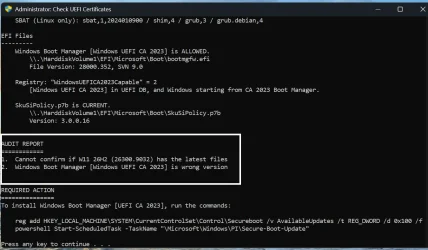
When I run the Secure Boot check certificates script, I get this result in AUDIT REPORT section:

cert.webp

When I run the commands in REQUIRED ACTION section and, after restarting I re-check the certificates status, I get the same result. Nothing changes.

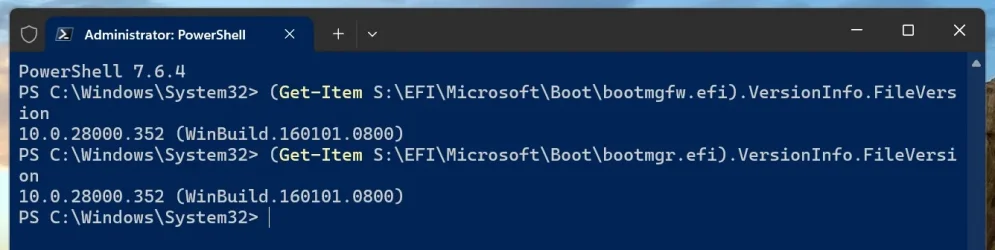
This is the bootmgfw.efi version in System partition:

bootmgfw.webp

What can be the reason ? Any ideas.
 

My Computers My Computers

  • At a glance

    Windows 11 Pro build 26200.8524Intel i7-4790Teams DDR3-1600 4x4 GBMSI Nvidia GeForce GTX 1050Ti
    OS
    Windows 11 Pro build 26200.8524
    Computer type
    PC/Desktop
    Manufacturer/Model
    Home Built
    CPU
    Intel i7-4790
    Motherboard
    Asus H97 Pro Gamer with add-on TPM1.2 module
    Memory
    Teams DDR3-1600 4x4 GB
    Graphics Card(s)
    MSI Nvidia GeForce GTX 1050Ti
    Sound Card
    Realtek ALC1150
    Monitor(s) Displays
    Dell P2425D
    Screen Resolution
    2560 by 1440 pixels
    Hard Drives
    Corsair NVMe M.2 Core XT 1000 GB (Windows 11 v.25H2); Samsung SATA Evo 870 500 GB (Windows 11 v.25H2);
    PSU
    Corsair HX850
    Case
    Gigabyte Solo 210
    Cooling
    Zalman CNPS7X Tower
    Keyboard
    Microsoft AIO Wireless (includes touchpad)
    Mouse
    HP S1000 Plus Wireless
    Internet Speed
    500 Mb fiber optic
    Browser
    Chrome; MS Edge
    Antivirus
    Windows Defender
  • At a glance

    MacOS 12 MontereyIntel Core i58 GBIntel integrated
    Operating System
    MacOS 12 Monterey
    Computer type
    Laptop
    Manufacturer/Model
    Apple Macbook Air
    CPU
    Intel Core i5
    Memory
    8 GB
    Graphics card(s)
    Intel integrated
    Screen Resolution
    1440 by 900 pixels
    Hard Drives
    128 GB
    Keyboard
    Built-in
    Mouse
    Microsoft Wireless
    Internet Speed
    802.11 ac
    Browser
    Chrome; Safari
    Antivirus
    N/A
A third option is to switch to integrated graphics, which your CPU supports.
*******************************
thank you, Scott
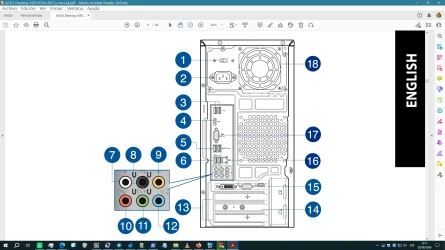
yes, the ASUS have another, (than the own NVIDIA card), HDMI port which i guess is an input only port and a VGA port which implies that i´d need an adapter VGA/HDMI as my monitor only has a HDMI and DISPLAY PORT inputs...,
fernando
 

Attachments

  • Captura de pantalla (473).webp
    Captura de pantalla (473).webp
    112.5 KB · Views: 1
  • Captura de pantalla (474).webp
    Captura de pantalla (474).webp
    116.7 KB · Views: 1

My Computer My Computer

At a glance

windows 10 Enterprise IoT LTSCIntel(R) Core(TM) i5-6400 CPU @ 2.70GHz16GBNVIDIA GeForce GT 720 2GB
OS
windows 10 Enterprise IoT LTSC
Computer type
PC/Desktop
Manufacturer/Model
ASUS/ K31CD
CPU
Intel(R) Core(TM) i5-6400 CPU @ 2.70GHz
Memory
16GB
Graphics Card(s)
NVIDIA GeForce GT 720 2GB
Other Info
BIOS: American Megatrends Inc.
v. 1102 (12-2018)
... NVIDIA GeForce GT 720 graphic card ...
... revocation ...
...
REQUIRED ACTION
===============
To REVOKE the [PCA 2011] cert, run the commands:

reg add HKEY_LOCAL_MACHINE\SYSTEM\CurrentControlSet\Control\Secureboot /v AvailableUpdates /t REG_DWORD /d 0x280 /f
powershell Start-ScheduledTask -TaskName "\Microsoft\Windows\PI\Secure-Boot-Update"

In my opinion, revoking the PCA 2011 certificate has no effect on the Nvidia GPU, because the Nvidia GPU is signed with the UEFI CA 2011 certificate. In my opinion, if you revoke the PCA 2011 certificate with the quoted command, the Nvidia GPU will continue to work, because the Nvidia GPU firmware is signed with the UEFI CA 2011 certificate and this certificate is not revoked by the quoted command.

Edit:
The above information is not true based on the information below from suatchini54.
 
Last edited:

My Computer My Computer

At a glance

Windows 11AMD32 GB
OS
Windows 11
Computer type
PC/Desktop
Manufacturer/Model
Gigabyte
CPU
AMD
Motherboard
Gigabyte
Memory
32 GB
Revoking PCA 2011 certificate causes boot failure on my Asus motherboard if GPU is signed with UEFI CA 2011 certificate and CSM support on the motherboard is disabled. Enabling CSM support eliminates boot failure and my PC boots fine.
 

My Computers My Computers

  • At a glance

    Windows 11 Pro build 26200.8524Intel i7-4790Teams DDR3-1600 4x4 GBMSI Nvidia GeForce GTX 1050Ti
    OS
    Windows 11 Pro build 26200.8524
    Computer type
    PC/Desktop
    Manufacturer/Model
    Home Built
    CPU
    Intel i7-4790
    Motherboard
    Asus H97 Pro Gamer with add-on TPM1.2 module
    Memory
    Teams DDR3-1600 4x4 GB
    Graphics Card(s)
    MSI Nvidia GeForce GTX 1050Ti
    Sound Card
    Realtek ALC1150
    Monitor(s) Displays
    Dell P2425D
    Screen Resolution
    2560 by 1440 pixels
    Hard Drives
    Corsair NVMe M.2 Core XT 1000 GB (Windows 11 v.25H2); Samsung SATA Evo 870 500 GB (Windows 11 v.25H2);
    PSU
    Corsair HX850
    Case
    Gigabyte Solo 210
    Cooling
    Zalman CNPS7X Tower
    Keyboard
    Microsoft AIO Wireless (includes touchpad)
    Mouse
    HP S1000 Plus Wireless
    Internet Speed
    500 Mb fiber optic
    Browser
    Chrome; MS Edge
    Antivirus
    Windows Defender
  • At a glance

    MacOS 12 MontereyIntel Core i58 GBIntel integrated
    Operating System
    MacOS 12 Monterey
    Computer type
    Laptop
    Manufacturer/Model
    Apple Macbook Air
    CPU
    Intel Core i5
    Memory
    8 GB
    Graphics card(s)
    Intel integrated
    Screen Resolution
    1440 by 900 pixels
    Hard Drives
    128 GB
    Keyboard
    Built-in
    Mouse
    Microsoft Wireless
    Internet Speed
    802.11 ac
    Browser
    Chrome; Safari
    Antivirus
    N/A
Revoking PCA 2011 certificate causes boot failure on my Asus motherboard if GPU is signed with UEFI CA 2011 certificate and CSM support on the motherboard is disabled. Enabling CSM support eliminates boot failure and my PC boots fine.
I didn't know that, does Asus have some kind of faulty implementation? :-(
 

My Computer My Computer

At a glance

Windows 11AMD32 GB
OS
Windows 11
Computer type
PC/Desktop
Manufacturer/Model
Gigabyte
CPU
AMD
Motherboard
Gigabyte
Memory
32 GB
I didn't know that, does Asus have some kind of faulty implementation? :-(
Sorry I can't tell. When I disable CSM, I meet with beeps and a notice on red background window reading that there is boot failure. Press F1 to enter into BIOS, bla.. bla..
 

My Computers My Computers

  • At a glance

    Windows 11 Pro build 26200.8524Intel i7-4790Teams DDR3-1600 4x4 GBMSI Nvidia GeForce GTX 1050Ti
    OS
    Windows 11 Pro build 26200.8524
    Computer type
    PC/Desktop
    Manufacturer/Model
    Home Built
    CPU
    Intel i7-4790
    Motherboard
    Asus H97 Pro Gamer with add-on TPM1.2 module
    Memory
    Teams DDR3-1600 4x4 GB
    Graphics Card(s)
    MSI Nvidia GeForce GTX 1050Ti
    Sound Card
    Realtek ALC1150
    Monitor(s) Displays
    Dell P2425D
    Screen Resolution
    2560 by 1440 pixels
    Hard Drives
    Corsair NVMe M.2 Core XT 1000 GB (Windows 11 v.25H2); Samsung SATA Evo 870 500 GB (Windows 11 v.25H2);
    PSU
    Corsair HX850
    Case
    Gigabyte Solo 210
    Cooling
    Zalman CNPS7X Tower
    Keyboard
    Microsoft AIO Wireless (includes touchpad)
    Mouse
    HP S1000 Plus Wireless
    Internet Speed
    500 Mb fiber optic
    Browser
    Chrome; MS Edge
    Antivirus
    Windows Defender
  • At a glance

    MacOS 12 MontereyIntel Core i58 GBIntel integrated
    Operating System
    MacOS 12 Monterey
    Computer type
    Laptop
    Manufacturer/Model
    Apple Macbook Air
    CPU
    Intel Core i5
    Memory
    8 GB
    Graphics card(s)
    Intel integrated
    Screen Resolution
    1440 by 900 pixels
    Hard Drives
    128 GB
    Keyboard
    Built-in
    Mouse
    Microsoft Wireless
    Internet Speed
    802.11 ac
    Browser
    Chrome; Safari
    Antivirus
    N/A
this maybe of help for those with Nvidia cards

you are most likely going to need a BIOS or firmware update for Nvidia GPU's for them to boot with the new windows secure boot certs

if they have any available.
best of luck Steve ..
 

My Computers My Computers

  • At a glance

    Windows 11 HomeRyzen 7 5825u64GB DDR4 3200Ryzen 7 5825u
    OS
    Windows 11 Home
    Computer type
    PC/Desktop
    Manufacturer/Model
    HP 24" AiO
    CPU
    Ryzen 7 5825u
    Motherboard
    HP
    Memory
    64GB DDR4 3200
    Graphics Card(s)
    Ryzen 7 5825u
    Sound Card
    RealTek
    Monitor(s) Displays
    24" HP AiO
    Screen Resolution
    1920 x 1080 @60 Hz
    Hard Drives
    1TB WD Blue SN580 M2 SSD Partitioned.
    2x 1TB USB HDD External Backup/Storage.
    PSU
    90W external power brick
    Case
    24" All in One
    Cooling
    Default Air Cooling
    Keyboard
    HP WiFi UK extended
    Mouse
    HP WiFi 3 Button
    Internet Speed
    1GB full fibre
    Browser
    Edge & Firefox
    Antivirus
    AVG Internet Security/Windows Defender
    Other Info
    Mainly Open Source Software
  • At a glance

    Ubuntu 22.04.5 LTSi5 7200u16GB DDR4Intel
    Operating System
    Ubuntu 22.04.5 LTS
    Computer type
    Laptop
    Manufacturer/Model
    Dell 13" Latitude 2017
    CPU
    i5 7200u
    Motherboard
    Dell
    Memory
    16GB DDR4
    Graphics card(s)
    Intel
    Sound Card
    Intel
    Monitor(s) Displays
    13" Dell Laptop
    Hard Drives
    250GB Crucial 2.5" SSD
    Mouse
    Generic WiFi 3 button
    Internet Speed
    WiFi only
    Browser
    Firefox
    Antivirus
    ClamAV TK
    Other Info
    Mainly Open Source Software
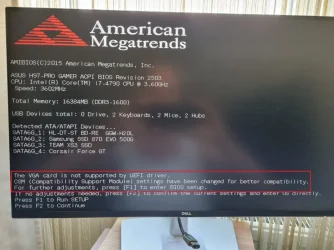
This is the screen I get if I disable CSM support. Sorry for the background color. It was dark, not red.

VGA.webp

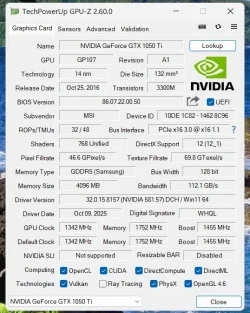
The behavior was different before I revoked PCA 2011 certificate. My GFX card is UEFI compatible.

GFX.webp

Hope this answers your question about Asus having some kind of faulty implementation.
 

My Computers My Computers

  • At a glance

    Windows 11 Pro build 26200.8524Intel i7-4790Teams DDR3-1600 4x4 GBMSI Nvidia GeForce GTX 1050Ti
    OS
    Windows 11 Pro build 26200.8524
    Computer type
    PC/Desktop
    Manufacturer/Model
    Home Built
    CPU
    Intel i7-4790
    Motherboard
    Asus H97 Pro Gamer with add-on TPM1.2 module
    Memory
    Teams DDR3-1600 4x4 GB
    Graphics Card(s)
    MSI Nvidia GeForce GTX 1050Ti
    Sound Card
    Realtek ALC1150
    Monitor(s) Displays
    Dell P2425D
    Screen Resolution
    2560 by 1440 pixels
    Hard Drives
    Corsair NVMe M.2 Core XT 1000 GB (Windows 11 v.25H2); Samsung SATA Evo 870 500 GB (Windows 11 v.25H2);
    PSU
    Corsair HX850
    Case
    Gigabyte Solo 210
    Cooling
    Zalman CNPS7X Tower
    Keyboard
    Microsoft AIO Wireless (includes touchpad)
    Mouse
    HP S1000 Plus Wireless
    Internet Speed
    500 Mb fiber optic
    Browser
    Chrome; MS Edge
    Antivirus
    Windows Defender
  • At a glance

    MacOS 12 MontereyIntel Core i58 GBIntel integrated
    Operating System
    MacOS 12 Monterey
    Computer type
    Laptop
    Manufacturer/Model
    Apple Macbook Air
    CPU
    Intel Core i5
    Memory
    8 GB
    Graphics card(s)
    Intel integrated
    Screen Resolution
    1440 by 900 pixels
    Hard Drives
    128 GB
    Keyboard
    Built-in
    Mouse
    Microsoft Wireless
    Internet Speed
    802.11 ac
    Browser
    Chrome; Safari
    Antivirus
    N/A
Back
Top Bottom