Solved garlin's PowerShell scripts for updating Secure Boot CA 2023


this maybe of help for those with Nvidia cards

you are most likely going to need a BIOS or firmware update for Nvidia GPU's for them to boot with the new windows secure boot certs

if they have any available.
best of luck Steve ..
Thanks for this information. Unfortunately, my gfx card is out of support and there is no firmware update nor a new driver update to insert new certificates into the gfx card.

If my memory serves me well, I remember @garlin gave me a link where firmware of gfx cards was modified for compatibility of new certificates but modifying firmware of my card using hex editors and such is too complex a process for me to carry out without a possible bricking of the card.

Thanks anyway.

Have a nice weekend.
 

My Computers My Computers

  • At a glance

    Windows 11 Pro build 26200.8524Intel i7-4790Teams DDR3-1600 4x4 GBMSI Nvidia GeForce GTX 1050Ti
    OS
    Windows 11 Pro build 26200.8524
    Computer type
    PC/Desktop
    Manufacturer/Model
    Home Built
    CPU
    Intel i7-4790
    Motherboard
    Asus H97 Pro Gamer with add-on TPM1.2 module
    Memory
    Teams DDR3-1600 4x4 GB
    Graphics Card(s)
    MSI Nvidia GeForce GTX 1050Ti
    Sound Card
    Realtek ALC1150
    Monitor(s) Displays
    Dell P2425D
    Screen Resolution
    2560 by 1440 pixels
    Hard Drives
    Corsair NVMe M.2 Core XT 1000 GB (Windows 11 v.25H2); Samsung SATA Evo 870 500 GB (Windows 11 v.25H2);
    PSU
    Corsair HX850
    Case
    Gigabyte Solo 210
    Cooling
    Zalman CNPS7X Tower
    Keyboard
    Microsoft AIO Wireless (includes touchpad)
    Mouse
    HP S1000 Plus Wireless
    Internet Speed
    500 Mb fiber optic
    Browser
    Chrome; MS Edge
    Antivirus
    Windows Defender
  • At a glance

    MacOS 12 MontereyIntel Core i58 GBIntel integrated
    Operating System
    MacOS 12 Monterey
    Computer type
    Laptop
    Manufacturer/Model
    Apple Macbook Air
    CPU
    Intel Core i5
    Memory
    8 GB
    Graphics card(s)
    Intel integrated
    Screen Resolution
    1440 by 900 pixels
    Hard Drives
    128 GB
    Keyboard
    Built-in
    Mouse
    Microsoft Wireless
    Internet Speed
    802.11 ac
    Browser
    Chrome; Safari
    Antivirus
    N/A
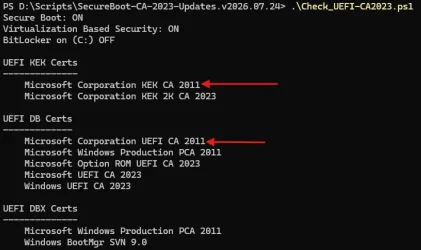
When I run the Secure Boot check certificates script, I get this result in AUDIT REPORT section:
To make sure you have the latest boot manager, there is a check for your Windows build version. In the script, it's any Windows that is updated to June 2026 or later. But here's a major problem: unlike other folks, I don't have time to install all the different Insider or Preview builds.

Some of the Insider builds aren't always in sync with Secure Boot update files (slightly behind).

There isn't a published table of all of the Insider or Preview builds by date, so you can determine when that build was released. For production Windows, MS provides the Windows Update History and it lists every update by build and release date. Since I'm not going to spend my entire week looking at random pre-release builds, I wait until Patch Tuesday to determine if the Windows build check needs to be updating. For some months, nothing major happens with the Secure Boot files.

Any Windows that is higher than the Production channels will be marked "Cannot confirm if [X] has the latest file".

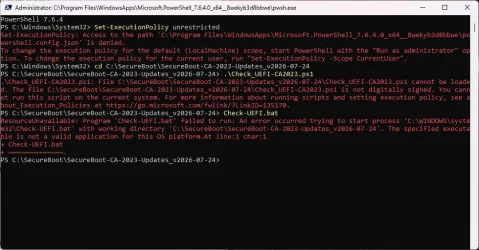
When I run the commands in REQUIRED ACTION section and, after restarting I re-check the certificates status, I get the same result. Nothing changes.
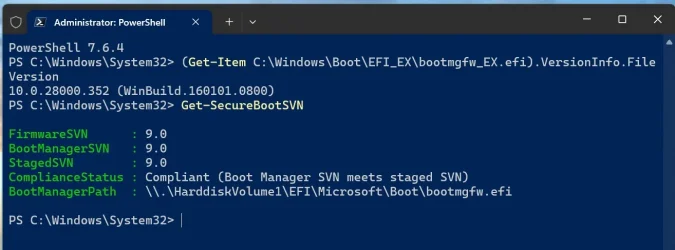
What is the version of C:\Windows\Boot\EFI_EX\bootmgfw_EX.efi?
Run the PS command: Get-SecureBootSVN
 

My Computer My Computer

At a glance

Windows 7
OS
Windows 7
Sorry @garlin My post was intended for informational purposes only.

But now you ask, please find the info below:

Screenshot 2026-08-02 174112.webp

Thanks. Edit: This is build 26300.9032 (26H2)
 

My Computers My Computers

  • At a glance

    Windows 11 Pro build 26200.8524Intel i7-4790Teams DDR3-1600 4x4 GBMSI Nvidia GeForce GTX 1050Ti
    OS
    Windows 11 Pro build 26200.8524
    Computer type
    PC/Desktop
    Manufacturer/Model
    Home Built
    CPU
    Intel i7-4790
    Motherboard
    Asus H97 Pro Gamer with add-on TPM1.2 module
    Memory
    Teams DDR3-1600 4x4 GB
    Graphics Card(s)
    MSI Nvidia GeForce GTX 1050Ti
    Sound Card
    Realtek ALC1150
    Monitor(s) Displays
    Dell P2425D
    Screen Resolution
    2560 by 1440 pixels
    Hard Drives
    Corsair NVMe M.2 Core XT 1000 GB (Windows 11 v.25H2); Samsung SATA Evo 870 500 GB (Windows 11 v.25H2);
    PSU
    Corsair HX850
    Case
    Gigabyte Solo 210
    Cooling
    Zalman CNPS7X Tower
    Keyboard
    Microsoft AIO Wireless (includes touchpad)
    Mouse
    HP S1000 Plus Wireless
    Internet Speed
    500 Mb fiber optic
    Browser
    Chrome; MS Edge
    Antivirus
    Windows Defender
  • At a glance

    MacOS 12 MontereyIntel Core i58 GBIntel integrated
    Operating System
    MacOS 12 Monterey
    Computer type
    Laptop
    Manufacturer/Model
    Apple Macbook Air
    CPU
    Intel Core i5
    Memory
    8 GB
    Graphics card(s)
    Intel integrated
    Screen Resolution
    1440 by 900 pixels
    Hard Drives
    128 GB
    Keyboard
    Built-in
    Mouse
    Microsoft Wireless
    Internet Speed
    802.11 ac
    Browser
    Chrome; Safari
    Antivirus
    N/A
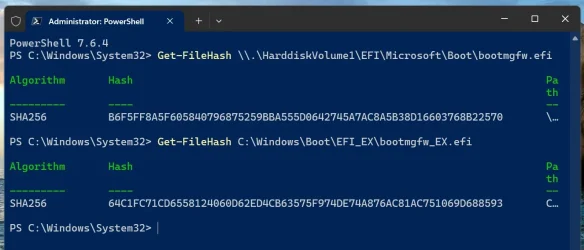
Are these two results the same?
Code:
Get-FileHash \\.\HarddiskVolume1\EFI\Microsoft\Boot\bootmgfw.efi
Get-FileHash C:\Windows\Boot\EFI_EX\bootmgfw_EX.efi
 

My Computer My Computer

At a glance

Windows 7
OS
Windows 7
No. They are different.

Screenshot 2026-08-02 180444.webp
 

My Computers My Computers

  • At a glance

    Windows 11 Pro build 26200.8524Intel i7-4790Teams DDR3-1600 4x4 GBMSI Nvidia GeForce GTX 1050Ti
    OS
    Windows 11 Pro build 26200.8524
    Computer type
    PC/Desktop
    Manufacturer/Model
    Home Built
    CPU
    Intel i7-4790
    Motherboard
    Asus H97 Pro Gamer with add-on TPM1.2 module
    Memory
    Teams DDR3-1600 4x4 GB
    Graphics Card(s)
    MSI Nvidia GeForce GTX 1050Ti
    Sound Card
    Realtek ALC1150
    Monitor(s) Displays
    Dell P2425D
    Screen Resolution
    2560 by 1440 pixels
    Hard Drives
    Corsair NVMe M.2 Core XT 1000 GB (Windows 11 v.25H2); Samsung SATA Evo 870 500 GB (Windows 11 v.25H2);
    PSU
    Corsair HX850
    Case
    Gigabyte Solo 210
    Cooling
    Zalman CNPS7X Tower
    Keyboard
    Microsoft AIO Wireless (includes touchpad)
    Mouse
    HP S1000 Plus Wireless
    Internet Speed
    500 Mb fiber optic
    Browser
    Chrome; MS Edge
    Antivirus
    Windows Defender
  • At a glance

    MacOS 12 MontereyIntel Core i58 GBIntel integrated
    Operating System
    MacOS 12 Monterey
    Computer type
    Laptop
    Manufacturer/Model
    Apple Macbook Air
    CPU
    Intel Core i5
    Memory
    8 GB
    Graphics card(s)
    Intel integrated
    Screen Resolution
    1440 by 900 pixels
    Hard Drives
    128 GB
    Keyboard
    Built-in
    Mouse
    Microsoft Wireless
    Internet Speed
    802.11 ac
    Browser
    Chrome; Safari
    Antivirus
    N/A
*******************************
thank you, Scott
yes, the ASUS have another, (than the own NVIDIA card), HDMI port which i guess is an input only port and a VGA port which implies that i´d need an adapter VGA/HDMI as my monitor only has a HDMI and DISPLAY PORT inputs...,
fernando
With your previous post, I though there was no ports (HDMI, DP or VGA) on the back.
I would simply try it and see !
Remove the NVidia card, plug your monitor to the onboard HDMI port and see if you get a display.
My guess is that's an onboard integrated graphics card, but let's try it out and see...

Do you remember if you ever went to the BIOS to tell it to only use the PCI graphics card.
If you don't get a display with the onboard port, put back the NVidia and check the BIOS to see if it's configure to only use the PCI one.
 

My Computer My Computer

At a glance

Windows 11
OS
Windows 11
No. They are different.
The script checks if the EFI boot manager is:
- Windows UEFI CA 2023​
- has the same SVN or higher​
- has the same file hash as the \Windows\Boot\EFI_EX version (so I don't have to perform a file compare)​

Like I said before, Insider and Preview releases aren't always in sync with updates because they are not production releases. Why does this build have a differently compiled boot manager with the same version and SVN? I have no idea.
 

My Computer My Computer

At a glance

Windows 7
OS
Windows 7
Thanks @garlin . This info is satisfactory for me. After a few months when 26H2 is out of experimental preview, we will know.

Have a nice weekend.
 

My Computers My Computers

  • At a glance

    Windows 11 Pro build 26200.8524Intel i7-4790Teams DDR3-1600 4x4 GBMSI Nvidia GeForce GTX 1050Ti
    OS
    Windows 11 Pro build 26200.8524
    Computer type
    PC/Desktop
    Manufacturer/Model
    Home Built
    CPU
    Intel i7-4790
    Motherboard
    Asus H97 Pro Gamer with add-on TPM1.2 module
    Memory
    Teams DDR3-1600 4x4 GB
    Graphics Card(s)
    MSI Nvidia GeForce GTX 1050Ti
    Sound Card
    Realtek ALC1150
    Monitor(s) Displays
    Dell P2425D
    Screen Resolution
    2560 by 1440 pixels
    Hard Drives
    Corsair NVMe M.2 Core XT 1000 GB (Windows 11 v.25H2); Samsung SATA Evo 870 500 GB (Windows 11 v.25H2);
    PSU
    Corsair HX850
    Case
    Gigabyte Solo 210
    Cooling
    Zalman CNPS7X Tower
    Keyboard
    Microsoft AIO Wireless (includes touchpad)
    Mouse
    HP S1000 Plus Wireless
    Internet Speed
    500 Mb fiber optic
    Browser
    Chrome; MS Edge
    Antivirus
    Windows Defender
  • At a glance

    MacOS 12 MontereyIntel Core i58 GBIntel integrated
    Operating System
    MacOS 12 Monterey
    Computer type
    Laptop
    Manufacturer/Model
    Apple Macbook Air
    CPU
    Intel Core i5
    Memory
    8 GB
    Graphics card(s)
    Intel integrated
    Screen Resolution
    1440 by 900 pixels
    Hard Drives
    128 GB
    Keyboard
    Built-in
    Mouse
    Microsoft Wireless
    Internet Speed
    802.11 ac
    Browser
    Chrome; Safari
    Antivirus
    N/A
*******************************
thank you, Scott
yes, the ASUS have another, (than the own NVIDIA card), HDMI port which i guess is an input only port and a VGA port which implies that i´d need an adapter VGA/HDMI as my monitor only has a HDMI and DISPLAY PORT inputs...,
fernando
I doubt you have an input HDMI port on your motherboard, that's an output from the embedded motherboard GPU.
 

My Computers My Computers

  • At a glance

    Win 11 Pro 25H2, Build 26200.8973Intel Core i5 1450064GB DDR4GeForce RTX 4060
    OS
    Win 11 Pro 25H2, Build 26200.8973
    Computer type
    PC/Desktop
    Manufacturer/Model
    Home Brew
    CPU
    Intel Core i5 14500
    Motherboard
    Gigabyte B760M G P WIFI
    Memory
    64GB DDR4
    Graphics Card(s)
    GeForce RTX 4060
    Sound Card
    Chipset Realtek
    Monitor(s) Displays
    LG 45" Ultragear, Acer 24" 1080p
    Screen Resolution
    5120x1440, 1920x1080
    Hard Drives
    Crucial P310 2TB 2280 PCIe Gen4 3D NAND NVMe M.2 SSD (O/S)
    Silicon Power 2TB US75 NVMe PCIe Gen4 M.2 2280 SSD (backup)
    Crucial BX500 2TB 3D NAND (2nd backup)
    Seagate 4TB Ironwolf, rotating HDD archive files
    External off-line backup Drives: 2 NVMe 4TB drives in external enclosures
    PSU
    Thermaltake Toughpower GF3 750W
    Case
    LIAN LI LANCOOL 216 E-ATX PC Case
    Cooling
    Lots of fans!
    Keyboard
    Microsoft Comfort Curve 2000
    Mouse
    Logitech G305
    Internet Speed
    Verizon FiOS 1GB
    Browser
    Firefox
    Antivirus
    Malware Bytes & Windows Defender Security
  • At a glance

    Win 11 Pro 25H2, Build 26200.8894Intel Core i5 1440032GB DDR5Intel 700 Embedded GPU
    Operating System
    Win 11 Pro 25H2, Build 26200.8894
    Computer type
    PC/Desktop
    Manufacturer/Model
    Home Brew
    CPU
    Intel Core i5 14400
    Motherboard
    Gigabyte B760M DS3H AX
    Memory
    32GB DDR5
    Graphics card(s)
    Intel 700 Embedded GPU
    Sound Card
    Realtek Embedded
    Monitor(s) Displays
    27" HP 1080p
    Screen Resolution
    1920x1080
    Hard Drives
    Crucial P310 2TB 2280 PCIe Gen4 eD NAND PCIe SSD
    Samsung EVO 990 2TB NVMe Gen4 SSD
    Samsung 2TB SATA SSD
    PSU
    Thermaltake Smart BM3 650W
    Case
    Okinos Micro ATX Case
    Cooling
    Fans
    Keyboard
    Microsoft Comfort Curve 2000
    Mouse
    Logitech G305
    Internet Speed
    Verizon FiOS 1GB
    Browser
    Firefox
    Antivirus
    Malware Bytes & Windows Defender Security
  • Nimo N171 17" Laptop, (Intel i3-1215U, 16GB RAM, 2TB NVMe, Win11 Pro)
    Acemagic Vista Mini PC V1 (Intel N150, 16GB RAM, 1TB NVMe, Win11 Pro)
    HP ENVY h8-1540t, (24GB RAM, 2TB SSD, 2TB HDD, Win11 Pro)
With your previous post, I though there was no ports (HDMI, DP or VGA) on the back.
I would simply try it and see !
Remove the NVidia card, plug your monitor to the onboard HDMI port and see if you get a display.
My guess is that's an onboard integrated graphics card, but let's try it out and see...

Do you remember if you ever went to the BIOS to tell it to only use the PCI graphics card.
If you don't get a display with the onboard port, put back the NVidia and check the BIOS to see if it's configure to only use the PCI one.
********************************************************************************
Scott said:

A third option is to switch to integrated graphics, which your CPU supports.

************************************************
thank you, anchamp65 and Scott
yes, it seems you are right; i will try that when possible and report the result,
fernando
 
Last edited:

My Computer My Computer

At a glance

windows 10 Enterprise IoT LTSCIntel(R) Core(TM) i5-6400 CPU @ 2.70GHz16GBNVIDIA GeForce GT 720 2GB
OS
windows 10 Enterprise IoT LTSC
Computer type
PC/Desktop
Manufacturer/Model
ASUS/ K31CD
CPU
Intel(R) Core(TM) i5-6400 CPU @ 2.70GHz
Memory
16GB
Graphics Card(s)
NVIDIA GeForce GT 720 2GB
Other Info
BIOS: American Megatrends Inc.
v. 1102 (12-2018)
I doubt you have an input HDMI port on your motherboard, that's an output from the embedded motherboard GPU.
**************
hello, gunrunnerjohn
indeed, i think you´re right; i will try that HDMI port-------- thank you,
fernando
 

My Computer My Computer

At a glance

windows 10 Enterprise IoT LTSCIntel(R) Core(TM) i5-6400 CPU @ 2.70GHz16GBNVIDIA GeForce GT 720 2GB
OS
windows 10 Enterprise IoT LTSC
Computer type
PC/Desktop
Manufacturer/Model
ASUS/ K31CD
CPU
Intel(R) Core(TM) i5-6400 CPU @ 2.70GHz
Memory
16GB
Graphics Card(s)
NVIDIA GeForce GT 720 2GB
Other Info
BIOS: American Megatrends Inc.
v. 1102 (12-2018)
My HP Z440 workstation and my graphics card: at the moment I am very confused about needing a CA 2023 cert on my graphics card (GOP part of the VBIOS) or not.

At the moment I have the following situation:
The HP Z440 UEFI has the CA 2023 cert, and works well.
The graphics card (GOP) has the CA 2011 cert.
I revoked the CA 2011 in the UEFI weeks ago, but my graphics card still works. The script clearly says: CA 2011 revoked, as you can see below

PS C:\Users\admin\Downloads\SecureBoot-CA-2023-Updates.v2026.07.28> .\check-UEFI.bat -Verbose
PowerShell 7.6.4
Windows 11 25H2 (26200.8973)

Secure Boot: ON
Virtualization Based Security: ON
BitLocker on (C:) OFF

BIOS Firmware
-------------
Hewlett-Packard HP Z440 Workstation
Version: M60 v02.62
Date: 2024-01-04

Factory Default UEFI PK Cert
----------------------------
Hewlett-Packard UEFI Secure Boot Platform Key

UEFI PK Cert
------------
Hewlett-Packard UEFI Secure Boot Platform Key

Factory Default UEFI KEK Certs
------------------------------
Microsoft Corporation KEK CA 2011
Hewlett-Packard UEFI Secure Boot Key Exchange Key

UEFI KEK Certs
--------------
Microsoft Corporation KEK CA 2011
Microsoft Corporation KEK 2K CA 2023
Hewlett-Packard UEFI Secure Boot Key Exchange Key

Factory Default UEFI DB Certs
-----------------------------
Microsoft Corporation UEFI CA 2011
Microsoft Windows Production PCA 2011
Hewlett-Packard UEFI Secure Boot DB Key

UEFI DB Certs
-------------
Microsoft Corporation UEFI CA 2011
Microsoft Windows Production PCA 2011
Microsoft Option ROM UEFI CA 2023
Microsoft UEFI CA 2023
Windows UEFI CA 2023
Hewlett-Packard UEFI Secure Boot DB Key
HP UEFI Secure Boot 2013 DB key

Factory Default UEFI DBX Certs
------------------------------
(NONE)
EFI_CERT_SHA256_GUID Signatures: 14

UEFI DBX Certs
--------------
Microsoft Windows Production PCA 2011
Windows BootMgr SVN 9.0
EFI_CERT_SHA256_GUID Signatures: 298

UEFI Variables
--------------
Credential Guard: ON
SBAT (Linux only): sbat,1,2024010900 / shim,4 / grub,3 / grub.debian,4

EFI Files
---------
Windows Boot Manager [Windows UEFI CA 2023] is ALLOWED.
\\.\HarddiskVolume1\EFI\Microsoft\Boot\bootmgfw.efi
File Version: 28000.352, SVN 9.0

Registry: "WindowsUEFICA2023Capable" = 2
[Windows UEFI CA 2023] in UEFI DB, and Windows starting from CA 2023 Boot Manager.

[OPTIONAL] SkuSiPolicy.p7b (for VBS) is MISSING.


STATUS REPORT
-------------
Registry: "UEFICA2023Status" = Updated

SUCCESS: UPDATES ARE FINISHED.
UEFI CA 2023 certs are present, PCA 2011 cert is revoked.

PS C:\Users\admin\Downloads\SecureBoot-CA-2023-Updates.v2026.07.28>

But, if the CA 2011 is revoked, the graphics card should not work anymore, or should it?

Reading this thread:
some users say it is not important what cert you have on the graphics card.

Is it possible that, because of limited or bad or not strict implementation, some systems only validate the certs of the UEFI, but not the GOP cert on the graphics card?
Otherwise, I do not understand why my HP Z440 works with my old Nvidia K2200 graphics card, and with the CA 2011 revoked in the UEFI.
 

My Computer My Computer

At a glance

windows 11
OS
windows 11
My HP Z440 workstation and my graphics card: at the moment I am very confused about needing a CA 2023 cert on my graphics card (GOP part of the VBIOS) or not.

At the moment I have the following situation:
The HP Z440 UEFI has the CA 2023 cert, and works well.
The graphics card (GOP) has the CA 2011 cert.
I revoked the CA 2011 in the UEFI weeks ago, but my graphics card still works. The script clearly says: CA 2011 revoked, as you can see below

PS C:\Users\admin\Downloads\SecureBoot-CA-2023-Updates.v2026.07.28> .\check-UEFI.bat -Verbose
PowerShell 7.6.4
Windows 11 25H2 (26200.8973)

Secure Boot: ON
Virtualization Based Security: ON
BitLocker on (C:) OFF

BIOS Firmware
-------------
Hewlett-Packard HP Z440 Workstation
Version: M60 v02.62
Date: 2024-01-04

Factory Default UEFI PK Cert
----------------------------
Hewlett-Packard UEFI Secure Boot Platform Key

UEFI PK Cert
------------
Hewlett-Packard UEFI Secure Boot Platform Key

Factory Default UEFI KEK Certs
------------------------------
Microsoft Corporation KEK CA 2011
Hewlett-Packard UEFI Secure Boot Key Exchange Key

UEFI KEK Certs
--------------
Microsoft Corporation KEK CA 2011
Microsoft Corporation KEK 2K CA 2023
Hewlett-Packard UEFI Secure Boot Key Exchange Key

Factory Default UEFI DB Certs
-----------------------------
Microsoft Corporation UEFI CA 2011
Microsoft Windows Production PCA 2011
Hewlett-Packard UEFI Secure Boot DB Key

UEFI DB Certs
-------------
Microsoft Corporation UEFI CA 2011
Microsoft Windows Production PCA 2011
Microsoft Option ROM UEFI CA 2023
Microsoft UEFI CA 2023
Windows UEFI CA 2023
Hewlett-Packard UEFI Secure Boot DB Key
HP UEFI Secure Boot 2013 DB key

Factory Default UEFI DBX Certs
------------------------------
(NONE)
EFI_CERT_SHA256_GUID Signatures: 14

UEFI DBX Certs
--------------
Microsoft Windows Production PCA 2011
Windows BootMgr SVN 9.0
EFI_CERT_SHA256_GUID Signatures: 298

UEFI Variables
--------------
Credential Guard: ON
SBAT (Linux only): sbat,1,2024010900 / shim,4 / grub,3 / grub.debian,4

EFI Files
---------
Windows Boot Manager [Windows UEFI CA 2023] is ALLOWED.
\\.\HarddiskVolume1\EFI\Microsoft\Boot\bootmgfw.efi
File Version: 28000.352, SVN 9.0

Registry: "WindowsUEFICA2023Capable" = 2
[Windows UEFI CA 2023] in UEFI DB, and Windows starting from CA 2023 Boot Manager.

[OPTIONAL] SkuSiPolicy.p7b (for VBS) is MISSING.


STATUS REPORT
-------------
Registry: "UEFICA2023Status" = Updated

SUCCESS: UPDATES ARE FINISHED.
UEFI CA 2023 certs are present, PCA 2011 cert is revoked.

PS C:\Users\admin\Downloads\SecureBoot-CA-2023-Updates.v2026.07.28>

But, if the CA 2011 is revoked, the graphics card should not work anymore, or should it?

Reading this thread:
some users say it is not important what cert you have on the graphics card.

Is it possible that, because of limited or bad or not strict implementation, some systems only validate the certs of the UEFI, but not the GOP cert on the graphics card?
Otherwise, I do not understand why my HP Z440 works with my old Nvidia K2200 graphics card, and with the CA 2011 revoked in the UEFI.
The only certificate that needs to be revoked is the Microsoft Windows Production PCA 2011 certificate, and you have revoked it.

This certificate is only used for Windows, not for graphics cards.
The other certificates will expire, I'm sure of that, and without being revoked I think. It is when they expire that issues could arise for graphics cards.

I believe that the nvidia 4000 series graphics cards use a 2011 certificate, so nvidia should move to update the GOP, I think, but whether they will do it for all GPU series is not certain.
 

My Computer My Computer

At a glance

windows 11
OS
windows 11
The only certificate that needs to be revoked is the Microsoft Windows Production PCA 2011 certificate, and you have revoked it.

This certificate is only used for Windows, not for graphics cards.
The other certificates will expire, I'm sure of that, and without being revoked I think. It is when they expire that issues could arise for graphics cards.

I believe that the nvidia 4000 series graphics cards use a 2011 certificate, so nvidia should move to update the GOP, I think, but whether they will do it for all GPU series is not certain.
Ah...that makes sense to me. And no, nvidia will never update the Quadro K2200 graphics cards. They are far too old.

So, secure boot will need to be disabled before Oct 2026.

I am not going to invest anymore in the HP Z440. I would need to swap the power supply, and the graphics card. It is simply too much money for a 10-year old system. A pity, as this system has served me well. I bought it second-hand in 2020 for a very good price.
And expecting a financial bonus sometime at the start of 2027, I wll be able to buy another computer.
 

My Computer My Computer

At a glance

windows 11
OS
windows 11
Otherwise, I do not understand why my HP Z440 works with my old Nvidia K2200 graphics card, and with the CA 2011 revoked in the UEFI.

The only certificate that needs to be revoked is the Microsoft Windows Production PCA 2011 certificate, and you have revoked it.

Someday these two will expire and be revoked. We'll see what happens then.

1785746553512.webp
 

My Computers My Computers

  • At a glance

    Win 11 Pro 25H2 26200.8973Intel® Core™ i7-14700KG.SKILL Ripjaws S5 Series 64GB (2 x 32GB) DDR5ASUS GeForce RTX 4070 Super 12GB
    OS
    Win 11 Pro 25H2 26200.8973
    Computer type
    PC/Desktop
    Manufacturer/Model
    Self Built
    CPU
    Intel® Core™ i7-14700K
    Motherboard
    ASUS TUF Z690-PLUS WIFI (BIOS 4505)
    Memory
    G.SKILL Ripjaws S5 Series 64GB (2 x 32GB) DDR5
    Graphics Card(s)
    ASUS GeForce RTX 4070 Super 12GB
    Sound Card
    Sound Blaster AE-5 Plus
    Monitor(s) Displays
    ASUS TUF Gaming 27" 2K HDR Gaming
    Screen Resolution
    2560 x 1440
    Hard Drives
    Samsung 990 Pro 1TB NVMe (Win 11 25H2)
    SK hynix P41 500GB NVMe
    SK hynix P41 2TB NVMe (x3)
    Crucial P3 Plus 4TB
    PSU
    Corsair RM850x Shift
    Case
    Antec Dark Phantom DP502 FLUX
    Cooling
    Corsair Nautilus 360 RS AIO
    Keyboard
    Logitech MK 320
    Mouse
    Razer Basilisk V3
    Internet Speed
    750Mbs
    Browser
    Firefox
    Antivirus
    Winows Security
    Other Info
    MR 8.1 Home
  • At a glance

    Win 11 Pro 25H2 26200.8973Intel Core i5-1140064 GB DDR4MSI GeForce RTX 3060 Ventus 2X 12GB
    Operating System
    Win 11 Pro 25H2 26200.8973
    Computer type
    PC/Desktop
    Manufacturer/Model
    Self Built
    CPU
    Intel Core i5-11400
    Motherboard
    Asus TUF Gaming Z590 Plus WiFi (BIOS 2803)
    Memory
    64 GB DDR4
    Graphics card(s)
    MSI GeForce RTX 3060 Ventus 2X 12GB
    Sound Card
    SoundBlaster Audigy Fx V2
    Monitor(s) Displays
    Samsung F27T350
    Screen Resolution
    1920x1080
    Hard Drives
    Samsung 980 Pro 1TB
    Samsung 970 EVO Plus 2TB
    Samsung 870 EVO 500GB SSD
    PSU
    Corsair HX750
    Case
    Cougar MX330-G Window
    Cooling
    Thermalright Frozen Edge 240 Black AIO
    Internet Speed
    350Mbps
    Browser
    Firefox
    Antivirus
    Windows Security
  • System Three
    Win 11 Pro 25H2 26200.8973
    ASUS PRIME Z370-P II BIOS 3004 7/12/21
    Intel Core i7-8700 CPU @ 3.20GHz
    32GB DDR4 RAM (4x8)
    iGPU Intel UHD Graphics 630
    Mid-Tower Desktop
I have a GTX 1060 in my laptop. I’m waiting and hoping it won’t be abandoned.:crossed
 

My Computer My Computer

At a glance

windows 11
OS
windows 11
Just because they expire doesn't mean they are revoked
 

My Computer My Computer

At a glance

Windows 11 Pro 64bit (release preview channel)i5 840016 GB DDR4RTX 3060 Ti
OS
Windows 11 Pro 64bit (release preview channel)
Computer type
PC/Desktop
Manufacturer/Model
Asus
CPU
i5 8400
Motherboard
ROG STRIX Z370-H GAMING
Memory
16 GB DDR4
Graphics Card(s)
RTX 3060 Ti
Sound Card
On Board
Monitor(s) Displays
Acer VG242Y P
Screen Resolution
1080p
Hard Drives
Intel 660p SSD
PSU
800w
Internet Speed
1000 Mbps

My Computers My Computers

  • At a glance

    Windows 11 Pro 25H2i7-8565U16GBIntel UHD Graphics 620
    OS
    Windows 11 Pro 25H2
    Computer type
    Laptop
    Manufacturer/Model
    Lenovo T490 (2020 Hardware)
    CPU
    i7-8565U
    Motherboard
    20N20028US
    Memory
    16GB
    Graphics Card(s)
    Intel UHD Graphics 620
    Sound Card
    Realtec Audio
    Monitor(s) Displays
    ASUS VE248
    Screen Resolution
    1920 X 1080
    Hard Drives
    Samsung SSD 970 PRO 512GB NVMe
    Internet Speed
    Frontier fiber 1GB
    Browser
    Chrome, Firefox, Edge
    Antivirus
    Norton 360 Deluxe Plus
    Other Info
    Supported hardware, upgraded from Windows 10 Pro to Windows 11 Pro version 24H2 on 06/01/2025 using the Windows 11 ISO file. Used the enablement package to upgrade to version 25H2 on 10/07/2025. Secure boot enabled. Secure Boot CA 2023 updated.
  • At a glance

    Windows 11 Pro 25H2i7-4770 (with SSE4.2, and POPCNT)16GBIntel HD Graphics 4600
    Operating System
    Windows 11 Pro 25H2
    Computer type
    PC/Desktop
    Manufacturer/Model
    Lenovo ThinkCentre M83 (2014 Hardware)
    CPU
    i7-4770 (with SSE4.2, and POPCNT)
    Motherboard
    10AL000GUS
    Memory
    16GB
    Graphics card(s)
    Intel HD Graphics 4600
    Sound Card
    Realtec High Definition Audio
    Monitor(s) Displays
    ASUS VE248
    Screen Resolution
    1920 X 1080
    Hard Drives
    Samsung SSD 860 PRO 1TB SATA
    Internet Speed
    Frontier fiber 1GB
    Browser
    Chrome, Firefox, Edge
    Antivirus
    Norton 360 Deluxe Plus
    Other Info
    Unsupported hardware, upgraded from Windows 10 Pro (TPM 1.2 & unsupported CPU, but does have SSE4.2, and POPCNT) to Windows 11 Pro version 24H2 on 06/15/2025. Added Registry Key HKEY_LOCAL_MACHINE\SYSTEM\Setup\MoSetup – AllowUpgradesWithUnsupportedTPMOrCPU=1 to allow installation using the Windows 11 ISO file. Used the enablement package to upgrade to version 25H2 on 10/08/2025. Secure boot enabled. Secure Boot CA 2023 updated.
I have the nVidia RTX 4060, it's starting to sound like I'm about to run into issues with Secure Boot.
 

My Computers My Computers

  • At a glance

    Win 11 Pro 25H2, Build 26200.8973Intel Core i5 1450064GB DDR4GeForce RTX 4060
    OS
    Win 11 Pro 25H2, Build 26200.8973
    Computer type
    PC/Desktop
    Manufacturer/Model
    Home Brew
    CPU
    Intel Core i5 14500
    Motherboard
    Gigabyte B760M G P WIFI
    Memory
    64GB DDR4
    Graphics Card(s)
    GeForce RTX 4060
    Sound Card
    Chipset Realtek
    Monitor(s) Displays
    LG 45" Ultragear, Acer 24" 1080p
    Screen Resolution
    5120x1440, 1920x1080
    Hard Drives
    Crucial P310 2TB 2280 PCIe Gen4 3D NAND NVMe M.2 SSD (O/S)
    Silicon Power 2TB US75 NVMe PCIe Gen4 M.2 2280 SSD (backup)
    Crucial BX500 2TB 3D NAND (2nd backup)
    Seagate 4TB Ironwolf, rotating HDD archive files
    External off-line backup Drives: 2 NVMe 4TB drives in external enclosures
    PSU
    Thermaltake Toughpower GF3 750W
    Case
    LIAN LI LANCOOL 216 E-ATX PC Case
    Cooling
    Lots of fans!
    Keyboard
    Microsoft Comfort Curve 2000
    Mouse
    Logitech G305
    Internet Speed
    Verizon FiOS 1GB
    Browser
    Firefox
    Antivirus
    Malware Bytes & Windows Defender Security
  • At a glance

    Win 11 Pro 25H2, Build 26200.8894Intel Core i5 1440032GB DDR5Intel 700 Embedded GPU
    Operating System
    Win 11 Pro 25H2, Build 26200.8894
    Computer type
    PC/Desktop
    Manufacturer/Model
    Home Brew
    CPU
    Intel Core i5 14400
    Motherboard
    Gigabyte B760M DS3H AX
    Memory
    32GB DDR5
    Graphics card(s)
    Intel 700 Embedded GPU
    Sound Card
    Realtek Embedded
    Monitor(s) Displays
    27" HP 1080p
    Screen Resolution
    1920x1080
    Hard Drives
    Crucial P310 2TB 2280 PCIe Gen4 eD NAND PCIe SSD
    Samsung EVO 990 2TB NVMe Gen4 SSD
    Samsung 2TB SATA SSD
    PSU
    Thermaltake Smart BM3 650W
    Case
    Okinos Micro ATX Case
    Cooling
    Fans
    Keyboard
    Microsoft Comfort Curve 2000
    Mouse
    Logitech G305
    Internet Speed
    Verizon FiOS 1GB
    Browser
    Firefox
    Antivirus
    Malware Bytes & Windows Defender Security
  • Nimo N171 17" Laptop, (Intel i3-1215U, 16GB RAM, 2TB NVMe, Win11 Pro)
    Acemagic Vista Mini PC V1 (Intel N150, 16GB RAM, 1TB NVMe, Win11 Pro)
    HP ENVY h8-1540t, (24GB RAM, 2TB SSD, 2TB HDD, Win11 Pro)
The more I read those NVIDIA threads, the more I'm confused. Are other people online just wrong, and confused and spreading FUD? Because most of them don't sound very technical, like they can't even explain how the whole thing works.

1. Secure Boot mode requires full UEFI mode, no CSM support.
2. Secure Boot can require a signed ROM, if your GPU has to work with the UEFI during the power on state (GOP) before you boot an OS.
3. MS wants everyone to ban Windows PCA 2011. There is no requirement to ban Microsoft UEFI CA 2011.
4. Expired certs don't brick the UEFI. Once a cert is enrolled in the UEFI variables, it's forever trusted unless it's explicitly banned.
5. This would be trivial to test by rolling the BIOS clock forward to past the expiration date.
6. If this issue was so serious, why hasn't NVIDIA published any advisory, since they've had a couple of years in advance of 2026 to get ready?

Are we really here because people don't know to make a solid test case?
Are people confusing Secure Boot (with no CSM) with cert expiration/banning?

NVIDIA is the biggest player in the GPU market. If this was such a crippling concern, why isn't there a Secure Boot campaign like what MS is doing? Or why doesn't MS bother to check if you have an impacted GPU before running the Secure Boot task? :think:
 

My Computer My Computer

At a glance

Windows 7
OS
Windows 7
Back
Top Bottom