Solved garlin's PowerShell scripts for updating Secure Boot CA 2023


My Computers My Computers

  • At a glance

    Windows 11 HomeRyzen 7 5825u64GB DDR4 3200Ryzen 7 5825u
    OS
    Windows 11 Home
    Computer type
    PC/Desktop
    Manufacturer/Model
    HP 24" AiO
    CPU
    Ryzen 7 5825u
    Motherboard
    HP
    Memory
    64GB DDR4 3200
    Graphics Card(s)
    Ryzen 7 5825u
    Sound Card
    RealTek
    Monitor(s) Displays
    24" HP AiO
    Screen Resolution
    1920 x 1080 @60 Hz
    Hard Drives
    1TB WD Blue SN580 M2 SSD Partitioned.
    2x 1TB USB HDD External Backup/Storage.
    PSU
    90W external power brick
    Case
    24" All in One
    Cooling
    Default Air Cooling
    Keyboard
    HP WiFi UK extended
    Mouse
    HP WiFi 3 Button
    Internet Speed
    1GB full fibre
    Browser
    Edge & Firefox
    Antivirus
    AVG Internet Security/Windows Defender
    Other Info
    Mainly Open Source Software
  • At a glance

    Ubuntu 22.04.5 LTSi5 7200u16GB DDR4Intel
    Operating System
    Ubuntu 22.04.5 LTS
    Computer type
    Laptop
    Manufacturer/Model
    Dell 13" Latitude 2017
    CPU
    i5 7200u
    Motherboard
    Dell
    Memory
    16GB DDR4
    Graphics card(s)
    Intel
    Sound Card
    Intel
    Monitor(s) Displays
    13" Dell Laptop
    Hard Drives
    250GB Crucial 2.5" SSD
    Mouse
    Generic WiFi 3 button
    Internet Speed
    WiFi only
    Browser
    Firefox
    Antivirus
    ClamAV TK
    Other Info
    Mainly Open Source Software
I've read that thread before, but I still think something's wrong.

Microsoft UEFI CA 2011 & Microsoft UEFI CA 2023 are strictly reserved for 3rd-parties (HW partners or Linux distros). Many users get confused because both certs have "Microsoft" in the name.

Windows Production CA 2011 & Windows UEFI CA 2023 are limited to Windows releases. OEM's don't get a copy of these certs, nor can they get binaries signed with them. MS wants to ban PCA 2011 to stop Black Lotus. There is no known security vulnerability for Microsoft UEFI CA 2011 which requires a similar ban.

If nobody's saying their option ROM's are signed by the Windows cert, then the Microsoft cert is still valid. An user could certainly download the MS UEFI CA 2011 cert and manually add it to their DBX list (thus banning it). I suspect in a large number of cases, these non-technical users don't have an accurate method for determining their current Secure Boot state, and using piecemeal instructions that don't explain the whole picture.

https://go.microsoft.com/fwlink/p/?linkid=321194
 

My Computer My Computer

At a glance

Windows 7
OS
Windows 7
Doesn't look good.
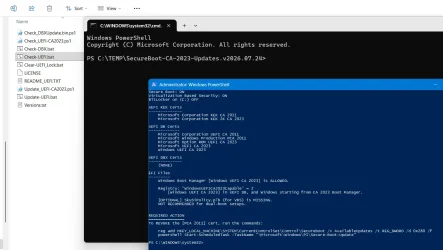
Just open File Explorer, find Check-UEFI.bat and double-click on it. Say 'Yes' to the UAC prompt and it will run, doing all the rest for you....

1785772301572.webp
 

My Computers My Computers

  • At a glance

    Windows 11 HomeAMD Athlon Silver 3050U8GBRadeon Graphics
    OS
    Windows 11 Home
    Computer type
    Laptop
    Manufacturer/Model
    Acer Aspire 3 A315-23-R9VY
    CPU
    AMD Athlon Silver 3050U
    Memory
    8GB
    Graphics Card(s)
    Radeon Graphics
    Monitor(s) Displays
    laptop screen
    Screen Resolution
    1366x768 native resolution, up to 2560x1440 with Radeon Virtual Super Resolution
    Hard Drives
    1TB Samsung EVO 870 SSD (from April 2026: 250GB EVO 850)
    Internet Speed
    150 Mbps
    Browser
    Edge, Firefox
    Antivirus
    Defender
    Other Info
    UPDATE - 11 April 2026: due to lid hinges starting to break up this laptop has been retired from active duty. The OS with all software and files has been migrated to my System Seven in 'Other systems' to carry on as my general purpose 'main machine'.

    I've now clean installed 25H2 and used Garlin's scripts to update Secure Boot to CA 2023 and revoke the PCA 2011 certificates. It's new role is to test secure boot issues.

    Info for 2021-2026:
    fully 'Windows 11 ready' laptop. Windows 10 C: partition migrated from my old unsupported 'main machine' then upgraded to 11. A test migration ran Insider builds for 2 months. When 11 was released on 5th October 2021 it was re-imaged back to 10 and was offered the upgrade in Windows Update on 20th October. Windows Update offered the 22H2 Feature Update on 20th September 2022. It got the 23H2 Feature Update on 4th November 2023 through Windows Update, 24H2 on 3rd October 2024 through Windows Update by setting the Target Release Version for 24H2, and 25H2 on 30th September 2025 through Windows Update by setting the Target Release Version for 25H2.
  • At a glance

    Windows 11 ProIntel® Core™ i5-520M8GB(integrated graphics) Intel HD Graphics
    Operating System
    Windows 11 Pro
    Computer type
    Laptop
    Manufacturer/Model
    Dell Latitude E4310
    CPU
    Intel® Core™ i5-520M
    Motherboard
    0T6M8G
    Memory
    8GB
    Graphics card(s)
    (integrated graphics) Intel HD Graphics
    Screen Resolution
    1366x768
    Hard Drives
    500GB Crucial MX500 SSD
    Browser
    Firefox, Edge
    Antivirus
    Defender
    Other Info
    unsupported machine: Legacy bios, MBR, TPM 1.2, upgraded from W10 to W11 using W10/W11 hybrid install media workaround.

    In-place upgrade to 22H2 using ISO and a workaround.
    Feature Update to 23H2 by manually installing the Enablement Package.
    In-place upgrade to 24H2 using hybrid 23H2/24H2 install media.
    Upgraded to 25H2 by Enablement Package.

    Also running Insider Dev, and Canary builds and Windows 10 as native boot .vhdx.
  • My SYSTEM THREE is a Dell Latitude 5410, i7-10610U, 32GB RAM, 512GB NVMe ssd, supported device running Windows 11 Pro.

    My SYSTEM FOUR was a 2-in-1 convertible Lenovo Yoga 11e (1st gen) type 20DA, Celeron N2930, 8GB RAM, 256GB ssd. Unsupported device. This has now been sold. It has been replaced by my System Eight.

    My SYSTEM FIVE is a Dell Latitude 3190 2-in-1, Pentium Silver N5030, 8GB RAM, 1TB NVMe ssd, supported device running Windows 11 Pro, plus Insider Beta, Dev, and Canary builds (and a few others) as a native boot .vhdx.

    My SYSTEM SIX is a Dell Latitude 5550, Core Ultra 7 165H, 64GB RAM, 1TB NVMe SSD, supported device, Windows 11 Pro 24H2, Hyper-V host machine. Updated to 25H2 on 30th September 2025.

    My SYSTEM SEVEN is a Lenovo Thinkpad T580, 1920x1080 touchscreen, Intel Core i7-8650U, 16GB RAM, 512GB NVMe SSD + 2nd 512GB NVMe SSD, a supported device for Windows 11. This is my current general purpose 'main machine'. The installed Windows 11 Home from my System One has been migrated to this machine.

    My SYSTEM EIGHT is a 2-in-1 convertible Lenovo Yoga 11e (5th gen) type 20LN, Celeron N4120, 8GB RAM, 512GB NVMe ssd, a supported device for Windows 11. Currently running Windows 11 Pro, plus Insider Dev, Beta, and Canary builds as native boot vhdx.
I've read that thread before, but I still think something's wrong.

Microsoft UEFI CA 2011 & Microsoft UEFI CA 2023 are strictly reserved for 3rd-parties (HW partners or Linux distros). Many users get confused because both certs have "Microsoft" in the name.

Windows Production CA 2011 & Windows UEFI CA 2023 are limited to Windows releases. OEM's don't get a copy of these certs, nor can they get binaries signed with them. MS wants to ban PCA 2011 to stop Black Lotus. There is no known security vulnerability for Microsoft UEFI CA 2011 which requires a similar ban.

If nobody's saying their option ROM's are signed by the Windows cert, then the Microsoft cert is still valid. An user could certainly download the MS UEFI CA 2011 cert and manually add it to their DBX list (thus banning it). I suspect in a large number of cases, these non-technical users don't have an accurate method for determining their current Secure Boot state, and using piecemeal instructions that don't explain the whole picture.

https://go.microsoft.com/fwlink/p/?linkid=321194
Garlin, Do I understand your post properly, as in:
The graphics card firmware can only be signed with the Microsoft UEFI CA 2011 or 2023, but NOT windows PCA 2011. And it is the windows PCA 2011 that will be revoked in Oct 2026.
Hence, that would mean it might be worthwhile to test in Oct 2026 if those computers with older graphics cards and only the Microsoft CA 2011, could still work or not. Or am I completey wrong on this topic? I am just trying to get my head around all of it.

And today I got an answer from one of the computer firms I buy stuff from: I asked them if they have graphic cards wit hte 2023 cert. They could NOT give me an answer. Either the person was non-technical or there is no info on such cards. AS this company sells to businesses, and not just consumers, I assume they have enough technical knowledge to answer my question. Therefore, I assume the cards may not be a problem, but I may be totally and utterly wrong.
 

My Computer My Computer

At a glance

windows 11
OS
windows 11

My Computer My Computer

At a glance

Windows 11AMD32 GB
OS
Windows 11
Computer type
PC/Desktop
Manufacturer/Model
Gigabyte
CPU
AMD
Motherboard
Gigabyte
Memory
32 GB

My Computer My Computer

At a glance

windows 11
OS
windows 11
Probably the heat, it's 40 here, I thought you meant CA 2011 :-(
 

My Computer My Computer

At a glance

Windows 11AMD32 GB
OS
Windows 11
Computer type
PC/Desktop
Manufacturer/Model
Gigabyte
CPU
AMD
Motherboard
Gigabyte
Memory
32 GB
On reading this article https://techcommunity.microsoft.com...re-boot-certificates-expiring-in-2026/4530725, it is clear that the microsoft CA 2011 has expired at the end of june 2026, but has NOT been revoked. It is being replaced with the Microsoft Option ROM CA 2023 on new graphics card.
To me, it means that, as long as you use older graphics cards, signed with the microsoft CA 2011, you can still work with it. As it has not been revoked, it continues to be present in the DB, and can work properly with those graphic cards. I truly hope this is the case, but I am not 100% certain.
 

My Computer My Computer

At a glance

windows 11
OS
windows 11
UPDATE: 2026-08-03

1. Refactor existing -BootMedia code into new script Check_BootMedia.ps1
2. Add winload.efi compliance checking to Check_BootMedia.ps1
3. Temporarily suspend BitLocker protection after copying KEK CA 2023 cert to the EFI volume
4. Add support for MCT-created SWM files when checking winload.efi compliance

This release is a major change for users who depend on the -BootMedia feature to check their Media Creation Tool-created USB drives, or Macrium and Hasleo recovery USB drives.

When the boot media check was first introduced, it simply confirmed whether you had a CA 2023-signed boot file in place.

But in an environment where users have applied the CA 2011 revocation, Windows can enable additional security protections like the minimum SVN level and enforcing SkuSiPolicy when VBS is enabled. While Check_UEFI-CA2023.ps1 has those important checks in place for your system drive, the existing methods could not identify the same conditions on boot media.

I decided to remove the boot media checks from Check_UEFI-CA2023.ps1, and create a new script Check_BootMedia.ps1. The new script supports an Audit mode, where it runs the checks as if Secure Boot and VBS are enabled. The major change is the script will download and extract three helper tools (wimlib-imagex, 7z.exe, offlinreg) into your temp folder for future use. These apps are not permanently installed to Windows, the bare minimum files are copied to AppData\Local\Temp and won't interfere with other apps, or other versions of the same apps.

If you delete the helper apps, the script will re-download them to the temp folder the next time it runs.

With these new tools, it's now possible to temporarily extract the boot manager and winload.efi files from any WIM or ESD file. If you can't extract a copy of those files, it's difficult to determine exactly what version you have and whether it's allowed or banned in your current environment.
  • boot.wim files are identified as WinPE or WinRE-based images. For all WIM, ESD, or SWM images, the correct UBR (actual build version) is reported.

  • New boot media are expected to include a copy of boot.stl. This file was always available, but the June 2026 Monthly Update recommends it be present on all boot media. The file is a Certificate Trust List to be used for security enforcement.

  • For Macrium and Hasleo users, Check_BootMedia.ps1 will report on boot files stored in your program's cache folders where it keeps the source WinRE or WinPE files.

  • For MCT users, the new script can report on the split WIM (SWM) files that appear to be proprietary to MCT.

    MCT's unique version of SWM cannot be read by 3rd-party tools, so a temporary WIM is exported from the USB's SWM. The temporary WIM is processed, before it's removed so you don't lose any disk space. But the conversion process is slow, takes about 5-6 GB of C: drive space, and you will have to wait a few minutes.

    Be patient. I had no idea why MCT creates SWM files that cannot be read by other tools. If you convert the MCT ISO (not the USB) to SWM, using DISM tools, that converted file can be read without issues. If you used Rufus to create a boot drive using the MCT ISO, this challenge can also be avoided.

Code:
Secure Boot: ON
Virtualization Based Security: OFF

UEFI KEK Certs
--------------
    Microsoft Corporation KEK CA 2011
    Microsoft Corporation KEK 2K CA 2023

UEFI DB Certs
-------------
    Microsoft Corporation UEFI CA 2011
    Microsoft Windows Production PCA 2011
    Microsoft Option ROM UEFI CA 2023
    Microsoft UEFI CA 2023
    Windows UEFI CA 2023

UEFI DBX Certs
--------------
    Microsoft Windows Production PCA 2011
    Windows BootMgr SVN 9.0

Macrium v8.0.7783
-----------------
    WinRE Boot Manager [Production PCA 2011] is BANNED.
    WinPE Boot File [Production PCA 2011] is BANNED.

Bootable Media
--------------

USB Drive D: "ESD-USB"
    Boot File [Windows UEFI CA 2023] is ALLOWED.

    boot.wim:2 (WinPE 26100.8875)
        Boot Manager [Windows UEFI CA 2023] is ALLOWED.
        winload.efi is ALLOWED.

    Please wait while install SWM is analyzed.

    install.swm:1 (W11 25H2 26200.8875)
        Boot Manager [Windows UEFI CA 2023] is ALLOWED.
        winload.efi is ALLOWED.

        Skipping over the next 6 images.

    boot.stl is CURRENT.

DVD Drive E: "CCCOMA_X64FRE_EN-US_DV9"
    Boot File [Production PCA 2011] is BANNED.

    boot.wim:2 (WinPE 19041.2965)
        Boot Manager [Production PCA 2011] is BANNED.
        winload.efi is ALLOWED.

    install.wim:1 (W10 22H2 19045.2965)
        Boot Manager [Production PCA 2011] is BANNED.
        winload.efi is ALLOWED.

        Skipping over the next 10 images.
 
Last edited:

My Computer My Computer

At a glance

Windows 7
OS
Windows 7
Running the 2 versions of the Check_BootMedia scripts (.ps1 and .bat) gives me 2 slightly different results:

This is with \Check_BootMedia.ps1:
PS C:\Program Files\PowerShell-7.6.4-win-x64> powershell -nop -ep bypass -f C:\temp\newscripts\Check_BootMedia.ps1
Secure Boot: ON
Virtualization Based Security: OFF

UEFI KEK Certs
--------------
Microsoft Corporation KEK CA 2011
Microsoft Corporation KEK 2K CA 2023

UEFI DB Certs
-------------
Microsoft Corporation UEFI CA 2011
Microsoft Windows Production PCA 2011
Microsoft Option ROM UEFI CA 2023
Microsoft UEFI CA 2023
Windows UEFI CA 2023

UEFI DBX Certs
--------------
Microsoft Windows Production PCA 2011
Windows BootMgr SVN 9.0

Macrium v8.0.7783
-----------------
WinRE Boot Manager [Production PCA 2011] is BANNED.
WinPE Boot File [Production PCA 2011] is BANNED.

PS C:\Program Files\PowerShell-7.6.4-win-x64>

This is with the .bat:
Secure Boot: ON
Virtualization Based Security: OFF

UEFI KEK Certs
--------------
Microsoft Corporation KEK CA 2011
Microsoft Corporation KEK 2K CA 2023

UEFI DB Certs
-------------
Microsoft Corporation UEFI CA 2011
Microsoft Windows Production PCA 2011
Microsoft Option ROM UEFI CA 2023
Microsoft UEFI CA 2023
Windows UEFI CA 2023

UEFI DBX Certs
--------------
Microsoft Windows Production PCA 2011
Windows BootMgr SVN 9.0

Macrium v8.0.7783
-----------------
WinRE Boot Manager [Production PCA 2011] is BANNED.
WinPE Boot File [Production PCA 2011] is BANNED.

Bootable Media
--------------

USB Drive D: "HASLEOBS"
Boot File [Windows UEFI CA 2023] is ALLOWED.

boot.wim:1 (WinRE 26100.1)
Boot Manager [Windows UEFI CA 2023] is ALLOWED.
winload.efi is ALLOWED.

boot.stl is CURRENT.


PS C:\TEMP\newscripts>

Only the .bat reports the Boot Media I have plugged in.

[for some reason the Spoiler function didn't work on this post!!!]
 

My Computers My Computers

  • At a glance

    Windows 11 Home, ver 25H2 build 26200.8246Intel Core i5 5200U @ 2.20GH4 GBIntel HD Graphics 5500 on board
    OS
    Windows 11 Home, ver 25H2 build 26200.8246
    Computer type
    Laptop
    Manufacturer/Model
    Hewlett-Packard Spectre 13-4001 x360 convertable
    CPU
    Intel Core i5 5200U @ 2.20GH
    Motherboard
    Hewlett-Packard 802D
    Memory
    4 GB
    Graphics Card(s)
    Intel HD Graphics 5500 on board
    Sound Card
    Intel Smart Sound Technology (Intel SST)
    Hard Drives
    Micron 256GB M.2 2280 NGFF SSD MTFDDAV256TBN, (SATA 6.0 Gb/s)
    Keyboard
    Model # G01KB
    Antivirus
    Microsoft Defender
    Other Info
    born on date: 25 Feb 2016
  • At a glance

    Win 11 Home 25H2 build 26200.7922Intel Core i7 4th Gen 4790 (3.60GHz), Haswell...Samsung 16 GB DDR3 (8GB in 2 modules)NVIDIA GeForce GTX 760, 3GB, and on-board Int...
    Operating System
    Win 11 Home 25H2 build 26200.7922
    Computer type
    PC/Desktop
    Manufacturer/Model
    Asus Desktop model M32AD-US019S (DOM: 6/9/2014 )
    CPU
    Intel Core i7 4th Gen 4790 (3.60GHz), Haswell 22nm Technology, SOCKET 1150
    Motherboard
    H81M-E/M51AD/DP_MB
    Memory
    Samsung 16 GB DDR3 (8GB in 2 modules)
    Graphics card(s)
    NVIDIA GeForce GTX 760, 3GB, and on-board Intel HD Graphics 4600 Rev 6
    Monitor(s) Displays
    HP EliteDisplay E241i LED; HP EliteDisplay E243
    Hard Drives
    Samsung 500GB SSD, 870 EVO (SATA 6.0 )
    Micron 250GB SSD, CT250MX500
    Toshiba HDD, 3GB (original drive w/PC)
    Case
    ASUS
    Keyboard
    ASUS-------------------------
    Antivirus
    MS Defender
    Other Info
    Additional Laptops:

    HEWLETT PACKARD
    HP OmniBook X Flip NGAI (Next Gen AI),
    Model: 16-as0023dx
    PT# B5UH1UA#ABA Product #: B5UH1UA
    delivered and setup 7/25/25
    16" 2K Touch-Screen Laptop
    Intel Core Ultra 7 256V '24 Series 2 - CPU
    Boost Clock Frequency 4.8 gigahertz; Neural Processing Unit (NPU) Yes;
    16GB Memory, LPDDR5X
    1TB SSD PCIe 4.0
    Graphics: Intel Arc 140V
    1 x HDMI 2.1
    1 x Thunderbolt 4
    2K Touch-Screen display, LED, IPS; 1920 x 1200 (Full HD+)
    USB Ports: 1 x USB-C 3.1, 2 x USB-A 3.1
    Wi-Fi 6E
    weight 4.15 pounds

    DELL
    Model:I7591-7483BLK-PUS 2-in-1 (7000 Series)
    purchased 12/3/2019,
    15.6 inch 2-IN-1;
    4K Ultra HD Touch-Screen, 3840 x 2160,
    Intel Core i7 10510U CPU 1.80GHz,
    16GB RAM DDR4 SDRAM 2400 megahert (2 slots),
    dedicated graphics Nvidia GeForce MX250 2 GB Graphics,
    PCIe 512GB Intel SSD + 32GB Optane Memory (Intel Optane Memory H10 with solid-state storage),
    wireless-AX & Bluetooth
    Battery: 68wh, Type 4VGMP 4 cell
Sorry I have no idea what all this means on the bootmedia script: I have not done anything yet to fix winre on Macrium because I don't fully understand the procedure:

bootmedia check
PS C:\Windows\System32> powershell -nop -ep bypass -f C:\temp16\check_bootmedia.ps1 -verbose -audit
Windows 11 25H2 (26200.8973)

Secure Boot: ON
Virtualization Based Security: ON

UEFI KEK Certs
--------------
Microsoft Corporation KEK CA 2011
Microsoft Corporation KEK 2K CA 2023

UEFI DB Certs
-------------
Microsoft Corporation UEFI CA 2011
Microsoft Windows Production PCA 2011
Microsoft Option ROM UEFI CA 2023
Microsoft UEFI CA 2023
Windows UEFI CA 2023

UEFI DBX Certs
--------------
Microsoft Windows Production PCA 2011
Windows BootMgr SVN 9.0

EFI Files
---------
SkuSiPolicy.p7b is CURRENT.
\\.\HarddiskVolume1\EFI\Microsoft\Boot\SkuSiPolicy.p7b
Version: 3.0.0.16

FileRule MinimumFileVersion MaximumFileVersion
-------- ------------------ ------------------
ID_FILEATTRIB_F_0042 0.0.0.0 10.0.14393.9309
ID_FILEATTRIB_F_0044 10.0.14400.0 10.0.17763.8979
ID_FILEATTRIB_F_0040 10.0.18000.0 10.0.19041.7519
ID_FILEATTRIB_F_0049 10.0.19100.0 10.0.20348.5359
ID_FILEATTRIB_F_0047 10.0.20400.0 10.0.22621.7349
ID_FILEATTRIB_F_0041 10.0.23000.0 10.0.26100.8835
ID_FILEATTRIB_F_0043 10.0.26100.32000 10.0.26100.33099
ID_FILEATTRIB_F_0048 10.0.26172.0 10.0.26172.33099
ID_FILEATTRIB_F_0046 10.0.27000.0 10.0.28000.2489
ID_FILEATTRIB_F_0045 10.0.29426.0 65535.65535.65535.65535


Macrium v8.0.7690
-----------------
WinPE Boot File [Production PCA 2011] is BANNED.
c:\boot\macrium\\WA11KFiles\media\EFI\Boot\bootx64.efi
File Version: 22621.1702, SVN 1.0

What are all those FileAttrib files telling me.
 

My Computer My Computer

At a glance

Windows 11 Intel i5 10400 HD630 graphics chipi5-1040012 gbHD630 chipset
OS
Windows 11 Intel i5 10400 HD630 graphics chip
Computer type
PC/Desktop
Manufacturer/Model
HP
CPU
i5-10400
Memory
12 gb
Graphics Card(s)
HD630 chipset
Monitor(s) Displays
LG 24inch
Hard Drives
SSD, external usb drive 1tb for files/backups
Keyboard
wireless Logi
Mouse
ms 4000 wireless mouse
Internet Speed
10meg
Browser
Firefox
Antivirus
Defender
Other Info
Win11 Home 25h2 26200.8973 07/28/2026
SkuSiPolicy.p7b is CURRENT.
\\.\HarddiskVolume1\EFI\Microsoft\Boot\SkuSiPolicy.p7b
Version: 3.0.0.16

FileRule MinimumFileVersion MaximumFileVersion
-------- ------------------ ------------------
ID_FILEATTRIB_F_0042 0.0.0.0 10.0.14393.9309
ID_FILEATTRIB_F_0044 10.0.14400.0 10.0.17763.8979
ID_FILEATTRIB_F_0040 10.0.18000.0 10.0.19041.7519
ID_FILEATTRIB_F_0049 10.0.19100.0 10.0.20348.5359
ID_FILEATTRIB_F_0047 10.0.20400.0 10.0.22621.7349
ID_FILEATTRIB_F_0041 10.0.23000.0 10.0.26100.8835
ID_FILEATTRIB_F_0043 10.0.26100.32000 10.0.26100.33099
ID_FILEATTRIB_F_0048 10.0.26172.0 10.0.26172.33099
ID_FILEATTRIB_F_0046 10.0.27000.0 10.0.28000.2489
ID_FILEATTRIB_F_0045 10.0.29426.0 65535.65535.65535.65535
-Verbose will analyze the contents of the SkuSiPolicy file. Basically it's a set of rules that bans your winload.efi based on its file version.

For example versions 26100.32000 thru .33099 of winload.efi are forbidden. The script checks to see if your version fails into any one of the forbidden ranges. If it doesn't match any of the rules, then it's allowed by Windows.

You really don't need to bother with those numbers, but they're reported in case someone wants to see them.

Macrium v8.0.7690
-----------------
WinPE Boot File [Production PCA 2011] is BANNED.
c:\boot\macrium\\WA11KFiles\media\EFI\Boot\bootx64.efi
File Version: 22621.1702, SVN 1.0

This reports your Macrium is staging a really ancient copy of the WinPE files. A problem with older Macrium 8 Free is they don't provide an more recent WinPE example for you. You probably want to choose WinRE instead. I believe if you clear the staging folders from the Macrium UI, it will delete the downloaded files to stop having to see this error. Or you can find a newer WinPE.

I'm not here to instruct everyone on how to fix/update their Macrium or Hasleo, but to point out reasons why it may be creating an outdated USB recovery drive (because its own source files are outdated). "User beware."
 

My Computer My Computer

At a glance

Windows 7
OS
Windows 7
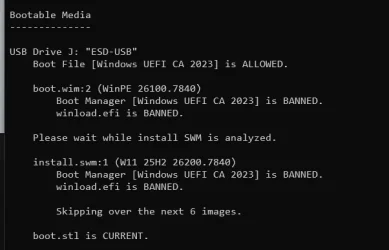
how to update bootmedia with this new version?
1785786515954.webp
 

My Computer My Computer

At a glance

Windows 11 Pro 64bit (release preview channel)i5 840016 GB DDR4RTX 3060 Ti
OS
Windows 11 Pro 64bit (release preview channel)
Computer type
PC/Desktop
Manufacturer/Model
Asus
CPU
i5 8400
Motherboard
ROG STRIX Z370-H GAMING
Memory
16 GB DDR4
Graphics Card(s)
RTX 3060 Ti
Sound Card
On Board
Monitor(s) Displays
Acer VG242Y P
Screen Resolution
1080p
Hard Drives
Intel 660p SSD
PSU
800w
Internet Speed
1000 Mbps
how to update bootmedia with this new version?
Run MCT and download a newer ISO.

26200.7840 is from February 2026. If you've installed the April or June 2026 CU's, and have revoked PCA 2011, then your current SVN level is higher than the boot manager available in this ISO. The "clock" has moved forward, and you're not allowed to travel backwards in time.

If you use the -Verbose option, the script will display the actual version numbers for comparison.
 

My Computer My Computer

At a glance

Windows 7
OS
Windows 7
This is what I got;

Code:
PowerShell 7.6.4
PS C:\Users\nelson\Desktop\Garlin v20260.80.03> .\Check_BootMedia.ps1
Secure Boot: ON
Virtualization Based Security: ON

UEFI KEK Certs
--------------
    Microsoft Corporation KEK CA 2011
    Microsoft Corporation KEK 2K CA 2023

UEFI DB Certs
-------------
    Microsoft Corporation UEFI CA 2011
    Microsoft Windows Production PCA 2011
    Microsoft Option ROM UEFI CA 2023
    Microsoft UEFI CA 2023
    Windows UEFI CA 2023

UEFI DBX Certs
--------------
    Microsoft Windows PCA 2010
    Microsoft Windows Production PCA 2011
    Windows BootMgr SVN 9.0

EFI Files
---------
    SkuSiPolicy.p7b is CURRENT.

Bootable Media
--------------

USB Drive D: "HASLEOBS"
    Boot File [Windows UEFI CA 2023] is ALLOWED.

    boot.wim:1 (WinPE 26100.1)
        Boot Manager [Windows UEFI CA 2023] is BANNED.
        winload.efi is BANNED.

    boot.stl is WRONG VERSION.


USB Drive E: "26200-8457"
    Boot File [Windows UEFI CA 2023] is ALLOWED.

    boot.wim:2 (WinPE 26100.8457)
        Boot Manager [Windows UEFI CA 2023] is BANNED.
        winload.efi is BANNED.

    Please wait while install SWM is analyzed.

    install.swm:1 (W11 25H2 26200.8457)
        Boot Manager [Windows UEFI CA 2023] is BANNED.
        winload.efi is BANNED.

        Skipping over the next 6 images.

    boot.stl is WRONG VERSION.

PS C:\Users\nelson\Desktop\Garlin v20260.80.03>
 

My Computers My Computers

  • At a glance

    Windows 11 Pro 25H2 26200.8894Intel® Core™ Ultra 7 265 1.8GHz to 5.3GHz (Ar...SK Hynix 32GB DDR5 5600 Desktop RAM UDIMM Non...Dell NVIDIA® GeForce RTX™ 4060 8GB GDDR6 & (i...
    OS
    Windows 11 Pro 25H2 26200.8894
    Computer type
    PC/Desktop
    Manufacturer/Model
    Dell Tower Plus EBT2250, DOB: 06/15/2025
    CPU
    Intel® Core™ Ultra 7 265 1.8GHz to 5.3GHz (Arrow Lake)
    Motherboard
    Dell Inc. 02D3NT A00 (U3E1)
    Memory
    SK Hynix 32GB DDR5 5600 Desktop RAM UDIMM Non-ECC PC5-5600B
    Graphics Card(s)
    Dell NVIDIA® GeForce RTX™ 4060 8GB GDDR6 & (iGPU) Integrated Intel® UHD Graphics
    Sound Card
    Chipset Realtek High-Definition Audio with Dolby Atmos
    Monitor(s) Displays
    Dell Ultra Sharp U2515H 25-Inch Screen LED-Lit
    Screen Resolution
    2560 X 1440
    Hard Drives
    Samsung (NVMe PM9C1a 1024GB) M.2 PCIe NVMe Solid State Drive (OS), with Samsung Piccolo (S4LY022) 6-Core 4 Channel Controller.

    Samsung T7 500GB SSD, USB-C External Drive
    PSU
    Dell 460W
    Case
    Dell Tower Plus EBT 2250
    Cooling
    Fan
    Keyboard
    Dell Wired Keyboard - KB216
    Mouse
    Logitech M510
    Internet Speed
    Intel Killer E3100G 2.5 Gigabit Ethernet Controller
    Browser
    Microsoft Edge
    Antivirus
    Microsoft Windows Security
    Other Info
    The Samsung NVMe PM9C1a 1024GB SSD does not use a Phison NAND controller. Instead, it uses Samsung's in-house developed Piccolo (S4LY022) 6-Core 4 Channel Controller. The PM9C1a utilizes a controller built using Samsung's 5-nanometer process and seventh-generation V-NAND technology. 🤔
  • At a glance

    Windows 11 Pro 25H2 26200.889410th Generation Intel Core i7-10510U Processo...16GB DDR4 RAMNVIDIA® GeForce® MX250 with 2GB GDDR5 graphic...
    Operating System
    Windows 11 Pro 25H2 26200.8894
    Computer type
    Laptop
    Manufacturer/Model
    Dell Inspiron 15 7000 (7591) 2-in-1, DOB: 11/30/2019
    CPU
    10th Generation Intel Core i7-10510U Processor (8MB Cache, up to 4.9 GHz) Comet Lake
    Motherboard
    Dell 0NNW5N
    Memory
    16GB DDR4 RAM
    Graphics card(s)
    NVIDIA® GeForce® MX250 with 2GB GDDR5 graphics memory
    Sound Card
    Chipset Realtek ALC3254 🤔
    Monitor(s) Displays
    Dell 15.6-inch UHD Truelife Touch Narrow Border WVA Display with Active Pen support
    Screen Resolution
    3840 x 2160
    Hard Drives
    Intel NVME 512GB SSD with 32GB Intel Optane Memory, M.2 80mm PCIe 3.0 RAID

    SanDisk 256GB Extreme microSDXC UHS-I Memory Card
    PSU
    Dell 4-Cell Battery, 68 Whr (Integrated), 90 Watt AC Adapter
    Case
    Dell Inspiron 15 7000 2-in-1 (7591)
    Cooling
    Standard Dell Case Fan & Havit HV-F2056 USB Powered (3 Fans) Laptop Cooling Pad.
    Keyboard
    Dell
    Mouse
    Logitech Wireless Mouse M650L
    Internet Speed
    Wireless/Wired connectivity (WiFi 6 - 802.11 ax)
    Browser
    Microsoft Edge
    Antivirus
    Microsoft Windows Security
    Other Info
    From Dell: 512GB NVME Solid State Drive accelerated by 32GB Intel Optane Memory are the fastest as compared to NAND SSDs. Intel Optane H10 with SSD offers speedy storage and accelerates opening your programs.
Running the 2 versions of the Check_BootMedia scripts (.ps1 and .bat) gives me 2 slightly different results:
Macrium v8.0.7783
-----------------
WinRE Boot Manager [Production PCA 2011] is BANNED.
WinPE Boot File [Production PCA 2011] is BANNED.
Macrium v8.0.7783

-----------------
WinRE Boot Manager [Production PCA 2011] is BANNED.
WinPE Boot File [Production PCA 2011] is BANNED.

Bootable Media
--------------

USB Drive D: "HASLEOBS"
Boot File [Windows UEFI CA 2023] is ALLOWED.

boot.wim:1 (WinRE 26100.1)
Boot Manager [Windows UEFI CA 2023] is ALLOWED.
winload.efi is ALLOWED.

boot.stl is CURRENT.

That's strange. All the batch file does is run the PS script using "-ep bypass" and pass along any command-line arguments.

There is no -BootMedia option for this script, since that's obviously what it does. The only reason for skipping the drives is if the script didn't detect any at the time. I've never had a problem like this in testing. Let me know if the PS script always fails for you.
 

My Computer My Computer

At a glance

Windows 7
OS
Windows 7
This is what I got;

Code:
USB Drive D: "HASLEOBS"
    Boot File [Windows UEFI CA 2023] is ALLOWED.

    boot.wim:1 (WinPE 26100.1)
        Boot Manager [Windows UEFI CA 2023] is BANNED.
        winload.efi is BANNED.

    boot.stl is WRONG VERSION.


USB Drive E: "26200-8457"
    Boot File [Windows UEFI CA 2023] is ALLOWED.

    boot.wim:2 (WinPE 26100.8457)
        Boot Manager [Windows UEFI CA 2023] is BANNED.
        winload.efi is BANNED.

    Please wait while install SWM is analyzed.

    install.swm:1 (W11 25H2 26200.8457)
        Boot Manager [Windows UEFI CA 2023] is BANNED.
        winload.efi is BANNED.

        Skipping over the next 6 images.

    boot.stl is WRONG VERSION.

The rule on boot.stl is a bit hazy. MS writes on the June 2026 CU notes:

If you deploy dynamic updates such as this update to an existing Windows image, ensure the boot.stl file is included as part of the installation media. Failure to include the file might prevent devices from successfully starting from the installation media and can result in error code 0xc0430001.

The boot.stl file is used during Secure Boot validation and must match the Windows version and architecture of the image you are updating.

To ensure the boot.stl file is included as part of the installation media, do one of the following:

  • Use the Update WinPE script to update an existing Windows image. (Recommended)
  • Manually copy the boot.stl file from the device Windows\Boot\EFI folder to the corresponding folder on your installation media before deploying the update.
For information about how to apply Dynamic Update packages to existing Windows images, see Update Windows installation media with Dynamic Update.


Here's the catch, it's ridiculously expensive to determine if your boot.wim has the Dynamic Update. Dynamic Update is an optional feature that can be added to any WinPE which allows Windows Setup to find (if there's a working network connection) any missing Monthly Update files while it's performing a clean install or in-place upgrade.

The idea is rather than force you to check for missing updates right after the install/upgrade, Setup will do it while it's busy doing the install. A different set of files need to be present to handle this Dynamic updating. But you don't update the boot.wim by applying a MSU update, parts of the ISO folder have to be replaced.

"Update-UEFI.bat -BootMedia" will copy the boot.stl to any drive which is missing it, or doesn't have the latest version found in Windows\Boot\EFI.
 
Last edited:

My Computer My Computer

At a glance

Windows 7
OS
Windows 7
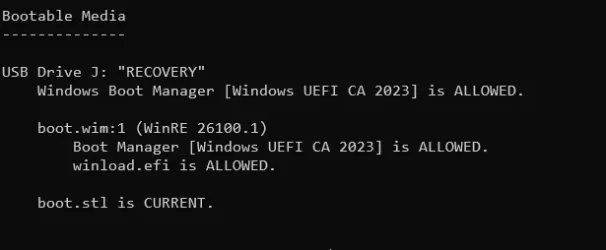
made recovery drive. boot.stl had to be updated
1785796861267.webp
 

My Computer My Computer

At a glance

Windows 11 Pro 64bit (release preview channel)i5 840016 GB DDR4RTX 3060 Ti
OS
Windows 11 Pro 64bit (release preview channel)
Computer type
PC/Desktop
Manufacturer/Model
Asus
CPU
i5 8400
Motherboard
ROG STRIX Z370-H GAMING
Memory
16 GB DDR4
Graphics Card(s)
RTX 3060 Ti
Sound Card
On Board
Monitor(s) Displays
Acer VG242Y P
Screen Resolution
1080p
Hard Drives
Intel 660p SSD
PSU
800w
Internet Speed
1000 Mbps
Back
Top Bottom