
Solved garlin's PowerShell scripts for updating Secure Boot CA 2023


My Computers My Computers

  • At a glance

    Windows 11 Home, ver 25H2 build 26200.8894Intel Core i5 5200U @ 2.20GH4 GBIntel HD Graphics 5500 on board
    OS
    Windows 11 Home, ver 25H2 build 26200.8894
    Computer type
    Laptop
    Manufacturer/Model
    Hewlett-Packard Spectre 13-4001 x360 convertable
    CPU
    Intel Core i5 5200U @ 2.20GH
    Motherboard
    Hewlett-Packard 802D
    Memory
    4 GB
    Graphics Card(s)
    Intel HD Graphics 5500 on board
    Sound Card
    Intel Smart Sound Technology (Intel SST)
    Hard Drives
    Micron 256GB M.2 2280 NGFF SSD MTFDDAV256TBN, (SATA 6.0 Gb/s)
    Keyboard
    Model # G01KB
    Antivirus
    Microsoft Defender
    Other Info
    born on date: 25 Feb 2016
  • At a glance

    Win 11 Home 25H2 build 26200.8894Intel Core i7 4th Gen 4790 (3.60GHz), Haswell...Samsung 16 GB DDR3 (8GB in 2 modules)NVIDIA GeForce GTX 760, 3GB, and on-board Int...
    Operating System
    Win 11 Home 25H2 build 26200.8894
    Computer type
    PC/Desktop
    Manufacturer/Model
    Asus Desktop model M32AD-US019S (DOM: 6/9/2014 )
    CPU
    Intel Core i7 4th Gen 4790 (3.60GHz), Haswell 22nm Technology, SOCKET 1150
    Motherboard
    H81M-E/M51AD/DP_MB
    Memory
    Samsung 16 GB DDR3 (8GB in 2 modules)
    Graphics card(s)
    NVIDIA GeForce GTX 760, 3GB, and on-board Intel HD Graphics 4600 Rev 6
    Monitor(s) Displays
    HP EliteDisplay E241i LED; HP EliteDisplay E243
    Hard Drives
    Samsung 500GB SSD, 870 EVO (SATA 6.0 )
    Micron 250GB SSD, CT250MX500
    Toshiba HDD, 3GB (original drive w/PC)
    Case
    ASUS
    Keyboard
    ASUS-------------------------
    Antivirus
    MS Defender
    Other Info
    purchased 8/28/2015 from Newegg.
  • HEWLETT PACKARD
    HP OmniBook X Flip NGAI (Next Gen AI),
    Model: 16-as0023dx
    PT# B5UH1UA#ABA Product #: B5UH1UA
    delivered and setup 7/25/25
    16" 2K Touch-Screen Laptop
    Intel Core Ultra 7 256V '24 Series 2 - CPU
    Boost Clock Frequency 4.8 gigahertz; Neural Processing Unit (NPU) Yes;
    16GB Memory, LPDDR5X
    1TB SSD PCIe 4.0
    Graphics: Intel Arc 140V
    1 x HDMI 2.1
    1 x Thunderbolt 4
    2K Touch-Screen display, LED, IPS; 1920 x 1200 (Full HD+)
    USB Ports: 1 x USB-C 3.1, 2 x USB-A 3.1
    Wi-Fi 6E

    DELL
    Model:I7591-7483BLK-PUS 2-in-1 (7000 Series)
    purchased new 12/3/2019,
    15.6 inch 2-IN-1;
    4K Ultra HD Touch-Screen, 3840 x 2160,
    Intel Core i7 10510U CPU 1.80GHz,
    16GB RAM DDR4 SDRAM 2400 megahert (2 slots),
    dedicated graphics Nvidia GeForce MX250 2 GB Graphics,
    PCIe 512GB Intel SSD + 32GB Optane Memory (Intel Optane Memory H10 with solid-state storage),
    wireless-AX & Bluetooth
    Battery: 68wh, Type 4VGMP 4 cell
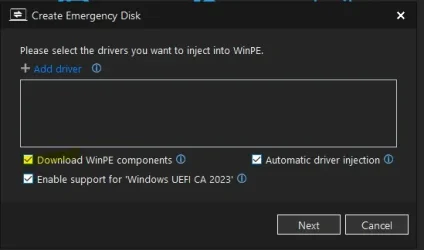
I think that location is used when the build is done with the WPE.OPE.

Easy to find out just compare file size on your rescue media and file size in Hasleo.
 

My Computer My Computer

At a glance

Windows 11 Pro
OS
Windows 11 Pro
When you think Macrium devs are the only silly people, Hasleo will surprise you.

Let's go find the latest WPE.OPE file:
How to get offline WinPE package for all Hasleo Products?

After running the WinPE Downloader (2.4.2.0), I'm confronted by an unknown file format. Turns out WPE.OPE is repacked version of boot.wim with some weird file header in front. If you strip off the leading bytes, you're left with a normal WinPE WIM.

Let's run it thru the check script:
Code:
C:\Users\GARLIN\Downloads\winpe.wim:1 (W10 20H2 19041.1)
    Boot Manager [Production PCA 2011] is BANNED.
        \Windows\Boot\EFI\bootmgfw.efi
        File Version: 19041.1, SVN 0.0

    \Windows\System32\winload.efi will be BANNED.
        File Version: 10.0.19041.1

Oh boy. That is one super crufty boot.wim (W10 20H1). You really, really don't want to be using that file for anything. "James" last updated their support article in May 2026, so I have no idea where Hasleo is going with their WinPE Downloader.

Which gets us back to the mysterious "Hasleo will find the proper files in the right places..."

The only logical conclusion is they're grabbing a copy of your WinRE.wim.
 
Last edited:

My Computer My Computer

At a glance

Windows 7
OS
Windows 7
@starchase Try this updated version.
Here is the result:
Code:
PS C:\Program Files\PowerShell\7> pwsh -nop -ep bypass -f C:\temp\Check_BootMedia_2026-08-04.ps1
Secure Boot: ON
Virtualization Based Security: OFF

UEFI KEK Certs
--------------
    Microsoft Corporation KEK CA 2011
    Microsoft Corporation KEK 2K CA 2023

UEFI DB Certs
-------------
    Microsoft Corporation UEFI CA 2011
    Microsoft Windows Production PCA 2011
    Microsoft Option ROM UEFI CA 2023
    Microsoft UEFI CA 2023
    Windows UEFI CA 2023

UEFI DBX Certs
--------------
    Microsoft Windows Production PCA 2011
    Windows BootMgr SVN 9.0

Macrium v8.0.7783
-----------------
    WinRE Boot Manager [Production PCA 2011] is BANNED.
    WinPE Boot File [Production PCA 2011] is BANNED.

Bootable Media
--------------

USB Drive D: "HASLEOBS"
    Boot File [Windows UEFI CA 2023] is ALLOWED.

    boot.wim:1 (WinRE 26100.1)
        Boot Manager [Windows UEFI CA 2023] is ALLOWED.
        winload.efi is ALLOWED.

    boot.stl is CURRENT.


PS C:\Program Files\PowerShell\7>
 

My Computers My Computers

  • At a glance

    Windows 11 Home, ver 25H2 build 26200.8894Intel Core i5 5200U @ 2.20GH4 GBIntel HD Graphics 5500 on board
    OS
    Windows 11 Home, ver 25H2 build 26200.8894
    Computer type
    Laptop
    Manufacturer/Model
    Hewlett-Packard Spectre 13-4001 x360 convertable
    CPU
    Intel Core i5 5200U @ 2.20GH
    Motherboard
    Hewlett-Packard 802D
    Memory
    4 GB
    Graphics Card(s)
    Intel HD Graphics 5500 on board
    Sound Card
    Intel Smart Sound Technology (Intel SST)
    Hard Drives
    Micron 256GB M.2 2280 NGFF SSD MTFDDAV256TBN, (SATA 6.0 Gb/s)
    Keyboard
    Model # G01KB
    Antivirus
    Microsoft Defender
    Other Info
    born on date: 25 Feb 2016
  • At a glance

    Win 11 Home 25H2 build 26200.8894Intel Core i7 4th Gen 4790 (3.60GHz), Haswell...Samsung 16 GB DDR3 (8GB in 2 modules)NVIDIA GeForce GTX 760, 3GB, and on-board Int...
    Operating System
    Win 11 Home 25H2 build 26200.8894
    Computer type
    PC/Desktop
    Manufacturer/Model
    Asus Desktop model M32AD-US019S (DOM: 6/9/2014 )
    CPU
    Intel Core i7 4th Gen 4790 (3.60GHz), Haswell 22nm Technology, SOCKET 1150
    Motherboard
    H81M-E/M51AD/DP_MB
    Memory
    Samsung 16 GB DDR3 (8GB in 2 modules)
    Graphics card(s)
    NVIDIA GeForce GTX 760, 3GB, and on-board Intel HD Graphics 4600 Rev 6
    Monitor(s) Displays
    HP EliteDisplay E241i LED; HP EliteDisplay E243
    Hard Drives
    Samsung 500GB SSD, 870 EVO (SATA 6.0 )
    Micron 250GB SSD, CT250MX500
    Toshiba HDD, 3GB (original drive w/PC)
    Case
    ASUS
    Keyboard
    ASUS-------------------------
    Antivirus
    MS Defender
    Other Info
    purchased 8/28/2015 from Newegg.
  • HEWLETT PACKARD
    HP OmniBook X Flip NGAI (Next Gen AI),
    Model: 16-as0023dx
    PT# B5UH1UA#ABA Product #: B5UH1UA
    delivered and setup 7/25/25
    16" 2K Touch-Screen Laptop
    Intel Core Ultra 7 256V '24 Series 2 - CPU
    Boost Clock Frequency 4.8 gigahertz; Neural Processing Unit (NPU) Yes;
    16GB Memory, LPDDR5X
    1TB SSD PCIe 4.0
    Graphics: Intel Arc 140V
    1 x HDMI 2.1
    1 x Thunderbolt 4
    2K Touch-Screen display, LED, IPS; 1920 x 1200 (Full HD+)
    USB Ports: 1 x USB-C 3.1, 2 x USB-A 3.1
    Wi-Fi 6E

    DELL
    Model:I7591-7483BLK-PUS 2-in-1 (7000 Series)
    purchased new 12/3/2019,
    15.6 inch 2-IN-1;
    4K Ultra HD Touch-Screen, 3840 x 2160,
    Intel Core i7 10510U CPU 1.80GHz,
    16GB RAM DDR4 SDRAM 2400 megahert (2 slots),
    dedicated graphics Nvidia GeForce MX250 2 GB Graphics,
    PCIe 512GB Intel SSD + 32GB Optane Memory (Intel Optane Memory H10 with solid-state storage),
    wireless-AX & Bluetooth
    Battery: 68wh, Type 4VGMP 4 cell
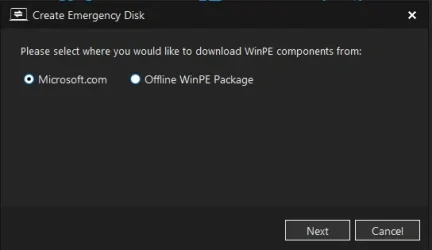
After running the WinPE Downloader

Did not run through the process but when I selected Download WINPE from within Hasleo it gave me two choices.

r.webp

Screenshot 2026-08-04 184907.webp
 

My Computer My Computer

At a glance

Windows 11 Pro
OS
Windows 11 Pro
Thanks for the tips. Here's the latest test version:

Code:
PS C:\Users\GARLIN\Downloads> .\Check_BootMedia.ps1 -verbose
Windows 11 25H2 (26200.8973)

Secure Boot: ON
Virtualization Based Security: OFF

UEFI KEK Certs
--------------
    Microsoft Corporation KEK CA 2011
    Microsoft Corporation KEK 2K CA 2023

UEFI DB Certs
-------------
    Microsoft Corporation UEFI CA 2011
    Microsoft Windows Production PCA 2011
    Microsoft Option ROM UEFI CA 2023
    Microsoft UEFI CA 2023
    Windows UEFI CA 2023

UEFI DBX Certs
--------------
    Microsoft Windows Production PCA 2011
    Windows BootMgr SVN 9.0

Macrium v8.0.7783
-----------------
    WinRE Boot Manager [Production PCA 2011] is BANNED.
        c:\boot\macrium\WinREFiles\media\EFI\Microsoft\Boot\bootmgfw.efi
        File Version: 28000.352, SVN 9.0

    WinPE Boot File [Production PCA 2011] is BANNED.
        c:\boot\macrium\\WA11KFiles\media\EFI\Boot\bootx64.efi
        File Version: 22621.1702, SVN 1.0

Hasleo 5.8.2.2
--------------
    C:\Program Files\Hasleo\Hasleo Backup Suite\bin\WADK\Windows Preinstallation Environment\amd64\winpe.wim:1 (WinPE 26100.1)
        Boot Manager [Windows UEFI CA 2023] is BANNED.
            \Windows\Boot\EFI_EX\bootmgfw_EX.efi
            File Version: 26089.1001, SVN 2.0

        \Windows\System32\winload.efi is ALLOWED.
            File Version: 10.0.26100.1

    WinPE Boot Manager [Windows UEFI CA 2023] is BANNED.
        C:\Program Files\Hasleo\Hasleo Backup Suite\bin\WADK\Boot\EFI_EX\bootmgfw.efi
        File Version: 26100.30227, SVN 7.0

Bootable Media
--------------

USB Drive D: "ESD-USB"
    Boot File [Windows UEFI CA 2023] is ALLOWED.
        D:\EFI\Boot\bootx64.efi
        File Version: 28000.352, SVN 9.0

    boot.wim:2 (WinPE 26100.8875)
        Boot Manager [Windows UEFI CA 2023] is ALLOWED.
            \Windows\Boot\EFI_EX\bootmgfw_EX.efi
            File Version: 28000.352, SVN 9.0

        \Windows\System32\winload.efi is ALLOWED.
            File Version: 10.0.26100.8875

    Please wait while install SWM is analyzed.

    install.swm:1 (W11 25H2 26200.8875)
        Boot Manager [Windows UEFI CA 2023] is ALLOWED.
            \Windows\Boot\EFI_EX\bootmgfw_EX.efi
            File Version: 28000.352, SVN 9.0

        \Windows\System32\winload.efi is ALLOWED.
            File Version: 10.0.26100.8875

        Skipping over the next 6 images.
    D:\EFI\Microsoft\Boot\boot.stl [5/18/2026 10:44 AM] is CURRENT.


DVD Drive F: "ESD-ISO"
    Boot File [Production PCA 2011] is BANNED.
        F:\EFI\Boot\bootx64.efi
        File Version: 28000.352, SVN 9.0

    boot.wim:2 (WinPE 26100.8873)
        Boot Manager [Windows UEFI CA 2023] is ALLOWED.
            \Windows\Boot\EFI_EX\bootmgfw_EX.efi
            File Version: 28000.352, SVN 9.0

        \Windows\System32\winload.efi is ALLOWED.
            File Version: 10.0.26100.8870

    install.esd:1 (W11 25H2 26200.8873)
        Boot Manager [Windows UEFI CA 2023] is ALLOWED.
            \Windows\Boot\EFI_EX\bootmgfw_EX.efi
            File Version: 28000.352, SVN 9.0

        \Windows\System32\winload.efi is ALLOWED.
            File Version: 10.0.26100.8870

        Skipping over the next 6 images.
 

Attachments

My Computer My Computer

At a glance

Windows 7
OS
Windows 7
@garlin I just tested your latest above and I am getting the same as above :
Hasleo 5.9.2.1
--------------
WinPE Boot Manager [Windows UEFI CA 2023] is BANNED.
C:\Program Files\Hasleo\Hasleo Backup Suite\bin\WADK\Boot\EFI_EX\bootmgfw.efi
File Version: 26100.30227, SVN 7.0

The bat file shows:

Hasleo 5.9.2.1
--------------
WinPE Boot Manager [Windows UEFI CA 2023] is BANNED.

Bootable Media
--------------

USB Drive G: "HASLEOBS"
Boot File [Windows UEFI CA 2023] is ALLOWED.

boot.wim:1 (WinRE 26100.1)
Boot Manager [Windows UEFI CA 2023] is ALLOWED.
winload.efi is ALLOWED.
 

My Computer My Computer

At a glance

Windows 11 Intel i5 10400 HD630 graphics chipi5-1040012 gbHD630 chipset
OS
Windows 11 Intel i5 10400 HD630 graphics chip
Computer type
PC/Desktop
Manufacturer/Model
HP
CPU
i5-10400
Memory
12 gb
Graphics Card(s)
HD630 chipset
Monitor(s) Displays
LG 24inch
Hard Drives
SSD, external usb drive 1tb for files/backups
Keyboard
wireless Logi
Mouse
ms 4000 wireless mouse
Internet Speed
10meg
Browser
Firefox
Antivirus
Defender
Other Info
Win11 Home 25h2 26200.8973 07/28/2026
Can you each of these 3 test scripts? I suspect the Get-Volume call is returning no reported USB drives, and there are at least 3 different supposed fixes for the same issue. Thanks.
 

Attachments

My Computer My Computer

At a glance

Windows 7
OS
Windows 7
Can you each of these 3 test scripts? I suspect the Get-Volume call is returning no reported USB drives, and there are at least 3 different supposed fixes for the same issue. Thanks.
I don't know if I ran these right, all three give same result:
PowerShell 7.6.4
PS C:\Windows\System32> powershell -nop -ep bypass -f C:\temp16\testscript_a.ps1
Test Script A counts drives
PS C:\Windows\System32> powershell -nop -ep bypass -f C:\temp16\testscript_b.ps1
Test Script B counts drives
PS C:\Windows\System32> powershell -nop -ep bypass -f C:\temp16\testscript_c.ps1
Test Script C counts drives
PS C:\Windows\System32>
 

My Computer My Computer

At a glance

Windows 11 Intel i5 10400 HD630 graphics chipi5-1040012 gbHD630 chipset
OS
Windows 11 Intel i5 10400 HD630 graphics chip
Computer type
PC/Desktop
Manufacturer/Model
HP
CPU
i5-10400
Memory
12 gb
Graphics Card(s)
HD630 chipset
Monitor(s) Displays
LG 24inch
Hard Drives
SSD, external usb drive 1tb for files/backups
Keyboard
wireless Logi
Mouse
ms 4000 wireless mouse
Internet Speed
10meg
Browser
Firefox
Antivirus
Defender
Other Info
Win11 Home 25h2 26200.8973 07/28/2026
Can you each of these 3 test scripts? I suspect the Get-Volume call is returning no reported USB drives, and there are at least 3 different supposed fixes for the same issue. Thanks.
Could it be the same issue that I have with one of my USB thumb drive... it reports as "Fixed" with Get-Volume.

Code:
PS E:\Tmp> powershell -nop -ep bypass -f E:\tmp\TestScript_A.ps1
Test Script A counts 0 drives
PS E:\Tmp> powershell -nop -ep bypass -f E:\tmp\TestScript_b.ps1
Test Script B counts 0 drives
PS E:\Tmp> powershell -nop -ep bypass -f E:\tmp\TestScript_c.ps1
Test Script C counts 0 drives
PS E:\Tmp> get-volumes

DriveLetter FriendlyName FileSystemType DriveType HealthStatus OperationalStatus SizeRemaining  Size
----------- ------------ -------------- --------- ------------ ----------------- -------------  ----
H           RESCUE       FAT32          Fixed     Healthy      OK                      2.48 GB  3.72 GB
G           Rescue       Unknown        CD-ROM    Healthy      OK                          0 B  1.25 GB

H - USB drive reporting as fixed which contains Macrium ISO created with Rufus
G - Macrium ISO mounted directly
 

My Computer My Computer

At a glance

Windows 11
OS
Windows 11
What happens with:
pwshl -nop -ep bypass -f C:\temp16\testscript_a.ps1​
pwshl -nop -ep bypass -f C:\temp16\testscript_b.ps1​
pwshl -nop -ep bypass -f C:\temp16\testscript_c.ps1​
 

My Computer My Computer

At a glance

Windows 7
OS
Windows 7
What happens with:
pwshl -nop -ep bypass -f C:\temp16\testscript_a.ps1​
pwshl -nop -ep bypass -f C:\temp16\testscript_b.ps1​
pwshl -nop -ep bypass -f C:\temp16\testscript_c.ps1​

same result:
Windows PowerShell
Copyright (C) Microsoft Corporation. All rights reserved.

PS C:\WINDOWS\system32> powershell -nop -ep bypass -f C:\temp16\testscript_a.ps1
Test Script A counts drives
PS C:\WINDOWS\system32> powershell -nop -ep bypass -f C:\temp16\testscript_b.ps1
Test Script B counts drives
PS C:\WINDOWS\system32> powershell -nop -ep bypass -f C:\temp16\testscript_c.ps1
Test Script C counts drives
PS C:\WINDOWS\system32>
 

My Computer My Computer

At a glance

Windows 11 Intel i5 10400 HD630 graphics chipi5-1040012 gbHD630 chipset
OS
Windows 11 Intel i5 10400 HD630 graphics chip
Computer type
PC/Desktop
Manufacturer/Model
HP
CPU
i5-10400
Memory
12 gb
Graphics Card(s)
HD630 chipset
Monitor(s) Displays
LG 24inch
Hard Drives
SSD, external usb drive 1tb for files/backups
Keyboard
wireless Logi
Mouse
ms 4000 wireless mouse
Internet Speed
10meg
Browser
Firefox
Antivirus
Defender
Other Info
Win11 Home 25h2 26200.8973 07/28/2026
Could it be the same issue that I have with one of my USB thumb drive... it reports as "Fixed" with Get-Volume.
I found Uwe Sieber complaining about the same issue on a programmer's thread. :facepalm:
If you don't know who he is, he wrote some clever USB reporting tools.

yeah... some OEM's are apparently that stupid and can report Removable drives as Fixed.
 

My Computer My Computer

At a glance

Windows 7
OS
Windows 7
I just saw his post that shows it as "Removable", so no not what I mentioned earlier
 

My Computer My Computer

At a glance

Windows 11
OS
Windows 11
@garlin I just noticed in looking through all these tests that one the tests shows the Hasleo SVN is wrong:
Hasleo 5.9.2.1
--------------
WinPE Boot Manager [Windows UEFI CA 2023] is BANNED.
C:\Program Files\Hasleo\Hasleo Backup Suite\bin\WADK\Boot\EFI_EX\bootmgfw.efi
File Version: 26100.30227, SVN 7.0

How do I update that to current 9.0 version. And the fact the SVN is wrong on the Hasleo drive causing your tests to give bad info ?
 

My Computer My Computer

At a glance

Windows 11 Intel i5 10400 HD630 graphics chipi5-1040012 gbHD630 chipset
OS
Windows 11 Intel i5 10400 HD630 graphics chip
Computer type
PC/Desktop
Manufacturer/Model
HP
CPU
i5-10400
Memory
12 gb
Graphics Card(s)
HD630 chipset
Monitor(s) Displays
LG 24inch
Hard Drives
SSD, external usb drive 1tb for files/backups
Keyboard
wireless Logi
Mouse
ms 4000 wireless mouse
Internet Speed
10meg
Browser
Firefox
Antivirus
Defender
Other Info
Win11 Home 25h2 26200.8973 07/28/2026
@garlin I just noticed in looking through all these tests that one the tests shows the Hasleo SVN is wrong:
Hasleo 5.9.2.1
--------------
WinPE Boot Manager [Windows UEFI CA 2023] is BANNED.
C:\Program Files\Hasleo\Hasleo Backup Suite\bin\WADK\Boot\EFI_EX\bootmgfw.efi
File Version: 26100.30227, SVN 7.0

How do I update that to current 9.0 version. And the fact the SVN is wrong on the Hasleo drive causing your tests to give bad info ?
The SVN is another form of version number, which belongs to the file. It doesn't impact how Get-Volume determines what are removable (USB) drives.

Run this command as Admin:
Code:
copy C:\Windows\Boot\EFI_EX\bootmgfw_EX.efi "C:\Program Files\Hasleo\Hasleo Backup Suite\bin\WADK\Boot\EFI_EX\bootmgfw.efi"
 

My Computer My Computer

At a glance

Windows 7
OS
Windows 7
I created an Hasleo emergency disk several times with the "2023 certificate" option checked, and each time I encountered an SVN error. I never had this error with the 2011 certificate (i.e., with the 2023 option unchecked). I suspected Hasleo wasn't using the correct SVN for the 2023 certificate, but then again, my 2011 PCA certificate hasn't been revoked yet, so I'm not entirely sure.

Edit: I forgot to mention that I'm using the Hasleo ISO with Ventoy.
 
Last edited:

My Computer My Computer

At a glance

windows 11
OS
windows 11
@garlin You will love these test results

1.These the 3 tests were done with the HBS USB only
PS C:\WINDOWS\system32> powershell -nop -ep bypass -f "D:\Downloads\TestScript_A.ps1"
Test Script A counts drives
PS C:\WINDOWS\system32> powershell -nop -ep bypass -f "D:\Downloads\TestScript_B.ps1"
Test Script B counts drives
PS C:\WINDOWS\system32> powershell -nop -ep bypass -f "D:\Downloads\TestScript_C.ps1"
Test Script C counts drives

2. These tests were done with the Ventoy USB only
PS C:\WINDOWS\system32> powershell -nop -ep bypass -f D:\Downloads\TestScript_A.ps1
Test Script A counts 2 drives
PS C:\WINDOWS\system32> powershell -nop -ep bypass -f D:\Downloads\TestScript_B.ps1
Test Script B counts 2 drives
PS C:\WINDOWS\system32> powershell -nop -ep bypass -f D:\Downloads\TestScript_C.ps1
Test Script C counts 2 drives

3. These 3 tests were done with both the HBS USB & a Ventoy USB (seen by Explorer as 2 drives)
PS C:\WINDOWS\system32> powershell -nop -ep bypass -f D:\Downloads\TestScript_C.ps1
Test Script C counts 3 drives
PS C:\WINDOWS\system32> powershell -nop -ep bypass -f D:\Downloads\TestScript_B.ps1
Test Script B counts 3 drives
PS C:\WINDOWS\system32> powershell -nop -ep bypass -f D:\Downloads\TestScript_A.ps1
Test Script A counts 3 drives
 

My Computer My Computer

At a glance

Windows 11 ProIntel Core Ultra16GBIntel(R) Arc Graphics
OS
Windows 11 Pro
Computer type
Laptop
Manufacturer/Model
ASUS Zenbook 14 OLED
CPU
Intel Core Ultra
Memory
16GB
Graphics Card(s)
Intel(R) Arc Graphics
Sound Card
Realtek High Definition Audio(SST)
Screen Resolution
2880 x 1800
Hard Drives
500 GB NVMe SSD
Internet Speed
1,500Mbps
Browser
Firefox, Edge
Antivirus
Windows Defender
Bad info from Get-Volume it's giving a device type for devices with no drive letter?

PS C:\Windows\System32> Get-Volume | Select-Object DriveLetter, FriendlyName, DriveType, HealthStatus, Size, SizeRemaining

DriveLetter : D
FriendlyName :
DriveType : Fixed
HealthStatus : Healthy
Size : 322122543104
SizeRemaining : 101528715264

DriveLetter : E
FriendlyName :
DriveType : Removable
HealthStatus : Healthy
Size : 126193238016
SizeRemaining : 124468723712

DriveLetter : C
FriendlyName :
DriveType : Fixed
HealthStatus : Healthy
Size : 966367637504
SizeRemaining : 728199610368

DriveLetter :
FriendlyName :
DriveType : Removable
HealthStatus : Healthy
Size : 33277440
SizeRemaining : 4507648

DriveLetter :
FriendlyName :
DriveType : Fixed
HealthStatus : Healthy
Size : 205520896
SizeRemaining : 123133952

DriveLetter :
FriendlyName :
DriveType : Fixed
HealthStatus : Healthy
Size : 3263164416
SizeRemaining : 2220277760

DriveLetter : F
FriendlyName :
DriveType : Removable
HealthStatus : Healthy
Size : 25753026560
SizeRemaining : 25367199744
 

My Computer My Computer

At a glance

Windows 11 & Zorin ProIntel® Core™ Ultra 9 Processor 275HX 2.7 GHz32 gbNVIDIA® GeForce RTX™ 5060 Laptop GPU
OS
Windows 11 & Zorin Pro
Computer type
Laptop
Manufacturer/Model
Asus Rog Strix G16
CPU
Intel® Core™ Ultra 9 Processor 275HX 2.7 GHz
Motherboard
AsusteK Computer
Memory
32 gb
Graphics Card(s)
NVIDIA® GeForce RTX™ 5060 Laptop GPU
Sound Card
Realtek High Definition Audio
Monitor(s) Displays
Laptop 16 inch
Screen Resolution
2560 X 1600
Hard Drives
Boot: Samsung 9100 NVME 2 TB Microsoft Storage Controller: Standard NVM Express Driver: Microsoft 6/21/2006. No SATA/AHCI on my motherboard or in bios
Mouse
Pad
Browser
Google Chrome
Antivirus
Microsoft
Other Info
Printer: HP Color LaserJet MFP M477dw
Back
Top Bottom




