Solved garlin's PowerShell scripts for updating Secure Boot CA 2023


I'm not good with "vibe coding". Usually it means your AI has no clue why the generated code can't be easily supportable (updated for other needs). It's usually stealing borrowing code examples written by someone else.

Only a human can offer background context, because it has previous working experiences. Like Mr. Flintstone knowing there's a PS bug. An AI would never infer that, unless it scraped that detail off the net. In complex programming, knowing the why is more important than the how.
(y)
Maybe in a few more years Elon Musk can suck the brains out of programmers using NeuroLink.
:LOL:
 

My Computer My Computer

At a glance

Windows 11
OS
Windows 11
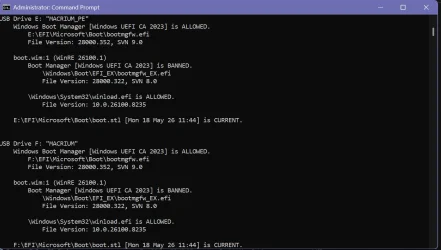
Here's the latest test version of Check_BootMedia.ps1
 

Attachments

My Computer My Computer

At a glance

Windows 7
OS
Windows 7
Here's the latest test version of Check_BootMedia.ps1
Works for me
  • Macrium staging folder
  • G: virtual CD-ROM of Macrium ISO
  • H: USB drive (configured by OEM as "fixed")
Code:
Macrium v10.0.8843
------------------
    WinRE Boot Manager [Windows UEFI CA 2023] is ALLOWED.
        E:\boot\macrium\WinREFiles\media\EFI\Microsoft\Boot\bootmgfw.efi
        File Version: 28000.352, SVN 9.0

Bootable Media
--------------

DVD Drive G: "Rescue"
    Windows Boot Manager [Windows UEFI CA 2023] is ALLOWED.
        G:\EFI\Microsoft\Boot\bootmgfw.efi
        File Version: 28000.352, SVN 9.0

    boot.wim:1 (WinRE 26100.1)
        Boot Manager [Windows UEFI CA 2023] is ALLOWED.
            \Windows\Boot\EFI_EX\bootmgfw_EX.efi
            File Version: 28000.352, SVN 9.0

        \Windows\System32\winload.efi is ALLOWED.
            File Version: 26100.8875


DVD Drive H: "RESCUE"
    Windows Boot Manager [Windows UEFI CA 2023] is ALLOWED.
        H:\EFI\Microsoft\Boot\bootmgfw.efi
        File Version: 28000.352, SVN 9.0

    boot.wim:1 (WinRE 26100.1)
        Boot Manager [Windows UEFI CA 2023] is ALLOWED.
            \Windows\Boot\EFI_EX\bootmgfw_EX.efi
            File Version: 28000.352, SVN 9.0

        \Windows\System32\winload.efi is ALLOWED.
            File Version: 26100.8875
 

My Computer My Computer

At a glance

Windows 11
OS
Windows 11
Latest, looking good I think. The initial error may have been due to updating the G drive to pick up the SVN update.
PowerShell 7.6.4
PS C:\Windows\System32> powershell -nop -ep bypass -f C:\temp16\check_bootmedia.ps1 -verbose
Windows 11 25H2 (26200.8973)

Secure Boot: ON
Virtualization Based Security: ON

UEFI KEK Certs
--------------
Microsoft Corporation KEK CA 2011
Microsoft Corporation KEK 2K CA 2023

UEFI DB Certs
-------------
Microsoft Corporation UEFI CA 2011
Microsoft Windows Production PCA 2011
Microsoft Option ROM UEFI CA 2023
Microsoft UEFI CA 2023
Windows UEFI CA 2023

UEFI DBX Certs
--------------
Microsoft Windows Production PCA 2011
Windows BootMgr SVN 9.0

EFI Files
---------
SkuSiPolicy.p7b is CURRENT.
\\.\HarddiskVolume1\EFI\Microsoft\Boot\SkuSiPolicy.p7b
Version: 3.0.0.16

FileRule MinimumFileVersion MaximumFileVersion
-------- ------------------ ------------------
ID_FILEATTRIB_F_0042 0.0.0.0 10.0.14393.9309
ID_FILEATTRIB_F_0044 10.0.14400.0 10.0.17763.8979
ID_FILEATTRIB_F_0040 10.0.18000.0 10.0.19041.7519
ID_FILEATTRIB_F_0049 10.0.19100.0 10.0.20348.5359
ID_FILEATTRIB_F_0047 10.0.20400.0 10.0.22621.7349
ID_FILEATTRIB_F_0041 10.0.23000.0 10.0.26100.8835
ID_FILEATTRIB_F_0043 10.0.26100.32000 10.0.26100.33099
ID_FILEATTRIB_F_0048 10.0.26172.0 10.0.26172.33099
ID_FILEATTRIB_F_0046 10.0.27000.0 10.0.28000.2489
ID_FILEATTRIB_F_0045 10.0.29426.0 65535.65535.65535.65535


Hasleo 5.9.2.1
--------------
WinPE Boot Manager [Windows UEFI CA 2023] is BANNED.
C:\Program Files\Hasleo\Hasleo Backup Suite\bin\WADK\Boot\EFI_EX\bootmgfw.efi
File Version: 26100.30227, SVN 7.0
Get-Volume : Cannot validate argument on parameter 'DriveLetter'. The argument is null. Provide a valid value for the
argument, and then try running the command again.
At C:\temp16\check_bootmedia.ps1:344 char:33
+ Get-Volume -DriveLetter $Drive
+ ~~~~~~
+ CategoryInfo : InvalidData: (:) [Get-Volume], ParameterBindingValidationException
+ FullyQualifiedErrorId : ParameterArgumentValidationError,Get-Volume


Bootable Media
--------------

USB Drive G: "HASLEOBS"
Boot File [Windows UEFI CA 2023] is ALLOWED.
G:\EFI\Boot\bootx64.efi
File Version: 28000.352, SVN 9.0

G:\EFI\Microsoft\Boot\boot.stl [5/18/2026 1:44 PM] is CURRENT.

boot.wim:1 (WinRE 26100.1)
Boot Manager [Windows UEFI CA 2023] is ALLOWED.
\Windows\Boot\EFI_EX\bootmgfw_EX.efi
File Version: 28000.352, SVN 9.0

\Windows\System32\winload.efi is ALLOWED.
File Version: 26100.8971


PS C:\Windows\System32>
 

My Computer My Computer

At a glance

Windows 11 Intel i5 10400 HD630 graphics chipi5-1040012 gbHD630 chipset
OS
Windows 11 Intel i5 10400 HD630 graphics chip
Computer type
PC/Desktop
Manufacturer/Model
HP
CPU
i5-10400
Memory
12 gb
Graphics Card(s)
HD630 chipset
Monitor(s) Displays
LG 24inch
Hard Drives
SSD, external usb drive 1tb for files/backups
Keyboard
wireless Logi
Mouse
ms 4000 wireless mouse
Internet Speed
10meg
Browser
Firefox
Antivirus
Defender
Other Info
Win11 Home 25h2 26200.8973 07/28/2026
Part of the results from the latest BootMedia.ps1 with Hasleo USB & Ventoy USB inserted.

Hasleo 5.9.2.1
--------------
WinPE Boot Manager [Windows UEFI CA 2023] is ALLOWED.
C:\Program Files\Hasleo\Hasleo Backup Suite\bin\WADK\Boot\EFI_EX\bootmgfw.efi
File Version: 28000.352, SVN 9.0
Get-Volume : Cannot validate argument on parameter 'DriveLetter'. The argument is null. Provide a valid value for the
argument, and then try running the command again.
At E:\Garlin\Check_BootMedia.ps1:344 char:33
+ Get-Volume -DriveLetter $Drive
+ ~~~~~~
+ CategoryInfo : InvalidData: (:) [Get-Volume], ParameterBindingValidationException
+ FullyQualifiedErrorId : ParameterArgumentValidationError,Get-Volume


Bootable Media
--------------

USB Drive F: "HASLEOBS"
Boot File [Windows UEFI CA 2023] is ALLOWED.
F:\EFI\Boot\bootx64.efi
File Version: 28000.352, SVN 9.0

F:\EFI\Microsoft\Boot\boot.stl [2026-05-18 1:44 PM] is CURRENT.

boot.wim:1 (WinRE 26100.1)
Boot Manager [Windows UEFI CA 2023] is ALLOWED.
\Windows\Boot\EFI_EX\bootmgfw_EX.efi
File Version: 28000.352, SVN 9.0

\Windows\System32\winload.efi is ALLOWED.
File Version: 26100.8875
 

My Computer My Computer

At a glance

Windows 11 ProIntel Core Ultra16GBIntel(R) Arc Graphics
OS
Windows 11 Pro
Computer type
Laptop
Manufacturer/Model
ASUS Zenbook 14 OLED
CPU
Intel Core Ultra
Memory
16GB
Graphics Card(s)
Intel(R) Arc Graphics
Sound Card
Realtek High Definition Audio(SST)
Screen Resolution
2880 x 1800
Hard Drives
500 GB NVMe SSD
Internet Speed
1,500Mbps
Browser
Firefox, Edge
Antivirus
Windows Defender
Mine -

Code:
UEFI DBX Certs
--------------
    Microsoft Windows PCA 2010
    Microsoft Windows Production PCA 2011
    Windows BootMgr SVN 9.0

EFI Files
---------
    SkuSiPolicy.p7b is CURRENT.
        \\.\HarddiskVolume1\EFI\Microsoft\Boot\SkuSiPolicy.p7b
        Version: 3.0.0.16

    FileRule             MinimumFileVersion MaximumFileVersion
    --------             ------------------ ------------------
    ID_FILEATTRIB_F_0042 0.0.0.0            10.0.14393.9309
    ID_FILEATTRIB_F_0044 10.0.14400.0       10.0.17763.8979
    ID_FILEATTRIB_F_0040 10.0.18000.0       10.0.19041.7519
    ID_FILEATTRIB_F_0049 10.0.19100.0       10.0.20348.5359
    ID_FILEATTRIB_F_0047 10.0.20400.0       10.0.22621.7349
    ID_FILEATTRIB_F_0041 10.0.23000.0       10.0.26100.8835
    ID_FILEATTRIB_F_0043 10.0.26100.32000   10.0.26100.33099
    ID_FILEATTRIB_F_0048 10.0.26172.0       10.0.26172.33099
    ID_FILEATTRIB_F_0046 10.0.27000.0       10.0.28000.2489
    ID_FILEATTRIB_F_0045 10.0.29426.0       65535.65535.65535.65535


Hasleo 5.9.2.1
--------------
    C:\Program Files\Hasleo\Hasleo Backup Suite\bin\WADK\Windows Preinstallation Environment\amd64\winpe.wim:1 (WinPE 26100.1)
        Boot Manager [Windows UEFI CA 2023] is BANNED.
            \Windows\Boot\EFI_EX\bootmgfw_EX.efi
            File Version: 26089.1001, SVN 2.0

        \Windows\System32\winload.efi is BANNED.
            File Version: 26100.1
Get-Volume: C:\Users\nelson\Desktop\Check_BootMedia.ps1:344
Line |
 344 |          Get-Volume -DriveLetter $Drive
     |                                  ~~~~~~
     | Cannot validate argument on parameter 'DriveLetter'. The argument is null. Provide a valid
     | value for the argument, and then try running the command again.

Bootable Media
--------------

USB Drive D: "HASLEOBS"
    Boot File [Windows UEFI CA 2023] is ALLOWED.
        D:\EFI\Boot\bootx64.efi
        File Version: 28000.352, SVN 9.0

    D:\EFI\Microsoft\Boot\boot.stl [5/18/2026 1:44 PM] is CURRENT.

    boot.wim:1 (WinPE 26100.1)
        Boot Manager [Windows UEFI CA 2023] is BANNED.
            \Windows\Boot\EFI_EX\bootmgfw_EX.efi
            File Version: 26089.1001, SVN 2.0

        \Windows\System32\winload.efi is BANNED.
            File Version: 26100.1


PS C:\Users\nelson\Desktop>
 

My Computers My Computers

  • At a glance

    Windows 11 Pro 25H2 26200.8894Intel® Core™ Ultra 7 265 1.8GHz to 5.3GHz (Ar...SK Hynix 32GB DDR5 5600 Desktop RAM UDIMM Non...Dell NVIDIA® GeForce RTX™ 4060 8GB GDDR6 & (i...
    OS
    Windows 11 Pro 25H2 26200.8894
    Computer type
    PC/Desktop
    Manufacturer/Model
    Dell Tower Plus EBT2250, DOB: 06/15/2025
    CPU
    Intel® Core™ Ultra 7 265 1.8GHz to 5.3GHz (Arrow Lake)
    Motherboard
    Dell Inc. 02D3NT A00 (U3E1)
    Memory
    SK Hynix 32GB DDR5 5600 Desktop RAM UDIMM Non-ECC PC5-5600B
    Graphics Card(s)
    Dell NVIDIA® GeForce RTX™ 4060 8GB GDDR6 & (iGPU) Integrated Intel® UHD Graphics
    Sound Card
    Chipset Realtek High-Definition Audio with Dolby Atmos
    Monitor(s) Displays
    Dell Ultra Sharp U2515H 25-Inch Screen LED-Lit
    Screen Resolution
    2560 X 1440
    Hard Drives
    Samsung (NVMe PM9C1a 1024GB) M.2 PCIe NVMe Solid State Drive (OS), with Samsung Piccolo (S4LY022) 6-Core 4 Channel Controller.

    Samsung T7 500GB SSD, USB-C External Drive
    PSU
    Dell 460W
    Case
    Dell Tower Plus EBT 2250
    Cooling
    Fan
    Keyboard
    Dell Wired Keyboard - KB216
    Mouse
    Logitech M510
    Internet Speed
    Intel Killer E3100G 2.5 Gigabit Ethernet Controller
    Browser
    Microsoft Edge
    Antivirus
    Microsoft Windows Security
    Other Info
    The Samsung NVMe PM9C1a 1024GB SSD does not use a Phison NAND controller. Instead, it uses Samsung's in-house developed Piccolo (S4LY022) 6-Core 4 Channel Controller. The PM9C1a utilizes a controller built using Samsung's 5-nanometer process and seventh-generation V-NAND technology. 🤔
  • At a glance

    Windows 11 Pro 25H2 26200.889410th Generation Intel Core i7-10510U Processo...16GB DDR4 RAMNVIDIA® GeForce® MX250 with 2GB GDDR5 graphic...
    Operating System
    Windows 11 Pro 25H2 26200.8894
    Computer type
    Laptop
    Manufacturer/Model
    Dell Inspiron 15 7000 (7591) 2-in-1, DOB: 11/30/2019
    CPU
    10th Generation Intel Core i7-10510U Processor (8MB Cache, up to 4.9 GHz) Comet Lake
    Motherboard
    Dell 0NNW5N
    Memory
    16GB DDR4 RAM
    Graphics card(s)
    NVIDIA® GeForce® MX250 with 2GB GDDR5 graphics memory
    Sound Card
    Chipset Realtek ALC3254 🤔
    Monitor(s) Displays
    Dell 15.6-inch UHD Truelife Touch Narrow Border WVA Display with Active Pen support
    Screen Resolution
    3840 x 2160
    Hard Drives
    Intel NVME 512GB SSD with 32GB Intel Optane Memory, M.2 80mm PCIe 3.0 RAID

    SanDisk 256GB Extreme microSDXC UHS-I Memory Card
    PSU
    Dell 4-Cell Battery, 68 Whr (Integrated), 90 Watt AC Adapter
    Case
    Dell Inspiron 15 7000 2-in-1 (7591)
    Cooling
    Standard Dell Case Fan & Havit HV-F2056 USB Powered (3 Fans) Laptop Cooling Pad.
    Keyboard
    Dell
    Mouse
    Logitech Wireless Mouse M650L
    Internet Speed
    Wireless/Wired connectivity (WiFi 6 - 802.11 ax)
    Browser
    Microsoft Edge
    Antivirus
    Microsoft Windows Security
    Other Info
    From Dell: 512GB NVME Solid State Drive accelerated by 32GB Intel Optane Memory are the fastest as compared to NAND SSDs. Intel Optane H10 with SSD offers speedy storage and accelerates opening your programs.
@garlin might have found a small bug, maybe...

Check_BootMedia, Line 1974
Code:
    if ($DriveType -eq 'USB') {
        Validate-BootStl "$DriveLetter\EFI\Microsoft\Boot\boot.stl"
    }
Why only test Boot.stl for USB, why not CD-ROM. For me, because of my misconfigured flash drive that reports as "fixed", I commented line 1974 and 1976 just to see and it works for both types USB or CD-ROM.

Also, why even test the $Volume.Value.DriveType at line 1949 since you now get the drives using the InterfaceType with the latest command from Fred Flinstone. It would also mean removing the $DriveType in the "if" at line 1956.

Finaly, I know I'm repeating myself...
We all appreciate all the work you do !!!!!!!
 
Last edited:

My Computer My Computer

At a glance

Windows 11
OS
Windows 11
New fix for "The argument is null".
 

Attachments

My Computer My Computer

At a glance

Windows 7
OS
Windows 7
Can someone explain the ' BANNED ' part?
Screenshot 2026-08-06 115524.webp
 

My Computer My Computer

At a glance

Windows 11
OS
Windows 11
@garlin might have found a small bug, maybe...

Check_BootMedia, Line 1974
Code:
    if ($DriveType -eq 'USB') {
        Validate-BootStl "$DriveLetter\EFI\Microsoft\Boot\boot.stl"
    }
Why only test Boot.stl for USB, why not CD-ROM. For me, because of my misconfigured flash drive that reports as "fixed", I commented line 1974 and 1976 just to see and it works for both types USB or CD-ROM.
The theory being a Windows ISO will include the correct version of boot.stl for that ISO. And users don't normally modify their ISO file.

Whereas a random USB boot drive could be constructed by different programs, and some of them will fall to check for boot.stl. But the ISO should always carry the version that was intended for that ISO. Checking would be important for the non-ISO instance, and when the ISO is mounted from an actual CD/DVD device or virtually mounted from File Explorer, it's reported as the CD-ROM type.

Also, why even test the $Volume.Value.DriveType at line 1949 since you now get the drives using the InterfaceType with the latest command from Fred Flinstone. It would also mean removing the $DriveType in the "if" at line 1956.
The Flintstone trick works to search for USB devices, but I also need to support reading ISO files. So we're throwing two different data sets into the same queue:

Code:
    $RemovableDrives = @(
# This one filters for USB media
        ((Get-CimInstance -Class Win32_DiskDrive -Filter 'InterfaceType = "USB"' -KeyOnly | Get-CimAssociatedInstance -ResultClassName Win32_DiskPartition -KeyOnly | Get-CimAssociatedInstance -ResultClassName Win32_LogicalDisk).DeviceID | where { $_ -ne $null } | foreach { $_ -replace ':' }),

# This one adds the ISO's
        (Get-Volume | where { $_.DriveType -eq 'CD-ROM' -and $_.DriveLetter -ne $null -and $_.OperationalStatus -eq 'OK' }).DriveLetter
    )

I need the internal functions to be flexible instead of having an USB-only vs. a CDROM-only function.
 

My Computer My Computer

At a glance

Windows 7
OS
Windows 7
Can someone explain the ' BANNED ' part?
After you've installed the June 2026 (or later) CU, Windows has updated the DBX SVN to 9.0.

When Secure Boot is enabled, A=any boot manager/file version with a SVN lower than 9.0 isn't allowed to boot. Which means you need to replace the file, or rebuild from an updated WIM source. Think of it as a clock where the hands can only move forward. Once revocation has happened, Windows will gradually rev the SVN upwards every time the boot manager is replaced.

It's replaced because someone reported a security hole that's now closed. MS doesn't want attackers to abuse your system because you're using an outdated boot file from somewhere. Sorry, it's the new "normal".
 

My Computer My Computer

At a glance

Windows 7
OS
Windows 7
New fix for "The argument is null".
I'm still getting that :;


Hasleo 5.9.2.1
--------------
WinPE Boot Manager [Windows UEFI CA 2023] is BANNED.
C:\Program Files\Hasleo\Hasleo Backup Suite\bin\WADK\Boot\EFI_EX\bootmgfw.efi
File Version: 26100.30227, SVN 7.0
Get-Volume : Cannot validate argument on parameter 'DriveLetter'. The argument is null. Provide a valid value for the
argument, and then try running the command again.
At C:\temp16\check_bootmedia.ps1:344 char:33
+ Get-Volume -DriveLetter $Drive
+ ~~~~~~
+ CategoryInfo : InvalidData: (:) [Get-Volume], ParameterBindingValidationException
+ FullyQualifiedErrorId : ParameterArgumentValidationError,Get-Volume


Bootable Media
--------------

USB Drive G: "HASLEOBS"
Boot File [Windows UEFI CA 2023] is ALLOWED.
G:\EFI\Boot\bootx64.efi
File Version: 28000.352, SVN 9.0

G:\EFI\Microsoft\Boot\boot.stl [5/18/2026 1:44 PM] is CURRENT.

boot.wim:1 (WinRE 26100.1)
Boot Manager [Windows UEFI CA 2023] is ALLOWED.
\Windows\Boot\EFI_EX\bootmgfw_EX.efi
File Version: 28000.352, SVN 9.0

\Windows\System32\winload.efi is ALLOWED.
File Version: 26100.8971
 

My Computer My Computer

At a glance

Windows 11 Intel i5 10400 HD630 graphics chipi5-1040012 gbHD630 chipset
OS
Windows 11 Intel i5 10400 HD630 graphics chip
Computer type
PC/Desktop
Manufacturer/Model
HP
CPU
i5-10400
Memory
12 gb
Graphics Card(s)
HD630 chipset
Monitor(s) Displays
LG 24inch
Hard Drives
SSD, external usb drive 1tb for files/backups
Keyboard
wireless Logi
Mouse
ms 4000 wireless mouse
Internet Speed
10meg
Browser
Firefox
Antivirus
Defender
Other Info
Win11 Home 25h2 26200.8973 07/28/2026
After you've installed the June 2026 (or later) CU, Windows has updated the DBX SVN to 9.0.

When Secure Boot is enabled, A=any boot manager/file version with a SVN lower than 9.0 isn't allowed to boot. Which means you need to replace the file, or rebuild from an updated WIM source. Think of it as a clock where the hands can only move forward. Once revocation has happened, Windows will gradually rev the SVN upwards every time the boot manager is replaced.

It's replaced because someone reported a security hole that's now closed. MS doesn't want attackers to abuse your system because you're using an outdated boot file from somewhere. Sorry, it's the new "normal".
Thanks for the explanation. I have tested both USB's and they still boot into Macrium Rescue okay. I'll install Macrium v8.0 again at some point and rebuild the USB's.
 

My Computer My Computer

At a glance

Windows 11
OS
Windows 11
The theory being a Windows ISO will include the correct version of boot.stl for that ISO. And users don't normally modify their ISO file.

Whereas a random USB boot drive could be constructed by different programs, and some of them will fall to check for boot.stl. But the ISO should always carry the version that was intended for that ISO. Checking would be important for the non-ISO instance, and when the ISO is mounted from an actual CD/DVD device or virtually mounted from File Explorer, it's reported as the CD-ROM type.
But that is assuming it's a Windows ISO
What if the ISO in question was mounted as a virtual CD-ROM but created by Hasleo or Macriun (or anyother...)
I need the internal functions to be flexible instead of having an USB-only vs. a CDROM-only function.
I fully understand and agree with you on this
It's just that testing the bootl.stl for both USB and ISO (when not Windows ISO) would make sens
It would just tell users, yup your boot.stl is good or not for any USB or CD-ROM

Obviously, removing the "if ($DriveType -eq 'USB')" at line 1974 would address my misconfigured USB that reports as "Fixed"
But it's not your fault I have a misconfigured USB drive ;-)

Hey it's your code, whatever you decide will be fine with me
 

My Computer My Computer

At a glance

Windows 11
OS
Windows 11
That looks clean:

PS C:\Windows\System32> powershell -nop -ep bypass -f C:\temp16\check_bootmedia.ps1 -verbose
Windows 11 25H2 (26200.8973)

Secure Boot: ON
Virtualization Based Security: ON

UEFI KEK Certs
--------------
Microsoft Corporation KEK CA 2011
Microsoft Corporation KEK 2K CA 2023

UEFI DB Certs
-------------
Microsoft Corporation UEFI CA 2011
Microsoft Windows Production PCA 2011
Microsoft Option ROM UEFI CA 2023
Microsoft UEFI CA 2023
Windows UEFI CA 2023

UEFI DBX Certs
--------------
Microsoft Windows Production PCA 2011
Windows BootMgr SVN 9.0

EFI Files
---------
SkuSiPolicy.p7b is CURRENT.
\\.\HarddiskVolume1\EFI\Microsoft\Boot\SkuSiPolicy.p7b
Version: 3.0.0.16

FileRule MinimumFileVersion MaximumFileVersion
-------- ------------------ ------------------
ID_FILEATTRIB_F_0042 0.0.0.0 10.0.14393.9309
ID_FILEATTRIB_F_0044 10.0.14400.0 10.0.17763.8979
ID_FILEATTRIB_F_0040 10.0.18000.0 10.0.19041.7519
ID_FILEATTRIB_F_0049 10.0.19100.0 10.0.20348.5359
ID_FILEATTRIB_F_0047 10.0.20400.0 10.0.22621.7349
ID_FILEATTRIB_F_0041 10.0.23000.0 10.0.26100.8835
ID_FILEATTRIB_F_0043 10.0.26100.32000 10.0.26100.33099
ID_FILEATTRIB_F_0048 10.0.26172.0 10.0.26172.33099
ID_FILEATTRIB_F_0046 10.0.27000.0 10.0.28000.2489
ID_FILEATTRIB_F_0045 10.0.29426.0 65535.65535.65535.65535


Hasleo 5.9.2.1
--------------
WinPE Boot Manager [Windows UEFI CA 2023] is BANNED.
C:\Program Files\Hasleo\Hasleo Backup Suite\bin\WADK\Boot\EFI_EX\bootmgfw.efi
File Version: 26100.30227, SVN 7.0

Bootable Media
--------------

USB Drive G: "HASLEOBS"
Boot File [Windows UEFI CA 2023] is ALLOWED.
G:\EFI\Boot\bootx64.efi
File Version: 28000.352, SVN 9.0

G:\EFI\Microsoft\Boot\boot.stl [5/18/2026 1:44 PM] is CURRENT.

boot.wim:1 (WinRE 26100.1)
Boot Manager [Windows UEFI CA 2023] is ALLOWED.
\Windows\Boot\EFI_EX\bootmgfw_EX.efi
File Version: 28000.352, SVN 9.0

\Windows\System32\winload.efi is ALLOWED.
File Version: 26100.8971
 

My Computer My Computer

At a glance

Windows 11 Intel i5 10400 HD630 graphics chipi5-1040012 gbHD630 chipset
OS
Windows 11 Intel i5 10400 HD630 graphics chip
Computer type
PC/Desktop
Manufacturer/Model
HP
CPU
i5-10400
Memory
12 gb
Graphics Card(s)
HD630 chipset
Monitor(s) Displays
LG 24inch
Hard Drives
SSD, external usb drive 1tb for files/backups
Keyboard
wireless Logi
Mouse
ms 4000 wireless mouse
Internet Speed
10meg
Browser
Firefox
Antivirus
Defender
Other Info
Win11 Home 25h2 26200.8973 07/28/2026
But that is assuming it's a Windows ISO
What if the ISO in question was mounted as a virtual CD-ROM but created by Hasleo or Macriun (or anyother...)
For that to happen, does Hasleo or Macrium create a finalized .ISO file for you? I honestly don't know. My experience is both tools want to format and write a finished image to your USB drive.

It's just that testing the bootl.stl for both USB and ISO (when not Windows ISO) would make sens
It would just tell users, yup your boot.stl is good or not for any USB or CD-ROM

Obviously, removing the "if ($DriveType -eq 'USB')" at line 1974 would address my misconfigured USB that reports as "Fixed"
But it's not your fault I have a misconfigured USB drive ;-)
No, because the root of the original problem are USB drives which are marked Fixed instead of Removable. But both drives are still USB (based on the controller type).

As for Windows ISO's, you can't just simply assume replacing your boot.stl from your latest version of Windows is valid for that older release. It's designed to be a matching set, for better or worse.
 

My Computer My Computer

At a glance

Windows 7
OS
Windows 7
Mine, looks good to me. There is something in the Hasleo software that "they" need to fix. My version is free so I cannot complain.

Code:
UEFI DBX Certs
--------------
    Microsoft Windows PCA 2010
    Microsoft Windows Production PCA 2011
    Windows BootMgr SVN 9.0

EFI Files
---------
    SkuSiPolicy.p7b is CURRENT.

Hasleo 5.9.2.1
--------------
    C:\Program Files\Hasleo\Hasleo Backup Suite\bin\WADK\Windows Preinstallation Environment\amd64\winpe.wim:1 (WinPE 26100.1)
        Boot Manager [Windows UEFI CA 2023] is BANNED.
        winload.efi is BANNED.

Bootable Media
--------------

USB Drive D: "HASLEOBS"
    Boot File [Windows UEFI CA 2023] is ALLOWED.

    boot.stl is CURRENT.

    boot.wim:1 (WinPE 26100.1)
        Boot Manager [Windows UEFI CA 2023] is BANNED.
        winload.efi is BANNED.


PS C:\Users\nelson\Desktop>
 

My Computers My Computers

  • At a glance

    Windows 11 Pro 25H2 26200.8894Intel® Core™ Ultra 7 265 1.8GHz to 5.3GHz (Ar...SK Hynix 32GB DDR5 5600 Desktop RAM UDIMM Non...Dell NVIDIA® GeForce RTX™ 4060 8GB GDDR6 & (i...
    OS
    Windows 11 Pro 25H2 26200.8894
    Computer type
    PC/Desktop
    Manufacturer/Model
    Dell Tower Plus EBT2250, DOB: 06/15/2025
    CPU
    Intel® Core™ Ultra 7 265 1.8GHz to 5.3GHz (Arrow Lake)
    Motherboard
    Dell Inc. 02D3NT A00 (U3E1)
    Memory
    SK Hynix 32GB DDR5 5600 Desktop RAM UDIMM Non-ECC PC5-5600B
    Graphics Card(s)
    Dell NVIDIA® GeForce RTX™ 4060 8GB GDDR6 & (iGPU) Integrated Intel® UHD Graphics
    Sound Card
    Chipset Realtek High-Definition Audio with Dolby Atmos
    Monitor(s) Displays
    Dell Ultra Sharp U2515H 25-Inch Screen LED-Lit
    Screen Resolution
    2560 X 1440
    Hard Drives
    Samsung (NVMe PM9C1a 1024GB) M.2 PCIe NVMe Solid State Drive (OS), with Samsung Piccolo (S4LY022) 6-Core 4 Channel Controller.

    Samsung T7 500GB SSD, USB-C External Drive
    PSU
    Dell 460W
    Case
    Dell Tower Plus EBT 2250
    Cooling
    Fan
    Keyboard
    Dell Wired Keyboard - KB216
    Mouse
    Logitech M510
    Internet Speed
    Intel Killer E3100G 2.5 Gigabit Ethernet Controller
    Browser
    Microsoft Edge
    Antivirus
    Microsoft Windows Security
    Other Info
    The Samsung NVMe PM9C1a 1024GB SSD does not use a Phison NAND controller. Instead, it uses Samsung's in-house developed Piccolo (S4LY022) 6-Core 4 Channel Controller. The PM9C1a utilizes a controller built using Samsung's 5-nanometer process and seventh-generation V-NAND technology. 🤔
  • At a glance

    Windows 11 Pro 25H2 26200.889410th Generation Intel Core i7-10510U Processo...16GB DDR4 RAMNVIDIA® GeForce® MX250 with 2GB GDDR5 graphic...
    Operating System
    Windows 11 Pro 25H2 26200.8894
    Computer type
    Laptop
    Manufacturer/Model
    Dell Inspiron 15 7000 (7591) 2-in-1, DOB: 11/30/2019
    CPU
    10th Generation Intel Core i7-10510U Processor (8MB Cache, up to 4.9 GHz) Comet Lake
    Motherboard
    Dell 0NNW5N
    Memory
    16GB DDR4 RAM
    Graphics card(s)
    NVIDIA® GeForce® MX250 with 2GB GDDR5 graphics memory
    Sound Card
    Chipset Realtek ALC3254 🤔
    Monitor(s) Displays
    Dell 15.6-inch UHD Truelife Touch Narrow Border WVA Display with Active Pen support
    Screen Resolution
    3840 x 2160
    Hard Drives
    Intel NVME 512GB SSD with 32GB Intel Optane Memory, M.2 80mm PCIe 3.0 RAID

    SanDisk 256GB Extreme microSDXC UHS-I Memory Card
    PSU
    Dell 4-Cell Battery, 68 Whr (Integrated), 90 Watt AC Adapter
    Case
    Dell Inspiron 15 7000 2-in-1 (7591)
    Cooling
    Standard Dell Case Fan & Havit HV-F2056 USB Powered (3 Fans) Laptop Cooling Pad.
    Keyboard
    Dell
    Mouse
    Logitech Wireless Mouse M650L
    Internet Speed
    Wireless/Wired connectivity (WiFi 6 - 802.11 ax)
    Browser
    Microsoft Edge
    Antivirus
    Microsoft Windows Security
    Other Info
    From Dell: 512GB NVME Solid State Drive accelerated by 32GB Intel Optane Memory are the fastest as compared to NAND SSDs. Intel Optane H10 with SSD offers speedy storage and accelerates opening your programs.
First, I hope I'm not getting on your nerves, if I am, let me know...

For that to happen, does Hasleo or Macrium create a finalized .ISO file for you? I honestly don't know. My experience is both tools want to format and write a finished image to your USB drive.


No, because the root of the original problem are USB drives which are marked Fixed instead of Removable. But both drives are still USB (based on the controller type).

As for Windows ISO's, you can't just simply assume replacing your boot.stl from your latest version of Windows is valid for that older release. It's designed to be a matching set, for better or worse.
Actually, I tested/used Macrium, Hasleo, Paragon, Veeam, Ghost and others that I can't remember the names over the years. I always use the pattern: create ISO and write ISO to a USB. The reason is that I also backup the ISO to a backup drive in case the USB stops working. I also have off site copy of my backups. Old habbit from when I had my own business and needed off site backups. I just kept doing it afterwards... But we disgress....
As for Windows ISO's, you can't just simply assume replacing your boot.stl from your latest version of Windows is valid for that older release. It's designed to be a matching set, for better or worse.
Again, I agree with you
But what would be the harm of reporting that the boot.stl is good or not on a Windows ISO or any other ISO...
 
Last edited:

My Computer My Computer

At a glance

Windows 11
OS
Windows 11
Garlin- Thanks for the outstanding coding & support effort!

Just wanted to double-check [Macrium 8.0] recovery media is solid...

~~~~~~~~~~~~~~~~~~~~~~~~~~~~~~~~~~~~~~~~~~

[Lenovo M93P-2 platform]

Windows Recovery Environment (Windows RE) and system reset configuration
Information:

Windows RE status: Enabled
Windows RE location: \\?\GLOBALROOT\device\harddisk0\partition4\Recovery\WindowsRE
Boot Configuration Data (BCD) identifier: 87581057-e746-11f0-882f-5cf370a0fed6
Recovery image location:
Recovery image index: 0
Custom image location:
Custom image index: 0
Windows RE Version: 10.0.26100.8875
~~~~~~~~~~~~~~~~~~~~~~~~~~~~~~~~~~~~~~~~~~

[Check_BootMedia.ps1 -Audit -Verbose;]

Windows 11 25H2 (26200.8875)

Secure Boot: ON
Virtualization Based Security: ON

UEFI KEK Certs
--------------
Microsoft Corporation KEK CA 2011
Microsoft Corporation KEK 2K CA 2023

UEFI DB Certs
-------------
Microsoft Corporation UEFI CA 2011
Microsoft Windows Production PCA 2011
Microsoft Option ROM UEFI CA 2023
Microsoft UEFI CA 2023
Windows UEFI CA 2023

UEFI DBX Certs
--------------
Microsoft Windows Production PCA 2011
Windows BootMgr SVN 9.0

EFI Files
---------
SkuSiPolicy.p7b is CURRENT.
\\.\HarddiskVolume1\EFI\Microsoft\Boot\SkuSiPolicy.p7b
Version: 3.0.0.16

FileRule MinimumFileVersion MaximumFileVersion
-------- ------------------ ------------------
ID_FILEATTRIB_F_0042 0.0.0.0 10.0.14393.9309
ID_FILEATTRIB_F_0044 10.0.14400.0 10.0.17763.8979
ID_FILEATTRIB_F_0040 10.0.18000.0 10.0.19041.7519
ID_FILEATTRIB_F_0049 10.0.19100.0 10.0.20348.5359
ID_FILEATTRIB_F_0047 10.0.20400.0 10.0.22621.7349
ID_FILEATTRIB_F_0041 10.0.23000.0 10.0.26100.8835
ID_FILEATTRIB_F_0043 10.0.26100.32000 10.0.26100.33099
ID_FILEATTRIB_F_0048 10.0.26172.0 10.0.26172.33099
ID_FILEATTRIB_F_0046 10.0.27000.0 10.0.28000.2489
ID_FILEATTRIB_F_0045 10.0.29426.0 65535.65535.65535.65535


NOT RECOMMENDED for dual-boot setups.

Macrium 8.0
-----------
WinRE Boot Manager [Production PCA 2011] is BANNED.
c:\boot\macrium\WinREFiles\media\EFI\Microsoft\Boot\bootmgfw.efi
File Version: 28000.342, SVN 9.0

WinPE Boot File [Production PCA 2011] is BANNED.
c:\boot\macrium\\WA11KFiles\media\EFI\Boot\bootx64.efi
File Version: 9600.16384, SVN 0.0

Bootable Media
--------------

USB Drive F: "RESCUEM93P2"
Windows Boot Manager [Windows UEFI CA 2023] is ALLOWED.
F:\EFI\Microsoft\Boot\bootmgfw.efi
File Version: 28000.352, SVN 9.0

F:\EFI\Microsoft\Boot\boot.stl [Mon 05/18/2026 11:44 AM] is CURRENT.

boot.wim:1 (WinRE 26100.1)
Boot Manager [Windows UEFI CA 2023] is BANNED.
\Windows\Boot\EFI_EX\bootmgfw_EX.efi
File Version: 26100.30227, SVN 7.0

\Windows\System32\winload.efi is BANNED.
File Version: 26100.7149

~~~~~~~~~~~~~~~~~~~~~~~~~~~~~~~~~~~~~~~~~~
Thanks
 

My Computer My Computer

At a glance

Windows 11
OS
Windows 11
Computer type
PC/Desktop
Manufacturer/Model
Lenovo

Latest Support Threads

Back
Top Bottom