Solved garlin's PowerShell scripts for updating Secure Boot CA 2023


It's called the "ICE" tact
Guys, can we keep this thread about secure boot related and not about how you customize and use Windows
You can have a private chat about it if you want to continue

Thanks in advance guys
Just gave em an honest answer
 

My Computer My Computer

At a glance

Win11 24H2 IOT LTSC / Win11 Pro 25H2AMD Ryzen 7 8700G / Ryzen 7 8700G / Ryzen 8600GF5-6000J3636F16GX2-FX5 32GB / Lexar Ares RGB ...internal
OS
Win11 24H2 IOT LTSC / Win11 Pro 25H2
Computer type
PC/Desktop
Manufacturer/Model
Gigabyte x2 / Asus = Home builds
CPU
AMD Ryzen 7 8700G / Ryzen 7 8700G / Ryzen 8600G
Motherboard
Gigabyte B650 AORUS ELITE AX V2 / ASUS TUF GAMING B650-PLUS / B650 GAMING X AX V2
Memory
F5-6000J3636F16GX2-FX5 32GB / Lexar Ares RGB LD5BU016G-R6000GDLA 32GB / Kingston FURY Beast 32 GB DDR5-5600
Graphics Card(s)
internal
Sound Card
Realtek
Monitor(s) Displays
BenQ 27 L EW2780
Screen Resolution
1920x1080
Hard Drives
Many M.2's (WD)
PSU
be quiet! Pure Power 13 M 550W
Case
Chieftec HC-10B-OP
Cooling
Gelid Solutions Tranquillo 5, many Noctua's 12x12
Keyboard
Microsoft
Mouse
Cherry
Internet Speed
500 mbs
Browser
Vivaldi
Antivirus
Eset
Other Info
PC builder / repair / Trouble-shooter etc.
No, leave it there, it avoids any questionning is it good or not

If it's allowed, it'll be blank. If it's banned it'll say so.
Or run it in -verbose mode and it'll say either way.
 

My Computers My Computers

  • At a glance

    Win 11 Pro 25H2 26200.9550Intel® Core™ i7-14700KG.SKILL Ripjaws S5 Series 64GB (2 x 32GB) DDR5ASUS GeForce RTX 4070 Super 12GB
    OS
    Win 11 Pro 25H2 26200.9550
    Computer type
    PC/Desktop
    Manufacturer/Model
    Self Built
    CPU
    Intel® Core™ i7-14700K
    Motherboard
    ASUS TUF Z690-PLUS WIFI (BIOS 4505)
    Memory
    G.SKILL Ripjaws S5 Series 64GB (2 x 32GB) DDR5
    Graphics Card(s)
    ASUS GeForce RTX 4070 Super 12GB
    Sound Card
    Sound Blaster AE-5 Plus
    Monitor(s) Displays
    ASUS TUF Gaming 27" 2K HDR Gaming
    Screen Resolution
    2560 x 1440
    Hard Drives
    Samsung 990 Pro 1TB NVMe (Win 11 25H2)
    SK hynix P41 500GB NVMe
    SK hynix P41 2TB NVMe (x3)
    Crucial P3 Plus 4TB
    PSU
    Corsair RM850x Shift
    Case
    Antec Dark Phantom DP502 FLUX
    Cooling
    Corsair Nautilus 360 RS AIO
    Keyboard
    Logitech MK 320
    Mouse
    Razer Basilisk V3
    Internet Speed
    750Mbs
    Browser
    Firefox
    Antivirus
    Winows Security
    Other Info
    MR 8.1 Home
  • At a glance

    Win 11 Pro 25H2 26200.9550Intel Core i5-1140064 GB DDR4MSI GeForce RTX 3060 Ventus 2X 12GB
    Operating System
    Win 11 Pro 25H2 26200.9550
    Computer type
    PC/Desktop
    Manufacturer/Model
    Self Built
    CPU
    Intel Core i5-11400
    Motherboard
    Asus TUF Gaming Z590 Plus WiFi (BIOS 2803)
    Memory
    64 GB DDR4
    Graphics card(s)
    MSI GeForce RTX 3060 Ventus 2X 12GB
    Sound Card
    SoundBlaster Audigy Fx V2
    Monitor(s) Displays
    Samsung F27T350
    Screen Resolution
    1920x1080
    Hard Drives
    Samsung 980 Pro 1TB
    Samsung 970 EVO Plus 2TB
    Samsung 870 EVO 500GB SSD
    PSU
    Corsair HX750
    Case
    Cougar MX330-G Window
    Cooling
    Thermalright Frozen Edge 240 Black AIO
    Internet Speed
    350Mbps
    Browser
    Firefox
    Antivirus
    Windows Security
  • System Three
    Win 11 Pro 25H2 26200.9550
    ASUS PRIME Z370-P II BIOS 3004 7/12/21
    Intel Core i7-8700 CPU @ 3.20GHz
    32GB DDR4 RAM (4x8)
    EVGA RTX 2060 (used)
    iGPU Intel UHD Graphics 630 (backup)
    Cooler Master Hyper 212
    Mid-Tower Desktop
If it's allowed, it'll be blank. If it's banned it'll say so.
Or run it in -verbose mode and it'll say either way.
ok, then maybe have the "banned" written in red
so no red, all good !

make sens ?
 

My Computers My Computers

  • At a glance

    Windows 1132GB
    OS
    Windows 11
    Computer type
    PC/Desktop
    Manufacturer/Model
    Dell 3910
    Memory
    32GB
  • At a glance

    Windows 1116GB
    Operating System
    Windows 11
    Computer type
    Tablet
    Manufacturer/Model
    Surface Pro 9
    Memory
    16GB
Proposed normal mode:
Code:
Macrium v8.0.7783
-----------------
    WinRE Boot Manager [Production PCA 2011] is BANNED.
    WinPE Boot File [Production PCA 2011] is BANNED.

Hasleo 5.8.2.2
--------------
    C:\Program Files\Hasleo\Hasleo Backup Suite\bin\WADK\Windows Preinstallation Environment\amd64\winpe.wim:1 (WinPE 26100.1)
        Boot Manager [Windows UEFI CA 2023] is BANNED.
        winload.efi (26100.1)

    WinPE Boot Manager [Windows UEFI CA 2023] is BANNED.

Bootable Media
--------------
USB Drive D: "ESD-ISO"
    Boot File [Microsoft Corporation UEFI CA 2011]

    boot.wim:2 (WinPE 26100.8873)
        Boot Manager [Windows UEFI CA 2023]
        winload.efi (26100.8870)

    boot.stl is CURRENT.

    install.esd:1 (W11 25H2 26200.8873)
        Boot Manager [Windows UEFI CA 2023]
        winload.efi (26100.8870)

DVD Drive E: "CCCOMA_X64FRE_EN-US_DV9"
    Boot File [Production PCA 2011] is BANNED.

    boot.wim:2 (WinPE 19041.2965)
        Boot Manager [Production PCA 2011] is BANNED.
        winload.efi (19041.2965)

    install.wim:1 (Windows 22H2 19045.2965)
        Boot Manager [Production PCA 2011] is BANNED.
        winload.efi (19041.2965)

Verbose mode
Code:
Macrium v8.0.7783
-----------------
    WinRE Boot Manager [Production PCA 2011] is BANNED.
        c:\boot\macrium\WinREFiles\media\EFI\Microsoft\Boot\bootmgfw.efi
        File Version: 28000.352, SVN 9.0

    WinPE Boot File [Production PCA 2011] is BANNED.
        c:\boot\macrium\\WA11KFiles\media\EFI\Boot\bootx64.efi
        File Version: 22621.1702, SVN 1.0

Hasleo 5.8.2.2
--------------
    C:\Program Files\Hasleo\Hasleo Backup Suite\bin\WADK\Windows Preinstallation Environment\amd64\winpe.wim:1 (WinPE 26100.1)
        Boot Manager [Windows UEFI CA 2023] is BANNED.
            \Windows\Boot\EFI_EX\bootmgfw_EX.efi
            File Version: 26089.1001, SVN 2.0

        \Windows\System32\winload.efi is ALLOWED.
            File Version: 26100.1

    WinPE Boot Manager [Windows UEFI CA 2023] is BANNED.
        C:\Program Files\Hasleo\Hasleo Backup Suite\bin\WADK\Boot\EFI_EX\bootmgfw.efi
        File Version: 26100.30227, SVN 7.0

Bootable Media
--------------
USB Drive D: "ESD-ISO"
    Boot File [Microsoft Corporation UEFI CA 2011] is ALLOWED.
        D:\EFI\Boot\bootx64.efi
        [THIRD-PARTY] EFI File

    boot.wim:2 (WinPE 26100.8873)
        Boot Manager [Windows UEFI CA 2023] is ALLOWED.
            \Windows\Boot\EFI_EX\bootmgfw_EX.efi
            File Version: 28000.352, SVN 9.0

        \Windows\System32\winload.efi is ALLOWED.
            File Version: 26100.8870

    D:\EFI\Microsoft\Boot\boot.stl [5/18/2026 10:44 AM] is CURRENT.

    install.esd:1 (W11 25H2 26200.8873)
        Boot Manager [Windows UEFI CA 2023] is ALLOWED.
            \Windows\Boot\EFI_EX\bootmgfw_EX.efi
            File Version: 28000.352, SVN 9.0

        \Windows\System32\winload.efi is ALLOWED.
            File Version: 26100.8870

DVD Drive E: "CCCOMA_X64FRE_EN-US_DV9"
    Boot File [Production PCA 2011] is BANNED.
        E:\EFI\Boot\bootx64.efi
        File Version: 19041.2965, SVN 1.0

    boot.wim:2 (WinPE 19041.2965)
        Boot Manager [Production PCA 2011] is BANNED.
            \Windows\Boot\EFI\bootmgfw.efi
            File Version: 19041.2965, SVN 1.0

        \Windows\System32\winload.efi is ALLOWED.
            File Version: 19041.2965

    install.wim:1 (Windows 22H2 19045.2965)
        Boot Manager [Production PCA 2011] is BANNED.
            \Windows\Boot\EFI\bootmgfw.efi
            File Version: 19041.2965, SVN 1.0

        \Windows\System32\winload.efi is ALLOWED.
            File Version: 19041.2965
 

My Computer My Computer

At a glance

Windows 7
OS
Windows 7
ok, then maybe have the "banned" written in red
so no red, all good !

make sens ?
I don't like colored text because you can't copy/paste a color to a thread post. Also colors require you to use a different PS print function, which cannot be redirected back into a log file. I'd have to rewrite the entire logging system from scratch.

Some of you already post entire screenshots, which work OK for a small listing, but once the window gets too big, it's not practical to read a a screenshot that requires you to scroll an image up and down.
 

My Computer My Computer

At a glance

Windows 7
OS
Windows 7

My Computers My Computers

  • At a glance

    Windows 1132GB
    OS
    Windows 11
    Computer type
    PC/Desktop
    Manufacturer/Model
    Dell 3910
    Memory
    32GB
  • At a glance

    Windows 1116GB
    Operating System
    Windows 11
    Computer type
    Tablet
    Manufacturer/Model
    Surface Pro 9
    Memory
    16GB
I don't like colored text because you can't copy/paste a color to a thread post. Also colors require you to use a different PS print function, which cannot be redirected back into a log file. I'd have to rewrite the entire logging system from scratch.

Some of you already post entire screenshots, which work OK for a small listing, but once the window gets too big, it's not practical to read a a screenshot that requires you to scroll an image up and down.
ok, makes sens
verbose it is
Thanks Garlin
 

My Computers My Computers

  • At a glance

    Windows 1132GB
    OS
    Windows 11
    Computer type
    PC/Desktop
    Manufacturer/Model
    Dell 3910
    Memory
    32GB
  • At a glance

    Windows 1116GB
    Operating System
    Windows 11
    Computer type
    Tablet
    Manufacturer/Model
    Surface Pro 9
    Memory
    16GB
Would a 3rd-option work for the dissenters?

Normal: is ALLOWED
Quiet: (nothing)
Verbose: is ALLOWED

The reason the script originally printed so much text was to avoid any possible confusion. You wouldn't assume any detail was good or bad, it was always stated for you. But now I can see if you got lots of drives to check, the output gets painful to read.
 

My Computer My Computer

At a glance

Windows 7
OS
Windows 7
Normal, Quiet, and Verbose seems like the best plan.
 

My Computer My Computer

At a glance

Windows 11 ProIntel Core Ultra16GBIntel(R) Arc Graphics
OS
Windows 11 Pro
Computer type
Laptop
Manufacturer/Model
ASUS Zenbook 14 OLED
CPU
Intel Core Ultra
Memory
16GB
Graphics Card(s)
Intel(R) Arc Graphics
Sound Card
Realtek High Definition Audio(SST)
Screen Resolution
2880 x 1800
Hard Drives
500 GB NVMe SSD
Internet Speed
1,500Mbps
Browser
Firefox, Edge
Antivirus
Windows Defender
Had to look that word up in the wikipedia, nah keep it simple man ! :cool:
Use the code that's easy for you.
 

My Computer My Computer

At a glance

Win11 24H2 IOT LTSC / Win11 Pro 25H2AMD Ryzen 7 8700G / Ryzen 7 8700G / Ryzen 8600GF5-6000J3636F16GX2-FX5 32GB / Lexar Ares RGB ...internal
OS
Win11 24H2 IOT LTSC / Win11 Pro 25H2
Computer type
PC/Desktop
Manufacturer/Model
Gigabyte x2 / Asus = Home builds
CPU
AMD Ryzen 7 8700G / Ryzen 7 8700G / Ryzen 8600G
Motherboard
Gigabyte B650 AORUS ELITE AX V2 / ASUS TUF GAMING B650-PLUS / B650 GAMING X AX V2
Memory
F5-6000J3636F16GX2-FX5 32GB / Lexar Ares RGB LD5BU016G-R6000GDLA 32GB / Kingston FURY Beast 32 GB DDR5-5600
Graphics Card(s)
internal
Sound Card
Realtek
Monitor(s) Displays
BenQ 27 L EW2780
Screen Resolution
1920x1080
Hard Drives
Many M.2's (WD)
PSU
be quiet! Pure Power 13 M 550W
Case
Chieftec HC-10B-OP
Cooling
Gelid Solutions Tranquillo 5, many Noctua's 12x12
Keyboard
Microsoft
Mouse
Cherry
Internet Speed
500 mbs
Browser
Vivaldi
Antivirus
Eset
Other Info
PC builder / repair / Trouble-shooter etc.
I have been using your scripts sinds March 12 and never had a problem with it.
 

My Computer My Computer

At a glance

Win11 24H2 IOT LTSC / Win11 Pro 25H2AMD Ryzen 7 8700G / Ryzen 7 8700G / Ryzen 8600GF5-6000J3636F16GX2-FX5 32GB / Lexar Ares RGB ...internal
OS
Win11 24H2 IOT LTSC / Win11 Pro 25H2
Computer type
PC/Desktop
Manufacturer/Model
Gigabyte x2 / Asus = Home builds
CPU
AMD Ryzen 7 8700G / Ryzen 7 8700G / Ryzen 8600G
Motherboard
Gigabyte B650 AORUS ELITE AX V2 / ASUS TUF GAMING B650-PLUS / B650 GAMING X AX V2
Memory
F5-6000J3636F16GX2-FX5 32GB / Lexar Ares RGB LD5BU016G-R6000GDLA 32GB / Kingston FURY Beast 32 GB DDR5-5600
Graphics Card(s)
internal
Sound Card
Realtek
Monitor(s) Displays
BenQ 27 L EW2780
Screen Resolution
1920x1080
Hard Drives
Many M.2's (WD)
PSU
be quiet! Pure Power 13 M 550W
Case
Chieftec HC-10B-OP
Cooling
Gelid Solutions Tranquillo 5, many Noctua's 12x12
Keyboard
Microsoft
Mouse
Cherry
Internet Speed
500 mbs
Browser
Vivaldi
Antivirus
Eset
Other Info
PC builder / repair / Trouble-shooter etc.
It's also responsible for Webview2

What I do is just download a new version of webview2 then update manually from this site.

Normally get the middle download then run as admin.


You can see what version you have by looking at the name of the folder which is the name of the version installed.

C:\Program Files (x86)\Microsoft\EdgeWebView\Application
 

My Computer My Computer

At a glance

Windows 11 Pro
OS
Windows 11 Pro
Hey Garling, just wanted to say thanks — I ran your scripts on my Acer laptop and everything worked great. Looks like Acer isn’t planning a BIOS update for this model, so I figured I’d post this for anyone else who might be in the same boat. Cheers.

Secure Boot: ON
Virtualization Based Security: ON
BitLocker on (C:) OFF

UEFI KEK Certs
--------------
Microsoft Corporation KEK CA 2011
Microsoft Corporation KEK 2K CA 2023

UEFI DB Certs
-------------
Microsoft Corporation UEFI CA 2011
Microsoft Windows Production PCA 2011
Microsoft Option ROM UEFI CA 2023
Microsoft UEFI CA 2023
Windows UEFI CA 2023

UEFI DBX Certs
--------------
Microsoft Windows Production PCA 2011
Windows BootMgr SVN 9.0

EFI Files
---------
Windows Boot Manager [Windows UEFI CA 2023] is ALLOWED.

Registry: "WindowsUEFICA2023Capable" = 2
[Windows UEFI CA 2023] in UEFI DB, and Windows starting from CA 2023 Boot Manager.

[OPTIONAL] SkuSiPolicy.p7b (for VBS) is MISSING.

STATUS REPORT
-------------
Registry: "UEFICA2023Status" = Updated

SUCCESS: UPDATES ARE FINISHED.
UEFI CA 2023 certs are present, PCA 2011 cert is revoked.

09 Aug 2026
------------------------------------------------------------
HW : Acer Aspire A315-34 - GLK Rose_GL
FW : Insyde Corp. - V1.11 - 17 Jun 2022
OS : Windows 11 - 25H2 (Build 26200.8875)

Detected AMD64/X64 UEFI architecture. Ensure that this is correct for valid DBX results.

Secure Boot status: Enabled

Current UEFI PK
√ Windows OEM Devices PK

Default UEFI PK
√ Acer Platform Key

Current UEFI KEK
√ Microsoft Corporation KEK CA 2011 (revoked: false)
√ Microsoft Corporation KEK 2K CA 2023 (revoked: false)

Default UEFI KEK
√ Microsoft Corporation KEK CA 2011 (revoked: false)
X Microsoft Corporation KEK 2K CA 2023 (revoked: false)
√ Acer Key Exchange Key (revoked: false)

Current UEFI DB
√ Microsoft Windows Production PCA 2011 (revoked: true)
√ Microsoft Corporation UEFI CA 2011 (revoked: false)
√ Windows UEFI CA 2023 (revoked: false)
√ Microsoft UEFI CA 2023 (revoked: false)
√ Microsoft Option ROM UEFI CA 2023 (revoked: false)

Default UEFI DB
√ Microsoft Windows Production PCA 2011 (revoked: true)
√ Microsoft Corporation UEFI CA 2011 (revoked: false)
X Windows UEFI CA 2023 (revoked: false)
X Microsoft UEFI CA 2023 (revoked: false)
X Microsoft Option ROM UEFI CA 2023 (revoked: false)
√ Acer Database (revoked: false)
√ HQSecureFlash (revoked: false)

Current UEFI DBX
2026-06-09 [AMD64] : SUCCESS: 443 successes detected
Windows BootMgr SVN : 9.0
Windows CDBoot SVN : 3.0
Windows WDSMgFw SVN : 3.0
Statistics : 23123 Bytes, 445 SHA256 hashes, 1 X.509 certs, 4 SVNs
 

My Computer My Computer

At a glance

W11
OS
W11
Computer type
PC/Desktop
Manufacturer/Model
Asus
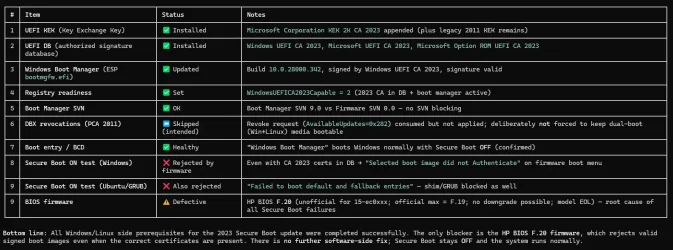
Hi everyone, are there any HP users here? I've been having an issue where I can't get into Windows when Secure Boot is enabled. I've tried a few tools and they seemed promising at first, but unfortunately none of them actually helped.

The problem first started early this year. Back then, I always kept Secure Boot enabled on my HP Pavilion Gaming - 15-ec0001ax. I then tried doing a clean install of Windows 11 (I even tried Windows 10 as well), but after that I couldn't boot into Windows 11 anymore — I just kept getting a "Boot Device Not Found, HP 3F0" error on screen. I've tried numerous methods to fix this, but none of them have worked so far.

My strong suspicion is that the culprit is an unofficial BIOS version F.20 that somehow showed up in HP Assistant for my device, so I updated to it without checking for it on the official website first. The official site only lists up to F.19, and HP support confirmed that showing F.20 was a bug/glitch on their end. Unfortunately, they can no longer fix their mistake because my laptop's warranty has already expired.

HP support's response was to tell me to wait for a solution from Microsoft. Their words: "Issues like this are usually related to Secure Boot keys synchronization or the Windows bootloader after a BIOS update." So up to now, I've just been running my laptop with Secure Boot disabled, and I honestly have no idea if that's a viable long-term solution or not.

The results of the analysis using this tool are in the attachment.
 

Attachments

  • 2026-08-09_13-14.webp
    2026-08-09_13-14.webp
    90.8 KB · Views: 2

My Computer My Computer

At a glance

Windows 11
OS
Windows 11
Computer type
PC/Desktop
Manufacturer/Model
HP
Hi everyone, are there any HP users here? I've been having an issue where I can't get into Windows when Secure Boot is enabled. I've tried a few tools and they seemed promising at first, but unfortunately none of them actually helped.

The problem first started early this year. Back then, I always kept Secure Boot enabled on my HP Pavilion Gaming - 15-ec0001ax. I then tried doing a clean install of Windows 11 (I even tried Windows 10 as well), but after that I couldn't boot into Windows 11 anymore — I just kept getting a "Boot Device Not Found, HP 3F0" error on screen. I've tried numerous methods to fix this, but none of them have worked so far.

My strong suspicion is that the culprit is an unofficial BIOS version F.20 that somehow showed up in HP Assistant for my device, so I updated to it without checking for it on the official website first. The official site only lists up to F.19, and HP support confirmed that showing F.20 was a bug/glitch on their end. Unfortunately, they can no longer fix their mistake because my laptop's warranty has already expired.

HP support's response was to tell me to wait for a solution from Microsoft. Their words: "Issues like this are usually related to Secure Boot keys synchronization or the Windows bootloader after a BIOS update." So up to now, I've just been running my laptop with Secure Boot disabled, and I honestly have no idea if that's a viable long-term solution or not.

The results of the analysis using this tool are in the attachment.

this is from HP how to downgrade a BIOS

BIOS Downgrade Information for HP Systems​

HP BIOS downgrade (rollback) support depends on the specific product and BIOS version.

From the provided information:

  • For the listed HP Commercial Systems with the September 2021 BIOS release (for example, HP EliteDesk 800 G8, EliteBook G8 families, etc., with BIOS versions such as v02.05.00, v01.06.02, v01.06.03), BIOS rollback is explicitly not allowed after a successful update. These platforms cannot be downgraded once that BIOS is installed.
  • On certain HP Z Workstations (Z4 G4, Z6 G4, Z8 G4, Z2 G5, Z2 G4, ZCentral 4R) with BIOS version 2.71 (or 01.02.01, 01.07 depending on model), the BIOS update includes fixes for issues when attempting to downgrade from Windows. This means downgrading may function more reliably, but whether a rollback is allowed still depends on the specific BIOS packages available for your model.

How to Check If Downgrade Is Possible (General Steps)​

  1. Identify current BIOS version - In Windows: Press Windows key + R, type msinfo32, press Enter, and note the BIOS version. - Or at startup: Press F10 at the HP logo to open Computer Setup, then check System Information.
  2. Check available BIOS versions on HP Support - Go to HP Support (Software & Drivers) for your exact model. - Select your operating system. - Expand the BIOS section and review listed versions. - If older BIOS versions are available and the release notes do not state “no rollback,” they may support installation over the current version.
  3. If rollback is allowed, install the desired older BIOS - Download the selected BIOS SoftPaq. - Connect the system to AC power. - Run the SoftPaq in Windows and follow on‑screen instructions. - Do not power off, disconnect, or restart until the process completes.
For any of the G8 commercial systems listed in the “HP Commercial Systems September 2021 BIOS release – No Rollback” notice, once you are on those specified BIOS versions, you cannot downgrade the BIOS.

here is the link to that how to

here is a link to the HP BIOS downgrade

and here is a how to to complete the BIOS downgrade

best of luck Steve ..
 

My Computers My Computers

  • At a glance

    Windows 11 HomeRyzen 7 5825u64GB DDR4 3200Ryzen 7 5825u
    OS
    Windows 11 Home
    Computer type
    PC/Desktop
    Manufacturer/Model
    HP 24" AiO
    CPU
    Ryzen 7 5825u
    Motherboard
    HP
    Memory
    64GB DDR4 3200
    Graphics Card(s)
    Ryzen 7 5825u
    Sound Card
    Realtek External 5w speaker bar.
    Monitor(s) Displays
    24" HP AiO
    Screen Resolution
    1920 x 1080 @60 Hz
    Hard Drives
    1TB WD Blue SN580 M2 SSD Partitioned C:/D: drives.
    2x 1TB USB HDD External Backup/Storage.
    all VeraCrypt encrypted.
    PSU
    90W external power brick
    Case
    24" All in One
    Cooling
    Default Air Cooling
    Keyboard
    Dell WiFi UK extended
    Mouse
    Dell WiFi 3 Button
    Internet Speed
    1GB full fibre
    Browser
    Vivaldi Browser/Email/Calendar
    Antivirus
    AVG Internet Security/Windows Defender
    Other Info
    Mainly Open Source Software
  • At a glance

    Ubuntu 22.04.5 LTSi5 7200u16GB DDR4Intel
    Operating System
    Ubuntu 22.04.5 LTS
    Computer type
    Laptop
    Manufacturer/Model
    Dell 13" Latitude 2017
    CPU
    i5 7200u
    Motherboard
    Dell
    Memory
    16GB DDR4
    Graphics card(s)
    Intel
    Sound Card
    Intel
    Monitor(s) Displays
    13" Dell Laptop
    Hard Drives
    250GB Crucial 2.5" SSD
    Mouse
    Generic WiFi 3 button
    Internet Speed
    WiFi only
    Browser
    Firefox
    Antivirus
    ClamAV TK
    Other Info
    Mainly Open Source Software
this is from HP how to downgrade a BIOS


here is the link to that how to

here is a link to the HP BIOS downgrade

and here is a how to to complete the BIOS downgrade

best of luck Steve ..
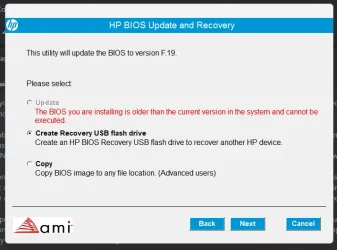
I've tried this for a while now, but it's still blocked; I can't downgrade using the driver from the website.
 

Attachments

  • 2026-08-09_14-15.webp
    2026-08-09_14-15.webp
    31 KB · Views: 1

My Computer My Computer

At a glance

Windows 11
OS
Windows 11
Computer type
PC/Desktop
Manufacturer/Model
HP
Hi everyone, are there any HP users here? I've been having an issue where I can't get into Windows when Secure Boot is enabled. I've tried a few tools and they seemed promising at first, but unfortunately none of them actually helped.

The problem first started early this year. Back then, I always kept Secure Boot enabled on my HP Pavilion Gaming - 15-ec0001ax. I then tried doing a clean install of Windows 11 (I even tried Windows 10 as well), but after that I couldn't boot into Windows 11 anymore — I just kept getting a "Boot Device Not Found, HP 3F0" error on screen. I've tried numerous methods to fix this, but none of them have worked so far.

My strong suspicion is that the culprit is an unofficial BIOS version F.20 that somehow showed up in HP Assistant for my device, so I updated to it without checking for it on the official website first. The official site only lists up to F.19, and HP support confirmed that showing F.20 was a bug/glitch on their end. Unfortunately, they can no longer fix their mistake because my laptop's warranty has already expired.

HP support's response was to tell me to wait for a solution from Microsoft. Their words: "Issues like this are usually related to Secure Boot keys synchronization or the Windows bootloader after a BIOS update." So up to now, I've just been running my laptop with Secure Boot disabled, and I honestly have no idea if that's a viable long-term solution or not.
The release notes for F.19 don't list any Secure Boot updates. HP finished rolling out new firmware for supported PC's at the end of 2025.

You could be right that F.20 is the wrong firmware for this model. There's a few things you can try:

1. Confirm BitLocker and Windows Hello are disabled (if they're enabled right now).
2. Disable Secure Boot.
3. Reset to factory defaults for Secure Boot. This should return you to CA 2021 certs.
4. Reboot Windows twice in a row (with Secure Boot off). This is to allow your BIOS to perform any internal cleanup operations related to NVRAM settings.
5. Repeat whatever steps you took to add KEK CA 2023. I presume you manually enrolled the cert.
6. Restart Windows, run the update script (but do not revoke PCA 2011).
7. Try to enable Secure Boot again.

With some poor BIOS implementations or glitchy firmware updates, it's possible that NVRAM corruption has happened. By resetting back to factory defaults and rebooting without Secure Boot mode, sometimes a BIOS will return to a known good state. After that, the normal update steps will work fine.

If you can't boot a GRUB2 file, it's unlikely the issue is Windows specific.
 

My Computer My Computer

At a glance

Windows 7
OS
Windows 7
The release notes for F.19 don't list any Secure Boot updates. HP finished rolling out new firmware for supported PC's at the end of 2025.

You could be right that F.20 is the wrong firmware for this model. There's a few things you can try:

1. Confirm BitLocker and Windows Hello are disabled (if they're enabled right now).
2. Disable Secure Boot.
3. Reset to factory defaults for Secure Boot. This should return you to CA 2021 certs.
4. Reboot Windows twice in a row (with Secure Boot off). This is to allow your BIOS to perform any internal cleanup operations related to NVRAM settings.
5. Repeat whatever steps you took to add KEK CA 2023. I presume you manually enrolled the cert.
6. Restart Windows, run the update script (but do not revoke PCA 2011).
7. Try to enable Secure Boot again.

With some poor BIOS implementations or glitchy firmware updates, it's possible that NVRAM corruption has happened. By resetting back to factory defaults and rebooting without Secure Boot mode, sometimes a BIOS will return to a known good state. After that, the normal update steps will work fine.

If you can't boot a GRUB2 file, it's unlikely the issue is Windows specific.
Unfortunately, I’ve tried that, but it still hasn't worked. I’m currently using a dual-boot setup with Linux, but I previously tried without dual-booting and encountered the "Boot not found 3F0" error; the result is the same with the dual-boot setup.

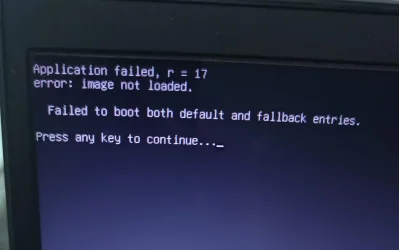
When I try to enter by selecting "Windows Boot Manager" (for my Windows 11), it seems to automatically kick me back—accompanied by a flickering effect—to the GRUB menu.

The photo I attached shows what happens when it automatically boots to the Windows Boot Manager (I intentionally didn't select anything and let the 15-second GRUB menu timer run out).

Update:

I also removed my dual-boot setup for a clean slate and tried following your instructions again. Unfortunately, a boot loop occurred; the HP logo didn't appear, and instead, some small text just kept flickering continuously—unless I disabled Secure Boot. It looks like it's beyond saving :')
 

Attachments

  • Image 2026-08-09 at 13.04.25.webp
    Image 2026-08-09 at 13.04.25.webp
    43.1 KB · Views: 2
Last edited:

My Computer My Computer

At a glance

Windows 11
OS
Windows 11
Computer type
PC/Desktop
Manufacturer/Model
HP
@byztma
if you can boot into Linux you can update the secure boot certs from there
just follow the instructions line by line

then you may need to repair the Windows EFI bootloader

best of luck Steve ..
 

My Computers My Computers

  • At a glance

    Windows 11 HomeRyzen 7 5825u64GB DDR4 3200Ryzen 7 5825u
    OS
    Windows 11 Home
    Computer type
    PC/Desktop
    Manufacturer/Model
    HP 24" AiO
    CPU
    Ryzen 7 5825u
    Motherboard
    HP
    Memory
    64GB DDR4 3200
    Graphics Card(s)
    Ryzen 7 5825u
    Sound Card
    Realtek External 5w speaker bar.
    Monitor(s) Displays
    24" HP AiO
    Screen Resolution
    1920 x 1080 @60 Hz
    Hard Drives
    1TB WD Blue SN580 M2 SSD Partitioned C:/D: drives.
    2x 1TB USB HDD External Backup/Storage.
    all VeraCrypt encrypted.
    PSU
    90W external power brick
    Case
    24" All in One
    Cooling
    Default Air Cooling
    Keyboard
    Dell WiFi UK extended
    Mouse
    Dell WiFi 3 Button
    Internet Speed
    1GB full fibre
    Browser
    Vivaldi Browser/Email/Calendar
    Antivirus
    AVG Internet Security/Windows Defender
    Other Info
    Mainly Open Source Software
  • At a glance

    Ubuntu 22.04.5 LTSi5 7200u16GB DDR4Intel
    Operating System
    Ubuntu 22.04.5 LTS
    Computer type
    Laptop
    Manufacturer/Model
    Dell 13" Latitude 2017
    CPU
    i5 7200u
    Motherboard
    Dell
    Memory
    16GB DDR4
    Graphics card(s)
    Intel
    Sound Card
    Intel
    Monitor(s) Displays
    13" Dell Laptop
    Hard Drives
    250GB Crucial 2.5" SSD
    Mouse
    Generic WiFi 3 button
    Internet Speed
    WiFi only
    Browser
    Firefox
    Antivirus
    ClamAV TK
    Other Info
    Mainly Open Source Software
Update:

I also removed my dual-boot setup for a clean slate and tried following your instructions again. Unfortunately, a boot loop occurred; the HP logo didn't appear, and instead, some small text just kept flickering continuously—unless I disabled Secure Boot. It looks like it's beyond saving :')
I agree this is one of those problematic BIOS'es. Over on the Acer forums, there's a technical discussion by an expert that explains in some bad implementations the BIOS designers didn't anticipate how much NVRAM was needed to hold the Secure Boot variables.

From the outside, one would think the NVRAM is a shared pool of memory so there should be enough available bytes to hold the certs and more. But he points out older BIOS'es create reserved blocks of memory for each of the different BIOS features. And if they didn't anticipate future needs, then writing more data could overflow the pre-assigned space for Secure Boot data.

As the key append operation overflowed the limited space, the normal checksum fails. The other half of the firmware flags this data corruption and won't let you proceed. The only option that users have (other reflashing the BIOS, but you can't apparently go backwards on a HP) is to reset to defaults. Unfortunately, and the reason for the thread on the Acer forum, is your BIOS can't figure how to properly reset everything (data remains corrupted because the reset didn't touch all the memory regions).

Therefore a new firmware is required which properly increases the size of the data blocks assigned to Secure Boot.

It might be possible for HP factory service (or a qualified tech) to reflash the BIOS chip using a flash ROM programmer, but you still don't know if F.19 will behave much better. I think it's more likely that your stuck with having keep Secure Boot disabled.
 

My Computer My Computer

At a glance

Windows 7
OS
Windows 7
Back
Top Bottom