
Navigation
Install the app
How to install the app on iOS
Follow along with the video below to see how to install our site as a web app on your home screen.
Note: This feature may not be available in some browsers.
More options
Style variation
System
Light
Dark
You are using an out of date browser. It may not display this or other websites correctly.
You should upgrade or use an alternative browser.
You should upgrade or use an alternative browser.
Solved garlin's PowerShell scripts for updating Secure Boot CA 2023
- Thread starter garlin
- Start date

- Local time
- 11:34 AM
- Posts
- 53
- OS
- windows 11 25H2
In response to anchamp65: yes, it is true that the script posted is indeed the one by cjee21—the only one, in fact. My mistake. Best regards.
My Computer
At a glance
windows 11 25H224GBiris xe
- OS
- windows 11 25H2
- Computer type
- Laptop
- Manufacturer/Model
- ASUS Vivobook 15 (X1504)
- Motherboard
- Intel Alder Lake-P PCH
- Memory
- 24GB
- Graphics Card(s)
- iris xe
- Sound Card
- realtek
- Screen Resolution
- 1920X1080
- Hard Drives
- Samsung SSD 990 PRO 1TB
- Browser
- edge
- Antivirus
- eset anti virus
- Local time
- 11:34 AM
- Posts
- 36
- OS
- windows 11
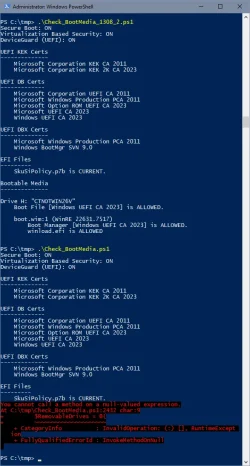
Using your latest check_bootmedia.ps1 script from post 3,401, I get the following result on my standard windows 11 recovery drive (computer is a gigabyte X570 aorus master mainboard with 5800X processor):
PS C:\Users\admin\Downloads\SecureBoot-CA-2023-Updates.v2026.08.15> .\Check-Bootmedia.bat -Verbose
PowerShell 7.6.4
Windows 11 25H2 (26200.9168)
Secure Boot: ON
Virtualization Based Security: ON
UEFI KEK Certs
--------------
Microsoft Corporation KEK CA 2011
Microsoft Corporation KEK 2K CA 2023
UEFI DB Certs
-------------
Microsoft Corporation UEFI CA 2011
Microsoft Windows Production PCA 2011
Microsoft Option ROM UEFI CA 2023
Microsoft UEFI CA 2023
Windows UEFI CA 2023
UEFI DBX Certs
--------------
Microsoft Windows Production PCA 2011
Windows BootMgr SVN 9.0
EFI Files
---------
SkuSiPolicy.p7b is CURRENT.
\\.\HarddiskVolume1\EFI\Microsoft\Boot\SkuSiPolicy.p7b
Version: 3.0.0.17
FileRule MinimumFileVersion MaximumFileVersion
-------- ------------------ ------------------
ID_FILEATTRIB_F_0044 0.0.0.0 10.0.14393.9399
ID_FILEATTRIB_F_0042 10.0.14400.0 10.0.17763.9099
ID_FILEATTRIB_F_0040 10.0.18000.0 10.0.19041.7639
ID_FILEATTRIB_F_0041 10.0.19100.0 10.0.20348.5479
ID_FILEATTRIB_F_0046 10.0.20400.0 10.0.22621.7494
ID_FILEATTRIB_F_0049 10.0.23000.0 10.0.26100.9140
ID_FILEATTRIB_F_0045 10.0.26100.32000 10.0.26100.33249
ID_FILEATTRIB_F_0048 10.0.26172.0 10.0.26172.33249
ID_FILEATTRIB_F_0047 10.0.27000.0 10.0.28000.2684
ID_FILEATTRIB_F_0043 10.0.29426.0 65535.65535.65535.65535
Bootable Media
--------------
USB Drive H: "RECOVERY"
Windows Boot Manager [Windows UEFI CA 2023] is ALLOWED.
H:\EFI\Microsoft\Boot\bootmgfw.efi
File Version: 28000.352, SVN 9.0
boot.wim:1 (WinRE 26100.1)
Boot Manager [Windows UEFI CA 2023] is ALLOWED.
\Windows\Boot\EFI_EX\bootmgfw_EX.efi
File Version: 28000.352, SVN 9.0
\Windows\System32\winload.efi is BANNED.
File Version: 26100.8875
PS C:\Users\admin\Downloads\SecureBoot-CA-2023-Updates.v2026.08.15>
And your comment "I'm not crazy like all you people and have multiple Macrium or Windows ISO drives plugged in. You're all weirdos." made my day. Thank you. Lol......
PS C:\Users\admin\Downloads\SecureBoot-CA-2023-Updates.v2026.08.15> .\Check-Bootmedia.bat -Verbose
PowerShell 7.6.4
Windows 11 25H2 (26200.9168)
Secure Boot: ON
Virtualization Based Security: ON
UEFI KEK Certs
--------------
Microsoft Corporation KEK CA 2011
Microsoft Corporation KEK 2K CA 2023
UEFI DB Certs
-------------
Microsoft Corporation UEFI CA 2011
Microsoft Windows Production PCA 2011
Microsoft Option ROM UEFI CA 2023
Microsoft UEFI CA 2023
Windows UEFI CA 2023
UEFI DBX Certs
--------------
Microsoft Windows Production PCA 2011
Windows BootMgr SVN 9.0
EFI Files
---------
SkuSiPolicy.p7b is CURRENT.
\\.\HarddiskVolume1\EFI\Microsoft\Boot\SkuSiPolicy.p7b
Version: 3.0.0.17
FileRule MinimumFileVersion MaximumFileVersion
-------- ------------------ ------------------
ID_FILEATTRIB_F_0044 0.0.0.0 10.0.14393.9399
ID_FILEATTRIB_F_0042 10.0.14400.0 10.0.17763.9099
ID_FILEATTRIB_F_0040 10.0.18000.0 10.0.19041.7639
ID_FILEATTRIB_F_0041 10.0.19100.0 10.0.20348.5479
ID_FILEATTRIB_F_0046 10.0.20400.0 10.0.22621.7494
ID_FILEATTRIB_F_0049 10.0.23000.0 10.0.26100.9140
ID_FILEATTRIB_F_0045 10.0.26100.32000 10.0.26100.33249
ID_FILEATTRIB_F_0048 10.0.26172.0 10.0.26172.33249
ID_FILEATTRIB_F_0047 10.0.27000.0 10.0.28000.2684
ID_FILEATTRIB_F_0043 10.0.29426.0 65535.65535.65535.65535
Bootable Media
--------------
USB Drive H: "RECOVERY"
Windows Boot Manager [Windows UEFI CA 2023] is ALLOWED.
H:\EFI\Microsoft\Boot\bootmgfw.efi
File Version: 28000.352, SVN 9.0
boot.wim:1 (WinRE 26100.1)
Boot Manager [Windows UEFI CA 2023] is ALLOWED.
\Windows\Boot\EFI_EX\bootmgfw_EX.efi
File Version: 28000.352, SVN 9.0
\Windows\System32\winload.efi is BANNED.
File Version: 26100.8875
PS C:\Users\admin\Downloads\SecureBoot-CA-2023-Updates.v2026.08.15>
And your comment "I'm not crazy like all you people and have multiple Macrium or Windows ISO drives plugged in. You're all weirdos." made my day. Thank you. Lol......
My Computer
At a glance
windows 11
- OS
- windows 11

- Local time
- 11:34 AM
- Posts
- 53
- OS
- windows 11 25H2
With the Check_BootMedia.ps1 script from garlin's post #3,401, I get this output; I don't really understand it, sorry.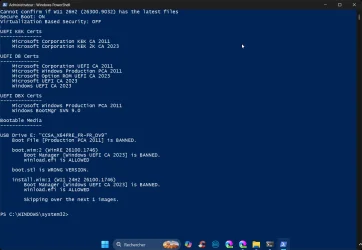
My Computer
At a glance
windows 11 25H224GBiris xe
- OS
- windows 11 25H2
- Computer type
- Laptop
- Manufacturer/Model
- ASUS Vivobook 15 (X1504)
- Motherboard
- Intel Alder Lake-P PCH
- Memory
- 24GB
- Graphics Card(s)
- iris xe
- Sound Card
- realtek
- Screen Resolution
- 1920X1080
- Hard Drives
- Samsung SSD 990 PRO 1TB
- Browser
- edge
- Antivirus
- eset anti virus
- Local time
- 11:34 AM
- Posts
- 36
- OS
- windows 11
When I run your latest bootmedia script (post 3401) on my rufus-made install win 11 USB stick, I get the following error:
PS C:\Users\admin\Downloads\SecureBoot-CA-2023-Updates.v2026.08.15> .\Check-Bootmedia.bat -Verbose
PowerShell 7.6.4
Windows 11 25H2 (26200.9168)
Secure Boot: ON
Virtualization Based Security: ON
UEFI KEK Certs
--------------
Microsoft Corporation KEK CA 2011
Microsoft Corporation KEK 2K CA 2023
UEFI DB Certs
-------------
Microsoft Corporation UEFI CA 2011
Microsoft Windows Production PCA 2011
Microsoft Option ROM UEFI CA 2023
Microsoft UEFI CA 2023
Windows UEFI CA 2023
UEFI DBX Certs
--------------
Microsoft Windows Production PCA 2011
Windows BootMgr SVN 9.0
EFI Files
---------
SkuSiPolicy.p7b is CURRENT.
\\.\HarddiskVolume1\EFI\Microsoft\Boot\SkuSiPolicy.p7b
Version: 3.0.0.17
FileRule MinimumFileVersion MaximumFileVersion
-------- ------------------ ------------------
ID_FILEATTRIB_F_0044 0.0.0.0 10.0.14393.9399
ID_FILEATTRIB_F_0042 10.0.14400.0 10.0.17763.9099
ID_FILEATTRIB_F_0040 10.0.18000.0 10.0.19041.7639
ID_FILEATTRIB_F_0041 10.0.19100.0 10.0.20348.5479
ID_FILEATTRIB_F_0046 10.0.20400.0 10.0.22621.7494
ID_FILEATTRIB_F_0049 10.0.23000.0 10.0.26100.9140
ID_FILEATTRIB_F_0045 10.0.26100.32000 10.0.26100.33249
ID_FILEATTRIB_F_0048 10.0.26172.0 10.0.26172.33249
ID_FILEATTRIB_F_0047 10.0.27000.0 10.0.28000.2684
ID_FILEATTRIB_F_0043 10.0.29426.0 65535.65535.65535.65535
Bootable Media
--------------
USB Drive H: "Win11_25H2_EngUS_x64_14aug2026"
Boot File [Windows UEFI CA 2023] is ALLOWED.
H:\EFI\Boot\bootx64.efi
File Version: 28000.352, SVN 9.0
boot.wim:2 (WinPE 26100.9168)
Boot Manager [Windows UEFI CA 2023] is ALLOWED.
\Windows\Boot\EFI_EX\bootmgfw_EX.efi
File Version: 28000.352, SVN 9.0
\Windows\System32\winload.efi is ALLOWED.
File Version: 26100.9168
&: C:\Users\admin\Downloads\SecureBoot-CA-2023-Updates.v2026.08.15\Check_BootMedia.ps1:1735
Line |
1735 | if ((& $7z_exe -ba l $WIM_File 2/Windows/System32/wlanapi.dl …
| ~~~~~~~
| The term 'C:\Users\admin\AppData\Local\Temp\7z.exe' is not recognized as a name of a cmdlet, function, script
| file, or executable program. Check the spelling of the name, or if a path was included, verify that the path is
| correct and try again.
H:\EFI\Microsoft\Boot\boot.stl [18/05/2026 19:44] is CURRENT.
install.esd:1 (W11 25H2 26200.9168)
Boot Manager [Windows UEFI CA 2023] is ALLOWED.
\Windows\Boot\EFI_EX\bootmgfw_EX.efi
File Version: 28000.352, SVN 9.0
\Windows\System32\winload.efi is ALLOWED.
File Version: 26100.9168
Skipping over the next 6 images.
PS C:\Users\admin\Downloads\SecureBoot-CA-2023-Updates.v2026.08.15>
On checking the temp dir, there is no 7z.exe present.
PS C:\Users\admin\Downloads\SecureBoot-CA-2023-Updates.v2026.08.15> .\Check-Bootmedia.bat -Verbose
PowerShell 7.6.4
Windows 11 25H2 (26200.9168)
Secure Boot: ON
Virtualization Based Security: ON
UEFI KEK Certs
--------------
Microsoft Corporation KEK CA 2011
Microsoft Corporation KEK 2K CA 2023
UEFI DB Certs
-------------
Microsoft Corporation UEFI CA 2011
Microsoft Windows Production PCA 2011
Microsoft Option ROM UEFI CA 2023
Microsoft UEFI CA 2023
Windows UEFI CA 2023
UEFI DBX Certs
--------------
Microsoft Windows Production PCA 2011
Windows BootMgr SVN 9.0
EFI Files
---------
SkuSiPolicy.p7b is CURRENT.
\\.\HarddiskVolume1\EFI\Microsoft\Boot\SkuSiPolicy.p7b
Version: 3.0.0.17
FileRule MinimumFileVersion MaximumFileVersion
-------- ------------------ ------------------
ID_FILEATTRIB_F_0044 0.0.0.0 10.0.14393.9399
ID_FILEATTRIB_F_0042 10.0.14400.0 10.0.17763.9099
ID_FILEATTRIB_F_0040 10.0.18000.0 10.0.19041.7639
ID_FILEATTRIB_F_0041 10.0.19100.0 10.0.20348.5479
ID_FILEATTRIB_F_0046 10.0.20400.0 10.0.22621.7494
ID_FILEATTRIB_F_0049 10.0.23000.0 10.0.26100.9140
ID_FILEATTRIB_F_0045 10.0.26100.32000 10.0.26100.33249
ID_FILEATTRIB_F_0048 10.0.26172.0 10.0.26172.33249
ID_FILEATTRIB_F_0047 10.0.27000.0 10.0.28000.2684
ID_FILEATTRIB_F_0043 10.0.29426.0 65535.65535.65535.65535
Bootable Media
--------------
USB Drive H: "Win11_25H2_EngUS_x64_14aug2026"
Boot File [Windows UEFI CA 2023] is ALLOWED.
H:\EFI\Boot\bootx64.efi
File Version: 28000.352, SVN 9.0
boot.wim:2 (WinPE 26100.9168)
Boot Manager [Windows UEFI CA 2023] is ALLOWED.
\Windows\Boot\EFI_EX\bootmgfw_EX.efi
File Version: 28000.352, SVN 9.0
\Windows\System32\winload.efi is ALLOWED.
File Version: 26100.9168
&: C:\Users\admin\Downloads\SecureBoot-CA-2023-Updates.v2026.08.15\Check_BootMedia.ps1:1735
Line |
1735 | if ((& $7z_exe -ba l $WIM_File 2/Windows/System32/wlanapi.dl …
| ~~~~~~~
| The term 'C:\Users\admin\AppData\Local\Temp\7z.exe' is not recognized as a name of a cmdlet, function, script
| file, or executable program. Check the spelling of the name, or if a path was included, verify that the path is
| correct and try again.
H:\EFI\Microsoft\Boot\boot.stl [18/05/2026 19:44] is CURRENT.
install.esd:1 (W11 25H2 26200.9168)
Boot Manager [Windows UEFI CA 2023] is ALLOWED.
\Windows\Boot\EFI_EX\bootmgfw_EX.efi
File Version: 28000.352, SVN 9.0
\Windows\System32\winload.efi is ALLOWED.
File Version: 26100.9168
Skipping over the next 6 images.
PS C:\Users\admin\Downloads\SecureBoot-CA-2023-Updates.v2026.08.15>
On checking the temp dir, there is no 7z.exe present.
My Computer
At a glance
windows 11
- OS
- windows 11
Unfortunately not quite there yet.Latest test version of Check_BootMedia.ps1.
1. Good results with a Hasleo & Ventoy USB inserted
WinPE Boot Manager [Windows UEFI CA 2023] is ALLOWED.
C:\Program Files\Hasleo\Hasleo Backup Suite\bin\WADK\Boot\EFI_EX\bootmgfw.efi
File Version: 28000.352, SVN 9.0
Bootable Media
--------------
USB Drive F: "HASLEOBS"
Boot File [Windows UEFI CA 2023] is ALLOWED.
F:\EFI\Boot\bootx64.efi
File Version: 28000.342, SVN 9.0
boot.wim:1 (WinRE 26100.1)
Boot Manager [Windows UEFI CA 2023] is ALLOWED.
\Windows\Boot\EFI_EX\bootmgfw_EX.efi
File Version: 28000.342, SVN 9.0
\Windows\System32\winload.efi is ALLOWED.
File Version: 26100.8737
2. But error with only the Hasleo USB inserted
WinPE Boot Manager [Windows UEFI CA 2023] is ALLOWED.
C:\Program Files\Hasleo\Hasleo Backup Suite\bin\WADK\Boot\EFI_EX\bootmgfw.efi
File Version: 28000.352, SVN 9.0
You cannot call a method on a null-valued expression.
At E:\Garlin\Check_BootMedia.ps1:2432 char:9
+ $RemovableDrives = @(
+ ~~~~~~~~~~~~~~~~~~~~~
+ CategoryInfo : InvalidOperation: (:) [], RuntimeException
+ FullyQualifiedErrorId : InvokeMethodOnNull
My Computer
At a glance
Windows 11 ProIntel Core Ultra16GBIntel(R) Arc Graphics
- OS
- Windows 11 Pro
- Computer type
- Laptop
- Manufacturer/Model
- ASUS Zenbook 14 OLED
- CPU
- Intel Core Ultra
- Memory
- 16GB
- Graphics Card(s)
- Intel(R) Arc Graphics
- Sound Card
- Realtek High Definition Audio(SST)
- Screen Resolution
- 2880 x 1800
- Hard Drives
- 500 GB NVMe SSD
- Internet Speed
- 1,500Mbps
- Browser
- Firefox, Edge
- Antivirus
- Windows Defender

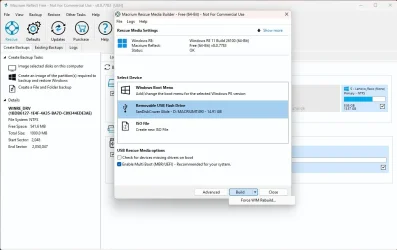
Is this Macrium 8.0.7783 Free USB boot drive okay? It boots just fine but I'm wondering why I'm getting - File Version: 28000.322, SVN 8.0 in 2 places. This "wim" stuff on the last several pages of this thread is way over my head. I'm using the latest script @garlin posted in garlin's PowerShell scripts for updating Secure Boot CA 2023
PS C:\z> .\Check_BootMedia.ps1 -Verbose
Security warning
Run only scripts that you trust. While scripts from the internet can be useful, this script can potentially harm your
computer. If you trust this script, use the Unblock-File cmdlet to allow the script to run without this warning
message. Do you want to run C:\z\Check_BootMedia.ps1?
[D] Do not run [R] Run once Suspend [?] Help (default is "D"): r
Windows 11 25H2 (26200.9168)
Secure Boot: ON
Virtualization Based Security: ON
UEFI KEK Certs
--------------
Microsoft Corporation KEK CA 2011
Microsoft Corporation KEK 2K CA 2023
UEFI DB Certs
-------------
Microsoft Corporation UEFI CA 2011
Microsoft Windows Production PCA 2011
Microsoft Option ROM UEFI CA 2023
Microsoft UEFI CA 2023
Windows UEFI CA 2023
UEFI DBX Certs
--------------
Microsoft Windows Production PCA 2011
Windows BootMgr SVN 9.0
EFI Files
---------
[OPTIONAL] SkuSiPolicy.p7b (for VBS) is MISSING.
Macrium 8.0
-----------
WinRE Boot Manager [Production PCA 2011] is BANNED.
c:\boot\macrium\WinREFiles\media\EFI\Microsoft\Boot\bootmgfw.efi
File Version: 28000.322, SVN 8.0
Bootable Media
--------------
USB Drive D: "MACRIUMT490"
Windows Boot Manager [Windows UEFI CA 2023] is ALLOWED.
D:\EFI\Microsoft\Boot\bootmgfw.efi
File Version: 28000.342, SVN 9.0
boot.wim:1 (WinRE 26100.1)
Boot Manager [Windows UEFI CA 2023] is BANNED.
\Windows\Boot\EFI_EX\bootmgfw_EX.efi
File Version: 28000.322, SVN 8.0
\Windows\System32\winload.efi is ALLOWED.
File Version: 26100.8235
PS C:\z>
PS C:\z> .\Check_BootMedia.ps1 -Verbose
Security warning
Run only scripts that you trust. While scripts from the internet can be useful, this script can potentially harm your
computer. If you trust this script, use the Unblock-File cmdlet to allow the script to run without this warning
message. Do you want to run C:\z\Check_BootMedia.ps1?
[D] Do not run [R] Run once Suspend [?] Help (default is "D"): r
Windows 11 25H2 (26200.9168)
Secure Boot: ON
Virtualization Based Security: ON
UEFI KEK Certs
--------------
Microsoft Corporation KEK CA 2011
Microsoft Corporation KEK 2K CA 2023
UEFI DB Certs
-------------
Microsoft Corporation UEFI CA 2011
Microsoft Windows Production PCA 2011
Microsoft Option ROM UEFI CA 2023
Microsoft UEFI CA 2023
Windows UEFI CA 2023
UEFI DBX Certs
--------------
Microsoft Windows Production PCA 2011
Windows BootMgr SVN 9.0
EFI Files
---------
[OPTIONAL] SkuSiPolicy.p7b (for VBS) is MISSING.
Macrium 8.0
-----------
WinRE Boot Manager [Production PCA 2011] is BANNED.
c:\boot\macrium\WinREFiles\media\EFI\Microsoft\Boot\bootmgfw.efi
File Version: 28000.322, SVN 8.0
Bootable Media
--------------
USB Drive D: "MACRIUMT490"
Windows Boot Manager [Windows UEFI CA 2023] is ALLOWED.
D:\EFI\Microsoft\Boot\bootmgfw.efi
File Version: 28000.342, SVN 9.0
boot.wim:1 (WinRE 26100.1)
Boot Manager [Windows UEFI CA 2023] is BANNED.
\Windows\Boot\EFI_EX\bootmgfw_EX.efi
File Version: 28000.322, SVN 8.0
\Windows\System32\winload.efi is ALLOWED.
File Version: 26100.8235
PS C:\z>
Last edited:
My Computers
-
At a glance
Windows 11 Pro 25H2i7-8565U16GBIntel UHD Graphics 620- OS
- Windows 11 Pro 25H2
- Computer type
- Laptop
- Manufacturer/Model
- Lenovo T490 (2020 Hardware)
- CPU
- i7-8565U
- Motherboard
- 20N20028US
- Memory
- 16GB
- Graphics Card(s)
- Intel UHD Graphics 620
- Sound Card
- Realtec Audio
- Monitor(s) Displays
- ASUS VE248
- Screen Resolution
- 1920 X 1080
- Hard Drives
- Samsung SSD 970 PRO 512GB NVMe
- Internet Speed
- Frontier fiber 1GB
- Browser
- Chrome, Firefox, Edge
- Antivirus
- Norton 360 Deluxe Plus
- Other Info
- Supported hardware, upgraded from Windows 10 Pro to Windows 11 Pro version 24H2 on 06/01/2025 using the Windows 11 ISO file. Used the enablement package to upgrade to version 25H2 on 10/07/2025. Secure boot enabled. Secure Boot CA 2023 updated.
-
At a glance
Windows 11 Pro 25H2i7-4770 (with SSE4.2, and POPCNT)16GBIntel HD Graphics 4600- Operating System
- Windows 11 Pro 25H2
- Computer type
- PC/Desktop
- Manufacturer/Model
- Lenovo ThinkCentre M83 (2014 Hardware)
- CPU
- i7-4770 (with SSE4.2, and POPCNT)
- Motherboard
- 10AL000GUS
- Memory
- 16GB
- Graphics card(s)
- Intel HD Graphics 4600
- Sound Card
- Realtec High Definition Audio
- Monitor(s) Displays
- ASUS VE248
- Screen Resolution
- 1920 X 1080
- Hard Drives
- Samsung SSD 860 PRO 1TB SATA
- Internet Speed
- Frontier fiber 1GB
- Browser
- Chrome, Firefox, Edge
- Antivirus
- Norton 360 Deluxe Plus
- Other Info
- Unsupported hardware, upgraded from Windows 10 Pro (TPM 1.2 & unsupported CPU, but does have SSE4.2, and POPCNT) to Windows 11 Pro version 24H2 on 06/15/2025. Added Registry Key HKEY_LOCAL_MACHINE\SYSTEM\Setup\MoSetup – AllowUpgradesWithUnsupportedTPMOrCPU=1 to allow installation using the Windows 11 ISO file. Used the enablement package to upgrade to version 25H2 on 10/08/2025. Secure boot enabled. Secure Boot CA 2023 updated.
I wondering if I need to restore this conditional "-and $_.MediaLoaded". Meaning your drive is plugged in, but ejected.Now it's gone again
(Both versions from thursday, 13th showed it- both time single USB and the error on the new script is the the same output as if no USB device is connected)
Try this test version.
Attachments
My Computer
At a glance
Windows 7
- OS
- Windows 7
The script is reporting your 26100.1746 Windows ISO can no longer be installed on this PC, with Secure Boot enabled.With the Check_BootMedia.ps1 script from garlin's post #3,401, I get this output; I don't really understand it, sorry.
After revoking the CA 2011 cert and applying the latest Monthly Updates, for security reasons you're only allowed to clean install W11 25H2 ISO's released after June 2026 (SVN 9.0). This is done to prevent attackers from using security holes in old versions of the boot manager.
When a new boot manager is released, the SVN will be raised to a higher number. This number will restrict which older versions of Windows are allowed to run. The only way to install a Windows ISO older than June 2026 would be to disable Secure Boot and leave it off.
My Computer
At a glance
Windows 7
- OS
- Windows 7
I forgot to add a file check for 7z.exe, the other two tools (wimlib-imagex and offlinereg) had a file check.&: C:\Users\admin\Downloads\SecureBoot-CA-2023-Updates.v2026.08.15\Check_BootMedia.ps1:1735
Line |
1735 | if ((& $7z_exe -ba l $WIM_File 2/Windows/System32/wlanapi.dl …
| ~~~~~~~
| The term 'C:\Users\admin\AppData\Local\Temp\7z.exe' is not recognized as a name of a cmdlet, function, script
| file, or executable program. Check the spelling of the name, or if a path was included, verify that the path is
| correct and try again.
Try the version in post #3410.
My Computer
At a glance
Windows 7
- OS
- Windows 7

I wondering if I need to restore this conditional "-and $_.MediaLoaded". Meaning your drive is plugged in, but ejected.
Try this test version.

My Computer
At a glance
Win11 24H2 IOT LTSC / Win11 Pro 25H2AMD Ryzen 7 8700G / Ryzen 7 8700G / Ryzen 8600GF5-6000J3636F16GX2-FX5 32GB / Lexar Ares RGB ...internal
- OS
- Win11 24H2 IOT LTSC / Win11 Pro 25H2
- Computer type
- PC/Desktop
- Manufacturer/Model
- Gigabyte x2 / Asus = Home builds
- CPU
- AMD Ryzen 7 8700G / Ryzen 7 8700G / Ryzen 8600G
- Motherboard
- Gigabyte B650 AORUS ELITE AX V2 / ASUS TUF GAMING B650-PLUS / B650 GAMING X AX V2
- Memory
- F5-6000J3636F16GX2-FX5 32GB / Lexar Ares RGB LD5BU016G-R6000GDLA 32GB / Kingston FURY Beast 32 GB DDR5-5600
- Graphics Card(s)
- internal
- Sound Card
- Realtek
- Monitor(s) Displays
- BenQ 27 L EW2780
- Screen Resolution
- 1920x1080
- Hard Drives
- Many M.2's (WD)
- PSU
- be quiet! Pure Power 13 M 550W
- Case
- Chieftec HC-10B-OP
- Cooling
- Gelid Solutions Tranquillo 5, many Noctua's 12x12
- Keyboard
- Microsoft
- Mouse
- Cherry
- Internet Speed
- 500 mbs
- Browser
- Vivaldi
- Antivirus
- Eset
- Other Info
- PC builder / repair / Trouble-shooter etc.
Macrium 8.0
-----------
WinRE Boot Manager [Production PCA 2011] is BANNED.
c:\boot\macrium\WinREFiles\media\EFI\Microsoft\Boot\bootmgfw.efi
File Version: 28000.322, SVN 8.0
Here's a shortcut to fixing your Macrium problems (running as Admin):
Code:
copy C:\Windows\Boot\EFI_EX\bootmgfw_EX.efi c:\boot\macrium\WinREFiles\media\EFI\Microsoft\Boot\bootmgfw.efiThis replaces the Macrium folder's copy with the latest SVN 9.0 boot manager from the Windows folder. Now you should be able to build new USB's with the correct file version.
My Computer
At a glance
Windows 7
- OS
- Windows 7
Relax. Just reload, you were clicking when I had to update the script after reading @Capricornus' report on 7z.exe.
My Computer
At a glance
Windows 7
- OS
- Windows 7
- Local time
- 11:34 AM
- Posts
- 36
- OS
- windows 11
Hi Garlin, Using your script from post 3410, I now get the following on my rufus-made install win 11 USB stick:
PS C:\Users\admin\Downloads\SecureBoot-CA-2023-Updates.v2026.08.15> .\Check-Bootmedia.bat -Verbose
PowerShell 7.6.5
Windows 11 25H2 (26200.9168)
Secure Boot: ON
Virtualization Based Security: ON
UEFI KEK Certs
--------------
Microsoft Corporation KEK CA 2011
Microsoft Corporation KEK 2K CA 2023
UEFI DB Certs
-------------
Microsoft Corporation UEFI CA 2011
Microsoft Windows Production PCA 2011
Microsoft Option ROM UEFI CA 2023
Microsoft UEFI CA 2023
Windows UEFI CA 2023
UEFI DBX Certs
--------------
Microsoft Windows Production PCA 2011
Windows BootMgr SVN 9.0
EFI Files
---------
SkuSiPolicy.p7b is CURRENT.
\\.\HarddiskVolume1\EFI\Microsoft\Boot\SkuSiPolicy.p7b
Version: 3.0.0.17
FileRule MinimumFileVersion MaximumFileVersion
-------- ------------------ ------------------
ID_FILEATTRIB_F_0044 0.0.0.0 10.0.14393.9399
ID_FILEATTRIB_F_0042 10.0.14400.0 10.0.17763.9099
ID_FILEATTRIB_F_0040 10.0.18000.0 10.0.19041.7639
ID_FILEATTRIB_F_0041 10.0.19100.0 10.0.20348.5479
ID_FILEATTRIB_F_0046 10.0.20400.0 10.0.22621.7494
ID_FILEATTRIB_F_0049 10.0.23000.0 10.0.26100.9140
ID_FILEATTRIB_F_0045 10.0.26100.32000 10.0.26100.33249
ID_FILEATTRIB_F_0048 10.0.26172.0 10.0.26172.33249
ID_FILEATTRIB_F_0047 10.0.27000.0 10.0.28000.2684
ID_FILEATTRIB_F_0043 10.0.29426.0 65535.65535.65535.65535
Bootable Media
--------------
USB Drive J: "Win11_25H2_EngUS_x64_14aug2026"
Boot File [Windows UEFI CA 2023] is ALLOWED.
J:\EFI\Boot\bootx64.efi
File Version: 28000.352, SVN 9.0
boot.wim:2 (WinPE 26100.9168)
Boot Manager [Windows UEFI CA 2023] is ALLOWED.
\Windows\Boot\EFI_EX\bootmgfw_EX.efi
File Version: 28000.352, SVN 9.0
\Windows\System32\winload.efi is ALLOWED.
File Version: 26100.9168
'Repair My PC' is broken.
J:\EFI\Microsoft\Boot\boot.stl [18/05/2026 19:44] is CURRENT.
install.esd:1 (W11 25H2 26200.9168)
Boot Manager [Windows UEFI CA 2023] is ALLOWED.
\Windows\Boot\EFI_EX\bootmgfw_EX.efi
File Version: 28000.352, SVN 9.0
\Windows\System32\winload.efi is ALLOWED.
File Version: 26100.9168
Skipping over the next 6 images.
PS C:\Users\admin\Downloads\SecureBoot-CA-2023-Updates.v2026.08.15>
Not sure why I now get the message "repair my pc is broken".
PS C:\Users\admin\Downloads\SecureBoot-CA-2023-Updates.v2026.08.15> .\Check-Bootmedia.bat -Verbose
PowerShell 7.6.5
Windows 11 25H2 (26200.9168)
Secure Boot: ON
Virtualization Based Security: ON
UEFI KEK Certs
--------------
Microsoft Corporation KEK CA 2011
Microsoft Corporation KEK 2K CA 2023
UEFI DB Certs
-------------
Microsoft Corporation UEFI CA 2011
Microsoft Windows Production PCA 2011
Microsoft Option ROM UEFI CA 2023
Microsoft UEFI CA 2023
Windows UEFI CA 2023
UEFI DBX Certs
--------------
Microsoft Windows Production PCA 2011
Windows BootMgr SVN 9.0
EFI Files
---------
SkuSiPolicy.p7b is CURRENT.
\\.\HarddiskVolume1\EFI\Microsoft\Boot\SkuSiPolicy.p7b
Version: 3.0.0.17
FileRule MinimumFileVersion MaximumFileVersion
-------- ------------------ ------------------
ID_FILEATTRIB_F_0044 0.0.0.0 10.0.14393.9399
ID_FILEATTRIB_F_0042 10.0.14400.0 10.0.17763.9099
ID_FILEATTRIB_F_0040 10.0.18000.0 10.0.19041.7639
ID_FILEATTRIB_F_0041 10.0.19100.0 10.0.20348.5479
ID_FILEATTRIB_F_0046 10.0.20400.0 10.0.22621.7494
ID_FILEATTRIB_F_0049 10.0.23000.0 10.0.26100.9140
ID_FILEATTRIB_F_0045 10.0.26100.32000 10.0.26100.33249
ID_FILEATTRIB_F_0048 10.0.26172.0 10.0.26172.33249
ID_FILEATTRIB_F_0047 10.0.27000.0 10.0.28000.2684
ID_FILEATTRIB_F_0043 10.0.29426.0 65535.65535.65535.65535
Bootable Media
--------------
USB Drive J: "Win11_25H2_EngUS_x64_14aug2026"
Boot File [Windows UEFI CA 2023] is ALLOWED.
J:\EFI\Boot\bootx64.efi
File Version: 28000.352, SVN 9.0
boot.wim:2 (WinPE 26100.9168)
Boot Manager [Windows UEFI CA 2023] is ALLOWED.
\Windows\Boot\EFI_EX\bootmgfw_EX.efi
File Version: 28000.352, SVN 9.0
\Windows\System32\winload.efi is ALLOWED.
File Version: 26100.9168
'Repair My PC' is broken.
J:\EFI\Microsoft\Boot\boot.stl [18/05/2026 19:44] is CURRENT.
install.esd:1 (W11 25H2 26200.9168)
Boot Manager [Windows UEFI CA 2023] is ALLOWED.
\Windows\Boot\EFI_EX\bootmgfw_EX.efi
File Version: 28000.352, SVN 9.0
\Windows\System32\winload.efi is ALLOWED.
File Version: 26100.9168
Skipping over the next 6 images.
PS C:\Users\admin\Downloads\SecureBoot-CA-2023-Updates.v2026.08.15>
Not sure why I now get the message "repair my pc is broken".
My Computer
At a glance
windows 11
- OS
- windows 11
- Local time
- 11:34 AM
- Posts
- 53
- OS
- windows 11 25H2
Regarding post #3,411: Thanks, Garlin, for all the details and the quick reply. Basically, for any ISOs from before June 2026, Secure Boot needs to be disabled, whereas for ISOs from after June, I can leave Secure Boot enabled. That seems to be correct, right? Thanks.
My Computer
At a glance
windows 11 25H224GBiris xe
- OS
- windows 11 25H2
- Computer type
- Laptop
- Manufacturer/Model
- ASUS Vivobook 15 (X1504)
- Motherboard
- Intel Alder Lake-P PCH
- Memory
- 24GB
- Graphics Card(s)
- iris xe
- Sound Card
- realtek
- Screen Resolution
- 1920X1080
- Hard Drives
- Samsung SSD 990 PRO 1TB
- Browser
- edge
- Antivirus
- eset anti virus
It's an Easter egg for fans of @fg2001gf11F's postings. Since April 2026 (?) the "Repair My PC" option in WinPE has been broken because MS added a new Cloud Rebuild feature.Not sure why I now get the message "repair my pc is broken".
1. Assuming your normal Windows volume is generally borked, but WinRE can still be booted, you can run "Repair My PC" from the Recovery menu.
2. Not everyone has a Macrium or Hasleo restore setup. The next best option is to boot from a Windows ISO, hit some magic key sequence to skip into the hidden menu and run "Repair My PC". You might need this scenario if you're bringing a Windows USB drive to your friend or family's home to help fix a broken PC.
When MS threw in the new Cloud Rebuild feature, it required two DLL files which they forgot to add to WinPE (boot.wim). Everything works normally in WinPE, except for running "Repair My PC". A short-term fix is to mount the boot.wim and insert the two missing files from install.wim. But how would you know whether that's required or not? So the new check confirms if those two files aren't there.
You may never use "Repair My PC", but it's supposed to be there in WinPE. The check only runs in verbose mode. @fg2001gf11F is hoping MS gets a clue and finally fixes the problem, which is broken across all the different release channels. After that, we don't need to warn users.
My Computer
At a glance
Windows 7
- OS
- Windows 7
There are two major events in the Secure Boot process:Regarding post #3,411: Thanks, Garlin, for all the details and the quick reply. Basically, for any ISOs from before June 2026, Secure Boot needs to be disabled, whereas for ISOs from after June, I can leave Secure Boot enabled. That seems to be correct, right? Thanks.
1. Installing the right CA 2023 certs. This is an one-time event, and any W11 ISO going back to 24H2 (October 2024) will install.
2. Revoking the CA 2011 cert. When revocation happens, another Windows security feature is added. The SVN is a number that restricts older versions of the boot manager from booting up. If you have an installed boot file that has too low a version, it immediately stops booting with a security violation error. You will see the boot file report which SVN version it has, and what the BIOS is now expecting.
The problem is you cannot tell what SVN version is inside any Windows ISO by looking at it. You could make a long list of different ISO versions, but that is not practical because new ISO's are constantly being released.
What the script does is check your current Secure Boot settings, and compares the files inside the ISO to see if they are allowed. One problem is not everyone installs the same Windows Update. You have the latest updates, and SVN 9.0. Someone who installed the original 24H2 ISO and blocked updates could be at SVN 2.0. Another person could be SVN 5.0 or 7.0.
Your SVN is a result of the last Monthly Update you installed. If someone finally installs a later update, they will catch up to SVN 9.0. This is why the script checks your current PC's SVN, to know if an ISO works for you. Another person might get a different result.
For you and everyone with SVN 9.0, the older ISO's won't boot when Secure Boot is enforced. In practice you should avoid the older ISO's since MS knows how attackers can break the boot security. They will not discuss in public what they fixed, you just have to trust it was an important fix.
My Computer
At a glance
Windows 7
- OS
- Windows 7
I ran your code and created a new USB building a new WIM. Tried booting, but it no longer boots. I did something wrong. Whatever I did back in April, the USB drive booted correctly into Macrium. Back then I had to replace \EFI\Boot\bootx64.efi on the USB drive, I think with an older version in order to get it to boot.Here's a shortcut to fixing your Macrium problems (running as Admin):
Code:copy C:\Windows\Boot\EFI_EX\bootmgfw_EX.efi c:\boot\macrium\WinREFiles\media\EFI\Microsoft\Boot\bootmgfw.efi
This replaces the Macrium folder's copy with the latest SVN 9.0 boot manager from the Windows folder. Now you should be able to build new USB's with the correct file version.
Here's the new Check_BootMedia script output:
PS C:\z> .\Check_BootMedia.ps1 -Verbose
Security warning
Run only scripts that you trust. While scripts from the internet can be useful, this script can potentially harm your
computer. If you trust this script, use the Unblock-File cmdlet to allow the script to run without this warning
message. Do you want to run C:\z\Check_BootMedia.ps1?
[D] Do not run [R] Run once Suspend [?] Help (default is "D"): r
Windows 11 25H2 (26200.9168)
Secure Boot: ON
Virtualization Based Security: ON
UEFI KEK Certs
--------------
Microsoft Corporation KEK CA 2011
Microsoft Corporation KEK 2K CA 2023
UEFI DB Certs
-------------
Microsoft Corporation UEFI CA 2011
Microsoft Windows Production PCA 2011
Microsoft Option ROM UEFI CA 2023
Microsoft UEFI CA 2023
Windows UEFI CA 2023
UEFI DBX Certs
--------------
Microsoft Windows Production PCA 2011
Windows BootMgr SVN 9.0
EFI Files
---------
[OPTIONAL] SkuSiPolicy.p7b (for VBS) is MISSING.
Macrium 8.0
-----------
WinRE Boot Manager [Production PCA 2011] is BANNED.
c:\boot\macrium\WinREFiles\media\EFI\Microsoft\Boot\bootmgfw.efi
File Version: 28000.352, SVN 9.0
Bootable Media
--------------
USB Drive D: "MACRIUMT490"
Windows Boot Manager [Production PCA 2011] is BANNED.
D:\EFI\Microsoft\Boot\bootmgfw.efi
File Version: 28000.352, SVN 9.0
boot.wim:1 (WinRE 26100.1)
Boot Manager [Windows UEFI CA 2023] is ALLOWED.
\Windows\Boot\EFI_EX\bootmgfw_EX.efi
File Version: 28000.352, SVN 9.0
\Windows\System32\winload.efi is ALLOWED.
File Version: 26100.9168
PS C:\z>
Last edited:
My Computers
-
At a glance
Windows 11 Pro 25H2i7-8565U16GBIntel UHD Graphics 620- OS
- Windows 11 Pro 25H2
- Computer type
- Laptop
- Manufacturer/Model
- Lenovo T490 (2020 Hardware)
- CPU
- i7-8565U
- Motherboard
- 20N20028US
- Memory
- 16GB
- Graphics Card(s)
- Intel UHD Graphics 620
- Sound Card
- Realtec Audio
- Monitor(s) Displays
- ASUS VE248
- Screen Resolution
- 1920 X 1080
- Hard Drives
- Samsung SSD 970 PRO 512GB NVMe
- Internet Speed
- Frontier fiber 1GB
- Browser
- Chrome, Firefox, Edge
- Antivirus
- Norton 360 Deluxe Plus
- Other Info
- Supported hardware, upgraded from Windows 10 Pro to Windows 11 Pro version 24H2 on 06/01/2025 using the Windows 11 ISO file. Used the enablement package to upgrade to version 25H2 on 10/07/2025. Secure boot enabled. Secure Boot CA 2023 updated.
-
At a glance
Windows 11 Pro 25H2i7-4770 (with SSE4.2, and POPCNT)16GBIntel HD Graphics 4600- Operating System
- Windows 11 Pro 25H2
- Computer type
- PC/Desktop
- Manufacturer/Model
- Lenovo ThinkCentre M83 (2014 Hardware)
- CPU
- i7-4770 (with SSE4.2, and POPCNT)
- Motherboard
- 10AL000GUS
- Memory
- 16GB
- Graphics card(s)
- Intel HD Graphics 4600
- Sound Card
- Realtec High Definition Audio
- Monitor(s) Displays
- ASUS VE248
- Screen Resolution
- 1920 X 1080
- Hard Drives
- Samsung SSD 860 PRO 1TB SATA
- Internet Speed
- Frontier fiber 1GB
- Browser
- Chrome, Firefox, Edge
- Antivirus
- Norton 360 Deluxe Plus
- Other Info
- Unsupported hardware, upgraded from Windows 10 Pro (TPM 1.2 & unsupported CPU, but does have SSE4.2, and POPCNT) to Windows 11 Pro version 24H2 on 06/15/2025. Added Registry Key HKEY_LOCAL_MACHINE\SYSTEM\Setup\MoSetup – AllowUpgradesWithUnsupportedTPMOrCPU=1 to allow installation using the Windows 11 ISO file. Used the enablement package to upgrade to version 25H2 on 10/08/2025. Secure boot enabled. Secure Boot CA 2023 updated.
- Local time
- 11:34 AM
- Posts
- 36
- OS
- windows 11
Whoa......what a screwup from MIcrosoft..................good to know, as the laptop of a good friend for some unknown reason does not want to produce a recovery usb drive anymore, and nothing I tried, including an inplace upgrade, solved the problem. So I thought an install USB stick could help in case. Wrong assumption. I will definitely need to do a clean install on that laptop. Thanks for that info. Very helpful. I will inform her, that a clean install is required.When MS threw in the new Cloud Rebuild feature, it required two DLL files which they forgot to add to WinPE (boot.wim). Everything works normally in WinPE, except for running "Repair My PC". A short-term fix is to mount the boot.wim and insert the two missing files from install.wim. But how would you know whether that's required or not? So the new check confirms if those two files aren't there.
My Computer
At a glance
windows 11
- OS
- windows 11
Similar threads
- Replies
- 23
- Views
- 4K


Latest Support Threads
-
-
Trying to figure out a unexpected crash/shutdown during idle
- Started by flick
- Replies: 1
-
-
Networking Sharing Issues Windows 11 Pro Major Problem sorta
- Started by bikemanAMD
- Replies: 6
-

Latest Tutorials
-
 Apps Change Gallery Layout View in OneDrive Photos app in Windows 11
- Started by Brink
- Replies: 0
-

-

-
 Apps Add or Remove Images for Albums in OneDrive Photos app in Windows 11
- Started by Brink
- Replies: 0
-
 Apps Create and Delete Albums in OneDrive Photos app in Windows 11
- Started by Brink
- Replies: 0