Solved garlin's PowerShell scripts for updating Secure Boot CA 2023


Macrium 8.0
-----------
WinRE Boot Manager [Production PCA 2011] is BANNED.
c:\boot\macrium\WinREFiles\media\EFI\Microsoft\Boot\bootmgfw.efi
File Version: 28000.352, SVN 9.0
That's weird. SVN 9.0 is correct, but it's the wrong certificate.
CA 2011 is \Windows\Boot\EFI
CA 2023 is \Windows\Boot\EFI_EX

Try the copy command again.
 

My Computer My Computer

At a glance

Windows 7
OS
Windows 7
Thanks a lot, Garlin, you're the best—reply to post 3,419.
 

My Computer My Computer

At a glance

windows 11 25H224GBiris xe
OS
windows 11 25H2
Computer type
Laptop
Manufacturer/Model
ASUS Vivobook 15 (X1504)
Motherboard
Intel Alder Lake-P PCH
Memory
24GB
Graphics Card(s)
iris xe
Sound Card
realtek
Screen Resolution
1920X1080
Hard Drives
Samsung SSD 990 PRO 1TB
Browser
edge
Antivirus
eset anti virus
I wondering if I need to restore this conditional "-and $_.MediaLoaded". Meaning your drive is plugged in, but ejected.

Try this test version.

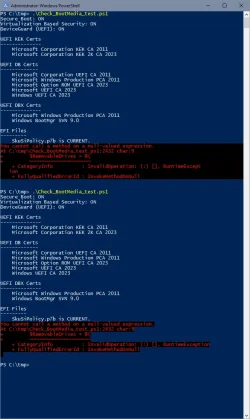
Thank you! But there's no difference- output is the same as if no USB device connected (1st run with USB SSD connected, 2nd run with no USB device connected)

1786813695954.webp
 

My Computer My Computer

At a glance

W10
OS
W10
the "Repair My PC" option in WinPE has been broken because MS added a new Cloud Rebuild feature.
Another workaround -

Ventoy > Select ISO > Select "Boot in wimboot mode"

Assumes installer uses .wim file type instead of the .esd MCT default.
 

My Computer My Computer

At a glance

Windows 11 Pro 25H2
OS
Windows 11 Pro 25H2
Computer type
Laptop
Manufacturer/Model
Toshiba
Code:
        ID_FILEATTRIB_F_0043 10.0.29426.0       65535.65535.65535.65535


Bootable Media
--------------

Drive F: "ESD-USB"
    Boot File [Production PCA 2011] is BANNED.
        F:\EFI\Boot\bootx64.efi
        File Version: 28000.352, SVN 9.0

    boot.wim:2 (WinPE 26100.9168)
        Boot Manager [Windows UEFI CA 2023] is ALLOWED.
            \Windows\Boot\EFI_EX\bootmgfw_EX.efi
            File Version: 28000.352, SVN 9.0

        \Windows\System32\winload.efi is ALLOWED.
            File Version: 26100.9168

        'Repair My PC' is broken.

    Please wait while install SWM is analyzed.

    install.swm:1 (W11 25H2 26200.9168)
        Boot Manager [Windows UEFI CA 2023] is ALLOWED.
            \Windows\Boot\EFI_EX\bootmgfw_EX.efi
            File Version: 28000.352, SVN 9.0

        \Windows\System32\winload.efi is ALLOWED.
            File Version: 26100.9168

        Skipping over the next 6 images.


USB Drive G: "GIGC23_0826"
    Windows Boot Manager [Windows UEFI CA 2023] is ALLOWED.
        G:\EFI\Microsoft\Boot\bootmgfw.efi
        File Version: 28000.352, SVN 9.0

    boot.wim:1 (WinRE 26100.1)
        Boot Manager [Windows UEFI CA 2023] is ALLOWED.
            \Windows\Boot\EFI_EX\bootmgfw_EX.efi
            File Version: 28000.352, SVN 9.0

        \Windows\System32\winload.efi is ALLOWED.
            File Version: 26100.9168


PS C:\Users\

Looks good to me, dont know how you have the patience to perfect this but thank you again for all the work you put into this 😁
 

My Computer My Computer

At a glance

Win11 24H2 IOT LTSC / Win11 Pro 25H2AMD Ryzen 7 8700G / Ryzen 7 8700G / Ryzen 8600GF5-6000J3636F16GX2-FX5 32GB / Lexar Ares RGB ...internal
OS
Win11 24H2 IOT LTSC / Win11 Pro 25H2
Computer type
PC/Desktop
Manufacturer/Model
Gigabyte x2 / Asus = Home builds
CPU
AMD Ryzen 7 8700G / Ryzen 7 8700G / Ryzen 8600G
Motherboard
Gigabyte B650 AORUS ELITE AX V2 / ASUS TUF GAMING B650-PLUS / B650 GAMING X AX V2
Memory
F5-6000J3636F16GX2-FX5 32GB / Lexar Ares RGB LD5BU016G-R6000GDLA 32GB / Kingston FURY Beast 32 GB DDR5-5600
Graphics Card(s)
internal
Sound Card
Realtek
Monitor(s) Displays
BenQ 27 L EW2780
Screen Resolution
1920x1080
Hard Drives
Many M.2's (WD)
PSU
be quiet! Pure Power 13 M 550W
Case
Chieftec HC-10B-OP
Cooling
Gelid Solutions Tranquillo 5, many Noctua's 12x12
Keyboard
Microsoft
Mouse
Cherry
Internet Speed
500 mbs
Browser
Vivaldi
Antivirus
Eset
Other Info
PC builder / repair / Trouble-shooter etc.
If I run the latest test version from post #3409 and don't have a USB inserted I get this
Code:
Macrium v10.0.8843
------------------
    WinRE Boot Manager [Windows UEFI CA 2023] is ALLOWED.
        E:\boot\macrium\WinREFiles\media\EFI\Microsoft\Boot\bootmgfw.efi
        File Version: 28000.352, SVN 9.0
You cannot call a method on a null-valued expression.
At E:\tmp\Check_BootMedia.ps1:2432 char:9
+         $RemovableDrives = @(
+         ~~~~~~~~~~~~~~~~~~~~~
    + CategoryInfo          : InvalidOperation: (:) [], RuntimeException
    + FullyQualifiedErrorId : InvokeMethodOnNull

But if I use the version from the latest zip from post #1, it works
And, C:, E: and F: are not DVDs, C: & F: NVME, E: SSD
Code:
Macrium v10.0.8843
------------------
    WinRE Boot Manager [Windows UEFI CA 2023] is ALLOWED.
        E:\boot\macrium\WinREFiles\media\EFI\Microsoft\Boot\bootmgfw.efi
        File Version: 28000.352, SVN 9.0

Bootable Media
--------------
DVD Drive C: "System"
DVD Drive E: "Data-SSD"
DVD Drive F: "Data-NVME"

If I put a USB in, both work without issue and detect the USB properly

Maybe you already know and it's a test version, so work in progress...
 

My Computer My Computer

At a glance

Windows 11
OS
Windows 11
Another workaround -

Ventoy > Select ISO > Select "Boot in wimboot mode"

Assumes installer uses .wim file type instead of the .esd MCT default.
I don't see how this fixes the problem. boot.wim itself is missing files, because MS forgot to add them in recent builds.

There used to be an older version of the "Repair My PC" app and they switched to look like the WinRE version. Except WinRE already has the required files, which boot.wim never got. It's broken across multiple release channels, so it's like someone at MS forgot about the change.
 

My Computer My Computer

At a glance

Windows 7
OS
Windows 7
I ran your code and created a new USB building a new WIM. Tried booting, but it no longer boots. I did something wrong. Whatever I did back in April, the USB drive booted correctly into Macrium. Back then I had to replace \EFI\Boot\bootx64.efi on the USB drive, I think with an older version in order to get it to boot.

You can't use Macrium's base WIM, as it's severely outdated. You need to tell Macrium
to use the most current WinRE.wim located in your recovery partition.

Open an elevated command prompt. Enter:
reagentc /info

If enabled:
reagentc /disable

This places the most recent winre.wim into C:\Windows\System32\Recovery

With thumb drive plugged in, open Macrium. If it asks to update WIM say NO.

Select Advanced.
At the bottom select Custom base WIM.
In location, type
C:\Windows\System32\Recovery\winre.wim

Build drive. When done use garlin's update script with the -BootMedia option.
Should be bootable now.

Also, to update your SkuSiPolicy.p7b file, run garlin's update script with the -SkuSiPolicy option.

Don't forget to reagentc /enable
 
Last edited:

My Computers My Computers

  • At a glance

    Win 11 Pro 25H2 26200.9168Intel® Core™ i7-14700KG.SKILL Ripjaws S5 Series 64GB (2 x 32GB) DDR5ASUS GeForce RTX 4070 Super 12GB
    OS
    Win 11 Pro 25H2 26200.9168
    Computer type
    PC/Desktop
    Manufacturer/Model
    Self Built
    CPU
    Intel® Core™ i7-14700K
    Motherboard
    ASUS TUF Z690-PLUS WIFI (BIOS 4505)
    Memory
    G.SKILL Ripjaws S5 Series 64GB (2 x 32GB) DDR5
    Graphics Card(s)
    ASUS GeForce RTX 4070 Super 12GB
    Sound Card
    Sound Blaster AE-5 Plus
    Monitor(s) Displays
    ASUS TUF Gaming 27" 2K HDR Gaming
    Screen Resolution
    2560 x 1440
    Hard Drives
    Samsung 990 Pro 1TB NVMe (Win 11 25H2)
    SK hynix P41 500GB NVMe
    SK hynix P41 2TB NVMe (x3)
    Crucial P3 Plus 4TB
    PSU
    Corsair RM850x Shift
    Case
    Antec Dark Phantom DP502 FLUX
    Cooling
    Corsair Nautilus 360 RS AIO
    Keyboard
    Logitech MK 320
    Mouse
    Razer Basilisk V3
    Internet Speed
    750Mbs
    Browser
    Firefox
    Antivirus
    Winows Security
    Other Info
    MR 8.1 Home
  • At a glance

    Win 11 Pro 25H2 26200.9168Intel Core i5-1140064 GB DDR4MSI GeForce RTX 3060 Ventus 2X 12GB
    Operating System
    Win 11 Pro 25H2 26200.9168
    Computer type
    PC/Desktop
    Manufacturer/Model
    Self Built
    CPU
    Intel Core i5-11400
    Motherboard
    Asus TUF Gaming Z590 Plus WiFi (BIOS 2803)
    Memory
    64 GB DDR4
    Graphics card(s)
    MSI GeForce RTX 3060 Ventus 2X 12GB
    Sound Card
    SoundBlaster Audigy Fx V2
    Monitor(s) Displays
    Samsung F27T350
    Screen Resolution
    1920x1080
    Hard Drives
    Samsung 980 Pro 1TB
    Samsung 970 EVO Plus 2TB
    Samsung 870 EVO 500GB SSD
    PSU
    Corsair HX750
    Case
    Cougar MX330-G Window
    Cooling
    Thermalright Frozen Edge 240 Black AIO
    Internet Speed
    350Mbps
    Browser
    Firefox
    Antivirus
    Windows Security
  • System Three
    Win 11 Pro 25H2 26200.9168
    ASUS PRIME Z370-P II BIOS 3004 7/12/21
    Intel Core i7-8700 CPU @ 3.20GHz
    32GB DDR4 RAM (4x8)
    iGPU Intel UHD Graphics 630
    Cooler Master Hyper 212
    Mid-Tower Desktop
If I put a USB in, both work without issue and detect the USB properly

Maybe you already know and it's a test version, so work in progress...
That confirms my suspicion about another bug. Try this version, it works when there's no USB drives.
 

Attachments

My Computer My Computer

At a glance

Windows 7
OS
Windows 7
I don't see how this fixes the problem
It doesn't "fix" anything in boot.wim

Ventoy uses the ventoy_wimboot.img plugin.

 
Last edited:

My Computer My Computer

At a glance

Windows 11 Pro 25H2
OS
Windows 11 Pro 25H2
Computer type
Laptop
Manufacturer/Model
Toshiba
That confirms my suspicion about another bug. Try this version, it works when there's no USB drives.
That one works with or without USB in.

With
Code:
Macrium v10.0.8843
------------------
    WinRE Boot Manager [Windows UEFI CA 2023] is ALLOWED.
        E:\boot\macrium\WinREFiles\media\EFI\Microsoft\Boot\bootmgfw.efi
        File Version: 28000.352, SVN 9.0

Bootable Media
--------------
Drive G: "RESCUE"
    Windows Boot Manager [Windows UEFI CA 2023] is ALLOWED.
        G:\EFI\Microsoft\Boot\bootmgfw.efi
        File Version: 28000.352, SVN 9.0

    boot.wim:1 (WinRE 26100.1)
        Boot Manager [Windows UEFI CA 2023] is ALLOWED.
            \Windows\Boot\EFI_EX\bootmgfw_EX.efi
            File Version: 28000.352, SVN 9.0

        \Windows\System32\winload.efi is ALLOWED.
            File Version: 26100.9168

Without
Code:
Macrium v10.0.8843
------------------
    WinRE Boot Manager [Windows UEFI CA 2023] is ALLOWED.
        E:\boot\macrium\WinREFiles\media\EFI\Microsoft\Boot\bootmgfw.efi
        File Version: 28000.352, SVN 9.0

Thanks !
 

My Computer My Computer

At a glance

Windows 11
OS
Windows 11
You can't use Macrium's base WIM, as it's severely outdated. You need to tell Macrium
to use the most current WinRE.wim located in your recovery partition.

Open an elevated command prompt. Enter:

reagentc /info

If enabled:
reagentc /disable

This places the most recent winre.wim into C:\Windows\System32\Recovery

With thumb drive plugged in, open Macrium. If it asks to update WIM say NO.

Select Advanced.
At the bottom select Custom base WIM.
In location, type
C:\Windows\System32\Recovery\winre.wim

Build drive. When done use garlin's update script with the -BootMedia option.
Should be bootable now.

Also, to update your SkuSiPolicy.p7b file, run garlin's update script with the -SkuSiPolicy option.

Don't forget to reagentc /enable
I'll have to wait until tomorrow to try this.

While playing around with the USB drive that does boot successfully I accidentally found out that I can't mount and browse a backup file. Selecting a file assigns it the drive letter F: but I can't find/open Explorer to to browse the backup file. For example the file 1C9F526C1616A5FC-00-00.mrimg I created last Sunday, 08/09/2026.

I'm about ready to go ahead and buy 2 copies of Macrium X, but I'll give this a try.
 

My Computers My Computers

  • At a glance

    Windows 11 Pro 25H2i7-8565U16GBIntel UHD Graphics 620
    OS
    Windows 11 Pro 25H2
    Computer type
    Laptop
    Manufacturer/Model
    Lenovo T490 (2020 Hardware)
    CPU
    i7-8565U
    Motherboard
    20N20028US
    Memory
    16GB
    Graphics Card(s)
    Intel UHD Graphics 620
    Sound Card
    Realtec Audio
    Monitor(s) Displays
    ASUS VE248
    Screen Resolution
    1920 X 1080
    Hard Drives
    Samsung SSD 970 PRO 512GB NVMe
    Internet Speed
    Frontier fiber 1GB
    Browser
    Chrome, Firefox, Edge
    Antivirus
    Norton 360 Deluxe Plus
    Other Info
    Supported hardware, upgraded from Windows 10 Pro to Windows 11 Pro version 24H2 on 06/01/2025 using the Windows 11 ISO file. Used the enablement package to upgrade to version 25H2 on 10/07/2025. Secure boot enabled. Secure Boot CA 2023 updated.
  • At a glance

    Windows 11 Pro 25H2i7-4770 (with SSE4.2, and POPCNT)16GBIntel HD Graphics 4600
    Operating System
    Windows 11 Pro 25H2
    Computer type
    PC/Desktop
    Manufacturer/Model
    Lenovo ThinkCentre M83 (2014 Hardware)
    CPU
    i7-4770 (with SSE4.2, and POPCNT)
    Motherboard
    10AL000GUS
    Memory
    16GB
    Graphics card(s)
    Intel HD Graphics 4600
    Sound Card
    Realtec High Definition Audio
    Monitor(s) Displays
    ASUS VE248
    Screen Resolution
    1920 X 1080
    Hard Drives
    Samsung SSD 860 PRO 1TB SATA
    Internet Speed
    Frontier fiber 1GB
    Browser
    Chrome, Firefox, Edge
    Antivirus
    Norton 360 Deluxe Plus
    Other Info
    Unsupported hardware, upgraded from Windows 10 Pro (TPM 1.2 & unsupported CPU, but does have SSE4.2, and POPCNT) to Windows 11 Pro version 24H2 on 06/15/2025. Added Registry Key HKEY_LOCAL_MACHINE\SYSTEM\Setup\MoSetup – AllowUpgradesWithUnsupportedTPMOrCPU=1 to allow installation using the Windows 11 ISO file. Used the enablement package to upgrade to version 25H2 on 10/08/2025. Secure boot enabled. Secure Boot CA 2023 updated.
While playing around with the USB drive that does boot successfully I accidentally found out that I can't mount and browse a backup file. Selecting a file assigns it the drive letter F: but I can't find/open Explorer to to browse the backup file. For example the file 1C9F526C1616A5FC-00-00.mrimg I created last Sunday, 08/09/2026.

I'm about ready to go ahead and buy 2 copies of Macrium X, but I'll give this a try.
You mean in Windows Explorer, you can't right click on the mrimg file and select "Explore Image..." anymore or you never could ?
Because that's been present in Macrium versions as far as I can remember and still is in v10.
 

My Computer My Computer

At a glance

Windows 11
OS
Windows 11
....found out that I can't mount and browse a backup file....
You mean in Windows Explorer, you can't right click on the mrimg file and select "Explore Image..." anymore or you never could ?
Because that's been present in Macrium versions as far as I can remember and still is in v10.
Mounting images no longer works in Reflect v8. The psmounterex.sys it uses was added to Microsoft's Vulerable Driver Blocklist in April this year and will no longer be allowed to load. Reflect X uses a different newer driver that is not blocked, so continues to be able to mount images.


The confirmed image mounting issue relates to Microsoft’s updated Vulnerable Driver Blocklist enforcement and impacts the psmounterex.sys driver used by Reflect 8 and Reflect LTSC for image mounting functionality.

Reflect X is not affected by the confirmed image mounting driver block because it does not use the psmounterex.sys driver. Reflect 8 is an end-of-life product and no longer receives feature development or ongoing security updates.
 

My Computers My Computers

  • At a glance

    Windows 11 HomeAMD Athlon Silver 3050U8GBRadeon Graphics
    OS
    Windows 11 Home
    Computer type
    Laptop
    Manufacturer/Model
    Acer Aspire 3 A315-23-R9VY
    CPU
    AMD Athlon Silver 3050U
    Memory
    8GB
    Graphics Card(s)
    Radeon Graphics
    Monitor(s) Displays
    laptop screen
    Screen Resolution
    1366x768 native resolution, up to 2560x1440 with Radeon Virtual Super Resolution
    Hard Drives
    1TB Samsung EVO 870 SSD (from April 2026: 250GB EVO 850)
    Internet Speed
    150 Mbps
    Browser
    Edge, Firefox
    Antivirus
    Defender
    Other Info
    UPDATE - 11 April 2026: due to lid hinges starting to break up this laptop has been retired from active duty. The OS with all software and files has been migrated to my System Seven in 'Other systems' to carry on as my general purpose 'main machine'.

    I've now clean installed 25H2 and used Garlin's scripts to update Secure Boot to CA 2023 and revoke the PCA 2011 certificates. It's new role is to test secure boot issues.

    Info for 2021-2026:
    fully 'Windows 11 ready' laptop. Windows 10 C: partition migrated from my old unsupported 'main machine' then upgraded to 11. A test migration ran Insider builds for 2 months. When 11 was released on 5th October 2021 it was re-imaged back to 10 and was offered the upgrade in Windows Update on 20th October. Windows Update offered the 22H2 Feature Update on 20th September 2022. It got the 23H2 Feature Update on 4th November 2023 through Windows Update, 24H2 on 3rd October 2024 through Windows Update by setting the Target Release Version for 24H2, and 25H2 on 30th September 2025 through Windows Update by setting the Target Release Version for 25H2.
  • At a glance

    Windows 11 ProIntel® Core™ i5-520M8GB(integrated graphics) Intel HD Graphics
    Operating System
    Windows 11 Pro
    Computer type
    Laptop
    Manufacturer/Model
    Dell Latitude E4310
    CPU
    Intel® Core™ i5-520M
    Motherboard
    0T6M8G
    Memory
    8GB
    Graphics card(s)
    (integrated graphics) Intel HD Graphics
    Screen Resolution
    1366x768
    Hard Drives
    500GB Crucial MX500 SSD
    Browser
    Firefox, Edge
    Antivirus
    Defender
    Other Info
    unsupported machine: Legacy bios, MBR, TPM 1.2, upgraded from W10 to W11 using W10/W11 hybrid install media workaround.

    In-place upgrade to 22H2 using ISO and a workaround.
    Feature Update to 23H2 by manually installing the Enablement Package.
    In-place upgrade to 24H2 using hybrid 23H2/24H2 install media.
    Upgraded to 25H2 by Enablement Package.

    Also running Insider Dev, and Canary builds and Windows 10 as native boot .vhdx.
  • My SYSTEM THREE is a Dell Latitude 5410, i7-10610U, 32GB RAM, 512GB NVMe ssd, supported device running Windows 11 Pro.

    My SYSTEM FOUR was a 2-in-1 convertible Lenovo Yoga 11e (1st gen) type 20DA, Celeron N2930, 8GB RAM, 256GB ssd. Unsupported device. This has now been sold. It has been replaced by my System Eight.

    My SYSTEM FIVE is a Dell Latitude 3190 2-in-1, Pentium Silver N5030, 8GB RAM, 1TB NVMe ssd, supported device running Windows 11 Pro, plus Insider Beta, Dev, and Canary builds (and a few others) as a native boot .vhdx.

    My SYSTEM SIX is a Dell Latitude 5550, Core Ultra 7 165H, 64GB RAM, 1TB NVMe SSD, supported device, Windows 11 Pro, Hyper-V host machine. Updated to 25H2 on 30th September 2025.

    My SYSTEM SEVEN is a Lenovo Thinkpad T580, 1920x1080 touchscreen, Intel Core i7-8650U, 16GB RAM, 512GB NVMe SSD + 2nd 512GB NVMe SSD, a supported device for Windows 11. This is my current general purpose 'main machine'. The installed Windows 11 Home from my System One has been migrated to this machine. As its new home has an existing digital licence for Pro I've been able to upgrade the migrated OS from Home to Pro.

    My SYSTEM EIGHT is a 2-in-1 convertible Lenovo Yoga 11e (5th gen) type 20LN, Celeron N4120, 8GB RAM, 512GB NVMe ssd, a supported device for Windows 11. Currently running Windows 11 Pro, plus Insider Dev, Beta, and Canary builds as native boot vhdx.

That confirms my suspicion about another bug. Try this version, it works when there's no USB drives.
This version still produces the error below when just the Hasleo USB is inserted, but the script continues and produces the Bootable Media info.

You cannot call a method on a null-valued expression.
At E:\Garlin\Check_BootMedia.ps1:2431 char:13


So I tried coding an alternate process that replaces lines 2425-2448. It is not as compact and elegant as your code, but it works for me. See attached file.
 

Attachments

My Computer My Computer

At a glance

Windows 11 ProIntel Core Ultra16GBIntel(R) Arc Graphics
OS
Windows 11 Pro
Computer type
Laptop
Manufacturer/Model
ASUS Zenbook 14 OLED
CPU
Intel Core Ultra
Memory
16GB
Graphics Card(s)
Intel(R) Arc Graphics
Sound Card
Realtek High Definition Audio(SST)
Screen Resolution
2880 x 1800
Hard Drives
500 GB NVMe SSD
Internet Speed
1,500Mbps
Browser
Firefox, Edge
Antivirus
Windows Defender
This version still produces the error below when just the Hasleo USB is inserted, but the script continues and produces the Bootable Media info.

You cannot call a method on a null-valued expression.
At E:\Garlin\Check_BootMedia.ps1:2431 char:13


So I tried coding an alternate process that replaces lines 2425-2448. It is not as compact and elegant as your code, but it works for me. See attached file.
Try this test script. It incorporates your differences, and also runs the other "more relaxed" filter criteria.

Let me know if there's a difference or not.
 

Attachments

My Computer My Computer

At a glance

Windows 7
OS
Windows 7
Here is result from tes6.ps1 on Hasleo sandisk:
PS C:\Windows\System32> powershell -nop -ep bypass -f C:\temp18\test6.ps1

DriveLetter FriendlyName FileSystemType DriveType HealthStatus OperationalStatus SizeRemaining Size
----------- ------------ -------------- --------- ------------ ----------------- ------------- ----
F Unknown CD-ROM Healthy Unknown 0 B 0 B
G HASLEOBS FAT32 Removable Healthy OK 31.12 GB 31.98 GB
E My Passport NTFS Fixed Healthy OK 391.31 GB 931.48 GB
D Unknown Removable Healthy Unknown 0 B 0 B
FAT32 Fixed Healthy OK 19.61 MB 96 MB
C NTFS Fixed Healthy OK 299.05 GB 464.83 GB
NTFS Fixed Healthy OK 71.12 MB 839 MB

PARANOID VERSION
----------------
Removable USB
G
E

CDROM

MBR/FAT32
G

COMBINED
E
G

RELAXED VERSION
---------------
Removable USB
E
G

CDROM

MBR/FAT32
G

COMBINED
E
G
 

My Computer My Computer

At a glance

Windows 11 Intel i5 10400 HD630 graphics chipi5-1040012 gbHD630 chipset
OS
Windows 11 Intel i5 10400 HD630 graphics chip
Computer type
PC/Desktop
Manufacturer/Model
HP
CPU
i5-10400
Memory
12 gb
Graphics Card(s)
HD630 chipset
Monitor(s) Displays
LG 24inch
Hard Drives
SSD, external usb drive 1tb for files/backups
Keyboard
wireless Logi
Mouse
ms 4000 wireless mouse
Internet Speed
10meg
Browser
Firefox
Antivirus
Defender
Other Info
Win11 Home 25h2 26200.9168 08/11/2026
Mounting images no longer works in Reflect v8. The psmounterex.sys it uses was added to Microsoft's Vulerable Driver Blocklist in April this year and will no longer be allowed to load. Reflect X uses a different newer driver that is not blocked, so continues to be able to mount images.
Oh ! I was not aware of that
 

My Computer My Computer

At a glance

Windows 11
OS
Windows 11
Try this test script. It incorporates your differences, and also runs the other "more relaxed" filter criteria.

Let me know if there's a difference or not.
It runs fine with 2 USB, but with only Hasleo it produces this

PS C:\Windows\System32> powershell -nop -ep bypass -f "E:\Garlin\TEST6.ps1"

DriveLetter FriendlyName FileSystemType DriveType HealthStatus OperationalStatus SizeRemaining Size
----------- ------------ -------------- --------- ------------ ----------------- ------------- ----
D Data NTFS Fixed Healthy OK 27.04 GB 59.94 GB
C System NTFS Fixed Healthy OK 83.8 GB 155.01 GB
E Overflow NTFS Fixed Healthy OK 214.69 GB 260.71 GB
F HASLEOBS FAT32 Removable Healthy OK 28.46 GB 29.41 GB
SYSTEM FAT32 Fixed Healthy OK 139.86 MB 256 MB
Recovery NTFS Fixed Healthy OK 277.59 MB 1 GB

PARANOID VERSION
----------------
Removable USB
You cannot call a method on a null-valued expression.
At E:\Garlin\TEST6.ps1:11 char:5
+ $1 = (Get-CimInstance -ClassName Win32_DiskDrive | where { (($_.P ...
+ ~~~~~~~~~~~~~~~~~~~~~~~~~~~~~~~~~~~~~~~~~~~~~~~~~~~~~~~~~~~~~~~~~
+ CategoryInfo : InvalidOperation: (:) [], RuntimeException
+ FullyQualifiedErrorId : InvokeMethodOnNull


CDROM

MBR/FAT32
F

COMBINED
F

RELAXED VERSION
---------------
Removable USB
You cannot call a method on a null-valued expression.
At E:\Garlin\TEST6.ps1:34 char:5
+ $1 = (Get-CimInstance -ClassName Win32_DiskDrive | where { (($_.P ...
+ ~~~~~~~~~~~~~~~~~~~~~~~~~~~~~~~~~~~~~~~~~~~~~~~~~~~~~~~~~~~~~~~~~
+ CategoryInfo : InvalidOperation: (:) [], RuntimeException
+ FullyQualifiedErrorId : InvokeMethodOnNull


CDROM

MBR/FAT32
F

COMBINED
F
 

My Computer My Computer

At a glance

Windows 11 ProIntel Core Ultra16GBIntel(R) Arc Graphics
OS
Windows 11 Pro
Computer type
Laptop
Manufacturer/Model
ASUS Zenbook 14 OLED
CPU
Intel Core Ultra
Memory
16GB
Graphics Card(s)
Intel(R) Arc Graphics
Sound Card
Realtek High Definition Audio(SST)
Screen Resolution
2880 x 1800
Hard Drives
500 GB NVMe SSD
Internet Speed
1,500Mbps
Browser
Firefox, Edge
Antivirus
Windows Defender
Try this version, it works when there's no USB drives.

Works nicely with more than one drive as well :-)

Code:
Macrium v8.1.8853
-----------------
    WinRE Boot Manager [Windows UEFI CA 2023] is ALLOWED.
        c:\boot\macrium\WinREFiles\media\EFI\Microsoft\Boot\bootmgfw.efi
        File Version: 28000.352, SVN 9.0

Bootable Media
--------------

USB Drive J: "BOOT2023PCA"
    Boot File [Windows UEFI CA 2023] is ALLOWED.
        J:\EFI\Boot\bootx64.efi
        File Version: 28000.352, SVN 9.0

    boot.wim:2 (WinRE 26100.9168)
        Boot Manager [Windows UEFI CA 2023] is ALLOWED.
            \Windows\Boot\EFI_EX\bootmgfw_EX.efi
            File Version: 28000.352, SVN 9.0

        \Windows\System32\winload.efi is ALLOWED.
            File Version: 26100.9168


USB Drive K: "MACRIUMHOME"
    Windows Boot Manager [Windows UEFI CA 2023] is ALLOWED.
        K:\EFI\Microsoft\Boot\bootmgfw.efi
        File Version: 28000.352, SVN 9.0

    boot.wim:1 (WinRE 26100.1)
        Boot Manager [Windows UEFI CA 2023] is ALLOWED.
            \Windows\Boot\EFI_EX\bootmgfw_EX.efi
            File Version: 28000.352, SVN 9.0

        \Windows\System32\winload.efi is ALLOWED.
            File Version: 26100.9168
 

My Computers My Computers

  • At a glance

    Win 11 Pro 25H2 26200.9168Intel® Core™ i7-14700KG.SKILL Ripjaws S5 Series 64GB (2 x 32GB) DDR5ASUS GeForce RTX 4070 Super 12GB
    OS
    Win 11 Pro 25H2 26200.9168
    Computer type
    PC/Desktop
    Manufacturer/Model
    Self Built
    CPU
    Intel® Core™ i7-14700K
    Motherboard
    ASUS TUF Z690-PLUS WIFI (BIOS 4505)
    Memory
    G.SKILL Ripjaws S5 Series 64GB (2 x 32GB) DDR5
    Graphics Card(s)
    ASUS GeForce RTX 4070 Super 12GB
    Sound Card
    Sound Blaster AE-5 Plus
    Monitor(s) Displays
    ASUS TUF Gaming 27" 2K HDR Gaming
    Screen Resolution
    2560 x 1440
    Hard Drives
    Samsung 990 Pro 1TB NVMe (Win 11 25H2)
    SK hynix P41 500GB NVMe
    SK hynix P41 2TB NVMe (x3)
    Crucial P3 Plus 4TB
    PSU
    Corsair RM850x Shift
    Case
    Antec Dark Phantom DP502 FLUX
    Cooling
    Corsair Nautilus 360 RS AIO
    Keyboard
    Logitech MK 320
    Mouse
    Razer Basilisk V3
    Internet Speed
    750Mbs
    Browser
    Firefox
    Antivirus
    Winows Security
    Other Info
    MR 8.1 Home
  • At a glance

    Win 11 Pro 25H2 26200.9168Intel Core i5-1140064 GB DDR4MSI GeForce RTX 3060 Ventus 2X 12GB
    Operating System
    Win 11 Pro 25H2 26200.9168
    Computer type
    PC/Desktop
    Manufacturer/Model
    Self Built
    CPU
    Intel Core i5-11400
    Motherboard
    Asus TUF Gaming Z590 Plus WiFi (BIOS 2803)
    Memory
    64 GB DDR4
    Graphics card(s)
    MSI GeForce RTX 3060 Ventus 2X 12GB
    Sound Card
    SoundBlaster Audigy Fx V2
    Monitor(s) Displays
    Samsung F27T350
    Screen Resolution
    1920x1080
    Hard Drives
    Samsung 980 Pro 1TB
    Samsung 970 EVO Plus 2TB
    Samsung 870 EVO 500GB SSD
    PSU
    Corsair HX750
    Case
    Cougar MX330-G Window
    Cooling
    Thermalright Frozen Edge 240 Black AIO
    Internet Speed
    350Mbps
    Browser
    Firefox
    Antivirus
    Windows Security
  • System Three
    Win 11 Pro 25H2 26200.9168
    ASUS PRIME Z370-P II BIOS 3004 7/12/21
    Intel Core i7-8700 CPU @ 3.20GHz
    32GB DDR4 RAM (4x8)
    iGPU Intel UHD Graphics 630
    Cooler Master Hyper 212
    Mid-Tower Desktop

Latest Support Threads

Back
Top Bottom