Solved garlin's PowerShell scripts for updating Secure Boot CA 2023


+ CategoryInfo : InvalidOperation: (:) [], RuntimeException
+ FullyQualifiedErrorId : InvokeMethodOnNull

I may have found a clue, but no idea why the values are different for you.
Code:
$USB_DeviceIDs = @(Get-PnpDevice -PresentOnly | where { $_.Service -eq 'USBSTOR' } | foreach { ($_.PNPDeviceID -split '\\')[2] })
(Get-CimInstance -ClassName Win32_DiskDrive | where { (($_.PNPDeviceID -split '\\')[-1] -split '&')[0] -in $USB_DeviceIDs } | Get-CimAssociatedInstance -ResultClass Win32_DiskPartition | Get-CimAssociatedInstance -ResultClass Win32_LogicalDisk | where { $null -ne $_.Name }).Name.SubString(0,1)
 

My Computer My Computer

At a glance

Windows 7
OS
Windows 7
Well, no problem to check manually, but since you were able to include it in your script once....

1786856797525.webp
 

My Computer My Computer

At a glance

W10
OS
W10
Well, no problem to check manually, but since you were able to include it in your script once....
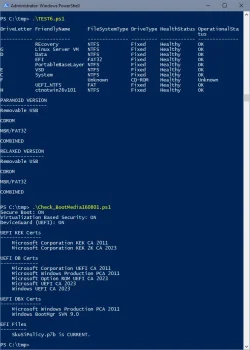
Is your FAT32 a GPT? We have this crazy Venn diagram...

USB Drives is looking at USBSTOR service (which is mostly removable drives). Previously I was using BusType USB, but people said that was missing devices...

MBR + FAT32 covers some devices like Rufus or Ventoy. But if your SSD is GPT + FAT32, then it's not in the Venn overlap.
 

My Computer My Computer

At a glance

Windows 7
OS
Windows 7
Is your FAT32 a GPT? We have this crazy Venn diagram...

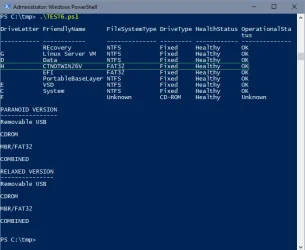
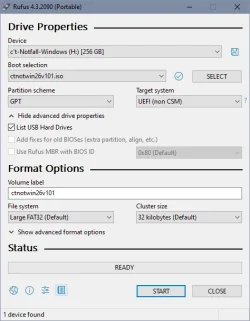
Yes

1786862148190.webp 1786860790348.webp

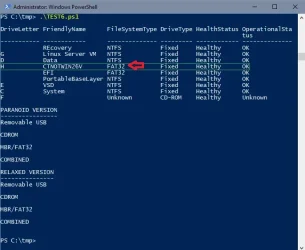
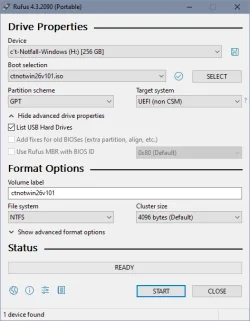
But if I create it with NTFS it doesn't make any difference:

1786862052324.webp 1786860844663.webp

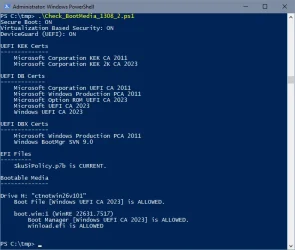
But scripts from thursday still finding it with NTFS, too:

1786860924376.webp
 
Last edited:

My Computer My Computer

At a glance

W10
OS
W10

Latest Support Threads

Back
Top Bottom