Solved garlin's PowerShell scripts for updating Secure Boot CA 2023


Been playing with Hasleo for the past few days.

I remember a lot of people were patching Hasleo staging to copy the boot loader with latest certs and SVN number.
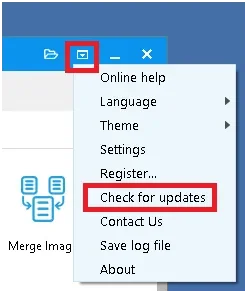
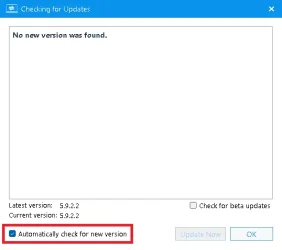
Latest version, 5.9.2.2, if you use WinRE, so not ticking the "Download WinPE components", you don't need to patch the staging anymore.
If all backup products would stop promoting the use of WinPE for W11, that would be ideal. But older systems (W7-W10) don't mandate having a working WinRE, and therefore you need to support WinPE/ADK.

The problem is all the user guides talk about WinPE since it's universal across the different Windows versions. Except for W10 22H2, all the old Windows never got Secure boot updates, so that's why they don't mention why WinRE works better for W11.
 

My Computer My Computer

At a glance

Windows 7
OS
Windows 7

My Computer My Computer

At a glance

Windows 11 Intel i5 10400 HD630 graphics chipi5-1040012 gbHD630 chipset
OS
Windows 11 Intel i5 10400 HD630 graphics chip
Computer type
PC/Desktop
Manufacturer/Model
HP
CPU
i5-10400
Memory
12 gb
Graphics Card(s)
HD630 chipset
Monitor(s) Displays
LG 24inch
Hard Drives
SSD, external usb drive 1tb for files/backups
Keyboard
wireless Logi
Mouse
ms 4000 wireless mouse
Internet Speed
10meg
Browser
Firefox
Antivirus
Defender
Other Info
Win11 Home 25h2 26200.9278 08/27/2026
If all backup products would stop promoting the use of WinPE for W11, that would be ideal. But older systems (W7-W10) don't mandate having a working WinRE, and therefore you need to support WinPE/ADK.

The problem is all the user guides talk about WinPE since it's universal across the different Windows versions. Except for W10 22H2, all the old Windows never got Secure boot updates, so that's why they don't mention why WinRE works better for W11.
And I actually was not using WinRE a few years back and I would delete the recovery partition on any of my systems ! :zany:
When I moved to Win11, I decided to just leave it there and not bother with it any more.
When I upgraded to Macrium X, I decided to give WinRE a try and it worked, used to have issues back in v6 or v7, can't remember.
With your comments and recommandations, I'm now glad I use WinRE !!!
 

My Computer My Computer

At a glance

Windows 11
OS
Windows 11
Hi Garlin, just a headsup, my mistake I accidently ran the update instead of check, and I suggest adding a warning followed by a pause, for the following reasons.

It proceeds offering no abort.
It overwritten my bcdedit, luckily I had a backup.
The new bcd config, removed my custom config, and changed my locale from en-gb to en-us.

I am hoping it didnt wipe my 2011 cert from UEFI.
 

My Computer My Computer

At a glance

Windows 1013700k32 Gig 3200CL12Nvidia 4800 Super RTX
OS
Windows 10
Computer type
PC/Desktop
CPU
13700k
Motherboard
Asrock Steel Legend D4 Z690
Memory
32 Gig 3200CL12
Graphics Card(s)
Nvidia 4800 Super RTX
Sound Card
Creative AE9
Monitor(s) Displays
LG 27GL850
Screen Resolution
2560x1440
Hard Drives
970 EVO 1TB
SN850X 2TB
DC P4600 2TB
860 EVO 1TB
3 x 3TB WD Red
2 x 4TB WD Red
PSU
Antec HCG 750 Gold
Case
Fractal Define R4
Cooling
Noctua NH-D15S
Internet Speed
1000/1000
Browser
Firefox
Antivirus
Windows Defender
So I believe my system is now falsely reporting the bootloader as updated.

Sequence of events,

Check script said not updated.
I accidentally ran update script, rebooted, and it booted with wrong locale whilst wiping my bcd config, this I thinkj set a registry key to mark as updated.
I restored backup of EFI partition which has the 2011 bootloader.
Windows now thinks I have 2023 bootloader when it is 2011.

So how do I fix this without also restoring main C: drive backup as well? Ntlite and the script reports the new bootloader is on but I assume these are just checking the registry value.

Is there an actual sector check I can carry out. Or a way to reset the fragile Microsoft process which was so easy for me to break.

Ok this seems to claim the EFI boot loader is good. So luckily I think the EFI backup was already updated and system not left in frankenstein state.

 
Last edited:

My Computer My Computer

At a glance

Windows 1013700k32 Gig 3200CL12Nvidia 4800 Super RTX
OS
Windows 10
Computer type
PC/Desktop
CPU
13700k
Motherboard
Asrock Steel Legend D4 Z690
Memory
32 Gig 3200CL12
Graphics Card(s)
Nvidia 4800 Super RTX
Sound Card
Creative AE9
Monitor(s) Displays
LG 27GL850
Screen Resolution
2560x1440
Hard Drives
970 EVO 1TB
SN850X 2TB
DC P4600 2TB
860 EVO 1TB
3 x 3TB WD Red
2 x 4TB WD Red
PSU
Antec HCG 750 Gold
Case
Fractal Define R4
Cooling
Noctua NH-D15S
Internet Speed
1000/1000
Browser
Firefox
Antivirus
Windows Defender
Hi Garlin, just a headsup, my mistake I accidently ran the update instead of check, and I suggest adding a warning followed by a pause, for the following reasons.

It proceeds offering no abort.
There is no pause because the update script, when used without the -Revoke option, should no harm. The exception is if you have a problem BIOS with a firmware restriction on the size of the Secure Boot keys added.

The script follows MS's recommendation to use bcdboot to copy all of the required boot files to the EFI. By default, bcdboot assumes US English (en-US). I'll change the script to keep your current system locale.

It overwritten my bcdedit, luckily I had a backup.
The new bcd config, removed my custom config, and changed my locale from en-gb to en-us.

I am hoping it didnt wipe my 2011 cert from UEFI.
When the script updates removable media, I will backup the BCD and restore it afterwards. This wasn't done for the EFI volume, and I've added that just in case you have a custom BCD.

The update script cannot delete certs. It can ban the PCA 2011 cert, but only when the -Revoke option is used.
 

My Computer My Computer

At a glance

Windows 7
OS
Windows 7
Check script said not updated.
I accidentally ran update script, rebooted, and it booted with wrong locale whilst wiping my bcd config, this I thinkj set a registry key to mark as updated.
I restored backup of EFI partition which has the 2011 bootloader.
Windows now thinks I have 2023 bootloader when it is 2011.
Please run "Check-UEFI.bat -Verbose" and post the results.

So how do I fix this without also restoring main C: drive backup as well? Ntlite and the script reports the new bootloader is on but I assume these are just checking the registry value.

Is there an actual sector check I can carry out. Or a way to reset the fragile Microsoft process which was so easy for me to break.
Please don't use NTLite as a reliable basis for determining your status. While it reads the same reg keys, it's an incomplete picture of your current state, which the check script's verbose output can report.
 

My Computer My Computer

At a glance

Windows 7
OS
Windows 7
Here is the results, thanks for agreeing to changing to backup the bcd.

Code:
Secure Boot: ON
Virtualization Based Security: OFF
BitLocker on (C:) OFF

BIOS Firmware
-------------
    ASRock Z690 Steel Legend
    Version: 19.02
    Date: 2024-08-09

Factory Default UEFI PK Cert
----------------------------
    ASRock Inc.

UEFI PK Cert
------------
    ASRock Inc.

Factory Default UEFI KEK Certs
------------------------------
    Microsoft Corporation KEK CA 2011

UEFI KEK Certs
--------------
    Microsoft Corporation KEK CA 2011
    Microsoft Corporation KEK 2K CA 2023

Factory Default UEFI DB Certs
-----------------------------
    Microsoft Corporation UEFI CA 2011
    Microsoft Windows Production PCA 2011

UEFI DB Certs
-------------
    Microsoft Corporation UEFI CA 2011
    Microsoft Windows Production PCA 2011
    Microsoft Option ROM UEFI CA 2023
    Microsoft UEFI CA 2023
    Windows UEFI CA 2023

Factory Default UEFI DBX Certs
------------------------------
    (NONE)
    EFI_CERT_SHA256_GUID Signatures: 217

UEFI DBX Certs
--------------
    (NONE)
    Windows BootMgr SVN is MISSING.
    EFI_CERT_SHA256_GUID Signatures: 445

UEFI Variables
--------------
    SBAT (Linux only): sbat,1,2024010900 / shim,4 / grub,3 / grub.debian,4

EFI Files
---------
    Windows Boot Manager [Production PCA 2011] is ALLOWED.
        \\.\HarddiskVolume18\EFI\Microsoft\Boot\bootmgfw.efi
        File Version: 26100.1041, SVN 3.0

    Registry: "WindowsUEFICA2023Capable" = 2
        [Windows UEFI CA 2023] in UEFI DB, and Windows starting from CA 2023 Boot Manager.

STATUS REPORT
-------------
    Registry: "UEFICA2023Status" = Updated
 

My Computer My Computer

At a glance

Windows 1013700k32 Gig 3200CL12Nvidia 4800 Super RTX
OS
Windows 10
Computer type
PC/Desktop
CPU
13700k
Motherboard
Asrock Steel Legend D4 Z690
Memory
32 Gig 3200CL12
Graphics Card(s)
Nvidia 4800 Super RTX
Sound Card
Creative AE9
Monitor(s) Displays
LG 27GL850
Screen Resolution
2560x1440
Hard Drives
970 EVO 1TB
SN850X 2TB
DC P4600 2TB
860 EVO 1TB
3 x 3TB WD Red
2 x 4TB WD Red
PSU
Antec HCG 750 Gold
Case
Fractal Define R4
Cooling
Noctua NH-D15S
Internet Speed
1000/1000
Browser
Firefox
Antivirus
Windows Defender
That's a really old version of boot manager on the EFI (SVN 3.0). What version of Windows are you running?

To manually copy the latest version, run as Admin:
Code:
mountvol S: /s
copy C:\Windows\Boot\EFI_EX\bootmgfw_EX.efi S:\EFI\Microsoft\Boot\bootmgfw.efi
mountvol S: /d
 

My Computer My Computer

At a glance

Windows 7
OS
Windows 7
I looked up bootmgfw.efi (version 26100.1041). That's a Windows ISO from August to December 2024.
 

My Computer My Computer

At a glance

Windows 7
OS
Windows 7
From the current Acer support page:
Predator PH315-54Available on Windows Updatev1.16

In theory, version 1.17 would also work. What I would try is this:

1. Disable Secure Boot.
2. Try reset to factory defaults (it should have the CA 2023 certs included now).
3. Leave Secure Boot off. Boot Windows.
4. Run the check script, make sure everything is still OK.
5. Enable Secure Boot. See if the VSM error disappears; sometimes a firmware update leaves corrupted NVRAM values which the reset to defaults can fix.
Would the BIOS boot even after that error code?
 

My Computer My Computer

At a glance

Windows 11 Pro 25H2Intel Core i7-11800H16GB (2x8 GB)RTX 3060 Laptop GPU
OS
Windows 11 Pro 25H2
Computer type
Laptop
Manufacturer/Model
Acer Predator Helios 300 PH314-54-72ZJ
CPU
Intel Core i7-11800H
Motherboard
TGL
Memory
16GB (2x8 GB)
Graphics Card(s)
RTX 3060 Laptop GPU
Sound Card
Realtek ALC295
Monitor(s) Displays
1
Screen Resolution
2560 x 1440 @ 165Hz
Hard Drives
1TB NVMe SSD, 512GB NVMe SSD, 1TB 7200 RPM HDD
Cooling
Aeroblade 5th Gen 3D fan
Keyboard
RGB Laptop keyboard
Mouse
Logitech Lightsync G203
Internet Speed
175 Mbps up/175 Mbps down
Browser
Firefox with uBlock Origin and YouTube enhancing extensions..
Antivirus
Windows Security with Core Isolation on
That's one of the big unknowns. For some problem BIOS'es, a Reset to Factory Defaults can clear the broken condition.

For other firmwares, you're stuck until you can reflash the BIOS image. Whatever can be done is entirely controlled by what the current BIOS can or can't do. Unfortunately, it's like a black box. All you can do is either reset (and hope it clears), or reflash the BIOS (and hope it clears).

It's not about the Secure Key keys, but rather how the BIOS writes that data into the NVRAM.
 

My Computer My Computer

At a glance

Windows 7
OS
Windows 7
Acer VN7-792G here, bios v1.10 (received last update during Spectre)
Check_UEFI-CA2023 came up UNTRUSTED
I have run Update_UEFI-CA2023 but it didnt stick. Kept resetting back to default keys after every restart. "Select an UEFI file as trusted for execution" option on bios showed nothing.
So, I have used "Erase all Secure Boot Setting" option on bios, then Disabled Secure Boot, once back on Win10, opened up Powershell with admin rights,

Set-ExecutionPolicy -ExecutionPolicy Bypass -Scope Process
.\Update_UEFI-CA2023 -Latest -Revoke

after a restart i run Check_UEFI-CA2023 again, it cames up with ALLOWED with 2011 certs revoked, Check_DBXupdate.bin said no missing files. Restarted again and Re-enabled Secure Boot, run Check_UEFI-CA2023 once again to make sure, everything is order. Thank you very much.
 
Last edited:

My Computer My Computer

At a glance

Windows 10
OS
Windows 10
Computer type
Laptop
Manufacturer/Model
Acer
Back
Top Bottom