Solved garlin's PowerShell scripts for updating Secure Boot CA 2023


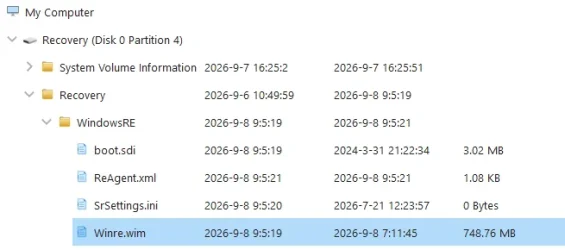
Thanks, not sure what happened but I have 1Gb recovery partition
DISKPART> select part 3

Partition 3 is now the selected partition.

DISKPART> shrink desired=250 minimum=250

DiskPart successfully shrunk the volume by: 250 MB

DISKPART> sel part 4

Partition 4 is now the selected partition.

DISKPART> delete partition override

DiskPart successfully deleted the selected partition.

DISKPART> create partition primary id=de94bba4-06d1-4d40-a16a-bfd50179d6ac

DiskPart succeeded in creating the specified partition.

DISKPART> gpt attributes =0x8000000000000001

DiskPart successfully assigned the attributes to the selected GPT partition.

DISKPART> format quick fs=ntfs label="Windows RE tools"

100 percent completed

DiskPart successfully formatted the volume.

DISKPART> list vol

Volume ### Ltr Label Fs Type Size Status Info
---------- --- ----------- ----- ---------- ------- --------- --------
Volume 0 F DVD-ROM 0 B No Media
Volume 1 C NTFS Partition 464 GB Healthy Boot
Volume 2 FAT32 Partition 100 MB Healthy System
Volume 4 G HASLEOBS FAT32 Removable 31 GB Healthy
Volume 5 E My Passport NTFS Partition 931 GB Healthy
Volume 6 D Removable 0 B No Media
* Volume 7 Windows RE NTFS Partition 1091 MB Healthy Hidden

DISKPART>
 

My Computer My Computer

At a glance

Windows 11 Intel i5 10400 HD630 graphics chipi5-1040012 gbHD630 chipset
OS
Windows 11 Intel i5 10400 HD630 graphics chip
Computer type
PC/Desktop
Manufacturer/Model
HP
CPU
i5-10400
Memory
12 gb
Graphics Card(s)
HD630 chipset
Monitor(s) Displays
LG 24inch
Hard Drives
SSD, external usb drive 1tb for files/backups
Keyboard
wireless Logi
Mouse
ms 4000 wireless mouse
Internet Speed
10meg
Browser
Firefox
Antivirus
Defender
Other Info
Win11 Home 25h2 26200.9278 08/27/2026
Looks good, did you do the reagentc enable?
 

My Computers My Computers

  • At a glance

    Windows 11 & Zorin ProIntel® Core™ Ultra 9 Processor 275HX 2.7 GHz32 gbNVIDIA® GeForce RTX™ 5060 Laptop GPU
    OS
    Windows 11 & Zorin Pro
    Computer type
    Laptop
    Manufacturer/Model
    Asus Rog Strix G16
    CPU
    Intel® Core™ Ultra 9 Processor 275HX 2.7 GHz
    Motherboard
    AsusteK Computer
    Memory
    32 gb
    Graphics Card(s)
    NVIDIA® GeForce RTX™ 5060 Laptop GPU
    Sound Card
    Realtek High Definition Audio
    Monitor(s) Displays
    Laptop 16 inch
    Screen Resolution
    2560 X 1600
    Hard Drives
    Boot: Samsung 9100 NVME 2 TB Microsoft Storage Controller: Standard NVM Express Driver: Microsoft 6/21/2006. No SATA/AHCI on my motherboard or in bios
    Mouse
    Pad
    Browser
    Google Chrome
    Antivirus
    Microsoft
    Other Info
    Printer: HP Color LaserJet MFP M477dw
  • At a glance

    Windows 11 Pro, Zorin ProIntel Nuc 8i7, Intel Nuc 8i5Intel internal
    Operating System
    Windows 11 Pro, Zorin Pro
    Computer type
    PC/Desktop
    Manufacturer/Model
    Intel
    CPU
    Intel Nuc 8i7, Intel Nuc 8i5
    Motherboard
    Intel
    Graphics card(s)
    Intel internal
    Monitor(s) Displays
    Dell U27
    Hard Drives
    Samsung 990 Pro
    Keyboard
    Dell USB
    Mouse
    Dell USB
    Antivirus
    Windows Defender
  • Dell 8500 Windows 10 Pro extended, Dell 8700 Windows 10 Pro extended , Hp Pavilion Linux

My Computer My Computer

At a glance

Windows 11 Intel i5 10400 HD630 graphics chipi5-1040012 gbHD630 chipset
OS
Windows 11 Intel i5 10400 HD630 graphics chip
Computer type
PC/Desktop
Manufacturer/Model
HP
CPU
i5-10400
Memory
12 gb
Graphics Card(s)
HD630 chipset
Monitor(s) Displays
LG 24inch
Hard Drives
SSD, external usb drive 1tb for files/backups
Keyboard
wireless Logi
Mouse
ms 4000 wireless mouse
Internet Speed
10meg
Browser
Firefox
Antivirus
Defender
Other Info
Win11 Home 25h2 26200.9278 08/27/2026
Someone remind me how to fix this? I've done it before but can't seem to remember.

Screenshot 2026-09-08 140459.webp
 

My Computer My Computer

At a glance

Windows 11
OS
Windows 11
Is anyone else getting the same out put when they check Check_DBXUpdate.bin.ps1 ?

I have tried a bunch of things to fix it but I am at a loss.


Code:
PS C:\> cd .\SecureBoot-CA-2023-Updates.v2026.09.08\

PS C:\SecureBoot-CA-2023-Updates.v2026.09.08> powershell -nop -ep bypass -f .\Check_DBXUpdate.bin.ps1

SUCCESS: Matched 291/291 EFI signatures from "dbxupdate.bin"

FAILED: Missing 1/3 SVN signatures from "DBXUpdate2024.bin"

SUCCESS: Matched 3/3 SVN signatures from "DBXUpdateSVN.bin"


PS C:\SecureBoot-CA-2023-Updates.v2026.09.08>
 

My Computers My Computers

  • At a glance

    Windows 11 ProIntel Core i5-12600K 3.7 GHz 10-Core ProcessorCorsair Vengeance LPX 64 GB (2 x 32 GB) DDR4-...Integrated Intel UHD Graphics 770
    OS
    Windows 11 Pro
    Computer type
    PC/Desktop
    Manufacturer/Model
    Self built PC by me.
    CPU
    Intel Core i5-12600K 3.7 GHz 10-Core Processor
    Motherboard
    Gigabyte B760M H DDR4 Micro ATX LGA1700 Motherboard
    Memory
    Corsair Vengeance LPX 64 GB (2 x 32 GB) DDR4-3200 CL16 Memory
    Graphics Card(s)
    Integrated Intel UHD Graphics 770
    Sound Card
    Realtek
    Monitor(s) Displays
    LG
    Hard Drives
    Samsung 990 Pro 1 TB M.2-2280 PCIe 4.0 X4 NVME Solid State Drive
    Samsung 990 Pro 2 TB M.2-2280 PCIe 4.0 X4 NVME Solid State Drive
    PSU
    NZXT 850w ATX 3.1 Gold Fully Modular Power Supply
    Case
    Thermaltake Versa H25 ATX Mid Tower Case
    Cooling
    CPU Cooler Thermalright Assassin Spirit 120 EVO ARGB (ARGB Disabled) - Case Fans BlackThermalright TL-C12C-S X3 66.17 CFM 120 mm Fans 3-Pack (ARGB disabled)
    Internet Speed
    1 Gbps
    Other Info
    I hate ARGB.
  • At a glance

    Windows 11 Pro
    Operating System
    Windows 11 Pro
    Computer type
    Laptop
    Manufacturer/Model
    Lenovo ThinkBook 14 G2 ITL
Is anyone else getting the same out put when they check Check_DBXUpdate.bin.ps1 ?

I have tried a bunch of things to fix it but I am at a loss.


Code:
PS C:\> cd .\SecureBoot-CA-2023-Updates.v2026.09.08\

PS C:\SecureBoot-CA-2023-Updates.v2026.09.08> powershell -nop -ep bypass -f .\Check_DBXUpdate.bin.ps1

SUCCESS: Matched 291/291 EFI signatures from "dbxupdate.bin"

FAILED: Missing 1/3 SVN signatures from "DBXUpdate2024.bin"

SUCCESS: Matched 3/3 SVN signatures from "DBXUpdateSVN.bin"


PS C:\SecureBoot-CA-2023-Updates.v2026.09.08>
I see the same:

PS C:\Windows\System32> powershell -nop -ep bypass -f C:\temp23\check_dbxupdate.bin.ps1
SUCCESS: Matched 291/291 EFI signatures from "dbxupdate.bin"
FAILED: Missing 1/3 SVN signatures from "DBXUpdate2024.bin"
SUCCESS: Matched 3/3 SVN signatures from "DBXUpdateSVN.bin"
 

My Computer My Computer

At a glance

Windows 11 Intel i5 10400 HD630 graphics chipi5-1040012 gbHD630 chipset
OS
Windows 11 Intel i5 10400 HD630 graphics chip
Computer type
PC/Desktop
Manufacturer/Model
HP
CPU
i5-10400
Memory
12 gb
Graphics Card(s)
HD630 chipset
Monitor(s) Displays
LG 24inch
Hard Drives
SSD, external usb drive 1tb for files/backups
Keyboard
wireless Logi
Mouse
ms 4000 wireless mouse
Internet Speed
10meg
Browser
Firefox
Antivirus
Defender
Other Info
Win11 Home 25h2 26200.9278 08/27/2026
Is anyone else getting the same out put when they check Check_DBXUpdate.bin.ps1 ?
You didn't run the update script, which would have installed SVN 11.0 and copied a new Windows boot file to the EFI.
Or the Secure Boot update task hasn't run yet...
 

My Computer My Computer

At a glance

Windows 7
OS
Windows 7
You didn't run the update script, which would have installed SVN 11.0 and copied a new Windows boot file to the EFI.
Or the Secure Boot update task hasn't run yet...
I ran the update script which installed SVN 11.0 same as I do every month.


Code:
PS C:\SecureBoot-CA-2023-Updates.v2026.09.08> powershell -nop -ep bypass -f .\Check_UEFI-CA2023.ps1 -Verbose -Audit
Windows 11 25H2 (26200.9445)
Secure Boot: ON
Virtualization Based Security: ON
BitLocker on (C:) OFF

BIOS Firmware
-------------
    Gigabyte Technology Co. B760M H DDR4
    Version: F14
    Date: 2025-06-19

Factory Default UEFI PK Cert
----------------------------
    GIGABYTE

UEFI PK Cert
------------
    GIGABYTE

Factory Default UEFI KEK Certs
------------------------------
    Microsoft Corporation KEK CA 2011
    Microsoft Corporation KEK 2K CA 2023
    GIGABYTE

UEFI KEK Certs
--------------
    Microsoft Corporation KEK CA 2011
    Microsoft Corporation KEK 2K CA 2023
    GIGABYTE

Factory Default UEFI DB Certs
-----------------------------
    Microsoft Corporation UEFI CA 2011
    Microsoft Windows Production PCA 2011
    Windows UEFI CA 2023
    GIGABYTE
    GIGABYTE

UEFI DB Certs
-------------
    Microsoft Corporation UEFI CA 2011
    Microsoft Windows Production PCA 2011
    Microsoft Option ROM UEFI CA 2023
    Microsoft UEFI CA 2023
    Windows UEFI CA 2023
    GIGABYTE
    GIGABYTE

Factory Default UEFI DBX Certs
------------------------------
    (NONE)
    EFI_CERT_SHA256_GUID Signatures: 77

UEFI DBX Certs
--------------
    Microsoft Windows Production PCA 2011
    Windows BootMgr SVN 11.0
    EFI_CERT_SHA256_GUID Signatures: 504

UEFI Variables
--------------
    Credential Guard: ON
    SBAT (Linux only): sbat,1,2025051000 / shim,4 / grub,5 / grub.debian,4 / grub.peimage,2 / grub.proxmox,2

EFI Files
---------
    Windows Boot Manager [Windows UEFI CA 2023] is ALLOWED.
        \\.\HarddiskVolume1\EFI\Microsoft\Boot\bootmgfw.efi
        File Version: 28000.367, SVN 11.0

    Registry: "WindowsUEFICA2023Capable" = 2
        [Windows UEFI CA 2023] in UEFI DB, and Windows starting from CA 2023 Boot Manager.

    SkuSiPolicy.p7b is CURRENT.
        \\.\HarddiskVolume1\EFI\Microsoft\Boot\SkuSiPolicy.p7b
        Version: 3.0.0.18

AUDIT REPORT
============
    PASSED ALL CHECKS.

STATUS REPORT
-------------
    Registry: "UEFICA2023Status" = Updated

    SUCCESS: UPDATES ARE FINISHED.
    UEFI CA 2023 certs are present, PCA 2011 cert is revoked.

PS C:\SecureBoot-CA-2023-Updates.v2026.09.08>


Code:
PS C:\SecureBoot-CA-2023-Updates.v2026.09.08> powershell -nop -ep bypass -f .\Check_DBXUpdate.bin.ps1
SUCCESS: Matched 291/291 EFI signatures from "dbxupdate.bin"
FAILED: Missing 1/3 SVN signatures from "DBXUpdate2024.bin"
SUCCESS: Matched 3/3 SVN signatures from "DBXUpdateSVN.bin"

PS C:\SecureBoot-CA-2023-Updates.v2026.09.08>
 

My Computers My Computers

  • At a glance

    Windows 11 ProIntel Core i5-12600K 3.7 GHz 10-Core ProcessorCorsair Vengeance LPX 64 GB (2 x 32 GB) DDR4-...Integrated Intel UHD Graphics 770
    OS
    Windows 11 Pro
    Computer type
    PC/Desktop
    Manufacturer/Model
    Self built PC by me.
    CPU
    Intel Core i5-12600K 3.7 GHz 10-Core Processor
    Motherboard
    Gigabyte B760M H DDR4 Micro ATX LGA1700 Motherboard
    Memory
    Corsair Vengeance LPX 64 GB (2 x 32 GB) DDR4-3200 CL16 Memory
    Graphics Card(s)
    Integrated Intel UHD Graphics 770
    Sound Card
    Realtek
    Monitor(s) Displays
    LG
    Hard Drives
    Samsung 990 Pro 1 TB M.2-2280 PCIe 4.0 X4 NVME Solid State Drive
    Samsung 990 Pro 2 TB M.2-2280 PCIe 4.0 X4 NVME Solid State Drive
    PSU
    NZXT 850w ATX 3.1 Gold Fully Modular Power Supply
    Case
    Thermaltake Versa H25 ATX Mid Tower Case
    Cooling
    CPU Cooler Thermalright Assassin Spirit 120 EVO ARGB (ARGB Disabled) - Case Fans BlackThermalright TL-C12C-S X3 66.17 CFM 120 mm Fans 3-Pack (ARGB disabled)
    Internet Speed
    1 Gbps
    Other Info
    I hate ARGB.
  • At a glance

    Windows 11 Pro
    Operating System
    Windows 11 Pro
    Computer type
    Laptop
    Manufacturer/Model
    Lenovo ThinkBook 14 G2 ITL
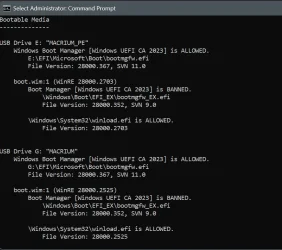
Having a bit of problems with my Macrium Reflect X Rescue USB in Windows RE


Code:
PS D:\Scripts\Tools> .\Check_BootMedia.ps1
Invoke-WebRequest: D:\Scripts\Tools\Check_BootMedia.ps1:230
Line |
 230 |              Invoke-WebRequest -UseBasicParsing -Uri $offlinereg_BACKU …
     |              ~~~~~~~~~~~~~~~~~~~~~~~~~~~~~~~~~~~~~~~~~~~~~~~~~~~~~~~~~
     | 429 Too Many Requests You have sent too many requests in a given amount of time.
Remove-Item: D:\Scripts\Tools\Check_BootMedia.ps1:243
Line |
 243 |              Remove-Item $ZIP_File -Force
     |              ~~~~~~~~~~~~~~~~~~~~~~~~~~~~
     | Cannot find path 'C:\Users\PCADMI~1\AppData\Local\Temp\offlinereg.zip' because it does not exist.
You might have a temporary network problem downloading the offlinereg tool into your TEMP folder. Try again in a bit.
 

My Computer My Computer

At a glance

Windows 7
OS
Windows 7
I just ran the UEFI update script got this:

PS C:\Windows\System32> powershell -nop -ep bypass -f C:\temp21\update_uefi-ca2023.ps1
SUCCESS: NO UPDATES ARE REQUIRED.

PS C:\Windows\System32> powershell -nop -ep bypass -f C:\temp23\check_dbxupdate.bin.ps1
SUCCESS: Matched 291/291 EFI signatures from "dbxupdate.bin"
FAILED: Missing 1/3 SVN signatures from "DBXUpdate2024.bin"
SUCCESS: Matched 3/3 SVN signatures from "DBXUpdateSVN.bin"
 

My Computer My Computer

At a glance

Windows 11 Intel i5 10400 HD630 graphics chipi5-1040012 gbHD630 chipset
OS
Windows 11 Intel i5 10400 HD630 graphics chip
Computer type
PC/Desktop
Manufacturer/Model
HP
CPU
i5-10400
Memory
12 gb
Graphics Card(s)
HD630 chipset
Monitor(s) Displays
LG 24inch
Hard Drives
SSD, external usb drive 1tb for files/backups
Keyboard
wireless Logi
Mouse
ms 4000 wireless mouse
Internet Speed
10meg
Browser
Firefox
Antivirus
Defender
Other Info
Win11 Home 25h2 26200.9278 08/27/2026
Code:
PS C:\SecureBoot-CA-2023-Updates.v2026.09.08> powershell -nop -ep bypass -f .\Check_DBXUpdate.bin.ps1
SUCCESS: Matched 291/291 EFI signatures from "dbxupdate.bin"
FAILED: Missing 1/3 SVN signatures from "DBXUpdate2024.bin"
SUCCESS: Matched 3/3 SVN signatures from "DBXUpdateSVN.bin"
[/QUOTE]
Can you run Check_DBXUpdate.bin.ps1 with "-Verbose"?
 

My Computer My Computer

At a glance

Windows 7
OS
Windows 7
I got:

PS C:\Windows\System32> powershell -nop -ep bypass -f C:\temp23\check_dbxupdate.bin.ps1 -verbose
SUCCESS: Matched 291/291 EFI signatures from "dbxupdate.bin"
FAILED: Missing 1/3 SVN signatures from "DBXUpdate2024.bin"
Missing [01612B139DD5598843AB1C185C3CB2EB92000005000000000000000000000000] bootmgfw.efi SVN 5.0
SUCCESS: Matched 3/3 SVN signatures from "DBXUpdateSVN.bin"
 

My Computer My Computer

At a glance

Windows 11 Intel i5 10400 HD630 graphics chipi5-1040012 gbHD630 chipset
OS
Windows 11 Intel i5 10400 HD630 graphics chip
Computer type
PC/Desktop
Manufacturer/Model
HP
CPU
i5-10400
Memory
12 gb
Graphics Card(s)
HD630 chipset
Monitor(s) Displays
LG 24inch
Hard Drives
SSD, external usb drive 1tb for files/backups
Keyboard
wireless Logi
Mouse
ms 4000 wireless mouse
Internet Speed
10meg
Browser
Firefox
Antivirus
Defender
Other Info
Win11 Home 25h2 26200.9278 08/27/2026
Can you run Check_DBXUpdate.bin.ps1 with "-Verbose"?

Code:
PS C:\SecureBoot-CA-2023-Updates.v2026.09.08> powershell -nop -ep bypass -f .\Check_DBXUpdate.bin.ps1 -Verbose
SUCCESS: Matched 291/291 EFI signatures from "dbxupdate.bin"
FAILED: Missing 1/3 SVN signatures from "DBXUpdate2024.bin"
    Missing [01612B139DD5598843AB1C185C3CB2EB92000005000000000000000000000000] bootmgfw.efi SVN 5.0
SUCCESS: Matched 3/3 SVN signatures from "DBXUpdateSVN.bin"

PS C:\SecureBoot-CA-2023-Updates.v2026.09.08>
 

My Computers My Computers

  • At a glance

    Windows 11 ProIntel Core i5-12600K 3.7 GHz 10-Core ProcessorCorsair Vengeance LPX 64 GB (2 x 32 GB) DDR4-...Integrated Intel UHD Graphics 770
    OS
    Windows 11 Pro
    Computer type
    PC/Desktop
    Manufacturer/Model
    Self built PC by me.
    CPU
    Intel Core i5-12600K 3.7 GHz 10-Core Processor
    Motherboard
    Gigabyte B760M H DDR4 Micro ATX LGA1700 Motherboard
    Memory
    Corsair Vengeance LPX 64 GB (2 x 32 GB) DDR4-3200 CL16 Memory
    Graphics Card(s)
    Integrated Intel UHD Graphics 770
    Sound Card
    Realtek
    Monitor(s) Displays
    LG
    Hard Drives
    Samsung 990 Pro 1 TB M.2-2280 PCIe 4.0 X4 NVME Solid State Drive
    Samsung 990 Pro 2 TB M.2-2280 PCIe 4.0 X4 NVME Solid State Drive
    PSU
    NZXT 850w ATX 3.1 Gold Fully Modular Power Supply
    Case
    Thermaltake Versa H25 ATX Mid Tower Case
    Cooling
    CPU Cooler Thermalright Assassin Spirit 120 EVO ARGB (ARGB Disabled) - Case Fans BlackThermalright TL-C12C-S X3 66.17 CFM 120 mm Fans 3-Pack (ARGB disabled)
    Internet Speed
    1 Gbps
    Other Info
    I hate ARGB.
  • At a glance

    Windows 11 Pro
    Operating System
    Windows 11 Pro
    Computer type
    Laptop
    Manufacturer/Model
    Lenovo ThinkBook 14 G2 ITL
Try this test script.
Code:
PS C:\> powershell -nop -ep bypass -f .\Check_DBXUpdate.bin.ps1 -Verbose
SUCCESS: Matched 291/291 EFI signatures from "dbxupdate.bin"
Current SVN: 11.0
FAILED: Missing 1/3 SVN signatures from "DBXUpdate2024.bin"
    Missing [01612B139DD5598843AB1C185C3CB2EB92000005000000000000000000000000] bootmgfw.efi SVN 5.0
SUCCESS: Matched 3/3 SVN signatures from "DBXUpdateSVN.bin"

PS C:\>

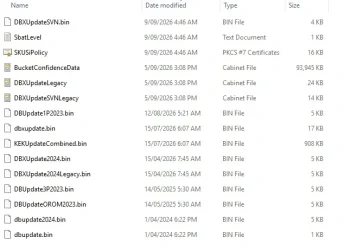
Also DBXUpdateSVN.bin was updated today.

d.webp
 

My Computers My Computers

  • At a glance

    Windows 11 ProIntel Core i5-12600K 3.7 GHz 10-Core ProcessorCorsair Vengeance LPX 64 GB (2 x 32 GB) DDR4-...Integrated Intel UHD Graphics 770
    OS
    Windows 11 Pro
    Computer type
    PC/Desktop
    Manufacturer/Model
    Self built PC by me.
    CPU
    Intel Core i5-12600K 3.7 GHz 10-Core Processor
    Motherboard
    Gigabyte B760M H DDR4 Micro ATX LGA1700 Motherboard
    Memory
    Corsair Vengeance LPX 64 GB (2 x 32 GB) DDR4-3200 CL16 Memory
    Graphics Card(s)
    Integrated Intel UHD Graphics 770
    Sound Card
    Realtek
    Monitor(s) Displays
    LG
    Hard Drives
    Samsung 990 Pro 1 TB M.2-2280 PCIe 4.0 X4 NVME Solid State Drive
    Samsung 990 Pro 2 TB M.2-2280 PCIe 4.0 X4 NVME Solid State Drive
    PSU
    NZXT 850w ATX 3.1 Gold Fully Modular Power Supply
    Case
    Thermaltake Versa H25 ATX Mid Tower Case
    Cooling
    CPU Cooler Thermalright Assassin Spirit 120 EVO ARGB (ARGB Disabled) - Case Fans BlackThermalright TL-C12C-S X3 66.17 CFM 120 mm Fans 3-Pack (ARGB disabled)
    Internet Speed
    1 Gbps
    Other Info
    I hate ARGB.
  • At a glance

    Windows 11 Pro
    Operating System
    Windows 11 Pro
    Computer type
    Laptop
    Manufacturer/Model
    Lenovo ThinkBook 14 G2 ITL

My Computers My Computers

  • At a glance

    Win 11 Pro 25H2 26200.9445Intel® Core™ i7-14700KG.SKILL Ripjaws S5 Series 64GB (2 x 32GB) DDR5ASUS GeForce RTX 4070 Super 12GB
    OS
    Win 11 Pro 25H2 26200.9445
    Computer type
    PC/Desktop
    Manufacturer/Model
    Self Built
    CPU
    Intel® Core™ i7-14700K
    Motherboard
    ASUS TUF Z690-PLUS WIFI (BIOS 4505)
    Memory
    G.SKILL Ripjaws S5 Series 64GB (2 x 32GB) DDR5
    Graphics Card(s)
    ASUS GeForce RTX 4070 Super 12GB
    Sound Card
    Sound Blaster AE-5 Plus
    Monitor(s) Displays
    ASUS TUF Gaming 27" 2K HDR Gaming
    Screen Resolution
    2560 x 1440
    Hard Drives
    Samsung 990 Pro 1TB NVMe (Win 11 25H2)
    SK hynix P41 500GB NVMe
    SK hynix P41 2TB NVMe (x3)
    Crucial P3 Plus 4TB
    PSU
    Corsair RM850x Shift
    Case
    Antec Dark Phantom DP502 FLUX
    Cooling
    Corsair Nautilus 360 RS AIO
    Keyboard
    Logitech MK 320
    Mouse
    Razer Basilisk V3
    Internet Speed
    750Mbs
    Browser
    Firefox
    Antivirus
    Winows Security
    Other Info
    MR 8.1 Home
  • At a glance

    Win 11 Pro 25H2 26200.9445Intel Core i5-1140064 GB DDR4MSI GeForce RTX 3060 Ventus 2X 12GB
    Operating System
    Win 11 Pro 25H2 26200.9445
    Computer type
    PC/Desktop
    Manufacturer/Model
    Self Built
    CPU
    Intel Core i5-11400
    Motherboard
    Asus TUF Gaming Z590 Plus WiFi (BIOS 2803)
    Memory
    64 GB DDR4
    Graphics card(s)
    MSI GeForce RTX 3060 Ventus 2X 12GB
    Sound Card
    SoundBlaster Audigy Fx V2
    Monitor(s) Displays
    Samsung F27T350
    Screen Resolution
    1920x1080
    Hard Drives
    Samsung 980 Pro 1TB
    Samsung 970 EVO Plus 2TB
    Samsung 870 EVO 500GB SSD
    PSU
    Corsair HX750
    Case
    Cougar MX330-G Window
    Cooling
    Thermalright Frozen Edge 240 Black AIO
    Internet Speed
    350Mbps
    Browser
    Firefox
    Antivirus
    Windows Security
  • System Three
    Win 11 Pro 25H2 26200.9445
    ASUS PRIME Z370-P II BIOS 3004 7/12/21
    Intel Core i7-8700 CPU @ 3.20GHz
    32GB DDR4 RAM (4x8)
    iGPU Intel UHD Graphics 630
    Cooler Master Hyper 212
    Mid-Tower Desktop

My Computers My Computers

  • At a glance

    Win11 25H2 26200.7623Intel XEON W-2245 8c/16t128GB DDR4-2933 ECCNvidia Quadro K4200
    OS
    Win11 25H2 26200.7623
    Computer type
    PC/Desktop
    Manufacturer/Model
    Lenovo P520
    CPU
    Intel XEON W-2245 8c/16t
    Memory
    128GB DDR4-2933 ECC
    Graphics Card(s)
    Nvidia Quadro K4200
    Sound Card
    Bultin
    Monitor(s) Displays
    LCD 24in
    Screen Resolution
    1920x1200
    Hard Drives
    1TB SSD system, 16TB data 3.5in HDD, 16TB backup 3.5in HDD
    PSU
    900W
    Cooling
    Air
    Internet Speed
    1Gb
    Browser
    Firefox & Chrome
    Antivirus
    MalwareBytes
  • At a glance

    Win10 22H2Intel Core i7-3520m16GBintegrated CPU graphics
    Operating System
    Win10 22H2
    Computer type
    Laptop
    Manufacturer/Model
    Lenovo T530
    CPU
    Intel Core i7-3520m
    Memory
    16GB
    Graphics card(s)
    integrated CPU graphics
    Hard Drives
    1TB SSD
    Internet Speed
    1Gb
    Browser
    Fiefox & Chrome
    Antivirus
    Malwarebytes

:(

Code:
PS C:\> powershell -nop -ep bypass -f .\Check_DBXUpdate.bin.ps1 -Verbose
SUCCESS: Matched 291/291 EFI signatures from "dbxupdate.bin"
sort : Cannot convert the "7.0" value of type "System.Version" to type "System.Single".
At C:\Check_DBXUpdate.bin.ps1:530 char:99
+ ... h { [version](Get-SignatureDataSVN $_) } | sort { [float]$_ } | selec ...
+                                                ~~~~~~~~~~~~~~~~~~
    + CategoryInfo          : InvalidResult: (7.0:PSObject) [Sort-Object], RuntimeException
    + FullyQualifiedErrorId : ExpressionEvaluation,Microsoft.PowerShell.Commands.SortObjectCommand

sort : Cannot convert the "2.0" value of type "System.Version" to type "System.Single".
At C:\Check_DBXUpdate.bin.ps1:530 char:99
+ ... h { [version](Get-SignatureDataSVN $_) } | sort { [float]$_ } | selec ...
+                                                ~~~~~~~~~~~~~~~~~~
    + CategoryInfo          : InvalidResult: (2.0:PSObject) [Sort-Object], RuntimeException
    + FullyQualifiedErrorId : ExpressionEvaluation,Microsoft.PowerShell.Commands.SortObjectCommand

sort : Cannot convert the "8.0" value of type "System.Version" to type "System.Single".
At C:\Check_DBXUpdate.bin.ps1:530 char:99
+ ... h { [version](Get-SignatureDataSVN $_) } | sort { [float]$_ } | selec ...
+                                                ~~~~~~~~~~~~~~~~~~
    + CategoryInfo          : InvalidResult: (8.0:PSObject) [Sort-Object], RuntimeException
    + FullyQualifiedErrorId : ExpressionEvaluation,Microsoft.PowerShell.Commands.SortObjectCommand

sort : Cannot convert the "9.0" value of type "System.Version" to type "System.Single".
At C:\Check_DBXUpdate.bin.ps1:530 char:99
+ ... h { [version](Get-SignatureDataSVN $_) } | sort { [float]$_ } | selec ...
+                                                ~~~~~~~~~~~~~~~~~~
    + CategoryInfo          : InvalidResult: (9.0:PSObject) [Sort-Object], RuntimeException
    + FullyQualifiedErrorId : ExpressionEvaluation,Microsoft.PowerShell.Commands.SortObjectCommand

sort : Cannot convert the "11.0" value of type "System.Version" to type "System.Single".
At C:\Check_DBXUpdate.bin.ps1:530 char:99
+ ... h { [version](Get-SignatureDataSVN $_) } | sort { [float]$_ } | selec ...
+                                                ~~~~~~~~~~~~~~~~~~
    + CategoryInfo          : InvalidResult: (11.0:PSObject) [Sort-Object], RuntimeException
    + FullyQualifiedErrorId : ExpressionEvaluation,Microsoft.PowerShell.Commands.SortObjectCommand

FAILED: Missing 1/3 SVN signatures from "DBXUpdate2024.bin"
    Missing [01612B139DD5598843AB1C185C3CB2EB92000005000000000000000000000000] bootmgfw.efi SVN 5.0
SUCCESS: Matched 3/3 SVN signatures from "DBXUpdateSVN.bin"

PS C:\>
 

My Computers My Computers

  • At a glance

    Windows 11 ProIntel Core i5-12600K 3.7 GHz 10-Core ProcessorCorsair Vengeance LPX 64 GB (2 x 32 GB) DDR4-...Integrated Intel UHD Graphics 770
    OS
    Windows 11 Pro
    Computer type
    PC/Desktop
    Manufacturer/Model
    Self built PC by me.
    CPU
    Intel Core i5-12600K 3.7 GHz 10-Core Processor
    Motherboard
    Gigabyte B760M H DDR4 Micro ATX LGA1700 Motherboard
    Memory
    Corsair Vengeance LPX 64 GB (2 x 32 GB) DDR4-3200 CL16 Memory
    Graphics Card(s)
    Integrated Intel UHD Graphics 770
    Sound Card
    Realtek
    Monitor(s) Displays
    LG
    Hard Drives
    Samsung 990 Pro 1 TB M.2-2280 PCIe 4.0 X4 NVME Solid State Drive
    Samsung 990 Pro 2 TB M.2-2280 PCIe 4.0 X4 NVME Solid State Drive
    PSU
    NZXT 850w ATX 3.1 Gold Fully Modular Power Supply
    Case
    Thermaltake Versa H25 ATX Mid Tower Case
    Cooling
    CPU Cooler Thermalright Assassin Spirit 120 EVO ARGB (ARGB Disabled) - Case Fans BlackThermalright TL-C12C-S X3 66.17 CFM 120 mm Fans 3-Pack (ARGB disabled)
    Internet Speed
    1 Gbps
    Other Info
    I hate ARGB.
  • At a glance

    Windows 11 Pro
    Operating System
    Windows 11 Pro
    Computer type
    Laptop
    Manufacturer/Model
    Lenovo ThinkBook 14 G2 ITL
No problem here, updated 3 machines so far, laptop to go ...

Code:
PS C:\Users\jwdav> Get-SecureBootSVN


FirmwareSVN      : 11.0
BootManagerSVN   : 11.0
StagedSVN        : 11.0
ComplianceStatus : Compliant (Boot Manager SVN meets staged SVN)
BootManagerPath  : \\.\HarddiskVolume1\EFI\Microsoft\Boot\bootmgfw.efi


PS C:\Users\jwdav> powershell -nop -ep bypass -f E:\Z_c2023\Check_DBXUpdate.bin.ps1
SUCCESS: Matched 291/291 EFI signatures from "dbxupdate.bin"
SUCCESS: Matched 3/3 SVN signatures from "DBXUpdate2024.bin"
SUCCESS: Matched 3/3 SVN signatures from "DBXUpdateSVN.bin"

PS C:\Users\jwdav> powershell -nop -ep bypass -f E:\Z_c2023\Check_DBXUpdate.bin.ps1 -verbose
SUCCESS: Matched 291/291 EFI signatures from "dbxupdate.bin"
SUCCESS: Matched 3/3 SVN signatures from "DBXUpdate2024.bin"
SUCCESS: Matched 3/3 SVN signatures from "DBXUpdateSVN.bin"

PS C:\Users\jwdav>
 

My Computer My Computer

At a glance

Win11 24H2 IOT LTSC / Win11 Pro 25H2AMD Ryzen 7 8700G / Ryzen 7 8700G / Ryzen 8600GF5-6000J3636F16GX2-FX5 32GB / Lexar Ares RGB ...internal
OS
Win11 24H2 IOT LTSC / Win11 Pro 25H2
Computer type
PC/Desktop
Manufacturer/Model
Gigabyte x2 / Asus = Home builds
CPU
AMD Ryzen 7 8700G / Ryzen 7 8700G / Ryzen 8600G
Motherboard
Gigabyte B650 AORUS ELITE AX V2 / ASUS TUF GAMING B650-PLUS / B650 GAMING X AX V2
Memory
F5-6000J3636F16GX2-FX5 32GB / Lexar Ares RGB LD5BU016G-R6000GDLA 32GB / Kingston FURY Beast 32 GB DDR5-5600
Graphics Card(s)
internal
Sound Card
Realtek
Monitor(s) Displays
BenQ 27 L EW2780
Screen Resolution
1920x1080
Hard Drives
Many M.2's (WD)
PSU
be quiet! Pure Power 13 M 550W
Case
Chieftec HC-10B-OP
Cooling
Gelid Solutions Tranquillo 5, many Noctua's 12x12
Keyboard
Microsoft
Mouse
Cherry
Internet Speed
500 mbs
Browser
Vivaldi
Antivirus
Eset
Other Info
PC builder / repair / Trouble-shooter etc.
Back
Top Bottom