Solved garlin's PowerShell scripts for updating Secure Boot CA 2023


I am suffering from extreme brain fog yesterday and today after trying to to run the updated scripts after Tuesday patch day. What's the right way to fix this:
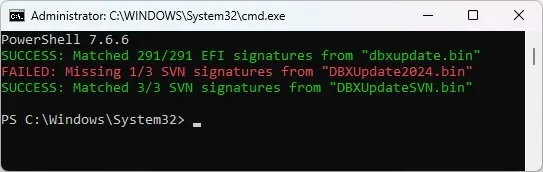
Image1.webp
 

My Computers My Computers

  • At a glance

    Windows 11 Pro 25H2i7-8565U16GBIntel UHD Graphics 620
    OS
    Windows 11 Pro 25H2
    Computer type
    Laptop
    Manufacturer/Model
    Lenovo T490 (2020 Hardware)
    CPU
    i7-8565U
    Motherboard
    20N20028US
    Memory
    16GB
    Graphics Card(s)
    Intel UHD Graphics 620
    Sound Card
    Realtec Audio
    Monitor(s) Displays
    ASUS VE248
    Screen Resolution
    1920 X 1080
    Hard Drives
    Samsung SSD 970 PRO 512GB NVMe
    Internet Speed
    Frontier fiber 1GB
    Browser
    Chrome, Firefox, Edge
    Antivirus
    Norton 360 Deluxe Plus
    Other Info
    Supported hardware, upgraded from Windows 10 Pro to Windows 11 Pro version 24H2 on 06/01/2025 using the Windows 11 ISO file. Used the enablement package to upgrade to version 25H2 on 10/07/2025. Secure boot enabled. Secure Boot CA 2023 updated.
  • At a glance

    Windows 11 Pro 25H2i7-4770 (with SSE4.2, and POPCNT)16GBIntel HD Graphics 4600
    Operating System
    Windows 11 Pro 25H2
    Computer type
    PC/Desktop
    Manufacturer/Model
    Lenovo ThinkCentre M83 (2014 Hardware)
    CPU
    i7-4770 (with SSE4.2, and POPCNT)
    Motherboard
    10AL000GUS
    Memory
    16GB
    Graphics card(s)
    Intel HD Graphics 4600
    Sound Card
    Realtec High Definition Audio
    Monitor(s) Displays
    ASUS VE248
    Screen Resolution
    1920 X 1080
    Hard Drives
    Samsung SSD 860 PRO 1TB SATA
    Internet Speed
    Frontier fiber 1GB
    Browser
    Chrome, Firefox, Edge
    Antivirus
    Norton 360 Deluxe Plus
    Other Info
    Unsupported hardware, upgraded from Windows 10 Pro (TPM 1.2 & unsupported CPU, but does have SSE4.2, and POPCNT) to Windows 11 Pro version 24H2 on 06/15/2025. Added Registry Key HKEY_LOCAL_MACHINE\SYSTEM\Setup\MoSetup – AllowUpgradesWithUnsupportedTPMOrCPU=1 to allow installation using the Windows 11 ISO file. Used the enablement package to upgrade to version 25H2 on 10/08/2025. Secure boot enabled. Secure Boot CA 2023 updated.
I am suffering from extreme brain fog yesterday and today after trying to to run the updated scripts after Tuesday patch day. What's the right way to fix this:

View attachment 182449
I had the same issue. Resolved with the instructions in How to manage the Windows Boot Manager revocations for Secure Boot changes associated with CVE-2023-24932 | Microsoft Support

Starting with the July 9, 2024, updates, the SVN is being incremented in the Boot Manager and the update to the firmware. The firmware update is optional and can be applied by following this step:

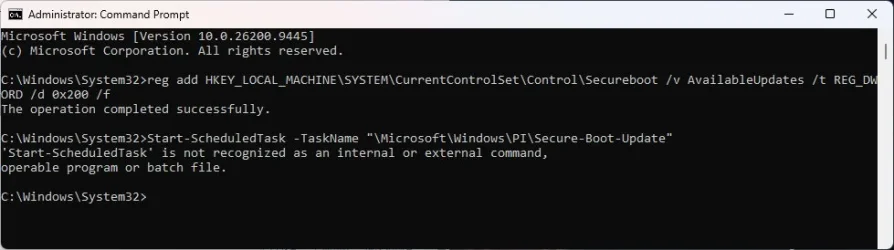
1: Apply the SVN update to the firmware. To do this, open a Command Prompt window as an Administrator, type each of the following commands separately, and then press Enter:

reg add HKEY_LOCAL_MACHINE\SYSTEM\CurrentControlSet\Control\Secureboot /v AvailableUpdates /t REG_DWORD /d 0x200 /f

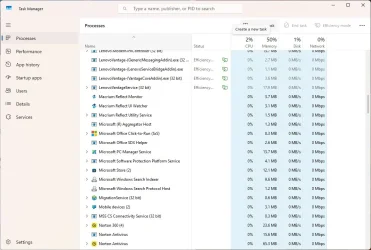
2: Then start the task in task manager
Start-ScheduledTask -TaskName "\Microsoft\Windows\PI\Secure-Boot-Update"

PS: command no. 2 give me an error. I started the task manually from Task Manager (under "Microsoft\Windows\PI\Secure-Boot-Update")
 

My Computer My Computer

At a glance

Windows 11 22H2 22621.2215Intel Core i7-11800H64 GBIntel Tiger Lake-H - GT1 Integrated Graphics ...
OS
Windows 11 22H2 22621.2215
Computer type
Laptop
Manufacturer/Model
HP OMEN 17''
CPU
Intel Core i7-11800H
Motherboard
HP 88F7 - Intel HM570 (Tiger Lake PCH-H) chipset
Memory
64 GB
Graphics Card(s)
Intel Tiger Lake-H - GT1 Integrated Graphics [Hewlett-Packard] + NVIDIA GeForce RTX 3070
Screen Resolution
2560x1440
Hard Drives
Crucial nvme (CT2000P5PSSD8+CT2000P3SSD8) with Intel RST WMD controller
I added the registry key, but I'm doing something wrong when running the task.

Image1.webp
 

My Computers My Computers

  • At a glance

    Windows 11 Pro 25H2i7-8565U16GBIntel UHD Graphics 620
    OS
    Windows 11 Pro 25H2
    Computer type
    Laptop
    Manufacturer/Model
    Lenovo T490 (2020 Hardware)
    CPU
    i7-8565U
    Motherboard
    20N20028US
    Memory
    16GB
    Graphics Card(s)
    Intel UHD Graphics 620
    Sound Card
    Realtec Audio
    Monitor(s) Displays
    ASUS VE248
    Screen Resolution
    1920 X 1080
    Hard Drives
    Samsung SSD 970 PRO 512GB NVMe
    Internet Speed
    Frontier fiber 1GB
    Browser
    Chrome, Firefox, Edge
    Antivirus
    Norton 360 Deluxe Plus
    Other Info
    Supported hardware, upgraded from Windows 10 Pro to Windows 11 Pro version 24H2 on 06/01/2025 using the Windows 11 ISO file. Used the enablement package to upgrade to version 25H2 on 10/07/2025. Secure boot enabled. Secure Boot CA 2023 updated.
  • At a glance

    Windows 11 Pro 25H2i7-4770 (with SSE4.2, and POPCNT)16GBIntel HD Graphics 4600
    Operating System
    Windows 11 Pro 25H2
    Computer type
    PC/Desktop
    Manufacturer/Model
    Lenovo ThinkCentre M83 (2014 Hardware)
    CPU
    i7-4770 (with SSE4.2, and POPCNT)
    Motherboard
    10AL000GUS
    Memory
    16GB
    Graphics card(s)
    Intel HD Graphics 4600
    Sound Card
    Realtec High Definition Audio
    Monitor(s) Displays
    ASUS VE248
    Screen Resolution
    1920 X 1080
    Hard Drives
    Samsung SSD 860 PRO 1TB SATA
    Internet Speed
    Frontier fiber 1GB
    Browser
    Chrome, Firefox, Edge
    Antivirus
    Norton 360 Deluxe Plus
    Other Info
    Unsupported hardware, upgraded from Windows 10 Pro (TPM 1.2 & unsupported CPU, but does have SSE4.2, and POPCNT) to Windows 11 Pro version 24H2 on 06/15/2025. Added Registry Key HKEY_LOCAL_MACHINE\SYSTEM\Setup\MoSetup – AllowUpgradesWithUnsupportedTPMOrCPU=1 to allow installation using the Windows 11 ISO file. Used the enablement package to upgrade to version 25H2 on 10/08/2025. Secure boot enabled. Secure Boot CA 2023 updated.
I added the registry key, but I'm doing something wrong when running the task.

View attachment 182456
Yes, I had the same error. As I wrote before, you must open Task Manager, search for the first task you see under "Microsoft\Windows\PI". The task is named "Secure-Boot-Update". Run it and reboot.
 

My Computer My Computer

At a glance

Windows 11 22H2 22621.2215Intel Core i7-11800H64 GBIntel Tiger Lake-H - GT1 Integrated Graphics ...
OS
Windows 11 22H2 22621.2215
Computer type
Laptop
Manufacturer/Model
HP OMEN 17''
CPU
Intel Core i7-11800H
Motherboard
HP 88F7 - Intel HM570 (Tiger Lake PCH-H) chipset
Memory
64 GB
Graphics Card(s)
Intel Tiger Lake-H - GT1 Integrated Graphics [Hewlett-Packard] + NVIDIA GeForce RTX 3070
Screen Resolution
2560x1440
Hard Drives
Crucial nvme (CT2000P5PSSD8+CT2000P3SSD8) with Intel RST WMD controller
tried last nights second test file - am I doing something wrong - this is an on a oldish Dell Inspiron 3668

BIOS Version/Date Dell Inc. 1.18.0, 05/10/2021
SMBIOS Version 3.0
Embedded Controller Version 255.255
BIOS Mode UEFI
on Win 10 with latest updates


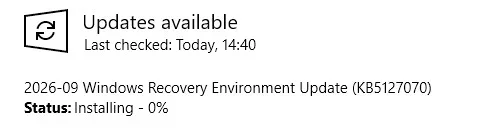
this is a strange one - it did a boomerang today

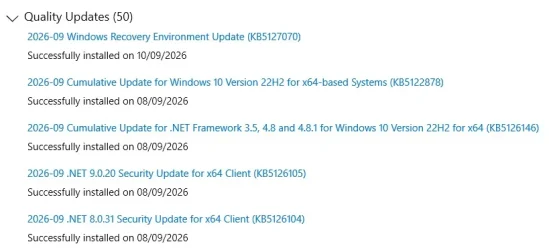
it already claimed it went on the day after it actually did - now MS are putting it on again ???

bomerang.webp

edit - and here it is magically reinstalled TODAY

Same PC.webp

how the very same PC looked yesterday.... KB5127070 loaded and rebooted showing it was there on Tuesday evening - but updates list says it went on Wednesday - now Thursday MS is reinstalling it ????

re-update-webp.182275
 

My Computer My Computer

At a glance

Win11
OS
Win11
UPDATE: 2026-09-10

1. September 2026 LCU introduced SVN 11.0, requiring a new minimum UBR for supported releases
2. Get-SignatureDataSVN fails to cast SVN as type [version] in Check_DBXUpdate.bin.ps1

Fixed the bug where Check_DBXUpdate.bin.ps1 incorrectly reports DBX is missing 1 out of 3 SVN's.

Updated the check for your Windows monthly update level, to reflect Sept 2026 is required for having the latest Secure Boot changes.
 

My Computer My Computer

At a glance

Windows 7
OS
Windows 7
Yes, I had the same error. As I wrote before, you must open Task Manager, search for the first task you see under "Microsoft\Windows\PI". The task is named "Secure-Boot-Update". Run it and reboot.
I don't have anything called Microsoft\Windows\PI in Task Manager.

Image1.webp
 

My Computers My Computers

  • At a glance

    Windows 11 Pro 25H2i7-8565U16GBIntel UHD Graphics 620
    OS
    Windows 11 Pro 25H2
    Computer type
    Laptop
    Manufacturer/Model
    Lenovo T490 (2020 Hardware)
    CPU
    i7-8565U
    Motherboard
    20N20028US
    Memory
    16GB
    Graphics Card(s)
    Intel UHD Graphics 620
    Sound Card
    Realtec Audio
    Monitor(s) Displays
    ASUS VE248
    Screen Resolution
    1920 X 1080
    Hard Drives
    Samsung SSD 970 PRO 512GB NVMe
    Internet Speed
    Frontier fiber 1GB
    Browser
    Chrome, Firefox, Edge
    Antivirus
    Norton 360 Deluxe Plus
    Other Info
    Supported hardware, upgraded from Windows 10 Pro to Windows 11 Pro version 24H2 on 06/01/2025 using the Windows 11 ISO file. Used the enablement package to upgrade to version 25H2 on 10/07/2025. Secure boot enabled. Secure Boot CA 2023 updated.
  • At a glance

    Windows 11 Pro 25H2i7-4770 (with SSE4.2, and POPCNT)16GBIntel HD Graphics 4600
    Operating System
    Windows 11 Pro 25H2
    Computer type
    PC/Desktop
    Manufacturer/Model
    Lenovo ThinkCentre M83 (2014 Hardware)
    CPU
    i7-4770 (with SSE4.2, and POPCNT)
    Motherboard
    10AL000GUS
    Memory
    16GB
    Graphics card(s)
    Intel HD Graphics 4600
    Sound Card
    Realtec High Definition Audio
    Monitor(s) Displays
    ASUS VE248
    Screen Resolution
    1920 X 1080
    Hard Drives
    Samsung SSD 860 PRO 1TB SATA
    Internet Speed
    Frontier fiber 1GB
    Browser
    Chrome, Firefox, Edge
    Antivirus
    Norton 360 Deluxe Plus
    Other Info
    Unsupported hardware, upgraded from Windows 10 Pro (TPM 1.2 & unsupported CPU, but does have SSE4.2, and POPCNT) to Windows 11 Pro version 24H2 on 06/15/2025. Added Registry Key HKEY_LOCAL_MACHINE\SYSTEM\Setup\MoSetup – AllowUpgradesWithUnsupportedTPMOrCPU=1 to allow installation using the Windows 11 ISO file. Used the enablement package to upgrade to version 25H2 on 10/08/2025. Secure boot enabled. Secure Boot CA 2023 updated.

Latest Support Threads

Back
Top Bottom