Solved garlin's PowerShell scripts for updating Secure Boot CA 2023


You're probably safer opting out of future updates, since HP will never fix the BIOS:
Code:
reg add HKEY_LOCAL_MACHINE\SYSTEM\CurrentControlSet\Control\SecureBoot /v HighConfidenceOptOut /t REG_DWORD /d 1 /f
ok, garlin
thank you for your advice; very much appreciated
best regards,
fernando
 

My Computers My Computers

  • At a glance

    Windows 10 Enterprise IoT LTSCIntel(R) Core(TM) i5-6400 CPU @ 2.70GHz16GBIntel HD Graphics 530 (integrated on Motherbo...
    OS
    Windows 10 Enterprise IoT LTSC
    Computer type
    PC/Desktop
    Manufacturer/Model
    ASUS/ K31CD
    CPU
    Intel(R) Core(TM) i5-6400 CPU @ 2.70GHz
    Memory
    16GB
    Graphics Card(s)
    Intel HD Graphics 530 (integrated on Motherboard)
    Other Info
    BIOS: American Megatrends Inc.
    v. 1102 (12-2018)
  • At a glance

    Windows 10 Enterprise IoT LTSCIntel(R) i5-3230M CPU @ 2.60GHz, 2601 Mhz8GBIntel HD Graphics 4000 (HP) 2047 // MBNVIDIA ...
    Operating System
    Windows 10 Enterprise IoT LTSC
    Computer type
    Laptop
    Manufacturer/Model
    HP ENVY 15 Notebook PC
    CPU
    Intel(R) i5-3230M CPU @ 2.60GHz, 2601 Mhz
    Memory
    8GB
    Graphics card(s)
    Intel HD Graphics 4000 (HP) 2047 // MBNVIDIA GeForce GT 740M (HP)
    Other Info
    BIOS: Insyde F.69, 06/03/2017

My Computers My Computers

  • At a glance

    Windows 11 Home, ver 25H2 build 26200.8894Intel Core i5 5200U @ 2.20GH4 GBIntel HD Graphics 5500 on board
    OS
    Windows 11 Home, ver 25H2 build 26200.8894
    Computer type
    Laptop
    Manufacturer/Model
    Hewlett-Packard Spectre 13-4001 x360 convertable
    CPU
    Intel Core i5 5200U @ 2.20GH
    Motherboard
    Hewlett-Packard 802D
    Memory
    4 GB
    Graphics Card(s)
    Intel HD Graphics 5500 on board
    Sound Card
    Intel Smart Sound Technology (Intel SST)
    Hard Drives
    Micron 256GB M.2 2280 NGFF SSD MTFDDAV256TBN, (SATA 6.0 Gb/s)
    Keyboard
    Model # G01KB
    Antivirus
    Microsoft Defender
    Other Info
    born on date: 25 Feb 2016
  • At a glance

    Win 11 Home 25H2 build 26200.8894Intel Core i7 4th Gen 4790 (3.60GHz), Haswell...Samsung 16 GB DDR3 (8GB in 2 modules)NVIDIA GeForce GTX 760, 3GB, and on-board Int...
    Operating System
    Win 11 Home 25H2 build 26200.8894
    Computer type
    PC/Desktop
    Manufacturer/Model
    Asus Desktop model M32AD-US019S (DOM: 6/9/2014 )
    CPU
    Intel Core i7 4th Gen 4790 (3.60GHz), Haswell 22nm Technology, SOCKET 1150
    Motherboard
    H81M-E/M51AD/DP_MB
    Memory
    Samsung 16 GB DDR3 (8GB in 2 modules)
    Graphics card(s)
    NVIDIA GeForce GTX 760, 3GB, and on-board Intel HD Graphics 4600 Rev 6
    Monitor(s) Displays
    HP EliteDisplay E241i LED; HP EliteDisplay E243
    Hard Drives
    Samsung 500GB SSD, 870 EVO (SATA 6.0 )
    Micron 250GB SSD, CT250MX500
    Toshiba HDD, 3GB (original drive w/PC)
    Case
    ASUS
    Keyboard
    ASUS-------------------------
    Antivirus
    MS Defender
    Other Info
    purchased 8/28/2015 from Newegg.
  • HEWLETT PACKARD
    HP OmniBook X Flip NGAI (Next Gen AI),
    Model: 16-as0023dx
    PT# B5UH1UA#ABA Product #: B5UH1UA
    delivered and setup 7/25/25
    16" 2K Touch-Screen Laptop
    Intel Core Ultra 7 256V '24 Series 2 - CPU
    Boost Clock Frequency 4.8 gigahertz; Neural Processing Unit (NPU) Yes;
    16GB Memory, LPDDR5X
    1TB SSD PCIe 4.0
    Graphics: Intel Arc 140V
    1 x HDMI 2.1
    1 x Thunderbolt 4
    2K Touch-Screen display, LED, IPS; 1920 x 1200 (Full HD+)
    USB Ports: 1 x USB-C 3.1, 2 x USB-A 3.1
    Wi-Fi 6E

    DELL
    Model:I7591-7483BLK-PUS 2-in-1 (7000 Series)
    purchased new 12/3/2019,
    15.6 inch 2-IN-1;
    4K Ultra HD Touch-Screen, 3840 x 2160,
    Intel Core i7 10510U CPU 1.80GHz,
    16GB RAM DDR4 SDRAM 2400 megahert (2 slots),
    dedicated graphics Nvidia GeForce MX250 2 GB Graphics,
    PCIe 512GB Intel SSD + 32GB Optane Memory (Intel Optane Memory H10 with solid-state storage),
    wireless-AX & Bluetooth
    Battery: 68wh, Type 4VGMP 4 cell
Does Windows 10 even support Secure Boot?
W10 22H2 (ESU), Server 2016, and Server 2019 include the latest Secure Boot files in their Monthly Updates. W10 ESU will stop being updated on Oct 2027.

Previous versions of W10 only support CA 2011 boot files. But then there are no newer boot files for them any way.
 

My Computer My Computer

At a glance

Windows 7
OS
Windows 7
Run the update script:
Code:
Update-UEFI.bat -Revoke

that sorted it - thanks for your support - and scripts (y)

Factory Default UEFI DBX Certs
------------------------------
(NONE)
EFI_CERT_SHA256_GUID Signatures: 77

UEFI DBX Certs
--------------
Microsoft Windows Production PCA 2011
Windows BootMgr SVN 11.0
EFI_CERT_SHA256_GUID Signatures: 501

UEFI Variables
--------------
Credential Guard: ON
SBAT (Linux only): sbat,1,2024010900 / shim,4 / grub,3 / grub.debian,4

EFI Files
---------
Windows Boot Manager [Windows UEFI CA 2023] is ALLOWED.
\\.\HarddiskVolume1\EFI\Microsoft\Boot\bootmgfw.efi
File Version: 28000.367, SVN 11.0

Registry: "WindowsUEFICA2023Capable" = 2
[Windows UEFI CA 2023] in UEFI DB, and Windows starting from CA 2023 Boot Manager.

[OPTIONAL] SkuSiPolicy.p7b (for VBS) is MISSING.

STATUS REPORT
-------------
Registry: "UEFICA2023Status" = Updated

SUCCESS: UPDATES ARE FINISHED.
UEFI CA 2023 certs are present, PCA 2011 cert is revoked.
 

My Computer My Computer

At a glance

Win11
OS
Win11
updated the other Asus late last night (running win10) - and had likely recently tried the dbx cert update more recently

just wondering that one's BIOS is a few months earlier - yet completing the process you mentioned in post #3873 on that machine it has something like 350 or 381 signatures listed whereas this other Asus the day before

UEFI DBX Certs
--------------
Microsoft Windows Production PCA 2011
Windows BootMgr SVN 11.0
EFI_CERT_SHA256_GUID Signatures: 501

is that because it cleared out some old ones leaving some space - or just a weird anomaly on the one with 501 signatures ?
 

My Computer My Computer

At a glance

Win11
OS
Win11
When you perform a CA 2011 revocation, the Secure Boot task (or my update script) applies the current dbxupdate.bin file.

This file dropped in size by 154 entries in the April 2026 Monthly Update. If you revoked before April 2026 (given you have 501 signatures), then you can lower your current DBX signature count by resetting to factory defaults, and repeating the update process from scratch.

1. Disable Secure Boot.
2. Reset to factory defaults.
3. Restart Windows. Run the update script with the -Revoke option.
4. Enable Secure Boot.
5. Restart Windows.

Depending on how many factory default EFI signatures are provided in the BIOS, you should end up with 300-400 EFI signatures. The final count is determined by which EFI signatures are non-duplicates.
 

My Computer My Computer

At a glance

Windows 7
OS
Windows 7
When you perform a CA 2011 revocation, the Secure Boot task (or my update script) applies the current dbxupdate.bin file.

This file dropped in size by 154 entries in the April 2026 Monthly Update. If you revoked before April 2026 (given you have 501 signatures), then you can lower your current DBX signature count by resetting to factory defaults, and repeating the update process from scratch.

1. Disable Secure Boot.
2. Reset to factory defaults.
3. Restart Windows. Run the update script with the -Revoke option.
4. Enable Secure Boot.
5. Restart Windows.

Depending on how many factory default EFI signatures are provided in the BIOS, you should end up with 300-400 EFI signatures. The final count is determined by which EFI signatures are non-duplicates.
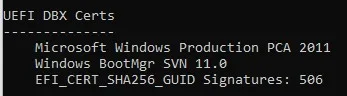
I don't remember when I ran the revoke option on my Lenovo T490 laptop, but looking at my current results, it looks like I need to follow your steps above. Yes?

506.webp

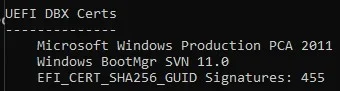
My older Lenovo M83 desktop shows 455 signatures which seems like an odd number. Is this a problem?

455.webp
 
Last edited:

My Computers My Computers

  • At a glance

    Windows 11 Pro 25H2i7-8565U16GBIntel UHD Graphics 620
    OS
    Windows 11 Pro 25H2
    Computer type
    Laptop
    Manufacturer/Model
    Lenovo T490 (2020 Hardware)
    CPU
    i7-8565U
    Motherboard
    20N20028US
    Memory
    16GB
    Graphics Card(s)
    Intel UHD Graphics 620
    Sound Card
    Realtec Audio
    Monitor(s) Displays
    ASUS VE248
    Screen Resolution
    1920 X 1080
    Hard Drives
    Samsung SSD 970 PRO 512GB NVMe
    Internet Speed
    Frontier fiber 1GB
    Browser
    Chrome, Firefox, Edge
    Antivirus
    Norton 360 Deluxe Plus
    Other Info
    Supported hardware, upgraded from Windows 10 Pro to Windows 11 Pro version 24H2 on 06/01/2025 using the Windows 11 ISO file. Used the enablement package to upgrade to version 25H2 on 10/07/2025. Secure boot enabled. Secure Boot CA 2023 updated.
  • At a glance

    Windows 11 Pro 25H2i7-4770 (with SSE4.2, and POPCNT)16GBIntel HD Graphics 4600
    Operating System
    Windows 11 Pro 25H2
    Computer type
    PC/Desktop
    Manufacturer/Model
    Lenovo ThinkCentre M83 (2014 Hardware)
    CPU
    i7-4770 (with SSE4.2, and POPCNT)
    Motherboard
    10AL000GUS
    Memory
    16GB
    Graphics card(s)
    Intel HD Graphics 4600
    Sound Card
    Realtec High Definition Audio
    Monitor(s) Displays
    ASUS VE248
    Screen Resolution
    1920 X 1080
    Hard Drives
    Samsung SSD 860 PRO 1TB SATA
    Internet Speed
    Frontier fiber 1GB
    Browser
    Chrome, Firefox, Edge
    Antivirus
    Norton 360 Deluxe Plus
    Other Info
    Unsupported hardware, upgraded from Windows 10 Pro (TPM 1.2 & unsupported CPU, but does have SSE4.2, and POPCNT) to Windows 11 Pro version 24H2 on 06/15/2025. Added Registry Key HKEY_LOCAL_MACHINE\SYSTEM\Setup\MoSetup – AllowUpgradesWithUnsupportedTPMOrCPU=1 to allow installation using the Windows 11 ISO file. Used the enablement package to upgrade to version 25H2 on 10/08/2025. Secure boot enabled. Secure Boot CA 2023 updated.
My older Lenovo M83 desktop shows 455 signatures which seems like an odd number. Is this a problem?
Your signature count is the sum of unique EFI entries shared between the factory defaults + Windows provided signatures.

There is no universal standard for factory defaults, it's whatever your OEM randomly decided upon when the BIOS was created. Typically OEM's didn't keep adding more entries to the factory defaults, because it was later understood that was Windows' responsibility. It's kinda like BIOS archeology.

The only thing that's certain is if you revoked the CA 2011 back before April 2026, then you can reduce the current count by 154 entries by repeating the process again today. It's more of a concern for older PC's, due to the uncertainty of how they manage NVRAM memory space.
 

My Computer My Computer

At a glance

Windows 7
OS
Windows 7
Your signature count is the sum of unique EFI entries shared between the factory defaults + Windows provided signatures.

There is no universal standard for factory defaults, it's whatever your OEM randomly decided upon when the BIOS was created. Typically OEM's didn't keep adding more entries to the factory defaults, because it was later understood that was Windows' responsibility. It's kinda like BIOS archeology.

The only thing that's certain is if you revoked the CA 2011 back before April 2026, then you can reduce the current count by 154 entries by repeating the process again today. It's more of a concern for older PC's, due to the uncertainty of how they manage NVRAM memory space.
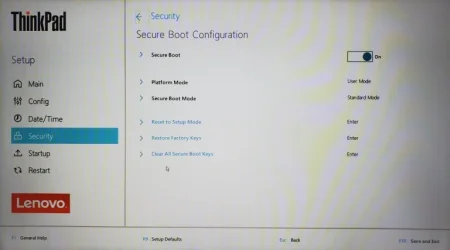
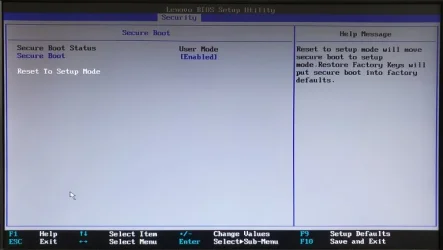
Thanks for the explanation. I'll probably run it tomorrow on both machines after I do my weekly full Macrium backups. Looking at the BIOS settings, it looks like I should be able to reset both machines to the factory defaults and then run your update script with the
-Revoke option.

T490 Secure Boot options:
T490SecureBoot.webp

M83 Secure Boot options:
M83SecureBoot.webp
 

My Computers My Computers

  • At a glance

    Windows 11 Pro 25H2i7-8565U16GBIntel UHD Graphics 620
    OS
    Windows 11 Pro 25H2
    Computer type
    Laptop
    Manufacturer/Model
    Lenovo T490 (2020 Hardware)
    CPU
    i7-8565U
    Motherboard
    20N20028US
    Memory
    16GB
    Graphics Card(s)
    Intel UHD Graphics 620
    Sound Card
    Realtec Audio
    Monitor(s) Displays
    ASUS VE248
    Screen Resolution
    1920 X 1080
    Hard Drives
    Samsung SSD 970 PRO 512GB NVMe
    Internet Speed
    Frontier fiber 1GB
    Browser
    Chrome, Firefox, Edge
    Antivirus
    Norton 360 Deluxe Plus
    Other Info
    Supported hardware, upgraded from Windows 10 Pro to Windows 11 Pro version 24H2 on 06/01/2025 using the Windows 11 ISO file. Used the enablement package to upgrade to version 25H2 on 10/07/2025. Secure boot enabled. Secure Boot CA 2023 updated.
  • At a glance

    Windows 11 Pro 25H2i7-4770 (with SSE4.2, and POPCNT)16GBIntel HD Graphics 4600
    Operating System
    Windows 11 Pro 25H2
    Computer type
    PC/Desktop
    Manufacturer/Model
    Lenovo ThinkCentre M83 (2014 Hardware)
    CPU
    i7-4770 (with SSE4.2, and POPCNT)
    Motherboard
    10AL000GUS
    Memory
    16GB
    Graphics card(s)
    Intel HD Graphics 4600
    Sound Card
    Realtec High Definition Audio
    Monitor(s) Displays
    ASUS VE248
    Screen Resolution
    1920 X 1080
    Hard Drives
    Samsung SSD 860 PRO 1TB SATA
    Internet Speed
    Frontier fiber 1GB
    Browser
    Chrome, Firefox, Edge
    Antivirus
    Norton 360 Deluxe Plus
    Other Info
    Unsupported hardware, upgraded from Windows 10 Pro (TPM 1.2 & unsupported CPU, but does have SSE4.2, and POPCNT) to Windows 11 Pro version 24H2 on 06/15/2025. Added Registry Key HKEY_LOCAL_MACHINE\SYSTEM\Setup\MoSetup – AllowUpgradesWithUnsupportedTPMOrCPU=1 to allow installation using the Windows 11 ISO file. Used the enablement package to upgrade to version 25H2 on 10/08/2025. Secure boot enabled. Secure Boot CA 2023 updated.
I'd have to write a special, one-off version of the update script which doesn't support updating the DBX certs. In this manner, you could ban PCA 2011 and get a SVN. But you would still need to disable the Secure Boot task permanently, in case MS decides it's time to apply DBX changes to everyone.

Let me figure that one out for you...
Hello Garlin,
Have you put anymore thought into this? Now believe me that I’m honestly not being rude to you, I just didn’t know any other way how to ask and I know it’s putting you out to help me and maybe others in the same predicament.
Thank you, Bob
 

My Computer My Computer

At a glance

Windows 11 25H2Intel Core i7-3632QM 2.20GHZ / 3.20GHZ8MB DDR3-1600 SDRAM (SODRAM)Intel HD4000
OS
Windows 11 25H2
Computer type
Laptop
Manufacturer/Model
Sony Vaio sve15128cxs
CPU
Intel Core i7-3632QM 2.20GHZ / 3.20GHZ
Motherboard
Ivy Bridge, Insyde Bios- R0200D5 (9/26/2016)
Memory
8MB DDR3-1600 SDRAM (SODRAM)
Graphics Card(s)
Intel HD4000
Hard Drives
1 TB-HDD Western Digital WDC WD10JPVT-55A1YT0
Cooling
3 fan cooling pad plus internal.
Mouse
Logitech ERGO
Antivirus
Norton365, Norton AntiTrack.
Other Info
Sony doesn’t support anymore and has deleted all firmware and software from their site.
Hello Garlin,
Have you put anymore thought into this? Now believe me that I’m honestly not being rude to you, I just didn’t know any other way how to ask and I know it’s putting you out to help me and maybe others in the same predicament.
Thank you, Bob
Sorry. I thought you were holding off on updates.

Here's a special version of the update script, with all the DBXupdate.bin features removed. If you use the optional -Revoke option, it will:
1. Ban the PCA 2011 cert by adding it to the DBX.
2. Allow SVN updates to the DBX (because the Windows boot manager needs this for versioning).
3. Will not add any EFI signatures to bloat the DBX.

This provides the benefits of revoking PCA 2011 without risking a DBX overflow.
 

Attachments

My Computer My Computer

At a glance

Windows 7
OS
Windows 7
Back
Top Bottom