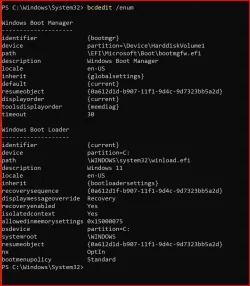
Solved garlin's PowerShell scripts for updating Secure Boot CA 2023


Have you tried the ISO version (where you boot from the USB drive)? That might have a different HW check.
 

My Computer My Computer

At a glance

Windows 7
OS
Windows 7
Found this over at Neowin - it talks about how Secure Boot might cause lag when your computer first touches the internet. There is a task that on boot that always checks for any updates to Secure Boot from Microsoft and how if you choose to you can disable the task.

There is a huge warning against doing so unless your system is unable to run Secure Boot or there are going to be zero updates for it -- YMMV and I am NOT responsible if your system gets borked or unable to boot if you make any changes.

https://www.neowin.net/news/users-f...eature-freezes-your-pc-when-you-use-internet/
 

My Computer My Computer

At a glance

Windows 11 Pro 25H2 (26200.9168)AMD Ryzen 7 7800X3D32gb Team Group (T-Force) DDR5-6000Zotac nVidia GeForce RTX 4070 SUPER - 12gb
OS
Windows 11 Pro 25H2 (26200.9168)
Computer type
PC/Desktop
Manufacturer/Model
Pre-built
CPU
AMD Ryzen 7 7800X3D
Motherboard
MSI Pro B650-VC WiFi
Memory
32gb Team Group (T-Force) DDR5-6000
Graphics Card(s)
Zotac nVidia GeForce RTX 4070 SUPER - 12gb
Sound Card
Sound BlasterX G6
Monitor(s) Displays
Koorui G2421V and ViewSonic VX2453
Screen Resolution
P:2560x1440 S:1920x1080
Hard Drives
WD Blue SN5000 - 500gb NVME
WD Blue SN580 - 2TB NVME
Seagate 4TB HDD - ST4000VN008-2DR166
Keyboard
Mountain Everest
Mouse
Logitech G502 Hero
Internet Speed
T-Mobile Home Internet
Browser
Firefox
Other Info
QNAP TS-469 Pro NAS
TP-Link W7200 (2 unit mesh network)
Elgato Streamdeck
This is what my Lenovo Yoga 920 shows now:

PowerShell 7.6.6
PS C:\Windows\System32> Get-SecureBootUEFI -Name DB -Decoded

SignatureOwner : 77fa9abd-0359-4d32-bd60-28f4e78f784b
Subject : CN=Microsoft Windows Production PCA 2011, O=Microsoft Corporation, L=Redmond, S=Washington, C=US
Version : 3
Algorithm : sha256RSA
SerialNumber : 61077656000000000008
ValidFrom : 2011-10-19 11:41:42Z
ValidTo : 2026-10-19 11:51:42Z

SignatureOwner : 77fa9abd-0359-4d32-bd60-28f4e78f784b
Subject : CN=Microsoft Corporation UEFI CA 2011, O=Microsoft Corporation, L=Redmond, S=Washington, C=US
Version : 3
Algorithm : sha256RSA
SerialNumber : 6108D3C4000000000004
ValidFrom : 2011-06-27 14:22:45Z
ValidTo : 2026-06-27 14:32:45Z

SignatureOwner : e04fd794-033e-46a0-81d2-048e8da1432e
Subject : CN=5NYoga920-13IKB
Version : 3
Algorithm : sha256RSA
SerialNumber : 52EE4228861C2A8441F8D5854B5A9388
ValidFrom : 2017-04-21 01:00:23Z
ValidTo : 2039-12-31 15:59:59Z

SignatureOwner : e04fd794-033e-46a0-81d2-048e8da1432e
Subject : CN=Mocca
Version : 3
Algorithm : sha256RSA
SerialNumber : EEE4AE78C24BF4A5488B6B77C611EDDE
ValidFrom : 2012-06-19 20:38:11Z
ValidTo : 2039-12-31 15:59:59Z

SignatureOwner : e04fd794-033e-46a0-81d2-048e8da1432e
Subject : CN=LCFC
Version : 3
Algorithm : sha256RSA
SerialNumber : 16E5000EC0E008A3434536C06D55A3B6
ValidFrom : 2014-05-29 00:09:40Z
ValidTo : 2039-12-31 15:59:59Z

SignatureOwner : 77fa9abd-0359-4d32-bd60-28f4e78f784b
Subject : CN=Windows UEFI CA 2023, O=Microsoft Corporation, C=US
Version : 3
Algorithm : sha256RSA
SerialNumber : 330000001A888B9800562284C100000000001A
ValidFrom : 2023-06-13 11:58:29Z
ValidTo : 2035-06-13 12:08:29Z

SignatureOwner : 77fa9abd-0359-4d32-bd60-28f4e78f784b
Subject : CN=Microsoft Option ROM UEFI CA 2023, O=Microsoft Corporation, C=US
Version : 3
Algorithm : sha256RSA
SerialNumber : 3300000017B3EC4D8F01E27005000000000017
ValidFrom : 2023-10-26 12:02:20Z
ValidTo : 2038-10-26 12:12:20Z

SignatureOwner : 77fa9abd-0359-4d32-bd60-28f4e78f784b
Subject : CN=Microsoft UEFI CA 2023, O=Microsoft Corporation, C=US
Version : 3
Algorithm : sha256RSA
SerialNumber : 330000001636BF36899F1575CC000000000016
ValidFrom : 2023-06-13 12:21:47Z
ValidTo : 2038-06-13 12:31:47Z

PS C:\Windows\System32>
1790536775682.webp

1790536815511.webp
 

My Computer My Computer

At a glance

Windows 11 Pro 25H2Intel I9-9900K64GBNVIDIA RTX 2060
OS
Windows 11 Pro 25H2
Computer type
PC/Desktop
Manufacturer/Model
Dell XPS 8930
CPU
Intel I9-9900K
Memory
64GB
Graphics Card(s)
NVIDIA RTX 2060
Sound Card
NVIDIA High Definition Audio
Monitor(s) Displays
4k Samsung
Screen Resolution
3840 x 2160
Hard Drives
512GB NVMe, ADATA SU 800, 2TB HDD
Found this over at Neowin - it talks about how Secure Boot might cause lag when your computer first touches the internet. There is a task that on boot that always checks for any updates to Secure Boot from Microsoft and how if you choose to you can disable the task.
This is caused by a HW bug in the TPM. The Secure Boot task runs every 12 hours, or 5 minutes after a reboot, to check for new changes.

One of the side functions queries the TPM attestation status to audit the Secure Boot state after bootup. There's a known issue with some TPM chips, notably Dell's with STM chips where you need to disable the Secure Boot task so it doesn't accidentally trigger the freeze bug. Dell needs to deal with it since they use the STM chips much more than the other TPM chip vendors.

A short term fix is to disable the Secure Boot update task, but that means it won't update your Windows boot manager whenever a new security fix is delivered in the Monthly Update. My update script largely doesn't need the Secure Boot task to function, so you can use it instead.
 

My Computer My Computer

At a glance

Windows 7
OS
Windows 7
This is what my Lenovo Yoga 920 shows now:

PowerShell 7.6.6
PS C:\Windows\System32> Get-SecureBootUEFI -Name DB -Decoded

-Decoded was a new flag added in April 2026's Monthly Update, but MS did a poor job informing users it's available instead of everyone using the original command:
Code:
[System.Text.Encoding]::ASCII.GetString((Get-SecureBootUEFI VariableName).Bytes)

Unfortunately, you still have to pick through the data fields by yourself.
Code:
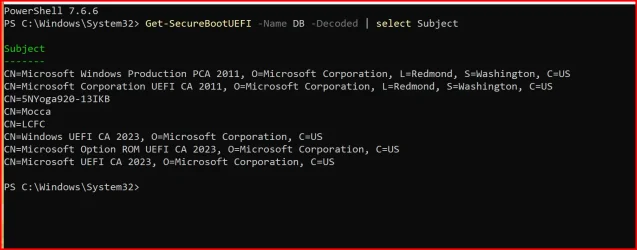
Get-SecureBootUEFI -Name DB -Decoded | select Subject
 

My Computer My Computer

At a glance

Windows 7
OS
Windows 7
-Decoded was a new flag added in April 2026's Monthly Update, but MS did a poor job informing users it's available instead of everyone using the original command:
Code:
[System.Text.Encoding]::ASCII.GetString((Get-SecureBootUEFI VariableName).Bytes)

Unfortunately, you still have to pick through the data fields by yourself.
Code:
Get-SecureBootUEFI -Name DB -Decoded | select Subject
1790542080057.webp
 

My Computer My Computer

At a glance

Windows 11 Pro 25H2Intel I9-9900K64GBNVIDIA RTX 2060
OS
Windows 11 Pro 25H2
Computer type
PC/Desktop
Manufacturer/Model
Dell XPS 8930
CPU
Intel I9-9900K
Memory
64GB
Graphics Card(s)
NVIDIA RTX 2060
Sound Card
NVIDIA High Definition Audio
Monitor(s) Displays
4k Samsung
Screen Resolution
3840 x 2160
Hard Drives
512GB NVMe, ADATA SU 800, 2TB HDD
Dell, Lenovo, and ASUS each love to add extra vendor-specific certs. Presumably to sign their own EFI boot tools.
 

My Computer My Computer

At a glance

Windows 7
OS
Windows 7

Latest Support Threads

Back
Top Bottom