Getting GPEDIT.MSC Templates back


Robocop

Member
Local time
1:29 PM
Posts
12
Location
United Kingdom
OS
windows 11
I had access to gpedit.msc before but it isn't there anymore.

I have run this batch file

@echo off
pushd "%~dp0"
dir /b %SystemRoot%\servicing\Packages\Microsoft-Windows-GroupPolicy-ClientTools-Package~*.mum >gpedit-install.txt
dir /b %SystemRoot%\servicing\Packages\Microsoft-Windows-GroupPolicy-ClientExtensions-Package~*.mum >>gpedit-install.txt
for /f %%i in ('findstr /i . gpedit-install.txt 2^>nul') do dism /online /norestart /add-package:"%SystemRoot%\servicing\Packages\%%i"
pause

and it gave me the gpeditor but only showing <software settings & windows setting plus an un-named directory>

I then ran

Administrative Templates (.admx) for Windows 11 2024 Update (24H2)​

from the MS web site but it hasn't changed the GPEDIT screen, even after a reset.

[note: the instal file ran correctly but I can not find that it installed any .admx files]

Under the 'un-named' directory there is no windows update entry.

Is there a simple way to get this back? I feel this is about the 24H2 update because it was OK before.

Any advice?

p.s. I have also found some instructions that say Group Policy Management needs to be checked. I went to 'Turn Windows Features On or Off' but there is no <Group Policy Management> entry
 
Last edited:

My Computer My Computer

At a glance

windows 11
OS
windows 11
Computer type
PC/Desktop
Manufacturer/Model
dell
Do you have Windows 11 Pro? The Home version does not include the group policy editor.

Please could you fill in your system specs completely?
 

My Computers My Computers

  • At a glance

    Windows 11 Pro 25H2 26200.8655AMD Ryzen 7 5825U with Radeon Graphics16GB
    OS
    Windows 11 Pro 25H2 26200.8655
    Computer type
    Laptop
    Manufacturer/Model
    Acemagic LX15PRO
    CPU
    AMD Ryzen 7 5825U with Radeon Graphics
    Motherboard
    BIOS CT_BI_AMI_LX15PRO_AB8139_A-004
    Memory
    16GB
    Screen Resolution
    1920 x 1080
    Hard Drives
    SSD 2TB
    Internet Speed
    30 Mbps
    Browser
    Brave
    Antivirus
    Defender/Windows Security
    Other Info
    System 3

    Acer Swift SF114-34 laptop
    OS Windows 11 Pro 26200.8655
    CPU Pentium Silver N6000
    RAM 4GB
    BIOS v1.17
    SSD Samsung 970 EVO Plus SSD 2TB (an upgrade)
  • At a glance

    Windows 11 Pro 23H2 22631.2506Atom N450 1.66GHz2GB
    Operating System
    Windows 11 Pro 23H2 22631.2506
    Computer type
    Laptop
    Manufacturer/Model
    HP Mini 210-1090NR PC (bought in late 2009!)
    CPU
    Atom N450 1.66GHz
    Memory
    2GB
    Browser
    Brave
    Antivirus
    Webroot
I am using win 11 Home;
Edition Windows 11 Home
Version 24H2
Installed on ‎06/‎01/‎2025
OS build 26100.4946
Experience Windows Feature Experience Pack 1000.26100.197.0
It was perfectly OK before as the only reason I use GPEDIT is to stop the automatic updating of Windows Updater, I had it set to 'notify'
 

My Computer My Computer

At a glance

windows 11
OS
windows 11
Computer type
PC/Desktop
Manufacturer/Model
dell
You can add gpedit to Home, but some features won't work!
 

My Computers My Computers

  • At a glance

    Windows 11 Pro 25H2 26200.8655AMD Ryzen 7 5825U with Radeon Graphics16GB
    OS
    Windows 11 Pro 25H2 26200.8655
    Computer type
    Laptop
    Manufacturer/Model
    Acemagic LX15PRO
    CPU
    AMD Ryzen 7 5825U with Radeon Graphics
    Motherboard
    BIOS CT_BI_AMI_LX15PRO_AB8139_A-004
    Memory
    16GB
    Screen Resolution
    1920 x 1080
    Hard Drives
    SSD 2TB
    Internet Speed
    30 Mbps
    Browser
    Brave
    Antivirus
    Defender/Windows Security
    Other Info
    System 3

    Acer Swift SF114-34 laptop
    OS Windows 11 Pro 26200.8655
    CPU Pentium Silver N6000
    RAM 4GB
    BIOS v1.17
    SSD Samsung 970 EVO Plus SSD 2TB (an upgrade)
  • At a glance

    Windows 11 Pro 23H2 22631.2506Atom N450 1.66GHz2GB
    Operating System
    Windows 11 Pro 23H2 22631.2506
    Computer type
    Laptop
    Manufacturer/Model
    HP Mini 210-1090NR PC (bought in late 2009!)
    CPU
    Atom N450 1.66GHz
    Memory
    2GB
    Browser
    Brave
    Antivirus
    Webroot
I meant for you to fill in your system specs in you profile!

1757325398089.webp
 

My Computers My Computers

  • At a glance

    Windows 11 Pro 25H2 26200.8655AMD Ryzen 7 5825U with Radeon Graphics16GB
    OS
    Windows 11 Pro 25H2 26200.8655
    Computer type
    Laptop
    Manufacturer/Model
    Acemagic LX15PRO
    CPU
    AMD Ryzen 7 5825U with Radeon Graphics
    Motherboard
    BIOS CT_BI_AMI_LX15PRO_AB8139_A-004
    Memory
    16GB
    Screen Resolution
    1920 x 1080
    Hard Drives
    SSD 2TB
    Internet Speed
    30 Mbps
    Browser
    Brave
    Antivirus
    Defender/Windows Security
    Other Info
    System 3

    Acer Swift SF114-34 laptop
    OS Windows 11 Pro 26200.8655
    CPU Pentium Silver N6000
    RAM 4GB
    BIOS v1.17
    SSD Samsung 970 EVO Plus SSD 2TB (an upgrade)
  • At a glance

    Windows 11 Pro 23H2 22631.2506Atom N450 1.66GHz2GB
    Operating System
    Windows 11 Pro 23H2 22631.2506
    Computer type
    Laptop
    Manufacturer/Model
    HP Mini 210-1090NR PC (bought in late 2009!)
    CPU
    Atom N450 1.66GHz
    Memory
    2GB
    Browser
    Brave
    Antivirus
    Webroot
You can add gpedit to Home, but some features won't work!
Sorry what do you mean?
I was using it before for the limited amount I need but now the templates are missing.
How do I get these back?
 

My Computer My Computer

At a glance

windows 11
OS
windows 11
Computer type
PC/Desktop
Manufacturer/Model
dell
I meant for you to fill in your system specs in you profile!

View attachment 144741
I have a new PC Dell 16 Premium laptop. It was setting up this one that I encountered the GPEDIT issue. When I went back to my existing laptop, Dell 16 Plus 2-in-1, I found it had now developed the same issue

Laptop
 

My Computer My Computer

At a glance

windows 11
OS
windows 11
Computer type
PC/Desktop
Manufacturer/Model
dell
"
Microsoft does not provide gpedit.msc for Windows 11 Home, and there’s no supported way to add it. Some websites offer scripts or installers that copy the Group Policy Editor files from Pro into Home, but:
  • They are unofficial and unsupported.
  • Some functions don’t actually work, because the underlying services and policy processing components are missing in Home.
  • They may create system instability or be a vector for malware if downloaded from the wrong place.

If you want Group Policy management properly, you need to upgrade to Windows 11 Pro (or higher)."
 

My Computers My Computers

  • At a glance

    Windows 11 Pro 25H2 26200.8655AMD Ryzen 7 5825U with Radeon Graphics16GB
    OS
    Windows 11 Pro 25H2 26200.8655
    Computer type
    Laptop
    Manufacturer/Model
    Acemagic LX15PRO
    CPU
    AMD Ryzen 7 5825U with Radeon Graphics
    Motherboard
    BIOS CT_BI_AMI_LX15PRO_AB8139_A-004
    Memory
    16GB
    Screen Resolution
    1920 x 1080
    Hard Drives
    SSD 2TB
    Internet Speed
    30 Mbps
    Browser
    Brave
    Antivirus
    Defender/Windows Security
    Other Info
    System 3

    Acer Swift SF114-34 laptop
    OS Windows 11 Pro 26200.8655
    CPU Pentium Silver N6000
    RAM 4GB
    BIOS v1.17
    SSD Samsung 970 EVO Plus SSD 2TB (an upgrade)
  • At a glance

    Windows 11 Pro 23H2 22631.2506Atom N450 1.66GHz2GB
    Operating System
    Windows 11 Pro 23H2 22631.2506
    Computer type
    Laptop
    Manufacturer/Model
    HP Mini 210-1090NR PC (bought in late 2009!)
    CPU
    Atom N450 1.66GHz
    Memory
    2GB
    Browser
    Brave
    Antivirus
    Webroot
"
Microsoft does not provide gpedit.msc for Windows 11 Home, and there’s no supported way to add it. Some websites offer scripts or installers that copy the Group Policy Editor files from Pro into Home, but:
  • They are unofficial and unsupported.
  • Some functions don’t actually work, because the underlying services and policy processing components are missing in Home.
  • They may create system instability or be a vector for malware if downloaded from the wrong place.

If you want Group Policy management properly, you need to upgrade to Windows 11 Pro (or higher)."
It was working OK before the latest update.
Is there an official way to stop updates taking over the PC and be notified when there are updates?
 

My Computer My Computer

At a glance

windows 11
OS
windows 11
Computer type
PC/Desktop
Manufacturer/Model
dell
Group Policy is just setting this registry value. You can try it, but it’s not guaranteed to work on Home edition.

How did 24H2 install?
 

My Computer My Computer

At a glance

Windows 11 Pro 25H212th Gen Core i7-1260P64 GB Micron PC4-25600Intel Iris Xe Graphics
OS
Windows 11 Pro 25H2
Computer type
PC/Desktop
Manufacturer/Model
Intel NUC12WSHi7
CPU
12th Gen Core i7-1260P
Motherboard
NUC12WSBi7
Memory
64 GB Micron PC4-25600
Graphics Card(s)
Intel Iris Xe Graphics
Sound Card
on-board Realtek HD Audio
Monitor(s) Displays
Dell U3219Q
Screen Resolution
3840 x 2160
Hard Drives
Samsung SSD 990 PRO 1TB
Crucial MX500 2 TB
Antivirus
Microsoft Defender
i am using home version and i was able to change group policy manually by editing registry value.
 

My Computers My Computers

  • At a glance

    windows 11 home 23H2 22631.6199Intel core i7 (2nd gen) Turbo 3.10 ghz6gbAmd Radeon HD 7400m 1GB & Intel hd graphics
    OS
    windows 11 home 23H2 22631.6199
    Computer type
    Laptop
    Manufacturer/Model
    HP
    CPU
    Intel core i7 (2nd gen) Turbo 3.10 ghz
    Memory
    6gb
    Graphics Card(s)
    Amd Radeon HD 7400m 1GB & Intel hd graphics
    Sound Card
    BeatsAudio
    Hard Drives
    128gb SSD
  • At a glance

    macOS SequoiaM1 3.2 ghz8gb onboardigpu
    Operating System
    macOS Sequoia
    Computer type
    PC/Desktop
    Manufacturer/Model
    iMac 24"
    CPU
    M1 3.2 ghz
    Memory
    8gb onboard
    Graphics card(s)
    igpu
    Monitor(s) Displays
    Retina 4.5K
    Screen Resolution
    4480x2520
    Hard Drives
    512gb SSD
When MS provides a copy of Administrative Templates, they never install or extract the files into the proper Windows folders.
This is by deliberate design, there may be previous versions of the template already installed, and the setup should never overwrite them.

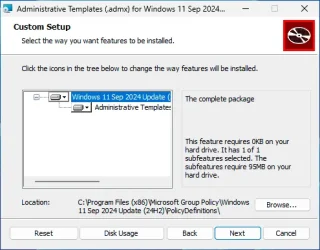
In this version, the MSI extracts the files to "C:\Program Files (x86)\Microsoft Group Policy\Windows 11 Sep 2024 Update (24H2)\PolicyDefinitions"

1757343803377.webp

If you're on Home edition, then you don't need to worry about overwriting the old templates.

1. Uninstall the Admin Templates from the Settings App / Apps / Installed apps
2. Reinstall the MSI, but change the Location to "C:\Windows\PolicyDefinitions".

Standard warning:
While you can play with GPE on Home edition, almost all GPO's are ignored by the release. Some changes can be implemented by using a reg key equivalent, which your typical ElevenForum or TenForums tutorial will detail.
 

My Computer My Computer

At a glance

Windows 7
OS
Windows 7
Use the registry edit;

Press Win + R, type regedit, and press Enter.

Navigate to:

HKEY_LOCAL_MACHINE\SOFTWARE\Policies\Microsoft\Windows\WindowsUpdate\AU


(If WindowsUpdate or AU doesn’t exist, create them as new keys).

In the AU key, right-click the right pane → New → DWORD (32-bit) Value.

Name it:

NoAutoUpdate


Double-click it, set Value data to 1, and press OK.

Close the Registry Editor and restart your PC.
 

My Computers My Computers

  • At a glance

    Windows 11 Pro 25H2 26200.8655AMD Ryzen 7 5825U with Radeon Graphics16GB
    OS
    Windows 11 Pro 25H2 26200.8655
    Computer type
    Laptop
    Manufacturer/Model
    Acemagic LX15PRO
    CPU
    AMD Ryzen 7 5825U with Radeon Graphics
    Motherboard
    BIOS CT_BI_AMI_LX15PRO_AB8139_A-004
    Memory
    16GB
    Screen Resolution
    1920 x 1080
    Hard Drives
    SSD 2TB
    Internet Speed
    30 Mbps
    Browser
    Brave
    Antivirus
    Defender/Windows Security
    Other Info
    System 3

    Acer Swift SF114-34 laptop
    OS Windows 11 Pro 26200.8655
    CPU Pentium Silver N6000
    RAM 4GB
    BIOS v1.17
    SSD Samsung 970 EVO Plus SSD 2TB (an upgrade)
  • At a glance

    Windows 11 Pro 23H2 22631.2506Atom N450 1.66GHz2GB
    Operating System
    Windows 11 Pro 23H2 22631.2506
    Computer type
    Laptop
    Manufacturer/Model
    HP Mini 210-1090NR PC (bought in late 2009!)
    CPU
    Atom N450 1.66GHz
    Memory
    2GB
    Browser
    Brave
    Antivirus
    Webroot
If the keys don't exist, try this

Here’s a .reg file that will create the missing keys and disable automatic updates for you.

Copy the text below into Notepad, then save the file as DisableAutoUpdate.reg (be sure to select All Files in the “Save as type” dropdown, not .txt). After saving, double-click the file and allow it to merge into the registry.

Windows Registry Editor Version 5.00

[HKEY_LOCAL_MACHINE\SOFTWARE\Policies\Microsoft\Windows\WindowsUpdate\AU]
"NoAutoUpdate"=dword:00000001


Effect

This creates the WindowsUpdate\AU keys if they don’t exist.

It sets NoAutoUpdate = 1, which disables automatic updates.

You’ll still be able to run Check for updates manually.
 

My Computers My Computers

  • At a glance

    Windows 11 Pro 25H2 26200.8655AMD Ryzen 7 5825U with Radeon Graphics16GB
    OS
    Windows 11 Pro 25H2 26200.8655
    Computer type
    Laptop
    Manufacturer/Model
    Acemagic LX15PRO
    CPU
    AMD Ryzen 7 5825U with Radeon Graphics
    Motherboard
    BIOS CT_BI_AMI_LX15PRO_AB8139_A-004
    Memory
    16GB
    Screen Resolution
    1920 x 1080
    Hard Drives
    SSD 2TB
    Internet Speed
    30 Mbps
    Browser
    Brave
    Antivirus
    Defender/Windows Security
    Other Info
    System 3

    Acer Swift SF114-34 laptop
    OS Windows 11 Pro 26200.8655
    CPU Pentium Silver N6000
    RAM 4GB
    BIOS v1.17
    SSD Samsung 970 EVO Plus SSD 2TB (an upgrade)
  • At a glance

    Windows 11 Pro 23H2 22631.2506Atom N450 1.66GHz2GB
    Operating System
    Windows 11 Pro 23H2 22631.2506
    Computer type
    Laptop
    Manufacturer/Model
    HP Mini 210-1090NR PC (bought in late 2009!)
    CPU
    Atom N450 1.66GHz
    Memory
    2GB
    Browser
    Brave
    Antivirus
    Webroot
When MS provides a copy of Administrative Templates, they never install or extract the files into the proper Windows folders.
This is by deliberate design, there may be previous versions of the template already installed, and the setup should never overwrite them.

In this version, the MSI extracts the files to "C:\Program Files (x86)\Microsoft Group Policy\Windows 11 Sep 2024 Update (24H2)\PolicyDefinitions"

View attachment 144759

If you're on Home edition, then you don't need to worry about overwriting the old templates.

1. Uninstall the Admin Templates from the Settings App / Apps / Installed apps
2. Reinstall the MSI, but change the Location to "C:\Windows\PolicyDefinitions".

Standard warning:
While you can play with GPE on Home edition, almost all GPO's are ignored by the release. Some changes can be implemented by using a reg key equivalent, which your typical ElevenForum or TenForums tutorial will detail.
I did this and it had no effect. I checked in c:\windows\policydefinitions and there are no new .admx files
 

My Computer My Computer

At a glance

windows 11
OS
windows 11
Computer type
PC/Desktop
Manufacturer/Model
dell
Use the registry edit;

Press Win + R, type regedit, and press Enter.

Navigate to:

HKEY_LOCAL_MACHINE\SOFTWARE\Policies\Microsoft\Windows\WindowsUpdate\AU


(If WindowsUpdate or AU doesn’t exist, create them as new keys).

In the AU key, right-click the right pane → New → DWORD (32-bit) Value.

Name it:

NoAutoUpdate


Double-click it, set Value data to 1, and press OK.

Close the Registry Editor and restart your PC.
Thanks I can follow this but before I try it can you change it for 'tell me there are updates' but not to download automatically. I think if I remember correctly (?? - aged 75) then the option was number 2
 

My Computer My Computer

At a glance

windows 11
OS
windows 11
Computer type
PC/Desktop
Manufacturer/Model
dell

My Computer My Computer

At a glance

Windows 11 Pro 25H212th Gen Core i7-1260P64 GB Micron PC4-25600Intel Iris Xe Graphics
OS
Windows 11 Pro 25H2
Computer type
PC/Desktop
Manufacturer/Model
Intel NUC12WSHi7
CPU
12th Gen Core i7-1260P
Motherboard
NUC12WSBi7
Memory
64 GB Micron PC4-25600
Graphics Card(s)
Intel Iris Xe Graphics
Sound Card
on-board Realtek HD Audio
Monitor(s) Displays
Dell U3219Q
Screen Resolution
3840 x 2160
Hard Drives
Samsung SSD 990 PRO 1TB
Crucial MX500 2 TB
Antivirus
Microsoft Defender
I did this and it had no effect. I checked in c:\windows\policydefinitions and there are no new .admx files
I just tried it on a test system, and it worked for me. There were new folders created for the non-English template files.
 

My Computer My Computer

At a glance

Windows 7
OS
Windows 7
I just tried it on a test system, and it worked for me. There were new folders created for the non-English template files.
Apologies you are absolutely correct. I checked again and like you said there are new directories. What I didn't see was any change to the EN-GB entry and no additional .admx files. I assumed it hadn't worked because there was no change to the GPEDIT.MSC when I opened it.

I must be missing something here because I used gpedit.msc to stop MS Updater taking control. I had previously found the entry where you could select 'notification of update', as I said I think it was option 2, and you could then do the updates as suited.

I know I am not familiar with the ins-and-outs of Windows; getting too old. I can see that KELPERs solution would stop the AUTOUPDATE but it seems that it wouldn't tell me there were any to download.

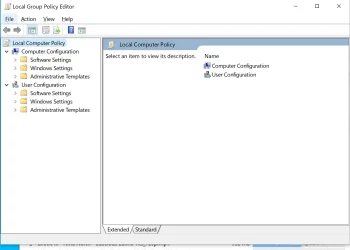
I have a win 10 desktop that gpedit.msc works on, see screen shot, and this is how it looked previously on my win 11 laptop when I enabled it. The trouble here is that I don't remember how I sorted out GPEDIT not being in win 11 when I first got this laptop.

What I am trying to do is replicate the actions that produced the screen shot on my laptop originally
 

Attachments

  • Screenshot (3).webp
    Screenshot (3).webp
    67.1 KB · Views: 1

My Computer My Computer

At a glance

windows 11
OS
windows 11
Computer type
PC/Desktop
Manufacturer/Model
dell
Back
Top Bottom