I seem to have a phantom folder in my File Explorer. I can’t delete it, nor can I find it because the path doesn’t exist. Even weirder is that its a document folder in what used to be the OneDrive Pictures folder.
The folder was deleted AFTER unsynching my computer from OneDrive and then uninstalling it. As the error messages says, it WAS deleted, but it gives me no clue how to make the folder go away.
Any ideas? Please tell me that I won't have to install OneDrive again. I will if I must, but that is SUCH a pain!
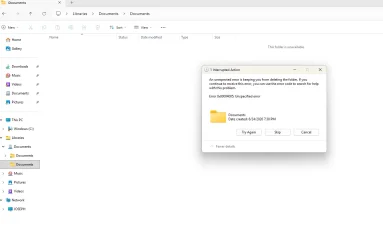
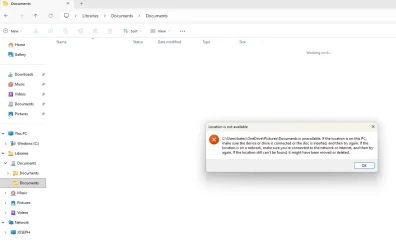
The folder was deleted AFTER unsynching my computer from OneDrive and then uninstalling it. As the error messages says, it WAS deleted, but it gives me no clue how to make the folder go away.
Any ideas? Please tell me that I won't have to install OneDrive again. I will if I must, but that is SUCH a pain!
- Windows Build/Version
- Windows 11 Version 25H2
My Computer
At a glance
Windows 11Intel Core i7-1470016GBDDR5-5600MT/sIntel UHD Graphics
- OS
- Windows 11
- Computer type
- PC/Desktop
- Manufacturer/Model
- HP
- CPU
- Intel Core i7-14700
- Memory
- 16GBDDR5-5600MT/s
- Graphics Card(s)
- Intel UHD Graphics
- Hard Drives
- 2TB PCle Gen4 NVMe M.2 SSD
- Antivirus
- Norton 360