Gigabyte motherboard BIOS update


Smalltown

Well-known member
Member
VIP
Local time
1:14 AM
Posts
111
Location
Western, Maine USA
OS
Windows 11
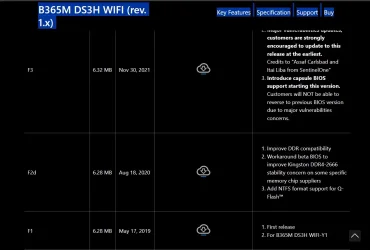
I currently running a used Gigabyte B365M DS3H WIFI (history unknown) that has a BIOS F2b Y1 that I wanted to update to the latest F3 but wasn't sure I could jump right to F3 so Ii contacted Gigabyte. There answer was that the Y1 designation meant it was a custom ""Y1" is an OEM version for system builders and would not be listed on our website. You would need to contact the system builder for the BIOS update since the BIOS is customized to them". I have no idea of the original system builder as I only have the motherboard.

I'm imagining that possibly a system builder had some special reason for changing the BIOS, and now that all I have is an orphaned motherboard I should be able to update the BIOS?

I am chasing a sudden shutdown issue followed by an auto restart without any reason for the problem.
I have a new case and a new power supply, and a used GPU that I will install one at a time to see if anything solves the issue but thought I should do the BIOS first.
Here is a listing of the BIOS selections from the Gigabyte support page. Any thoughts?
 
Windows Build/Version
Windows 25H2 build26200.7309

Attachments
  • GIGABYTE BIOS options.webp
    GIGABYTE BIOS options.webp
    57.3 KB · Views: 2

My Computer

System One

  • OS
    Windows 11
    Computer type
    PC/Desktop
    Manufacturer/Model
    Home built
    CPU
    Intel i5 9400
    Motherboard
    Gigabyte B365M D3SH WIFI
    Memory
    16GB tforce
    Graphics Card(s)
    GeForce GTX950 SSC
    Monitor(s) Displays
    View Sonic VX 3216 32" curved screen
    Screen Resolution
    1920 x 1080
    Hard Drives
    Crucial 250GB, Western Digital 6TB
    PSU
    MSI MAG A1000GL PCIE5
    Cooling
    standard Intel fan
    Keyboard
    Microsoft 3000 version 2
    Mouse
    Microsoft 3000
    Internet Speed
    symmetrical 50Mb fiber feed
    Browser
    Edge and Chrome
    Antivirus
    using Windows Defender

A little Web searching suggests that it may be an iBuypower board. There is a version of the F3 BIOS there.

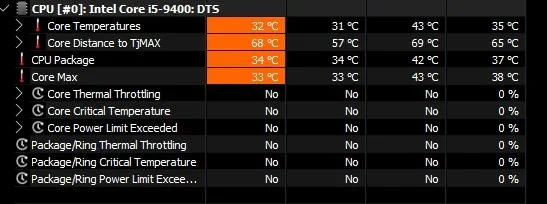
Shut down/reboot could be a CPU overheating issue. Are you monitoring the CPU temperature?
 

My Computers

System One System Two

  • OS
    Windows 11 26200.8116
    Computer type
    PC/Desktop
    Manufacturer/Model
    homebuilt
    CPU
    Amd Threadripper 7970X
    Motherboard
    Gigabyte TRX50 Aero D Rev. 1.0
    Memory
    128GB (4 X 32) G.Skill DDR5 6400 (RDIMM)
    Graphics Card(s)
    Gigabyte RTX 4090 OC
    Sound Card
    none (USB to speakers), Realtek
    Monitor(s) Displays
    Innocn 32" OLED
    Screen Resolution
    3840 X 2160 @ 60Hz
    Hard Drives
    Crucial T700 2TB M.2 NVME SSD
    WD 4TB Blue SATA SSD
    Seagate 18TB IronWolf Pro
    PSU
    BeQuiet! Straight Power 12 1500W
    Case
    Lian Li 011 Dynamic Evo XL
    Cooling
    SilverStone Technology XE360-TR5, with 3 Phanteks T30 fans
    Keyboard
    Cherry KC 500 MX LP (mechanical)
    Mouse
    Logitech M500s (wired)
    Internet Speed
    2000/250 Mbps (down/up)
    Other Info
    xFinity gateway
  • Operating System
    windows 11 26200.8116
    Computer type
    PC/Desktop
    Manufacturer/Model
    homebuilt
    CPU
    Intel I9-13900K
    Motherboard
    Asus RoG Strix Z690-E
    Memory
    64GB G.Skill DDR5-6000
    Graphics card(s)
    Gigabyte RTX 3090 ti
    Sound Card
    built in Realtek
    Monitor(s) Displays
    Philips 27E1N8900 27" OLED
    Screen Resolution
    3840 X 2160 @60Hz
    Hard Drives
    WDC SN850 1TB
    8TB Seagate Ironwolf
    4TB Seagate Ironwolf
    PSU
    eVGA SuperNOVA 1300 GT
    Case
    Lian Li 011 Dynamic Evo
    Cooling
    Corsair iCUE H150i ELITE CAPELLIX Liquid CPU Cooler
    Keyboard
    Cherry Streaming (wired)
    Mouse
    Logitech M500s (wired)
Thanks bobkn I'll take a look at the iBuypower link you posted.
It's a funny shut down for me no BSOD just an Immediate shutdown auto restart and everything resumes pretty much where it was before the shutdown.
 

Attachments

  • CPU .webp
    CPU .webp
    21.5 KB · Views: 1

My Computer

System One

  • OS
    Windows 11
    Computer type
    PC/Desktop
    Manufacturer/Model
    Home built
    CPU
    Intel i5 9400
    Motherboard
    Gigabyte B365M D3SH WIFI
    Memory
    16GB tforce
    Graphics Card(s)
    GeForce GTX950 SSC
    Monitor(s) Displays
    View Sonic VX 3216 32" curved screen
    Screen Resolution
    1920 x 1080
    Hard Drives
    Crucial 250GB, Western Digital 6TB
    PSU
    MSI MAG A1000GL PCIE5
    Cooling
    standard Intel fan
    Keyboard
    Microsoft 3000 version 2
    Mouse
    Microsoft 3000
    Internet Speed
    symmetrical 50Mb fiber feed
    Browser
    Edge and Chrome
    Antivirus
    using Windows Defender
One thing I did want to add was that Gigabyte asked me for the Serial number, and today I provided that. Hopefully in a few days they can come up with something.
I just wonder what a custom BIOS would be maybe for specific peripherals.

Looking online this motherboard does not have a dual BIOS and I'm told it's risky to try changing from an OEM BIOS.
Maybe I should back up and try the new power supply in the new case and see if anything changes.
 

My Computer

System One

  • OS
    Windows 11
    Computer type
    PC/Desktop
    Manufacturer/Model
    Home built
    CPU
    Intel i5 9400
    Motherboard
    Gigabyte B365M D3SH WIFI
    Memory
    16GB tforce
    Graphics Card(s)
    GeForce GTX950 SSC
    Monitor(s) Displays
    View Sonic VX 3216 32" curved screen
    Screen Resolution
    1920 x 1080
    Hard Drives
    Crucial 250GB, Western Digital 6TB
    PSU
    MSI MAG A1000GL PCIE5
    Cooling
    standard Intel fan
    Keyboard
    Microsoft 3000 version 2
    Mouse
    Microsoft 3000
    Internet Speed
    symmetrical 50Mb fiber feed
    Browser
    Edge and Chrome
    Antivirus
    using Windows Defender
One thing I did want to add was that Gigabyte asked me for the Serial number, and today I provided that. Hopefully in a few days they can come up with something.
I just wonder what a custom BIOS would be maybe for specific peripherals.

Looking online this motherboard does not have a dual BIOS and I'm told it's risky to try changing from an OEM BIOS.
Maybe I should back up and try the new power supply in the new case and see if anything changes.
I've had a couple of boards bricked by a BIOS update, but not for about 20 years. Both were early EFI boards. One was a dual BIOS board, but it had no hardware switch to use the backup BIOS. (Poor design, I thought.)

From what I've read, the Gigabyte BIOS update utility won't accept an unmatched BIOS. That includes using a non-OEM BIOS with an OEM board.

I wonder if there are any hardware differences at all between the iBuypower board and the non-OEM version? Seems crazy. But I haven't bought a pre-built (or piece thereof) since 1995.
 

My Computers

System One System Two

  • OS
    Windows 11 26200.8116
    Computer type
    PC/Desktop
    Manufacturer/Model
    homebuilt
    CPU
    Amd Threadripper 7970X
    Motherboard
    Gigabyte TRX50 Aero D Rev. 1.0
    Memory
    128GB (4 X 32) G.Skill DDR5 6400 (RDIMM)
    Graphics Card(s)
    Gigabyte RTX 4090 OC
    Sound Card
    none (USB to speakers), Realtek
    Monitor(s) Displays
    Innocn 32" OLED
    Screen Resolution
    3840 X 2160 @ 60Hz
    Hard Drives
    Crucial T700 2TB M.2 NVME SSD
    WD 4TB Blue SATA SSD
    Seagate 18TB IronWolf Pro
    PSU
    BeQuiet! Straight Power 12 1500W
    Case
    Lian Li 011 Dynamic Evo XL
    Cooling
    SilverStone Technology XE360-TR5, with 3 Phanteks T30 fans
    Keyboard
    Cherry KC 500 MX LP (mechanical)
    Mouse
    Logitech M500s (wired)
    Internet Speed
    2000/250 Mbps (down/up)
    Other Info
    xFinity gateway
  • Operating System
    windows 11 26200.8116
    Computer type
    PC/Desktop
    Manufacturer/Model
    homebuilt
    CPU
    Intel I9-13900K
    Motherboard
    Asus RoG Strix Z690-E
    Memory
    64GB G.Skill DDR5-6000
    Graphics card(s)
    Gigabyte RTX 3090 ti
    Sound Card
    built in Realtek
    Monitor(s) Displays
    Philips 27E1N8900 27" OLED
    Screen Resolution
    3840 X 2160 @60Hz
    Hard Drives
    WDC SN850 1TB
    8TB Seagate Ironwolf
    4TB Seagate Ironwolf
    PSU
    eVGA SuperNOVA 1300 GT
    Case
    Lian Li 011 Dynamic Evo
    Cooling
    Corsair iCUE H150i ELITE CAPELLIX Liquid CPU Cooler
    Keyboard
    Cherry Streaming (wired)
    Mouse
    Logitech M500s (wired)
"I wonder if there are any hardware differences at all between the iBuypower board and the non-OEM version? Seems crazy. But I haven't bought a pre-built (or piece thereof) since 1995."
That's exactly what I was wondering. I'll try the new power supply and see if things calm down for me.
 

My Computer

System One

  • OS
    Windows 11
    Computer type
    PC/Desktop
    Manufacturer/Model
    Home built
    CPU
    Intel i5 9400
    Motherboard
    Gigabyte B365M D3SH WIFI
    Memory
    16GB tforce
    Graphics Card(s)
    GeForce GTX950 SSC
    Monitor(s) Displays
    View Sonic VX 3216 32" curved screen
    Screen Resolution
    1920 x 1080
    Hard Drives
    Crucial 250GB, Western Digital 6TB
    PSU
    MSI MAG A1000GL PCIE5
    Cooling
    standard Intel fan
    Keyboard
    Microsoft 3000 version 2
    Mouse
    Microsoft 3000
    Internet Speed
    symmetrical 50Mb fiber feed
    Browser
    Edge and Chrome
    Antivirus
    using Windows Defender
bobkin after getting a reply from Gigabyte support regarding the motherboard serial number you were 100% correct the motherboard bios was Ibuypower created/modified, and yes there is an F3 bios update on the Ibuypower site that I will get and try after things calm down with my system.

Yesterday I pulled my old case apart moving things over to the new Montech King 95 pro "fish tank" case.
Could not get the new MSI power supply to power up. Drove me crazy. Last night after trying everything I could I took the motherboard out of the new case and connected it barebones to the old power supply, and it powered up. Then connected it to the new MSI supply and it powered up. 🤔
Even though I checked and rechecked all the connections something must not have been right.

I'm back up and stable (the computer not me) and everything is running fine. I'm going relax a little just to be sure then try installing that larger/longer used ASUS Strix GPU that started the move to this larger case.
 

My Computer

System One

  • OS
    Windows 11
    Computer type
    PC/Desktop
    Manufacturer/Model
    Home built
    CPU
    Intel i5 9400
    Motherboard
    Gigabyte B365M D3SH WIFI
    Memory
    16GB tforce
    Graphics Card(s)
    GeForce GTX950 SSC
    Monitor(s) Displays
    View Sonic VX 3216 32" curved screen
    Screen Resolution
    1920 x 1080
    Hard Drives
    Crucial 250GB, Western Digital 6TB
    PSU
    MSI MAG A1000GL PCIE5
    Cooling
    standard Intel fan
    Keyboard
    Microsoft 3000 version 2
    Mouse
    Microsoft 3000
    Internet Speed
    symmetrical 50Mb fiber feed
    Browser
    Edge and Chrome
    Antivirus
    using Windows Defender
Best of luck, although you probably won't need any.
 

My Computers

System One System Two

  • OS
    Windows 11 26200.8116
    Computer type
    PC/Desktop
    Manufacturer/Model
    homebuilt
    CPU
    Amd Threadripper 7970X
    Motherboard
    Gigabyte TRX50 Aero D Rev. 1.0
    Memory
    128GB (4 X 32) G.Skill DDR5 6400 (RDIMM)
    Graphics Card(s)
    Gigabyte RTX 4090 OC
    Sound Card
    none (USB to speakers), Realtek
    Monitor(s) Displays
    Innocn 32" OLED
    Screen Resolution
    3840 X 2160 @ 60Hz
    Hard Drives
    Crucial T700 2TB M.2 NVME SSD
    WD 4TB Blue SATA SSD
    Seagate 18TB IronWolf Pro
    PSU
    BeQuiet! Straight Power 12 1500W
    Case
    Lian Li 011 Dynamic Evo XL
    Cooling
    SilverStone Technology XE360-TR5, with 3 Phanteks T30 fans
    Keyboard
    Cherry KC 500 MX LP (mechanical)
    Mouse
    Logitech M500s (wired)
    Internet Speed
    2000/250 Mbps (down/up)
    Other Info
    xFinity gateway
  • Operating System
    windows 11 26200.8116
    Computer type
    PC/Desktop
    Manufacturer/Model
    homebuilt
    CPU
    Intel I9-13900K
    Motherboard
    Asus RoG Strix Z690-E
    Memory
    64GB G.Skill DDR5-6000
    Graphics card(s)
    Gigabyte RTX 3090 ti
    Sound Card
    built in Realtek
    Monitor(s) Displays
    Philips 27E1N8900 27" OLED
    Screen Resolution
    3840 X 2160 @60Hz
    Hard Drives
    WDC SN850 1TB
    8TB Seagate Ironwolf
    4TB Seagate Ironwolf
    PSU
    eVGA SuperNOVA 1300 GT
    Case
    Lian Li 011 Dynamic Evo
    Cooling
    Corsair iCUE H150i ELITE CAPELLIX Liquid CPU Cooler
    Keyboard
    Cherry Streaming (wired)
    Mouse
    Logitech M500s (wired)
Back
Top Bottom