H25/Control panel/change power plan.


Oldschool297

New member
Local time
3:56 PM
Posts
1
OS
Windows 11 H25.
I tried to solve this myself by searching on the web. But all solutions must be for older versions. I do not find the option to change the Power plan. I only find third part apps that can change. Has it been faded out from H25?
 

My Computer

System One

  • OS
    Windows 11 H25.
    Computer type
    PC/Desktop
    Manufacturer/Model
    Asrock Z590 Oc Formula (Extreme overclocking board)
I changed mine on my Ultrabook workstation to Ultimate Performance.
 

My Computers

System One System Two

  • OS
    Windows 11 Education For 25H2
    Computer type
    Laptop
    Manufacturer/Model
    HP ZBook G2
    CPU
    Intel® Core i7 5500u
    Motherboard
    HP
    Memory
    8 GB
    Graphics Card(s)
    Intel HD Family Graphics 5500 AMD Firepro 4150M
    Sound Card
    Realtek High Audio
    Hard Drives
    1 TB SSD
    Mouse
    HP USB Mouse
    Antivirus
    Windows Defender
  • Operating System
    Windows 11 Pro For Workstations 25H2
    Computer type
    Laptop
    Manufacturer/Model
    HP Zbook G4
    CPU
    Xeon 1535m v6
    Motherboard
    HP
    Memory
    32 GB
    Graphics card(s)
    AMD Quadro Pro 4100
    Sound Card
    Bang and Olufson Audio
    Hard Drives
    1TB SSD
    Mouse
    HP USB Mouse
    Antivirus
    Windows Defender
nope. its still there.. fully intact. what do you get if you
win+r and run:
Code:
shell:::{26EE0668-A00A-44D7-9371-BEB064C98683}\0\::{025A5937-A6BE-4686-A844-36FE4BEC8B6D}
 

My Computer

System One

  • OS
    Windows 11 Pro
In control panel, upper right corner that you have "view by" set tp small icons. REverthing is in alphabetical order. Select Power Options. This is result.

Screenshot 2026-06-14 230227.webp
 

My Computers

System One System Two

  • OS
    Windows 11 Pro 25H2 26200.8655
    Computer type
    PC/Desktop
    Manufacturer/Model
    Dell Optiplex 7080
    CPU
    i9-10900 10 core 20 threads
    Motherboard
    DELL 0J37VM
    Memory
    32 gb
    Graphics Card(s)
    none-Intel UHD Graphics 630
    Sound Card
    Integrated Realtek
    Monitor(s) Displays
    Benq 27
    Screen Resolution
    2560x1440
    Hard Drives
    2x1tb Solidigm m.2 nvme /External drives 512gb Samsung m.2 sata+2tb Kingston m2.nvme
    PSU
    500w
    Case
    MT
    Cooling
    Dell Premium
    Keyboard
    Logitech wired
    Mouse
    Logitech wireless
    Internet Speed
    so slow I'm too embarrassed to tell
    Browser
    #1 Edge #2 Firefox
    Antivirus
    Defender+MWB Premium
  • Operating System
    Windows 11 Pro 24H2 26200.8457
    Computer type
    PC/Desktop
    Manufacturer/Model
    Beelink Mini PC SER5
    CPU
    AMD Ryzen 7 6800U
    Memory
    32 gb
    Graphics card(s)
    integrated
    Sound Card
    integrated
    Monitor(s) Displays
    Benq 27
    Screen Resolution
    2560x1440
    Hard Drives
    1TB Crucial nvme
    Keyboard
    Logitech wired
    Mouse
    Logitech wireless
    Internet Speed
    still too embarrassed to tell
    Browser
    Firefox
    Antivirus
    Defender
    Other Info
    System 3 is non compliant Dell 9020 i7-4770/24gb ram Win11 PRO 26200.8457
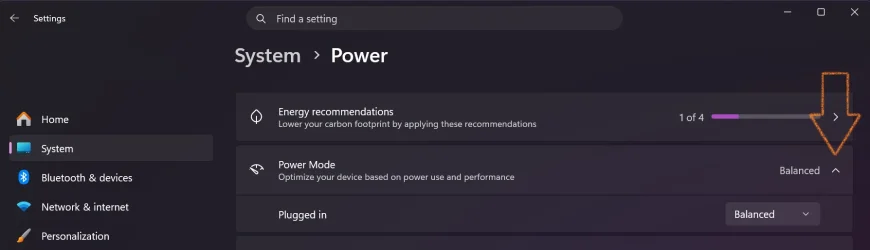
There are some power plans listed in Settings, but you have to click the little caret to see them.

Screenshot 2026-06-15 000437.webp

nope. its still there.. fully intact. what do you get if you
win+r and run:
Code:
shell:::{26EE0668-A00A-44D7-9371-BEB064C98683}\0\::{025A5937-A6BE-4686-A844-36FE4BEC8B6D}

powercfg.cpl is a little shorter. ;-)
 

My Computer

System One

  • OS
    Windows 11 Pro 25H2
    Computer type
    PC/Desktop
    Manufacturer/Model
    Intel NUC12WSHi7
    CPU
    12th Gen Core i7-1260P
    Motherboard
    NUC12WSBi7
    Memory
    64 GB Micron PC4-25600
    Graphics Card(s)
    Intel Iris Xe Graphics
    Sound Card
    on-board Realtek HD Audio
    Monitor(s) Displays
    Dell U3219Q
    Screen Resolution
    3840 x 2160
    Hard Drives
    Samsung SSD 990 PRO 1TB
    Crucial MX500 2 TB
    Antivirus
    Microsoft Defender
powercfg.cpl is a little shorter. ;-)
yeah yeah yeah :eyeroll:

Code:
shell:::{025A5937-A6BE-4686-A844-36FE4BEC8B6D}    (Win 11 Tabbed Explorer) (No Address in Bar)

shell:::{26EE0668-A00A-44D7-9371-BEB064C98683}\0\::{025A5937-A6BE-4686-A844-36FE4BEC8B6D}     (Classic Explorer) (Address Bar Correct)

control /name Microsoft.PowerOptions

powercfg.cpl

rundll32 shell32.dll,Control_RunDLL powercfg.cpl,,1

ms-settings-power:///

ms-settings:powersleep

ms-settings:batterysaver

ms-settings:energyrecommendations

(jk tho pseymour. i dont want "the smoke")
 
Last edited:

My Computer

System One

  • OS
    Windows 11 Pro
I do not find the option to change the Power plan
There are several tutorials on the subject. They use the term power plan rather than power options but it's the same thing really.

See Active Power Plan - ElevenForumTutorials
Change Power Plan - ElevenForumTutorials
Add or Remove context menu entry 'Choose Power Plan' - ElevenForumTutorials
Create Custom Power Plan - ElevenForumTutorials
Delete Power Plan - ElevenForumTutorials
Export and Import Power Plan - ElevenForumTutorials
Change Power Plan Name - ElevenForumTutorials
Change Power Plan Settings - ElevenForumTutorials
Reset and 'Restore to Default' Power Plan Settings - ElevenForumTutorials
Restore Missing Power Plans - ElevenForumTutorials


Denis


Welcome to ElevenForum.

It's really worth making time to browse through the ElevenForum Tutorial index - there's a shortcut to it at the top of every ElevenForum page [within the Tutorials dropdown list].
- At the foot of the ElevenForum Tutorial index is a shortcut to download it as a spreadsheet.
- I download a new copy each month.
- By downloading it as a spreadsheet I can benefit from Excel's excellent filtering capabilities when I search for topics of interest.
- ElevenForum tutorials are also listed at Tutorials and there's a shortcut to that at the top of every page.

You can search ElevenForum using the search box in the top-right corner of all ElevenForum webpages or using Advanced Search - ElevenForum
You can also search ElevenForum threads in many general search engines, such as Google, by adding site:elevenforum.com after your search term. For example,
Taskbar setup site:elevenforum.com
 

My Computer

System One

  • OS
    Windows 11 Home x64 Version 25H2 Build 26200.8037

Latest Support Threads

Back
Top Bottom