Dear Internet:
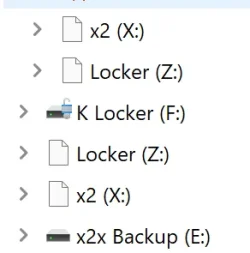
My C:\ drive icon is showing up as a blank document, not the normal HD icon. When I insert external drives, the same issue. Network drives appear to mount with the correct icons. Documents (docx, xlsx, jpg, pdf, etc) all appear okay.
It shows as a blank doc in both Explorer and Ghisler Total Commander.
I noticed on or about 23-March. The only change to my system in the last few weeks was a Beta update on 20-March (26220.8079). It's been consistent since.
I can't find any old autorun.inf copies lingering on my drive.
Icons appear "correct" in Disk Management.
Computer\HKEY_LOCAL_MACHINE\SOFTWARE\Microsoft\Windows\CurrentVersion\Explorer\DriveIcons\DefaultIcon defaults to %SystemRoot%\System32\imageres.dll,-109
Any help would be... helpful!
Thanks.
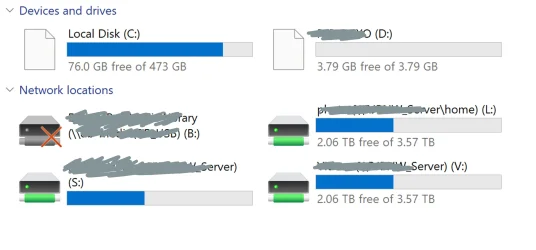
My C:\ drive icon is showing up as a blank document, not the normal HD icon. When I insert external drives, the same issue. Network drives appear to mount with the correct icons. Documents (docx, xlsx, jpg, pdf, etc) all appear okay.
It shows as a blank doc in both Explorer and Ghisler Total Commander.
I noticed on or about 23-March. The only change to my system in the last few weeks was a Beta update on 20-March (26220.8079). It's been consistent since.
I can't find any old autorun.inf copies lingering on my drive.
Icons appear "correct" in Disk Management.
Computer\HKEY_LOCAL_MACHINE\SOFTWARE\Microsoft\Windows\CurrentVersion\Explorer\DriveIcons\DefaultIcon defaults to %SystemRoot%\System32\imageres.dll,-109
Any help would be... helpful!
Thanks.
- Windows Build/Version
- Version 25H2 (0S Build 26220.8138)
My Computer
At a glance
Windows 1111th Gen Intel(R) Core(TM) i7-1185G7 @ 3.00GH16GB
- OS
- Windows 11
- Computer type
- Laptop
- Manufacturer/Model
- MSFT Surface Pro 8
- CPU
- 11th Gen Intel(R) Core(TM) i7-1185G7 @ 3.00GH
- Memory
- 16GB