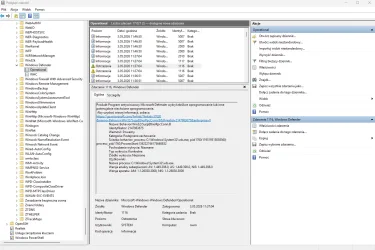
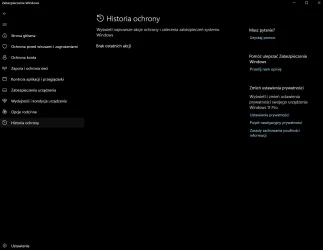
Help threat got detected but nothing shows in windows defender


bobek12121

New member
Local time
4:08 AM
Posts
1
OS
Windows 11
1777831519757.webp
1777831561936.webp
 
Windows Build/Version
Windows 11

My Computer My Computer

At a glance

Windows 11
OS
Windows 11
Computer type
PC/Desktop
One or more of these links may be useful:


From Microsoft:

Code:
Event ID 1116
Symbolic name: MALWAREPROTECTION_STATE_MALWARE_DETECTED

Message: The antimalware platform detected malware or other potentially unwanted software.

Description: Microsoft Defender Antivirus detected malware or other potentially unwanted software. For more information, see the following details:

Name: Threat name

ID: Threat ID

Severity: Severity. Examples: Low, Moderate, High, or Severe

Category: Category description, for example, any threat or malware type.

Path: File path

Detection Origin: Detection origin. Examples: Unknown, Local computer, Network share, Internet, Incoming traffic, or Outgoing traffic

Detection Type: Detection type. Examples: Heuristics, Generic, Concrete, or Dynamic signature

Detection Source: Detection source for example:

User: user initiated

System: system initiated

Real-time: real-time component initiated

IOAV: IE Downloads and Outlook Express Attachments initiated

NIS: Network inspection system

IEPROTECT: IE - IExtensionValidation; this protects against malicious webpage controls.

Early Launch Antimalware (ELAM). This includes malware detected by the boot sequence.

Remote attestation

Antimalware Scan Interface (AMSI). Primarily used to protect scripts (PowerShell, VBS), though it can be invoked by third parties as well. UAC

User: Domain\User

Process Name: Process in the PID

Signature Version: Definition version

Engine Version: Antimalware Engine version


Code:
User action:

No action is required.

Microsoft Defender Antivirus can suspend and take routine action on this threat.

If you want to remove the threat manually, in the Microsoft Defender Antivirus interface, select Clean Computer.
 

My Computer My Computer

At a glance

Windows 10Intel(R) Core(TM) i7-4800MQ CPU @ 2.70GHz16 GB Total: Manufacturer : Samsung MemoryTyp...NVIDIA Quadro K3100M; Intel(R) HD Graphics 4600
OS
Windows 10
Computer type
Laptop
Manufacturer/Model
HP
CPU
Intel(R) Core(TM) i7-4800MQ CPU @ 2.70GHz
Motherboard
Product : 190A Version : KBC Version 94.56
Memory
16 GB Total: Manufacturer : Samsung MemoryType : DDR3 FormFactor : SODIMM Capacity : 8GB Speed : 1600
Graphics Card(s)
NVIDIA Quadro K3100M; Intel(R) HD Graphics 4600
Sound Card
IDT High Definition Audio CODEC; PNP Device ID HDAUDIO\FUNC_01&VEN_111D&DEV_76E0
Hard Drives
Model Hitachi HTS727575A9E364
Antivirus
Microsoft Defender
Other Info
Mobile Workstation
I don't know what's wrong, but this kind of consistency problem would point to some corruption or glitch. The first fix I'd try is SFC and DISM. If that doesn't work, I'd check the options LLMs suggest to see if they've been used before in forum posts — for example, ask Brave: "Threat detection is logged in the Windows Defender Event Log, but nothing shows in the Protection History; what could be wrong?"

If I'm uncomfortable with the commands or investigations, BleepingComputer's malware removal forum may help reset Microsoft Defender to a working condition.

If I don't want to post logs from admin tools to public forums, I might try Settings > System > Recovery > Fix problems using Windows Update.
 

My Computer My Computer

At a glance

Windows 11 Pro 25H2
OS
Windows 11 Pro 25H2
Computer type
PC/Desktop

Latest Support Threads

Back
Top Bottom





