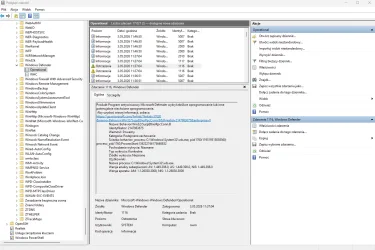
Event ID 1116
Symbolic name: MALWAREPROTECTION_STATE_MALWARE_DETECTED

Message: The antimalware platform detected malware or other potentially unwanted software.

Description: Microsoft Defender Antivirus detected malware or other potentially unwanted software. For more information, see the following details:

Name: Threat name

ID: Threat ID

Severity: Severity. Examples: Low, Moderate, High, or Severe

Category: Category description, for example, any threat or malware type.

Path: File path

Detection Origin: Detection origin. Examples: Unknown, Local computer, Network share, Internet, Incoming traffic, or Outgoing traffic

Detection Type: Detection type. Examples: Heuristics, Generic, Concrete, or Dynamic signature

Detection Source: Detection source for example:

User: user initiated

System: system initiated

Real-time: real-time component initiated

IOAV: IE Downloads and Outlook Express Attachments initiated

NIS: Network inspection system

IEPROTECT: IE - IExtensionValidation; this protects against malicious webpage controls.

Early Launch Antimalware (ELAM). This includes malware detected by the boot sequence.

Remote attestation

Antimalware Scan Interface (AMSI). Primarily used to protect scripts (PowerShell, VBS), though it can be invoked by third parties as well. UAC

User: Domain\User

Process Name: Process in the PID

Signature Version: Definition version

Engine Version: Antimalware Engine version