Help with selecting home router


I use two Asus Wifi 6e routers in a mesh configuration: RT-AX82U and a RT-AX86S. I have had no issues at all and they perform well and I have had no issues with them crashing or anything - they just work. I have a good number of devices being used by several people
They have updated the microcode regularly with security patches and some functionality improvements.

As for sending data to trend-micro - this needs to be enabled to use enhanced "AIProtection" such as blocking known malicious sites, DDOS protection, and isolating infected devices on your wireless LAN. Also, with it enabled, you can get statistics on visited sites. (traffic statistics). I have this "AIprotection" disabled unless I need it for some diagnostic. It doesn't affect the functionality of the routers.

"AIprotection" will send traffic statistics to trend-micro which can be sensitive. Here is a link to the description of the feature:


And here is the trend-micro global privacy notice


And their personal data collection disclosure

 
Last edited:

My Computers

System One System Two

  • OS
    Windows 11 Pro x64
    Computer type
    PC/Desktop
    Manufacturer/Model
    📷🔈🎧 🪛 DIY Photoshop/Audio/Game/tinker
    CPU
    i9 14900K P/E 5.8/4.5 GHz, cache 5.0 GHz
    Motherboard
    Asus ROG Maximus Z790 Dark Hero
    Memory
    🐏 96GB (2x48) G.skill Ripjaws 6800 MT/s
    Graphics Card(s)
    Asus ROG Strix 4070 Ti OC
    Sound Card
    🔊Bowers & Wilkins 606 S3 speakers; Audiolabs 7000a integrated amp; RSL 10S Mk2 sub; Creative Pebble Pro Minimilist
    Monitor(s) Displays
    🖥️🖥️ Eizo CG2730 ColorEdge, ViewSonic VP2768
    Screen Resolution
    🖥️🖥️ 2560 x 1440p x 2
    Hard Drives
    💾 WDC SN850X 4TB nvme, SN850 1TB nvme, SK-Hynix 2 TB P41 nvme,. Sabrent USB-C DS-SC5B 5-bay docking station: 6TB WDC Black, 6TB Ironwolf Pro; 2x 2TB WDC Black HDD
    PSU
    ⚡️ 850W Seasonic Vertex PX-850 ATX 3.0/PCI-E 5.0
    Case
    Fractal Design North XL Mesh, Black Walnut
    Cooling
    ❄️ EK Nucleus black 360 AIO w/Phanteks T30-120 fans, 2 Noctua NF-A14 Chromax case fan, 1 T30-120 fan cooling memory
    Keyboard
    ⌨️ Keychron Q3 Max TKL with custom GMK Redsuns Red Samuri keycaps, TX Stabs
    Mouse
    🖱️ Logitech G305 wireless gaming
    Internet Speed
    ⬇️ 500 Mb/s ⬆️ 12 Mb/s
    Browser
    🔥🦊 Firefox
    Antivirus
    🦺 Defender, Macrium Reflect X 🏆
    Other Info
    Phangkey Amaterasu V2 Desk Mat
  • Computer type
    Laptop
    Manufacturer/Model
    💻 Apple 13" Macbook Pro 2020 (m1)
    CPU
    Apple M1
    Screen Resolution
    2560x1600
    Browser
    Firefox
I currently use an RT-BE88U
I also have 2 in an AI Mesh: RT-AC68U, DSL-AX82U and none of the 3 have Trend turned on.

The one time I tried it (I always buy ASUS) it caused trouble with a cloud storage setup. I couldn't download anything from that site.
They told me to disable Trend in my Router, which fixed the issue.
 
Last edited:

My Computers

System One System Two

  • OS
    Windows 11 Pro 25H2 Build 26200.8524
    Computer type
    PC/Desktop
    Manufacturer/Model
    Sin-built 2013
    CPU
    Intel(R) Core(TM) i7-4770K CPU @ 3.50GHz
    Motherboard
    ASUS ROG Maximus VI Formula
    Memory
    32.0 GB of I forget and the box is in storage.
    Graphics Card(s)
    Gigabyte nVidia GeForce GTX 1660 Super OC 6GB
    Sound Card
    Onboard thingy
    Monitor(s) Displays
    5 x LG 25MS500-B - 1 x 24MK430H-B - 1 x Wacom Pro 22" Touch Screen Tablet
    Screen Resolution
    All over the place
    Hard Drives
    Too many to list.
    OS on Samsung 1TB 870 QVO SATA
    PSU
    Silverstone 1500
    Case
    NZXT Phantom 820 Full-Tower Case
    Cooling
    Noctua NH-D15 Elite Class Dual Tower CPU Cooler / 6 x EziDIY 120mm / 2 x Corsair 140mm somethings / 1 x 140mm Thermaltake something / 2 x 200mm Corsair.
    Keyboard
    Corsair K95 / Logitech diNovo Edge Wireless
    Mouse
    Logitech: G402 / G502 / Mx Masters / Mx Air Cordless
    Internet Speed
    2000/500Mbps
    Browser
    All sorts
    Antivirus
    Kaspersky Premium
    Other Info
    ㅤㅤㅤㅤㅤㅤㅤㅤㅤㅤㅤㅤㅤㅤㅤㅤㅤㅤㅤㅤㅤㅤㅤㅤㅤㅤㅤㅤㅤㅤㅤㅤㅤㅤㅤㅤㅤㅤㅤㅤ⠀⠀⠀⠀⠀⠀⠀⠀⠀⠀
    TP-Link BE9300 WiFi 7 Bluetooth 5.4 (Archer TBE550E)
    TP-Link TX201 V1 2.5GB Lan

    Grandstream HT812 - VoIP
    ASUS DSL-AX82U - Mesh
    ASUS RT-AC68U - Mesh
    ASUS RT-BE88U Router

    Brother MFC-L2880DW Printer

    I’m on a horse.
  • Operating System
    Windows 11 Pro 25H2 Build 26200.8524
    Computer type
    Laptop
    Manufacturer/Model
    LENOVO Yoga 7 14IRL8 - 7i EVO OLED 14" Touchscreen i5 12 Core 16GB/512GB
    CPU
    Intel Core 12th Gen i5-1240P Processor (1.7 - 4.4GHz)
    Memory
    16GB LPDDR5 RAM
    Graphics card(s)
    Intel Iris Xe Graphics Processor
    Sound Card
    Optimized with Dolby Atmos®
    Screen Resolution
    QHD 2880 x 1800 OLED
    Hard Drives
    M.2 512GB
    Antivirus
    Defender / Malwarebytes
    Other Info
    …still on a horse.
Last edited:

My Computer

System One

  • OS
    Win11
    Computer type
    PC/Desktop
    Manufacturer/Model
    Asus Home built
    CPU
    i9-13900
    Motherboard
    ASUS Strix Z790-H
    Memory
    64 GB
    Graphics Card(s)
    Nvidia RTX 5070 TI OC
    Monitor(s) Displays
    Sony 55"
    Hard Drives
    SSD
    PSU
    850 watt EVGA
    Case
    Cooler Master Haf 932
    Cooling
    CoolerMaster
    Keyboard
    RedDragon
    Mouse
    CoolerMaster
    Internet Speed
    300/300
    Antivirus
    Defender
    Other Info
    VR, Virtual Reality
What I love about Asus routers is that as long as it is even remotely modern (model does not matter), they can be used to build a mesh. No more throwing away old routers.
 

My Computers

System One System Two

  • OS
    Win 11 Pro 25H2 26200.8457 / Linux Mint 22.3
    Computer type
    Laptop
    Manufacturer/Model
    Lenovo A485
    CPU
    Ryzen 7 2700U Pro
    Motherboard
    Lenovo (WiFi/BT module upgraded to Intel Wireless-AC-9260)
    Memory
    32GB
    Graphics Card(s)
    iGPU Vega 10
    Sound Card
    Realtek
    Monitor(s) Displays
    14" FHD (built-in) + 14" Lenovo Thinkvision M14t (touch+pen) + 32" Asus PB328
    Screen Resolution
    FHD + FHD + 1440p
    Hard Drives
    Intel 660p m.2 nVME PCIe3.0 x2 512GB
    PSU
    125W(Dock)/65W(Travel Adapter)
    Keyboard
    Thinkpad / Logitech MX Keys
    Mouse
    Logitech MX Master 2S
    Internet Speed
    1/1Gbit
    Browser
    Firefox
    Antivirus
    Windows Defender
    Other Info
    SecureBoot: Enabled
    TPM2.0: Enabled
    AMD-V: Enabled
  • Operating System
    Win 11 Pro 25H2 26200.8521(RP)
    Computer type
    PC/Desktop
    Manufacturer/Model
    Custom
    CPU
    i7-7700k @4.8GHz
    Motherboard
    Asus PRIME Z270-A
    Memory
    32GB 2x16GB 2133MHz CL15
    Graphics card(s)
    EVGA GTX1080Ti FTW 11GB
    Sound Card
    Integrated
    Monitor(s) Displays
    32" 10-bit Asus PB328Q
    Screen Resolution
    WQHD 2560x1440
    Hard Drives
    512GB ADATA SX8000NP NVMe PCIe Gen 3 x4
    PSU
    850W
    Case
    Fractal Design Define 7
    Cooling
    Noctua NH-D15 chromax.black
    Keyboard
    Logitech MX Keys
    Mouse
    Logitech MX Master 2S
    Internet Speed
    1/1Gbit
    Browser
    Firefox
    Antivirus
    Windows Defender
    Other Info
    AC WiFi Card
What I love about Asus routers is that as long as it is even remotely modern (model does not matter), they can be used to build a mesh. No more throwing away old routers.
And you can mix and match them with no issue in my limited experience.
 

My Computers

System One System Two

  • OS
    Windows 11 Pro x64
    Computer type
    PC/Desktop
    Manufacturer/Model
    📷🔈🎧 🪛 DIY Photoshop/Audio/Game/tinker
    CPU
    i9 14900K P/E 5.8/4.5 GHz, cache 5.0 GHz
    Motherboard
    Asus ROG Maximus Z790 Dark Hero
    Memory
    🐏 96GB (2x48) G.skill Ripjaws 6800 MT/s
    Graphics Card(s)
    Asus ROG Strix 4070 Ti OC
    Sound Card
    🔊Bowers & Wilkins 606 S3 speakers; Audiolabs 7000a integrated amp; RSL 10S Mk2 sub; Creative Pebble Pro Minimilist
    Monitor(s) Displays
    🖥️🖥️ Eizo CG2730 ColorEdge, ViewSonic VP2768
    Screen Resolution
    🖥️🖥️ 2560 x 1440p x 2
    Hard Drives
    💾 WDC SN850X 4TB nvme, SN850 1TB nvme, SK-Hynix 2 TB P41 nvme,. Sabrent USB-C DS-SC5B 5-bay docking station: 6TB WDC Black, 6TB Ironwolf Pro; 2x 2TB WDC Black HDD
    PSU
    ⚡️ 850W Seasonic Vertex PX-850 ATX 3.0/PCI-E 5.0
    Case
    Fractal Design North XL Mesh, Black Walnut
    Cooling
    ❄️ EK Nucleus black 360 AIO w/Phanteks T30-120 fans, 2 Noctua NF-A14 Chromax case fan, 1 T30-120 fan cooling memory
    Keyboard
    ⌨️ Keychron Q3 Max TKL with custom GMK Redsuns Red Samuri keycaps, TX Stabs
    Mouse
    🖱️ Logitech G305 wireless gaming
    Internet Speed
    ⬇️ 500 Mb/s ⬆️ 12 Mb/s
    Browser
    🔥🦊 Firefox
    Antivirus
    🦺 Defender, Macrium Reflect X 🏆
    Other Info
    Phangkey Amaterasu V2 Desk Mat
  • Computer type
    Laptop
    Manufacturer/Model
    💻 Apple 13" Macbook Pro 2020 (m1)
    CPU
    Apple M1
    Screen Resolution
    2560x1600
    Browser
    Firefox
What do you mean by "give away your data"? Why do you think this will happen? What data does it want?
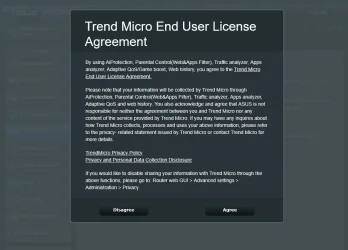
See the screenshot of the "click to agree" popup. (attached0

What data does it want? I don't know, and I don't think it matters. By clicking "I agree" to the popup, I give up certain rights. It really doesn't matter what data they claim they will or won't collect.. they WILL collect whatever they can and whatever they want, regardless of what the agreement statement claims.
For what it's worth, while there have been data collection lawsuits and penalties, none of them (as far as I can find in the USA), are related to a violation after a user clicked "I agree". There are none because there are no laws regarding such agreements.

There seems to be a data tracking trend in these products these days.
Examples: 1) Purchased a FitBit, then discovered that in order to do anything useful with it, I needed to open an online account with Fitbit. The unit functioned at the basic level, but would not perform all of the functions advertised on the box unless I opened an account and logged into Fitbit dot com or whatever.
2) When I investigated a home energy monitor, I found several dozen product offerings.. They're made by companies with names like Sense, Emporia, etc. All but two very obscure brands require an online account for the unit to upload all your data. They won't even work correctly without the account.

Did you know that when you sign the purchase agreement for a new car, the "I agree" statements compile to about 400+ pages of text? And that agreement allows for the sale of data from where and when you travel, to your sex life if they get access to it. Imagine all the other things they can collect about you. They record, collect, retain, and sell, the data related to your travel and your driving behaviors like how fast you accelerate or break, when and where you fill the fuel tank, where you go, when you go, etc. Everything. Profiles are then built and you are linked to others..

But I thought a router would be different since it is a security device in itself. So much for that wishful thinking.

I didn't click the agree so I still have some rights.. although I'm not clear on what those are.
 

Attachments

  • asus.webp
    asus.webp
    53.9 KB · Views: 1

My Computer

System One

  • OS
    Windows 11 Home
    Computer type
    PC/Desktop
    CPU
    AMD RYZEN 5 3600
    Motherboard
    ASUS B450M DS3H WIFI
    Memory
    32 Gb 3200MT
    Graphics Card(s)
    GeForce GTX
    Monitor(s) Displays
    YES
    Screen Resolution
    Enough
    Hard Drives
    SAMSUNG 990 PRO SSD 1TB NVMe
    PSU
    YES
    Case
    Thermaltake
    Cooling
    YES
    Keyboard
    Logitech K120
    Mouse
    Logitech
    Internet Speed
    200 Mb/s - 1 Gbs
    Browser
    Firefox
    Antivirus
    Windows Defender
I think I've exhausted my contribution here, bit too "tin-foil hatty" for me

Absolutely obviously an opt-out/work-around possibility for the OP, but who probably can't (or doesn't want to, for whatever reason) see that opportunity
 

My Computers

System One System Two

  • OS
    Windows 11 2xH2 (latest update ... forever anal)
    Computer type
    PC/Desktop
    Manufacturer/Model
    HP Slim S01
    CPU
    Intel i5-12400
    Memory
    8GB
    Graphics Card(s)
    NVIDIA GeForce GT730
    Sound Card
    OOBE
    Monitor(s) Displays
    Acer 32"
    Screen Resolution
    1920x1080
    Hard Drives
    512GB KIOXIA NVMe
    1TB SATA SSD
    PSU
    OOBE
    Case
    OOBE
    Cooling
    OOBE
    Keyboard
    BT
    Mouse
    BT
    Browser
    Brave FFox Chrome Opera
    Antivirus
    KIS
  • Operating System
    Windows 11 Pro 2xH2 (latest update ... 4ever anal)
    Computer type
    Laptop
    Manufacturer/Model
    HP Pavillion 15
    CPU
    i7-1165G7 @ 2.80GHz
    Graphics card(s)
    Intel Iris Xe Graphics
    Hard Drives
    Samsung NVMe 512GB
    + numerous/multiple SSD Type C USB enclosures
    Internet Speed
    NBN FTTN 50
    Browser
    Brave
    Antivirus
    KIS
I think I've exhausted my contribution here, bit too "tin-foil hatty" for me
Some people are indifferent to the invasive and costly data collection concerns. I don't understand why, but it's not tin-foil hatty.. Such comments imply conspiracy theory nonsense.

Anyhow, there does not seem to be a way to get around ASUS's collection if I want to use any of the more advanced router functions.
 

My Computer

System One

  • OS
    Windows 11 Home
    Computer type
    PC/Desktop
    CPU
    AMD RYZEN 5 3600
    Motherboard
    ASUS B450M DS3H WIFI
    Memory
    32 Gb 3200MT
    Graphics Card(s)
    GeForce GTX
    Monitor(s) Displays
    YES
    Screen Resolution
    Enough
    Hard Drives
    SAMSUNG 990 PRO SSD 1TB NVMe
    PSU
    YES
    Case
    Thermaltake
    Cooling
    YES
    Keyboard
    Logitech K120
    Mouse
    Logitech
    Internet Speed
    200 Mb/s - 1 Gbs
    Browser
    Firefox
    Antivirus
    Windows Defender
When you drive your car on the public road you agree to put on your seatbelt (except in New Hampshire) but when you surf your Asus router on the internet you don't have to put on your AiProtection. Aggrieving, isn't it?

Asus account is not required with both App or WebUI setup.

Data sharing to Asus is required for:
  • Firmware Updates
  • Asus App
  • Asus DDNS
  • Remote Connection
  • AiCloud
  • AiDisk
Data sharing to Trend Micro is required for popular firmware features. Without it the following will not work:
  • AiProtection
  • Traffic Analyzer
  • Apps Analyzer
  • Web & Apps Filters (Parental Controls)
  • Adaptive QoS & Game Boost
  • Web History
However, modern routers from Asus have plenty of other, really very useful features. For example, AiMesh 2.0 can be enabled/disabled regardless of whether you use the Wi-Fi system in router mode (the default mode) or in Access Point mode (AP mode). Switching to AP mode with AiMesh 2.0 turned on allows you to avoid Double NAT when you insert a separate router (e.g., enterprise-grade hardware or a DIY-based solution like VyOS, pfSense, OPNsense, IPFire, etc.) between your ISP modem/gateway and the Wi-Fi mesh system from Asus.

That said, aside from being able to mix multiple different router models from Asus together to create a single mesh setup, being able to choose the wired backhaul option is one of my big favorites with AiMesh 2.0. (Unlike a wireless backhaul, a wired backhaul neither adds nor is susceptible to wireless interference anywhere in the setup.) Another one is that I am getting better range, signal strength, coverage, stability, and performance with just 2 nodes when compared to much more expensive mesh setups from "competing" brands with 3 units (one base station/unit, 2 satellite units). Also, when I use the Asus router app on my phone to upgrade the mesh system's firmware, it automatically upgrades the firmware in both nodes at once.

The bottom line is that you don't even have to install the Asuswrt-Merlin firmware to get a whole plethora of interesting features that truly set Asus routers apart from most (or all) other popular brands in the same price range—and sometimes even far beyond the same price range especially if you understand what to look for and why.
 
Last edited:

My Computers

System One System Two

  • OS
    11 Home
    Computer type
    Laptop
    Manufacturer/Model
    Asus TUF Gaming F16 (2024)
    CPU
    i7 13650HX
    Memory
    16GB DDR5
    Graphics Card(s)
    GeForce RTX 4060 Mobile
    Sound Card
    Eastern Electric MiniMax DAC Supreme; Emotiva UMC-200; Astell & Kern AK240
    Monitor(s) Displays
    Sony Bravia XR-55X90J
    Screen Resolution
    3840×2160
    Hard Drives
    512GB SSD internal
    37TB external
    PSU
    Li-ion
    Cooling
    2× Arc Flow Fans, 4× exhaust vents, 5× heatpipes
    Keyboard
    Logitech K800
    Mouse
    Logitech G402
    Internet Speed
    30Mbit/s up, 500Mbit/s down
    Browser
    FF
    Antivirus
    What's an antivirus?
  • Operating System
    11 Home
    Computer type
    Laptop
    Manufacturer/Model
    Medion S15450
    CPU
    i5 1135G7
    Memory
    16GB DDR4
    Graphics card(s)
    Intel Iris Xe
    Sound Card
    Eastern Electric MiniMax DAC Supreme; Emotiva UMC-200; Astell & Kern AK240
    Monitor(s) Displays
    Sony Bravia XR-55X90J
    Screen Resolution
    3840×2160
    Hard Drives
    2TB SSD internal
    37TB external
    PSU
    Li-ion
    Keyboard
    Logitech K800
    Mouse
    Logitech G402
    Internet Speed
    30Mbit/s up, 500Mbit/s down
    Browser
    FF
It was time to upgrade my old linksys router. Received the Asus ZenwiFi AX today. Appears to be a good choice for my setup. Will setup tomorrow and maybe provide a bit more info.
 

My Computers

System One System Two

  • OS
    25H2 10.0.26200 26200.2584
    Computer type
    PC/Desktop
    Manufacturer/Model
    Beelink SER8 Mini
    CPU
    AMD Ryzen 7 8845HS
    Motherboard
    AZW SER8 AMD Promontory/Bixby FCH
    Memory
    DDR5-5600 / PC5-44800 DDR5 SDRAM SO-DIMM32G
    Graphics Card(s)
    AMD Radeon 780M
    Sound Card
    AMD Zen - Audio Processor - HD Audio Controller
    Monitor(s) Displays
    1 LG HDR 32"
    Screen Resolution
    2560x1440
    Hard Drives
    1TB Crucial NVMe
    2TB Crucial NVME
    WD 1TB SSD SATA to USB3
    1 Seagate BUP Slim 2TB SATA to USB3
    1 Seagate BUP Slim 4TB SATA to USB3
    Samsung SSD 1TB SATA to USB3
    Samsung 500G SATA to USB3
    500G Crucial SSD to USB3
    PSU
    Beelink Proprietary
    Case
    Beelink Proprietary
    Cooling
    Beelink Proprietary
    Keyboard
    Logitech Backlit USB
    Mouse
    Logitech M510
    Internet Speed
    T-Mobile 5G 500 T-Mobile Home Internet -Asus ZenWifi AX Mesh
    Browser
    Edge, Firefox, Chrome
    Antivirus
    Microsoft Security 1.451.235.0 version created 6-2-2026
    Other Info
    Macrium X Build 10.0.8843
    Minitool Pro Ultimate 13.6
    REVO Pro 5.5.0.0 Portable
    JAM Treesize 9.7.2.2203 Perpetual Outdated.
    JAM Ultrasearch Pro 4.9.1.1204 Perpetual Outdated.
    Malwarebytes Pro 5.5.7.255 Update 1.0.110434 Component 157.0.5633
    Screenpresso Pro 2.2.12.3 beta (.Net 4.8) 2026-5-026
    Hamrick Vue Scan Pro 9.8.51.13
    Visio 2021 Pro 2021 MSO (Version 2605 Build 16.0.20026.20076) 64-bit
    Droid Transfer-Android 26.2.26.0
    Thunderbird 151.0.1
    em Client 10.4.5326
    Affinity Suite 3.2.1
    Microsoft 365 MSO (Version 2605 Build 16.0.20026.20076) 64-bit
    Adobe Creative cloud Version 6911 Apps 6.9.0.618 CCLibrary 4.16.2 (Photo subscription)
    HXD Hex Editor Version 2.5.0.0
    DAW Software Reaper-Izotope Plugins
    TGRMN Software ViceVersa Pro Build 6015 and VVEngine 3 Build 3000
    ISOBuster Pro 5.8.0.0
    Microsoft Visio Pro 2021 Version 2605 Build 16.0.20026.20076
    Many Other free and paid applications
    WYSIWYG Web Builder 21.07
    Filezilla 3.70.5
    Putty .83 and Putty Gen .83
    System Informer 4.0.26144.416 Stable
    O&O Regedit Version12 Build 2172
    WINRAR 7.22
    Lockhunter 3.4.3.146. x64
    Advanced IP Scanner 2.5.1
    Epson Eco Tank Printers and Epson Scanners.
    Bluestacks for Ring Cameras
    PEAK DCA Transistor Graphical USB Interface for Viewing Transistor Operational Curves. Win 10 Version and has functioneded on Win11 perfectly. Version 1.1.1963.
    Games - Card Games -Microsoft FSX "Pro Gold Flight Sim with add ons. Still works perfectly.
    Still run a few older onese successfully on win11 as well with no graphic issue.
  • Operating System
    Win11 Pro OEM 25H2 OS Build 26200.7019
    Computer type
    PC/Desktop
    Manufacturer/Model
    Beelink
    CPU
    AMD Ryzen 7 8845HS
    Motherboard
    AMD
    Memory
    DDR5 32G
    Graphics card(s)
    Beelink SER7
    Sound Card
    Beelink SER7
    Monitor(s) Displays
    Dell
    Screen Resolution
    Native
    Hard Drives
    1TB Crucial NVMe SSD 2G SATA
    PSU
    Beelink Proprietary
    Case
    Beelink Proprietary
    Cooling
    Beelink Proprietary
    Keyboard
    gaming keyboard
    Mouse
    MS
    Internet Speed
    T-Mobile 5G
    Antivirus
    Defender Malwarebytes
    Other Info
    Microsoft 365 Family Office
    Macrium X Subscription1 Version 10
    Mini-Tool Ultimate 13.0 Lifetime
    Malwarebytes Premium w/VPN 5
    Revo Pro Portable Pro 5
    Roboform 9.7.7.
    Others. (All legit)
maybe step up to something like this?
 

My Computer

System One

  • OS
    11-25h2
    CPU
    amd 9850x3d
    Motherboard
    asus x870e apex
    Memory
    64gb g.skill @6000cl26
    Graphics Card(s)
    pny 5090 argb oc
    Sound Card
    creative x5
    Monitor(s) Displays
    dell aw3225qf
    Screen Resolution
    4k@240
    Hard Drives
    4tb samsung 9100 pro
    4tb samsung 990 pro
    4tb wd black sn850x
    2tb samsung 980 pro (usb)
    PSU
    phanteks 1600w
    Case
    antec flux pro
    Cooling
    phanteks 420x2
    Keyboard
    logitech gpx tkl
    Mouse
    logitech gpx2 ss
It was time to upgrade my old linksys router. Received the Asus ZenwiFi AX today. Appears to be a good choice for my setup. Will setup tomorrow and maybe provide a bit more info.
I don't know how much you paid for the ZenWiFi XT8, but: Amazon.com
 

My Computers

System One System Two

  • OS
    11 Home
    Computer type
    Laptop
    Manufacturer/Model
    Asus TUF Gaming F16 (2024)
    CPU
    i7 13650HX
    Memory
    16GB DDR5
    Graphics Card(s)
    GeForce RTX 4060 Mobile
    Sound Card
    Eastern Electric MiniMax DAC Supreme; Emotiva UMC-200; Astell & Kern AK240
    Monitor(s) Displays
    Sony Bravia XR-55X90J
    Screen Resolution
    3840×2160
    Hard Drives
    512GB SSD internal
    37TB external
    PSU
    Li-ion
    Cooling
    2× Arc Flow Fans, 4× exhaust vents, 5× heatpipes
    Keyboard
    Logitech K800
    Mouse
    Logitech G402
    Internet Speed
    30Mbit/s up, 500Mbit/s down
    Browser
    FF
    Antivirus
    What's an antivirus?
  • Operating System
    11 Home
    Computer type
    Laptop
    Manufacturer/Model
    Medion S15450
    CPU
    i5 1135G7
    Memory
    16GB DDR4
    Graphics card(s)
    Intel Iris Xe
    Sound Card
    Eastern Electric MiniMax DAC Supreme; Emotiva UMC-200; Astell & Kern AK240
    Monitor(s) Displays
    Sony Bravia XR-55X90J
    Screen Resolution
    3840×2160
    Hard Drives
    2TB SSD internal
    37TB external
    PSU
    Li-ion
    Keyboard
    Logitech K800
    Mouse
    Logitech G402
    Internet Speed
    30Mbit/s up, 500Mbit/s down
    Browser
    FF
Anyhow, there does not seem to be a way to get around ASUS's collection if I want to use any of the more advanced router functions.

I think the problem is your lack of understanding re the router.

You’re not missing out on any security features like the router firewall, unless you include the Bloatware Trend Micro Software, that’s all the AI does, is turn Trend on.

The router has a firewall and security settings
Your PC has antivirus and a firewall
Trend Micro in the router, I consider to be bloatware or at the least, overkill.
 

My Computers

System One System Two

  • OS
    Windows 11 Pro 25H2 Build 26200.8524
    Computer type
    PC/Desktop
    Manufacturer/Model
    Sin-built 2013
    CPU
    Intel(R) Core(TM) i7-4770K CPU @ 3.50GHz
    Motherboard
    ASUS ROG Maximus VI Formula
    Memory
    32.0 GB of I forget and the box is in storage.
    Graphics Card(s)
    Gigabyte nVidia GeForce GTX 1660 Super OC 6GB
    Sound Card
    Onboard thingy
    Monitor(s) Displays
    5 x LG 25MS500-B - 1 x 24MK430H-B - 1 x Wacom Pro 22" Touch Screen Tablet
    Screen Resolution
    All over the place
    Hard Drives
    Too many to list.
    OS on Samsung 1TB 870 QVO SATA
    PSU
    Silverstone 1500
    Case
    NZXT Phantom 820 Full-Tower Case
    Cooling
    Noctua NH-D15 Elite Class Dual Tower CPU Cooler / 6 x EziDIY 120mm / 2 x Corsair 140mm somethings / 1 x 140mm Thermaltake something / 2 x 200mm Corsair.
    Keyboard
    Corsair K95 / Logitech diNovo Edge Wireless
    Mouse
    Logitech: G402 / G502 / Mx Masters / Mx Air Cordless
    Internet Speed
    2000/500Mbps
    Browser
    All sorts
    Antivirus
    Kaspersky Premium
    Other Info
    ㅤㅤㅤㅤㅤㅤㅤㅤㅤㅤㅤㅤㅤㅤㅤㅤㅤㅤㅤㅤㅤㅤㅤㅤㅤㅤㅤㅤㅤㅤㅤㅤㅤㅤㅤㅤㅤㅤㅤㅤ⠀⠀⠀⠀⠀⠀⠀⠀⠀⠀
    TP-Link BE9300 WiFi 7 Bluetooth 5.4 (Archer TBE550E)
    TP-Link TX201 V1 2.5GB Lan

    Grandstream HT812 - VoIP
    ASUS DSL-AX82U - Mesh
    ASUS RT-AC68U - Mesh
    ASUS RT-BE88U Router

    Brother MFC-L2880DW Printer

    I’m on a horse.
  • Operating System
    Windows 11 Pro 25H2 Build 26200.8524
    Computer type
    Laptop
    Manufacturer/Model
    LENOVO Yoga 7 14IRL8 - 7i EVO OLED 14" Touchscreen i5 12 Core 16GB/512GB
    CPU
    Intel Core 12th Gen i5-1240P Processor (1.7 - 4.4GHz)
    Memory
    16GB LPDDR5 RAM
    Graphics card(s)
    Intel Iris Xe Graphics Processor
    Sound Card
    Optimized with Dolby Atmos®
    Screen Resolution
    QHD 2880 x 1800 OLED
    Hard Drives
    M.2 512GB
    Antivirus
    Defender / Malwarebytes
    Other Info
    …still on a horse.
Hello,
I am looking for information on which home router to purchase. I had a Netgear unit but it was outdated as it was a standard 10/100 unit.. So I upgraded to an ASUS RT-AC88U and it was a horrible choice. Apparently, in order to make use of most of the router's features, I have to agree to let Trend Micro spy on me. WTF?? I also have an ASUS motherboard on my PC and it's glitchy too.. I will never ever purchase an ASUS product ever again.

So onto google to find a good router and it has become apparent that google is flooded with crap links, most of which are just marketing and sales dressed up to look like a review or opinion article.

Does anyone make a router that is secure? One that isn't going to spy on me or force me to give out my private data to a 3rd party? I still can't get over the fact that ASUS wants me to give Trend Micro my data.. I'm floored by that. I even went so far as to write ASUS a nasty email letting them know I will never ever purchase another ASUS product..

As I've gotten older, it has become clear that as one company does something nasty and gets away with it, other brands will follow.. and I'm assuming the router issue isn't any different.. or am I wrong?
What do you mean with "ASUS motherboard on my PC and it's glitchy too"?

I'm using a Asus motherboard and router and it works good so far. Planning more upgrades with Asus products.

Anyone using the traffic analyzer in the Asus router? Seems kind of pointless.
 

My Computer

System One

  • OS
    Windows 11
    Computer type
    PC/Desktop
    Manufacturer/Model
    Asus
    CPU
    Intel Core i7-13700
    Motherboard
    ASUS TUF GAMING B760-PLUS WIFI
    Memory
    Corsair VENGEANCE DDR5 32GB
    Graphics Card(s)
    MSI GeForce RTX 5070 12G VENTUS 2X OC
    Monitor(s) Displays
    Samsung LS32AG504
    Hard Drives
    Kingston Fury Renegade M.2 2TB SSD
    PSU
    Corsair RM850X 2021 / 850W / 80+ Gold
    Browser
    Chrome
    Antivirus
    Defender
I think the problem is your lack of understanding re the router.

You’re not missing out on any security features like the router firewall, unless you include the Bloatware Trend Micro Software, that’s all the AI does, is turn Trend on.

The router has a firewall and security settings
Your PC has antivirus and a firewall
Trend Micro in the router, I consider to be bloatware or at the least, overkill.
Looking at the traffic and bandwidth requires agreement to allow trend/asus to collect my data. Why would a router need to communicate to a third party for those features? I don't want or use the AI security feature, but I would like to look at traffic and bandwidth. I would also like to use the parental control feature, but that requires trend/asus collection.

There is no legitimate reason (that I can think of) why my router would need to send data outside for these features to work. I understand the AI needing it, but not the traffic, bandwidth and parental features.
 

My Computer

System One

  • OS
    Windows 11 Home
    Computer type
    PC/Desktop
    CPU
    AMD RYZEN 5 3600
    Motherboard
    ASUS B450M DS3H WIFI
    Memory
    32 Gb 3200MT
    Graphics Card(s)
    GeForce GTX
    Monitor(s) Displays
    YES
    Screen Resolution
    Enough
    Hard Drives
    SAMSUNG 990 PRO SSD 1TB NVMe
    PSU
    YES
    Case
    Thermaltake
    Cooling
    YES
    Keyboard
    Logitech K120
    Mouse
    Logitech
    Internet Speed
    200 Mb/s - 1 Gbs
    Browser
    Firefox
    Antivirus
    Windows Defender
What do you mean with "ASUS motherboard on my PC and it's glitchy too"?

I'm using a Asus motherboard and router and it works good so far. Planning more upgrades with Asus products.

Anyone using the traffic analyzer in the Asus router? Seems kind of pointless.
The first glitch that comes to mind is that when I set my bios to fast boot, the F10 button stopped working to access bios. There is no way to access the bios settings when in superfast boot mode.. you have to go through windows troubleshooting in order to do it, which requires extra reboots.
 

My Computer

System One

  • OS
    Windows 11 Home
    Computer type
    PC/Desktop
    CPU
    AMD RYZEN 5 3600
    Motherboard
    ASUS B450M DS3H WIFI
    Memory
    32 Gb 3200MT
    Graphics Card(s)
    GeForce GTX
    Monitor(s) Displays
    YES
    Screen Resolution
    Enough
    Hard Drives
    SAMSUNG 990 PRO SSD 1TB NVMe
    PSU
    YES
    Case
    Thermaltake
    Cooling
    YES
    Keyboard
    Logitech K120
    Mouse
    Logitech
    Internet Speed
    200 Mb/s - 1 Gbs
    Browser
    Firefox
    Antivirus
    Windows Defender
What do you mean with "ASUS motherboard on my PC and it's glitchy too"?

I'm using a Asus motherboard and router and it works good so far. Planning more upgrades with Asus products.

Anyone using the traffic analyzer in the Asus router? Seems kind of pointless.
Before I updated my router's firmware, I was able to use it without agreeing to anything.

I used it to basically spy on my child's computer use. The schools at her age group, are using google classroom, which itself is collecting and storing every bit of data on these kids. Of more concern, is that the school is giving these kids "digital arts" homework.. IE: teaching them to draw, make animations, etc.

Stupid doesn't even begin to describe how useless and time wasting that is. They should be teaching them mathematics, science, etc.. Heck, even philosophy would be a good subject.. But what the schools are doing is addicting these kids to staring at computer monitors instead of playing outside like kids are supposed to.
My child has free roam of over 100 acres to do whatever.. nope, just wants to stare at the computer screen because the schools are addicting them to it.

So I use the traffic monitor to watch some of what's going on and to limit computer time.

Heck, just go and try to find a parental control software package to install... WTF? Every one of them requires an agreement for data collection that results in a privacy nightmare.

By the way, did you know that if you allow a school issued student computer into your home, the school can turn on the camera and speakers whenever they want? It's their device, they have legal control over it.
 

My Computer

System One

  • OS
    Windows 11 Home
    Computer type
    PC/Desktop
    CPU
    AMD RYZEN 5 3600
    Motherboard
    ASUS B450M DS3H WIFI
    Memory
    32 Gb 3200MT
    Graphics Card(s)
    GeForce GTX
    Monitor(s) Displays
    YES
    Screen Resolution
    Enough
    Hard Drives
    SAMSUNG 990 PRO SSD 1TB NVMe
    PSU
    YES
    Case
    Thermaltake
    Cooling
    YES
    Keyboard
    Logitech K120
    Mouse
    Logitech
    Internet Speed
    200 Mb/s - 1 Gbs
    Browser
    Firefox
    Antivirus
    Windows Defender
The first glitch that comes to mind is that when I set my bios to fast boot, the F10 button stopped working to access bios.

Asus uses either Delete key or F2 to enter bios.
 

My Computer

System One

  • OS
    Windows 11 Pro
first glitch that comes to mind is that when I set my bios to fast boot, the F10 button stopped working to access bios
RTFM!

ASUS boot keys for the BIOS are F9 (desktops) or F2/F9/Del (laptops, depending on the model) or F2 (netbook)

ASUS boot keys for the boot menu are F8 (desktop) or F8 (laptops, Esc for the R503C) or Esc (netbook)

... unless you've changed the motherboard?? :unsure:
 

My Computers

System One System Two

  • OS
    Windows 11 2xH2 (latest update ... forever anal)
    Computer type
    PC/Desktop
    Manufacturer/Model
    HP Slim S01
    CPU
    Intel i5-12400
    Memory
    8GB
    Graphics Card(s)
    NVIDIA GeForce GT730
    Sound Card
    OOBE
    Monitor(s) Displays
    Acer 32"
    Screen Resolution
    1920x1080
    Hard Drives
    512GB KIOXIA NVMe
    1TB SATA SSD
    PSU
    OOBE
    Case
    OOBE
    Cooling
    OOBE
    Keyboard
    BT
    Mouse
    BT
    Browser
    Brave FFox Chrome Opera
    Antivirus
    KIS
  • Operating System
    Windows 11 Pro 2xH2 (latest update ... 4ever anal)
    Computer type
    Laptop
    Manufacturer/Model
    HP Pavillion 15
    CPU
    i7-1165G7 @ 2.80GHz
    Graphics card(s)
    Intel Iris Xe Graphics
    Hard Drives
    Samsung NVMe 512GB
    + numerous/multiple SSD Type C USB enclosures
    Internet Speed
    NBN FTTN 50
    Browser
    Brave
    Antivirus
    KIS
Asus uses either Delete key or F2 to enter bios.
I tried them all.. Delete, F2, F8, F9, F12, Esc, and a few others.. You can google it, I'm not the only one complaining about the issue.
 

My Computer

System One

  • OS
    Windows 11 Home
    Computer type
    PC/Desktop
    CPU
    AMD RYZEN 5 3600
    Motherboard
    ASUS B450M DS3H WIFI
    Memory
    32 Gb 3200MT
    Graphics Card(s)
    GeForce GTX
    Monitor(s) Displays
    YES
    Screen Resolution
    Enough
    Hard Drives
    SAMSUNG 990 PRO SSD 1TB NVMe
    PSU
    YES
    Case
    Thermaltake
    Cooling
    YES
    Keyboard
    Logitech K120
    Mouse
    Logitech
    Internet Speed
    200 Mb/s - 1 Gbs
    Browser
    Firefox
    Antivirus
    Windows Defender
Back
Top Bottom