

lukscidev
Member
- Local time
- 11:57 PM
- Posts
- 1
- OS
- Windows 11
Hi,
For about two months I have been trying to diagnose a high audio/video latency problem on my laptop. I want to use this computer to record training videos with voice commentary, but I am currently experiencing delays, noise, and occasional network adapter problems while recording.
I would really appreciate some help figuring out what could be causing the problem and how I can properly diagnose it. I have already tried many different solutions, but most of what I did was basically trial and error, so it is possible that I have done some things incorrectly.
Hardware
When recording in OBS, I get a delay between the video and audio. The problem becomes noticeably worse when:
Interestingly, I noticed something quite unusual:
I get the lowest latency and the best overall behavior when I do not install the official Focusrite software/drivers and instead use only the basic Windows driver that is installed automatically when I connect the interface.
The latency problem also occurs when I use a different, simple microphone connected directly to the laptop's audio input, so it does not appear to be a problem limited specifically to the Scarlett + PodMic setup.
I also occasionally experience network adapter disconnects.
LatencyMon
One of the main tools I have been using to investigate the issue is LatencyMon.
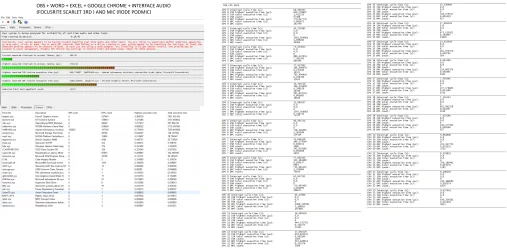
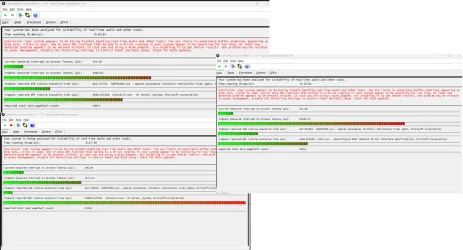
What concerns me most is that LatencyMon reports high latency even when the system is practically idle.
The problem occurs even when:
However, I am not sure whether I am interpreting the LatencyMon results correctly, or whether the drivers/processes it identifies are actually causing the problem or are simply a consequence of something else.
What I have already tried
Over the last two months I have performed a very large number of different tests and configuration changes.
Windows
I tested different power plans, including:
GPU
I tested different NVIDIA driver versions for both the dedicated and integrated graphics.
I also tried:
USB and audio devices
I tested:
I tested different:
In Process Lasso I tried, among other things:
Interrupt Affinity / GoInterruptPolicy
I also tried manually assigning devices to specific CPU cores.
For example:
For Ethernet, I disabled things such as:
ThrottleStop
I also tested various CPU-related settings in ThrottleStop, including:
CPU Unpark
I also tested CPU Unpark and different CPU unpark percentages, from approximately 5% to 100%.
Stability testing
I ran an approximately one-hour OCCT test.
It did not report any errors.
What concerns me the most
There are three things that I find particularly interesting:
1. LatencyMon reports high latency even when the system is idle.
I am not sure whether this is normal for this CPU/laptop or whether it indicates a specific problem with a driver, BIOS, power management, or a hardware device.
2. I get the best results without the official Focusrite software.
When using the basic Windows driver, the audio interface behaves better in terms of latency than when I install the official Focusrite package.
3. The problem is not limited to the audio interface.
I experience similar latency/recording issues even when using a microphone connected directly to the laptop (and different microphones via jack)
However, I do not want to keep randomly changing settings, because after two months of testing I am starting to feel that I may have made the configuration more complicated rather than actually finding the root cause.
What I need help with
What I really need at this point is a methodical way to diagnose the problem.
I would really appreciate some guidance on where I should start and what tests I should perform next.
In particular, I would like to understand:
Do the LatencyMon results point to a specific problem, or am I interpreting them incorrectly?
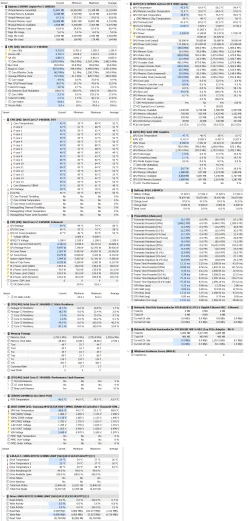
I have also attached screenshots from LatencyMon and HWiNFO taken during tests.
If any additional information, logs, screenshots, specific test results, or BIOS/OBS/Windows configuration details are needed, I can provide them.
I would really appreciate any suggestions. I have been trying to solve this problem for about two months now and unfortunately I still have not been able to identify the root cause.
For about two months I have been trying to diagnose a high audio/video latency problem on my laptop. I want to use this computer to record training videos with voice commentary, but I am currently experiencing delays, noise, and occasional network adapter problems while recording.
I would really appreciate some help figuring out what could be causing the problem and how I can properly diagnose it. I have already tried many different solutions, but most of what I did was basically trial and error, so it is possible that I have done some things incorrectly.
Hardware
- Laptop: Lenovo Legion Pro 5 16IRX10
- CPU: Intel Core i7-14650HX
- GPU: NVIDIA GeForce RTX 5060
- RAM: 16 GB
- OS: Windows 11
- Monitor: AOC G24G4
- Audio interface: Focusrite Scarlett 3rd Gen
- Microphone: RØDE PodMic
- Recording software: OBS Studio
When recording in OBS, I get a delay between the video and audio. The problem becomes noticeably worse when:
- I enable the webcam,
- I add additional audio plugins,
- the system load increases during recording.
Interestingly, I noticed something quite unusual:
I get the lowest latency and the best overall behavior when I do not install the official Focusrite software/drivers and instead use only the basic Windows driver that is installed automatically when I connect the interface.
The latency problem also occurs when I use a different, simple microphone connected directly to the laptop's audio input, so it does not appear to be a problem limited specifically to the Scarlett + PodMic setup.
I also occasionally experience network adapter disconnects.
LatencyMon
One of the main tools I have been using to investigate the issue is LatencyMon.
What concerns me most is that LatencyMon reports high latency even when the system is practically idle.
The problem occurs even when:
- I am not recording,
- I am not performing any demanding operations,
- the computer is basically idle.
However, I am not sure whether I am interpreting the LatencyMon results correctly, or whether the drivers/processes it identifies are actually causing the problem or are simply a consequence of something else.
What I have already tried
Over the last two months I have performed a very large number of different tests and configuration changes.
Windows
- performed a full Windows reinstall/format approximately 10 times,
- tested different Windows 11 configurations,
- also installed and tested Windows 11 LTSC,
- used WinUtil / Chris Titus Tech to debloat the system,
- updated the BIOS,
- updated and changed various device drivers.
I tested different power plans, including:
- High Performance,
- various maximum-performance settings,
- Bitsum Highest Performance from Process Lasso.
GPU
I tested different NVIDIA driver versions for both the dedicated and integrated graphics.
I also tried:
- installing drivers using NVCleanstall,
- completely removing the previous drivers using DDU,
- setting maximum GPU performance for OBS.
USB and audio devices
I tested:
- different USB ports for the audio interface,
- different ports for other devices,
- different XLR cables,
- the audio interface with other devices disconnected,
- another microphone connected directly to the laptop.
I tested different:
- resolutions,
- refresh rates for the external monitor,
- display-related settings on the laptop.
In Process Lasso I tried, among other things:
- setting CPU Priority for OBS,
- setting I/O Priority to High,
- assigning OBS and other processes to different CPU cores,
- excluding specific CPU cores from individual processes,
- selecting CPU affinity based on LatencyMon results.
Interrupt Affinity / GoInterruptPolicy
I also tried manually assigning devices to specific CPU cores.
For example:
- USB xHCI controller -> selected cores, e.g. 8-11,
- PCIe Ethernet controller -> e.g. cores 4-7,
- Wi-Fi controller -> selected cores,
- I also tested different affinity settings for the GPU.
For Ethernet, I disabled things such as:
- Energy Efficient Ethernet,
- Green Ethernet,
- Gigabit Lite,
- Power Saving Mode,
- Large Send Offload v2 for IPv4/IPv6.
- set Roaming Aggressiveness to Lowest,
- tested the system with Wi-Fi completely disabled,
- tested with Bluetooth disabled,
- disabled the network adapter in Device Manager.
ThrottleStop
I also tested various CPU-related settings in ThrottleStop, including:
- Speed Shift,
- SpeedStep,
- C1E.
CPU Unpark
I also tested CPU Unpark and different CPU unpark percentages, from approximately 5% to 100%.
Stability testing
I ran an approximately one-hour OCCT test.
It did not report any errors.
What concerns me the most
There are three things that I find particularly interesting:
1. LatencyMon reports high latency even when the system is idle.
I am not sure whether this is normal for this CPU/laptop or whether it indicates a specific problem with a driver, BIOS, power management, or a hardware device.
2. I get the best results without the official Focusrite software.
When using the basic Windows driver, the audio interface behaves better in terms of latency than when I install the official Focusrite package.
3. The problem is not limited to the audio interface.
I experience similar latency/recording issues even when using a microphone connected directly to the laptop (and different microphones via jack)
However, I do not want to keep randomly changing settings, because after two months of testing I am starting to feel that I may have made the configuration more complicated rather than actually finding the root cause.
What I need help with
What I really need at this point is a methodical way to diagnose the problem.
I would really appreciate some guidance on where I should start and what tests I should perform next.
In particular, I would like to understand:
Do the LatencyMon results point to a specific problem, or am I interpreting them incorrectly?
I have also attached screenshots from LatencyMon and HWiNFO taken during tests.
If any additional information, logs, screenshots, specific test results, or BIOS/OBS/Windows configuration details are needed, I can provide them.
I would really appreciate any suggestions. I have been trying to solve this problem for about two months now and unfortunately I still have not been able to identify the root cause.
My Computer
At a glance
Windows 11Intel Core i7-14650HX16NVIDIA GeForce RTX 5060
- OS
- Windows 11
- Computer type
- Laptop
- Manufacturer/Model
- Lenovo Legion Pro 5 16IRX10
- CPU
- Intel Core i7-14650HX
- Memory
- 16
- Graphics Card(s)
- NVIDIA GeForce RTX 5060
- PSU
- 245W 20V






