Windows Hardware Certification Blog:
Microsoft is pleased to announce that a refreshed HLK for Windows 11, version 25H2 and Windows Server 2025 is available starting February 17, 2026.
See below for detailed information on what’s new with this HLK refreshed version. The refreshed version of the HLK will replace the RTM version that is available on the HLK Download site. The VHLK version will be available in a week. Partners can submit to WHCP using either the RTM version of the HLK for Windows 11, version 25H2 and Windows Server 2025 or the refreshed HLK so long as passing results can be obtained (waivers acceptable).
What's new with this refresh?
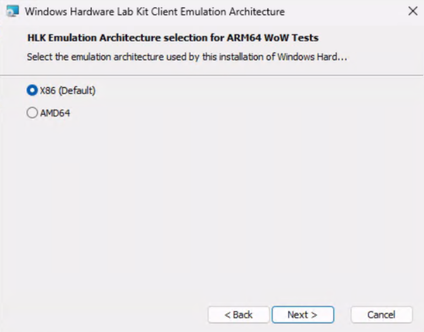
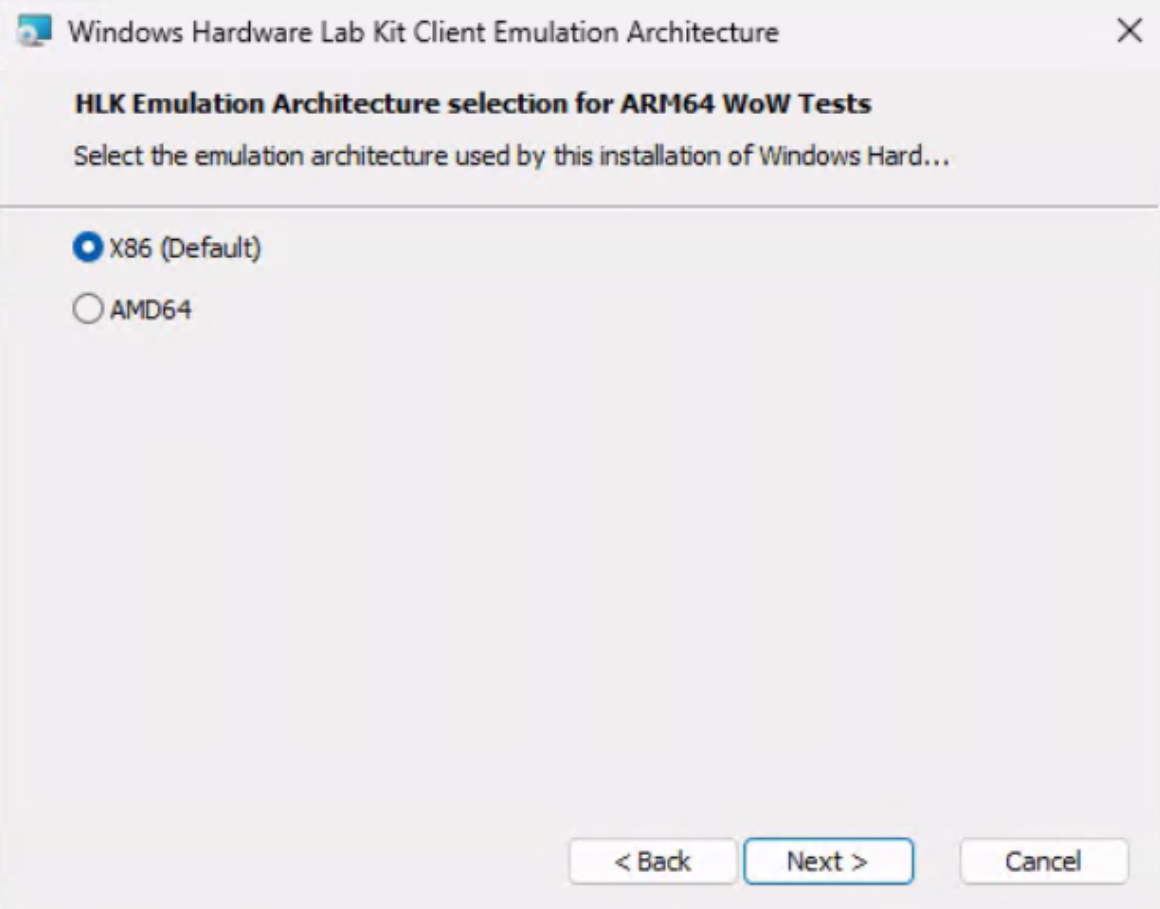
We’ve introduced a small update to the HLK ARM64 Client setup experience by defaulting the emulation test setting to x86. This change aligns ARM64 client testing more closely with the existing AMD64 workflow, allowing partners to use a single, unified playlist for ARM64 testing, including both full and emulation scenarios. By reducing the need to manage multiple architecture specific playlists, we’re making it faster and easier for partners to stand up an ARM64 emulation test environment, minimize playlist configuration overhead, and focus on validating driver quality. In the February refresh, partners can point to x86 as default emulation during automated script setup and enjoy the benefit of the single playlist deployment; in the following quarterly refresh, the default UI change will be available as well.
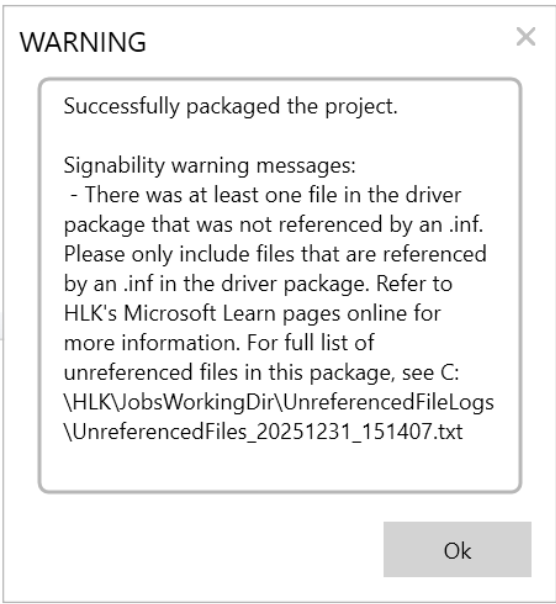
In addition, the refreshed kit includes a new check for unreferenced files. If the attached driver package includes one or more files that were not referenced by an .inf, a new warning will display at the end of packaging. The PackageWriter class in the Microsoft.Windows.Kits.Hardware.ObjectModel.Submission namespace has been updated to provide access to this new information from the HLK API. Please see Attention: HDC is changing the policy on signing unreferenced files in driver packages | Microsoft Community Hub for details.
25H2 Playlist updates:
The following tables describe the playlist changes included with this refresh.
Removed tests:
| GUID | TestName |
|---|---|
| 7bcca3c4-3853-4f22-8eb2-effa2feeba57 | Bluetooth - LE Audio VSAP (Broadcast) - [Render] Default, 32_1, 1 channel |
| 4a3813a2-b24c-4784-b932-f2aa1e559747 | Bluetooth - LE Audio VSAP (Broadcast) - [Render] Default, 32_1, 1 channel |
| 25a4e032-246f-491d-b246-5be7dd8abb3e | Bluetooth - LE Audio VSAP (Broadcast) - [Render] Default, 32_2, 1 channel |
| 4981e0a5-3583-4c49-896f-8342c70d75dc | Bluetooth - LE Audio VSAP (Broadcast) - [Render] Default, 32_2, 2 channels |
| b88a8d7b-4e43-41c2-b8e6-e6cb63a1f431 | DXGI - Hybrid WDDM 3.0 |
| f4f5a8a2-91fe-4508-a75c-24fe46c2b1f3 | Display capture tests - Display Mode Change Performance |
| b80af82b-6d0b-4ac5-b649-4c02c1242570 | DisplayMux Acpi block test |
| d0aaac5c-7c4c-488c-8352-14c49bc2ac67 | NDISTest 6.0 - [1 Machine] - 1c_NdisRequestCov |
| 5d6ac688-70fd-4163-8313-ffa2922b2afd | NDISTest 6.0 - [1 Machine] - 1c_WMICoverage |
| 5f53cf62-a767-4469-92e6-1bca087193fd | NDISTest 6.0 - [2 Machine] - 2c_Priority |
| 16084044-7baf-48ca-abe8-ae68062bebef | RepeatPublishWriteTag |
| d7e5b99f-d655-484c-a4ed-6467976d7813 | RepeatTagReading |
| 0cc234e0-9513-48fd-8b5d-1ef9ce168941 | RepeatTagReadingLonghaul |
Added tests:
| GUID | ThestName | Additional Information |
|---|---|---|
| 9d59f9d8-ca18-42db-8bc7-a50bf071af00 | Driver Attribute Test | This test is being added to the playlist. It reports the version of the WDK used to build the driver package. This test does not currently cause any failures as it is reporting only. |
| 9f351400-f4fa-42b1-8c53-7affb526ee78 | GRFX Adapter - Unreleased Features Block | Our new GRFX Adapter Unreleased Features Block Test will prevent graphics drivers from showing full support for unreleased features. Once a feature has been released, we will check that the system passes the corresponding HLK tests associated with the feature and remove it from the unreleased feature list. |
| d3d5e718-9313-4de6-9b38-41facdfd6314 | Wlan Test - Connect to an enterprise network using MLO | Adding missing test that supports existing WHCP requirements. |
26H1 Playlist (only) updates, no new HLK Kit:
Removed tests:
| GUID | Test Name |
|---|---|
| b88a8d7b-4e43-41c2-b8e6-e6cb63a1f431 | DXGI - Hybrid WDDM 3.0 |
| 16084044-7baf-48ca-abe8-ae68062bebef | RepeatPublishWriteTag |
| d7e5b99f-d655-484c-a4ed-6467976d7813 | RepeatTagReading |
| 0cc234e0-9513-48fd-8b5d-1ef9ce168941 | RepeatTagReadingLonghaul |
| 6db734d1-6bdc-4da5-87f9-51e0948e21b1 | BitLocker TPM + PIN + USB and Recovery Password Tests |
| ce9e5b64-8903-4025-bccf-a99d65663cf8 | BitLocker TPM and Recovery Password Tests for NONAOAC devices with Legacy PCRs |
| 5aac52da-a57c-4a12-aaac-de878a62bb08 | BitLocker Tpm And Recovery Password tests for AOAC devices with PCR[7] |
| 8a4641a2-4fc6-4447-9d94-fdf402ca263c | BitLocker Tpm And Recovery Password tests for AOAC devices with Legacy PCR's |
| 8c7a62bb-7f02-4a16-b37d-711cc9026e17 | BitLocker TPM and Recovery Password Tests for NONAOAC devices with PCR[7] |
Added tests:
| GUID | Test Name | Additional Information |
|---|---|---|
| d3d5e718-9313-4de6-9b38-41facdfd6314 | Wlan Test - Connect to an enterprise network using MLO | Adding missing test that supports existing WHCP requirements. |
| 6db734d1-6bdc-4da5-87f9-51e0948e21b1 | BitLocker TPM + PIN + USB and Recovery Password Tests | Replacing existing BitLocker Tpm+PIN+ USB and Recovery Password tests. |
| 721864b7-a33e-4831-bfb3-7e04e67a6f87 | BitLocker Device Encryption Test | New HLK test, doesn't raise WHCP bar as we use software APIs to determine hardware capability for DE. |
| ba380fe0-7d56-432e-b504-56b73201d08a | BitLocker TPM and Recovery Password Tests for AOAC devices | Replacing BitLocker Tpm and Recovery password tests for AOAC devices with PCR[7] and BitLocker Tpm and Recovery password tests for NONAOAC devices with Legacy PCRS. |
| 008d97d3-1535-4abe-b0c4-9663e5e12b1f | BitLocker TPM and Recovery Password Tests for NONAOAC devices with Legacy PCRs | Replacing BitLocker Tpm and Recovery password tests for NONAOAC devices with Legacy PCRS. |
| e922e6ac-a3ca-4e7f-a4c6-4b3ce685ec4f | BitLocker TPM and Recovery Password Tests for NONAOAC devices with PCR[7] | Replacing BitLocker Tpm and Recovery password tests for NONAOAC devices with PCR[7]. |
Troubleshooting and Known Issues:
Issue: "Failed to open package. Could not open package: (hlkx filename)" when opening HLKX generated from this release on separate system.
Submission packages from this release are generated in a new schema and a newer version of the HLK Studio is required to open it.
Solution: Install/Update to a newer of HLK or HLK Studio
Existing HLK Controller installations may be kept as is and do not need to be reinstalled as it is not supported to update just the HLK Studio on an existing HLK Controller instance. An HLK Studio only instance from the latest HLK may be installed on a separate system to open these HLKXes.
Issue: Wi-Fi tests regressed due to removal of TestNetv2.0 dependencies.
The TestNetv2.0 was removed from the HLK test infrastructure, causing some Wi-Ffi tests to regress due to not being able to invoke “testnetv2.0/ccrun.exe”. The list of affected tests can be found below:
- Wi-Fi Direct Basic Discovery Tests – Functional
- Wi-Fi Direct Basic Pairing Tests – Functional
- Wi-Fi Direct Basic Reconnect Tests – Functional
- Wi-Fi Direct Legacy Pairing Tests – Functional
- Wi-Fi Direct Service Discovery Tests – Functional
- Wi-Fi Direct Service Pairing and Reconnect Tests – Functional
Frequently Asked Questions
- What HLK version is being refreshed?
- The 25H2 RTM HLK is being refreshed, this HLK helps support certifying drivers for Windows 11, version 25H2 and Windows Server 2025. For the following FAQ’s, the 25H2 RTM release will be referenced to as “RTM HLK” and the upcoming release in February 2026 will be referenced as “refresh HLK.”
- How can I tell what version of the HLK I have?
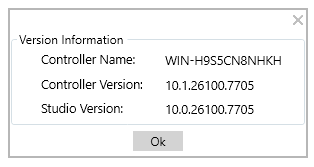
- The distinction between RTM HLK and refreshed HLK will be in the last digits of the HLK studio version, 10.1.26100.X
- The RTM HLK Studio version is 10.1.26100.1
- The refresh HLK Studio version is 10.1.26100.X
- The distinction between RTM HLK and refreshed HLK will be in the last digits of the HLK studio version, 10.1.26100.X
- How do I install the refreshed version of the HLK?
- To install the refreshed version of the HLK, visit the HLK download page: Windows Hardware Lab Kit | Microsoft Learn
- Download the refreshed HLK
- Run HLKSetup.exe
- Ensure your current HLK projects are finished before attempting to use the same system for the HLK refresh.
- The refreshed HLK cannot be installed on a system that already has the RTM HLK, this goes for both Controller and Client. It is highly recommended to start with a clean install of the OS for both.
- How should I address a test that was passing on the RTM HLK but now failing on the refreshed HLK?
- Triage the failure first. There have been cases where a test issue is fixed, and the failure is still present, but it is due to a driver issue that has the same failure message
- Next, open a CSS case. Click the following link for more information on opening a CSS case: Get support for Partner Center dashboard and HLK issues - Windows drivers | Microsoft Learn
- Going forward, will Microsoft be updating the HLK regularly?
- Yes, Microsoft is transitioning into this servicing model for the HLK, which maintains overall test quality and reduces dependency on errata.
- How often are the HLK refresh releases expected?
- Our current plan is to evaluate releasing a refreshed HLK each quarter.
- Does this update apply to client and server?
- Yes
- Can results from an RTM test run and a Refreshed test run be merged and used for submission?
- No, submission should be completed with either the RTM or refreshed HLK.
- Will the refreshed HLK continue to support merged packages for multiple-OS submissions?
- Yes
- Is the VHLK also going to be updated?
- Yes
Source:
HLK February Refresh Release for Windows 11 Version 25H2 and Windows Server 2025 | Microsoft Community Hub
Microsoft is pleased to announce that a refreshed HLK for Windows 11, version 25H2 and Windows Server 2025 is available starting February 17, 2026. See...
 techcommunity.microsoft.com