This tutorial will show you how to turn on or off automatically restart Edge to apply updates while you're away (idle) for your account in Windows 11.
Microsoft Edge is the AI-powered browser. A smarter way to browse. As the only browser built and optimized for Windows, it’s AI-powered tools are designed to help you make the most of your time online. Whether you’re searching, shopping or gaming, AI-powered tools and a security-first approach help you stay productive, save money, and get things done your way.
Restart to update on idle is a opt-in feature that relaunches your browser when you are away from your computer to apply pending updates. This means that critical security bug fixes reach you faster, and new features and enhancements are available to apply earlier.
Microsoft Edge will normally wait for you to manually check or close and restart your browser to apply updates. This behavior can be inconvenient and can result in some users going days without getting the latest update. Restart to update on idle goes beyond the “automatic” updates offered by other browsers, because it doesn’t require you to take the action to relaunch your browser. Instead, with this feature, Microsoft Edge knows when you step away from your computer and relaunches itself when there are any pending updates. After Microsoft Edge relaunches, it automatically restores your tabs, so you can seamlessly pick up where you left off, knowing you already have the latest version.
Microsoft Edge's Restart to update on idle is designed to recognize when you're actively using your browser or computer. It waits to restart, ensuring it doesn't disrupt your browsing, whether you're editing a document, downloading files, or streaming media.
The current idle period is defined as 20 minutes of no user input.
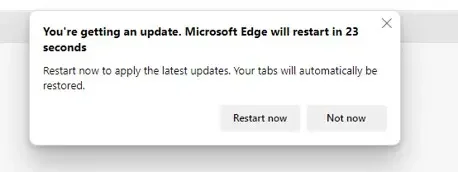
Once you have enabled the Restart to update on idle feature, the following notification will alert you of any pending browser updates when your computer is idle. This notification is designed to inform you of the upcoming browser relaunch in case you return to your browser during this time period. It will only appear when your device is idle, ensuring minimal disruption. Once the countdown concludes, the browser will automatically relaunch to implement the latest update.
References:
Automatically update Microsoft Edge when your device is idle | Microsoft Support
Description here
 support.microsoft.com

How Microsoft Edge is rethinking updates
Windows Blogs: At a glance Microsoft Edge is developing new ways to help security updates reach people faster with less disruption. A seamless-updates prototype shows how Edge could update while work continues. Available today, Restart to update on idle (formerly Instant Updates) can apply...
 www.elevenforum.com
Restart to update on idle does not work when using InPrivate browsing mode.
The Restart to update feature is designed to restart and update the browser when it isn't in use. However, there's a possibility of losing unsaved work during the restart.
Here's How:
1 Open Microsoft Edge.
2 Click/tap on the Setting and more (Alt+F) 3 dots button, and click/tap on Settings. (see screenshot below)
3 Click/tap on About Microsoft Edge in the left pane. (see screenshot below step 4)
If you do not see a left pane, then either click/tap on the 3 bars menu button towards the top left OR widen the horizontal borders of the Microsoft Edge window until you do.
4 Turn on or off (default) Restart to update on idle for what you want. (see screenshot below)
That's it,
Shawn Brink
Last edited: