Solved How can I avoid logging in to YouTube for access?


caffeine

Well-known member
Member
Local time
8:32 AM
Posts
75
OS
windows 11 home 64bit 24H2 (OS Build 26100.7992)
I'm not really sure which forum is correct for this post; so, I just started it here.
Recently I attempted to view a YouTube video which was linked via an internet search. I was blocked by a message telling me that I must log in, create an account, or some other foolishness. I do not wish to do any of these things. YouTube and its family of internet data harvesting hogs have enough data on me without volunteering more. Is there some way to work around this annoyance?

Thanks in advance for all helpful replies.

regards,
caffiene

EDIT: correct spelling
 
Last edited:

My Computer

System One

  • OS
    windows 11 home 64bit 24H2 (OS Build 26100.7992)
    Computer type
    Laptop
    Manufacturer/Model
    Lenovo ideapad 5
    CPU
    AMD RYZEN 5 8645HS, base 4.3GHz- up tp 5 GHz
    Memory
    16GB DDR5
    Monitor(s) Displays
    2
    Screen Resolution
    1920x1200
    Hard Drives
    512 GB SSD
    PSU
    65W
    Case
    military grade (mil-std 810h), color-abyss blue
    Keyboard
    backlit, light blue
    Mouse
    Logitech M100
    Internet Speed
    SLOOOOOOOW
    Antivirus
    Windows Defender & MBAM
    Other Info
    novabench score 2443
I use YT all the time with no sign-in

What browser?

Try some adblocker browser extensions (i.e. also work as popup blockers) - Adguard AdBlocker, DuckDuckGo Search and Tracker, Ublock Origin (Lite version if it's a Chromium based browser)

Are there any age limitations for social media access in your state/country?

Try a different browser (whatever browser you're using, make sure you're not signed in to that browser)

EDIT
What happens if you ignore this sign-in request? Could be just scareware?
 

My Computers

System One System Two

  • OS
    Windows 11 2xH2 (latest update ... forever anal)
    Computer type
    PC/Desktop
    Manufacturer/Model
    HP Slim S01
    CPU
    Intel i5-12400
    Memory
    8GB
    Graphics Card(s)
    NVIDIA GeForce GT730
    Sound Card
    OOBE
    Monitor(s) Displays
    Acer 32"
    Screen Resolution
    1920x1080
    Hard Drives
    512GB KIOXIA NVMe
    1TB SATA SSD
    PSU
    OOBE
    Case
    OOBE
    Cooling
    OOBE
    Keyboard
    BT
    Mouse
    BT
    Browser
    Brave FFox Chrome Opera
    Antivirus
    KIS
  • Operating System
    Windows 11 Pro 2xH2 (latest update ... 4ever anal)
    Computer type
    Laptop
    Manufacturer/Model
    HP Pavillion 15
    CPU
    i7-1165G7 @ 2.80GHz
    Graphics card(s)
    Intel Iris Xe Graphics
    Hard Drives
    Samsung NVMe 512GB
    + numerous/multiple SSD Type C USB enclosures
    Internet Speed
    NBN FTTN 50
    Browser
    Brave
    Antivirus
    KIS
Recently I attempted to view a YouTube video which was linked via an internet search.
What happens when you go directly to the YT page (i.e. not using the link)?
 

My Computers

System One System Two

  • OS
    Windows 11 2xH2 (latest update ... forever anal)
    Computer type
    PC/Desktop
    Manufacturer/Model
    HP Slim S01
    CPU
    Intel i5-12400
    Memory
    8GB
    Graphics Card(s)
    NVIDIA GeForce GT730
    Sound Card
    OOBE
    Monitor(s) Displays
    Acer 32"
    Screen Resolution
    1920x1080
    Hard Drives
    512GB KIOXIA NVMe
    1TB SATA SSD
    PSU
    OOBE
    Case
    OOBE
    Cooling
    OOBE
    Keyboard
    BT
    Mouse
    BT
    Browser
    Brave FFox Chrome Opera
    Antivirus
    KIS
  • Operating System
    Windows 11 Pro 2xH2 (latest update ... 4ever anal)
    Computer type
    Laptop
    Manufacturer/Model
    HP Pavillion 15
    CPU
    i7-1165G7 @ 2.80GHz
    Graphics card(s)
    Intel Iris Xe Graphics
    Hard Drives
    Samsung NVMe 512GB
    + numerous/multiple SSD Type C USB enclosures
    Internet Speed
    NBN FTTN 50
    Browser
    Brave
    Antivirus
    KIS
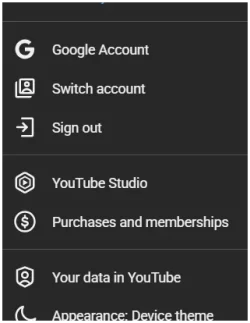
Maybe you signed in at one time? Go to the top Rt. your Pic or letter - Drop down & "Sign Out" See if that keeps you tube out?
 

Attachments

  • Screenshot 2026-03-21 174140.webp
    Screenshot 2026-03-21 174140.webp
    9.8 KB · Views: 1

My Computer

System One

  • OS
    Windows 11 25H2 (OS Build 26200.8524)
    Computer type
    Laptop
    Manufacturer/Model
    Dell
    CPU
    Processor: 11th Gen Intel(R) Core(TM) i5-1135G7 @ 2.40G
    Motherboard
    64-bit operating system Dell 0XMF7W
    Memory
    12GB
    Graphics Card(s)
    Intel R Iris R XE Graphics family
    Sound Card
    Cirrus Speakers High Definition Audio
    Monitor(s) Displays
    Generic PnP monitor
    Screen Resolution
    1920 x 1080
    Hard Drives
    NVMe 670p SSDPEKNU512GZ NVMe I NTEL 512GB
    Case
    cheap
    Mouse
    Logitech wireless mouse
    Internet Speed
    16 Mps download
    Browser
    Google Chrome
    Antivirus
    Security: Microsoft Defender & Malwarebytes Premium (with browser guard)
    Other Info
    Dell model: Inspiron 15 3511
Turn off ad blockers
 

My Computers

System One System Two

  • OS
    Windows 11 Pro 25H2 Build 26200.8524
    Computer type
    PC/Desktop
    Manufacturer/Model
    Sin-built 2013
    CPU
    Intel(R) Core(TM) i7-4770K CPU @ 3.50GHz
    Motherboard
    ASUS ROG Maximus VI Formula
    Memory
    32.0 GB of I forget and the box is in storage.
    Graphics Card(s)
    Gigabyte nVidia GeForce GTX 1660 Super OC 6GB
    Sound Card
    Onboard thingy
    Monitor(s) Displays
    5 x LG 25MS500-B - 1 x 24MK430H-B - 1 x Wacom Pro 22" Touch Screen Tablet
    Screen Resolution
    All over the place
    Hard Drives
    Too many to list.
    OS on Samsung 1TB 870 QVO SATA
    PSU
    Silverstone 1500
    Case
    NZXT Phantom 820 Full-Tower Case
    Cooling
    Noctua NH-D15 Elite Class Dual Tower CPU Cooler / 6 x EziDIY 120mm / 2 x Corsair 140mm somethings / 1 x 140mm Thermaltake something / 2 x 200mm Corsair.
    Keyboard
    Corsair K95 / Logitech diNovo Edge Wireless
    Mouse
    Logitech: G402 / G502 / Mx Masters / Mx Air Cordless
    Internet Speed
    2000/500Mbps
    Browser
    All sorts
    Antivirus
    Kaspersky Premium
    Other Info
    ㅤㅤㅤㅤㅤㅤㅤㅤㅤㅤㅤㅤㅤㅤㅤㅤㅤㅤㅤㅤㅤㅤㅤㅤㅤㅤㅤㅤㅤㅤㅤㅤㅤㅤㅤㅤㅤㅤㅤㅤ⠀⠀⠀⠀⠀⠀⠀⠀⠀⠀
    TP-Link BE9300 WiFi 7 Bluetooth 5.4 (Archer TBE550E)
    TP-Link TX201 V1 2.5GB Lan

    Grandstream HT812 - VoIP
    ASUS DSL-AX82U - Mesh
    ASUS RT-AC68U - Mesh
    ASUS RT-BE88U Router

    Brother MFC-L2880DW Printer

    I’m on a horse.
  • Operating System
    Windows 11 Pro 25H2 Build 26200.8524
    Computer type
    Laptop
    Manufacturer/Model
    LENOVO Yoga 7 14IRL8 - 7i EVO OLED 14" Touchscreen i5 12 Core 16GB/512GB
    CPU
    Intel Core 12th Gen i5-1240P Processor (1.7 - 4.4GHz)
    Memory
    16GB LPDDR5 RAM
    Graphics card(s)
    Intel Iris Xe Graphics Processor
    Sound Card
    Optimized with Dolby Atmos®
    Screen Resolution
    QHD 2880 x 1800 OLED
    Hard Drives
    M.2 512GB
    Antivirus
    Defender / Malwarebytes
    Other Info
    …still on a horse.

idgat,​

Thank you. You nailed it! I tried going directly to YouTube without any issues any played songs from my playlist. The problem has been with the hyperlink as you suggested. I'm going to mark this as solved and give it a like.
NOTE TO SELF: Go to the source rather follow links. I bet that has security implications too.
Thanks to all others who replied also.

regards,
caffeine
 

My Computer

System One

  • OS
    windows 11 home 64bit 24H2 (OS Build 26100.7992)
    Computer type
    Laptop
    Manufacturer/Model
    Lenovo ideapad 5
    CPU
    AMD RYZEN 5 8645HS, base 4.3GHz- up tp 5 GHz
    Memory
    16GB DDR5
    Monitor(s) Displays
    2
    Screen Resolution
    1920x1200
    Hard Drives
    512 GB SSD
    PSU
    65W
    Case
    military grade (mil-std 810h), color-abyss blue
    Keyboard
    backlit, light blue
    Mouse
    Logitech M100
    Internet Speed
    SLOOOOOOOW
    Antivirus
    Windows Defender & MBAM
    Other Info
    novabench score 2443

Latest Support Threads

Back
Top Bottom