How can I change the cpu priority for msmpeng.exe?


KDAM71

Active member
Local time
12:53 AM
Posts
32
OS
Windows 11
Hello

I like to scan my disks regularly using defender. I'd also like to keep using windows during the scan. When defender is scanning my disks the cpu usage by msmpeng is around 80%. I tried lowering the priority but I get the message "access denied". Then I tried to take ownership of msmpeng but that was denied as well.
Does someone know a way to lower priority for msmpeng?

Kind regards, Klaas
 

My Computer My Computer

At a glance

Windows 1111th Gen Intel(R) Core(TM) i5-11400H @ 2.70GH...8GBNVidia GeForce RTX 3050 Laptop GPU, Intel UHD...
OS
Windows 11
Computer type
Laptop
Manufacturer/Model
MSI
CPU
11th Gen Intel(R) Core(TM) i5-11400H @ 2.70GHz 2.69 G
Motherboard
I don't know. Laptop model is GF63 Thin 11 UC
Memory
8GB
Graphics Card(s)
NVidia GeForce RTX 3050 Laptop GPU, Intel UHD Graphics
Sound Card
I mainly use a Logitech bluetooth audio receiver
Monitor(s) Displays
I use the buildin laptop screen which uses Intel UHD Graphics
Screen Resolution
1920x1080
Hard Drives
WDC PC SN540 SDDPNPF-512G-1032
Mouse
Touchpad
Internet Speed
DSL
Browser
Firefox
Antivirus
Windows Defender
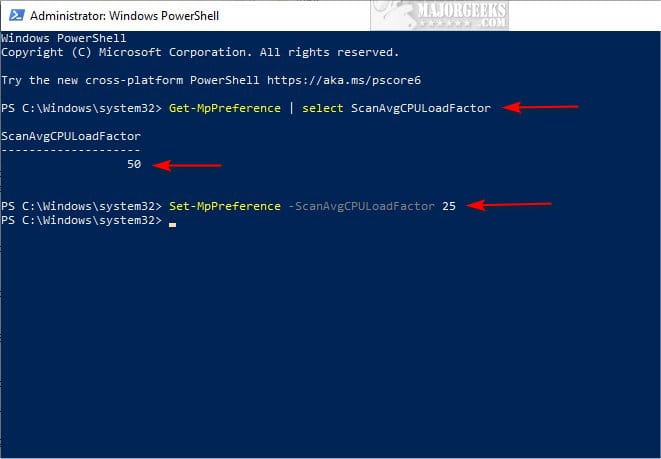
You can use attached batch script to change Windows Defender Antivirus Maximum CPU Usage for a Scan in Windows 10 and Windows 11.
 

Attachments

My Computer My Computer

At a glance

Windows 11AMD Ryzen 7 5700GMicron Technology DDR4-3200 16GBNVIDIA GeForce RTX 3060
OS
Windows 11
Computer type
PC/Desktop
Manufacturer/Model
HP Pavilion
CPU
AMD Ryzen 7 5700G
Motherboard
Erica6
Memory
Micron Technology DDR4-3200 16GB
Graphics Card(s)
NVIDIA GeForce RTX 3060
Sound Card
Realtek ALC671
Monitor(s) Displays
Samsung SyncMaster U28E590
Screen Resolution
3840 x 2160
Hard Drives
SAMSUNG MZVLQ1T0HALB-000H1
You can use attached batch script to change Windows Defender Antivirus Maximum CPU Usage for a Scan in Windows 10 and Windows 11.
Thanks for the effort but it doesn't seem to change the cpu usage. I chose 20.
Is this supposed to be a permanent change? Should I restart windows for the change to take effect?
 

My Computer My Computer

At a glance

Windows 1111th Gen Intel(R) Core(TM) i5-11400H @ 2.70GH...8GBNVidia GeForce RTX 3050 Laptop GPU, Intel UHD...
OS
Windows 11
Computer type
Laptop
Manufacturer/Model
MSI
CPU
11th Gen Intel(R) Core(TM) i5-11400H @ 2.70GHz 2.69 G
Motherboard
I don't know. Laptop model is GF63 Thin 11 UC
Memory
8GB
Graphics Card(s)
NVidia GeForce RTX 3050 Laptop GPU, Intel UHD Graphics
Sound Card
I mainly use a Logitech bluetooth audio receiver
Monitor(s) Displays
I use the buildin laptop screen which uses Intel UHD Graphics
Screen Resolution
1920x1080
Hard Drives
WDC PC SN540 SDDPNPF-512G-1032
Mouse
Touchpad
Internet Speed
DSL
Browser
Firefox
Antivirus
Windows Defender
Reboot to see changes take effect, don't forget the batch script use for lowering defender scan CPU usage.
 

My Computer My Computer

At a glance

Windows 11AMD Ryzen 7 5700GMicron Technology DDR4-3200 16GBNVIDIA GeForce RTX 3060
OS
Windows 11
Computer type
PC/Desktop
Manufacturer/Model
HP Pavilion
CPU
AMD Ryzen 7 5700G
Motherboard
Erica6
Memory
Micron Technology DDR4-3200 16GB
Graphics Card(s)
NVIDIA GeForce RTX 3060
Sound Card
Realtek ALC671
Monitor(s) Displays
Samsung SyncMaster U28E590
Screen Resolution
3840 x 2160
Hard Drives
SAMSUNG MZVLQ1T0HALB-000H1

My Computer My Computer

At a glance

Home26H2CanAMD Ryzen 5 8600G (07/24)2x32GB Kingston FURY DDR5 5600 MHz CL36 @5200...ASROCK Radeon RX 6600 Challenger D 8G @48FPS ...
OS
Home26H2Can
Computer type
PC/Desktop
CPU
AMD Ryzen 5 8600G (07/24)
Motherboard
ASROCK B650M-HDV/M.2 (07/24) BIOS 4.21 AGESA ComboAM5 1.3.0.1 (04/26)
Memory
2x32GB Kingston FURY DDR5 5600 MHz CL36 @5200 CL36 (07/24)
Graphics Card(s)
ASROCK Radeon RX 6600 Challenger D 8G @48FPS (08/24)
Sound Card
Creative Sound BlasterX AE-5 Plus (05/24)
Monitor(s) Displays
24" Philips 24M1N3200ZS/00 (05/24)
Screen Resolution
1920×1080@165Hz via DP1.4
Hard Drives
Kingston KC3000 NVMe 2TB (05/24)
ADATA XPG GAMMIX S11 Pro 512GB (07/19)
PSU
Seasonic Core GM 550 Gold (04/24)
Case
Fractal Design Define 7 Mini with 3x Noctua NF-P14s/12@555rpm (04/24)
Cooling
Noctua NH-U12S with Noctua NF-P12 (04/24)
Keyboard
HP Pavilion Wired Keyboard 300 (07/24) + Rabalux 76017 Parker (01/24)
Mouse
Logitech M330 Silent Plus (01/26)
Internet Speed
500/100 Mbps via RouterOS (05/21) & TCP Optimizer
Browser
Edge, Brave for YouTube, LibreWolf for FB
Antivirus
NextDNS blocking 1/3 Traffic
Other Info
Phone: Motorola Moto G86 (02/26)
Backup: Hasleo Backup Suite (PreOS)
Headphones: Sennheiser RS170 (09/10)
Chair: Huzaro Force 4.4 Grey Mesh (05/24)
Notifier: Xiaomi Mi Band 9 Milanese (10/24)
FlexCore USB-C 3.2 Gen 1 (M) to LAN (F) (08/25)
Reboot to see changes take effect, don't forget the batch script use for lowering defender scan CPU usage.
I ran the script, chose 20, rebooted and started the scan. The cpu usage is around 90% for a while now.
 

My Computer My Computer

At a glance

Windows 1111th Gen Intel(R) Core(TM) i5-11400H @ 2.70GH...8GBNVidia GeForce RTX 3050 Laptop GPU, Intel UHD...
OS
Windows 11
Computer type
Laptop
Manufacturer/Model
MSI
CPU
11th Gen Intel(R) Core(TM) i5-11400H @ 2.70GHz 2.69 G
Motherboard
I don't know. Laptop model is GF63 Thin 11 UC
Memory
8GB
Graphics Card(s)
NVidia GeForce RTX 3050 Laptop GPU, Intel UHD Graphics
Sound Card
I mainly use a Logitech bluetooth audio receiver
Monitor(s) Displays
I use the buildin laptop screen which uses Intel UHD Graphics
Screen Resolution
1920x1080
Hard Drives
WDC PC SN540 SDDPNPF-512G-1032
Mouse
Touchpad
Internet Speed
DSL
Browser
Firefox
Antivirus
Windows Defender
 

My Computer My Computer

At a glance

Windows 11AMD Ryzen 7 5700GMicron Technology DDR4-3200 16GBNVIDIA GeForce RTX 3060
OS
Windows 11
Computer type
PC/Desktop
Manufacturer/Model
HP Pavilion
CPU
AMD Ryzen 7 5700G
Motherboard
Erica6
Memory
Micron Technology DDR4-3200 16GB
Graphics Card(s)
NVIDIA GeForce RTX 3060
Sound Card
Realtek ALC671
Monitor(s) Displays
Samsung SyncMaster U28E590
Screen Resolution
3840 x 2160
Hard Drives
SAMSUNG MZVLQ1T0HALB-000H1
Thanks. Your script has set the value properly. It doesn't seem to have the desired effect on my computer though.
Now I set the value to 5. I rebooted and started the scan. The cpu usage stays under 10% for about a minute. Than it jumps to around 90% and stays there for about 7 minutes. Than it gradually comes down to under 10% again and stays there for the remainder of the scan (about 11 minutes).
 

My Computer My Computer

At a glance

Windows 1111th Gen Intel(R) Core(TM) i5-11400H @ 2.70GH...8GBNVidia GeForce RTX 3050 Laptop GPU, Intel UHD...
OS
Windows 11
Computer type
Laptop
Manufacturer/Model
MSI
CPU
11th Gen Intel(R) Core(TM) i5-11400H @ 2.70GHz 2.69 G
Motherboard
I don't know. Laptop model is GF63 Thin 11 UC
Memory
8GB
Graphics Card(s)
NVidia GeForce RTX 3050 Laptop GPU, Intel UHD Graphics
Sound Card
I mainly use a Logitech bluetooth audio receiver
Monitor(s) Displays
I use the buildin laptop screen which uses Intel UHD Graphics
Screen Resolution
1920x1080
Hard Drives
WDC PC SN540 SDDPNPF-512G-1032
Mouse
Touchpad
Internet Speed
DSL
Browser
Firefox
Antivirus
Windows Defender

Latest Support Threads

Back
Top Bottom