How can I reset My Default “Normal” Style in MS Windows 11


Dasha

Dasha
Local time
4:48 AM
Posts
19
Location
Yandina Sunshine Coast Qld
OS
Windows 11
Win 11Version 22H2 (OS 22621.1413

How can I reset the my “Normal” Style Template and Delete other 4 Normal Styles I don’t use from the MS Word “Style” Template
 
Windows Build/Version
Win 11Version 22H2 (OS 22621.1413

My Computer My Computer

OS
Windows 11
Computer type
PC/Desktop
Manufacturer/Model
DELL 3670 Inspiron PC
CPU
210-ANZR: Intel 64 bit /4 CPU
Motherboard
512 Meg Ram,
Memory
2.4 GB,
Monitor(s) Displays
21.5 BenQ Monitor
Screen Resolution
1920x1080
Hard Drives
2.4Gig WD Main HD-drive
and 1.000 Terrabyte Toshiba Ex HDD ( F; ) Partitions - FF / GG / HH / II
Case
DELL
Keyboard
Logitec Wireless
Mouse
Logitec Wireless
Internet Speed
2.5 Mbps
Browser
Firefox
Antivirus
Windows Defender, CCleaner
Other Info
21H2 (OS) Build 22000.978)

Template question:- Word does not have a template called 'Style'. Please explain what you mean using different words.

Style question:- 'Normal' is the name of a style. You do not have more than one 'Normal' style within the same template.
You can delete styles using steps 1-4 of this procedure
my ditty - Manage styles - TenForums
You will only need step 5 if Word is being awkward about deleting a particular style and I really only see the effort as worthwhile in co-operative working involving multiple users.

Best of luck,
Denis
 

My Computer My Computer

OS
Windows 11 Home x64 Version 25H2 Build 26200.8037
Thanks Try3 I meant the Styles in the Styles Box in a Word Doc" I meant that these other older Styles are repeatedly showing and areactive in the "Style Box" and How can I delete these Unwanted unused Styles from MS Word Eg In the Styles menu Panel in any word doc there are currently 5 differently named "Styles" in the Styles Box Doc as Dazz Dazzler, Normal Dazzla etc the only one I want to keep is the "normal" style. I can think of no other way to describe it and I cannot get a ScrClip Regards Dasha
 

My Computer My Computer

OS
Windows 11
Computer type
PC/Desktop
Manufacturer/Model
DELL 3670 Inspiron PC
CPU
210-ANZR: Intel 64 bit /4 CPU
Motherboard
512 Meg Ram,
Memory
2.4 GB,
Monitor(s) Displays
21.5 BenQ Monitor
Screen Resolution
1920x1080
Hard Drives
2.4Gig WD Main HD-drive
and 1.000 Terrabyte Toshiba Ex HDD ( F; ) Partitions - FF / GG / HH / II
Case
DELL
Keyboard
Logitec Wireless
Mouse
Logitec Wireless
Internet Speed
2.5 Mbps
Browser
Firefox
Antivirus
Windows Defender, CCleaner
Other Info
21H2 (OS) Build 22000.978)

Dasha,

I do not know why you cannot make & post a screenshot.

You can remove those styles using the illustrated procedure I gave you a link to in my last post. I have reviewed the procedure and have, I hope, improved it.
Prevent use of unwanted Word styles - my post #2 - TenForums


Best of luck,
Denis
 
Last edited:

My Computer My Computer

OS
Windows 11 Home x64 Version 25H2 Build 26200.8037

My Computers My Computers

System One System Two

  • OS
    Windows 11 Pro
    Computer type
    PC/Desktop
    Manufacturer/Model
    GMKtec K11
    CPU
    AMD Ryzen 9 8945HS
    Memory
    32GB DDR5 SO-DIMM
    Graphics Card(s)
    Integrated AMD Radeon 780M (4.00 GHz)
    Monitor(s) Displays
    Benq 2250HM
    Screen Resolution
    1920 x 1080
    Hard Drives
    1 TB PCIe 4.0 NVMe M.2 SSD
  • Operating System
    Windows 11 Home
    Computer type
    Laptop
    Manufacturer/Model
    ASUS Zenbook 14 OLED 14" Laptop - UX3405CA-QL192W
    CPU
    Intel® Core™ Ultra 7 - 255H processor
    Memory
    16 GB LPDDR5 SDRAM
    Graphics card(s)
    Intel Arc 140T onboard graphics
    Screen Resolution
    1920 x 1200 (16:10 WUXGA resolution) OLED Touchscreen
    Hard Drives
    1TB SSD
Dasha,

I've only just realised that you've been in the forum recently.
I only completed reviewing & amending the styles procedure seven minutes ago.
I think you might only want to go as far as my step 2. {I've just seen WiganKen's link. The MS article omits crucial steps; I don't.}

Why can't you post screenshots?
Upload and Attach Images and Files in Post - ElevenForumTutorials


All the best,
Denis
 

My Computer My Computer

OS
Windows 11 Home x64 Version 25H2 Build 26200.8037
Thanks wiganken Cheers Denis Good to here from you I could not take a ScrClip and post it because as soon as I moved to Click Start ScrClip - the "Style Menu box" I was referring to would close. I have sorted Insert Attachments in this forum (your Version 2)

I have run out of time now but I could not find Normal.Com or Normal.Dot X I have a Paid Version of MS Word 2016 I don't think it would be any different to 21 I will have to come back tomorrow Denis Kind Regards Dasha
 

My Computer My Computer

OS
Windows 11
Computer type
PC/Desktop
Manufacturer/Model
DELL 3670 Inspiron PC
CPU
210-ANZR: Intel 64 bit /4 CPU
Motherboard
512 Meg Ram,
Memory
2.4 GB,
Monitor(s) Displays
21.5 BenQ Monitor
Screen Resolution
1920x1080
Hard Drives
2.4Gig WD Main HD-drive
and 1.000 Terrabyte Toshiba Ex HDD ( F; ) Partitions - FF / GG / HH / II
Case
DELL
Keyboard
Logitec Wireless
Mouse
Logitec Wireless
Internet Speed
2.5 Mbps
Browser
Firefox
Antivirus
Windows Defender, CCleaner
Other Info
21H2 (OS) Build 22000.978)

I could not find Normal.Com or Normal.Dot X I have a Paid Version of MS Word 2016
Normal.dotm or Normal.dotx

The problem is not because your File explorer hides file extensions, is it?
If so, set your File explorer to show file extensions.​

What paths are shown in Word, File menu, Options, Advanced, File locations for User templates and for Workgroup templates?
Screenshot (31) - File locations snip - annotated.png - This is a Word 2016 screenshot.
One location to check is
C:\Users\%UserName%\AppData\Roaming\Microsoft\Templates
and I expect it is shown in the File locations dialog. If not, check it anyway.


I could not take a ScrClip
Take a photo then.
The better choice would be to set your screenshot utility to delay by a few seconds to allow you to set up the screen the way you want it before the picture is taken. But that depends on your utility. I still use the SnippingTool that I copied across from Windows 10 and it can be set to delay by up to 5 seconds.
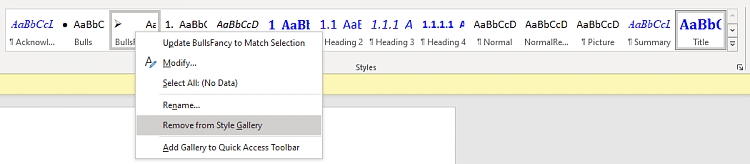
Or is what you are referring to in I meant the Styles in the Styles Box like what I show in step 2 of my procedure? If so you can just get on with removing unwanted ones as soon as you've resolved the Normal.dotm/.dotx location mystery.
385909d1676666228t-built-styles-4-remove-styles-style-gallery.png


All the best,
Denis
 
Last edited:

My Computer My Computer

OS
Windows 11 Home x64 Version 25H2 Build 26200.8037
I could not take a ScrClip and post it because as soon as I moved to Click Start ScrClip - the "Style Menu box" I was referring to would close.
Note that you can also take a screenshot by pressing the PrtSc (or similarly labelled) button. That will usually capture everything. The captured screen will be in the copy buffer. You can then paste it here or first paste it in an editor, such as mspaint, for trimming and/or annotation.

In cases where PrtSc doesn't capture the item you want, another option is to use IrfanView. With that tool you press Ctrl-F11 (can be reassigned if needed) to capture anything, including the cursor.
 

My Computer My Computer

OS
Windows 10/11
Computer type
Laptop
Manufacturer/Model
Acer
Thanks Denis I am getting too Old I think. I have one eye in a Patch for another week so I might call time Out and try again and return after I get this together it's impossible to concentrate, I have all your steps and advice and I should be able to sort it until next week Cheers Mate Dasha
 
Last edited:

My Computer My Computer

OS
Windows 11
Computer type
PC/Desktop
Manufacturer/Model
DELL 3670 Inspiron PC
CPU
210-ANZR: Intel 64 bit /4 CPU
Motherboard
512 Meg Ram,
Memory
2.4 GB,
Monitor(s) Displays
21.5 BenQ Monitor
Screen Resolution
1920x1080
Hard Drives
2.4Gig WD Main HD-drive
and 1.000 Terrabyte Toshiba Ex HDD ( F; ) Partitions - FF / GG / HH / II
Case
DELL
Keyboard
Logitec Wireless
Mouse
Logitec Wireless
Internet Speed
2.5 Mbps
Browser
Firefox
Antivirus
Windows Defender, CCleaner
Other Info
21H2 (OS) Build 22000.978)

I have run out of time now but I could not find Normal.Com or Normal.Dot X I have a Paid Version of MS Word 2016 I don't think it would be any different to 21 I will have to come back tomorrow Denis Kind Regards Dasha
To reset the Normal template all you have to do is delete the file Normal.dotm. Word will then recreate it.

I have every standalone version of Office for the last 20 years except Office 2016. However, I checked and the Normal template is the same for Office 2013 and Office 2021. To find it:

Step 1
Go to your user folder
Click on three dots
Select Options
1 template.jpg
Step 2
Select View tab
Select Show hidden files, folders, and drives
Unselect Hide extensions for known file types
Click on OK button
2  template.jpg
Step 3
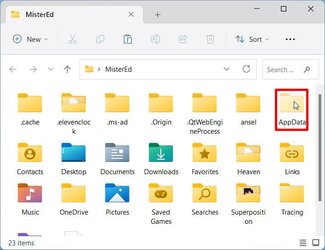
Double-click on AppData folder
3  template.jpg
Step 4
Navigate to Roaming > Microsoft > Templates
Delete Normal.dotm file
4  template.jpg
 

Attachments

  • 3  template.jpg
    3 template.jpg
    66.1 KB · Views: 1

My Computers My Computers

System One System Two

  • OS
    Windows 11 Pro 25H2 (26200.6901)
    Computer type
    Laptop
    Manufacturer/Model
    ASUS TUF Gaming A15 (2022)
    CPU
    AMD Ryzen 7 6800H with Radeon 680M GPU (486MB RAM)
    Memory
    Crucial DDR5-4800 (2400MHz) 32GB (2 x 16GB)
    Graphics Card(s)
    NVIDIA RTX 3060 Laptop (6GB RAM)
    Sound Card
    n/a
    Monitor(s) Displays
    15.6-inch
    Screen Resolution
    1920x1080 300Hz
    Hard Drives
    2 x Samsung 990 Evo Plus (2TB M.2 NVME SSD)
    PSU
    n/a
    Mouse
    Wireless Mouse M510
    Internet Speed
    2100Mbps/300Mbps
    Browser
    Firefox
    Antivirus
    Malwarebytes
  • Operating System
    Windows 11 Pro 25H2 (26200.8246)
    Computer type
    PC/Desktop
    Manufacturer/Model
    Custom build
    CPU
    AMD Ryzen 7 5700X3D
    Motherboard
    ASUS ROG Strix B550-F Gaming WiFi II
    Memory
    G.SKILL Flare X 32GB (2x16GB) DDR4
    Graphics card(s)
    ASUS ROG-STRIX-RTX3060TI-08G-V2-GAMING (RTX 3060-Ti, 8GB RAM)
    Monitor(s) Displays
    Samsung G50D IPS 27"
    Screen Resolution
    1440p/180Hz
    Hard Drives
    SAMSUNG 990 EVO Plus (2TB] M.2 NVME SSD
    SAMSUNG 990 EVO Plus (4TB) M.2 NVME SSD
    PSU
    Corsair RM750x (750 watts)
    Case
    Cooler Master MasterCase 5
    Cooling
    Scythe Mugen 6
    Keyboard
    Logitech K520 (MK540 keyboard/mouse combo)
    Mouse
    Logitech M310 (MK540 keyboard/mouse combo)
    Internet Speed
    2100 Mbps down / 300 Mbps up
    Browser
    Firefox, Edge, Chrome
    Antivirus
    Malwarebytes (Premium)
    Other Info
    ASUS Blu-ray Burner BW-16D1HT (SATA) || Western Digital Easystore 20TB USB 3.0 external hard drive used with Acronis True Image 2025 backup software || HP OfficeJet Pro 6975 Printer/Scanner
Dasha,

Best of luck. See you next week or whenever suits you.

Denis
 

My Computer My Computer

OS
Windows 11 Home x64 Version 25H2 Build 26200.8037
Back
Top Bottom