How Can I Save User Agent Change In Developer Options


Davy49

Well-known member
Member
VIP
Local time
12:38 AM
Posts
273
Location
USA - MS
OS
Windows11Pro (x64)
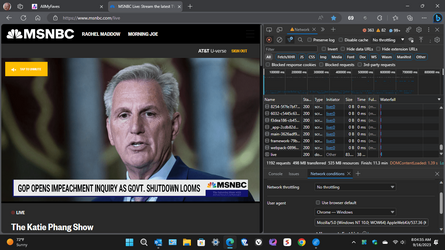
I'm rather perplexed as to why I have to change the default user agent to something other than the default edge user agent for this one site: MSNBC Live: Stream the latest TV shows As soon as I change it to say google chrome browser the live feed stream functions properly, my issue is the fact that I don't know how to save the desired user agent in the developer options area. I'm enclosing a screenshot of what I'm referring to, I feel like there must be a way to save my changed setting.
 
Windows Build/Version
22631.2338 / 23H2

Attachments

  • Screenshot (45).png
    Screenshot (45).png
    180.7 KB · Views: 1

My Computers My Computers

  • At a glance

    Windows11Pro (x64)Intel(R) Core(TM) i5-3470 CPU @ 3.20GHz 3.20 GHz8.00 GB (7.88 GB usable)
    OS
    Windows11Pro (x64)
    Computer type
    PC/Desktop
    Manufacturer/Model
    HP/HP8300EliteSFF
    CPU
    Intel(R) Core(TM) i5-3470 CPU @ 3.20GHz 3.20 GHz
    Memory
    8.00 GB (7.88 GB usable)
  • At a glance

    Windows11Pro(x64)Intel(R) Core(TM) i5-3320M CPU @ 2.60GHz 2.60...8.00 GB (7.82 GB usable)Intel (R) HD Graphics 4000
    Operating System
    Windows11Pro(x64)
    Computer type
    Laptop
    Manufacturer/Model
    Lenovo/T430
    CPU
    Intel(R) Core(TM) i5-3320M CPU @ 2.60GHz 2.60 GHz
    Motherboard
    Lenovo 2349KB7
    Memory
    8.00 GB (7.82 GB usable)
    Graphics card(s)
    Intel (R) HD Graphics 4000
    Sound Card
    Realtek High Definition Audio
    Hard Drives
    SSD 222.79 GB
You can try creating a 'custom shortcut' to edge with the following Target line to start Edge with the particular User Agent string you want.

eg: Using the default profile & User Agent "Chrome - Windows"
Code:
"C:\Program Files (x86)\Microsoft\Edge\Application\msedge.exe" --profile-directory="default" --user-agent="Mozilla/5.0 (Windows NT 10.0; WOW64) AppleWebKit/537.36 (KHTML, like Gecko) Chrome/%s Safari/537.36"

nb: Currently, in Edge Developer Tools, within the NetworkConditions dropdown, the UA string for "Chrome - Windows" is shown as "Mozilla/5.0 (Windows NT 10.0; WOW64) AppleWebKit/537.36 (KHTML, like Gecko) Chrome/%s Safari/537.36".
Also, note that the string will apply to all pages you open in Edge using this particular shortcut".
 

My Computer My Computer

At a glance

Win 11 25H2intel i7-870032GbIntel iGPU
OS
Win 11 25H2
Computer type
PC/Desktop
Manufacturer/Model
custom
CPU
intel i7-8700
Motherboard
Asus Z370 TUF Gaming
Memory
32Gb
Graphics Card(s)
Intel iGPU
Sound Card
Realtek
Hard Drives
Samsung
PSU
Corsair
Cooling
Fans
You can try creating a 'custom shortcut' to edge with the following Target line to start Edge with the particular User Agent string you want.

eg: Using the default profile & User Agent "Chrome - Windows"
Code:
"C:\Program Files (x86)\Microsoft\Edge\Application\msedge.exe" --profile-directory="default" --user-agent="Mozilla/5.0 (Windows NT 10.0; WOW64) AppleWebKit/537.36 (KHTML, like Gecko) Chrome/%s Safari/537.36"

nb: Currently, in Edge Developer Tools, within the NetworkConditions dropdown, the UA string for "Chrome - Windows" is shown as "Mozilla/5.0 (Windows NT 10.0; WOW64) AppleWebKit/537.36 (KHTML, like Gecko) Chrome/%s Safari/537.36".
Also, note that the string will apply to all pages you open in Edge using this particular shortcut".
das10,
Thanks so much for your informative reply, my main issue with applying the script that you have included in your reply is where & how to apply it. I'm thinking I could utilize an extension such as tampermonkey to make the process easier for a person like me that isn't that familiar with scripts.
 

My Computers My Computers

  • At a glance

    Windows11Pro (x64)Intel(R) Core(TM) i5-3470 CPU @ 3.20GHz 3.20 GHz8.00 GB (7.88 GB usable)
    OS
    Windows11Pro (x64)
    Computer type
    PC/Desktop
    Manufacturer/Model
    HP/HP8300EliteSFF
    CPU
    Intel(R) Core(TM) i5-3470 CPU @ 3.20GHz 3.20 GHz
    Memory
    8.00 GB (7.88 GB usable)
  • At a glance

    Windows11Pro(x64)Intel(R) Core(TM) i5-3320M CPU @ 2.60GHz 2.60...8.00 GB (7.82 GB usable)Intel (R) HD Graphics 4000
    Operating System
    Windows11Pro(x64)
    Computer type
    Laptop
    Manufacturer/Model
    Lenovo/T430
    CPU
    Intel(R) Core(TM) i5-3320M CPU @ 2.60GHz 2.60 GHz
    Motherboard
    Lenovo 2349KB7
    Memory
    8.00 GB (7.82 GB usable)
    Graphics card(s)
    Intel (R) HD Graphics 4000
    Sound Card
    Realtek High Definition Audio
    Hard Drives
    SSD 222.79 GB
You can use that code to create a new Shortcut on the Desktop for example, & in the "Type the location of the item" enter that "whole code".

Create Shortcut.png
 

My Computer My Computer

At a glance

Win 11 25H2intel i7-870032GbIntel iGPU
OS
Win 11 25H2
Computer type
PC/Desktop
Manufacturer/Model
custom
CPU
intel i7-8700
Motherboard
Asus Z370 TUF Gaming
Memory
32Gb
Graphics Card(s)
Intel iGPU
Sound Card
Realtek
Hard Drives
Samsung
PSU
Corsair
Cooling
Fans
das10,
Thanks for sharing this follow up information concerning the code.
 

My Computers My Computers

  • At a glance

    Windows11Pro (x64)Intel(R) Core(TM) i5-3470 CPU @ 3.20GHz 3.20 GHz8.00 GB (7.88 GB usable)
    OS
    Windows11Pro (x64)
    Computer type
    PC/Desktop
    Manufacturer/Model
    HP/HP8300EliteSFF
    CPU
    Intel(R) Core(TM) i5-3470 CPU @ 3.20GHz 3.20 GHz
    Memory
    8.00 GB (7.88 GB usable)
  • At a glance

    Windows11Pro(x64)Intel(R) Core(TM) i5-3320M CPU @ 2.60GHz 2.60...8.00 GB (7.82 GB usable)Intel (R) HD Graphics 4000
    Operating System
    Windows11Pro(x64)
    Computer type
    Laptop
    Manufacturer/Model
    Lenovo/T430
    CPU
    Intel(R) Core(TM) i5-3320M CPU @ 2.60GHz 2.60 GHz
    Motherboard
    Lenovo 2349KB7
    Memory
    8.00 GB (7.82 GB usable)
    Graphics card(s)
    Intel (R) HD Graphics 4000
    Sound Card
    Realtek High Definition Audio
    Hard Drives
    SSD 222.79 GB

Latest Support Threads

Back
Top Bottom