- Local time
- 2:06 AM
- Posts
- 20
- OS
- Windows 11 Pro 22H2, Version10.0.22621, Build 22621
I have 3 email accounts and have been using Chrome on my phone exclusively for about 6 months.
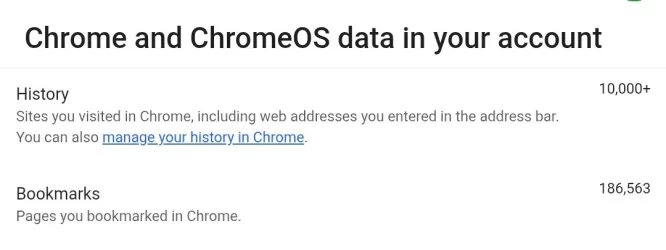
Recently I have been getting messages that my bookmarks are not being saved and telling me to back them up. But since there are 186,000 of them, I don't know how to do this.
Where did all these bookmarks come from? And more importantly, how do I back them up on a flashdrive? I ultimately want to dedupe them. Is there software that can handle this volume of data?
Please advise, thanks
Recently I have been getting messages that my bookmarks are not being saved and telling me to back them up. But since there are 186,000 of them, I don't know how to do this.
Where did all these bookmarks come from? And more importantly, how do I back them up on a flashdrive? I ultimately want to dedupe them. Is there software that can handle this volume of data?
Please advise, thanks
- Windows Build/Version
- Windows 11 Pro 64-bit
My Computers
-
At a glance
Windows 11 Pro 22H2, Version10.0.22621, Build...20.0 GBIntel HD Graphics- OS
- Windows 11 Pro 22H2, Version10.0.22621, Build 22621
- Computer type
- PC/Desktop
- Manufacturer/Model
- Gateway DX4870-UB318
- Motherboard
- Gateway DX4870
- Memory
- 20.0 GB
- Graphics Card(s)
- Intel HD Graphics
- Monitor(s) Displays
- ASUS ProArt PA238Q
- Screen Resolution
- 1920 x 1080
- Keyboard
- proud owner of an IBM Model M
- Mouse
- Logitech M570 Wireless Trackball Mouse & Logitech Trackman T-BC21 Wired Marble Mouse
- Browser
- Google Chrome
- Antivirus
- Microsoft Defender
-
At a glance
Windows 7- Operating System
- Windows 7
- Computer type
- Laptop
- Manufacturer/Model
- HP 250 G3 Notebook PC
- Other Info
- This is the 2nd system that I'm currently using to try to get System 1 up and running.