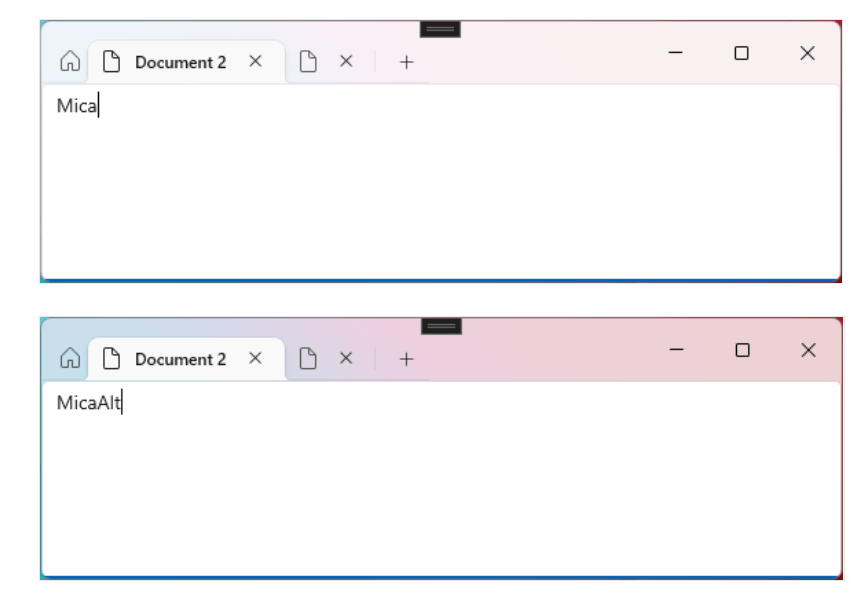
How do I change the color of the title block using msstyleEditor?


sendu

New member
Local time
11:40 PM
Posts
9
OS
Windows 11,
There are too many attributes in it and I can t find it
Thank you in advance
 
Windows Build/Version
22h2

Attachments

  • Snipaste_2022-12-11_16-51-21.png
    Snipaste_2022-12-11_16-51-21.png
    27.3 KB · Views: 6

My Computer

System One

  • OS
    Windows 11,
Try StartAllBack , choose Win10/7 title-bar ............
Dont need installing any startmenu !
Just look in the options of "Explorer" .........
 

My Computer

System One

  • OS
    Windows11 Pro 25H2
    Computer type
    PC/Desktop
    Manufacturer/Model
    Asus
    CPU
    i7
    Motherboard
    z97k
    Memory
    32GB
    Graphics Card(s)
    nVidia
    Sound Card
    Realtek
    Hard Drives
    3
    Cooling
    air
    Browser
    Edge
    Antivirus
    ESET
I think you will have problems achieving your goal on this due to the 'Mica/Mica Alt' effect introduced by Microsoft, which program/app writers have to use. I tried the same thing and gave up. See threads: -


A quote from my thread above: - "I discovered that if one turns OFF 'Transparency Effects' (like I did) then this creates the Active/Inactive File Explorer Title Bar colour issue. Turning 'Transparency Effects' back 'ON' fixed it so I now see different colours for the Active and Inactive windows."
 

My Computers

System One System Two

  • OS
    Windows 11 Pro
    Computer type
    PC/Desktop
    Manufacturer/Model
    GMKtec K11
    CPU
    AMD Ryzen 9 8945HS
    Memory
    32GB DDR5 SO-DIMM
    Graphics Card(s)
    Integrated AMD Radeon 780M (4.00 GHz)
    Monitor(s) Displays
    Benq 2250HM
    Screen Resolution
    1920 x 1080
    Hard Drives
    1 TB PCIe 4.0 NVMe M.2 SSD
  • Operating System
    Windows 11 Home
    Computer type
    Laptop
    Manufacturer/Model
    ASUS Zenbook 14 OLED 14" Laptop - UX3405CA-QL192W
    CPU
    Intel® Core™ Ultra 7 - 255H processor
    Memory
    16 GB LPDDR5 SDRAM
    Graphics card(s)
    Intel Arc 140T onboard graphics
    Screen Resolution
    1920 x 1200 (16:10 WUXGA resolution) OLED Touchscreen
    Hard Drives
    1TB SSD
Classic Color Panel by Wintools Customize Colors in Windows 10 - WinTools.Info
Keep in mind these settings work ONLY if you are NOT using a theme. Theme settings take preference so if you are using a theme, these settings WILL NOT over-ride any setting that is included in the theme.

If you have access to a Windows 7 VM or live machine, you can use its extensive color settings to design your own theme and tweak every aspect of a window.
As an example, I designed a very basic theme specifying only active/inactive title bar colors, menus, and active/inactive border colors. I saved the theme in 7 and then applied the theme to 11. I then used Classic Color Panel to change certain aspects of a window that were not included in the theme. My version of Classic Color Panel is older but the new version works the same. In this screenshot, Classic Color Panel is my active window. NOTE: Changing colors will NOT affect explorer. Its colors (or lack of) are hard coded.Screenshot 2022-12-11 085449.jpg
 

My Computers

System One System Two

  • OS
    Windows 11 Pro 25H2
    Computer type
    PC/Desktop
    Manufacturer/Model
    Dell Optiplex 7080
    CPU
    i9-10900 10 core 20 threads
    Motherboard
    DELL 0J37VM
    Memory
    32 gb
    Graphics Card(s)
    none-Intel UHD Graphics 630
    Sound Card
    Integrated Realtek
    Monitor(s) Displays
    Benq 27
    Screen Resolution
    2560x1440
    Hard Drives
    2x1tb Solidigm m.2 nvme /External drives 512gb Samsung m.2 sata+2tb Kingston m2.nvme
    PSU
    500w
    Case
    MT
    Cooling
    Dell Premium
    Keyboard
    Logitech wired
    Mouse
    Logitech wireless
    Internet Speed
    so slow I'm too embarrassed to tell
    Browser
    #1 Edge #2 Firefox
    Antivirus
    Defender+MWB Premium
  • Operating System
    Windows 11 Pro 24H2 26200.8457
    Computer type
    PC/Desktop
    Manufacturer/Model
    Beelink Mini PC SER5
    CPU
    AMD Ryzen 7 6800U
    Memory
    32 gb
    Graphics card(s)
    integrated
    Sound Card
    integrated
    Monitor(s) Displays
    Benq 27
    Screen Resolution
    2560x1440
    Hard Drives
    1TB Crucial nvme
    Keyboard
    Logitech wired
    Mouse
    Logitech wireless
    Internet Speed
    still too embarrassed to tell
    Browser
    Firefox
    Antivirus
    Defender
    Other Info
    System 3 is non compliant Dell 9020 i7-4770/24gb ram Win11 PRO 26200.8457
Try StartAllBack , choose Win10/7 title-bar ............
Dont need installing any startmenu !
Just look in the options of "Explorer" .........
What I want to change is the title bar color of third party apps
 

My Computer

System One

  • OS
    Windows 11,
I think you will have problems achieving your goal on this due to the 'Mica/Mica Alt' effect introduced by Microsoft, which program/app writers have to use. I tried the same thing and gave up. See threads: -


A quote from my thread above: - "I discovered that if one turns OFF 'Transparency Effects' (like I did) then this creates the Active/Inactive File Explorer Title Bar colour issue. Turning 'Transparency Effects' back 'ON' fixed it so I now see different colours for the Active and Inactive windows."
I agree with you that when I use theme files shared by others, I perform surprisingly well.
But I am not free to change the depth of the subject color because I can t find where to edit the title bar color
 

Attachments

  • Snipaste_2022-12-12_09-34-04.png
    Snipaste_2022-12-12_09-34-04.png
    43.5 KB · Views: 3

My Computer

System One

  • OS
    Windows 11,
Classic Color Panel by Wintools Customize Colors in Windows 10 - WinTools.Info
Keep in mind these settings work ONLY if you are NOT using a theme. Theme settings take preference so if you are using a theme, these settings WILL NOT over-ride any setting that is included in the theme.

If you have access to a Windows 7 VM or live machine, you can use its extensive color settings to design your own theme and tweak every aspect of a window.
As an example, I designed a very basic theme specifying only active/inactive title bar colors, menus, and active/inactive border colors. I saved the theme in 7 and then applied the theme to 11. I then used Classic Color Panel to change certain aspects of a window that were not included in the theme. My version of Classic Color Panel is older but the new version works the same. In this screenshot, Classic Color Panel is my active window. NOTE: Changing colors will NOT affect explorer. Its colors (or lack of) are hard coded.View attachment 47350
Thank you very much for sharing, I still think it is better to edit the theme file, easy to share and switch the display
 

My Computer

System One

  • OS
    Windows 11,

Latest Support Threads

Back
Top Bottom