How do I just block/prevent the Secure Boot update, without going into the BIOS?


Saved2Serve

Member
Local time
5:50 AM
Posts
19
OS
Windows 11 Pro, Ver. 23h2 build 22631 (as of 11-24)
Event viewer is populated with many Error messages, that "The Secure Boot update failed to update a Secure Boot variable with error Secure Boot is not enabled on this machine."

Searching how to prevent/block this update only shows results such as for disabling or enabling Secure Boot in the BIOS (or, sometimes on answers.microsoft.com, its typical recourse to doing a repair or clean install). However, I cannot find anyway on how to block/prevent this update. Of course, I find MS still trying to install updates even though they have been paused for 35 days.
 

My Computer My Computer

At a glance

Windows 11 Pro, Ver. 23h2 build 22631 (as of ...Ryzen 3200G CPU;128 GB Patriot 3200hzAMD Radeon Vega (integrated)
OS
Windows 11 Pro, Ver. 23h2 build 22631 (as of 11-24)
Computer type
PC/Desktop
Manufacturer/Model
Home built:
CPU
Ryzen 3200G CPU;
Motherboard
MSI B450 Pro
Memory
128 GB Patriot 3200hz
Graphics Card(s)
AMD Radeon Vega (integrated)

Event viewer is populated with many Error messages, that "The Secure Boot update failed to update a Secure Boot variable with error Secure Boot is not enabled on this machine."

Searching how to prevent/block this update only shows results such as for disabling or enabling Secure Boot in the BIOS (or, sometimes on answers.microsoft.com, its typical recourse to doing a repair or clean install). However, I cannot find anyway on how to block/prevent this update. Of course, I find MS still trying to install updates even though they have been paused for 35 days.


You shouldn't GET any BIOS updates, without manually downloading and flashing the BIOS yourself.
Not on a desktop motherboard used in a home built comp.

Do you have some kind of MSI motherboard utility installed?
 

My Computers My Computers

  • At a glance

    Win 11 Home ♦♦♦26200.8655 ♦♦♦♦♦♦♦25H2AMD Ryzen 7 3700XG.Skill (F4-3200C14D-16GTZKW)EVGA RTX 2070 (08G-P4-2171-KR)
    OS
    Win 11 Home ♦♦♦26200.8655 ♦♦♦♦♦♦♦25H2
    Computer type
    PC/Desktop
    Manufacturer/Model
    Built by Ghot® [May 2020]
    CPU
    AMD Ryzen 7 3700X
    Motherboard
    Asus Pro WS X570-ACE (BIOS 5302)
    Memory
    G.Skill (F4-3200C14D-16GTZKW)
    Graphics Card(s)
    EVGA RTX 2070 (08G-P4-2171-KR)
    Sound Card
    Realtek ALC1220P / ALC S1220A
    Monitor(s) Displays
    Dell U3011 30"
    Screen Resolution
    2560 x 1600
    Hard Drives
    2x Samsung 860 EVO 500GB,
    WD 4TB Black FZBX - SATA III,
    WD 8TB Black FZBX - SATA III,
    DRW-24B1ST CD/DVD Burner
    PSU
    PC Power & Cooling 750W Quad EPS12V
    Case
    Cooler Master ATCS 840 Tower
    Cooling
    CM Hyper 212 EVO (push/pull)
    Keyboard
    Ducky DK9008 Shine II Blue LED
    Mouse
    Logitech Optical M-100
    Internet Speed
    300/300
    Browser
    Firefox (latest)
    Antivirus
    Bitdefender Total Security
    Other Info
    Speakers: Klipsch Pro Media 2.1
  • At a glance

    Windows XP Pro 32bit w/SP3AMD Athlon 64 X2 5000+ (OC'd @ 3.2Ghz)TWIN2X2048-6400C4DHX (2 x 1GB, DDR2 800)EVGA 256-P2-N758-TR GeForce 8600GT SSC
    Operating System
    Windows XP Pro 32bit w/SP3
    Computer type
    PC/Desktop
    Manufacturer/Model
    Built by Ghot® (not in use)
    CPU
    AMD Athlon 64 X2 5000+ (OC'd @ 3.2Ghz)
    Motherboard
    ASUS M2N32-SLI Deluxe Wireless Edition
    Memory
    TWIN2X2048-6400C4DHX (2 x 1GB, DDR2 800)
    Graphics card(s)
    EVGA 256-P2-N758-TR GeForce 8600GT SSC
    Sound Card
    Onboard
    Monitor(s) Displays
    ViewSonic G90FB Black 19" Professional (CRT)
    Screen Resolution
    up to 2048 x 1536
    Hard Drives
    WD 36GB 10,000rpm Raptor SATA
    Seagate 80GB 7200rpm SATA
    Lite-On LTR-52246S CD/RW
    Lite-On LH-18A1P CD/DVD Burner
    PSU
    PC Power & Cooling Silencer 750 Quad EPS12V
    Case
    Generic Beige case, 80mm fans
    Cooling
    ZALMAN 9500A 92mm CPU Cooler
    Keyboard
    Logitech Classic Keybooard 200
    Mouse
    Logitech Optical M-BT96a
    Internet Speed
    300/300
    Browser
    Firefox 3.x ??
    Antivirus
    Symantec (Norton)
    Other Info
    Still assembled, still runs. Haven't turned it on for 15 years?
. However, I cannot find anyway on how to block/prevent this update. Of course, I find MS still trying to install updates even though they have been paused for 35 days.
Check out for Secure Boot DB and DBX variable update KB5016061 in Settings > Update > Update history. If you can find it check whether you can uninstall it. ( Most probably you may not find it and even if found you may not be able to uninstall it.)

I do not know whether you have looked at this

KB5016061: Secure Boot DB and DBX variable update events KB5016061: Secure Boot DB and DBX variable update events - Microsoft Support

"To help keep Windows devices secure, Microsoft adds vulnerable bootloader modules to the Secure Boot DBX revocation list (maintained in the system UEFI-based firmware) to invalidate the vulnerable modules. When the updated DBX revocation list is installed on a device, Windows checks to determine whether the system is in a state where the DBX update can be successfully applied to the firmware and will report event log errors if an issue is detected."
(The support article also shows various Event IDs that can arise.)

Check for any updated BIOS for your specific MSI motherboard ( Your MSI model has many variants and as many motherboards.) and see whether updating the BIOS makes it a non-event. If not contact MSI Support with the specific Event ID for a resolution.
 
Last edited:

My Computers My Computers

  • At a glance

    Windows 11 Pro Version:25H2 OS Build: 26200.865512th Gen Intel core i5-1235U(Alder16*2 (32 GB) DDR 4-3200(1600MHz) Crucial Tech...Intel Iris Xe Graphics (Internal)
    OS
    Windows 11 Pro Version:25H2 OS Build: 26200.8655
    Computer type
    PC/Desktop
    Manufacturer/Model
    Beelink Mini PC Model: SEi12
    CPU
    12th Gen Intel core i5-1235U(Alder
    Motherboard
    SEi (manufactured by AZW)
    Memory
    16*2 (32 GB) DDR 4-3200(1600MHz) Crucial Technology
    Graphics Card(s)
    Intel Iris Xe Graphics (Internal)
    Sound Card
    Internal
    Monitor(s) Displays
    BenQ GW2283
    Screen Resolution
    1920*1080
    Hard Drives
    500GB NVME (Kingston SNV2S500G)
    1TB (Crucial CT1000BX500SSD1)
    PSU
    Power Brick 19V-6.32A , 120.08W
    Keyboard
    Dell KB3322Wi (Wireless)
    Mouse
    Dell WM118t (Wireless)
    Internet Speed
    4G/5G
    Browser
    MS Edge, Chrome
    Antivirus
    Malwarebytes Premium - Subscription
  • At a glance

    Windows 11 Home Version 25H2 Build 26200.8655Intel Core i3 8145UIntel Optane 16GB module + DDR 4 16GB (Optane...Intel UHD Graphics 620
    Operating System
    Windows 11 Home Version 25H2 Build 26200.8655
    Computer type
    PC/Desktop
    Manufacturer/Model
    Dell Inspiron 3280 AIO 22"
    CPU
    Intel Core i3 8145U
    Motherboard
    Dell inc. 027W48
    Memory
    Intel Optane 16GB module + DDR 4 16GB (Optane disabled.)
    Graphics card(s)
    Intel UHD Graphics 620
    Sound Card
    Internal
    Monitor(s) Displays
    Dell Monitor 22"
    Screen Resolution
    1920x1080
    Hard Drives
    Crucial CT1000BX500SSD1 ; 1000,2 GB
    PSU
    Power Brick
    Case
    All-in one
    Keyboard
    Dell Wireless KM636
    Mouse
    Dell Wireless KM 636
    Internet Speed
    4G
    Browser
    Edge, Chrome
    Antivirus
    Malwarebytes
    Other Info
    Upgraded from Windows 10 Home to Windows 11 Home on 28 Oct 2023
You shouldn't GET any BIOS updates, without manually downloading and flashing the BIOS yourself.
Not on a desktop motherboard used in a home built comp.

Do you have some kind of MSI motherboard utility installed?
Sorry for not seeing replies here (I though I would see an email) No, this is not a BIOS update you must manually install, and I have excluded driver updates (lest HP nukes me printer), but following event viewer>Event ID1796 "please see KB5016061: Secure Boot DB and DBX variable update events - Microsoft Support" it is related to KB5016061 (which is not listed as installed):

"To help keep Windows devices secure, Microsoft adds vulnerable bootloader modules to the Secure Boot DBX revocation list (maintained in the system UEFI-based firmware) to invalidate the vulnerable modules. When the updated DBX revocation list is installed on a device, Windows checks to determine whether the system is in a state where the DBX update can be successfully applied to the firmware and will report event log errors if an issue is detected."

Thus, event though updates are paused, Windows does not pause in apparently incessantly trying to install a DBX update,. Seems to do not harm, but I wanted to stop this from showing up.

Event1796.webp
 

My Computer My Computer

At a glance

Windows 11 Pro, Ver. 23h2 build 22631 (as of ...Ryzen 3200G CPU;128 GB Patriot 3200hzAMD Radeon Vega (integrated)

OS
Windows 11 Pro, Ver. 23h2 build 22631 (as of 11-24)
Computer type
PC/Desktop
Manufacturer/Model
Home built:
CPU
Ryzen 3200G CPU;
Motherboard
MSI B450 Pro
Memory
128 GB Patriot 3200hz
Graphics Card(s)
AMD Radeon Vega (integrated)

If you have Secure Boot disabled in your UEFI then you'll always get this message after an update. What I do to prevent future error messages is to reboot my machine, go into my UEFI, set Secure Boot on, then reboot. Windows then resolves what it needs to do. Then I go back into the UEFI and disable Secure Boot. From then on no more error messages until the next Windows update which you will have to go through the same steps.
 

My Computer My Computer

At a glance

Windows 1113th Gen Intel(R) Core(TM) i9-13900KCorsair 2x32GB @ 6600PNY RTX3080 TI
OS
Windows 11
Computer type
PC/Desktop
Manufacturer/Model
Home Built
CPU
13th Gen Intel(R) Core(TM) i9-13900K
Motherboard
ASUS Maximus Hero Z790
Memory
Corsair 2x32GB @ 6600
Graphics Card(s)
PNY RTX3080 TI
Sound Card
Realtek on motherboard.
Monitor(s) Displays
Corsair 4k, BenQ 4k.
Screen Resolution
3840x2160
Check out for Secure Boot DB and DBX variable update KB5016061 in Settings > Update > Update history. If you can find it check whether you can uninstall it. ( Most probably you may not find it and even if found you may not be able to uninstall it.)

I do not know whether you have looked at this

KB5016061: Secure Boot DB and DBX variable update events KB5016061: Secure Boot DB and DBX variable update events - Microsoft Support

"To help keep Windows devices secure, Microsoft adds vulnerable bootloader modules to the Secure Boot DBX revocation list (maintained in the system UEFI-based firmware) to invalidate the vulnerable modules. When the updated DBX revocation list is installed on a device, Windows checks to determine whether the system is in a state where the DBX update can be successfully applied to the firmware and will report event log errors if an issue is detected."
(The support article also shows various Event IDs that can arise.)

Check for any updated BIOS for your specific MSI motherboard ( Your MSI model has many variants and as many motherboards.) and see whether updating the BIOS makes it a non-event. If not contact MSI Support with the specific Event ID for a resolution.
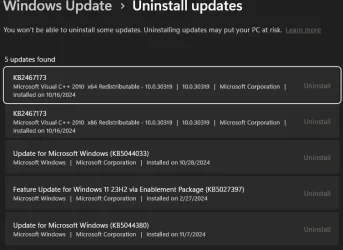
Thanks for the reply, and as with the above (please see), sorry for not seeing it or an email (turns out that one was sent), and losing this thread among tabs. But yes, this has to do with KB5016061, but which is not listed among updates that could be uninstalled.
Updates.webp

Secure boot is disabled on my PC. and I never remember changing it. Bios is 7B86vAH which says, it would "Change the default setting of Secure Boot" and there are only beta versions after that, none of which are said to deal with secure boot. I could try to follow instructions here, but there is a risk of having to restoring your PC to the factory state, which I do not want to do (extensively customized). Only I use this PC and am not interested in secure boot, nor in updating bios.

And the elevenforum post here only partly applies since Windows Security does not do anything now for me. But that page does instruct and include a Reg file to disable it. And despite HKEY_LOCAL_MACHINE\SYSTEM\CurrentControlSet\Control\DeviceGuard\Scenarios\SystemGuard saying 1, meaning enabled, msinfo32 says it is disabled. So I will change the reg value to 0.

Thus my question presupposed that there was a way to prevent Windows from even trying to install this update.
However, if I could edit the DBX revocation list then that might be the solution. More on the DBX update and its purpose is here, and a list of them is here, while a page on updating it is here, but beyond me, As there is this. which I have seen to "disable check" in HKEY_LOCAL_MACHINE\SYSTEM\CurrentControlSet\Control\SecureBoot which seems to be a key one must create.
 

Attachments

  • Updates.webp
    Updates.webp
    34.4 KB · Views: 2
Last edited:

My Computer My Computer

At a glance

Windows 11 Pro, Ver. 23h2 build 22631 (as of ...Ryzen 3200G CPU;128 GB Patriot 3200hzAMD Radeon Vega (integrated)
OS
Windows 11 Pro, Ver. 23h2 build 22631 (as of 11-24)
Computer type
PC/Desktop
Manufacturer/Model
Home built:
CPU
Ryzen 3200G CPU;
Motherboard
MSI B450 Pro
Memory
128 GB Patriot 3200hz
Graphics Card(s)
AMD Radeon Vega (integrated)
If you have Secure Boot disabled in your UEFI then you'll always get this message after an update. What I do to prevent future error messages is to reboot my machine, go into my UEFI, set Secure Boot on, then reboot. Windows then resolves what it needs to do. Then I go back into the UEFI and disable Secure Boot. From then on no more error messages until the next Windows update which you will have to go through the same steps.

I read that one should at least be able to stop Event Viewer from populating itself with this error, by going into the Registry and navigating to the Computer\HKEY_LOCAL_MACHINE\SYSTEM\CurrentControlSet\Control\WMI\Autologger\EventLog-System\ and going to {199fe037-2b82-40a9-82ac-e1d46c792b99} (or whatever GUID Event Viewer lists for Event 6155), and in the right pane of that key dbl click on Enabled and change the D word value to 0. Which I did.

I also found this https://www.elevenforum.com/t/enable-or-disable-system-guard-secure-launch-for-firmware-protection-in-windows-11.29233/ page which provides a Reg file to enable or disable System Guard Secure Launch for Firmware Protection, both of which I downloaded, and ran the disable one.

I also went to Computer\HKEY_LOCAL_MACHINE\SYSTEM\CurrentControlSet\Control\SecureBoot and dbl clicked on AvailableUpdates in the right pane and set it to 0. Have not restarted explorer yet.

See what happens.
 

My Computer My Computer

At a glance

Windows 11 Pro, Ver. 23h2 build 22631 (as of ...Ryzen 3200G CPU;128 GB Patriot 3200hzAMD Radeon Vega (integrated)
OS
Windows 11 Pro, Ver. 23h2 build 22631 (as of 11-24)
Computer type
PC/Desktop
Manufacturer/Model
Home built:
CPU
Ryzen 3200G CPU;
Motherboard
MSI B450 Pro
Memory
128 GB Patriot 3200hz
Graphics Card(s)
AMD Radeon Vega (integrated)
I read that one should at least be able to stop Event Viewer from populating itself with this error, by going into the Registry and navigating to the Computer\HKEY_LOCAL_MACHINE\SYSTEM\CurrentControlSet\Control\WMI\Autologger\EventLog-System\ and going to {199fe037-2b82-40a9-82ac-e1d46c792b99} (or whatever GUID Event Viewer lists for Event 6155), and in the right pane of that key dbl click on Enabled and change the D word value to 0. Which I did.

I also found this https://www.elevenforum.com/t/enable-or-disable-system-guard-secure-launch-for-firmware-protection-in-windows-11.29233/ page which provides a Reg file to enable or disable System Guard Secure Launch for Firmware Protection, both of which I downloaded, and ran the disable one.

I also went to Computer\HKEY_LOCAL_MACHINE\SYSTEM\CurrentControlSet\Control\SecureBoot and dbl clicked on AvailableUpdates in the right pane and set it to 0. Have not restarted explorer yet.

See what happens.
Over 12 days, and no more "The Secure Boot update failed to update a Secure Boot variable with error Secure Boot is not enabled on this machine." since I did the above! but I do get "A reboot is required before installing the Secure Boot update. Reason: 6. I rarely reboot. I would like to block that one.

Other than that, about the only warnings or errors now are " Installation Failure: Windows failed to install the following update..Notepad" or "Your Phone," or Session "Microsoft.Windows.Remediation" failure.Not serious.
 

My Computer My Computer

At a glance

Windows 11 Pro, Ver. 23h2 build 22631 (as of ...Ryzen 3200G CPU;128 GB Patriot 3200hzAMD Radeon Vega (integrated)
OS
Windows 11 Pro, Ver. 23h2 build 22631 (as of 11-24)
Computer type
PC/Desktop
Manufacturer/Model
Home built:
CPU
Ryzen 3200G CPU;
Motherboard
MSI B450 Pro
Memory
128 GB Patriot 3200hz
Graphics Card(s)
AMD Radeon Vega (integrated)

Latest Support Threads

Back
Top Bottom