Solved How do I make the system put Documents, Videos, Music, Downloads,etc to an internal SATA drive


I forgot to also ask do you use Office 365? That's another issue if you do as 365 automatically saves to onedrive. You have to manually choose where you want to save when you create a document.
Yes, I do. And I always manually tell everything where to save, with the exception of downloads.
 

My Computer My Computer

At a glance

Win 11 64-Bit Home12 Gen Intel i7-12700K 360 GHz32 GBEVGA Nividia GeForce RTX 3060 12GB
OS
Win 11 64-Bit Home
Computer type
PC/Desktop
Manufacturer/Model
Custom Build
CPU
12 Gen Intel i7-12700K 360 GHz
Motherboard
Gigabyte B760M
Memory
32 GB
Graphics Card(s)
EVGA Nividia GeForce RTX 3060 12GB
Sound Card
None
Monitor(s) Displays
Dell 32in curved
Screen Resolution
2560 x 1440
Hard Drives
Samsung 1 TB SSD M.2 970 EVO Nvme PicIe 3.0 x 4
Seagate 2 TB SATA 7200 RPM 64MB
PSU
Apevia 800W GOLD
Case
Apevia ENZO
Cooling
2 Case Fans, ZeroTherm ZT100 Thermal Grease
Keyboard
Logitech K360
Mouse
Logitech GS 502 Hero
Internet Speed
650 mbps
Browser
Duck Duck Go
Antivirus
Webroot Anywhere
Using the links to the tutorials that you supplied, I was able to move, Desktop, Downloads, Videos, to my F:\ drive (HDD). I was not able to move Documents, or Pictures.

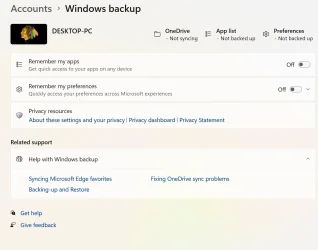
When I tried to shut off One Drive by going to that tutorial. My screen does not have an option to turn off or on (see picture attached)
Also, when I try to move Documents, it is not pinned with the others when I open File Explorer. It is in the quick start menu, but I put it there, it didn't come up automatically, like the others. So, I did the instructions for when it is not in the pinned list. And this is the message I get when I do that. (see picture)
I was signed in to my MS account while doing these operations.
What did I do wrong?
 

Attachments

  • Screenshot 2025-03-05 095813.webp
    Screenshot 2025-03-05 095813.webp
    57.3 KB · Views: 1
  • Screenshot 2025-03-05 101652.webp
    Screenshot 2025-03-05 101652.webp
    40.9 KB · Views: 1

My Computer My Computer

At a glance

Win 11 64-Bit Home12 Gen Intel i7-12700K 360 GHz32 GBEVGA Nividia GeForce RTX 3060 12GB
OS
Win 11 64-Bit Home
Computer type
PC/Desktop
Manufacturer/Model
Custom Build
CPU
12 Gen Intel i7-12700K 360 GHz
Motherboard
Gigabyte B760M
Memory
32 GB
Graphics Card(s)
EVGA Nividia GeForce RTX 3060 12GB
Sound Card
None
Monitor(s) Displays
Dell 32in curved
Screen Resolution
2560 x 1440
Hard Drives
Samsung 1 TB SSD M.2 970 EVO Nvme PicIe 3.0 x 4
Seagate 2 TB SATA 7200 RPM 64MB
PSU
Apevia 800W GOLD
Case
Apevia ENZO
Cooling
2 Case Fans, ZeroTherm ZT100 Thermal Grease
Keyboard
Logitech K360
Mouse
Logitech GS 502 Hero
Internet Speed
650 mbps
Browser
Duck Duck Go
Antivirus
Webroot Anywhere
Regarding photos, where does it show that the default location is currently?

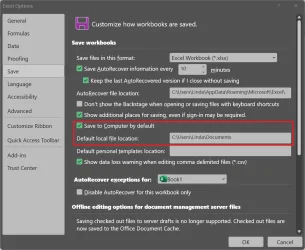
Ofc365 has an automatic save location as Onedrive. Go into options of both Word AND Excel change save options to "save to computer by default" and set its path. This is possibly what is precenting you from changing your documents folder location.
Capture.webp
 

My Computers My Computers

  • At a glance

    Windows 11 Pro 25H2 26200.8875i9-10900 10 core 20 threads32 gbnone-Intel UHD Graphics 630
    OS
    Windows 11 Pro 25H2 26200.8875
    Computer type
    PC/Desktop
    Manufacturer/Model
    Dell Optiplex 7080
    CPU
    i9-10900 10 core 20 threads
    Motherboard
    DELL 0J37VM
    Memory
    32 gb
    Graphics Card(s)
    none-Intel UHD Graphics 630
    Sound Card
    Integrated Realtek
    Monitor(s) Displays
    Benq 27
    Screen Resolution
    2560x1440
    Hard Drives
    2x1tb Solidigm m.2 nvme /External drives 512gb Samsung m.2 sata+2tb Kingston m2.nvme
    PSU
    500w
    Case
    MT
    Cooling
    Dell Premium
    Keyboard
    Logitech wired
    Mouse
    Logitech wireless
    Internet Speed
    so slow I'm too embarrassed to tell
    Browser
    #1 Edge #2 Firefox
    Antivirus
    Defender+MWB Premium
  • At a glance

    Windows 11 Pro 24H2 26200.8875AMD Ryzen 7 6800U32 gbintegrated
    Operating System
    Windows 11 Pro 24H2 26200.8875
    Computer type
    PC/Desktop
    Manufacturer/Model
    Beelink Mini PC SER5
    CPU
    AMD Ryzen 7 6800U
    Memory
    32 gb
    Graphics card(s)
    integrated
    Sound Card
    integrated
    Monitor(s) Displays
    Benq 27
    Screen Resolution
    2560x1440
    Hard Drives
    1TB Crucial nvme
    Keyboard
    Logitech wired
    Mouse
    Logitech wireless
    Internet Speed
    still too embarrassed to tell
    Browser
    Firefox
    Antivirus
    Defender
    Other Info
    System 3 is non compliant Dell 9020 i7-4770/24gb ram Win11 PRO 26200.8875
Regarding photos, where does it show that the default location is currently?

Ofc365 has an automatic save location as Onedrive. Go into options of both Word AND Excel change save options to "save to computer by default" and set its path. This is possibly what is precenting you from changing your documents folder location.
View attachment 127434
There is no Pictures folder in HDD F
 

My Computer My Computer

At a glance

Win 11 64-Bit Home12 Gen Intel i7-12700K 360 GHz32 GBEVGA Nividia GeForce RTX 3060 12GB
OS
Win 11 64-Bit Home
Computer type
PC/Desktop
Manufacturer/Model
Custom Build
CPU
12 Gen Intel i7-12700K 360 GHz
Motherboard
Gigabyte B760M
Memory
32 GB
Graphics Card(s)
EVGA Nividia GeForce RTX 3060 12GB
Sound Card
None
Monitor(s) Displays
Dell 32in curved
Screen Resolution
2560 x 1440
Hard Drives
Samsung 1 TB SSD M.2 970 EVO Nvme PicIe 3.0 x 4
Seagate 2 TB SATA 7200 RPM 64MB
PSU
Apevia 800W GOLD
Case
Apevia ENZO
Cooling
2 Case Fans, ZeroTherm ZT100 Thermal Grease
Keyboard
Logitech K360
Mouse
Logitech GS 502 Hero
Internet Speed
650 mbps
Browser
Duck Duck Go
Antivirus
Webroot Anywhere
Here are screenshots of the location of two pictures folders: both are after opening File Explorer and clicking on properties. Would it be better to just delete Office 365 and then re-install?
 

Attachments

  • Screenshot 2025-03-05 152302.webp
    Screenshot 2025-03-05 152302.webp
    21 KB · Views: 1
  • Screenshot 2025-03-05 152356.webp
    Screenshot 2025-03-05 152356.webp
    21.3 KB · Views: 1

My Computer My Computer

At a glance

Win 11 64-Bit Home12 Gen Intel i7-12700K 360 GHz32 GBEVGA Nividia GeForce RTX 3060 12GB
OS
Win 11 64-Bit Home
Computer type
PC/Desktop
Manufacturer/Model
Custom Build
CPU
12 Gen Intel i7-12700K 360 GHz
Motherboard
Gigabyte B760M
Memory
32 GB
Graphics Card(s)
EVGA Nividia GeForce RTX 3060 12GB
Sound Card
None
Monitor(s) Displays
Dell 32in curved
Screen Resolution
2560 x 1440
Hard Drives
Samsung 1 TB SSD M.2 970 EVO Nvme PicIe 3.0 x 4
Seagate 2 TB SATA 7200 RPM 64MB
PSU
Apevia 800W GOLD
Case
Apevia ENZO
Cooling
2 Case Fans, ZeroTherm ZT100 Thermal Grease
Keyboard
Logitech K360
Mouse
Logitech GS 502 Hero
Internet Speed
650 mbps
Browser
Duck Duck Go
Antivirus
Webroot Anywhere
I have no interest in using OneDrive, and frankly thought I had deleted it. Its like a bad penny, it keeps coming back.
This whole mess is a result of whatever you did when you attempted to delete onedrive at some point. You didn't deal with your folders first. Onedrive would have been reinstalled with Ofc365 or an Ofc365 update. Ofc365 depends on onedrive

When I tried to shut off One Drive by going to that tutorial. My screen does not have an option to turn off or on
Again, as a result of whatever you did.

From your screenshots
Folder C:\Users\there\pictures has no location tab. (14 folders 377 files)
Folder C:\users\there\Onedrive/Pictures\ does have a location tab. (5 files/2 folders)

Use the tutorial to move the folder location of C:\users\there\Onedrive/Pictures to your drive F:\Pictures (verify that all files moved)

Then MANUALLY move the pictures files from C\users\there\Pictures to F:\Pictures

Then DELETE the Pictures folder located in C:\Users\there\


Once you know for sure that all your files are on F: disable onedrive. Do not uninstall it as the next Ofc365 update will only reinstall it. To do this,
Open Task Manager>Startup Apps
Find Onedrive.exe in the list and, right click on it, select disable. This prevents Onedrive from auto-starting.

Hopefully, this will straighten it out. If it doesn't it will require creating a new user account. Report back results.
 

My Computers My Computers

  • At a glance

    Windows 11 Pro 25H2 26200.8875i9-10900 10 core 20 threads32 gbnone-Intel UHD Graphics 630
    OS
    Windows 11 Pro 25H2 26200.8875
    Computer type
    PC/Desktop
    Manufacturer/Model
    Dell Optiplex 7080
    CPU
    i9-10900 10 core 20 threads
    Motherboard
    DELL 0J37VM
    Memory
    32 gb
    Graphics Card(s)
    none-Intel UHD Graphics 630
    Sound Card
    Integrated Realtek
    Monitor(s) Displays
    Benq 27
    Screen Resolution
    2560x1440
    Hard Drives
    2x1tb Solidigm m.2 nvme /External drives 512gb Samsung m.2 sata+2tb Kingston m2.nvme
    PSU
    500w
    Case
    MT
    Cooling
    Dell Premium
    Keyboard
    Logitech wired
    Mouse
    Logitech wireless
    Internet Speed
    so slow I'm too embarrassed to tell
    Browser
    #1 Edge #2 Firefox
    Antivirus
    Defender+MWB Premium
  • At a glance

    Windows 11 Pro 24H2 26200.8875AMD Ryzen 7 6800U32 gbintegrated
    Operating System
    Windows 11 Pro 24H2 26200.8875
    Computer type
    PC/Desktop
    Manufacturer/Model
    Beelink Mini PC SER5
    CPU
    AMD Ryzen 7 6800U
    Memory
    32 gb
    Graphics card(s)
    integrated
    Sound Card
    integrated
    Monitor(s) Displays
    Benq 27
    Screen Resolution
    2560x1440
    Hard Drives
    1TB Crucial nvme
    Keyboard
    Logitech wired
    Mouse
    Logitech wireless
    Internet Speed
    still too embarrassed to tell
    Browser
    Firefox
    Antivirus
    Defender
    Other Info
    System 3 is non compliant Dell 9020 i7-4770/24gb ram Win11 PRO 26200.8875
I would like to report that changing the 'save' information on Word and Excel solved the issue of not being able to move the Documents folder to F:\. Thank you.
 

My Computer My Computer

At a glance

Win 11 64-Bit Home12 Gen Intel i7-12700K 360 GHz32 GBEVGA Nividia GeForce RTX 3060 12GB
OS
Win 11 64-Bit Home
Computer type
PC/Desktop
Manufacturer/Model
Custom Build
CPU
12 Gen Intel i7-12700K 360 GHz
Motherboard
Gigabyte B760M
Memory
32 GB
Graphics Card(s)
EVGA Nividia GeForce RTX 3060 12GB
Sound Card
None
Monitor(s) Displays
Dell 32in curved
Screen Resolution
2560 x 1440
Hard Drives
Samsung 1 TB SSD M.2 970 EVO Nvme PicIe 3.0 x 4
Seagate 2 TB SATA 7200 RPM 64MB
PSU
Apevia 800W GOLD
Case
Apevia ENZO
Cooling
2 Case Fans, ZeroTherm ZT100 Thermal Grease
Keyboard
Logitech K360
Mouse
Logitech GS 502 Hero
Internet Speed
650 mbps
Browser
Duck Duck Go
Antivirus
Webroot Anywhere
Thank you everyone for the comments and guidance. Special thanks to glasskutter for the patience. I followed the perfect instructions and finally all is as I originally posted for what I wanted to do. Thank you.
 

My Computer My Computer

At a glance

Win 11 64-Bit Home12 Gen Intel i7-12700K 360 GHz32 GBEVGA Nividia GeForce RTX 3060 12GB
OS
Win 11 64-Bit Home
Computer type
PC/Desktop
Manufacturer/Model
Custom Build
CPU
12 Gen Intel i7-12700K 360 GHz
Motherboard
Gigabyte B760M
Memory
32 GB
Graphics Card(s)
EVGA Nividia GeForce RTX 3060 12GB
Sound Card
None
Monitor(s) Displays
Dell 32in curved
Screen Resolution
2560 x 1440
Hard Drives
Samsung 1 TB SSD M.2 970 EVO Nvme PicIe 3.0 x 4
Seagate 2 TB SATA 7200 RPM 64MB
PSU
Apevia 800W GOLD
Case
Apevia ENZO
Cooling
2 Case Fans, ZeroTherm ZT100 Thermal Grease
Keyboard
Logitech K360
Mouse
Logitech GS 502 Hero
Internet Speed
650 mbps
Browser
Duck Duck Go
Antivirus
Webroot Anywhere
P.S. I have no idea why the user name on the C drive is "there" instead of my name. "There" is the first 5 letters of my email address.
That's because you used your MS account when setting up Windows. When using a MS account to setup Windows the default user name is the first five characters of your email address. Something should be so easy for MS to fix but for some reason they wont.
 

My Computers My Computers

  • At a glance

    Windows 11 Pro 25H2Intel Core i7-10700K16GB (8GB PC4-19200 DDR4 SDRAM x2)NVIDIA GeForce GTX 1050 TI
    OS
    Windows 11 Pro 25H2
    Computer type
    PC/Desktop
    Manufacturer/Model
    PowerSpec B746
    CPU
    Intel Core i7-10700K
    Motherboard
    ASRock Z490 Phantom Gaming 4/ax
    Memory
    16GB (8GB PC4-19200 DDR4 SDRAM x2)
    Graphics Card(s)
    NVIDIA GeForce GTX 1050 TI
    Sound Card
    Realtek Audio
    Monitor(s) Displays
    #1. LG ULTRAWIDE 34" #2. AOC Q32G2WG3 32"
    Screen Resolution
    #1. 3440 X 1440 #2. 1920 x 1080
    Hard Drives
    NVMe WDC WDS100T2B0C-00PXH0 1TB
    Samsung SSD 860 EVO 1TB
    PSU
    750 Watts (62.5A)
    Case
    PowerSpec/Lian Li ATX 205
    Keyboard
    Logitech K270
    Mouse
    Logitech M185
    Browser
    Microsoft Edge and Firefox
    Antivirus
    Webroot SecureAnywhere CE 26.1
  • At a glance

    Windows 11 Canary ChannelIntel Core i5-8400 CPU @ 2.80GHz16 MB DDR 4-2666
    Operating System
    Windows 11 Canary Channel
    Computer type
    PC/Desktop
    Manufacturer/Model
    PowerSpec G156
    CPU
    Intel Core i5-8400 CPU @ 2.80GHz
    Motherboard
    AsusTeK Prime B360M-A
    Memory
    16 MB DDR 4-2666
    Monitor(s) Displays
    23" Speptre HDMI 75Hz
    Screen Resolution
    1920x1080
    Hard Drives
    Samsung 970 EVO 500GB NVMe
    Keyboard
    Logitek K270
    Mouse
    Logitek M185
    Browser
    Firefox, Edge and Edge Canary
    Antivirus
    Windows Defender
Back
Top Bottom